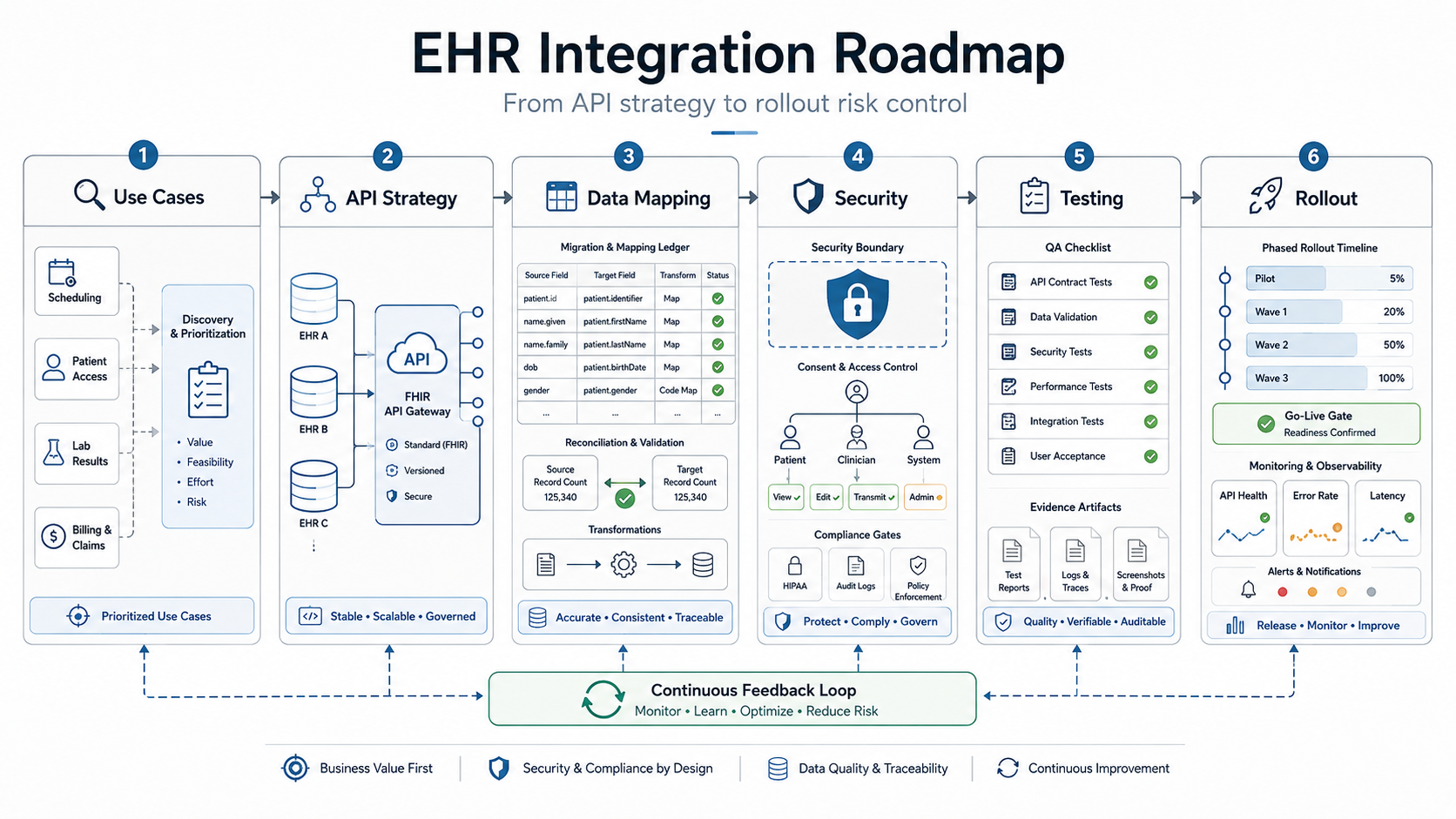

Quick Answer: EHR Integration Roadmap
An EHR integration roadmap should separate the project into six workstreams: define the clinical or operational use case, choose the right API or interface pattern, map and reconcile the data, build HIPAA-ready security and audit evidence, test every EHR-connected workflow, and roll out with monitoring, fallback, and support ownership.
The mistake is treating EHR integration as a single API ticket. A patient portal, billing workflow, care coordination dashboard, AI intake assistant, or remote monitoring app may all say "connect to EHR," but each one has a different data boundary, permission model, write-back risk, exception path, and launch owner.
Use this roadmap before development starts. It is written for healthcare product leaders, clinic groups, hospital IT teams, and healthtech founders who need to connect EHR or EMR data to custom software without creating compliance, migration, or release risk. For adjacent planning context, NextPage's healthcare data exchange software guide explains the broader FHIR, consent, and data-sharing architecture behind secure interoperability.
Why EHR Integration Is Not One API Ticket
Most EHR integration problems are not caused by a missing endpoint. They come from unclear ownership. Teams start with a feature request, then discover late that patient identity matching, consent state, role-based access, coding systems, sandbox differences, audit logs, payer workflows, or downtime behavior were never scoped.
Official interoperability progress is real. ONC reported in February 2026 that about 9 in 10 hospitals enabled patient access to health information through an API in 2024, increasingly through standards-based APIs. That does not remove implementation work. A certified API can standardize access patterns, but each product still has to handle context, authorization, mapping, validation, and operating support.
The 2026 planning bar is also higher than a generic FHIR proof. ONC's HTI-1 rule, USCDI data-set expectations, TEFCA's FHIR roadmap, and CMS prior authorization API requirements all push healthcare teams toward standards-based exchange with stronger endpoint, metric, and workflow evidence. For a product team, that means the integration roadmap should document which FHIR resources, HL7 messages, consent rules, payer/provider handoffs, and audit events are actually needed for the first release.
The reference article from SparxIT covers EMR/EHR software development benefits, features, and cost. That is a useful starting point for teams building or modernizing a health records system. NextPage's roadmap focuses on a narrower buyer problem: how to connect an EHR to a custom portal, analytics layer, RCM workflow, care operations tool, AI feature, or mobile app in a way that can pass security, QA, and rollout scrutiny.
If you are estimating scope before vendor calls, use the custom software cost estimator for a first-pass range, then refine it once the integration boundary and data flows are known.
Phase 1: Define The Integration Boundary
Start with the job the integration must do, not the interface name. A roadmap for appointment sync is different from a roadmap for clinical note generation, remote patient monitoring, claims enrichment, lab result routing, or patient-facing record access.
Create a one-page boundary map before architecture work begins:
- Users: patient, provider, care coordinator, billing user, support user, administrator, or external partner.
- Data: demographics, appointments, encounters, observations, medications, allergies, documents, orders, claims, payments, device readings, messages, or audit events.
- Direction: read-only, write-back, bidirectional sync, event notification, batch import, or manual review.
- Risk: patient safety impact, PHI exposure, billing impact, operational downtime, regulatory reporting, or AI decision support.
- Owner: who approves mappings, exceptions, support queues, release gates, and post-launch changes.
That boundary also protects budget. Healthcare software estimates often look low when the feature list ignores integrations, admin tooling, audit history, and support handoff. NextPage's healthcare app development cost guide breaks down similar scope drivers for patient-facing and operational healthcare products.
EHR Integration Ownership Model
An EHR roadmap needs named owners before sprint planning. Without ownership, the project can look technically complete while clinical validation, vendor approval, support queues, and migration reconciliation remain unresolved. Assign every decision to a business owner, technical owner, evidence owner, and launch owner.
| Roadmap Area | Primary Owner | Evidence To Produce | Failure If Missing |
|---|---|---|---|
| Clinical or operational workflow | Product owner plus clinical or billing lead | Approved workflow map, user roles, exception paths | The integration optimizes the wrong handoff or hides manual work |
| EHR vendor access | Technical lead plus vendor contact | Sandbox credentials, endpoint list, production approval steps | Engineering discovers late that required data is unavailable |
| Data mapping and reconciliation | Data owner plus QA lead | Mapping workbook, sample records, control totals, exception report | Records sync but cannot be trusted by operations |
| Security and compliance | Security or compliance owner | Data-flow diagram, access matrix, audit event catalog, risk decisions | HIPAA evidence is recreated under deadline pressure |
| Release and support | Delivery lead plus support owner | Go-live checklist, monitoring alerts, escalation runbook, rollback rule | The first production incident has no clear responder |
This ownership model is especially useful when an older clinical system is being modernized alongside a new integration. The Legacy Software Modernization Scorecard can help teams decide whether to stabilize the existing workflow first, replace brittle interfaces, or isolate the first release around the lowest-risk data boundary.
Phase 2: Choose The Right Interface Pattern
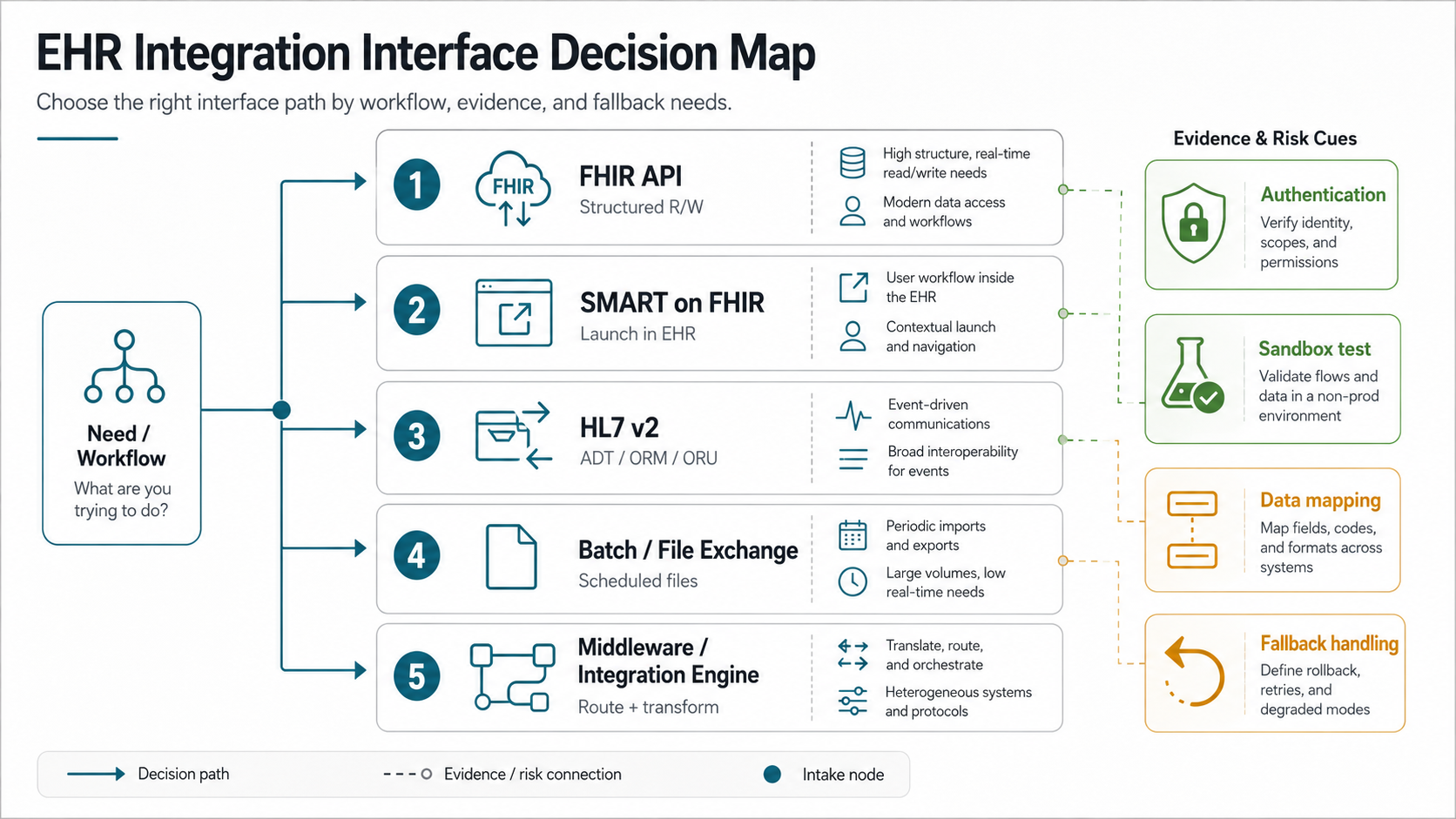
There is no universal best interface. FHIR APIs are usually the first pattern teams evaluate because they are modern, resource-oriented, and aligned with certified API expectations. SMART on FHIR can help when an app launches inside or beside an EHR context. HL7 v2 is still common for events and operational interfaces. Batch files, reports, flat exports, or integration engines may still be necessary when legacy systems or payer workflows are involved.
| Pattern | Best fit | Watch for |
|---|---|---|
| FHIR API | Patient access, structured record reads, app integrations, modern data exchange | Resource coverage, authorization scopes, pagination, rate limits, vendor-specific behavior |
| SMART on FHIR | App launch with patient or encounter context from the EHR | Context mapping, permissions, launch flow, UI handoff, write-back limits |
| HL7 v2 interface | Admissions, orders, results, scheduling events, interface-engine environments | Message variants, acknowledgements, retries, monitoring, mapping ownership |
| Batch or file exchange | Reporting, initial loads, scheduled reconciliation, low-frequency sync | Latency, data freshness, validation, encryption, retention, manual recovery |
| Middleware or integration engine | Multiple source systems, transformations, queues, monitoring, complex routing | Operating cost, interface governance, failure visibility, vendor lock-in |
Ask the EHR vendor for sandbox access, endpoint documentation, supported resources or messages, authentication method, test patient rules, rate limits, go-live checklist, production approval process, and support escalation path. Do not accept "we integrate with Epic, Oracle Health, athenahealth, or every major EHR" as an implementation plan.
For builds where the EHR feed is part of a larger custom product, anchor the architecture in the business workflow. NextPage's custom software development team typically starts by mapping user roles, data ownership, integrations, and release constraints before selecting the final stack.
The 2026 Interoperability Readiness Gate
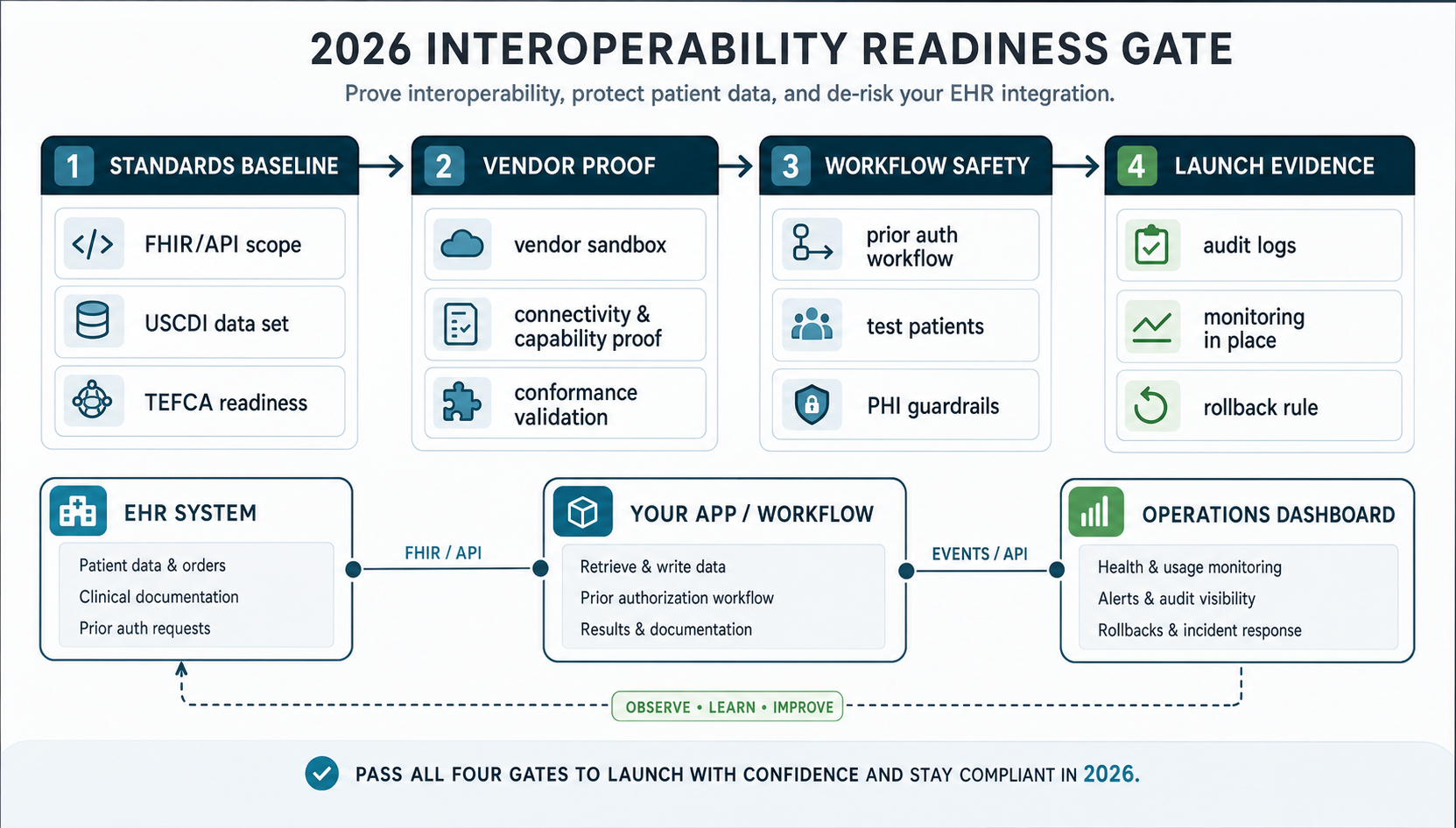
Before a healthcare team commits to build scope, it should pass a 2026 readiness gate. The standards baseline confirms the FHIR/API scope, USCDI data classes, HL7 message needs, TEFCA or network exchange context, and any payer API obligations. Vendor proof confirms sandbox access, test patients, write-back limits, prior authorization workflow behavior, rate limits, and go-live review steps.
The workflow safety gate is where many roadmaps become real. It should show how PHI moves through the product, who can see or change records, which exceptions stay manual, how AI or automation outputs are reviewed, and how denied, delayed, or duplicate records are handled. Launch evidence then ties the technical work to monitoring, audit logs, support queues, rollback rules, and named owners.
2026 planning note: Treat CMS-0057-F, ONC HTI-1, USCDI version alignment, SMART launch behavior, and vendor-specific FHIR support as evidence gates, not background research. Before approving a delivery budget, confirm which requirements apply to your payer, provider, or healthtech role, then prove the exact data, authorization scopes, launch context, and write-back limits in the target vendor sandbox.
This gate gives product and IT leaders a practical way to avoid vague vendor promises. If one gate is missing, narrow the first release, run a proof of concept, or delay fixed-scope commitments until the evidence exists.
Prove Vendor Access Before Estimating The Build
Before a team accepts a fixed delivery estimate, it should prove the target EHR can support the required workflow. A discovery checklist should include the vendor's sandbox rules, patient test-data policy, supported FHIR resources or HL7 messages, authentication flow, write-back approval process, rate limits, pagination behavior, webhook or event options, error payloads, and go-live review process.
The highest-risk question is usually not whether the vendor has an API. It is whether the required data can be read, written, reconciled, and supported in the workflow you are building. A read-only patient summary is very different from scheduling updates, clinical documentation, charge capture, prior authorization, device data ingestion, or AI-assisted worklists that require review and traceability.
- Ask for proof: sample API calls, sandbox screenshots, message examples, approval notes, and known limitations.
- Test unhappy paths: expired tokens, duplicate patients, missing codes, vendor downtime, failed writes, and delayed messages.
- Document gaps: unavailable fields, manual steps, unsupported write-backs, custom interface fees, and production certification needs.
- Re-estimate after proof: update scope once the team understands adapter work, mapping exceptions, monitoring, and support ownership.
If vendor proof exposes heavy migration or interface work, do not hide it inside a generic app budget. Treat it as its own workstream with acceptance criteria, rollback rules, and business validation.
Phase 3: Map, Migrate, And Reconcile Healthcare Data
Data migration and integration are related but different. Integration defines how systems keep exchanging data. Migration defines how existing records move, transform, clean up, or reconcile before the new workflow can go live.
Build a data workbook before implementation. It should list each source object, target object, required fields, optional fields, transformation rules, coding systems, owner, sample records, test cases, and reconciliation rule. For health data, add consent, retention, audit, and access notes to every sensitive object.
A practical migration checklist includes:
- Source inventory by EHR module, database, export, report, API, spreadsheet, or third-party system.
- Patient identity and duplicate handling rules.
- Mapping for clinical terms, codes, statuses, dates, locations, providers, and organizations.
- Historical data cutoff rules and retention requirements.
- Dry-run loads with control totals and exception reports.
- Business validation by clinical, billing, and operations owners.
- Rollback or correction plan for bad records discovered after launch.
Do not bury migration inside engineering tasks. It needs product, operations, compliance, and business review. If your project includes a material records move, use NextPage's data migration services or the broader data migration checklist to structure inventory, mapping, validation, cutover, and rollback.
Phase 4: Build Security, Compliance, And Audit Evidence
HHS describes the HIPAA Security Rule as establishing standards for electronic protected health information and requiring administrative, physical, and technical safeguards to protect confidentiality, integrity, and availability. Engineering teams should translate that into concrete product controls rather than vague "HIPAA compliant" labels.
For an EHR integration, the security plan should answer:
- Which systems create, receive, maintain, transmit, or display PHI?
- How are users authenticated, authorized, deprovisioned, and reviewed?
- Which actions create audit events, and who reviews them?
- How are secrets, tokens, certificates, files, logs, and exports protected?
- How are backups, retention, deletion, incident response, and vendor responsibilities handled?
- How does the system behave when the EHR, network, interface engine, or third-party API is unavailable?
Audit evidence should be planned before QA. A release should be able to show test cases, data-flow diagrams, risk decisions, access-control coverage, logging coverage, migration reconciliation, and approval notes. For connected device or remote monitoring scenarios, the service page for healthcare wearable app development shows how integration depth, sensitive data, and review roles shape the technical stack.
AI, Analytics, And Automation Guardrails For EHR Data
Many EHR integration roadmaps now include analytics dashboards, AI intake workflows, care-gap lists, denial prediction, documentation assistance, or operational automation. These features can be valuable, but they change the risk profile because EHR data may leave the source system, pass through models, appear in summaries, trigger work queues, or influence human decisions.
Add a separate guardrail checklist when EHR data supports AI or automation:
- Define whether the feature is read-only, recommendation-only, workflow automation, or decision support.
- Limit PHI to the minimum fields the use case needs and document retention rules for prompts, logs, exports, and model outputs.
- Keep a human review step for clinical, billing, eligibility, or patient-facing actions that carry safety or financial risk.
- Log the source record, model or rules version, user action, override reason, and final disposition when recommendations affect operations.
- Test for missing data, stale data, contradictory records, hallucinated summaries, unsupported codes, and biased or unsafe routing.
The point is not to block automation. It is to make the integration explainable enough that product, compliance, operations, and support teams can trust what happens after EHR data enters the new workflow. For teams planning model-assisted intake, summarization, routing, or revenue-cycle workflows, NextPage's AI automation services page explains how workflow automation should be scoped with human review, monitoring, and operational controls.
Phase 5: Test EHR-Connected Workflows
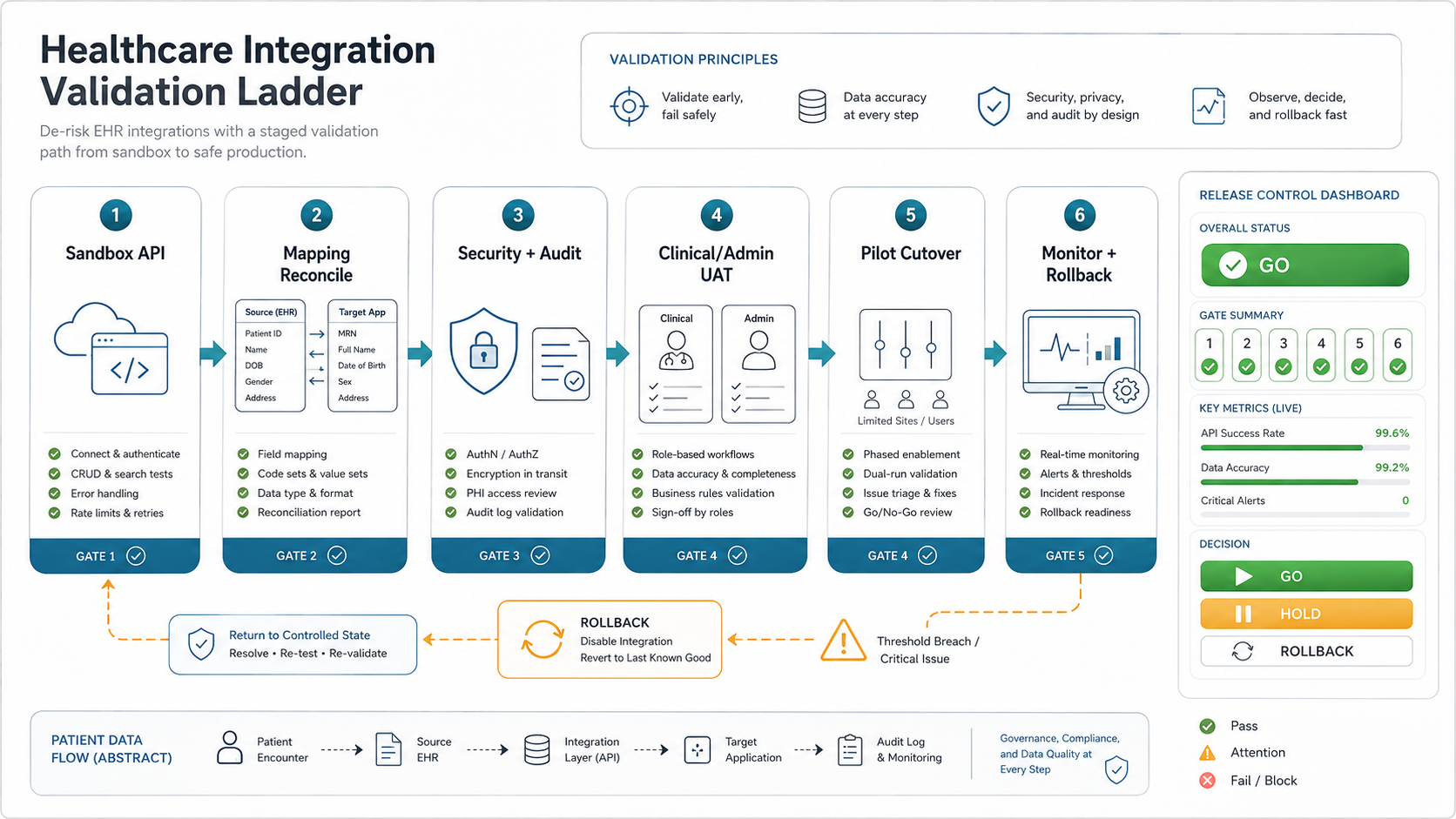
Testing an EHR-connected product means testing workflow, data, security, and operations together. A successful API call is only one signal. The release team also needs evidence that the right user saw the right record, the record mapped correctly, the audit event was captured, the exception path worked, and support can diagnose failures after launch.
Separate test ownership clearly:
- Engineering tests: API contracts, retries, authentication, parsing, mapping, transformations, and error handling.
- QA tests: core workflows, regression paths, role permissions, browser/device coverage, negative cases, and integration failure behavior.
- Business UAT: clinical, billing, admin, or support users validating realistic scenarios with expected outcomes.
- Security checks: access, audit logs, export controls, PHI exposure, dependency risks, and secret handling.
- Operational drills: pilot cutover, rollback, monitoring, alert routing, and support triage.
For teams formalizing this gate, NextPage's software QA testing services cover manual testing, automated regression, API validation, performance, security readiness, and release evidence. The distinction between UAT, functional testing, and regression testing matters because clinical users should validate business fit while QA protects repeatable release quality.
Phase 6: Roll Out, Monitor, And Own The Integration
The safest EHR integration rollout is staged. Start with sandbox validation, then limited production access, then a pilot user group, then wider rollout after monitoring and support evidence are stable. Avoid a launch plan where the first real test is full production traffic.
The rollout plan should define:
- Pilot scope, user cohort, success metrics, and stop conditions.
- Cutover calendar, communication plan, training material, and support coverage.
- Monitoring for API errors, data delays, failed messages, retry queues, latency, and unusual access patterns.
- Fallback workflows if the EHR interface or downstream software is unavailable.
- Ownership for vendor tickets, mapping updates, security review, and future EHR version changes.
Post-launch ownership is often the hidden cost. Someone has to review logs, respond to interface errors, update mappings, rotate credentials, adjust alert thresholds, and maintain test data as the EHR or workflow changes. Build that into the roadmap before go-live.
Sample EHR Integration Timeline
A practical timeline depends on vendor access, workflow risk, migration depth, and compliance review. A narrow read-only integration can move quickly after sandbox proof. A write-back workflow, migration-heavy program, or multi-site rollout needs staged acceptance because one technical miss can affect clinical operations or billing.
| Stage | Typical Focus | Exit Criteria |
|---|---|---|
| Weeks 1-2 | Workflow boundary, stakeholder owners, data inventory, vendor access request | Approved scope, target EHR, required resources/messages, risk register |
| Weeks 3-5 | Sandbox proof, authentication, sample data reads/writes, mapping workbook | Verified interface pattern, known gaps, revised estimate |
| Weeks 6-10 | Build adapters, product workflow, admin views, security controls, audit events | Feature-complete integration in test environment with traceable logs |
| Weeks 11-13 | Migration dry runs, QA matrix, UAT scripts, security review, monitoring | Signed release evidence, rollback plan, pilot checklist |
| Weeks 14-16+ | Pilot launch, issue triage, support handoff, broader rollout | Stable monitoring, resolved blockers, named operational ownership |
Use the timeline as a planning model, not a promise. If sandbox access takes longer, the roadmap should pause engineering commitments instead of guessing. If the proof stage is clean, the team can move faster with less contingency.
EHR Integration Risk Checklist
| Risk | Question to answer before build | Evidence to require |
|---|---|---|
| Unclear data boundary | Which PHI enters, leaves, or stays in the new software? | Data-flow diagram and field inventory |
| API assumption risk | Has the target EHR sandbox proven the required resources, scopes, and workflows? | Sandbox test report and endpoint notes |
| Mapping drift | Who owns code, status, field, and exception mapping after launch? | Mapping workbook and change owner |
| Migration quality | How will migrated or synchronized records be reconciled? | Control totals, exception reports, and sign-off |
| Security gaps | How are access, audit logs, tokens, exports, and support access controlled? | Security checklist and audit-event samples |
| Release uncertainty | Which workflows must pass before pilot and full rollout? | QA matrix, UAT scripts, and rollback plan |
If a vendor cannot answer these questions, the roadmap is not ready for fixed-scope delivery. Slow down discovery, narrow the first release, or isolate the riskiest interface in a proof-of-concept before committing to a full build.
A strong first release usually has fewer integration promises and stronger evidence. Prioritize one high-value workflow, one primary EHR context, clear user roles, tested data mapping, and a supportable rollout path. Expand after the pilot proves that the data, people, and operating process can hold up under real usage.
How NextPage Helps Healthcare Teams
NextPage helps healthcare teams turn integration ideas into scoped, testable, and supportable software plans. We can help you map the EHR data boundary, compare interface options, plan data migration, define security evidence, build the QA matrix, and sequence rollout around operational risk. If you are comparing delivery partners, the healthcare software development company checklist gives a practical question set for compliance, integration, AI, and support due diligence.
A useful first engagement is an integration readiness review. Bring the target EHR or EMR, current workflow, required data objects, target users, compliance assumptions, vendor documentation, and launch timeline. We will help identify what can be built in the first release, what needs sandbox proof, and what should wait until after pilot evidence.