
Quick Answer: What Should An Enterprise Application Modernization Roadmap Include?
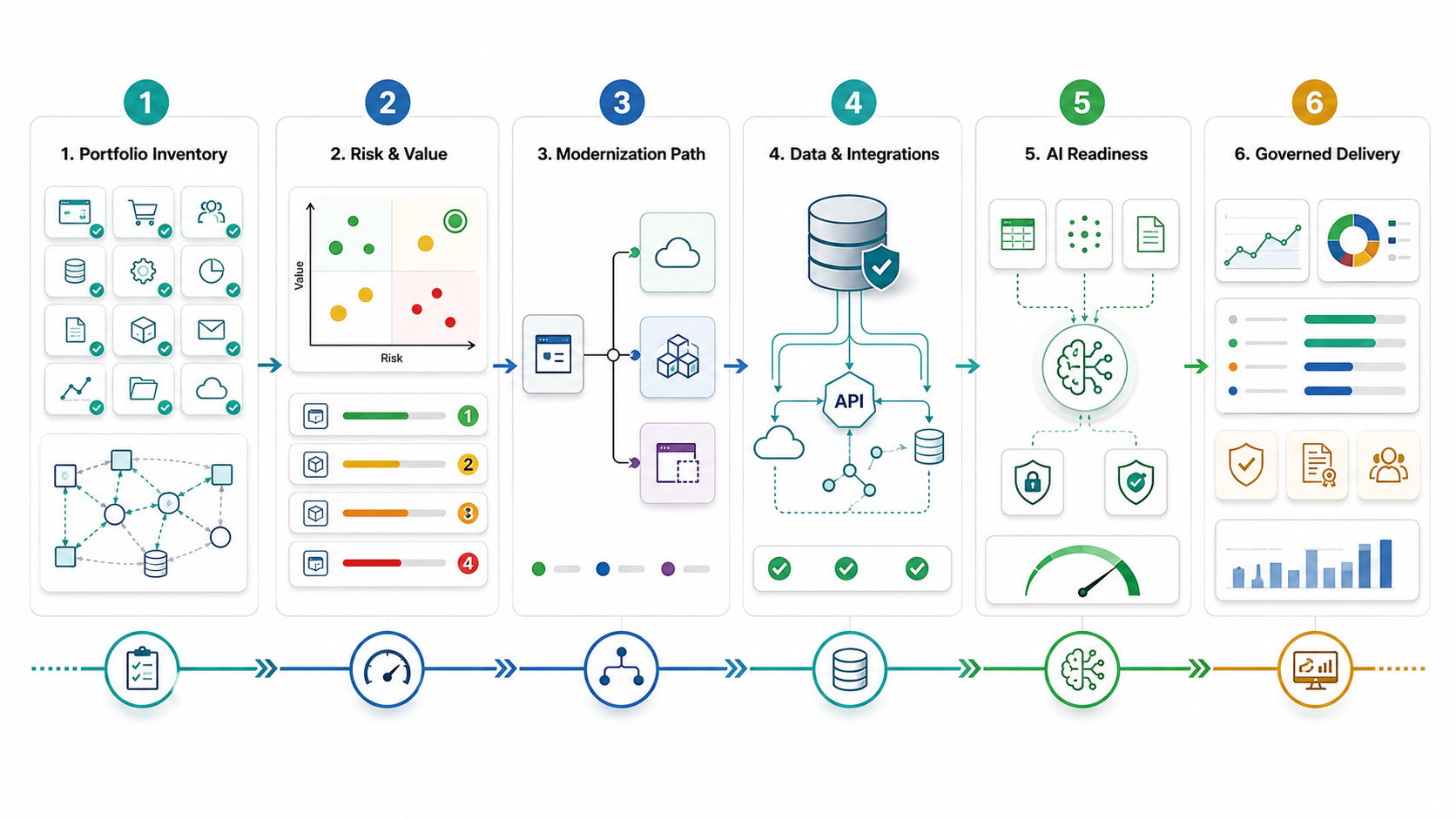
An enterprise application modernization roadmap should rank the application estate by business value, technical risk, data readiness, integration complexity, cloud fit, AI readiness, and change risk, then assign each system a path such as rehost, replatform, refactor, rearchitect, rebuild, replace, or retire. The roadmap is not a generic technology refresh. It is a controlled sequence of discovery, prioritization, architecture decisions, migration waves, validation evidence, and operating-model changes.
For most CTOs and CIOs, the right modernization plan starts with the workflows that constrain revenue, customer experience, reporting, compliance, or delivery speed. Some applications only need safer hosting and better observability. Others need API layers, database cleanup, workflow redesign, or a controlled rebuild. A few should be retired because their business value no longer justifies the risk and cost.
Use this guide when legacy systems are blocking cloud migration, AI pilots, analytics, product velocity, or integration work. If the main issue is platform age, start with application replatforming services. If the estate still runs on old infrastructure, pair the roadmap with legacy application rehosting services or a broader application migration services plan. When the estate is too broad to rank manually, start with the Legacy Software Modernization Scorecard so age, maintenance pressure, security uncertainty, and integration health are visible before funding waves.
Why Enterprise Modernization Roadmaps Fail
Modernization fails when teams treat every legacy application the same. A lift-and-shift cloud move can reduce infrastructure exposure but leave brittle code, poor data access, manual releases, and integration debt untouched. A full rebuild can produce a beautiful new platform while the business waits years for parity. A tool-led code conversion can speed parts of the work but still miss process, data, reporting, and adoption risk.
The Talentica source validates the broad buyer need: enterprise applications are no longer back-office utilities; they shape business operations, customer experience, and automation potential. Current cloud and AI discussions add urgency. Modern AI products need accessible data, secure integrations, elastic infrastructure, reliable APIs, and governance. Legacy estates often have the opposite: undocumented dependencies, batch extracts, hard-coded rules, fragile releases, and data that is difficult to trust.
That is why the roadmap must separate modernization goals. Some work reduces operational risk. Some work lowers cost. Some work enables product velocity. Some work unlocks analytics or AI. When all of those goals are blended into one giant transformation, the program becomes hard to fund, hard to sequence, and hard to validate.
Content Brief For Modernization Leaders
| Planning item | Decision for this post |
|---|---|
| Primary keyword | Enterprise application modernization roadmap. |
| Related queries and entities | Legacy modernization roadmap, cloud migration, replatforming, rehosting, refactoring, technical debt, data migration, AI readiness, integration modernization, governance. |
| Search intent | Commercial investigation and decision support for leaders planning modernization investments. |
| Expected SERP format | Strategic guide, roadmap, checklist, option comparison, and execution framework. |
| Reader job | Prioritize modernization work by business value, risk, and readiness instead of chasing a one-size-fits-all rewrite. |
| CTA | Request a legacy modernization assessment or application replatforming consultation. |
The Enterprise Application Modernization Roadmap
A practical roadmap has eight stages. Teams can compress or expand them based on portfolio size, but skipping the early stages usually creates rework later.
| Stage | Decision to make | Evidence to produce |
|---|---|---|
| 1. Inventory | Which applications, workflows, databases, integrations, reports, jobs, and owners are in scope? | Portfolio inventory, dependency map, owner matrix, business-criticality score. |
| 2. Risk and value scoring | Which systems create the highest operational, security, cost, customer, or growth constraint? | Risk/value heatmap, technical debt notes, incident/cost baseline. |
| 3. Path selection | Should each system be rehosted, replatformed, refactored, rebuilt, replaced, retired, or left alone? | Modernization decision matrix with rationale and exclusions. |
| 4. Architecture runway | What platform, integration, identity, observability, data, and DevOps foundations are required? | Target architecture, landing-zone decisions, API and data design notes. |
| 5. Data readiness | Can data be trusted, reconciled, secured, migrated, exposed, and governed after modernization? | Data inventory, migration plan, validation rules, reporting impact analysis. |
| 6. AI readiness | Which workflows and knowledge sources can safely support automation, RAG, agents, or predictive models? | AI use-case map, data access rules, evaluation criteria, governance controls. |
| 7. Delivery waves | Which sequence reduces risk while proving value early? | Wave plan, release gates, test strategy, rollback plan, business sign-offs. |
| 8. Operating model | How will teams maintain the modernized estate after the project? | Runbooks, ownership model, support model, observability dashboards, cost controls. |
1. Build A Portfolio Inventory That Goes Beyond Application Names
Most modernization plans begin too shallow. An inventory that lists only application names, owners, technologies, and hosting locations will not expose the real risk. Add business workflows, user groups, data domains, integration points, batch jobs, reporting dependencies, release cadence, incident volume, license cost, infrastructure cost, support skills, compliance obligations, and known failure modes.
The goal is to identify where the application is actually constraining the business. A stable old system that runs a low-change internal process may not deserve immediate rebuild budget. A moderately old system that blocks digital onboarding, partner integrations, analytics, or customer support may deserve a near-term modernization wave even if the technology is not the oldest in the estate.
For teams that already know a system must move, the application migration readiness checklist can help validate dependencies, data, cutover, and rollback before a migration wave begins.
2. Score Each Application By Business Value And Modernization Risk
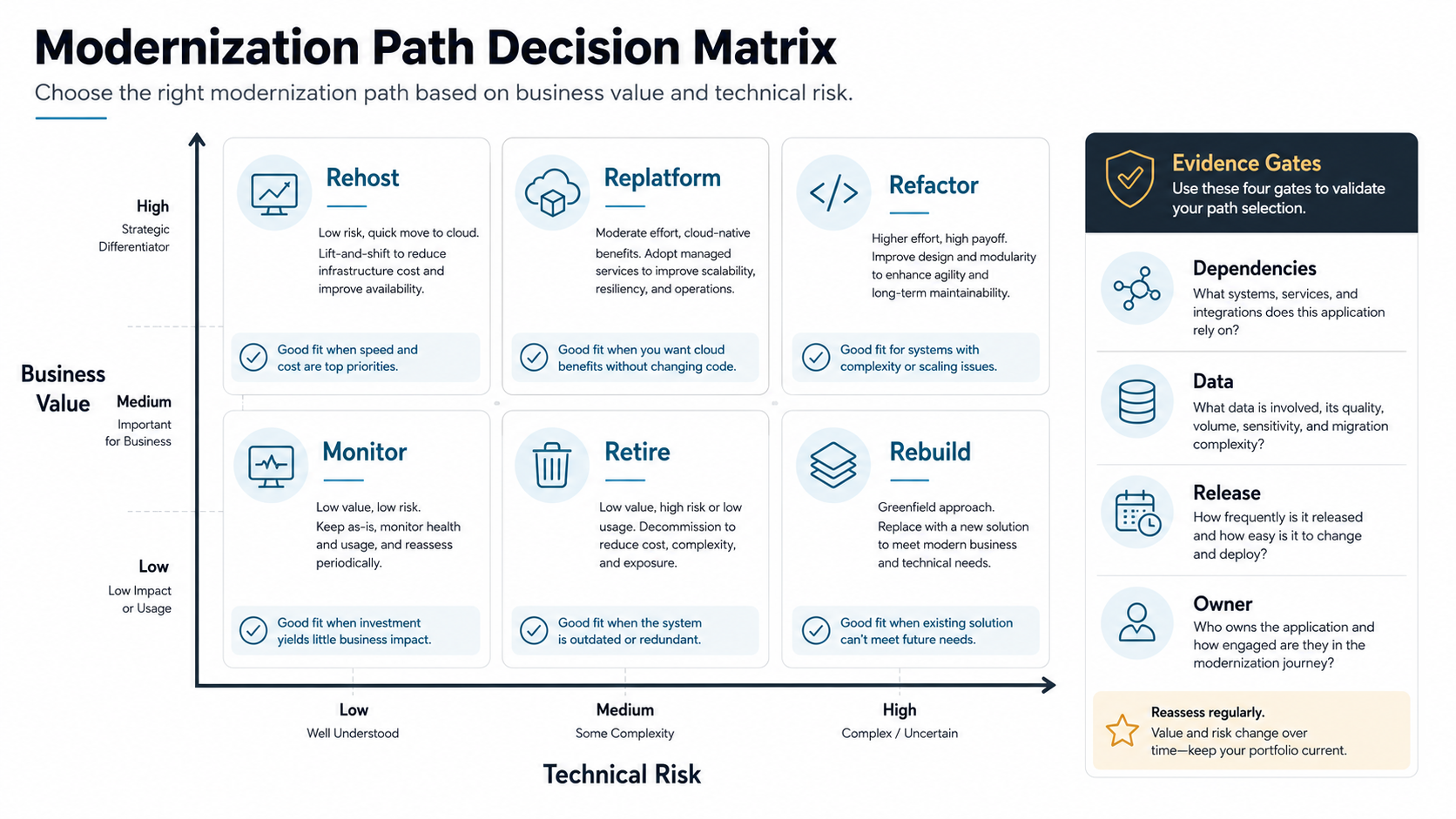
Rank applications across two axes: value unlocked and risk reduced. Value includes revenue enablement, customer experience, employee productivity, analytics, product velocity, and integration potential. Risk includes outage history, security exposure, unsupported runtimes, scarce skills, data quality issues, release fragility, performance limits, and compliance pressure.
This scoring helps avoid two common mistakes. The first is modernizing the loudest system instead of the most important one. The second is selecting the most technically interesting rebuild when a smaller replatforming or API modernization effort would remove the constraint faster. If the codebase is inherited, unstable, or already delayed, pair the scoring exercise with software project rescue services thinking so stabilization, release safety, and modernization are sequenced instead of mixed together.
| Portfolio signal | What it usually means | Roadmap implication |
|---|---|---|
| High business value, high technical risk | Critical system is slowing growth or creating operational exposure. | Prioritize discovery, risk controls, and phased modernization. |
| High value, moderate risk | System works but limits integrations, automation, or user experience. | Consider replatforming, API enablement, workflow improvements, or selective refactoring. |
| Low value, high risk | Legacy cost and support burden exceed business importance. | Retire, replace, consolidate, or freeze new investment. |
| Low value, low risk | Stable utility application with limited modernization upside. | Monitor, contain cost, and revisit only when dependency risk changes. |
3. Choose The Right Modernization Path For Each System
Modernization is a portfolio of choices, not a single method. Use rehosting when infrastructure risk is urgent and the application can move with limited changes. Use replatforming when the runtime, database, hosting model, CI/CD flow, or observability can improve without rewriting core business logic. Use refactoring when specific modules need better maintainability, performance, security, or cloud-native behavior. Use rearchitecting or rebuilding only when the current design cannot support future workflows.
Use replacement when the process is commodity and an off-the-shelf tool can meet business needs without recreating old custom behavior. Use retirement when the workflow is no longer needed or can be absorbed into another system. The strongest roadmap usually mixes these paths across the estate. For ERP-heavy portfolios, ERP integration and modernization services can help teams extend, integrate, migrate, or contain the ERP core without forcing every process into a risky full-system replacement.
| Path | Best fit | Watchout |
|---|---|---|
| Rehost | Urgent infrastructure or data-center exit with low functional change. | Technical debt moves with the app unless later waves address it. |
| Replatform | Runtime, database, deployment, observability, or hosting improvements while preserving logic. | Scope can creep into a hidden rewrite without strict guardrails. |
| Refactor | Specific modules need maintainability, performance, API, security, or testability improvements. | Needs strong regression testing and dependency mapping. |
| Rearchitect or rebuild | Business model, scale, user experience, or integration needs exceed the current architecture. | Requires parity planning and stakeholder patience. |
| Replace or retire | Low-differentiation workflow or duplicated capability. | Data migration, adoption, reporting, and contract terms still need planning. |
NextPage's legacy application modernization roadmap covers cost, risk, and migration options in more detail when a single system needs a deeper modernization plan.
4. Build The Architecture Runway Before You Move Workloads
Modernization-led cloud migration requires more than target infrastructure. It needs identity, network paths, secrets management, deployment pipelines, environment strategy, observability, backup, incident routing, cost controls, and security guardrails before the first production wave. Otherwise, the team simply recreates old operational risk in a new platform.
Define the target patterns that teams can reuse: API gateway standards, database migration patterns, message queues, integration adapters, logging and tracing, service ownership, release approval gates, and rollback patterns. For many estates, a small number of repeatable patterns does more than a large architecture deck.
If the target includes a cloud move, connect platform decisions to application replatforming services and application migration services rather than treating cloud hosting as a separate infrastructure track.
5. Treat Data Readiness As A Modernization Workstream
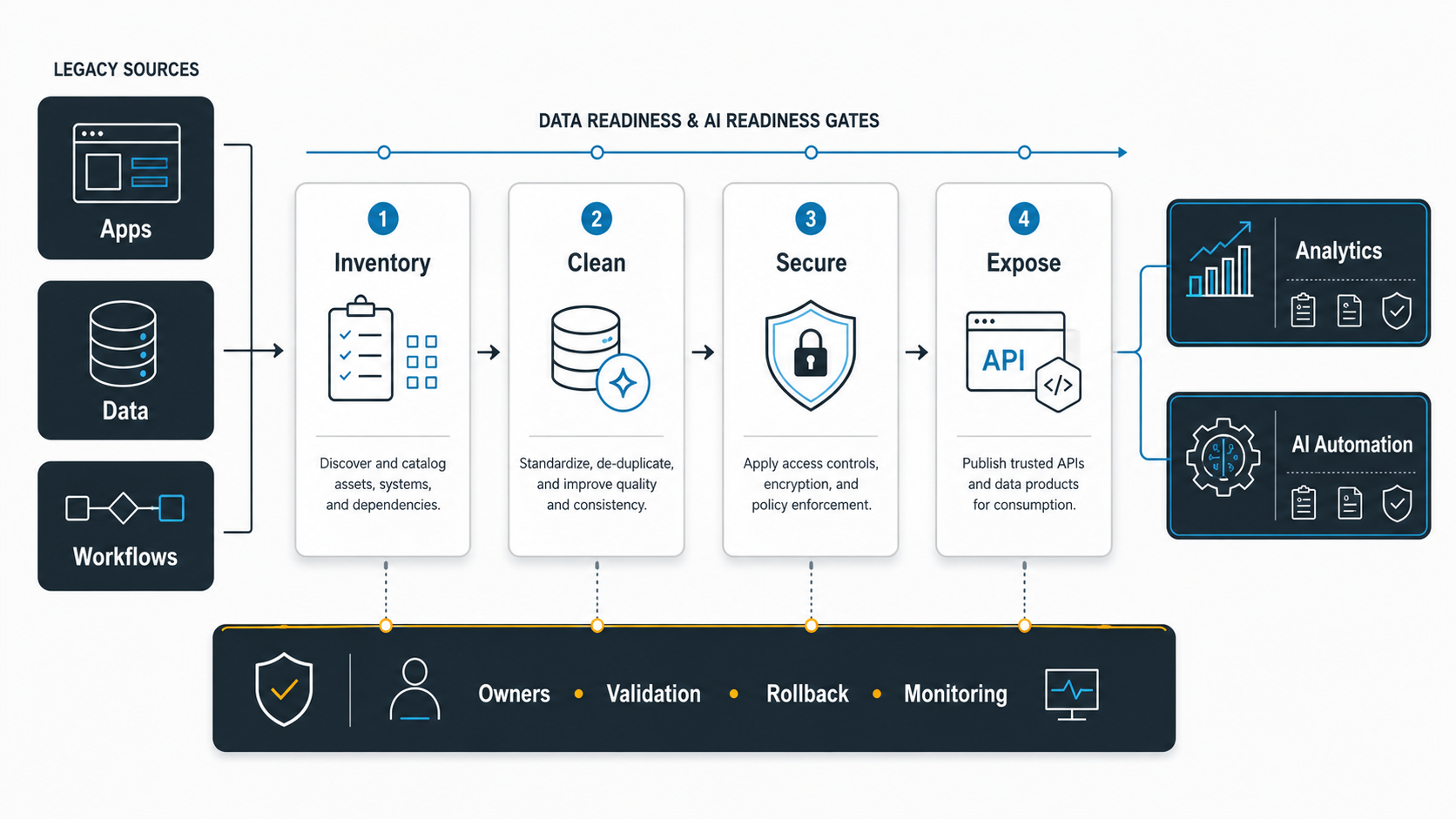
Applications modernize poorly when data is left until the end. Old systems often contain duplicated records, ambiguous fields, undocumented transformations, stale reports, file exports, shadow databases, and manual reconciliation rules. If those issues are copied forward, the modernized application may look new while decisions remain unreliable.
Create a data workstream for source inventory, field mapping, transformation rules, reconciliation, retention, reporting impact, access controls, and ownership. Decide which data must move, which should be archived, which should be cleansed, and which reporting outputs must remain identical during transition.
For system moves where records are the main risk, use a data migration checklist to plan inventory, mapping, validation, cutover, and rollback. For future AI programs, connect the modernization plan to an AI data readiness checklist so data access, freshness, ownership, governance, and evaluation needs are not bolted on later.
6. Decide What AI Readiness Actually Means For The Estate
AI readiness is not achieved by adding a chatbot to a legacy system. It means the application can expose trusted knowledge, events, workflows, permissions, and audit trails in a way that automation can safely use. For some systems, readiness means APIs and documentation. For others, it means data cleanup, event streaming, role-based access, evaluation datasets, or a new workflow layer around the old core.
Start with business use cases: support triage, document processing, forecasting, knowledge retrieval, workflow automation, recommendation, or agent-assisted operations. Then ask which applications, databases, documents, logs, and human approvals the use case needs. If the answer depends on manual exports and tribal knowledge, the modernization roadmap must close those gaps first. NextPage’s AI development services team uses the same readiness logic when deciding whether a workflow is ready for AI integration or still needs data, permissions, and process cleanup.
The enterprise AI readiness checklist is useful here because it separates data, workflows, security, governance, and ownership instead of treating AI readiness as a model-selection problem.
7. Sequence Delivery Waves Around Risk, Value, And Reuse
Do not modernize the whole estate at once. Build waves that prove reusable patterns. A good first wave is important enough to matter but contained enough to recover from. It should test discovery, data migration, integration changes, release automation, user acceptance, observability, support, and governance.
Group applications by shared dependencies, technology stack, business calendar, data domain, user group, or modernization pattern. Avoid waves that mix too many unknowns: new platform, new data model, new workflow, new vendor, new security model, and new support team in the same release.
| Wave type | Use when | Success metric |
|---|---|---|
| Stabilization wave | Incidents, security gaps, backups, monitoring, or support risk are urgent. | Lower incident volume, better recovery readiness, stronger operational visibility. |
| Platform wave | Applications need better hosting, runtime, deployment, or observability. | Reusable pipeline, lower infrastructure risk, faster releases. |
| Workflow wave | Business process is slow because the application design is outdated. | Shorter cycle time, fewer manual steps, better user adoption. |
| Data and AI wave | Analytics, RAG, agents, or automation need trusted data and APIs. | Usable data products, governed access, measurable automation outcomes. |
8. Govern Modernization With Evidence, Not Status Slides
Modernization governance should answer four questions every week: what risk was reduced, what business value was unlocked, what evidence proves readiness, and what decision is needed next? Useful governance artifacts include a portfolio heatmap, modernization-path register, architecture decisions, dependency map, data validation report, test evidence, cutover runbook, rollback triggers, cost baseline, and support handoff.
Set guardrails for scope change. If a replatforming wave starts turning into a product redesign, pause and re-approve the goal. If a rebuild cannot prove parity for critical workflows, narrow the first release. If a cloud migration exposes data-quality risk, split the data workstream instead of hiding it inside infrastructure tasks.
Modernization Cost Drivers To Estimate Early
Modernization cost is driven by uncertainty. The biggest drivers are unclear requirements, undocumented dependencies, fragile integrations, data cleanup, parity testing, security remediation, reporting changes, user adoption, and production support. Technology choices matter, but the costliest surprises usually come from what the organization did not know about the legacy process.
Use a budget model that separates discovery, stabilization, platform setup, data migration, modernization build, testing, rollout, support, and ongoing operations. For early planning, the custom software cost estimator can help frame scope and budget assumptions, while the custom software development cost guide helps explain why workflow complexity matters more than screen count. Portfolio examples such as DeviceBridge are a reminder that modernization budgets often include operational evidence, device or workflow integrations, and release controls, not just code conversion.
Common Modernization Pitfalls
- Choosing the oldest system first instead of the highest-value, highest-risk constraint.
- Moving applications to cloud without improving release, observability, security, or data practices.
- Starting a rebuild before documenting parity requirements and reporting dependencies.
- Treating AI readiness as a model problem rather than an application, data, permission, and workflow problem.
- Underestimating data migration, reconciliation, and downstream reporting impact.
- Letting every wave become a one-off instead of building repeatable patterns.
- Measuring progress by migrated applications instead of reduced risk, faster delivery, better data access, or business outcomes.
NextPage's Enterprise Application Modernization Roadmap
Before funding a modernization program, confirm that the team can answer these questions:
- Which applications create the biggest business, security, cost, delivery, or data constraints?
- Which systems should be rehosted, replatformed, refactored, rebuilt, replaced, retired, or left alone?
- Which data, reporting, integration, and approval flows must survive modernization?
- Which platform patterns can be reused across waves?
- Which workflows need API, event, or data access before AI automation is realistic?
- Which evidence will prove each wave is ready for production?
- Who owns the modernized system after the project team moves on?
NextPage helps teams assess legacy estates, prioritize modernization paths, replatform critical applications, plan migrations, modernize data flows, and build AI-ready software foundations. Start with application replatforming services when the application platform is the near-term constraint, or request a broader legacy modernization assessment when the portfolio needs a phased roadmap.