
Quick Answer: What Features Does A Music Streaming App Need?
A modern music streaming app needs more than playback. The strongest products combine a licensed audio catalog, fast search, personalized recommendations, offline listening, playlist tools, high-quality streaming, social discovery, creator or podcast support, payments, analytics, and reliable cross-device sync. The exact feature list should depend on the business model, catalog rights, audience segment, and launch budget.
If the product needs iOS, Android, backend APIs, subscriptions, media infrastructure, analytics, and release support, treat it as a full mobile app development program rather than a simple media player. Streaming products succeed when the feature set, data model, licensing assumptions, and retention loop are planned together.
Start With The Listener And Business Model
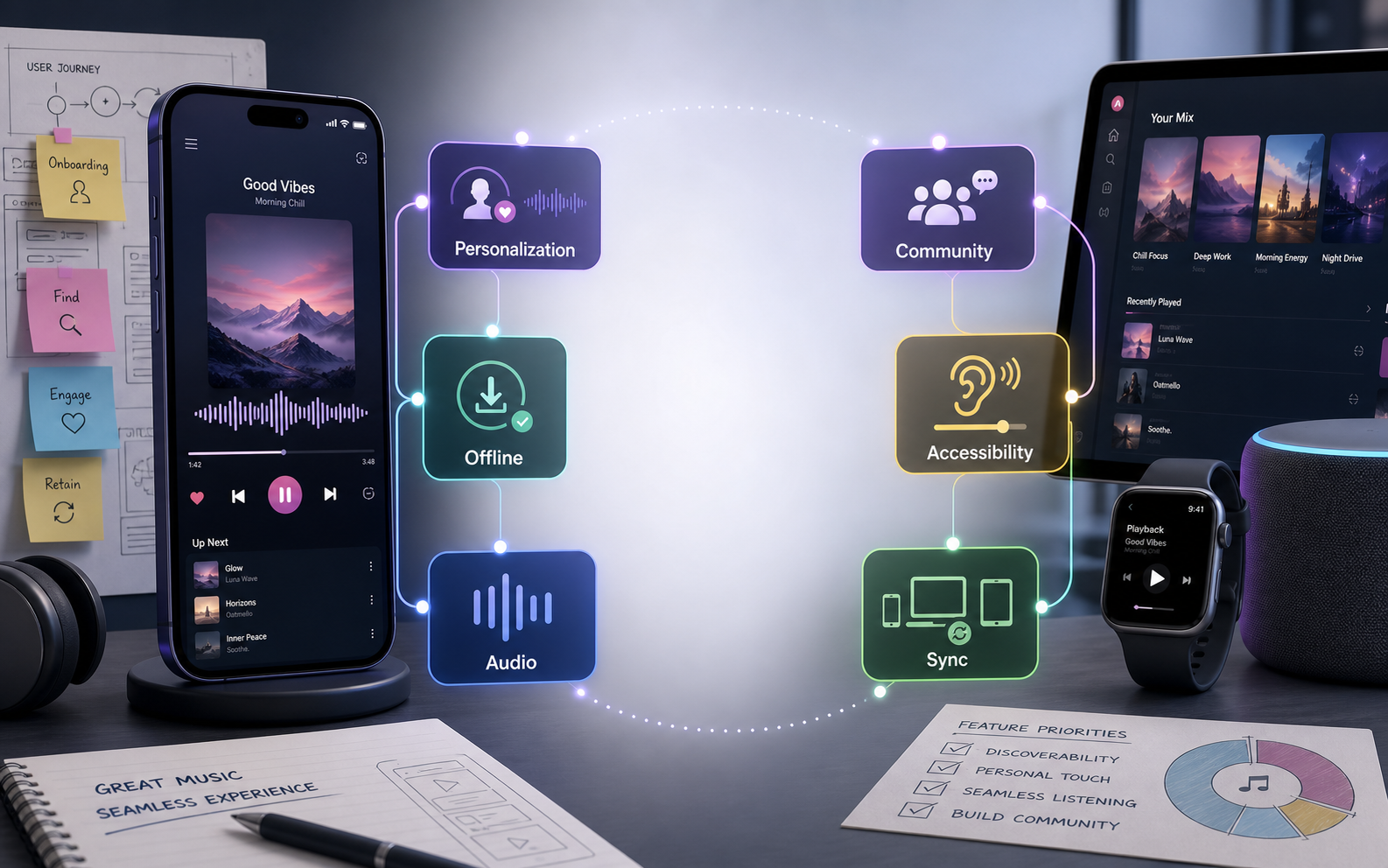
Before choosing features, define the listener segment and business model. A mainstream music streaming app, niche genre community, podcast network, creator-fan platform, meditation audio product, radio app, and enterprise audio library all need different journeys. A broad app may need catalog depth and recommendation quality, while a niche product may win through community, editorial curation, creator access, or exclusive content.
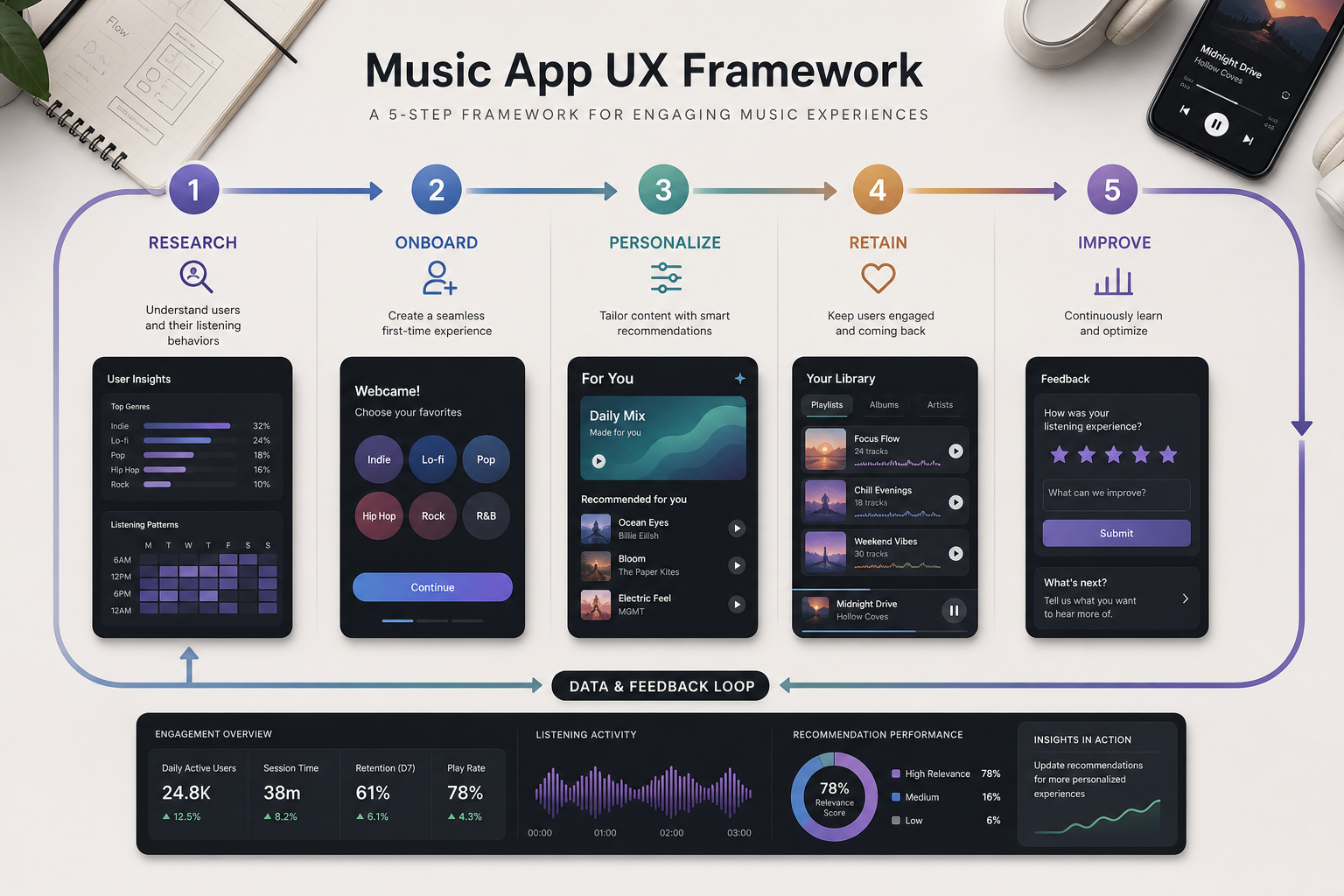
Use real audience research before writing the final backlog. The guide to user personas in app development is useful when turning listener groups into onboarding questions, playlist defaults, recommendation rules, notification preferences, and monetization assumptions.
Music Streaming App Feature Priority Matrix
Not every streaming feature belongs in the first release. Start with the features that let users discover, play, save, return, and pay. Add advanced personalization, social loops, creator tools, and AI features after the core listening experience is stable.
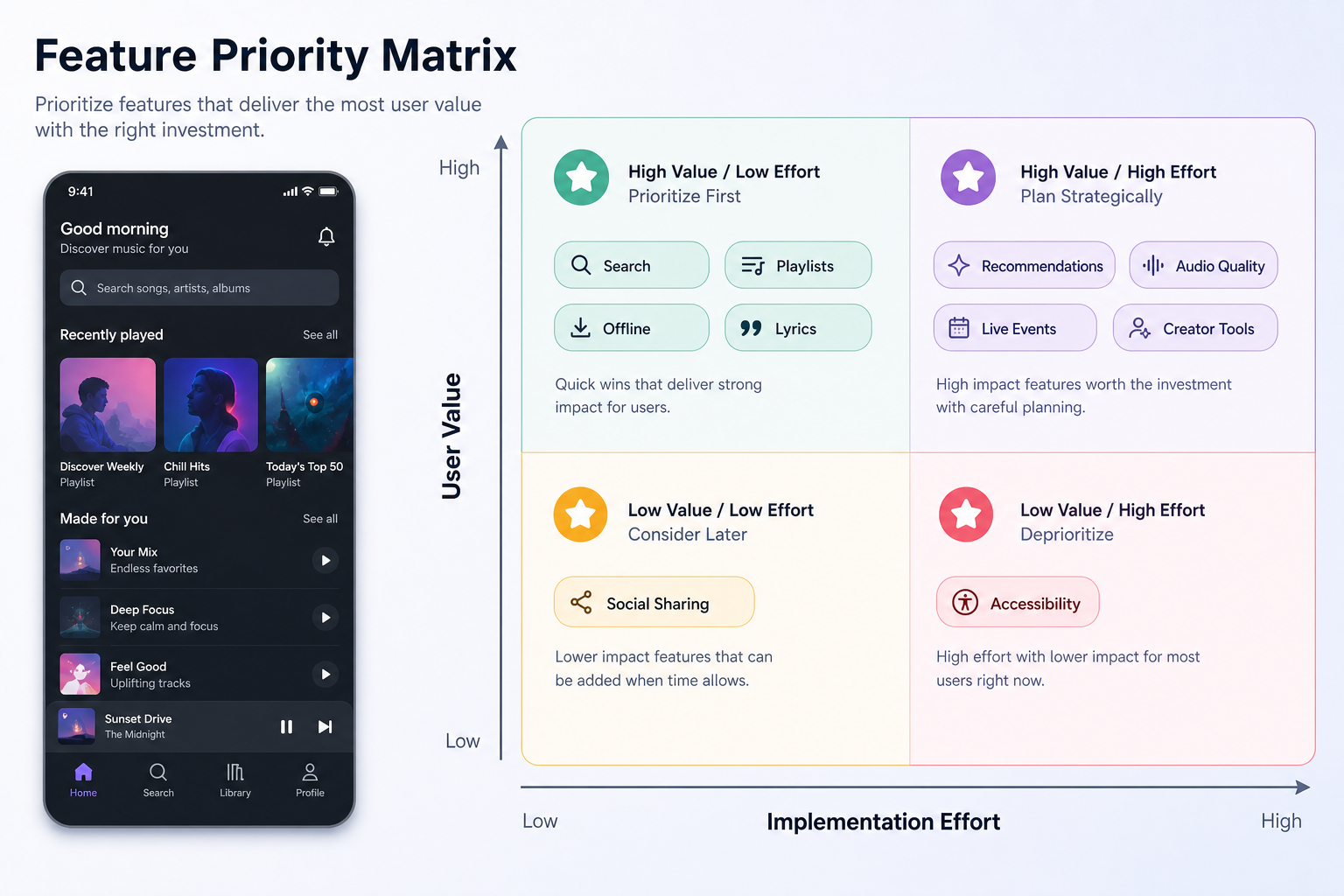
| Feature Area | MVP Scope | Expansion Scope |
|---|---|---|
| Catalog and search | Licensed tracks, albums, artists, genres, metadata, and fast keyword search. | Editorial collections, mood search, semantic search, lyrics search, and regional catalog rules. |
| Playback | Queue, play, pause, skip, repeat, shuffle, background playback, and basic streaming quality. | Hi-fi tiers, gapless playback, equalizer controls, crossfade, smart downloads, and device handoff. |
| Personalization | Onboarding preferences, recently played, favorites, and simple recommendations. | Collaborative filtering, contextual recommendations, dynamic playlists, and AI-assisted discovery. |
| Retention | Playlists, downloads, reminders, push notifications, and saved library. | Social sharing, collaborative playlists, creator follows, live sessions, and community loops. |
| Revenue | Subscription plans, trials, payments, entitlements, and account management. | Ads, creator subscriptions, bundles, family plans, merch, ticketing, and partner campaigns. |
If the backlog is still too broad, use the MVP Scope Builder to separate launch-critical features from features that can wait until usage data proves demand.
Catalog And Metadata Foundation
The catalog is the product's foundation. Users expect tracks, albums, artists, cover art, genres, release dates, explicit-content flags, rights territories, and clean metadata. Poor metadata creates broken search, weak recommendations, duplicate artists, bad playlists, and licensing risk.
Plan catalog ingestion as a real workflow. The backend should handle content import, normalization, deduplication, rights windows, takedown requests, regional availability, artwork, preview clips, and analytics events. If podcasts or creator uploads are part of the roadmap, add moderation, copyright review, transcript handling, and publishing controls.
Fast Search And Music Discovery
Search should work for songs, artists, albums, playlists, moods, genres, podcasts, and user libraries. Discovery should not rely only on a blank search box. Use home sections such as new releases, recently played, recommended for you, trending by genre, editor picks, continue listening, and similar artists.
Discovery quality improves when product, data, and design work together. The related guide on music app user experience explains how navigation, audio quality, playlist flows, and engagement patterns shape the daily listening habit.
Personalized Recommendations And Smart Playlists
Personalization starts with explicit signals such as favorite genres, artists, languages, moods, and use cases. It improves with implicit signals such as skips, repeats, saves, playlist adds, search terms, listening time, session context, and subscription status. A first release can start simple, but the data model should be ready for better recommendations later.
Smart playlists can include daily mixes, workout mixes, commute playlists, focus music, new-release radar, rediscovery playlists, and mood-based collections. Keep user controls visible. Listeners should be able to tune recommendations, hide disliked tracks, clear history, and understand why some content appears.
Offline Listening And Streaming Reliability
Offline listening is a must-have for travel, commutes, gyms, low-connectivity areas, and users with limited data plans. The app should support downloads for tracks, albums, and playlists, then sync updates when the device reconnects. It also needs entitlement checks so downloaded content respects subscription, licensing, and territory rules.
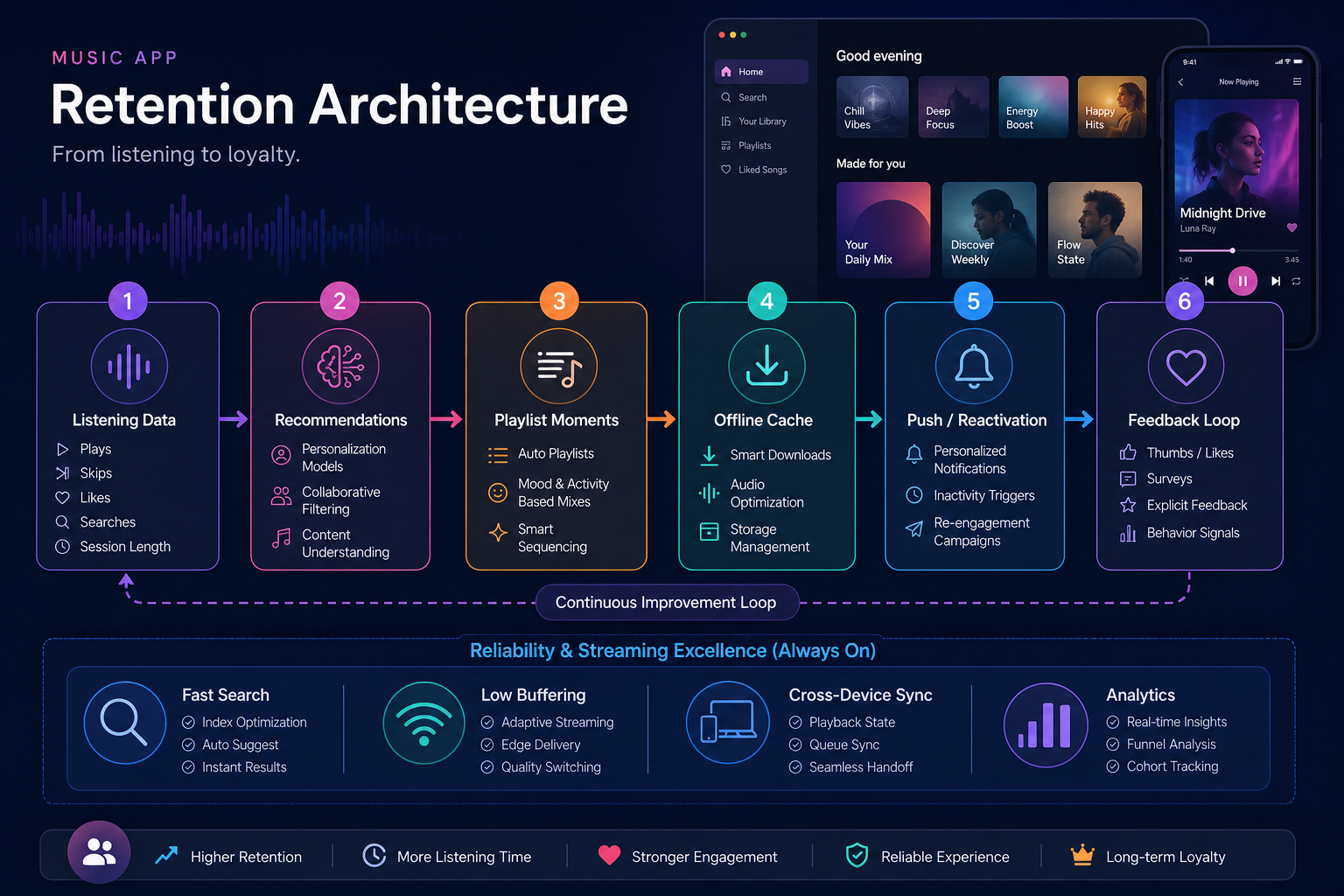
Reliability work should cover slow networks, app backgrounding, expired downloads, interrupted playback, retries, cached artwork, queue persistence, and analytics deduplication. For platform decisions, compare native versus cross-platform mobile app development before committing to a stack, especially if the app depends heavily on background audio, Bluetooth, CarPlay, Android Auto, or device-specific media controls.
Playlist And Library Features
Playlists are where users turn a streaming app into their own space. The first release should support creating playlists, adding tracks, reordering, removing, privacy settings, cover art, and sharing. The library should make saved songs, followed artists, albums, downloads, and recently played content easy to find.
Collaborative playlists can become a strong retention feature once the core product works. They need invitations, permissions, activity history, abuse controls, and conflict handling when several users edit the same playlist. For niche communities, collaborative playlists may be more valuable than generic social feeds.
Social Sharing, Creator, And Community Features
Social features should help discovery, not distract from listening. Useful options include share cards, public playlists, collaborative playlists, artist follows, friend activity, creator updates, listening rooms, comments on playlists, and direct links to songs or episodes. Start with lightweight sharing before building a full social network.
If the app includes independent artists, labels, DJs, podcasters, or educators, add creator tools deliberately: upload workflows, dashboards, audience analytics, payout reports, content scheduling, fan messaging, and rights management. Creator features can become a second product surface, so they need their own onboarding, permissions, and support model.
Subscriptions, Payments, And Monetization
Music streaming monetization usually combines subscriptions, free trials, ads, family plans, student plans, creator subscriptions, affiliate revenue, event tickets, merch, or brand campaigns. The payment model affects entitlement logic, download access, audio quality, ads, cancellation flows, and customer support.
The supporting article on monetizing music apps covers revenue options in more depth. For product planning, keep monetization transparent. Users should understand what is free, what is paid, what happens after a trial, and which features are locked by plan.
Analytics, Admin, And Content Operations
A streaming app needs admin tools from day one. The team should be able to manage catalog issues, playlists, featured sections, creators, users, plans, support cases, abuse reports, and content availability. Without admin tooling, every editorial or operational change becomes engineering work.
Track activation, first play, search success, saves, playlist creation, downloads, skips, completion rate, seven-day retention, subscription conversion, churn, payment failures, and support issues. These metrics show whether the app is becoming a habit or only attracting installs.
Security, Privacy, And Rights Management
Music apps handle account data, payment status, listening history, location signals, device identifiers, creator content, and licensing constraints. Plan secure authentication, token storage, rate limiting, abuse prevention, privacy controls, deletion/export flows, and least-privilege admin access.
Rights management is equally important. The app should know where a track can play, when rights expire, which users can download it, which plan includes it, and what happens when content is removed. Treat licensing, royalties, and content takedowns as product workflows, not back-office exceptions.
Music Streaming App Development Cost Drivers
Development cost depends on catalog complexity, media infrastructure, mobile platforms, subscriptions, personalization, offline downloads, admin tooling, analytics, creator workflows, and integrations. A simple niche streaming MVP is very different from a global Spotify-style platform.
For a directional budget, use the Custom Software Cost Estimator. The estimate should include product discovery, UX design, mobile development, backend APIs, media storage or CDN planning, QA, app store release, analytics, and post-launch iteration.
Common Mistakes To Avoid
- Copying Spotify feature-for-feature: a smaller product needs a sharper audience and a narrower launch loop.
- Underestimating catalog operations: metadata, rights, takedowns, and artwork need ongoing workflows.
- Adding recommendations too late: capture clean listening signals from the first release, even if the algorithm starts simple.
- Ignoring offline edge cases: downloads, expired entitlements, and poor connectivity create real support issues.
- Building social features before retention: sharing works best after users already find the app useful.
How NextPage Can Help
NextPage can help plan and build a music streaming app from product discovery through UX, mobile apps, backend APIs, media workflows, admin tools, analytics, QA, and launch support. The best first step is a feature and architecture workshop: define the audience, catalog model, rights assumptions, MVP loop, monetization plan, and technical risks before funding the full build.
A focused launch can still feel polished when the core listening experience is fast, reliable, and personal. Once users prove repeat listening behavior, advanced personalization, creator tools, community features, and monetization experiments become easier to prioritize.