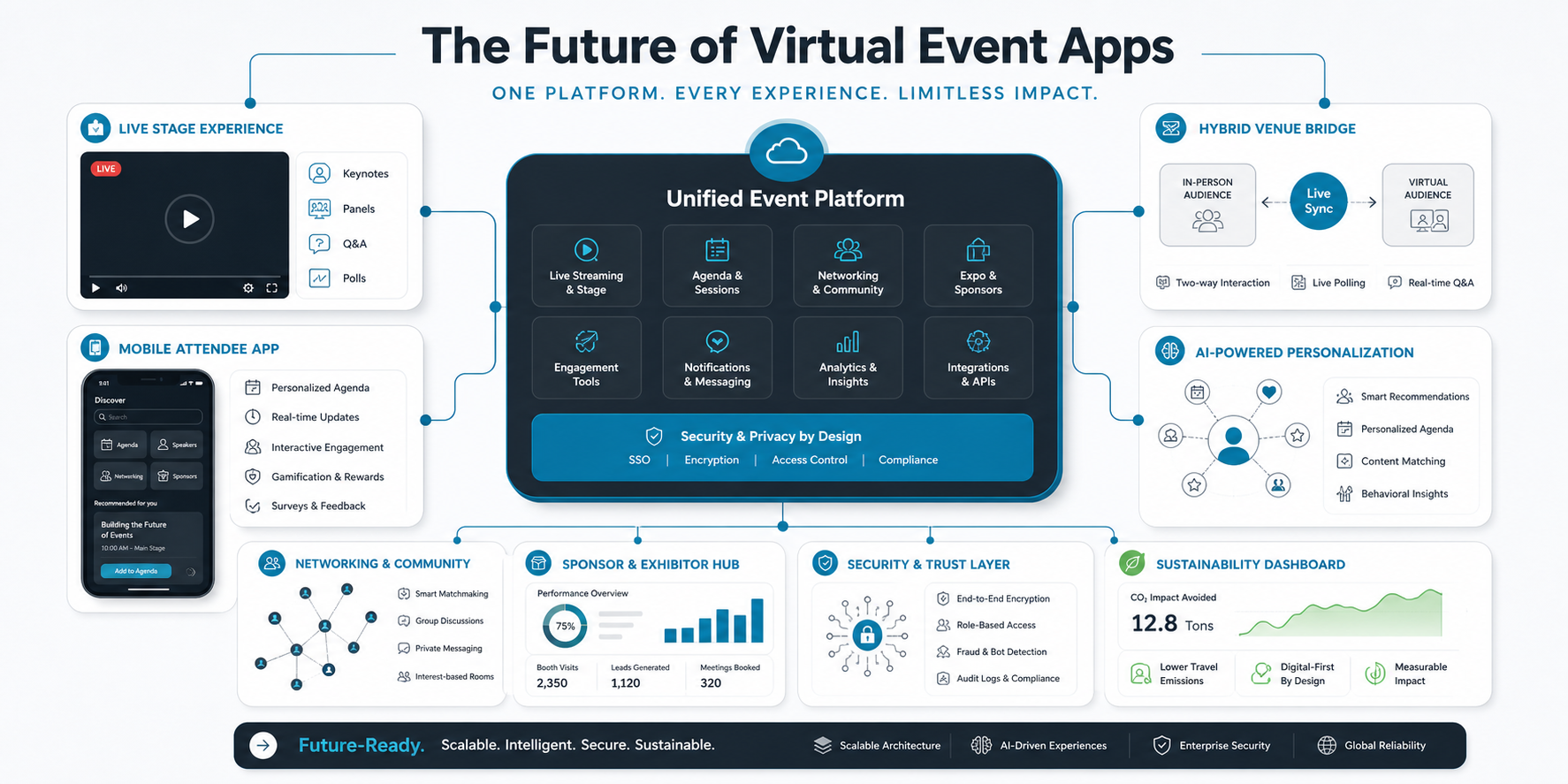

Quick Answer: What Makes An Event App Interface User-Friendly?
A user-friendly event app interface helps attendees find the next useful action in seconds: register, check in, build an agenda, navigate the venue, join a session, ask a question, network with the right people, and receive timely updates. For organizers, the same product must simplify content updates, attendee communication, sponsor visibility, analytics, and support workflows without forcing teams to jump between disconnected tools.
The strongest event apps feel simple on the surface because the product team has already made hard decisions about information architecture, roles, permissions, integrations, and real-time operations. A thoughtful mobile app development plan should connect the attendee journey, organizer dashboard, content model, notifications, analytics, and launch support before interface design starts.
Start With The Event Journey, Not A Feature List
Many event apps become confusing because teams start by collecting features instead of mapping the event journey. A conference attendee, exhibitor, speaker, sponsor, volunteer, and organizer each enters the app with a different job to complete. The interface should reflect those jobs rather than presenting the same crowded menu to everyone.
Map the journey across pre-event discovery, registration, onboarding, arrival, live sessions, networking, sponsor engagement, post-event feedback, and follow-up. Then decide which screens deserve priority for each role. This keeps the app useful during the real pressure points of an event: arrival, schedule changes, room finding, session reminders, lead capture, and support requests.
Event App UX Feature Roadmap
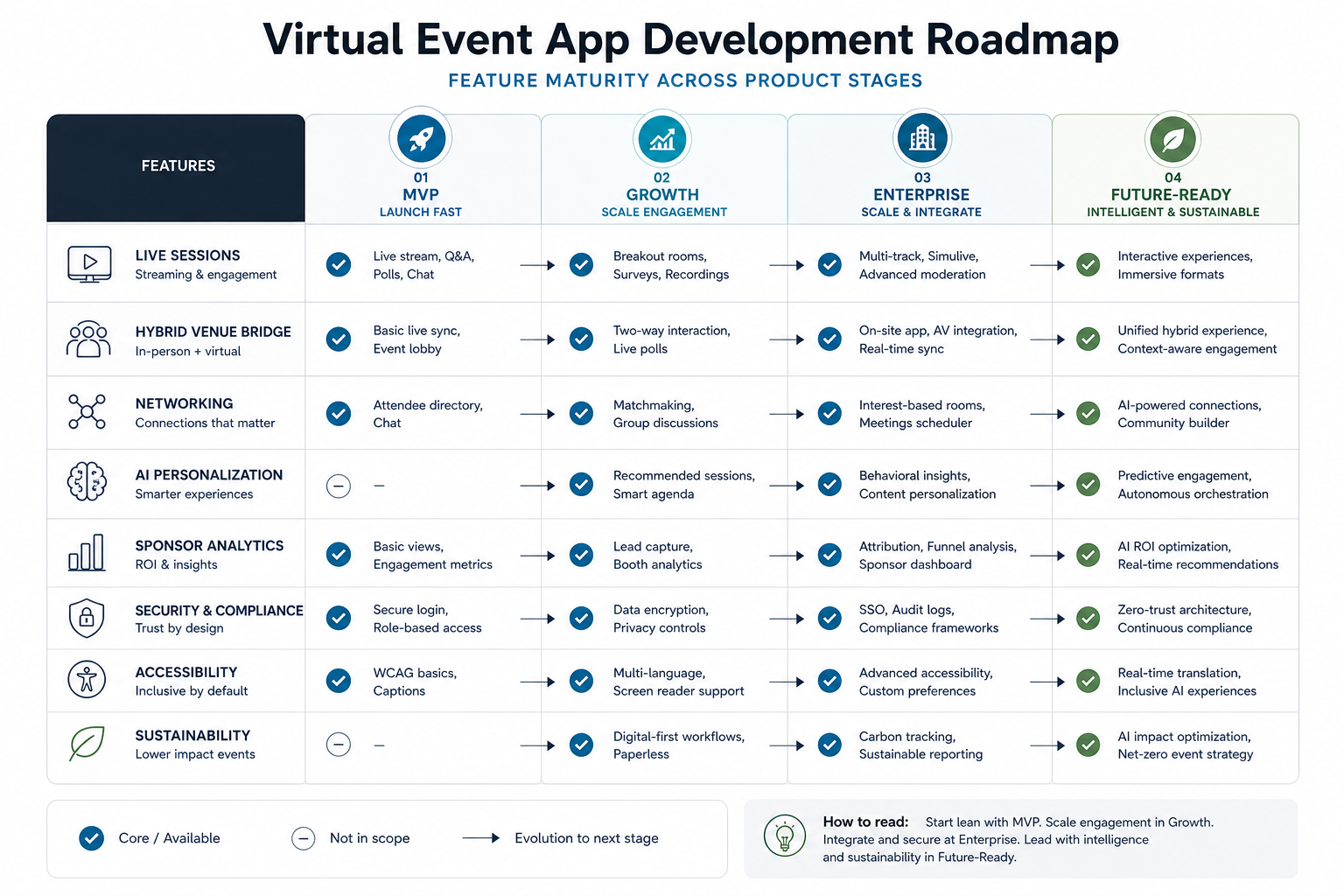
A practical roadmap separates must-have event app interface work from later growth features. The first release usually needs registration handoff, profile setup, personalized agenda, event schedule, session detail pages, push notifications, venue or virtual navigation, announcements, feedback, and basic organizer controls. Advanced features such as matchmaking, sponsor lead scoring, gamification, AI recommendations, and multi-event communities should come after the core event loop is reliable.
This sequence also helps budget and timeline conversations. Instead of asking whether the app needs every possible feature, teams can decide which features protect the live event experience and which features can be phased into a second release.
Design Around Two Primary Users: Attendees And Organizers
The attendee side should be fast, readable, and action-led. The organizer side should be controlled, auditable, and operational. An attendee wants to know where to go next. An organizer wants to know whether people are checked in, engaged, informed, and supported.
That difference should shape navigation. Attendees need agenda, sessions, map, notifications, networking, speakers, sponsors, tickets, and support. Organizers need content management, announcements, attendee lists, check-in data, sponsor reporting, live poll results, surveys, and issue tracking. When the same app serves both groups, role-based menus and permissions prevent the interface from becoming overloaded.
Prioritize Navigation That Works Under Event Pressure
Event environments are noisy, crowded, and time-sensitive. The app should not require careful reading to find key actions. Use clear tab labels, persistent search, short session cards, obvious save buttons, visible room information, and quick filters for time, track, speaker, and location. For virtual and hybrid events, make the join button, timezone handling, replay status, and chat or Q&A access impossible to miss.
The related NextPage guide on features for an event management app is useful when deciding which attendee and organizer capabilities belong in the first release. Use it as an input, then refine the interface around the specific event format and operating model.
Personalization Should Reduce Decisions
Personalization is valuable only when it reduces attendee effort. A good event app can recommend sessions by track, role, ticket type, interests, previous saves, capacity, location, and schedule conflicts. It can also personalize notifications so attendees receive reminders that match their chosen agenda instead of generic alerts.
AI can support this layer when the event has enough content and behavioral data. Recommendations, agenda suggestions, session summaries, and support assistants can improve the experience, but they need clear controls and human review paths. For teams exploring this direction, NextPage has a deeper guide to AI in event planning and execution.
Build Engagement Features Into The Session Flow
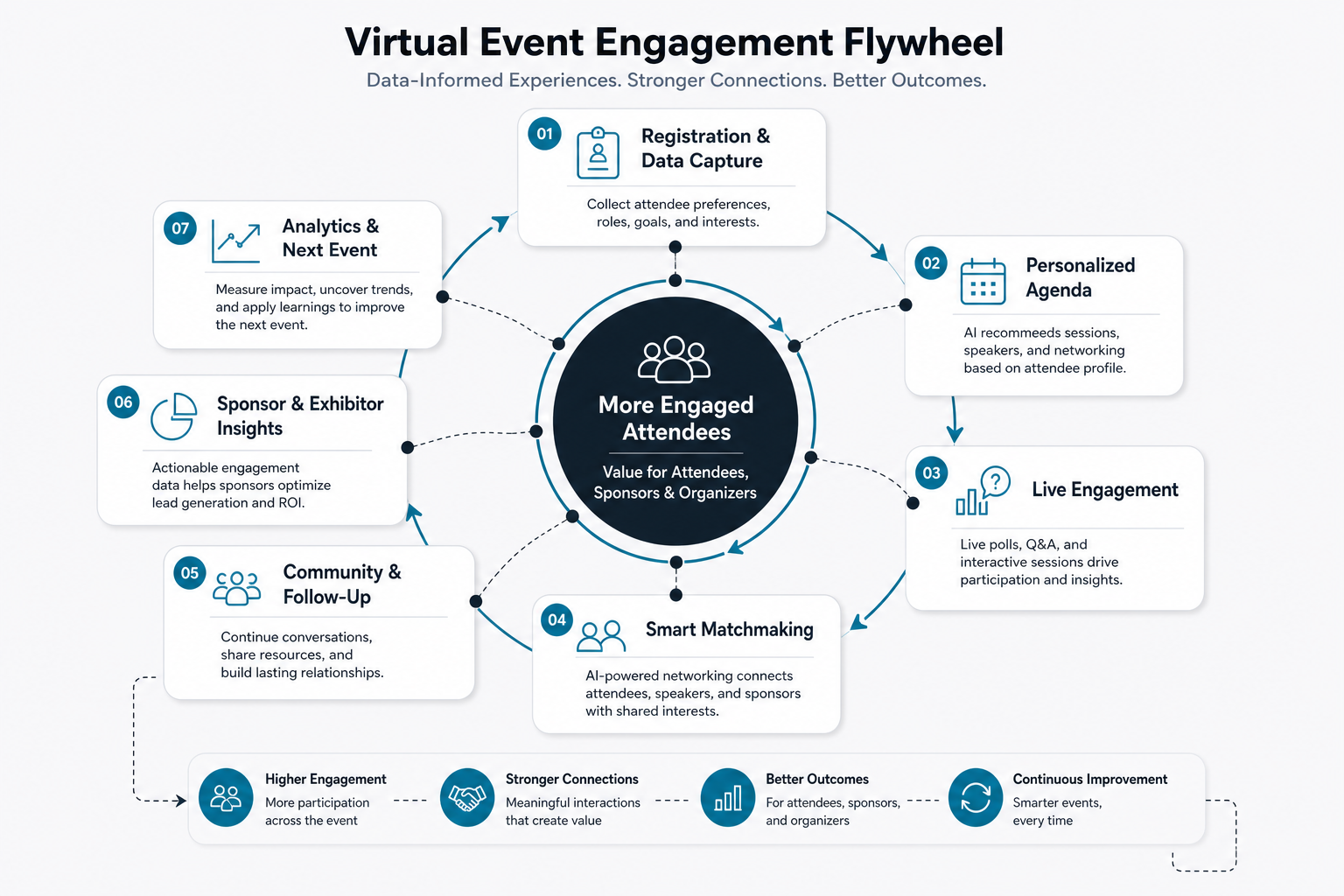
Live polls, Q&A, reactions, chat, matchmaking, session ratings, and surveys work best when they are embedded into the session flow. If attendees must hunt through a separate section during a talk, participation drops. Put interaction tools close to the agenda item, live stream, speaker profile, or session page where the user already has context.
For virtual and hybrid formats, Q&A and polling need moderation tools, speaker views, sponsor-safe controls, and exportable reporting. The supporting article on Q&A and live polls in virtual event apps covers these interaction patterns in more depth.
Make Notifications Timely, Sparse, And Useful
Push notifications are powerful during events, but overuse makes attendees mute the app. Reserve urgent pushes for room changes, session start reminders, agenda conflicts, check-in issues, safety updates, and high-value personalized recommendations. Less urgent updates can sit inside an announcements feed.
Give attendees preference controls for reminders, tracks, sponsors, networking, and quiet hours. Give organizers scheduling controls, approval flows, and segmentation so announcements reach the right audience. The interface should make accidental broad sends hard, especially during live operations.
Use Analytics To Improve The Event, Not Just Report It
Useful analytics begin with product decisions. Decide early which events the app should capture: registrations, check-ins, agenda saves, room scans, session attendance, poll participation, sponsor visits, meeting requests, support tickets, survey completion, and post-event actions. Then design the interface so these events happen naturally rather than forcing attendees through awkward tracking steps.
Analytics should feed organizer decisions during the event and post-event planning after it. Capacity alerts, low-engagement sessions, popular tracks, sponsor activity, and feedback trends can all shape staffing, room changes, follow-up campaigns, and the next event roadmap. The article on revenue-generating models for event management apps is a useful companion when analytics also support sponsorship or premium event packages.
Data, Security, And Integration Architecture
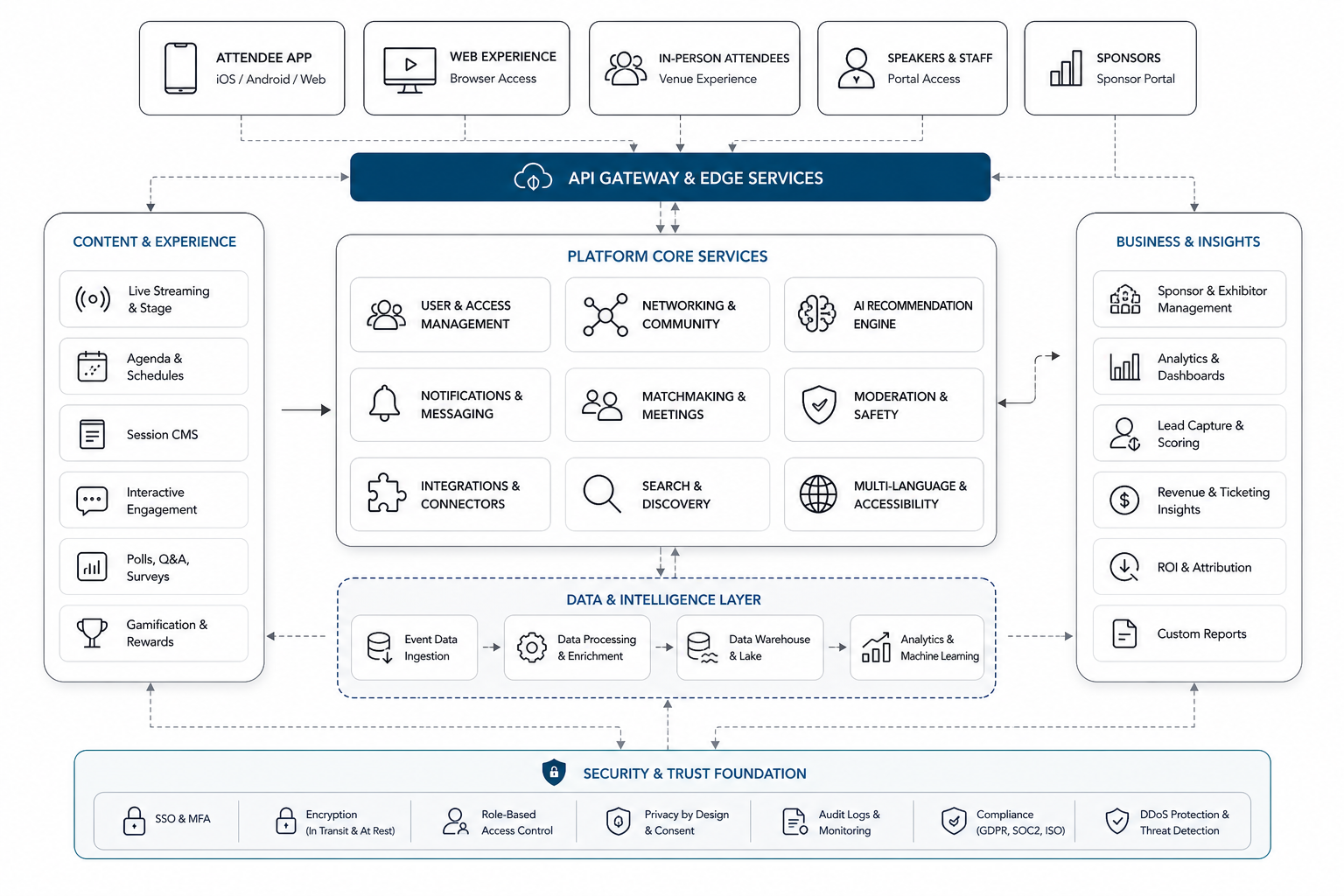
Event apps often connect registration platforms, ticketing, CRM, payment systems, email tools, venue maps, streaming tools, badge scanners, sponsor systems, and analytics. A user-friendly interface depends on this architecture because attendees notice when tickets fail to sync, agendas disappear, or notifications arrive late.
Plan for secure authentication, role-based access, consent, data retention, encrypted transport, API reliability, audit logs, and graceful failure states. Payment and ticketing flows need extra care; the supporting post on secure payment options in event management apps outlines several payment and registration considerations.
Accessibility And Performance Are Core UX Requirements
Event apps must work across different devices, lighting conditions, bandwidth levels, and accessibility needs. Use readable contrast, large tap targets, screen reader labels, captions for video, clear error states, keyboard-friendly web views, and offline-friendly access to critical information such as tickets, agenda, maps, and venue instructions.
Performance also shapes trust. The app should open quickly, cache key event data, sync changes predictably, and avoid making attendees wait when they are trying to enter a room or join a live session. Teams deciding between native and cross-platform delivery can compare tradeoffs in the NextPage guide to native vs cross-platform mobile app development.
Adoption Starts Before The Event Opens
A good interface still needs adoption planning. Promote the app through registration confirmation emails, calendar invites, event websites, QR codes, speaker communications, sponsor announcements, and onsite signage. Give attendees a reason to install early: personalized agenda setup, saved sessions, networking access, check-in readiness, or exclusive event updates.
Onsite support matters too. Provide clear download instructions, help desk scripts, backup access for ticket issues, and organizer tools for troubleshooting. Adoption should be treated as part of the product launch plan, not as a marketing afterthought.
How To Scope An Event App MVP
For an MVP, start with the event format, user roles, content model, integration requirements, and live operations risks. A small internal event app may need agenda, attendees, notifications, and feedback. A paid conference app may need ticketing handoff, check-in, sponsor profiles, lead capture, networking, surveys, analytics, and admin workflows.
NextPage's MVP Scope Builder can help product teams separate essential first-release functionality from expensive nice-to-have features. For custom builds that need dense admin workflows and mobile role experiences, the FieldIQ portfolio case study shows how role-aware dashboards, mobile access, media-heavy workflows, notifications, and AI assistance can fit into one product system.
How NextPage Can Help
NextPage helps teams plan, design, build, and improve event apps that connect polished mobile UX with reliable backend systems. That can include event journey mapping, attendee and organizer workflows, design systems, native or cross-platform app development, integration architecture, notifications, analytics, AI-assisted recommendations, admin dashboards, QA, launch support, and post-event optimization.
If your event app needs to move beyond a generic builder, start by defining the event journey, the roles involved, the systems that must connect, and the moments where app failure would damage the live experience. Those decisions give the interface a practical foundation.
Conclusion
User-friendly event app interfaces are built from operational clarity. The best apps make it easy for attendees to know what to do next and easy for organizers to manage the event while it is happening. When navigation, personalization, engagement, notifications, analytics, accessibility, security, and integrations are planned together, the app becomes more than a digital agenda. It becomes the operating layer for a better event experience.