
Grocery app development cost depends on the operating model, not just the number of screens. A single-store ordering MVP with catalog, cart, checkout, delivery slots, and basic admin can be planned very differently from a multi-store marketplace with inventory sync, substitutions, route tracking and driver workflows, loyalty, analytics, and AI recommendations.
For 2026 planning, use broad bands carefully: a focused grocery MVP often starts around $35,000 to $80,000, a growth-ready app with stronger inventory, delivery, and admin workflows often lands around $80,000 to $180,000, and an advanced multi-store or marketplace platform can move beyond $180,000 when routing, POS/ERP sync, fulfillment capacity, loyalty, analytics, quick-commerce expectations, and AI personalization are in scope. Treat those bands as planning ranges, not quote promises; the real estimate should be based on workflow risk, integration readiness, operating evidence, and launch geography.
If you are comparing scope options, start with NextPage's Custom Software Cost Estimator and the MVP Scope Builder. They help turn a feature wish list into a buildable first-release plan.
Quick Answer: Grocery App Cost By Scope
| Grocery App Scope | Planning Budget Band | Typical Timeline | Best For |
|---|---|---|---|
| MVP / single store | $35,000-$80,000 | 12-20 weeks | Retailer validating online ordering, local delivery, pickup, and repeat customers. |
| Growth-ready branded app | $80,000-$180,000 | 20-32 weeks | Retail chains needing better catalog, inventory, delivery slots, offers, admin, and analytics. |
| Marketplace or hyperlocal platform | $180,000-$350,000+ | 28-52+ weeks | Multi-store, multi-zone, driver/partner, commission, settlement, and dispatch operations. |
| Advanced AI-enabled grocery platform | $250,000+ | Ongoing roadmap | Personalization, recommendations, dynamic substitutions, route optimization, forecasting, and loyalty intelligence. |
These are planning bands, not fixed quotes. Geography, team seniority, design maturity, inventory quality, delivery model, integration ownership, and launch expectations can move the budget in either direction.
What Actually Drives Grocery App Development Cost?
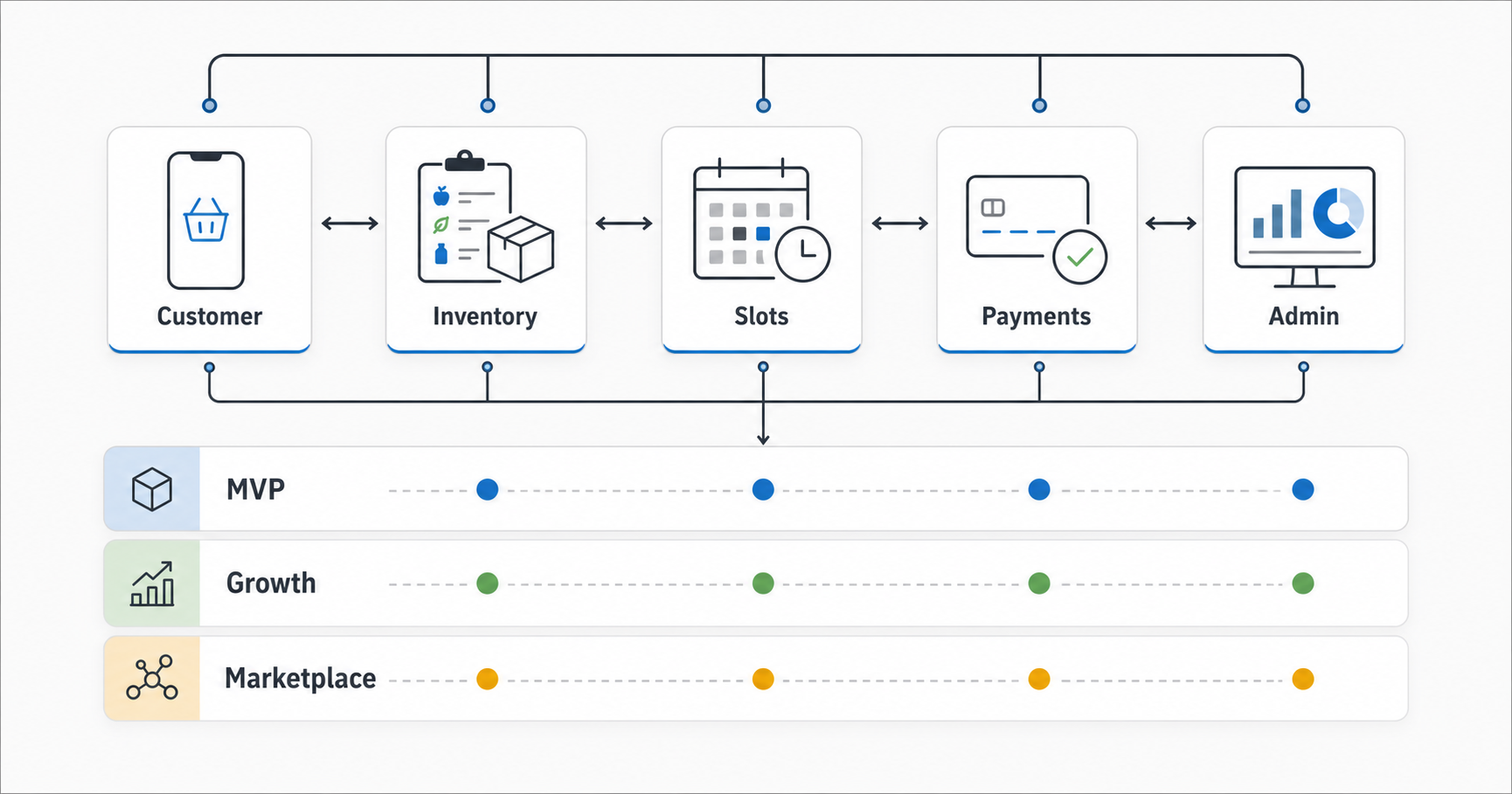
The expensive parts of a grocery app are usually below the surface. Product listing and cart screens are familiar. The hard work sits in availability, substitutions, fulfillment windows, payment states, refunds, delivery assignment, customer support, and operational dashboards.
NextPage's grocery app development services page frames this as a full operating workflow: customer ordering, delivery and pickup slots, inventory visibility, substitutions, offers, payments, dispatch, and admin control. That is the right way to estimate. A grocery app is not just eCommerce with vegetables in the catalog.
- Business model: owned retailer app, marketplace app, hyperlocal delivery, dark store, or hybrid pickup/delivery.
- Catalog quality: variants, weights, images, units, substitutions, freshness notes, and out-of-stock behavior.
- Inventory and POS integration: manual upload, scheduled sync, near-real-time stock, or deep ERP/POS integration.
- Delivery capacity: slots, zones, fees, rider assignment, pickup windows, and peak-hour constraints.
- Payments and loyalty: wallet, cards, COD, coupons, refunds, loyalty points, subscriptions, and invoices.
- Admin operations: order review, substitutions, picking/packing, driver handoff, support, reporting, and settlements.
MVP, Growth, And Advanced Grocery Scope
A grocery MVP should prove the order workflow, not imitate Instacart in the first release. The release-one question is simple: can customers browse, build a cart, choose pickup or delivery, pay or reserve, receive updates, and can operations fulfill the order without chaos? If that scope is still fuzzy, treat it like an MVP development exercise before pricing advanced personalization or marketplace modules.
| Feature Area | MVP | Growth | Advanced |
|---|---|---|---|
| Customer app | Catalog, search, cart, checkout, address, order history. | Saved lists, reorder, offers, loyalty, push notifications. | Personalization, subscriptions, voice/chat shopping, AI meal planning. |
| Admin and inventory | Product upload, order management, manual stock controls. | POS sync, substitution rules, picker workflow, reporting. | Multi-store inventory, forecasting, replenishment signals, vendor dashboards. |
| Delivery and pickup | Basic zones, fees, and time slots. | Capacity-aware slots, driver assignment, live tracking. | Route optimization, batching, dark-store workflows, SLA analytics. |
| Payments | Card/UPI/wallet or a local payment gateway, COD where relevant. | Refunds, coupons, loyalty, wallet, invoices. | Marketplace settlements, subscriptions, stored value, fraud checks. |
| QA and security | Core checkout, payment, and admin smoke tests. | Device matrix, performance, role permissions, integration failure tests. | Scale testing, fraud/abuse monitoring, observability, incident playbooks. |
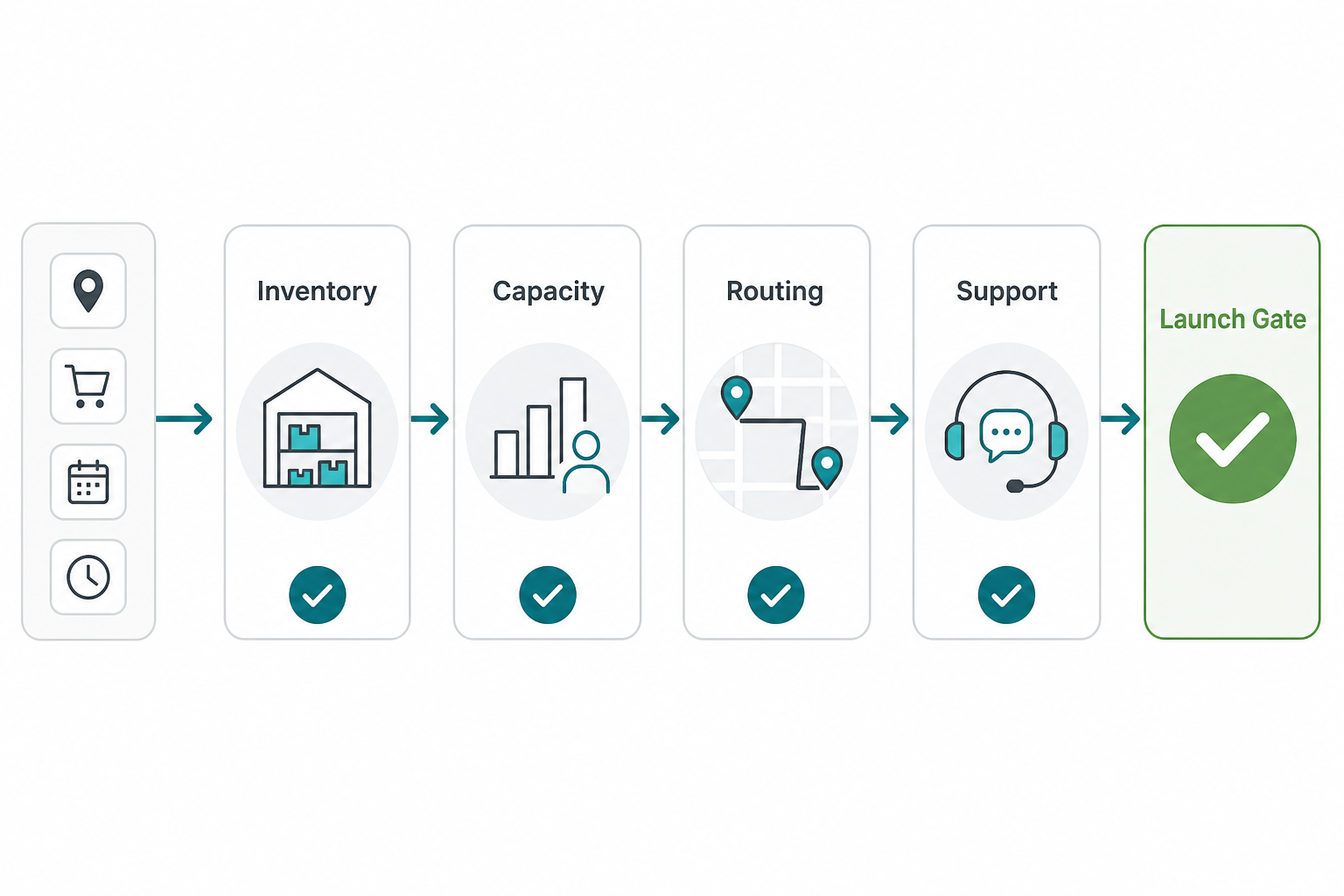
Delivery Slot And Fulfillment Readiness Gate
Delivery slots are one of the fastest ways for a grocery estimate to move from simple to complex. A basic MVP can expose a few manual pickup or delivery windows. A production-grade grocery platform needs capacity rules that connect store inventory, picker availability, driver supply, delivery zones, cold-chain constraints, cut-off times, order edits, substitutions, and support ownership.
Current delivery and grocery integrations also give buyers a build-versus-integrate decision. Instacart Connect is positioned for retailer partners adding scheduling, pickup, delivery, and order tracking to branded commerce workflows, while Instacart's Developer Platform is aimed at apps adding shopping-list or marketplace capabilities. Those can reduce some fulfillment build effort, but they still require API authentication, callbacks, data privacy review, operational constraints, and test coverage. The estimate should also name which team owns failed handoffs when partner availability, store capacity, or customer edits change after checkout.
| Gate | Evidence Needed Before Estimate | Budget Risk If Missing |
|---|---|---|
| Inventory readiness | SKU source, variant rules, stock update frequency, substitution data, and store-level availability. | Customers order unavailable items and operations needs manual correction. |
| Slot capacity | Zone map, store capacity, picker capacity, driver capacity, cut-off windows, and peak-hour limits. | Delivery promises become unfulfillable during weekends, holidays, or local demand spikes. |
| Route and driver model | Own fleet, partner fleet, manual dispatch, route optimization, tracking, and proof-of-delivery needs. | Routing, tracking, exceptions, and support workflows are underestimated. |
| Support ownership | Who handles substitutions, partial refunds, late deliveries, failed payments, and customer disputes. | Every exception becomes a support fire or a developer ticket after launch. |
Integration Costs That Buyers Underestimate
Grocery apps become expensive when integrations are vague. POS, inventory, payment, maps, SMS/WhatsApp, email, loyalty, CRM, analytics, accounting, and delivery partners all add implementation and testing work. A vendor quote that says "third-party integrations included" is not enough; the estimate should list each system, data direction, sync frequency, ownership, failure handling, and test environment.
Instacart's current documentation shows two useful integration patterns: Connect APIs for retailer partners that want Instacart capabilities on a branded commerce site, and a Developer Platform API for app developers adding shopping capabilities. Those can be strategic shortcuts, but they are still integrations with authentication, permissions, data privacy, callback handling, sandbox data, operational constraints, and regression tests after API changes.
For delivery-heavy products, NextPage's on-demand delivery app development services page is a useful adjacent reference because grocery fulfillment shares dispatch, courier, merchant, tracking, and support patterns with other delivery platforms.
Choose The Operating Model Before Estimating Features
The same feature can mean different costs depending on the business model. "Delivery slot" is simple when one store has ten daily slots and a manager can manually adjust capacity. It is much harder when multiple stores, multiple zones, cold-chain constraints, courier availability, and peak-hour rules all affect whether a customer can place an order.
| Operating Model | Cost Implication | Common Risk |
|---|---|---|
| Single-store branded app | Lowest complexity if catalog and stock are manageable. | Manual operations break when order volume rises. |
| Retail chain app | Store-level inventory, store selection, local pricing, and fulfillment capacity add backend work. | Customers see products that are not available at the selected store. |
| Marketplace app | Vendor onboarding, commissions, settlements, moderation, SLAs, and multi-party support increase cost. | Operational disputes and inconsistent catalog quality. |
| Hyperlocal delivery app | Zone logic, rider assignment, route tracking, surge capacity, and support workflows become central. | Late delivery and stock substitutions hurt repeat orders. |
| Dark-store or quick-commerce model | Warehouse operations, picking workflows, batching, forecasting, and performance monitoring raise cost. | Speed promises create high fulfillment and QA pressure. |
This is why a grocery cost estimate should include an operations workshop before a feature list is priced. If the model is wrong, the app may launch with attractive screens and unusable fulfillment.
Native, Cross-Platform, PWA, Or Web First?
Platform choice affects cost because it changes the team, QA matrix, release operations, offline behavior, push notifications, and device capabilities. Many grocery MVPs can begin with a mobile-first web app or PWA when discovery and checkout are the priority. A cross-platform mobile app becomes attractive when push notifications, repeat purchasing, saved lists, scanning, location, and app-store presence matter. Native apps may be worth it for deeper device experience, performance, or large-scale consumer brands.
NextPage's mobile app development cost guide explains how platform choice affects budget beyond the first build. For a grocery app, also budget for post-launch iteration because catalog, offers, delivery zones, and fulfillment rules will change after real orders begin.
Do Not Underbudget The Admin And Operations Console
Many grocery estimates overinvest in the customer app and underbudget the admin system. That is risky because operations teams need to fix the real-world messiness of grocery orders: out-of-stock products, partial fulfillment, substitutions, refunds, missed delivery slots, coupon disputes, payment failures, picker mistakes, and customer support questions.
A serious admin console should cover product and category management, order review, stock overrides, substitution approval, delivery slot capacity, driver or courier status, refund handling, promotions, customer notes, support history, and reporting. If the app is a marketplace, add vendor onboarding, catalog approval, commission rules, settlement reports, and SLA monitoring.
These workflows add cost because they need permissions, auditability, usable tables, filters, bulk actions, exports, and edge-case testing. They are also where a grocery app becomes maintainable. Without strong admin tooling, every operational exception becomes a developer ticket or a manual spreadsheet process.
Payment, Refund, And Marketplace Settlement Decisions
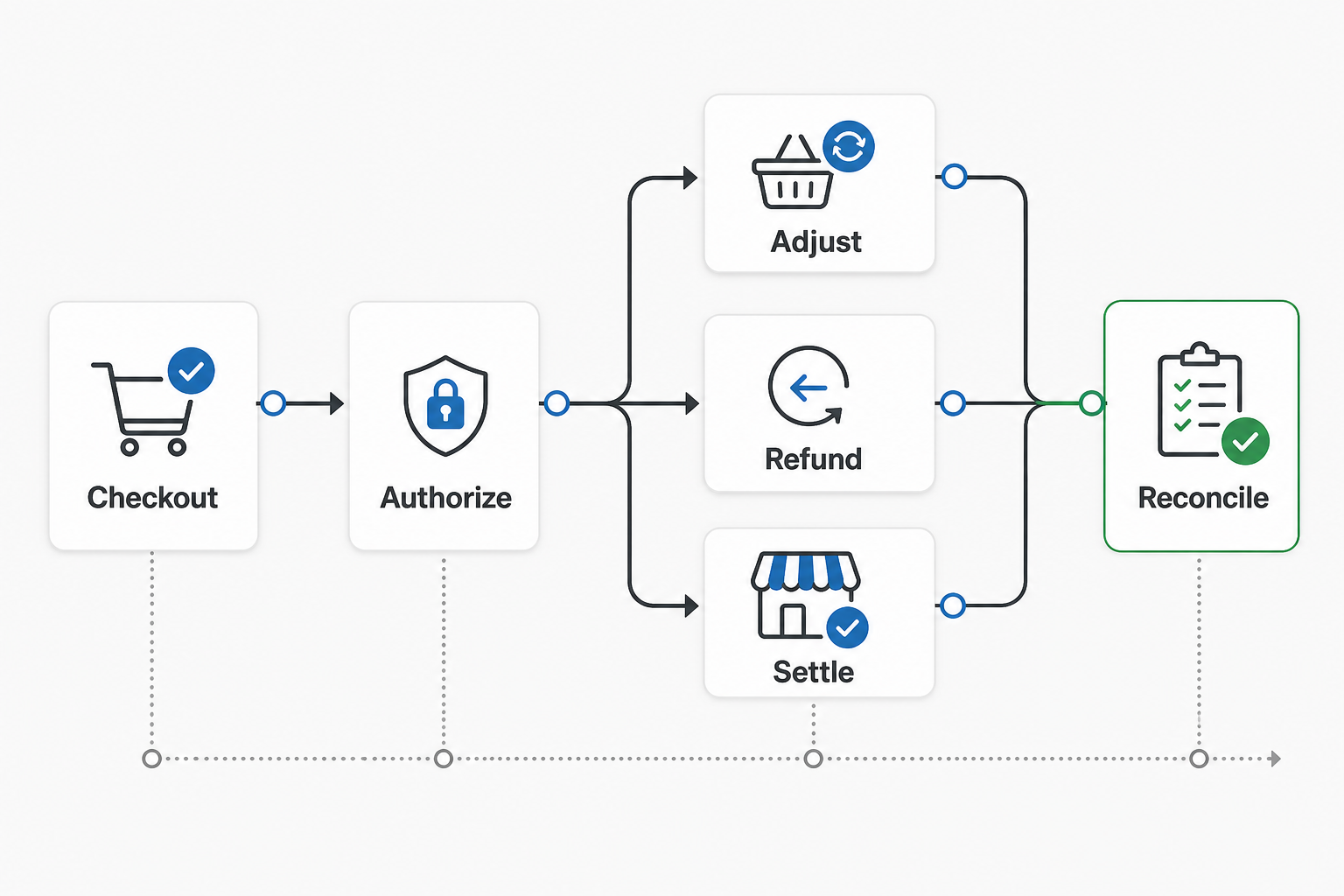
Payment scope is not just checkout. Grocery orders have substitutions, unavailable items, weighted products, changed totals, tips, delivery fees, coupons, refunds, chargebacks, COD rules in some markets, and settlement if stores, drivers, or vendors receive separate payouts. These decisions affect backend design, admin tools, accounting reports, and QA coverage.
Stripe Connect documentation shows why this belongs in the estimate: direct charges, destination charges, and separate charges/transfers handle fees, refunds, reversals, and disputes differently. For a grocery marketplace, the estimate should document who carries refund and chargeback liability, how partial refunds work after substitutions, whether platform fees reverse, and how settlement reports are reconciled.
| Payment Decision | Lower-Cost MVP Choice | Growth-Stage Choice |
|---|---|---|
| Order authorization | Charge at checkout with manual refund handling. | Authorization/capture or adjustment workflow for weighted items and substitutions. |
| Refunds | Admin-triggered full or partial refunds with clear support notes. | Automated refund rules tied to substitutions, cancellations, failed delivery, and disputes. |
| Marketplace settlement | Single merchant account or manual settlement report. | Connected accounts, commission rules, payout schedules, transfer reversals, and reconciliation exports. |
| Promotions and loyalty | Simple coupon codes and order-level discounts. | Store-level offers, loyalty points, subscriptions, wallet, fraud checks, and abuse monitoring. |
QA, Security, And Performance Costs
Grocery apps have high transaction and trust risk. A broken checkout, wrong slot capacity, stale inventory, duplicate payment, or failed notification can create immediate customer support cost. Budget QA for the workflows that protect revenue and retention: cart totals, taxes/fees, coupons, payment status, order edits, refunds, substitutions, driver handoff, inventory conflicts, and peak-hour load.
Security work should cover authentication, admin permissions, payment data boundaries, API authorization, customer addresses, order history, support access, and abuse cases such as coupon misuse or fake orders. Performance work should cover search, catalog browsing, cart update latency, checkout, and admin order queues under realistic product and order volume.
For mobile releases, also budget device coverage, push notifications, app-store privacy disclosures, crash reporting, analytics events, and update workflows. The cheaper build is not always cheaper after launch if it creates repeated hotfixes during busy shopping windows.
Grocery QA And Release Evidence
Grocery apps should be tested like operational software, not just a shopping UI. The release evidence should prove catalog search, cart totals, fees, coupons, taxes, inventory changes, substitutions, payment states, refunds, slot limits, driver handoff, notifications, and admin permissions under realistic order volume.
For route-heavy products, Google Maps Platform's Routes API can optimize intermediate waypoint order, but it still needs product-level decisions around batching, driver capacity, promised delivery windows, exceptions, and customer communication. Route optimization is not a replacement for a dispatch operating model, capacity rules, or support playbook.
- Checkout tests: totals, taxes, fees, discounts, weighted items, failed payments, and refunds.
- Inventory tests: stock changes during cart, out-of-stock behavior, substitutions, and store-level availability.
- Slot tests: capacity limits, late cut-offs, zone changes, holiday schedules, and peak-hour load.
- Admin tests: product edits, order edits, refunds, driver handoff, support notes, permissions, exports, and audit logs.
- Mobile tests: device coverage, push notifications, location, poor network, app-store privacy disclosures, and crash monitoring.
Post-Launch And Maintenance Budget
Plan a monthly maintenance and growth budget before launch. Grocery apps change constantly: prices, offers, product images, fulfillment zones, seasonal inventory, delivery partners, payment rules, support scripts, and analytics dashboards all evolve. A realistic plan includes bug fixes, dependency updates, OS and browser changes, monitoring, security patches, integration maintenance, and conversion improvements.
For an MVP, a smaller monthly retainer may be enough to stabilize ordering and support workflows. For a growth-stage app, expect ongoing product and engineering capacity for promotions, loyalty, operations reporting, performance tuning, and integration improvements. For marketplace or quick-commerce models, maintenance often becomes a product roadmap rather than a support line item.
A Practical Grocery App Launch Roadmap
Do not start with every advanced feature. Start with the smallest operating model that can handle real orders.
- Model decision: choose owned store, multi-store, marketplace, dark store, or pickup-first.
- Catalog and inventory audit: confirm SKU structure, prices, weights, substitutions, and stock update method.
- MVP workflow: define browse, cart, checkout, delivery/pickup slot, order update, support, and admin fulfillment.
- Integration plan: map payments, POS, notifications, maps, loyalty, analytics, and delivery partners.
- Build and QA: test checkout, stock changes, failed payments, refunds, slot limits, substitutions, driver handoff, and admin permissions.
- Soft launch: release by store, zone, or customer segment before scaling inventory and delivery complexity.
If your team is not sure what to include, NextPage's eCommerce app development cost guide can help compare grocery against broader commerce scope, while mobile app development support can turn the final scope into a realistic delivery plan for iOS, Android, or web-first releases.
Common Grocery App Cost Mistakes
- Pricing screens instead of operations: the customer app is only one surface; fulfillment, support, and admin workflows carry much of the cost.
- Assuming POS sync is simple: SKU cleanup, stock frequency, missing test environments, and reconciliation rules often drive integration time.
- Ignoring delivery-slot capacity: static slots can work for MVPs, but growth products need capacity rules and exception handling.
- Leaving refunds vague: partial refunds, substitutions, unavailable items, failed deliveries, and marketplace transfers need explicit payment rules.
- Underbudgeting QA: grocery apps fail in edge cases such as stock conflicts, payment changes, bad addresses, late drivers, and admin permission mistakes.
- Skipping post-launch analytics: without conversion, stock, slot, cancellation, refund, and support metrics, the team cannot decide where to improve the roadmap.
How NextPage Estimates Grocery App Cost
NextPage estimates grocery app development cost by mapping the operating model, user roles, release-one workflow, integrations, data quality, delivery model, admin needs, platform choice, QA coverage, and launch plan. The goal is not to make the first quote look small. The goal is to avoid surprises after design approval.
A good grocery estimate should show assumptions: number of apps or surfaces, store count, SKU count, inventory sync method, payment rules, delivery zones, driver model, substitution workflow, support handoff, analytics, and post-launch roadmap. Once those assumptions are visible, budget tradeoffs become easier.
For proof-oriented planning, compare the grocery roadmap with NextPage's NDA-safe StockWise inventory platform case study and FeastFlow food ordering case study. They show the same pattern buyers should expect in grocery software: the visible app matters, but the operating console, inventory flow, payments, and support evidence decide whether the product scales.
Use the Custom Software Cost Estimator for a first budget band, then use the MVP Scope Builder to decide what can safely wait for phase two.