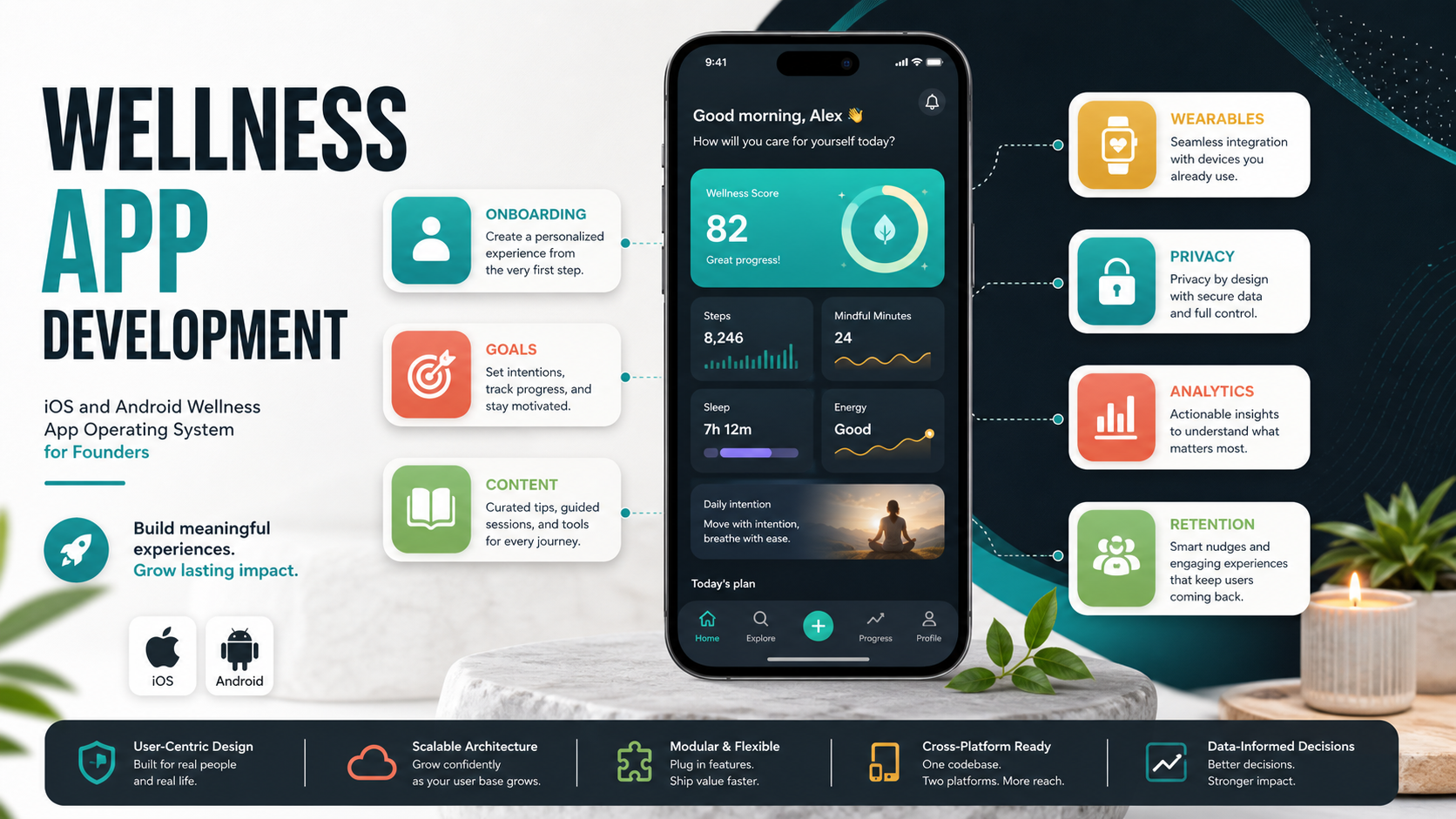

Wellness app development is not just about putting workouts, meal plans, meditation audio, or habit reminders into a mobile interface. A useful wellness product helps people set realistic goals, build routines, understand progress, and trust how their personal data is handled across iOS and Android.
The short answer: start with one clear wellness use case, define the smallest daily habit your app should support, and build a secure MVP around onboarding, goals, content delivery, reminders, progress tracking, privacy controls, and analytics. If you need a team that can plan native and cross-platform delivery together, NextPage's mobile app development work is structured around product scope, integrations, performance, and long-term maintainability.
Quick Answer: How Do You Develop A Wellness App For iOS And Android?
Develop a wellness app by choosing the product category, validating the user journey, defining regulated and non-regulated data, designing a simple habit loop, selecting the mobile stack, building the MVP, testing privacy and device compatibility, and launching with analytics that show retention and outcomes.
- Best first scope: one user segment, one core wellness goal, and one daily or weekly routine.
- Core MVP features: onboarding, profiles, goals, content, reminders, progress, consent, support, and admin controls.
- Highest-risk decisions: health data handling, wearable integrations, subscription model, clinical claims, and notification strategy.
- Best delivery approach: use native apps when performance, HealthKit, Google Fit, sensors, or device-specific UX is central; use cross-platform when speed and shared product logic matter more.
What Type Of Wellness App Are You Building?
Wellness is a broad category. A fitness tracker, meditation app, nutrition planner, pregnancy companion, mental wellness journal, sleep coach, corporate wellness platform, or habit app all need different workflows. The product type should shape the MVP, data model, content operations, and compliance posture.
| Wellness App Type | Core User Need | Important Build Decisions |
|---|---|---|
| Fitness and activity | Plans, workouts, tracking, progress | Wearables, video delivery, offline access, streaks |
| Mental wellness | Reflection, guided practices, mood support | Privacy, crisis boundaries, content quality, calm UX |
| Nutrition and meal planning | Food choices, meal plans, shopping support | Diet preferences, allergies, recommendations, recipes |
| Pregnancy and family care | Milestones, reminders, education, appointments | Sensitive data, provider links, personalization, trust |
| Habit and lifestyle coaching | Routine building, accountability, motivation | Notifications, habit loops, community, analytics |
For regulated or care-adjacent products, review the same risk questions used in healthcare software development company selection: data sensitivity, consent, auditability, integrations, support, and maintenance responsibility.
Wellness App MVP Scope Matrix
A strong MVP does less than the final vision, but it should still prove the product's main behavior loop. Avoid starting with every content category, every wearable, every social feature, and every subscription experiment at once.
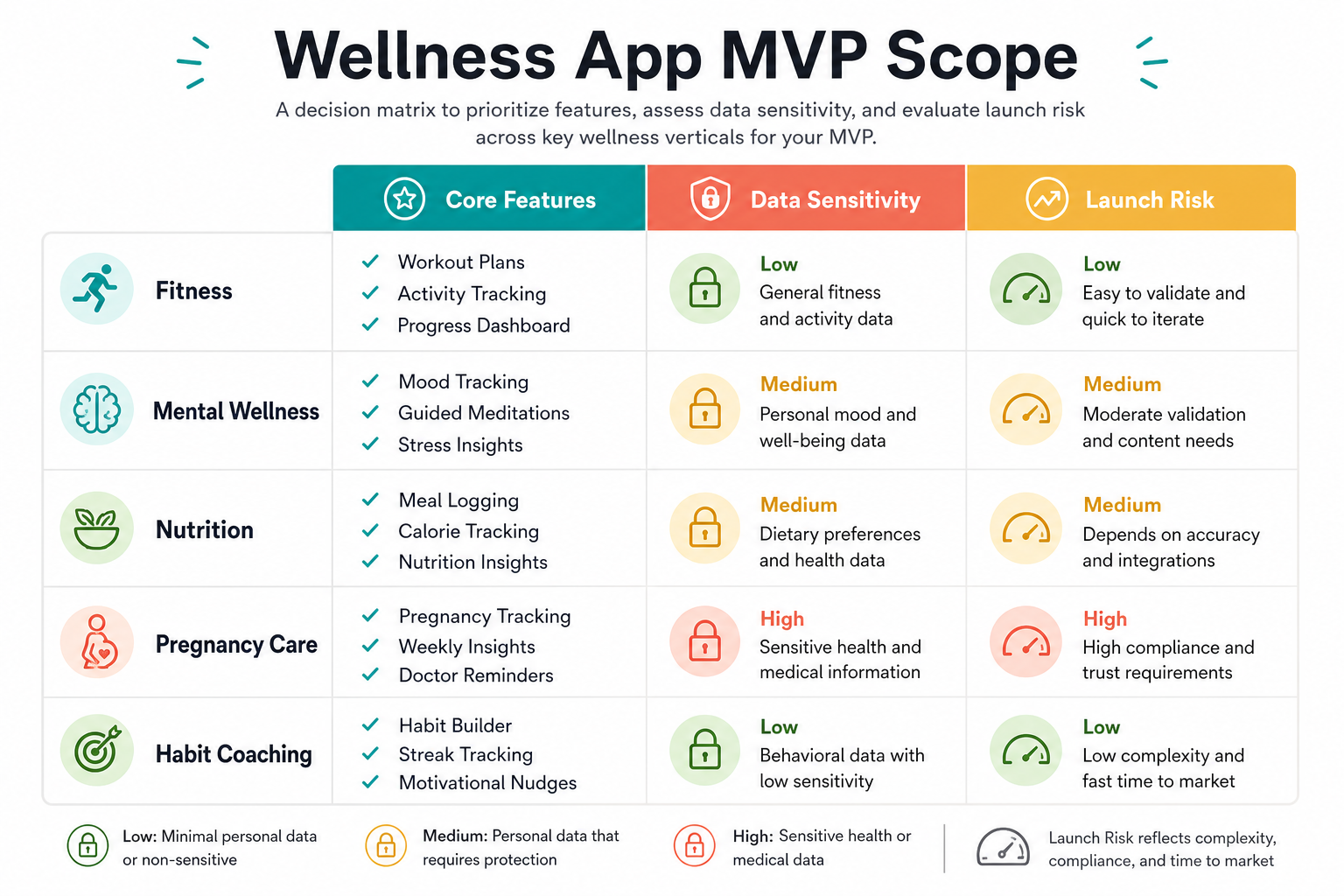
Use a simple scoring method before development begins: user value, technical complexity, privacy risk, content effort, and revenue impact. If the budget is unclear, a tool such as the custom software cost estimator can help frame early scope before a detailed discovery phase.
Must-Have Wellness App Features
Most wellness apps share a common feature base, even when the content and audience differ. Start with the features that make the app useful every week, then add advanced personalization after you have enough product evidence.
- Onboarding and profiles: capture goals, preferences, health constraints, notification choices, and consent without overwhelming the user.
- Goal setting: let users choose realistic goals, milestones, and measurement frequency.
- Content library: manage workouts, meditations, meal plans, lessons, checklists, or coaching prompts from an admin-friendly CMS.
- Progress tracking: show streaks, completed sessions, mood trends, sleep data, activity, or nutrition progress in a way users can understand.
- Reminders and nudges: send timely push notifications, but give users control so reminders do not become noise.
- Privacy controls: explain what data is collected, why it is needed, how it can be deleted, and whether it is shared.
- Support and safety: provide clear help paths, content disclaimers, emergency boundaries, and escalation guidance where needed.
For mental wellness interfaces, the details matter: tone, layout density, error states, crisis language, and emotional safety. NextPage's guide to user interfaces in mental wellness app development is a useful companion when the product deals with stress, anxiety, reflection, or therapy-adjacent experiences.
Native, Cross-Platform, Or Hybrid?
The iOS and Android stack decision should follow the product's needs instead of a generic preference. Native development gives deeper control over sensors, HealthKit, Google Fit, device performance, and platform-specific UX. Cross-platform frameworks can move faster when the app shares most logic and UI across devices.
| Decision | Choose Native When | Choose Cross-Platform When |
|---|---|---|
| Device integrations | You need deep HealthKit, Google Fit, sensors, watch, or Bluetooth behavior | You need basic APIs and consistent workflows |
| UX polish | Platform-specific gestures and performance are central | Shared UI consistency matters more than native nuance |
| Budget and timeline | You can support two codebases | You need faster MVP delivery and shared maintenance |
| Long-term roadmap | The product will rely on device-specific capabilities | The product is content, habit, community, or coaching heavy |
If the stack choice is still open, compare the tradeoffs in native vs cross-platform mobile app development before committing to a roadmap.
Wellness App Architecture
Wellness apps often look simple on the surface, but the backend needs to coordinate identity, content, personalization, subscriptions, notifications, analytics, privacy, and admin workflows. This is where many low-cost builds become hard to maintain.
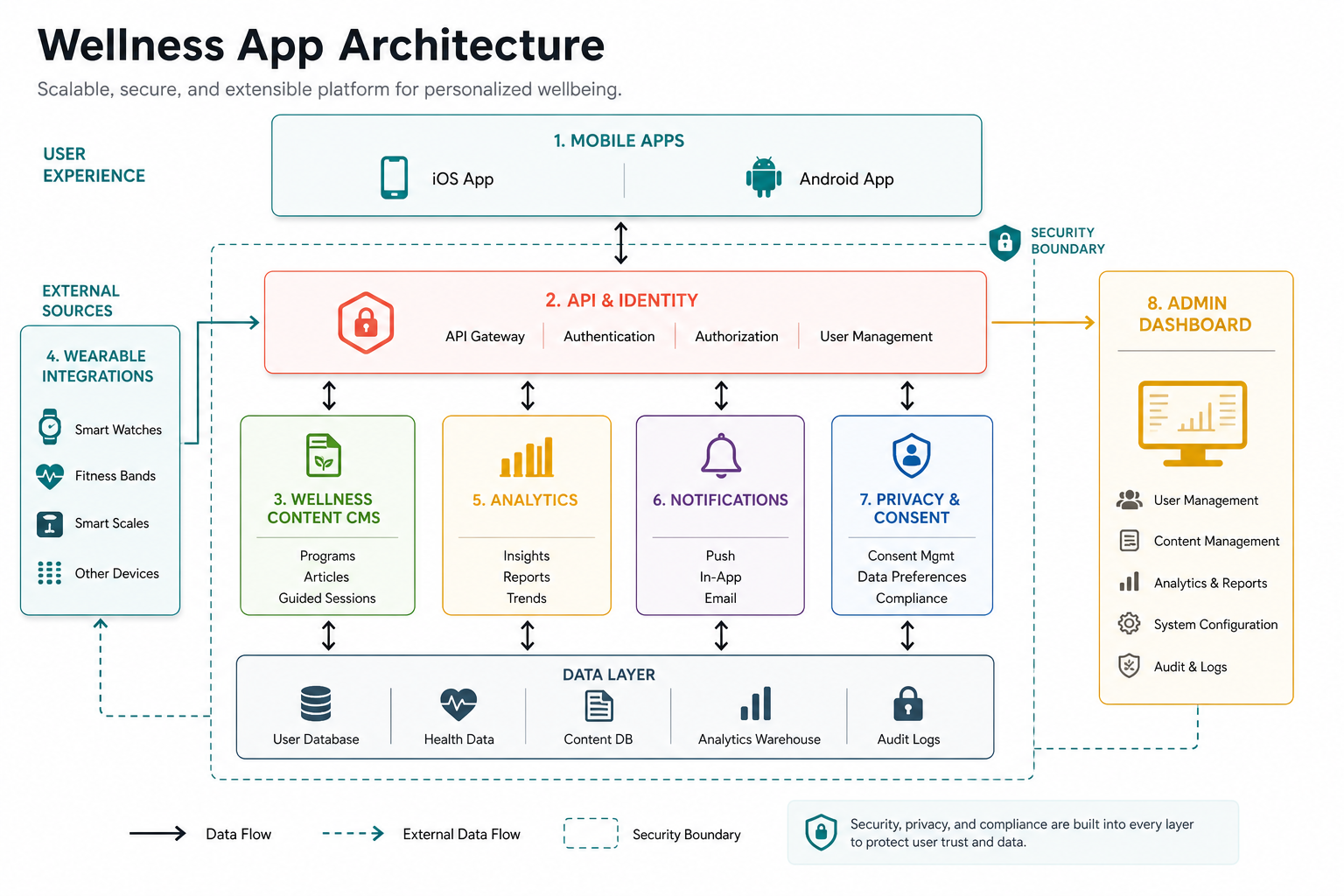
For products that touch medical, patient, or care data, architecture decisions should follow healthcare-grade expectations around access control, audit trails, encryption, retention, and integrations. The healthcare app development cost guide explains how compliance and integration scope affect budget more than screen count alone.
Privacy, Consent, And Data Security
Wellness products can collect sensitive information even when they are not formally medical devices. Mood logs, sleep patterns, pregnancy details, weight, diet, activity, symptoms, and wearable data can all feel personal to users. Treat privacy as a product feature, not a policy document added at the end.
- Ask only for needed data: reduce onboarding friction and limit risk by collecting the minimum useful information.
- Make consent visible: explain why a permission is requested before triggering the OS permission dialog.
- Separate wellness from medical claims: avoid clinical promises unless the product, evidence, and compliance model support them.
- Protect account access: use secure authentication, encrypted transport, appropriate storage, and admin access controls.
- Plan deletion and export: users should understand how to leave and what happens to their data.
When a wellness product moves closer to patient care or provider workflows, it may need a deeper healthcare software development approach rather than a generic consumer app build.
Retention Features That Actually Help Users
Retention should come from useful progress, not pressure. Wellness users often start motivated and then drop off when the app feels repetitive, judgmental, or too hard to maintain. Design retention around small wins, flexible routines, and relevant reminders.
- Personalized plans: adjust routines by goal, time, fitness level, mood, preferences, and previous activity.
- Progress summaries: show meaningful improvements without turning every day into a scorecard.
- Content freshness: rotate plans, lessons, practices, and challenges so users do not see the same app every week.
- Community carefully: social sharing can motivate some users, but privacy and comparison anxiety matter in wellness contexts.
- Offline access: let users keep core content available during travel, low connectivity, or gym sessions.
Fitness products can borrow roadmap thinking from fitness app development from idea to reality, especially around onboarding, progress tracking, and wearable-ready product planning.
Advanced Features To Add After MVP Validation
After the MVP proves engagement, add advanced features selectively. AI recommendations, wearable sync, coaching chat, nutrition intelligence, habit prediction, and community features can improve the product, but they also increase content, privacy, moderation, and support complexity.
- Wearable integrations: connect Apple Health, Google Fit, smartwatches, or device APIs when the data changes user decisions.
- AI personalization: recommend content, routines, or reminders, but keep explanations and user controls clear.
- Subscriptions: test pricing around habit value, expert content, coaching, or premium plans.
- Neurofeedback and sensor-led experiences: use a focused roadmap; the neurofeedback apps for mental wellness guide shows how sensor-driven wellness needs stronger evidence and UX controls.
- Provider or coach portals: add practitioner dashboards only when the operating model, consent, and support process are clear.
What Drives Wellness App Development Cost?
Wellness app cost depends on the product model, not just the number of screens. A meditation content app, fitness tracker, wearable-connected coaching app, and pregnancy care companion have very different backend, content, privacy, and support requirements.
- Platform choice: native iOS and Android, cross-platform, or phased launch.
- Content operations: admin CMS, video/audio hosting, localization, content tagging, and publishing workflow.
- Personalization: rules-based plans, AI recommendations, adaptive goals, and segmentation.
- Integrations: HealthKit, Google Fit, wearables, payments, CRM, analytics, email, and provider systems.
- Security and compliance: consent, encryption, audit logs, data retention, access controls, and testing.
- Growth systems: subscriptions, referrals, community, push campaigns, and lifecycle analytics.
Wellness App Launch Checklist
Before launch, confirm that the product is usable, trustworthy, measurable, and maintainable. A polished interface is not enough if onboarding fails, reminders annoy users, data permissions feel unclear, or support workflows are missing.
- Validate the core journey: new user to first completed wellness activity.
- Test on real iOS and Android devices: screen sizes, OS versions, notifications, permissions, and offline behavior.
- Review privacy language: data collection, consent, deletion, exports, and third-party tools.
- Measure retention: activation, completion rate, weekly active use, churn, and content engagement.
- Prepare support: FAQs, contact flow, admin tools, content updates, incident response, and moderation if community exists.
- Plan iteration: launch with analytics and a backlog for the first 30, 60, and 90 days.
How NextPage Helps Build Wellness Apps
NextPage helps founders and teams turn wellness app ideas into practical product roadmaps, MVPs, and scalable platforms. The work usually starts with product discovery: user segments, workflows, data sensitivity, content model, integrations, app stack, and launch priorities.
For care-adjacent products, we bring the same systems mindset used in healthcare and scheduling work, including portfolio experience such as Chairlink, where operational workflows and user trust are central to the product. The goal is not to ship a generic wellness app; it is to build a product people can safely return to and that the business can operate after launch.
Final Recommendation
Build your wellness app around one behavior change first. Choose the app type, define the MVP, protect user data, design for iOS and Android realities, and use analytics to improve retention after launch. Add advanced personalization, wearables, AI, and community only when they make the core routine more useful and more trustworthy.