
Quick Answer: How To Build A Food Delivery App Like Uber Eats
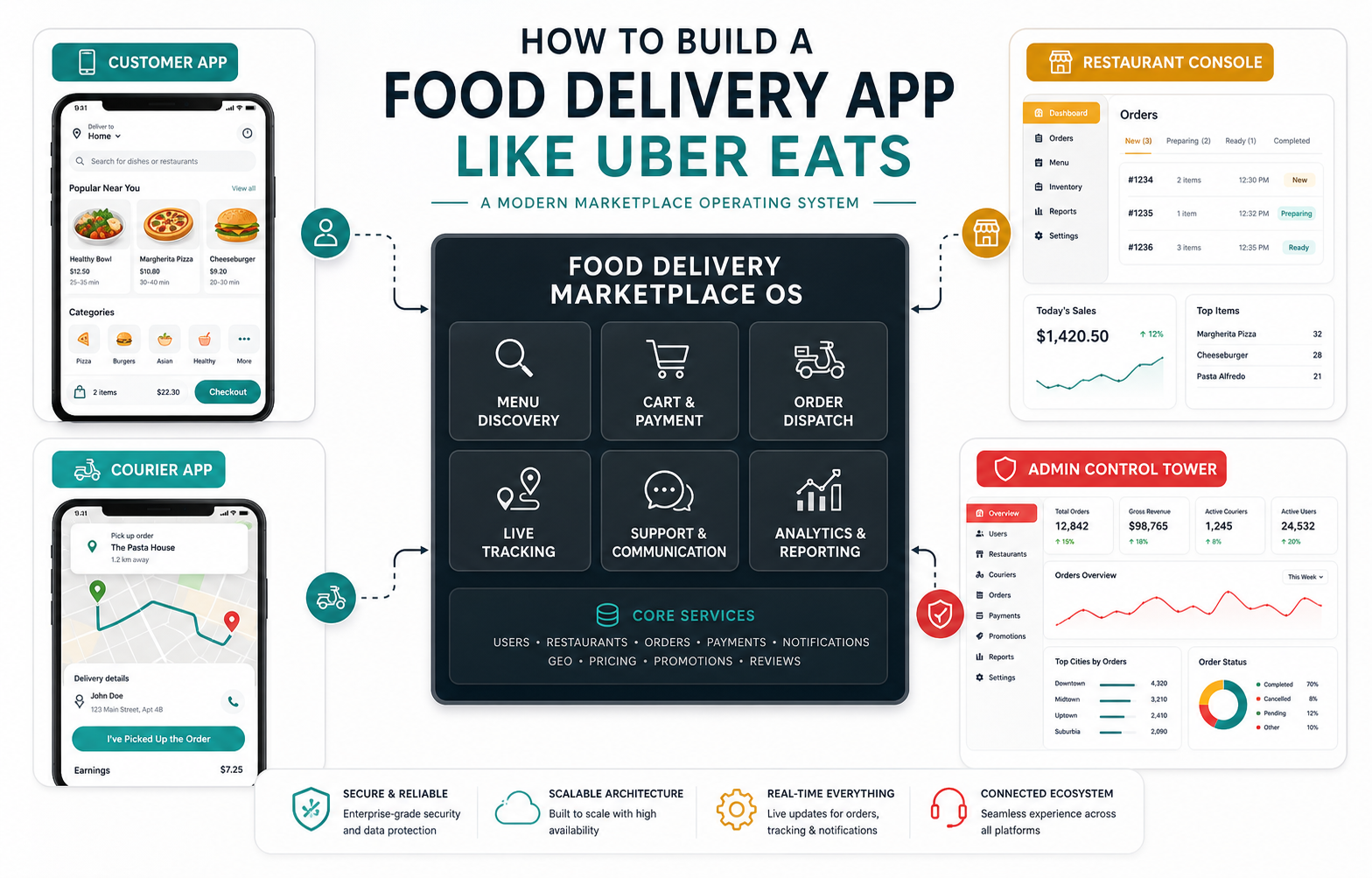
To build a food delivery app like Uber Eats, plan it as a marketplace operating system, not as one mobile app. The product usually needs a customer ordering app, restaurant or merchant console, courier app, admin dashboard, payments, maps, dispatch logic, notifications, support workflows, analytics, and clear marketplace rules for pricing, commissions, cancellations, refunds, and delivery zones.
The practical first release should not copy every mature marketplace feature. Start with the smallest reliable flow: customers can browse restaurants, customize items, pay, track orders, and get support; restaurants can accept and manage orders; couriers can receive delivery tasks; admins can control partners, fees, refunds, and service quality. If the business needs iOS, Android, and operational dashboards, scope mobile app development and web operations together from day one.
What An Uber Eats-Style App Really Means
An Uber Eats-style app is a multi-sided marketplace. The customer experience is visible, but the hard work sits underneath: merchant onboarding, menu data, availability, delivery radius, courier assignment, payment splits, order status, refunds, disputes, ratings, support, and performance reporting. A polished app that cannot keep restaurant and courier operations synchronized will fail during peak demand.
That is why the first product decision is the marketplace model. Some businesses need a direct restaurant ordering app. Others need a regional marketplace with many merchants and independent couriers. Some start as a cloud-kitchen or franchise ordering system and add marketplace features later. NextPage's guide to food delivery app development benefits is useful when deciding whether the app should reduce marketplace commission, improve customer ownership, or create a new delivery channel.
Core Products And User Roles
A food delivery marketplace usually has four primary surfaces. The customer app handles discovery, item customization, cart, checkout, order tracking, ratings, support, offers, and repeat ordering. The restaurant console handles menu updates, order acceptance, prep timing, item availability, cancellations, refund notes, and sales reporting. The courier app handles task assignment, navigation, pickup proof, delivery proof, earnings, and support. The admin dashboard controls partners, categories, fees, promotions, zones, disputes, quality metrics, payouts, and fraud signals.
Each surface creates technical and operational requirements. For example, restaurant staff need fast order acceptance and clear item modifiers, while couriers need reliable location updates and exception flows. Admin teams need enough visibility to resolve failed payments, late deliveries, unavailable items, and refund disputes without checking three disconnected systems.
MVP Scope For An Uber Eats-Style App
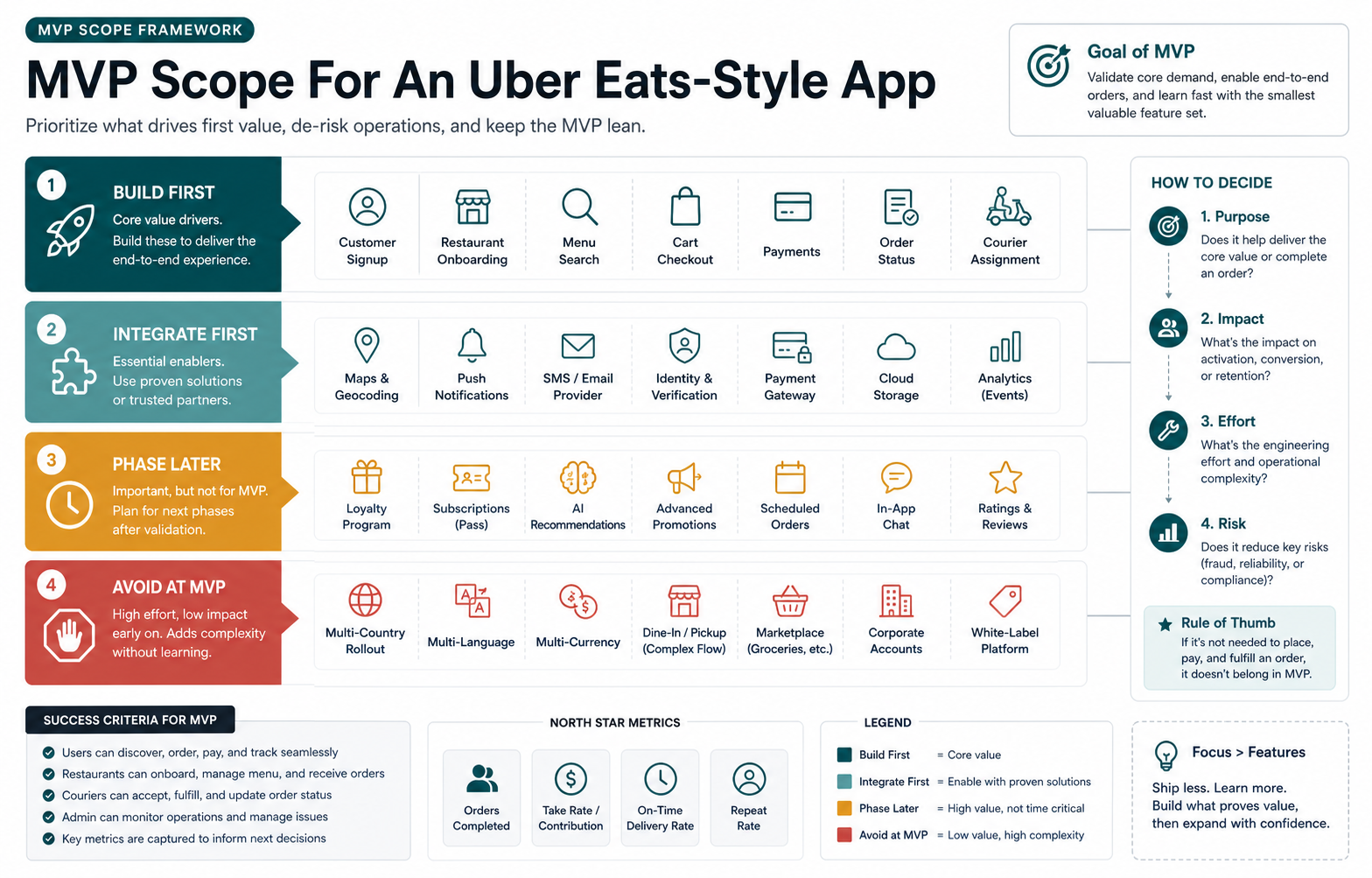
The MVP should prove that orders can move from customer intent to restaurant preparation to courier delivery without manual rescue. Build first: account setup, restaurant listings, menu browsing, item modifiers, cart, delivery address, fees, secure checkout, order confirmation, restaurant acceptance, basic courier assignment, order status, notifications, support, and admin controls. Integrate first where reliability matters: payments, maps, push notifications, email or SMS, analytics, and crash monitoring.
Phase later: loyalty, subscriptions, advanced coupons, AI recommendations, complex batching, dynamic pricing, multi-country rollout, advertising, and deep partner analytics. These features can be valuable, but they amplify complexity before the marketplace has stable supply, demand, and delivery quality. Use the MVP Scope Builder to separate launch-critical workflows from later growth ideas before the estimate becomes too broad.
Must-Have Feature Set
| Area | Launch Scope | Why It Matters |
|---|---|---|
| Customer ordering | Search, filters, restaurant pages, menu items, modifiers, cart, fees, checkout, saved addresses, and order history. | Customers need to place the first order without confusion. |
| Restaurant operations | Order queue, accept/reject controls, prep times, item availability, cancellation reasons, and daily reports. | Restaurants need enough control to fulfill orders accurately. |
| Courier workflow | Task list, pickup and drop-off details, route view, status updates, proof of delivery, and support escalation. | Delivery reliability depends on clear courier actions. |
| Admin controls | Partner onboarding, categories, zones, fees, commissions, refunds, disputes, support notes, and marketplace analytics. | The operator needs control over supply, demand, quality, and revenue. |
| Trust and safety | Payment status, refunds, fraud flags, ratings, support records, and audit logs. | Marketplace trust breaks when money or accountability is unclear. |
For a broader feature companion, compare this list with essential food app development features and the operating lessons in food ordering app best practices.
Marketplace Architecture And Integrations
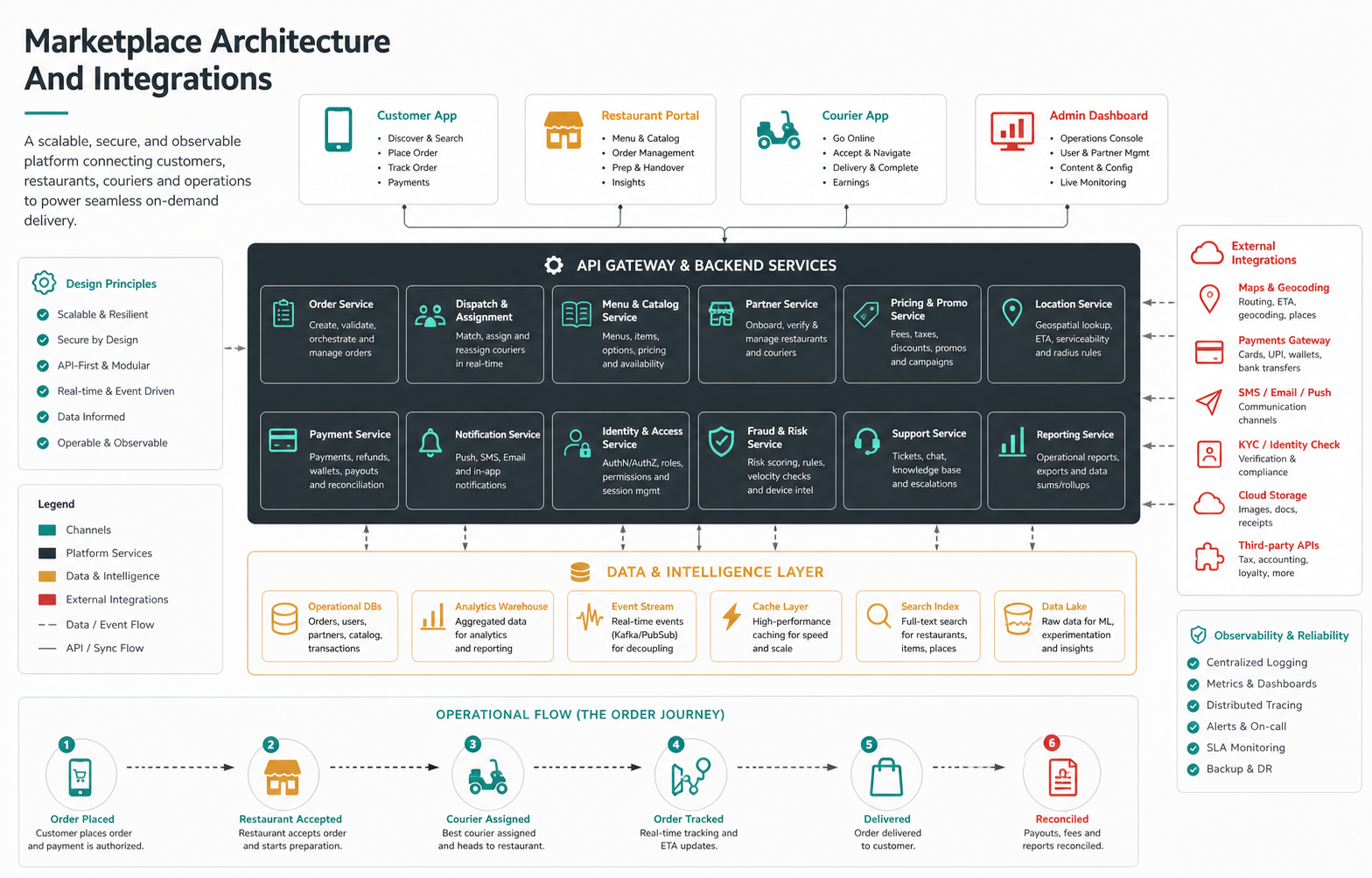
The architecture usually starts with mobile apps and an admin web layer connected to backend services for users, restaurants, menus, carts, orders, payments, dispatch, notifications, support, promotions, and reporting. The backend must manage state carefully because one order touches multiple parties at once. A customer may cancel, a restaurant may reject, a courier may be unavailable, a payment may fail, or an address may fall outside the delivery zone.
Common integrations include payment gateways, wallet providers, maps and geocoding, push notifications, SMS or email, analytics, crash monitoring, CRM, helpdesk tools, restaurant POS systems, accounting, fraud checks, and payout systems. If the product also needs browser-based ordering, partner dashboards, or internal support tools, plan web app development alongside the mobile release.
Cost Drivers And Timeline
The cost of building a food delivery app like Uber Eats depends on marketplace complexity, not just screen count. Major cost drivers include the number of user roles, restaurant onboarding depth, menu complexity, courier dispatch logic, live tracking, payment splits, refunds, coupon rules, support workflows, POS integrations, analytics, admin permissions, reliability targets, and whether the product is native, cross-platform, or web-supported.
A focused city-level MVP is very different from a multi-region marketplace with automated dispatch, courier payouts, partner analytics, subscriptions, and advertising. Use NextPage's food delivery app development cost guide and the Custom Software Cost Estimator to turn assumptions into a planning range before requesting a build quote.
Testing, Launch, And Marketplace Quality
Food delivery apps should be tested under live operational stress. Cover unavailable items, closed restaurants, out-of-zone addresses, duplicate taps, failed payments, payment callbacks, rejected orders, late couriers, order cancellation timing, refund paths, notification delays, map inaccuracies, slow networks, and support escalation. A marketplace that works only on happy paths will generate manual support load immediately.
Launch in a constrained geography with a manageable restaurant set, clear support coverage, and analytics on the full journey. Track search-to-cart rate, cart abandonment, payment failure rate, restaurant acceptance time, courier assignment time, delivery ETA accuracy, refund rate, support tickets, repeat order rate, and contribution margin per order.
Build Vs Buy And NextPage Fit
Buy or configure existing tools if you need a standard ordering channel quickly and can adapt to their workflows. Build custom when marketplace operations, restaurant onboarding, courier dispatch, data ownership, pricing rules, partner reporting, or customer experience are core differentiators. In many cases, the practical path is hybrid: use proven payments, maps, notifications, and support tools while building the marketplace workflow that makes the business different.
For product inspiration around food-service workflows, the FeastFlow portfolio case study shows how ordering, operations, and customer experience can be planned as a connected platform. If your app needs custom marketplace logic, partner dashboards, or operational integrations that packaged tools cannot support cleanly, custom software development can give the roadmap more control.
Final Recommendation
Build an Uber Eats-style food delivery app by starting with the marketplace operating model. Define who owns restaurants, delivery, support, payments, refunds, and partner quality before designing screens. Then ship a focused MVP that proves ordering, fulfillment, and admin control in one market before adding advanced growth features.
The best first step is a scoped product plan: user roles, transaction flow, delivery model, launch geography, integrations, support process, and metrics. Once those decisions are clear, the team can estimate the build honestly and avoid turning the first release into an overloaded clone of a mature global marketplace.