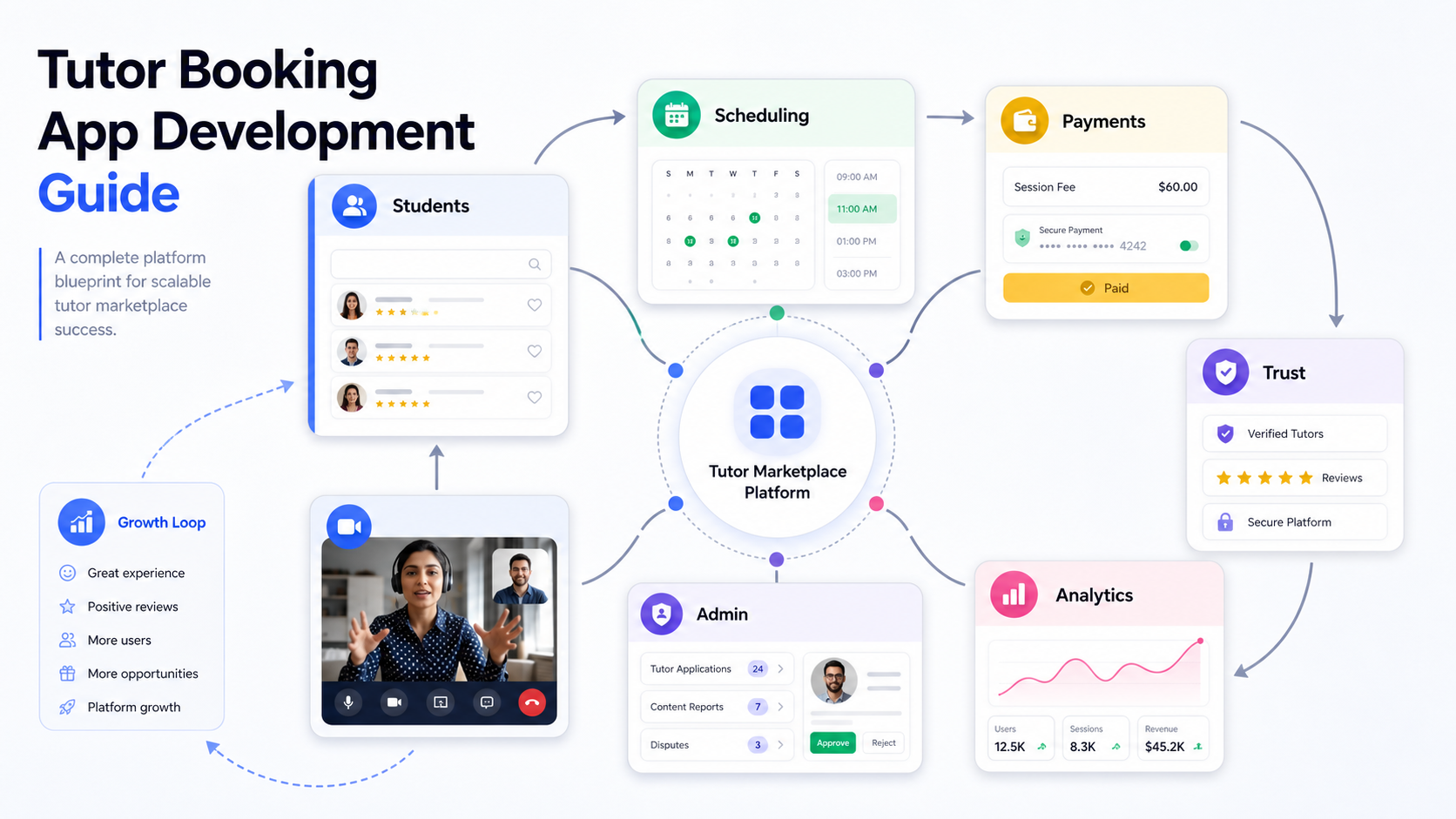

A tutor booking app is a specialized education marketplace. Students need a fast way to find the right tutor, compare availability, book a slot, pay securely, join the lesson, and leave feedback. Tutors need calendar control, profile credibility, session tools, earnings visibility, and reliable communication. The platform owner needs admin controls that keep quality, trust, payments, disputes, and growth under control.
The practical answer: build the product around one clear tutoring use case first, define the student and tutor journeys, launch a focused MVP, and treat scheduling, payments, video sessions, reviews, and admin review as core product architecture. If the product must work across mobile devices, complex integrations, or custom education workflows, plan it as a serious mobile app development project rather than a simple directory website.
Quick Answer: How Do You Develop A Tutor Booking App?
To develop a tutor booking app, define the marketplace model, map student and tutor workflows, build the profile and search experience, add booking and calendar logic, integrate secure payments, support online lessons, create admin moderation tools, test the MVP with a narrow learning segment, and expand based on booking conversion and lesson completion data.
- For a local tutoring marketplace: prioritize location filters, in-person scheduling, tutor verification, parent communication, and cancellation rules.
- For online tutoring: prioritize video lessons, screen sharing, whiteboards, file sharing, timezone-aware scheduling, and lesson notes.
- For exam preparation: prioritize subject expertise, tutor credentials, packages, progress tracking, mock tests, and repeat bookings.
- For institutional tutoring: prioritize admin roles, cohort management, reporting, permissions, attendance, and billing controls.
Start With The Tutor Marketplace Model
The model decides the product scope. A simple listing app can show tutor profiles and inquiry forms, but a true booking marketplace must manage availability, price rules, payment status, lesson delivery, reviews, refunds, and support workflows.
Most tutor booking products fall into one of four models:
| Model | Best Fit | Product Implication |
|---|---|---|
| Open marketplace | Independent tutors and students choose each other freely | Needs strong search, ratings, tutor verification, trust signals, and dispute handling. |
| Curated marketplace | Premium tutoring, test prep, language learning, or expert coaching | Needs tutor applications, admin approval, quality review, and onboarding workflows. |
| Institution-led platform | Schools, coaching centers, and education companies | Needs roles, batches, reports, internal tutors, attendance, billing, and permission controls. |
| On-demand instant help | Homework support, quick Q&A, and short sessions | Needs availability matching, instant chat/video, wallet balance, and fast payment capture. |
Define Student, Tutor, And Admin Roles
A tutor booking app should not be scoped as one app screen. It is a role-based system with separate expectations for students, tutors, parents, admins, support teams, and finance users.
Student And Parent Experience
- Account registration with email, phone, social login, or parent-managed profiles.
- Subject, grade, exam, language, location, price, availability, and rating filters.
- Tutor profiles with credentials, intro video, teaching style, availability, packages, and reviews.
- Booking flow with calendar slots, timezone handling, cancellation policy, reminders, and payment confirmation.
- Lesson room access, files, notes, homework, feedback, rescheduling, and repeat bookings.
Tutor Experience
- Profile setup with subjects, experience, certifications, teaching levels, pricing, and availability.
- Calendar controls for weekly schedules, blocked dates, recurring slots, and buffer time.
- Booking requests, lesson status, student notes, earnings, payout history, and performance metrics.
- Communication tools for pre-session questions, lesson summaries, shared files, and follow-up assignments.
Admin Experience
- Tutor applications, identity checks, profile review, content moderation, and approval workflows.
- Booking, payment, refund, cancellation, payout, dispute, and support dashboards.
- Category management, featured tutors, commission settings, promo codes, and platform analytics.
- Quality signals such as completion rate, response time, reviews, refunds, and reported sessions.
Plan The MVP Before Adding Every Feature
A tutor booking app can become expensive when it tries to launch with every subject, every tutor type, mobile apps, live classroom tools, subscription plans, wallets, certificates, and AI recommendations at once. A stronger first release proves one clear booking loop: a student finds a tutor, books a lesson, pays, attends, and returns.
Use the MVP Scope Builder to separate launch-critical workflows from later roadmap features. For most tutor marketplaces, the MVP should include student search, tutor profiles, availability, booking checkout, reminders, lesson link, review flow, admin review, basic reporting, and payment tracking.
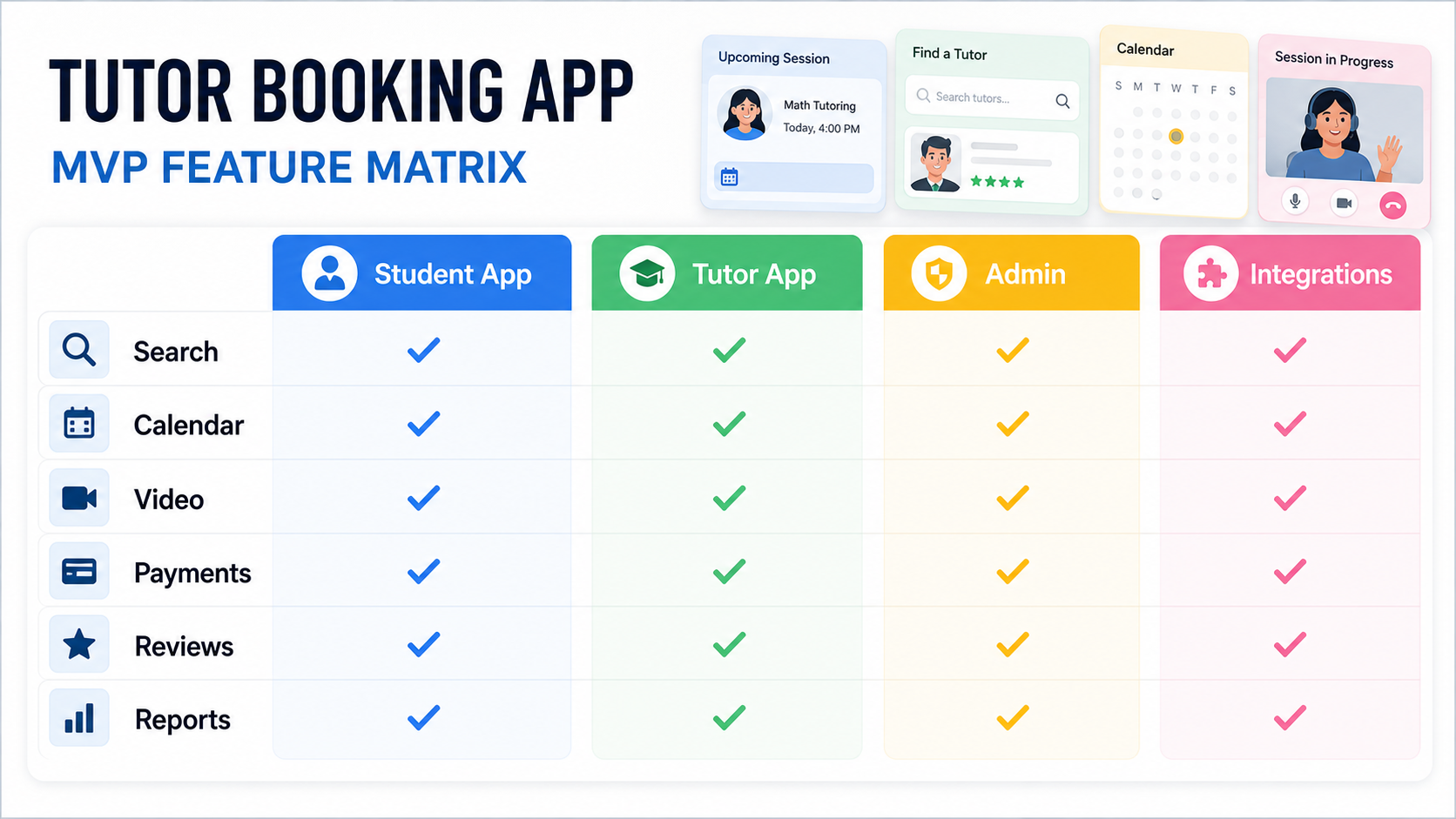
| Build Now | Add Later |
|---|---|
| Student search, tutor profile, booking calendar, payment confirmation, and reminders | AI tutor matching, loyalty programs, advanced recommendations, and gamification |
| Tutor onboarding, availability, lesson status, basic earnings, and student notes | Advanced CRM, content libraries, certification paths, and automated coaching insights |
| Admin approval, booking support, refund handling, reports, and commission settings | Multi-region operations, complex pricing engines, affiliate dashboards, and custom BI |
Design The Booking And Lesson Workflow
The booking flow is where tutor marketplaces win or lose users. Students need confidence that the tutor is qualified and available. Tutors need protection against bad scheduling, late cancellations, and unclear payments. Admins need enough visibility to resolve disputes quickly.
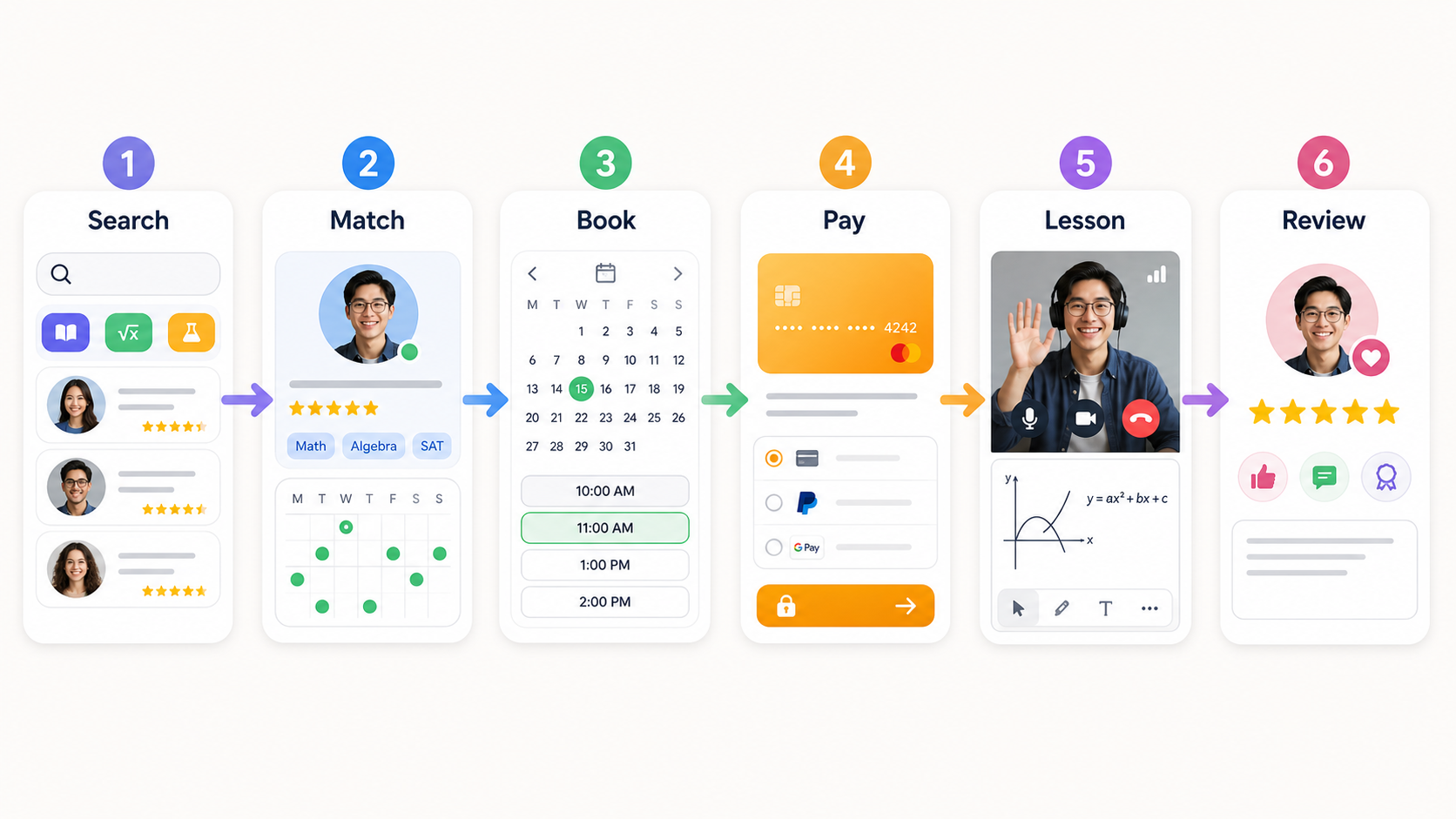
- Search: students filter by subject, level, availability, price, language, rating, and teaching mode.
- Match: tutor profiles show credentials, reviews, response time, teaching style, and trial options.
- Book: students select a slot, confirm timezone, accept cancellation rules, and receive reminders.
- Pay: the platform collects payment, applies commission rules, and records payout eligibility.
- Lesson: users join a video room or in-person session, share files, use notes, and mark attendance.
- Review: both sides complete feedback, report issues, and trigger repeat booking prompts.
Must-Have Tutor Booking App Features
Feature planning should follow the operating model, not a generic checklist. The most important features are the ones that reduce friction in discovery, booking, payment, lesson delivery, and trust.
- Smart search and filters: subject, grade, exam, availability, budget, location, language, online/in-person mode, and rating.
- Tutor profiles: bio, credentials, qualifications, intro video, teaching levels, pricing, packages, cancellation rules, and verified badges.
- Calendar and scheduling: recurring availability, blocked slots, timezone support, buffers, rescheduling, reminders, and cancellation windows.
- Secure payments: cards, wallets, invoices, commission, refunds, payout timing, tax records, and failed payment handling.
- Online lesson tools: video meeting links, whiteboard, chat, file sharing, screen sharing, session notes, and lesson recordings when allowed.
- Ratings and trust: verified reviews, completion rates, dispute reporting, response-time indicators, and tutor review queues.
- Admin console: tutor approval, booking support, payment visibility, refund tools, content moderation, analytics, and user management.
Choose A Technology Stack Around Product Risk
The best technology stack depends on launch scope, target devices, real-time requirements, integrations, and expected traffic. Do not choose technology only because a competitor uses it.
For mobile apps, the native versus cross-platform decision should be made around performance, release speed, budget, team skill, and device-specific needs. NextPage's guide to native vs cross-platform mobile app development is a useful companion when deciding whether a tutor marketplace should start with React Native, Flutter, native iOS/Android, or a responsive web MVP.
| Layer | Typical Choices | What To Consider |
|---|---|---|
| Frontend | React, Next.js, React Native, Flutter, native iOS, native Android | Mobile depth, SEO needs, speed to market, and long-term maintenance. |
| Backend | Node.js, NestJS, Laravel, Django, Rails, serverless functions | Booking rules, payment workflows, notifications, security, and admin tooling. |
| Database | PostgreSQL, MySQL, Redis, search index | Availability queries, user roles, booking history, search filters, and analytics. |
| Integrations | Stripe, Razorpay, Zoom, Twilio, SendGrid, calendar APIs, analytics | Regional payments, video reliability, reminders, fraud checks, and reporting. |
Payments, Trust, And Safety Need Early Decisions
Payment and trust rules should be designed before development starts. Tutor marketplaces have frequent edge cases: trial sessions, no-shows, cancellations, refunds, tutor payouts, parent payments, package credits, and disputes after a lesson.
Decide how the platform handles payment capture, commission, taxes, payouts, refund eligibility, tutor verification, review moderation, and user reports. These rules affect the database, admin console, notification logic, terms of service, and customer support workflows.
Tutor Booking App Development Cost Drivers
Tutor booking app development cost depends on the product model, target platforms, profile depth, scheduling complexity, video tools, payment rules, admin controls, integrations, and the amount of custom logic needed. A simple directory or inquiry MVP can be much smaller than a full marketplace with live lessons, wallets, packages, tutor verification, and mobile apps.
For education-specific budgeting, compare the scope with NextPage's education app development cost guide. A tutor booking app usually sits between an education marketplace and a scheduling-heavy service platform. NextPage's guide to doctor appointment booking app development is also relevant because both products depend on provider availability, user trust, reminders, payments, and cancellation rules.
| Cost Driver | Why It Changes Scope |
|---|---|
| Platform choice | Responsive web, iOS, Android, and cross-platform apps have different design, QA, and release needs. |
| Scheduling logic | Availability, recurring slots, timezones, buffers, packages, cancellations, and rescheduling add complexity. |
| Payment model | One-time sessions, subscriptions, wallets, commission, payouts, refunds, and tax records require careful backend design. |
| Lesson tools | Video, whiteboard, file sharing, chat, recording, and notes can be custom-built or integrated through third-party services. |
| Trust and moderation | Tutor verification, reviews, reports, disputes, and quality scoring require admin workflows and policy decisions. |
| Analytics | Conversion, retention, tutor utilization, revenue, and lesson completion reports increase data and dashboard scope. |
How Tutor Booking Apps Make Money
The revenue model should be defined before checkout and admin reporting are designed. Common monetization options include commission per booking, subscription plans for tutors, paid listing boosts, package sales, institutional licensing, premium learning tools, and payment processing margins where appropriate.
- Commission per lesson: the platform keeps a percentage from each paid booking.
- Tutor subscriptions: tutors pay monthly for profile visibility, lead access, analytics, or premium tools.
- Student packages: students buy bundles of sessions or exam-prep programs.
- Featured placement: verified tutors pay for promoted listings or category visibility.
- Institutional plans: schools or coaching centers pay for private tutor management and reporting.
A Practical Tutor Booking App Launch Roadmap
Start narrow. Choose one audience, one subject cluster, one geography or online segment, and one clear promise. A focused math tutoring MVP for high-school students is easier to validate than a global marketplace for every subject and age group.
- Discovery: validate student demand, tutor supply, pricing, parent expectations, and compliance needs.
- Prototype: design the search, tutor profile, booking, payment, and lesson handoff screens.
- MVP build: implement the student app, tutor workflow, admin console, booking engine, payments, notifications, and analytics baseline.
- Pilot: onboard a curated tutor group, run real bookings, track conversion and support issues, and refine policies.
- Scale: expand subjects, add mobile depth, improve matching, automate operations, and invest in retention.
Common Mistakes To Avoid
- Building a directory instead of a booking product: profiles alone do not solve scheduling, payment, trust, or lesson completion.
- Ignoring tutor operations: tutors need calendar control, payout clarity, support, and quality feedback to stay active.
- Adding too many subjects at launch: broad supply is hard to maintain before the core booking loop is proven.
- Leaving admin tools for later: approvals, disputes, refunds, and reports are essential marketplace infrastructure.
- Underestimating reminders: no-shows and late cancellations damage trust unless notifications and policies are clear.
- Choosing video tools too late: video, whiteboard, files, and recordings affect UX, cost, privacy, and support.
Final Recommendation
Develop a tutor booking app when you can own a clear learning niche, recruit credible tutors, and create a smoother booking experience than generic directories or messaging groups. Start with a focused marketplace model, prove the booking loop, and use admin controls to protect quality from day one.
The strongest tutor platforms are not just lists of teachers. They are operating systems for learning services: they help students choose confidently, help tutors manage lessons professionally, and help platform owners control scheduling, payments, trust, and growth with measurable data.