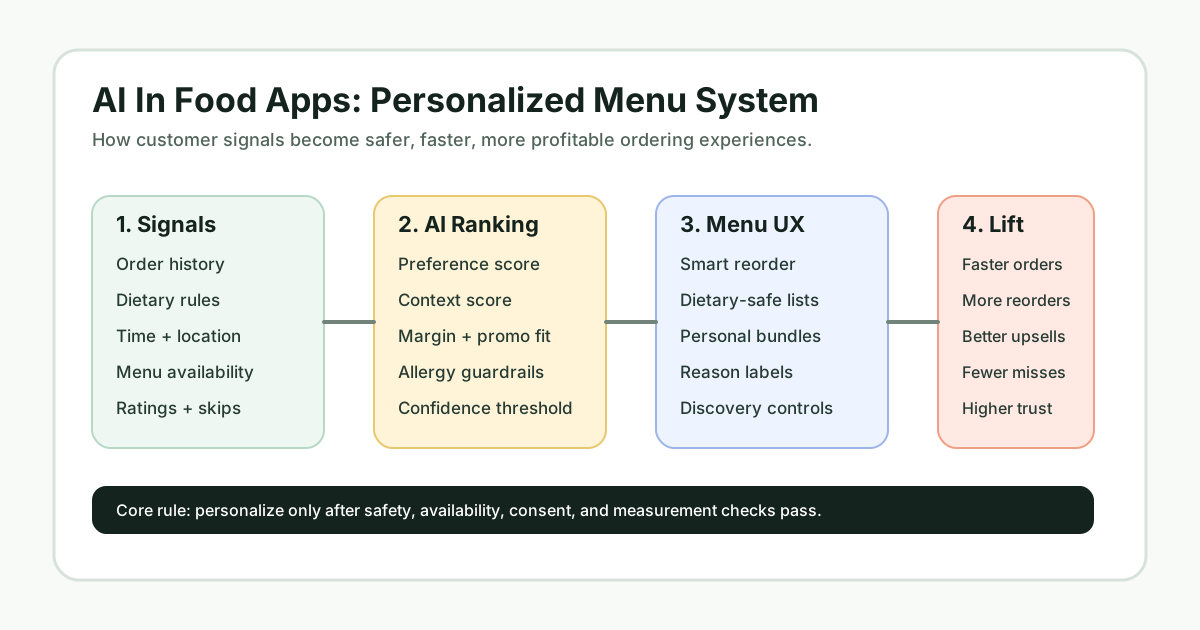

AI in food apps has moved beyond a simple “people also ordered” carousel. For restaurant groups, cloud kitchens, grocery platforms, and delivery startups, personalized menus now influence what customers see first, which combos they consider, how dietary needs are handled, and whether repeat customers come back without scrolling through the same long catalog every time.
The business case is practical: a better menu experience can reduce decision fatigue, lift reorder rates, make loyalty offers feel relevant, and help operators promote items that are available, profitable, and aligned with the customer’s preferences. The hard part is designing personalization that feels useful rather than invasive. That requires clean product thinking, consent-aware data collection, and engineering that connects recommendations to real inventory, pricing, and operations.
Why Personalized Menus Matter In Food Apps
Food ordering is a high-choice environment. A customer may open the app hungry, short on time, and unsure whether they want a repeat order, a healthier option, a family meal, or a deal. A static menu asks every user to solve that problem manually. An AI-powered menu narrows the field by ranking items around what the app already knows and what the business can actually fulfill.
For users, that means faster decisions, better discovery, and fewer irrelevant recommendations. For operators, it can mean more effective upsells, smarter merchandising, better use of loyalty data, and less dependence on blunt discounting. This is especially relevant for brands building direct ordering channels, where a better owned experience can protect margin and customer data. NextPage’s NextBite food ordering product is one example of how food businesses can benefit when ordering workflows are designed around direct customer relationships.
What AI Personalization Actually Uses
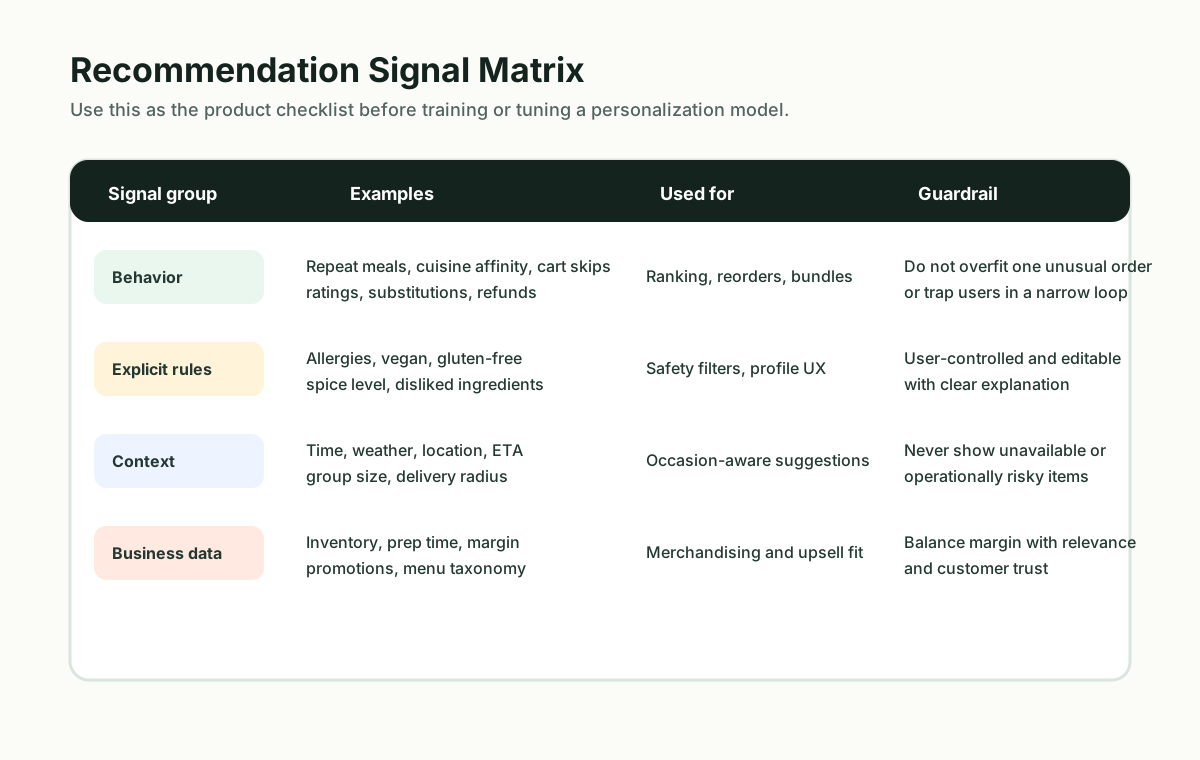
A personalized menu should not be treated as a black box that simply guesses what a customer wants. Strong systems combine several signal groups and then apply clear business and safety rules before showing recommendations.
| Signal | What It Helps Predict | Product Guardrail |
|---|---|---|
| Past orders and reorders | Favorite cuisines, dishes, spice levels, basket size, and repeat cadence. | Avoid trapping users in a narrow loop of the same meals. |
| Explicit preferences | Vegetarian, vegan, gluten-free, allergies, disliked ingredients, budget range, and portion preferences. | Let users edit these settings and make dietary handling transparent. |
| Context | Time of day, location, weather, delivery ETA, group size, and nearby restaurant availability. | Never recommend unavailable or operationally risky items. |
| Engagement feedback | Clicked items, skipped suggestions, ratings, refunds, substitutions, and abandoned carts. | Use negative signals carefully so one unusual order does not distort the model. |
Teams planning this feature should start with the data they already collect cleanly. If the app does not have reliable item taxonomy, dietary tags, restaurant availability, and event tracking, a complex AI layer will only amplify messy data. A focused discovery sprint or a custom software cost estimate can help define the engineering scope before the team commits to model work.
How AI Understands Customer Taste
Most useful food recommendations are a blend of rules, ranking models, and feedback loops. Rules handle hard constraints such as allergies, delivery radius, store hours, item availability, and customer-selected exclusions. Ranking models decide the order of safe, available options. Feedback loops help the system learn whether the recommendation was helpful.
In an early version, a restaurant or food delivery app may not need a heavy machine learning platform. A rules-based personalization MVP can rank repeat orders, cuisine affinity, dietary fit, and contextual offers. As usage grows, the team can add collaborative filtering, sequence models, vector search over menu descriptions, or LLM-assisted menu understanding. NextPage’s AI development services focus on this kind of practical progression: start with the workflow, add intelligence where it changes outcomes, and keep the system maintainable.
Architecture For Personalized Food Apps
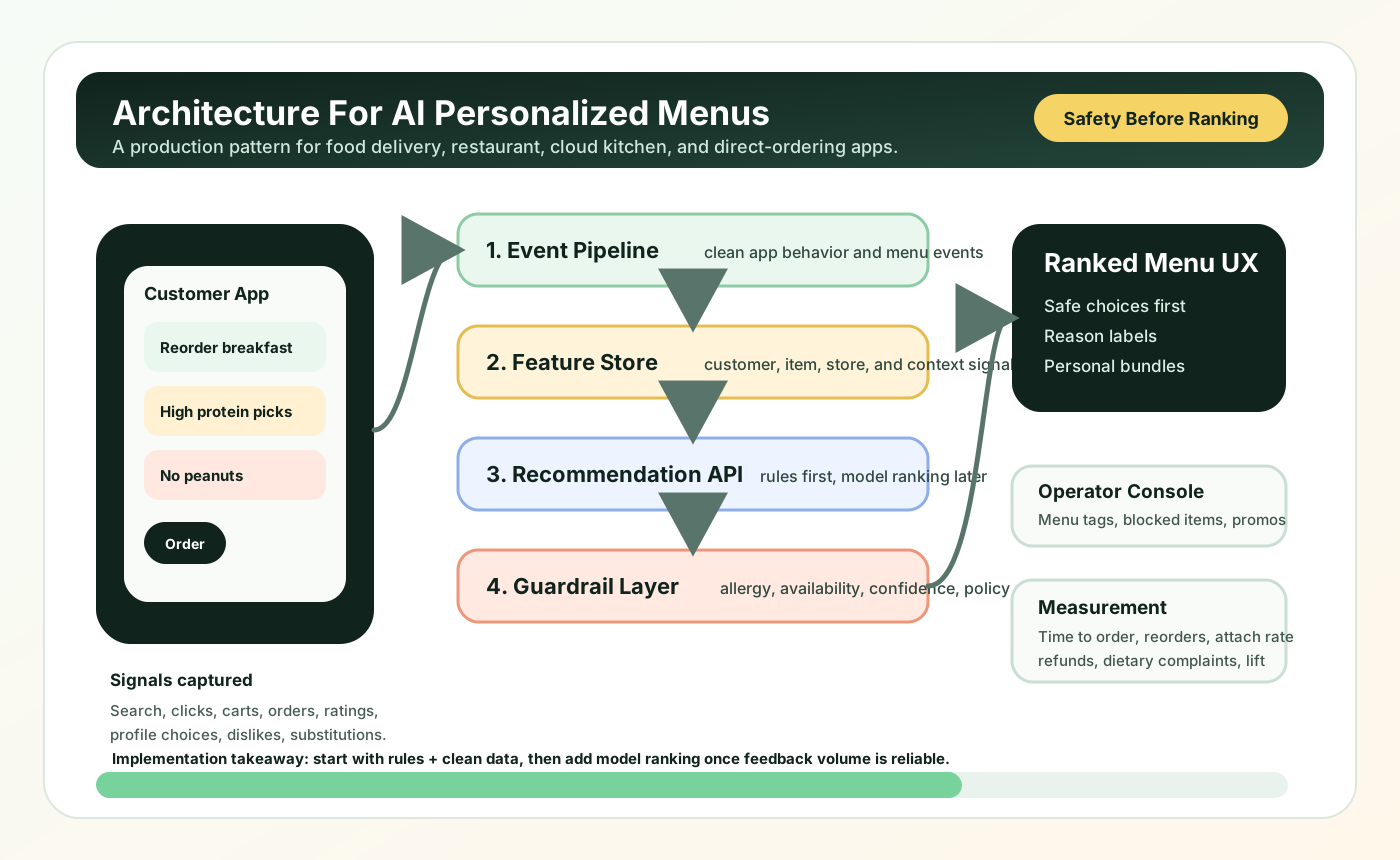
A production personalization system usually has five layers. The customer app captures events and explicit preferences. The backend normalizes menu, restaurant, inventory, and offer data. A feature store or customer profile service keeps reusable signals. A recommendation service ranks menu items. A rule and policy layer blocks unsafe, unavailable, or low-confidence suggestions before the app displays them.
This is where food apps become more than mobile screens. They need clean APIs, analytics events, admin controls, and operational integrations. If the menu experience spans iOS, Android, web ordering, and internal dashboards, the build often touches both mobile app development and web app development. For older ordering systems, the safer path may be to add personalization around existing APIs first instead of rewriting the entire platform.
Personalized Menu Features To Prioritize
The best feature set depends on the business model, but most food apps should prioritize personalization in a sequence that creates value without overcomplicating the first release.
- Smart reorder: surface repeat meals, recent baskets, and time-of-day favorites without making users search.
- Dietary-safe filtering: remember explicit restrictions and separate hard exclusions from soft preferences.
- Contextual ranking: adjust suggestions for breakfast, lunch, late night, weather, delivery ETA, and distance.
- Personalized bundles: recommend sides, drinks, desserts, or family combos based on basket context rather than generic upsells.
- Discovery controls: let customers ask for “something new,” “lighter options,” “high protein,” or “under 30 minutes.”
- Explainable prompts: show short reasons such as “because you often order spicy vegetarian meals” when it improves trust.
Supporting content from NextPage’s food app cluster, including Benefits Of Food Delivery App Development, 10 Essential Features To Include In Your Food App Development, and How To Build A Food Delivery App Like Uber Eats?, can help teams compare personalization against the broader product roadmap.
A Practical Rollout Roadmap
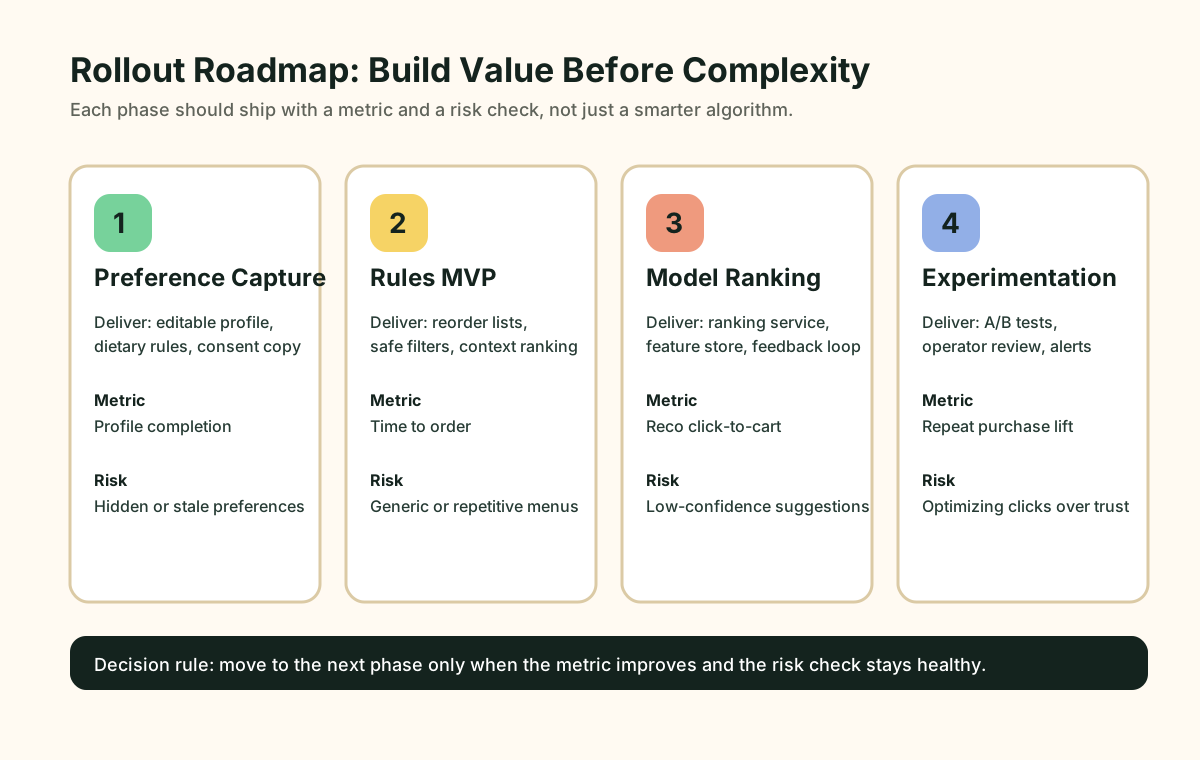
A safe rollout starts with measurement. Track search-to-cart rate, reorder rate, recommendation click-through, add-on attach rate, repeat purchase rate, refund rate, dietary complaint rate, and time to order. These metrics stop the team from optimizing only for clicks when the real goal is customer trust and profitable repeat orders.
- Capture preferences deliberately: add profile fields, onboarding questions, and editable dietary settings.
- Launch a rules-based MVP: rank items by repeats, cuisine affinity, budget, time of day, and availability.
- Add model ranking: use event history and menu taxonomy to improve recommendations over time.
- Experiment carefully: A/B test ranking changes, bundle suggestions, and explanation copy with guardrails for allergies and refunds.
Teams that are still deciding whether this should be custom-built can use the Build vs Buy Decision Tool. If the personalization logic depends on proprietary menus, loyalty data, multi-location inventory, or unique operating workflows, custom software is often easier to control than forcing a generic plugin into the product.
Risks And Design Guardrails
Personalization can fail when it feels creepy, hides too much control, or recommends items that conflict with a customer’s restrictions. The product should make preference settings easy to change, keep allergy and dietary rules explicit, and avoid over-personalizing every screen. Users still need search, category browsing, deals, and editorial discovery.
Privacy matters too. Food preferences can imply health, religion, lifestyle, family status, and location patterns. Teams should collect only the data they need, explain how it improves the experience, and separate user-controlled restrictions from inferred preferences. When AI systems influence pricing, promotions, or menu visibility, add review workflows so operators can catch unfair or confusing outcomes.
When To Build This With NextPage
If your food app already has customers but the menu experience is still static, personalization can be a strong next product investment. NextPage can help audit the existing ordering flow, define the first personalization release, connect data sources, build the recommendation service, and ship the app and admin surfaces around it. For broader product planning, our custom software development team can map the workflow from customer app to restaurant operations, analytics, and growth experiments.
The goal is not to add AI for its own sake. The goal is to help customers choose faster, help operators merchandise smarter, and give the business a direct ordering experience that keeps learning from real behavior.