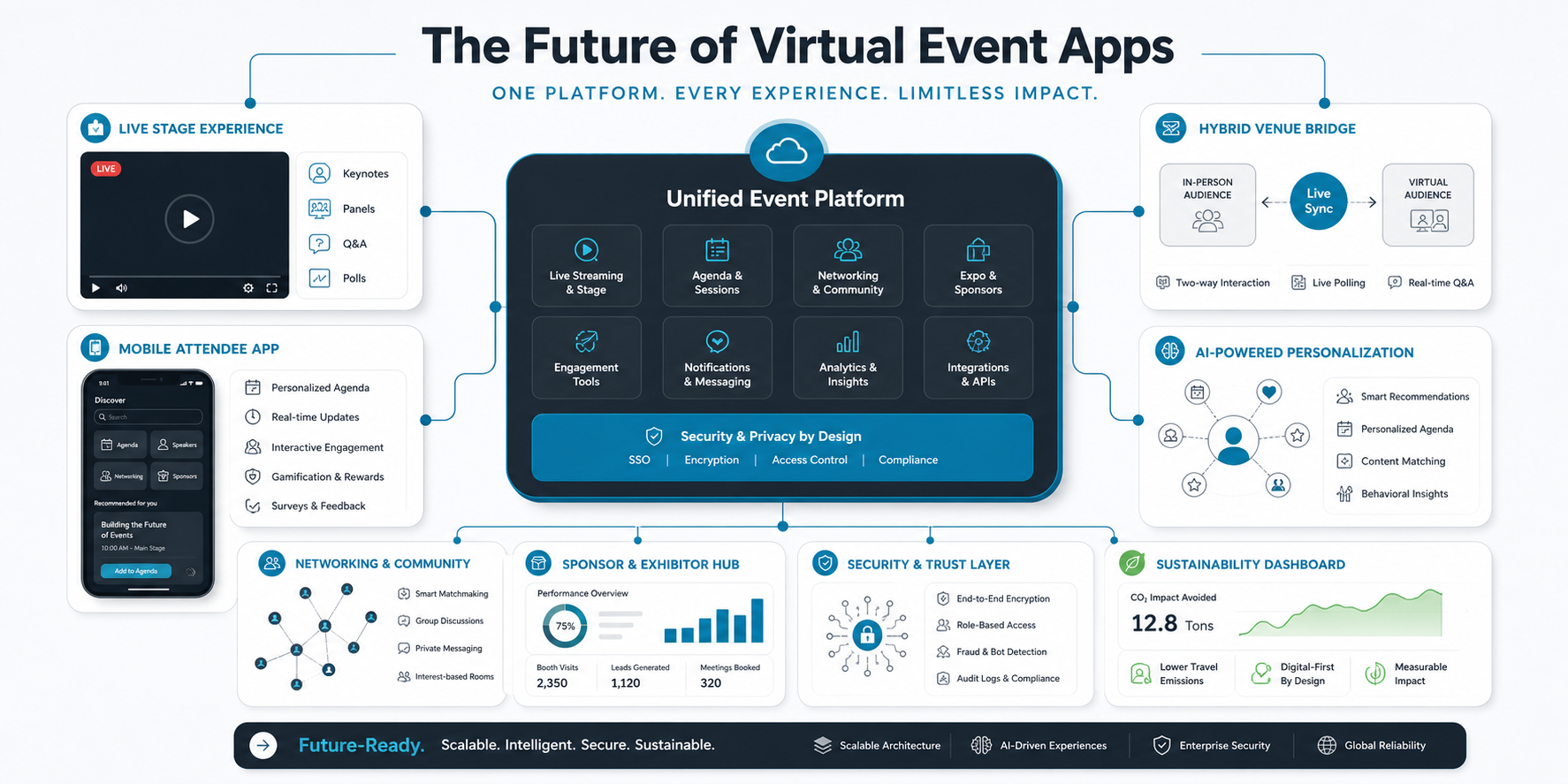

Quick Answer: How Do Live Polls And Q&A Improve Virtual Event Apps?
Live polls and Q&A improve a virtual event app when they are built into the session experience, not treated as side widgets. Polls help speakers understand the audience in real time, Q&A gives attendees a structured way to shape the conversation, and post-session analytics help organizers improve programming, sponsor value, and follow-up.
For product teams, the goal is not simply to add buttons for polls and questions. The goal is to design an interaction layer that works across the agenda, livestream, chat, notifications, moderation tools, analytics, and organizer dashboard. A thoughtful mobile app development plan should define these flows before engineering starts.
Start With The Interaction Strategy
A strong virtual event platform starts by deciding what kind of participation the event actually needs. A leadership town hall may need anonymous sentiment polls and moderated Q&A. A product launch may need reactions, ranked questions, sponsor-safe moderation, and post-event lead intelligence. A training event may need quizzes, completion checks, and downloadable results.
Map interaction moments across the attendee journey: registration, waiting room, session start, speaker handoff, mid-session pulse check, audience questions, closing feedback, replay, and follow-up. This keeps live interaction tied to event outcomes instead of becoming a collection of disconnected widgets.
Virtual Event Interaction Roadmap
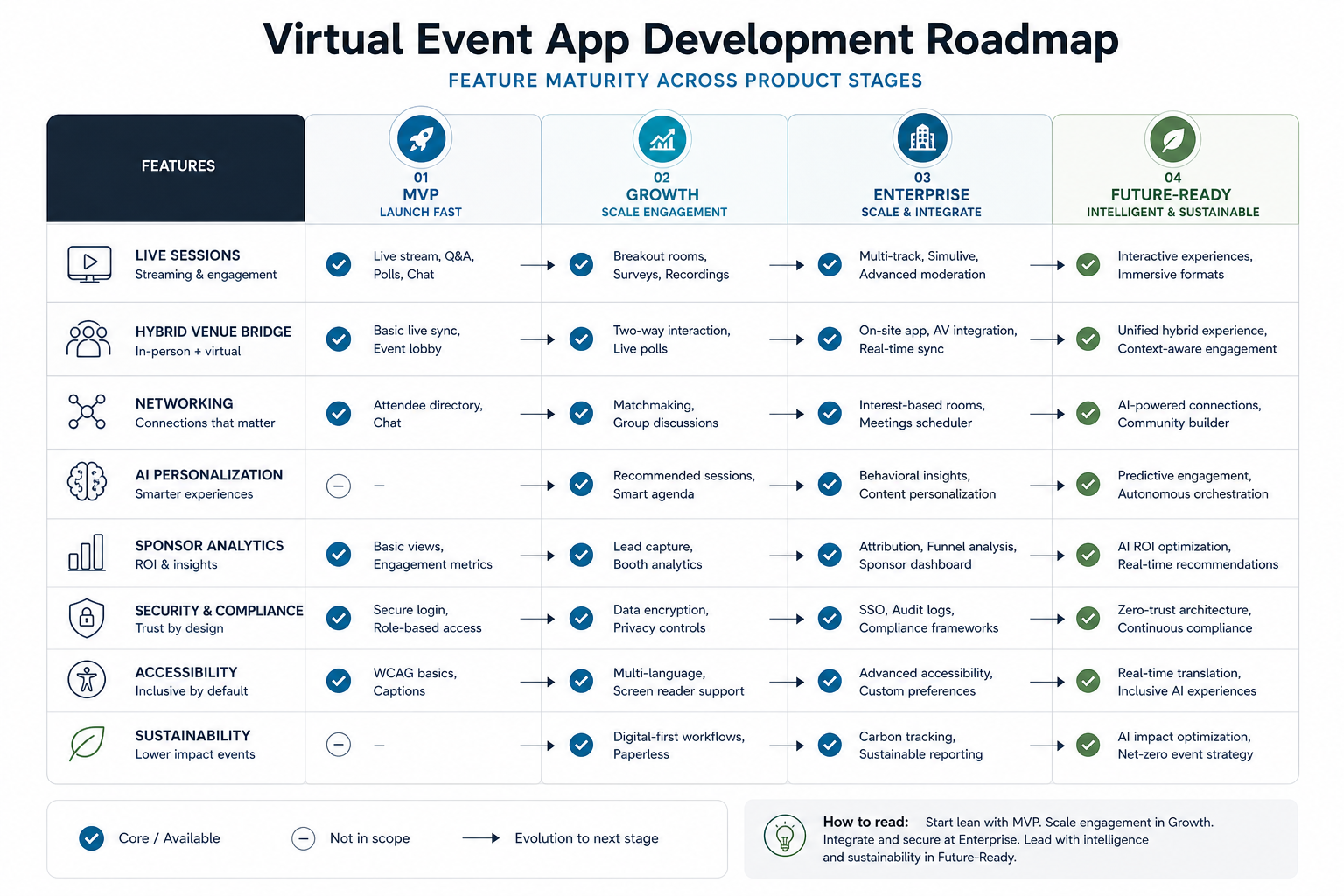
The first version of a virtual event interaction layer should usually include session-level polls, moderated Q&A, attendee identity controls, speaker views, organizer controls, simple analytics, and exportable results. Advanced features such as AI-assisted question clustering, sponsor insights, gamification, matchmaking, and personalized recommendations can come after the core live-event loop is reliable.
The related NextPage guide to event app user interfaces is useful when you need to connect interaction features with the larger attendee journey, organizer workflows, navigation, and mobile UX.
Design Polls Around Decisions, Not Novelty
Polls work best when each question helps someone make a decision. Speakers can adjust pacing, organizers can identify confusing topics, sponsors can understand segment interest, and product teams can measure which sessions create the strongest engagement. Avoid vague poll questions that create charts nobody uses after the event.
Good poll questions are short, answerable in seconds, and connected to the session topic. Use multiple choice for fast comparison, rating scales for satisfaction or readiness, and open-ended prompts only when the moderation team can review the volume. Keep the result display clear enough that the speaker can react without pausing the session for too long.
Make Q&A Easy To Submit And Safe To Moderate
Q&A participation drops when attendees have to leave the livestream, search for a separate tab, or wonder whether their question will be visible to everyone. Keep the question entry point close to the session player or agenda detail page. Let attendees upvote, follow, or filter answered questions, but keep the controls simple enough for first-time users.
Moderation is the operational side of Q&A. Organizers need queues, approval states, duplicate detection, speaker notes, rejected-question reasons, and exportable records. The supporting article on event management app features can help teams decide how Q&A fits alongside tickets, agendas, sponsor modules, check-in, notifications, and admin workflows.
Build An Engagement Loop, Not One-Off Interactions
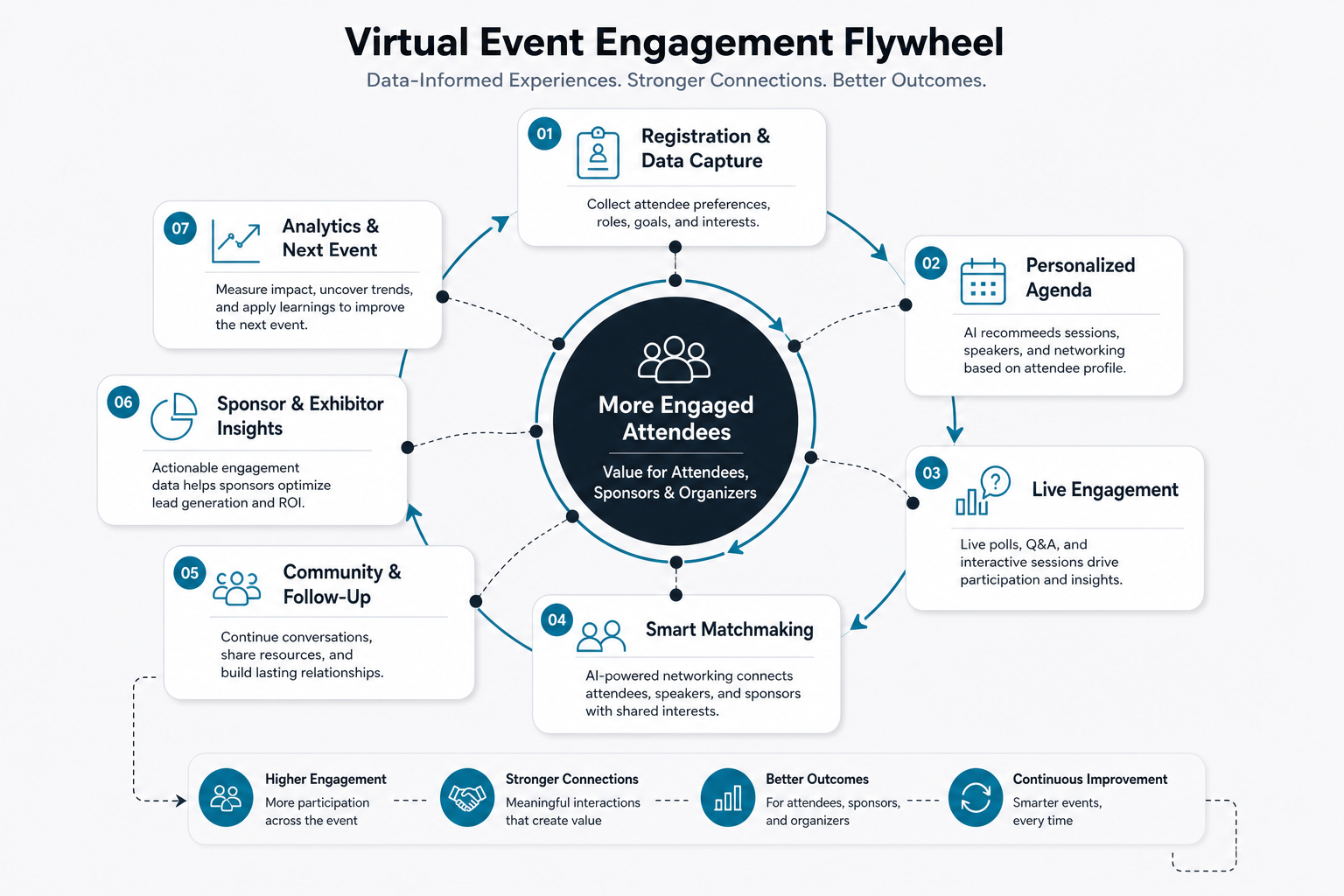
Polls and Q&A become more valuable when they are part of a repeatable engagement loop. Before the session, reminders can preview the topic and invite questions. During the session, polls can capture audience context and Q&A can surface the most useful questions. After the session, feedback and analytics can guide follow-up content, sales outreach, training material, or the next event agenda.
This loop also helps hybrid events. Remote attendees need the same clear participation path as people in the room. In-person attendees may scan a QR code or use the app, while remote attendees interact beside the stream. The platform should merge both audiences into one moderated queue and one analytics view.
Use Analytics While The Event Is Still Live
Post-event reports are useful, but the best interaction analytics help organizers react while the event is still happening. Low poll response rates can signal unclear instructions. Repeated questions can show that a speaker needs to clarify a point. High engagement in one track can shape room allocation, replay promotion, or follow-up content.
Useful metrics include active attendees, poll response rate, question submission rate, upvotes, unanswered questions, sentiment, drop-off points, session ratings, replay interest, and sponsor clicks. If the platform includes AI summaries or automated recommendations, teams should connect that scope to governance and measurement. NextPage's guide to AI in event planning and execution covers where AI can support logistics, engagement, and attendee experience.
Hybrid Event Architecture Matters
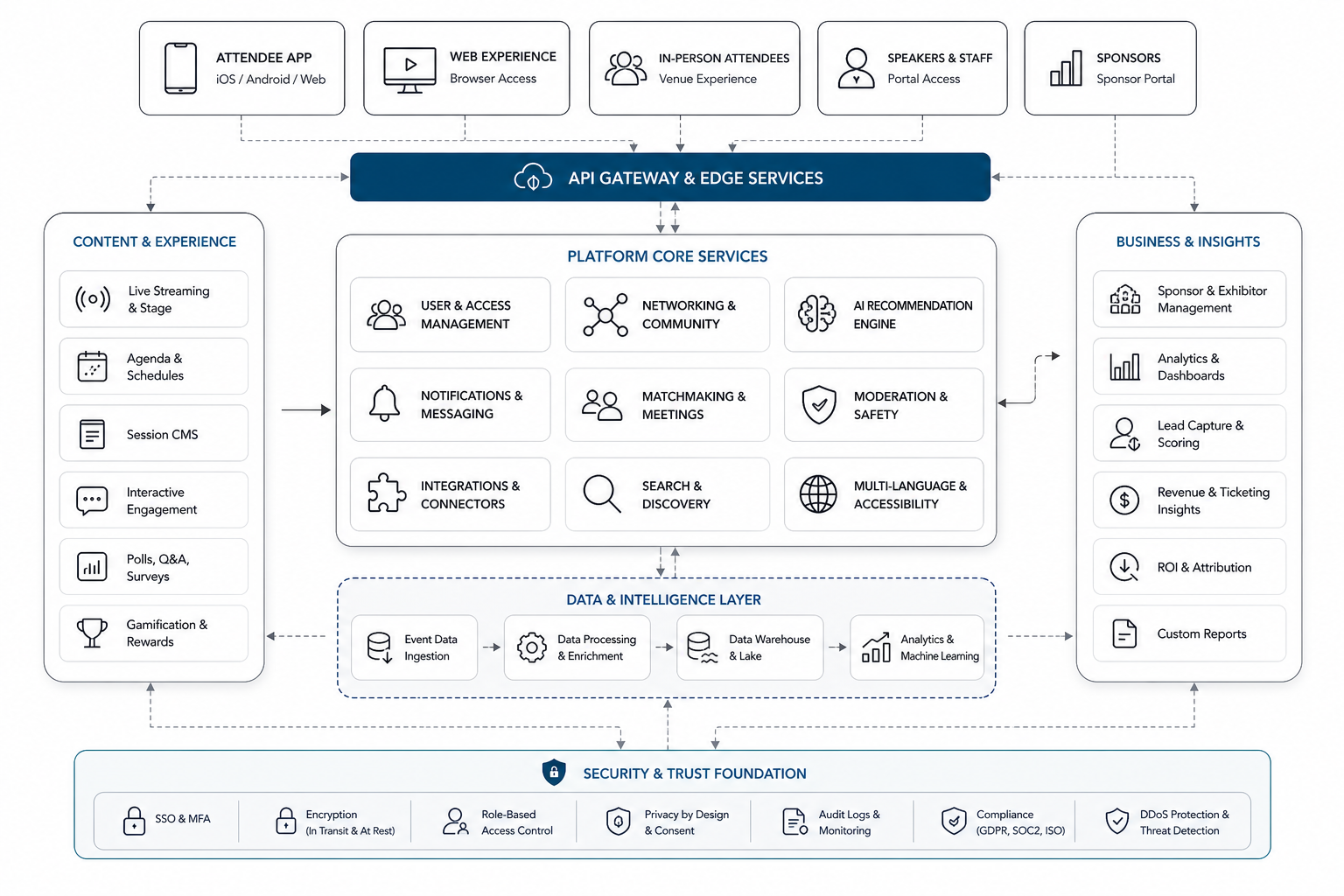
A smooth interaction experience depends on the architecture behind the screen. The app may need to connect registration data, ticket status, session agendas, livestream access, attendee profiles, notifications, poll results, Q&A moderation, sponsor data, CRM records, and analytics pipelines. When those systems are loosely connected, attendees notice through late notifications, missing permissions, duplicated questions, or broken replays.
Plan for authentication, role-based access, real-time sync, data retention, failure states, and admin audit logs. If you are building beyond a simple event builder, NextPage's MVP Scope Builder can help separate first-release interaction features from later enhancements.
Where AI Can Help Without Taking Over The Event
AI can support virtual event interaction when it reduces organizer workload without hiding important human judgment. Practical uses include clustering duplicate questions, summarizing long Q&A queues, flagging sensitive questions for review, recommending follow-up resources, generating session summaries, and helping support teams answer repeated attendee questions.
These features need clear review controls, data boundaries, and quality checks. For production-grade assistants or workflow automation inside an event platform, a focused AI development services plan should define where AI suggests, where humans approve, and what evidence is stored.
Implementation Checklist For Product Teams
Before development starts, align on the event formats, attendee roles, moderation policy, speaker workflow, analytics needs, integrations, privacy rules, and support process. Decide whether polls and Q&A need to work on web, iOS, Android, onsite kiosks, QR entry points, livestream embeds, or all of them.
Also decide how organizers will test the experience before launch. Run rehearsals with speaker view, moderator view, attendee view, poor-network conditions, timezone handling, accessibility checks, and post-event exports. The FieldIQ portfolio case study shows how NextPage approaches role-aware dashboards, mobile workflows, media-heavy operations, notifications, and AI assistance in a production product system.
How NextPage Can Help
NextPage helps teams plan, design, build, and improve virtual event apps with reliable interaction features. That can include attendee journey mapping, live poll and Q&A workflows, mobile app design, backend architecture, admin dashboards, livestream integrations, moderation tools, analytics, AI-assisted support, QA, launch support, and post-event optimization.
If your virtual event platform needs better participation, start by defining the moments where attendee input changes the experience. Those moments should drive the product roadmap, interface design, architecture, and analytics model.
Conclusion
Live polls and Q&A can turn a virtual event app from a passive viewing tool into an active event operating layer. The strongest implementations keep interaction close to the session, make moderation practical, include hybrid attendees fairly, and convert engagement data into better decisions. When the interaction strategy, UX, architecture, analytics, and AI support are planned together, the event platform becomes easier for attendees to use and easier for organizers to improve.