
Insurance claims automation software should shorten the path from first notice of loss to a documented decision without removing the controls that protect policyholders, adjusters, fraud teams, and regulators. A strong system captures claims across channels, extracts evidence from documents, applies policy and coverage rules, routes exceptions to humans, flags fraud signals, updates the core claims platform, and gives leaders a clear audit trail.
This checklist is for insurance operations leaders, claims managers, brokers, CTOs, and product owners who are modernizing claims intake, review, fraud detection, and policyholder service workflows. The goal is not to automate every claim on day one. The goal is to choose the right first workflow, prove measurable cycle-time and leakage improvement, and keep humans in control of judgment-heavy decisions. If AI is part of the scope, connect it to a narrow operating decision first; the same principle appears in NextPage's guide to AI in insurance use cases and implementation.
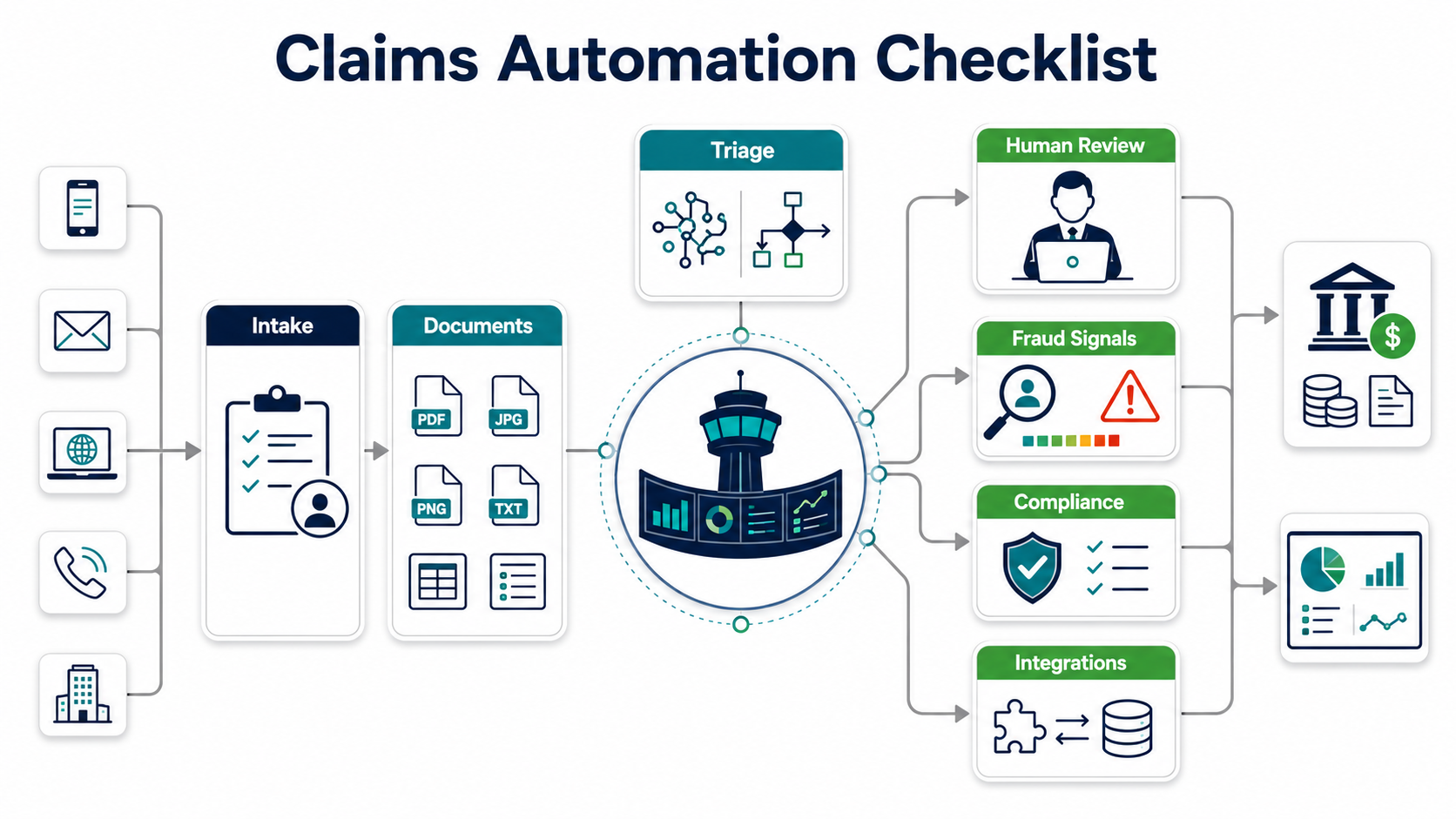
Quick Answer: What Should Insurance Claims Automation Software Include?
A practical claims automation platform should include omnichannel intake, document capture, OCR or intelligent document processing, rules-based and AI-assisted triage, coverage and policy checks, fraud signal scoring, exception routing, adjuster work queues, reserve and payment workflows, customer communications, compliance evidence, reporting dashboards, and integrations with policy administration, billing, CRM, document storage, payment, identity, and analytics systems.
The minimum viable scope is usually narrower: automate one claim type, one intake channel, and one decision handoff before trying to transform the full claims organization. For example, a property insurer might begin with FNOL capture and document completeness checks. A health or benefits administrator might begin with document classification and missing-information routing. A broker might begin with policyholder portal intake and status notifications.
Where Claims Automation Fits In The Operating Model
Claims automation should not be treated as a form replacement project. Claims work is a sequence of operating decisions: is the claim complete, which policy applies, what evidence is missing, which claims can be straight-through processed, which need adjuster review, which need special investigation, and what communications should be sent next.
That is why the workflow map matters more than the feature list. Start by documenting claim types, volumes, average cycle time, touch count, rework causes, escalation triggers, exception categories, handoffs, and downstream systems. If the existing process relies on email inboxes, spreadsheets, scanned PDFs, manual diary notes, or duplicated data entry, the automation design must address the process debt before adding AI.
For document-heavy claim flows, use an explicit document workflow audit before choosing vendors or models. NextPage's intelligent document processing services page outlines the same starting point: sources, formats, fields, quality issues, reviewers, downstream systems, and business rules.
Insurance Claims Automation Software Checklist
Use this checklist to evaluate an off-the-shelf claims system, a custom module, or a hybrid modernization roadmap.
| Checklist Area | What To Verify | Evidence To Ask For |
|---|---|---|
| Intake channels | Web portal, mobile, agent/broker submission, email ingestion, call-center assisted intake, API intake, and batch uploads. | Channel map, form schema, duplicate detection rule, identity check, and FNOL timestamp. |
| Document handling | Classification, field extraction, quality checks, missing-document prompts, versioning, and human correction workflow. | Sample extraction results, confidence thresholds, correction audit trail, document retention settings. |
| Triage rules | Routing by claim type, coverage, geography, severity, value, liability, SLA, and required expertise. | Rule catalog, override policy, queue dashboard, exception list. |
| Fraud signals | Structured red flags, anomaly detection, network/entity checks, prior claim patterns, and SIU handoff. | Signal dictionary, model or rule documentation, false-positive review process, investigator notes. |
| Human review | Adjuster workbench, approval stages, task diary, notes, collaboration, settlement recommendations, and escalation. | Role matrix, approval thresholds, work queue screenshots, audit events. |
| Compliance | Timelines, notices, state or line-of-business rules, consent, data use, appeals, complaints, and recordkeeping. | Jurisdiction rule table, notice templates, audit reports, retention policy. |
| Integrations | Policy, billing, CRM, payment, document storage, data warehouse, identity, fraud data, and communications. | API inventory, integration ownership, error handling plan, reconciliation report. |
| Reporting | Cycle time, pending inventory, leakage, reopen rate, complaint rate, automation rate, exception rate, and fraud referrals. | KPI definitions, dashboard mockup, baseline and target values. |
The most common mistake is letting the automation vendor or development team define the checklist around available features. Claims leaders should define the evidence they need to trust the workflow. That evidence becomes the acceptance criteria for the MVP.
Fraud Signals And Investigation Handoff
Fraud review is where over-automation can create real risk. Claims automation can surface patterns faster, but the system should not hide the reason a claim was routed, delayed, escalated, or denied. Keep fraud signals explainable enough for claims leadership and special investigation teams to review.
A useful fraud signal dictionary includes claim history, policy age, loss timing, duplicate documents, inconsistent narratives, location anomalies, provider or repair-shop patterns, entity relationships, device or identity risk, and prior suspicious activity. Each signal needs an owner, data source, threshold, action, and appeal or correction path. If AI scores are used, record model version, data inputs, confidence, known limitations, and human override events.
Do not make the fraud queue a black box. The best design is a queue with reason codes, supporting evidence, reviewer notes, status, SLA, and outcome feedback. That feedback helps improve future rules and reduces the risk that automation simply moves messy work to a different team.
Compliance, Audit, And AI Governance Controls
Insurance claims automation touches policyholder communications, sensitive documents, regulated timelines, payment decisions, complaints, appeals, and potentially AI-assisted recommendations. Compliance therefore needs to be designed into the workflow rather than reviewed after launch.
For AI-enabled claims workflows, governance expectations are moving toward documented accountability, risk management, testing, monitoring, and unfair-discrimination controls. Translate that into practical software requirements: decision logs, reviewer identity, data lineage, model or rule version, notice timing, communication templates, override reasons, and periodic sampling.
Compliance controls should answer five questions. Who made or approved the decision? Which data was used? Which rule, model, or workflow path influenced the decision? Was the required notice or communication sent on time? Can the insurer reproduce the record later? If the answer is unclear, the automation layer is not ready for production.
For 2026 planning, treat AI-assisted claims workflows as governed decision-support systems, not generic automation. The NAIC model bulletin on insurer AI systems, the NIST AI Risk Management Framework, and state-level algorithmic discrimination rules all point in the same operational direction: define accountability, test for unfair outcomes, document model or rule behavior, and keep humans responsible for high-impact claim decisions.
Integration Architecture For Claims Automation
Claims automation succeeds or fails at the integration layer. Many insurers have a core claims platform, a policy administration system, separate billing, document management, CRM, contact center, payment rails, fraud data providers, and warehouse/reporting systems. A new workflow that cannot exchange data cleanly will become another manual reconciliation burden.
Map integrations by direction, owner, latency, failure mode, data sensitivity, and reconciliation need. Synchronous APIs work well for eligibility checks, policy lookup, and claim status updates. Event streams are better for workflow changes, document arrivals, fraud queue events, and reporting feeds. Batch may still be acceptable for noncritical analytics or legacy systems, but it should not drive customer-facing claim status if freshness matters.
When a legacy system is the bottleneck, do not jump straight to replacement. A focused adapter, API facade, event outbox, or phased module rebuild can unlock the first claims workflow while reducing risk. The Legacy Software Modernization Scorecard is useful for deciding whether the core constraint is data access, brittle workflow logic, reporting, security, or maintainability. For ERP-like integration debt, NextPage's ERP integration and modernization services show the same phased integration pattern.
Claims Routing And Controls Matrix
The strongest claims automation designs separate workflow speed from decision authority. A practical matrix should show which events can move automatically, which events need adjuster or SIU review, which data sources support the decision, and what evidence is logged for audit, appeals, and model monitoring.
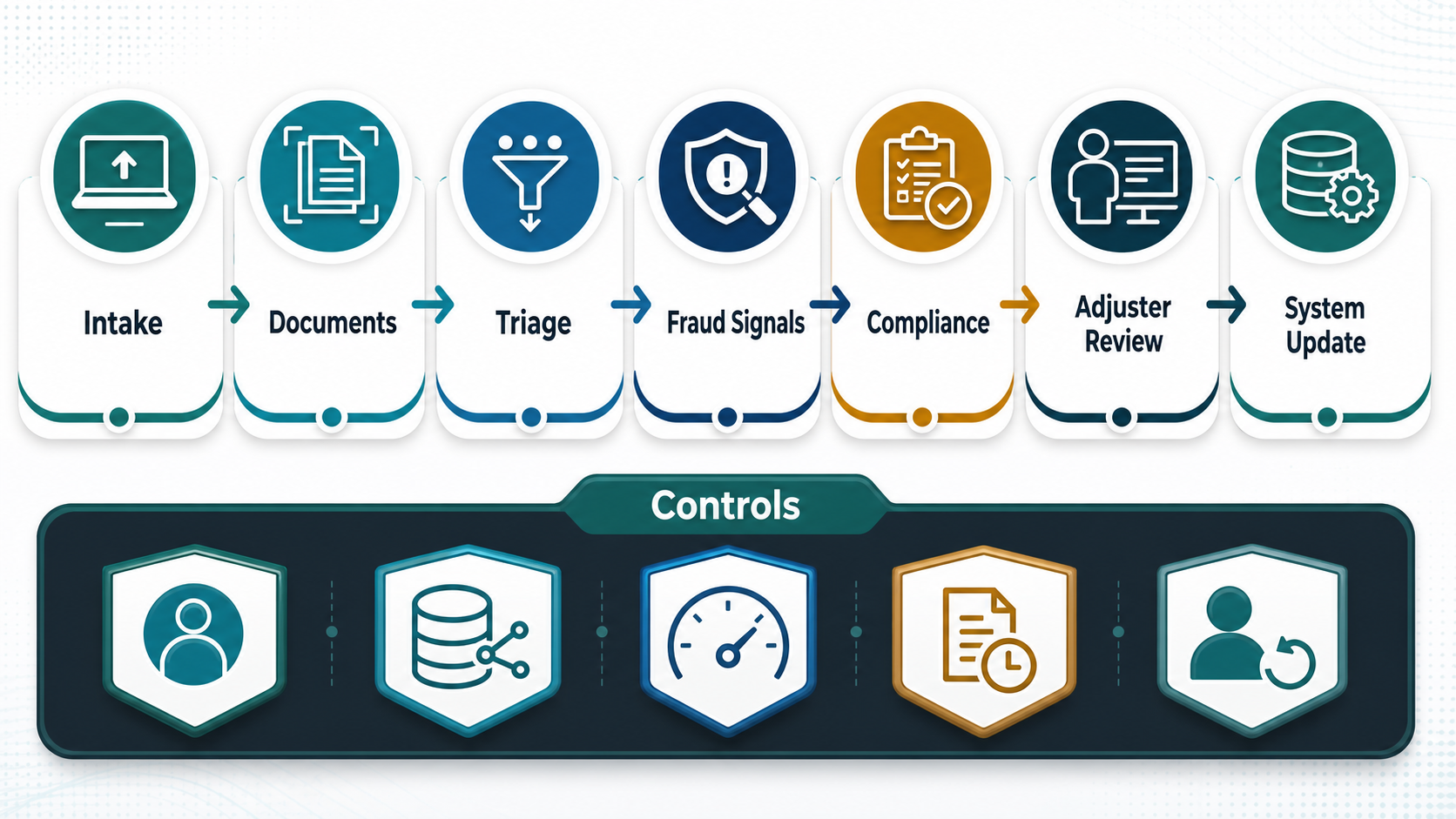
| Routing Event | Automation Can Do | Human Should Own | Evidence To Keep |
|---|---|---|---|
| New claim intake | Validate required fields, detect duplicates, timestamp FNOL, and create the initial case. | Exceptions, coverage ambiguity, unusual claim narratives, and customer-sensitive edge cases. | Submission channel, identity check, duplicate rule, required-field status, and intake timestamp. |
| Document extraction | Classify documents, extract fields, score confidence, and request missing evidence. | Low-confidence fields, conflicting values, handwritten or damaged documents, and coverage interpretation. | Document version, extraction confidence, corrected fields, reviewer ID, and downstream system update. |
| Fraud or compliance signal | Surface red flags, group related evidence, prioritize review queues, and summarize case context. | Investigation disposition, claim delay or denial decisions, regulatory notice language, and escalation. | Signal dictionary, threshold, supporting evidence, model or rule version, reviewer notes, and override reason. |
| Core claims update | Write status, task, document, reserve, communication, and payment events to approved systems. | Settlement authority, reserve approval, payment release, complaints, appeals, and unusual reconciliation. | API response, retry log, reconciliation result, role permission, approval chain, and rollback note. |
Build Vs. Buy Decision Criteria
Buy when the organization needs a broad claims platform, standard workflow support, vendor-maintained compliance updates, and mature product features faster than an internal team can build them. Build when the differentiating workflow is specific to the insurer, the existing system needs a custom bridge, the data model is unusual, or the first automation scope is a targeted module around an existing core.
A hybrid approach is often strongest. Keep the system of record stable, then build focused automation around intake, document processing, AI-assisted triage, customer communications, analytics, or adjuster work queues. This reduces replacement risk while improving the highest-friction steps.
Use the decision as an architecture choice, not a procurement shortcut. If the core platform already handles claim records but not the workflow around them, a custom layer around intake, document understanding, routing, and evidence review can often deliver faster value than replacing the system of record.
| Decision Factor | Prefer Buy | Prefer Build Or Hybrid |
|---|---|---|
| Workflow uniqueness | Standard line-of-business workflow. | Special claims rules, broker workflows, or proprietary operating model. |
| Legacy constraints | Modern core with supported APIs. | Legacy core needs adapters, staged migration, or custom reconciliation. |
| AI/document needs | Basic OCR and standard fields. | Complex documents, custom forms, human correction, or domain-specific triage. |
| Speed | Need broad platform quickly. | Need narrow MVP with measurable ROI. |
| Control | Vendor roadmap is acceptable. | Business wants ownership of rules, data model, experiments, and integrations. |
Implementation Roadmap And KPIs
Start with a discovery sprint. Capture current workflow data, select one claim type, define integration boundaries, identify compliance constraints, and agree on the first KPI baseline. Avoid starting with the hardest claim type or the most politically visible transformation. Choose a workflow with enough volume to matter and enough repeatability to automate responsibly.
Phase 1: map and baseline. Document claim stages, touch count, cycle time, rework, exception reasons, document volume, fraud referral rate, customer contact reasons, and adjuster workload.
Phase 2: automate intake and documents. Add structured FNOL, document upload, extraction, completeness checks, duplicate detection, and missing-information prompts. This is where AI workflow automation can help if it is bounded by clear rules and human review.
Phase 3: add triage and work queues. Route claims by value, severity, expertise, SLA, fraud signal, and coverage complexity. Give adjusters a clean workbench with context and next actions.
Phase 4: integrate and measure. Write status, reserves, payments, communications, documents, and audit events back to the right systems. Track cycle time, automation rate, exception rate, leakage indicators, customer response time, reopen rate, and adjuster productivity. Use the AI Automation ROI Calculator to sanity-check whether time savings and error reduction justify the next release.
How NextPage Can Help
NextPage helps insurance and financial-services teams turn claims automation ideas into scoped, buildable software. The work usually starts with a workflow map, integration inventory, compliance checklist, data-quality review, and MVP plan. From there, we can design intake portals, document processing pipelines, adjuster work queues, fraud signal dashboards, reporting layers, and integration adapters around the systems you already run.
The strongest claims automation programs are not sold as magic AI. They are built as operating systems for better claims decisions: faster intake, cleaner evidence, clearer routing, better auditability, and safer human review.