
Quick Answer: Java To Kotlin Migration For Android Apps
A Java to Kotlin migration for an Android app should be gradual, module-led, and protected by QA. Kotlin and Java can coexist in the same Android application, so most teams do not need a risky big-bang rewrite. The safest path is to audit the codebase, add Kotlin to new development first, convert low-risk modules, protect high-value workflows with regression tests, and then migrate complex areas only when the team has evidence that releases remain stable.
Kotlin is the practical default for new Android work because the Android ecosystem is Kotlin-first, Jetpack libraries are written with Kotlin ergonomics in mind, and modern Android teams increasingly use Kotlin for coroutines, null-safety, data classes, and Jetpack Compose. But a working Java codebase still has business value. NextPage's Android app development company team treats migration as modernization, not as a language conversion exercise.
The right migration plan answers four questions: which modules are safe to convert, which modules should stay Java for now, what tests prove user workflows still work, and how releases continue while migration is happening. If the scope is unclear, use the Custom Software Cost Estimator after mapping module count, test coverage, dependency risk, release goals, and the amount of product work that must continue in parallel.
When Kotlin Migration Is Worth It
Kotlin migration is worth considering when the Android codebase is slowing delivery, new hiring is harder because candidates expect Kotlin, null-related bugs keep recurring, async code is difficult to maintain, or new product work depends on Kotlin-first libraries and Compose. It is also useful when a modernization roadmap already includes architecture cleanup, dependency updates, test coverage, Play Store readiness, or a supportability push.
Do not migrate just because Kotlin is modern. If a stable Java module rarely changes and has weak tests, converting it may create more risk than value. Migration should improve maintainability, developer velocity, release confidence, product capability, or future hiring. If it does none of those, leave that module alone until a real reason appears.
A strong candidate for early migration is actively maintained code with decent tests and clear ownership. New features are also good candidates because they avoid rewriting old behavior. High-risk legacy modules, payment flows, authentication, offline sync, generated code, and deeply coupled Activities should wait until the team understands dependencies and has regression coverage.
What Official Guidance Means For Planning
Kotlin's official Android guidance emphasizes that Kotlin and Java can work together in Android applications. That interoperability is why a phased roadmap is realistic. Android's Kotlin-Java interop guidance also matters because public APIs, nullability, naming, SAM interfaces, and generated signatures affect whether Kotlin and Java code feel natural from both sides.
For product leaders, this means migration does not have to pause feature delivery. The team can add Kotlin to the build, write new modules in Kotlin, convert selected Java files, and keep Java modules working. The engineering cost comes from dependency cleanup, test coverage, Gradle and build adjustments, code review rules, and release validation, not from the language switch alone.
For engineering leaders, the key is to avoid "Java with Kotlin syntax." Android Studio conversion tools can speed up mechanical conversion, but converted files still need review for nullability, data classes, sealed states, coroutines, extension functions, idiomatic collections, and API boundaries. Treat automated conversion as a draft, not a finished migration.
Migration Roadmap
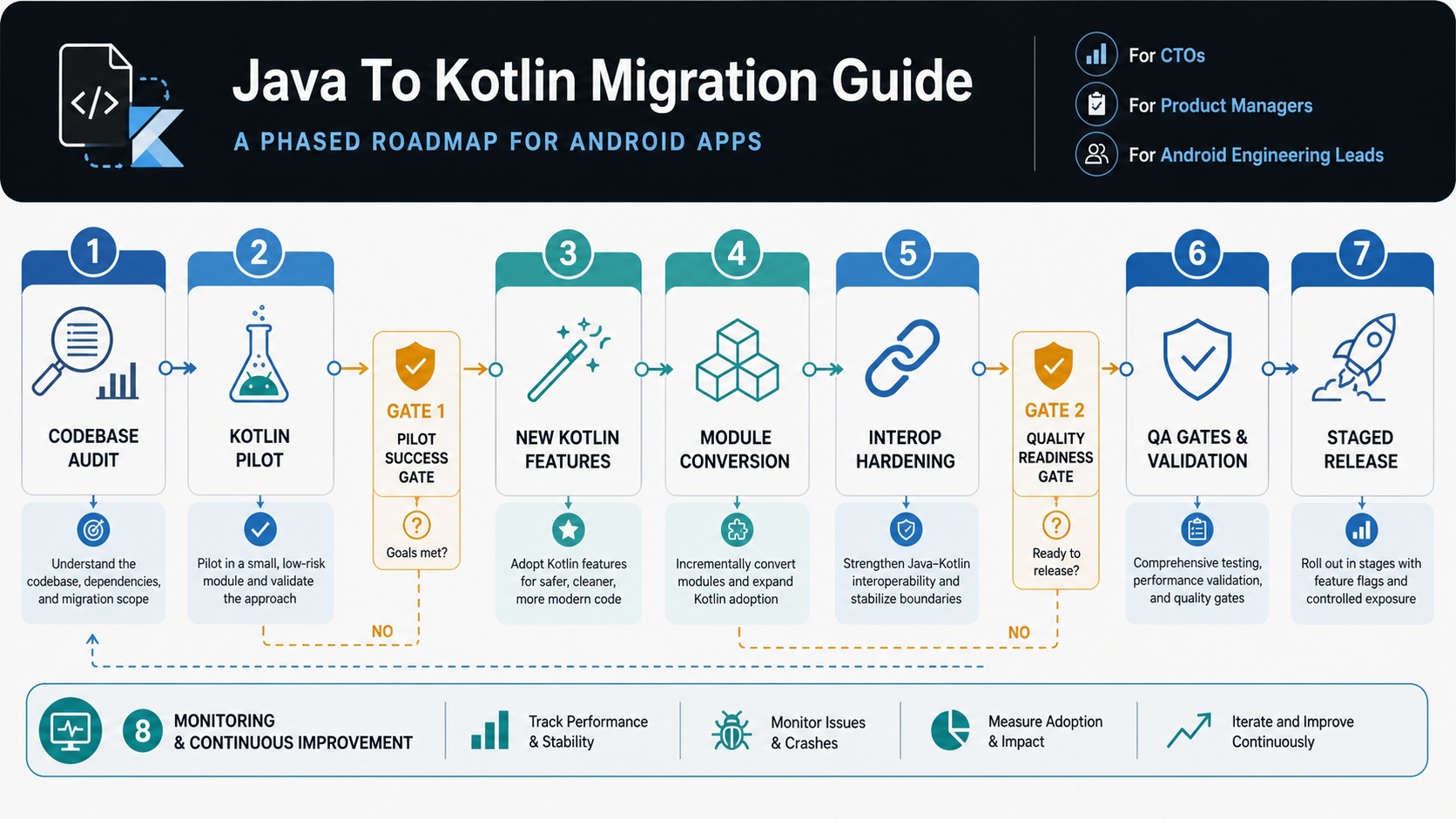
A practical Java-to-Kotlin migration should move through phases. Each phase should leave the app shippable. The goal is not to maximize converted lines of code; it is to improve maintainability without destabilizing users.
| Phase | What To Do | Exit Criteria |
|---|---|---|
| Audit | Inventory modules, screens, dependencies, build plugins, Java language features, test coverage, crash-prone workflows, and release cadence. | The team knows which modules are low, medium, and high migration risk. |
| Pilot | Convert a small, well-tested module or utility area and establish review rules. | Builds remain stable, tests pass, and developers agree on Kotlin style. |
| New Kotlin Work | Write new features, ViewModels, data classes, and Compose-ready screens in Kotlin where appropriate. | Feature delivery continues without forcing a rewrite of old modules. |
| Module Conversion | Convert actively changed modules in batches, especially where Kotlin reduces boilerplate or null-state defects. | Regression coverage proves key workflows still work. |
| High-Risk Migration | Handle payments, auth, offline sync, legacy Activities, generated code, and deep dependencies only after test gates and rollback plans exist. | No critical workflow ships without functional, regression, device, and monitoring coverage. |
If the team needs extra Android capacity, NextPage's hire Android developers model can add Kotlin, QA, backend, or release support without changing the whole delivery structure.
Module Risk Matrix
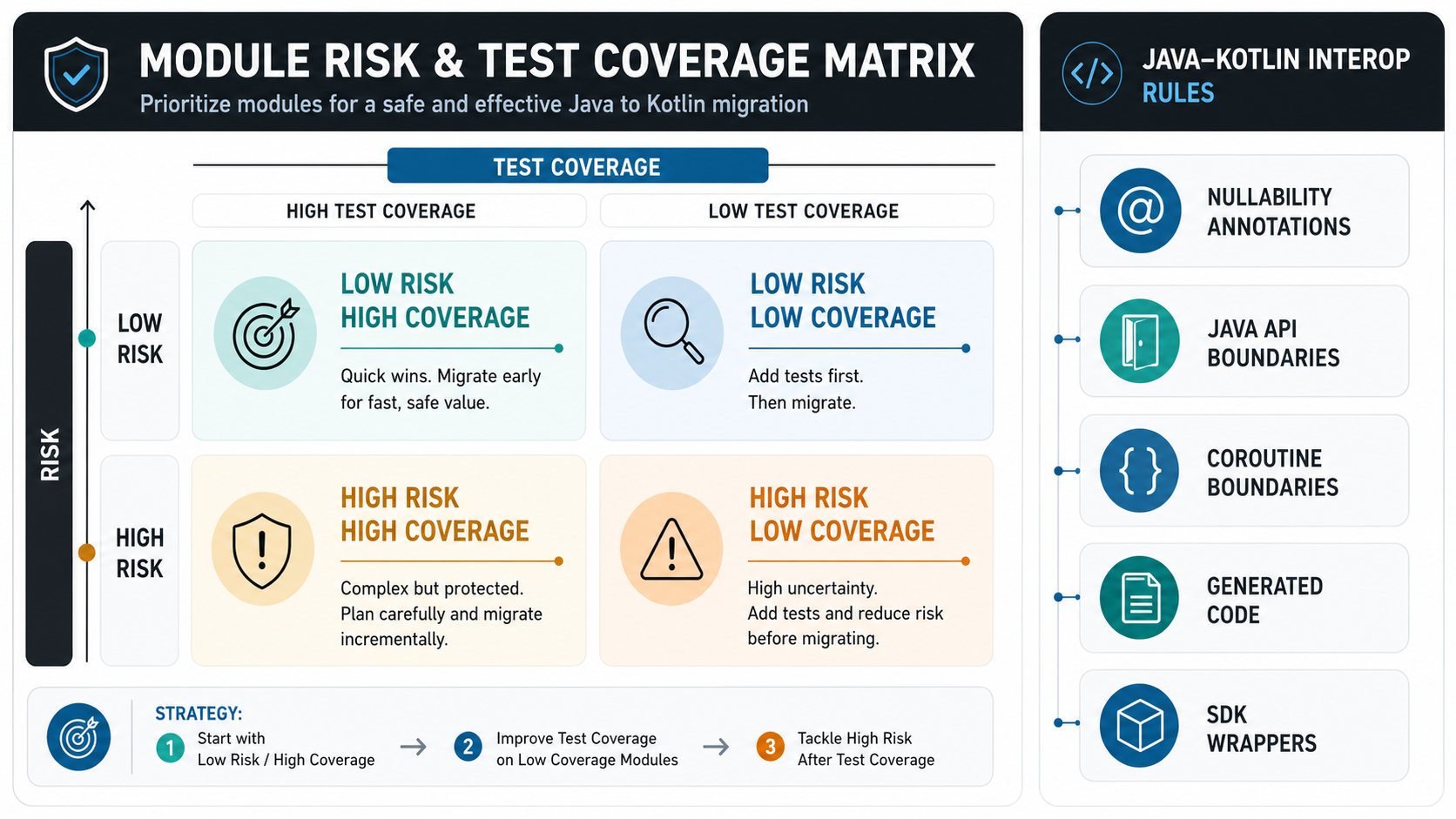
Module selection is where migrations succeed or fail. Low-risk modules build confidence. High-risk modules need planning. Weakly tested modules should often be tested before they are converted.
| Risk Level | Good Candidates | Migration Advice |
|---|---|---|
| Low | Data models, DTOs, simple utilities, isolated helpers, small adapters. | Use these for the pilot and Kotlin style guide. |
| Medium | ViewModels, repositories, networking wrappers, feature modules with tests. | Convert in batches and run targeted regression checks. |
| High | Payment, authentication, offline sync, permissions, legacy Activities, complex generated code. | Add tests first, convert with rollback, and monitor crashes closely. |
| Defer | Stable Java modules that rarely change, poorly understood code, brittle vendor SDK integrations. | Leave them alone until product work or risk reduction justifies conversion. |
Migration Readiness Checklist
Before the first conversion batch, confirm that the migration is ready to absorb real release risk. A checklist prevents the team from confusing language conversion with product modernization.
- Module inventory: modules, screens, owners, dependencies, generated code, and vendor SDKs are visible.
- Test baseline: the team knows which critical workflows already have unit, integration, functional, regression, and device coverage.
- Build health: Gradle plugins, CI jobs, dependency versions, static analysis, and release signing paths are stable enough for mixed Java/Kotlin work.
- Interop rules: nullability, Java-facing Kotlin APIs, coroutine boundaries, extension functions, companion objects, and package naming standards are documented.
- Release plan: conversion batches are tied to release windows, feature flags, staged rollout, crash monitoring, and rollback ownership.
- Business priority: product leaders know which feature work continues during migration and which modernization items are intentionally deferred.
If the migration is part of a larger platform decision, compare it with the native vs cross-platform mobile app development guide before coupling Kotlin migration with a broader rewrite.
QA Gates Before And After Migration
Kotlin migration is a refactor from the user's point of view. That means the release must prove nothing important broke. The QA plan should include build verification, unit tests, API contract checks, screen workflows, permissions, network conditions, crash monitoring, and device coverage. Use NextPage's mobile app testing services when the migration needs dedicated release evidence.
At minimum, protect login, onboarding, checkout or payment flows, push notifications, offline behavior, permissions, and any workflow tied to revenue or support. A mobile app can pass simulator checks and still fail on older OS versions, slow devices, background state, or unreliable networks. The mobile app QA and launch checklist is a useful release gate for these risks.
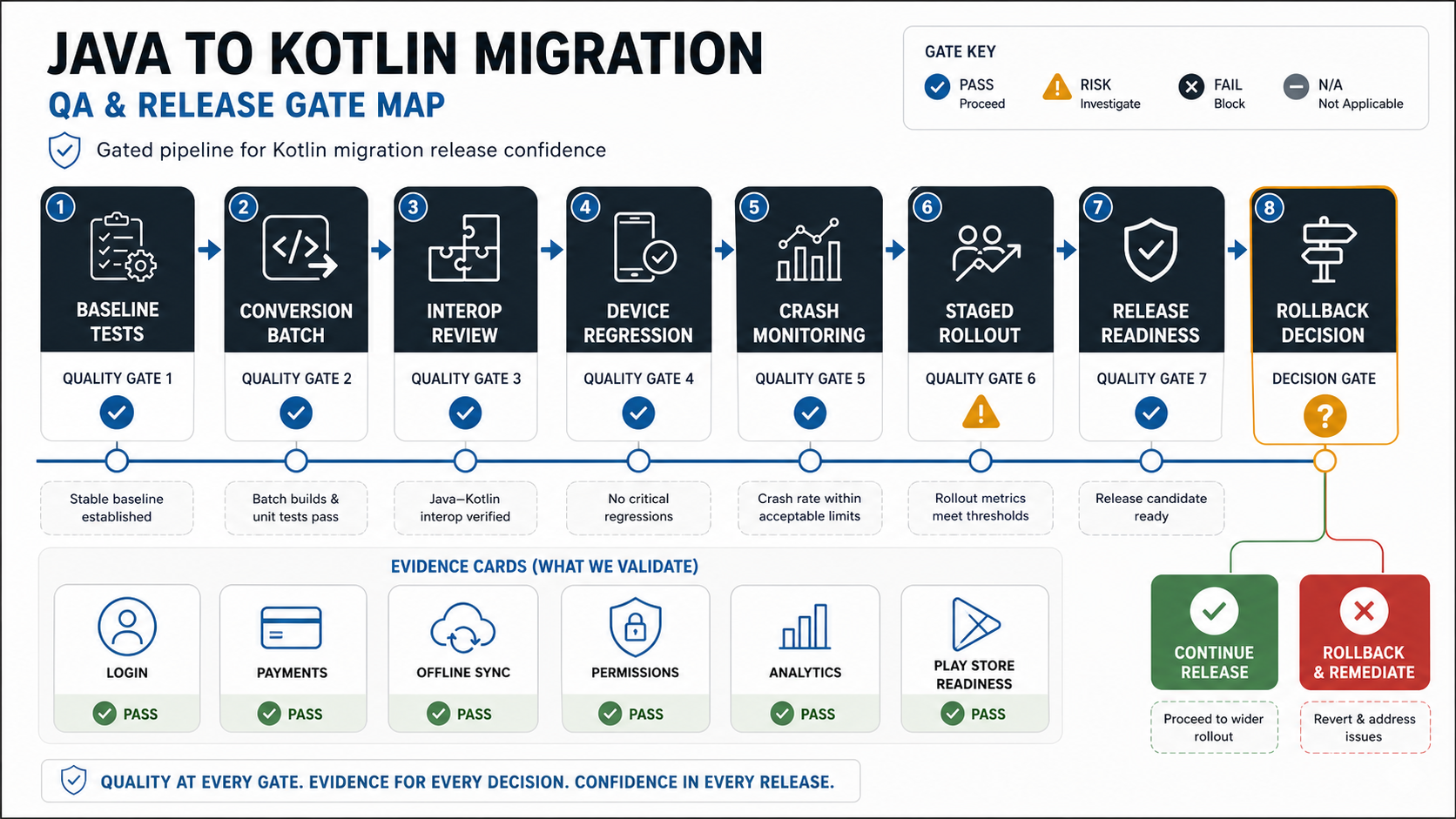
Regression testing should be scoped by changed modules. If a repository conversion affects multiple screens, test all dependent flows. If a UI module changes, test layout, accessibility, state restoration, and analytics. NextPage's regression testing checklist can help define what must be rerun after each conversion batch.
Java-Kotlin Interop Rules To Set Early
Interop is what makes gradual migration possible, but it also needs standards. Decide how Kotlin APIs will appear to Java callers, how nullability annotations will be handled, when to use companion objects, how to name top-level functions, and when extension functions are acceptable. Without these rules, the codebase can become technically Kotlin-compatible but awkward for teams still touching Java modules.
Review public interfaces carefully. A Kotlin class that looks clean from Kotlin may expose surprising names or null behavior from Java. A Java API with unclear nullability can force defensive Kotlin code everywhere. Migration reviews should therefore check both directions: how Kotlin calls Java and how Java calls Kotlin. This is especially important for shared domain models, repositories, SDK wrappers, and modules consumed by more than one team.
Use a small Kotlin style guide before the first large conversion batch. It should cover null-safety expectations, coroutine usage, collection handling, data classes, sealed results, error handling, logging, dependency injection, and test naming. The style guide prevents every migrated file from becoming a one-off interpretation of Kotlin.
Compose, Refactor, And Modernization Sequencing
Many teams want to combine Kotlin migration with Jetpack Compose, architecture cleanup, dependency upgrades, API refactors, or design refreshes. That can be sensible when the business outcome is clear, but it increases release risk. If every layer changes at once, defects become harder to diagnose and rollback becomes less credible.
A safer sequence is to convert or isolate one concern at a time. For example, add Kotlin and style rules first, convert utilities and ViewModels, stabilize repository boundaries, then introduce Compose in a self-contained screen or feature. If the team must refactor architecture during migration, define a stronger QA gate and avoid bundling unrelated UI redesign work into the same release.
For mobile teams already planning a broader modernization roadmap, NextPage's mobile app development services can connect Kotlin migration with backend APIs, admin workflows, analytics, QA, Play Store readiness, and post-launch support instead of treating the Android codebase in isolation.
Team Roles For A Safe Migration
A Java-to-Kotlin migration can be handled by a small team when the codebase is simple. Larger apps need clearer roles. A technical lead should own migration rules and module sequencing. Android engineers should convert and review modules. QA should define regression gates. A release owner should decide when conversion work can ship. Product should protect feature priorities so migration does not become invisible engineering churn.
If the existing team is already busy with product releases, add capacity instead of forcing migration into spare time. A practical migration pod may include one senior Android engineer, one Android engineer, QA support, and part-time backend or DevOps help when APIs, build pipelines, or analytics are affected. The goal is not a large team; it is enough focused capacity to migrate without slowing critical product work.
Common Migration Mistakes
The most common mistake is measuring progress by converted file count. A converted file that creates regressions is not progress. Track safer metrics: module risk reduced, null-related defects reduced, build stability, test coverage, release confidence, crash rate, and developer cycle time.
Another mistake is mixing too many modernization goals into one phase. Kotlin migration, Compose adoption, architecture refactoring, dependency upgrades, backend contract changes, and design refreshes can all be valuable. Doing all of them at once makes it hard to debug failures. Bundle changes only when the business reason is strong and the QA plan can absorb the risk.
The third mistake is ignoring stable Java modules. A module that works, rarely changes, and has weak tests may not be worth converting immediately. Let the roadmap focus on actively maintained areas, new features, and modules where Kotlin reduces real maintenance pain.
Cost And Timeline Drivers
Java-to-Kotlin migration cost depends on module count, architecture quality, test coverage, release cadence, dependency risk, team familiarity, and how much modernization is bundled into the work. A small migration with clean modules and good tests is very different from a legacy Android app with old Gradle plugins, mixed architecture, weak tests, vendor SDK constraints, and urgent feature delivery.
The biggest cost driver is not converting syntax. It is protecting the product while conversion happens. Teams pay for audit, setup, style rules, code review, dependency cleanup, test writing, QA, crash monitoring, and release coordination. If the migration also introduces Compose, coroutines, architecture changes, or API refactors, treat that as a larger modernization project.
A practical budget should separate discovery, pilot conversion, feature migration, high-risk module migration, QA, and post-release monitoring. That makes it easier to pause after the pilot if the value is not clear, or to accelerate when the migration improves delivery velocity. For adjacent Android budget planning, compare the migration scope with the Android app development cost guide or run the Custom Software Cost Estimator with module, QA, backend, and release assumptions.
How NextPage Plans Android Migration
NextPage starts with an Android modernization assessment: codebase structure, Java/Kotlin mix, module boundaries, dependencies, crash history, test coverage, release cadence, and product roadmap. We then classify modules by migration risk and define a phased plan that keeps the app shippable.
The delivery model may include Android engineers, QA, backend support, and release coordination. For some apps, the right first step is Kotlin for new features. For others, the right first step is test coverage and dependency cleanup. For high-risk legacy apps, migration should be tied to a broader mobile app modernization roadmap.
If your Android app is still Java-heavy, the goal is not to chase a language trend. The goal is to make the codebase easier to maintain, safer to release, and more compatible with modern Android product work. Start with a scoped modernization review, then decide whether the first milestone is Kotlin for new development, a pilot conversion, QA coverage, dependency cleanup, or a production release plan.