
Quick Answer: Doctor Appointment Booking App Features
A doctor appointment booking app should make it easy for patients to find the right provider, choose an available slot, prepare for the visit, receive reminders, attend in person or by video, pay securely, and follow up after care. The best feature set also helps clinics manage schedules, reduce no-shows, protect health data, and understand demand across locations and specialties.
For most healthcare teams, the first release should include patient registration, provider search, doctor profiles, real-time availability, appointment booking, rescheduling, automated reminders, intake forms, secure payments, ratings, admin controls, and analytics. Telemedicine, EHR integration, prescription workflows, insurance checks, and AI-assisted capacity planning can follow once the core scheduling flow is stable and governed.
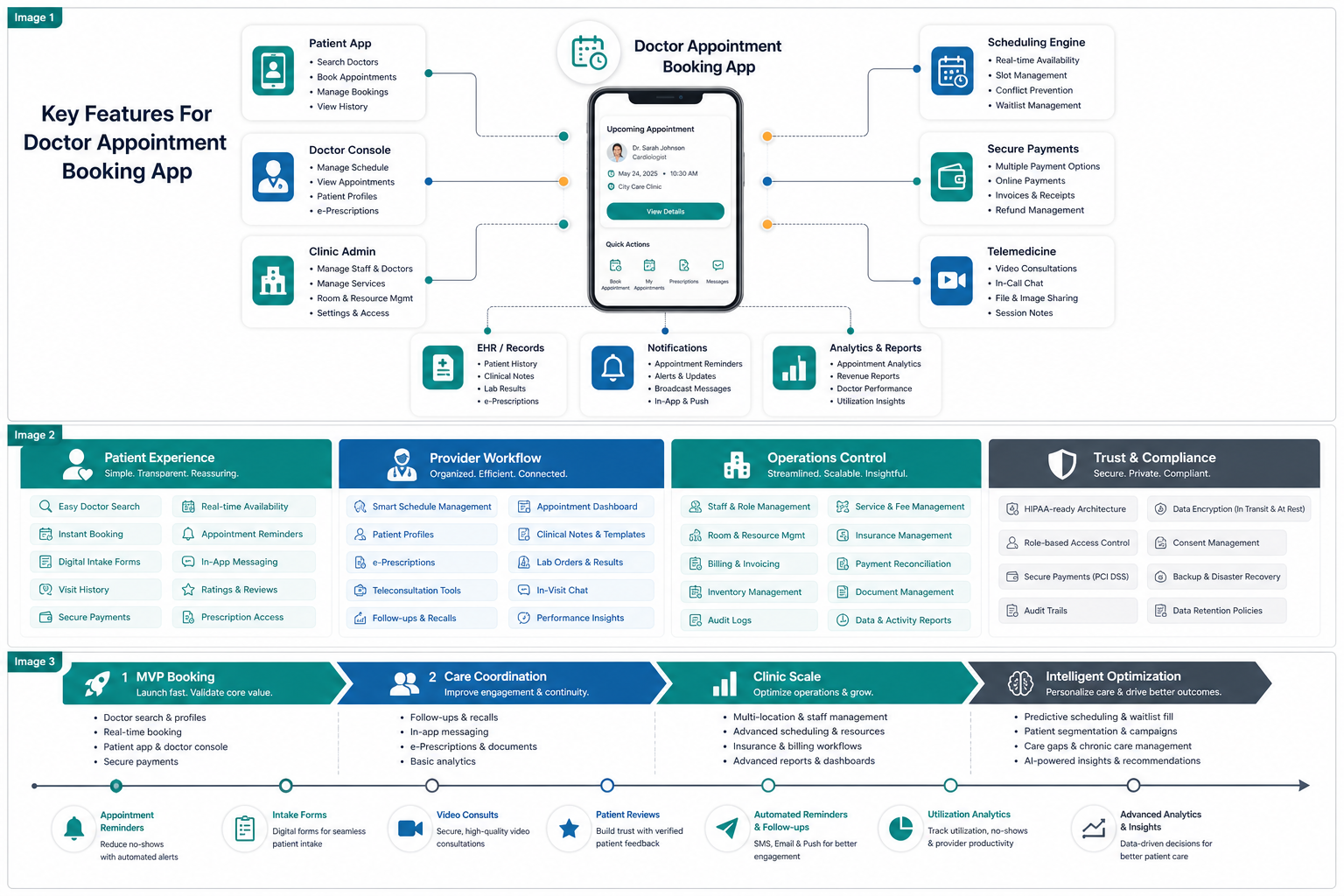
Why Feature Prioritization Matters
Healthcare scheduling looks simple from the patient side, but the product sits between patient expectations, provider availability, clinic operations, billing, privacy, and follow-up care. A weak app may still let someone book a slot, but it can create double bookings, incomplete intake, missed appointments, staff rework, and poor patient confidence.
This is why feature planning should happen during mobile app development, not after screens have already been designed. A useful roadmap separates launch-critical booking features from operational, compliance, and growth features, then connects each feature to a measurable clinic outcome.
Core Feature Stack For Doctor Appointment Apps
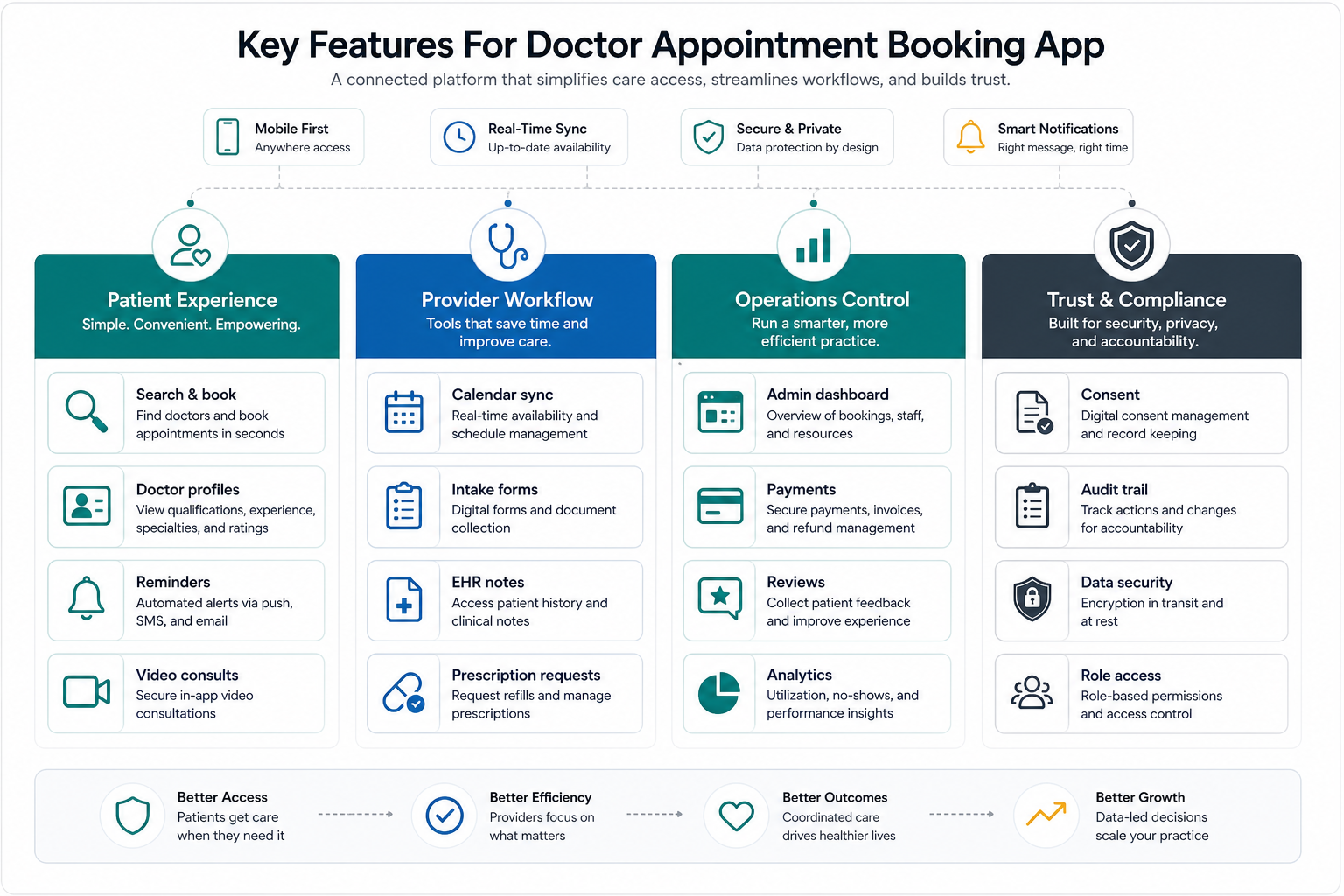
| Feature Area | What It Should Do | Launch Priority |
|---|---|---|
| Patient onboarding | Create an account, verify contact details, manage family profiles, and capture basic preferences. | Must have |
| Provider discovery | Search by specialty, location, language, insurance, availability, consultation type, and rating. | Must have |
| Real-time scheduling | Show accurate slots, prevent double booking, support rescheduling, and sync clinic calendars. | Must have |
| Reminders and notifications | Send appointment confirmations, pre-visit reminders, delay alerts, and follow-up prompts. | Must have |
| Doctor and clinic console | Let staff manage availability, appointment status, patient intake, notes, and queue changes. | Must have |
| Telemedicine | Support secure video visits, consent capture, files, prescriptions, and post-consult follow-up. | Second phase |
| Analytics | Track no-shows, utilization, booking conversion, specialty demand, and patient satisfaction. | Growth stage |
Patient Experience Features
The patient app should reduce friction before the appointment starts. Prioritize simple sign-up, clear specialty navigation, doctor profiles, location filters, available time slots, appointment confirmation, saved patient details, family member profiles, documents, language preference, and appointment history. The booking flow should show consultation type, expected fee, clinic address, cancellation policy, and what the patient needs to bring.
Strong doctor profiles are especially important because patients are making a trust decision. Include specialty, qualifications, experience, clinic location, consultation modes, languages, accepted payment methods, and verified reviews. For a broader build path, pair this feature work with how to develop a doctor appointment booking app.
Scheduling, Reminders, And No-Show Control
Scheduling is the operating core of the product. The app should read current availability, apply slot rules, handle buffer time, prevent overlapping appointments, allow staff overrides, and support rescheduling without losing the audit trail. Multi-location clinics also need provider rosters, holiday calendars, room constraints, and visit-type rules.
Automated reminders reduce missed visits when they are specific and well-timed. Use confirmation messages immediately after booking, reminders before the visit, pre-visit instructions, delay alerts, and post-visit follow-ups. For a deeper feature breakdown, see scheduling and reminders in doctor appointment booking apps.
Provider And Clinic Workflow
A booking app needs a provider-side workflow, not just a patient-side calendar. Doctors and staff should be able to view daily appointments, update status, see intake details, request documents, add notes, trigger follow-ups, and coordinate room or queue changes. Admin users need controls for specialties, providers, appointment lengths, locations, pricing, cancellation windows, and communication templates.
This is often where packaged scheduling tools become limiting. If a clinic needs custom intake, insurance checks, EHR handoff, billing rules, or multi-location workflows, custom software development can be a better fit than forcing operations into a generic booking tool.
Telemedicine, Records, And Prescriptions
Telemedicine turns appointment booking into a care delivery surface. The app should support secure video sessions, consent capture, file sharing, pre-consult forms, visit summaries, prescriptions, refill requests, and follow-up instructions. The product should also define what happens when a patient joins late, a doctor is delayed, connectivity fails, or a visit needs to move from video to in-person care.
EHR or patient-record integration should be scoped carefully. Start with the fields needed for safe scheduling and intake, then expand into deeper clinical workflows only when permissions, audit trails, and data ownership are clear. For cost and architecture planning across healthcare product types, use the healthcare app development cost guide.
Trust, Privacy, And Compliance Controls
Healthcare apps handle sensitive information, so trust controls need to be part of the first build. The app should include secure authentication, role-based access, encrypted data handling, consent capture, audit logs, privacy notices, breach-response planning, session controls, and clear data-retention rules. For U.S. healthcare products, teams should evaluate HIPAA, telehealth privacy, FTC health-app guidance, and state-level obligations with qualified legal and compliance support.
Product teams should also design for operational transparency. Staff should know who changed a slot, who accessed a record, why a cancellation happened, and whether reminders were delivered. These controls make the system easier to support and safer to scale.
Payments, Reviews, And Patient Support
Payments should be clear before booking. Show consultation fees, taxes, payment methods, refund rules, insurance disclaimers, and cancellation charges before the patient confirms. After the appointment, the app can support invoices, receipts, review requests, follow-up messages, and support tickets.
Reviews and feedback should be moderated and useful. Verified patient feedback can improve provider selection, but the app should also route service complaints, wait-time problems, and billing issues to the right staff workflow. For effort planning around payments, roles, integrations, and admin complexity, the Custom Software Cost Estimator gives a directional starting point.
MVP-To-Scale Feature Roadmap
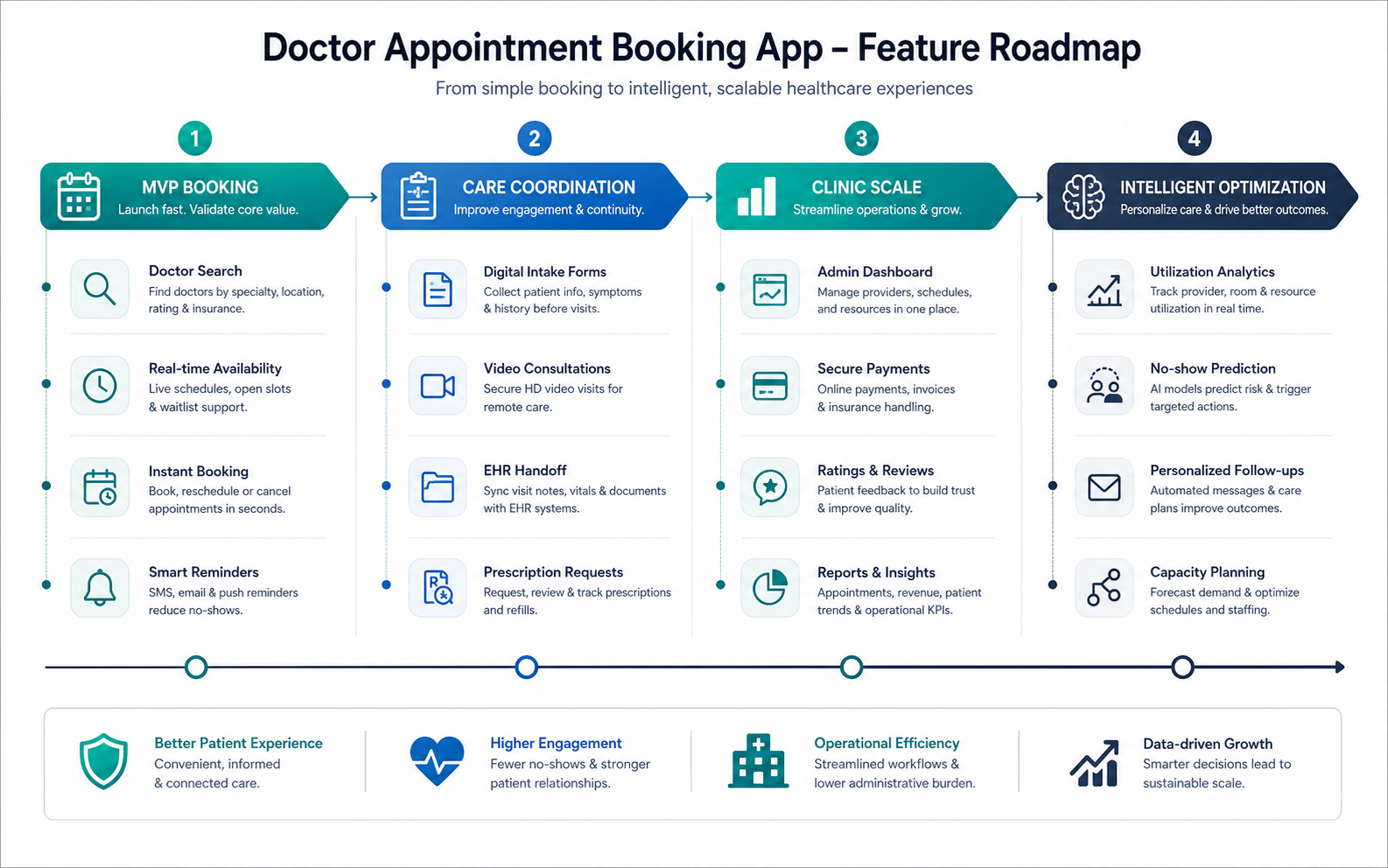
- MVP booking: patient account, doctor search, profiles, real-time slots, booking, rescheduling, notifications, and basic admin controls.
- Care coordination: intake forms, documents, visit instructions, video consultation, prescriptions, and follow-up tasks.
- Clinic scale: multi-location scheduling, staff permissions, payments, reviews, dashboards, calendar sync, and EHR handoff.
- Intelligent optimization: no-show prediction, capacity planning, personalized follow-ups, demand forecasting, and service-line analytics.
If the first release scope is still unclear, the MVP Scope Builder can help separate must-have booking features from later roadmap items. For healthcare workflow proof points, the CareGrid healthcare field operations case study shows how scheduling, staff coordination, and operational visibility can be treated as one system.
Metrics To Track After Launch
The most useful metrics connect patient behavior with clinic performance. Track search-to-booking conversion, booking completion, no-show rate, reschedule rate, appointment lead time, provider utilization, reminder delivery, wait-time complaints, support volume, payment failures, patient satisfaction, and repeat booking rate.
These measurements help the team decide what to build next. If no-shows remain high, improve reminders and cancellation flows. If provider utilization is uneven, adjust availability and routing. If support volume rises, improve appointment instructions, payment clarity, and status notifications.
Final Recommendation
Build the doctor appointment booking app around the full scheduling lifecycle: find care, choose the right provider, book a reliable slot, prepare for the visit, attend in person or online, pay clearly, follow up, and learn from the data. Start with a dependable booking and reminder system, then expand into telemedicine, records, prescriptions, analytics, and intelligent operations once the foundation is stable.