
Quick Answer: Should You Maintain, Migrate, Or Rebuild A Legacy Hybrid App?
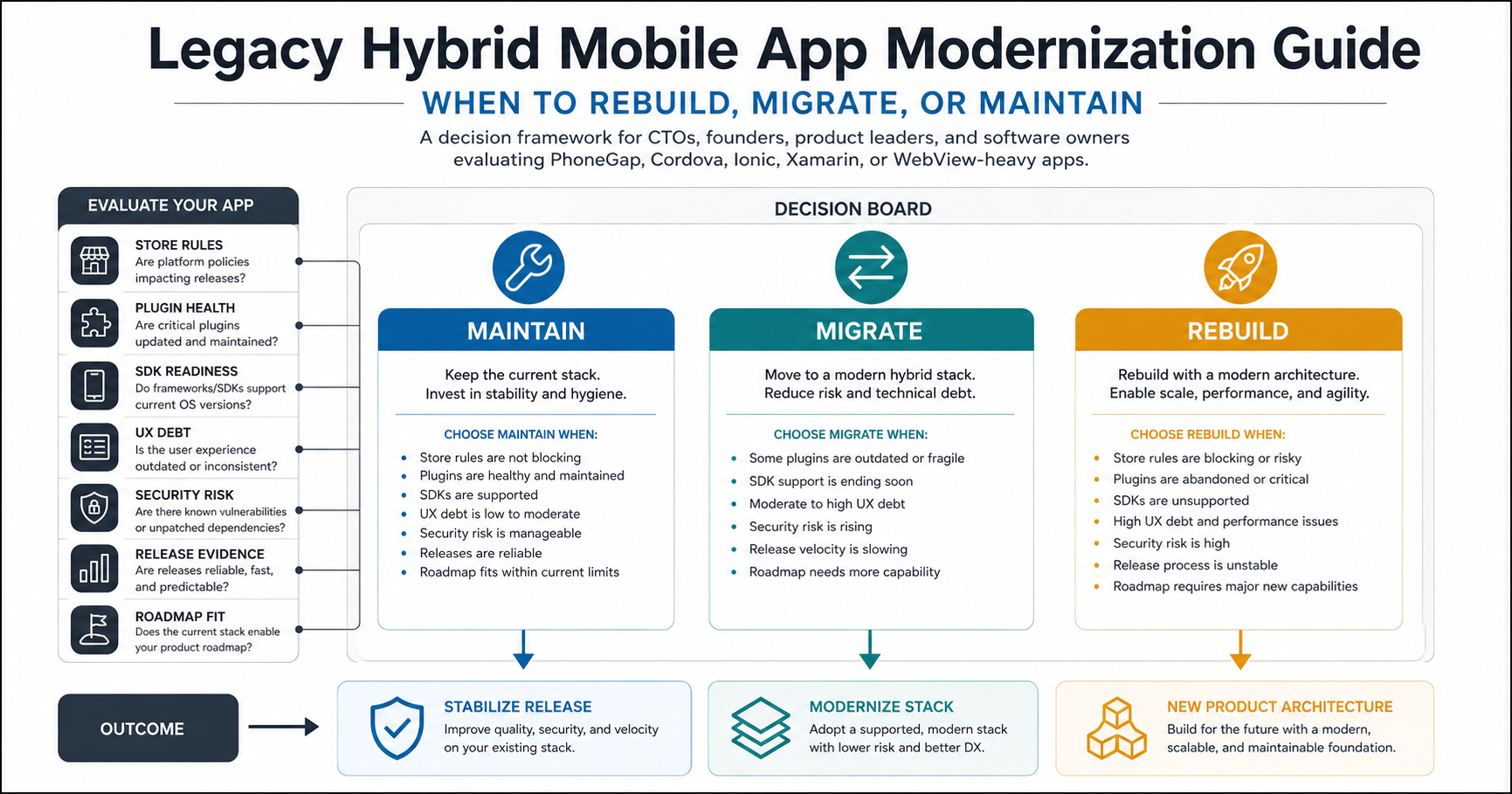
A legacy hybrid mobile app should be maintained only when it still builds from a clean environment, passes current store submission checks, has manageable security exposure, and can support the business roadmap for the next 6 to 12 months. It should be migrated when the product is still valuable but the framework, plugin layer, SDK version, or build pipeline is creating release risk. It should be rebuilt when the app architecture, UX, offline model, performance, or security posture no longer fits the product you need to ship.
This decision is not a preference for native, hybrid, or cross-platform development. It is a risk and ROI decision. Teams with older PhoneGap, Cordova, Ionic, Xamarin, or WebView-heavy apps need to know whether the smallest safe step is a maintenance sprint, a controlled migration, or a product rebuild. A focused hybrid app migration assessment and the Legacy Software Modernization Scorecard can turn that choice into a practical decision memo.
Why Legacy Hybrid Apps Become Risky In 2026
Hybrid apps age differently from standard web products. A web product can often be patched on the server. A mobile app also depends on native SDKs, store rules, signing credentials, device APIs, plugin maintainers, build images, crash behavior, privacy disclosures, and user update behavior. A small dependency gap can block a release even when the JavaScript product still looks usable.
Current platform requirements make the risk visible. Google Play states that new apps and updates must target Android 15, API level 35, or higher from August 31, 2025, with availability limits for apps that target older API levels. Apple says apps uploaded to App Store Connect since April 28, 2026 must be built with Xcode 26 or later using current platform SDKs. These are not abstract policy notes. They expose old Gradle setups, stale Cordova Android packages, outdated iOS project settings, abandoned plugins, privacy manifest gaps, and cloud build services that have not kept up.
The hidden operational debt is usually broader than the framework. Teams inherit plugins that no longer receive updates, native code nobody owns, undocumented certificates, old analytics and push SDKs, weak local storage practices, brittle WebView bridges, missing device coverage, and a release process that depends on one engineer's laptop. Modernization starts by making those risks explicit.
The Maintain, Migrate, Or Rebuild Decision Matrix
| Path | Best Fit | Warning Signs | Typical Outcome |
|---|---|---|---|
| Maintain | The app is stable, low-change, and needs dependency updates, certificates, SDK compatibility, crash fixes, or store submission work. | Plugin fixes are small, crash rates are acceptable, UX debt is contained, and the roadmap does not require major native capability changes. | A short stabilization sprint, documented build process, release checklist, monitoring, and a date to reassess. |
| Migrate | The product still works for users, but Cordova, PhoneGap, Ionic, Xamarin, plugins, or build tooling are slowing releases or blocking compliance. | Plugins are outdated, native projects are fragile, SDK support is tight, but the user flows and backend model still make sense. | A move to Capacitor, React Native, Flutter, native shells, or another maintainable target, with staged releases and rollback. |
| Rebuild | The app needs a new UX, better performance, stronger security, offline redesign, or a roadmap the old architecture cannot support. | Every change needs workarounds, users feel poor performance, security review fails, or product assumptions have changed. | A new product architecture, cleaner app experience, careful data migration, and a long-term delivery path. |
The mistake is treating migration as the automatic middle option. Some apps only need disciplined maintenance. Others should not be migrated because the old app's product assumptions are the real problem. Use evidence before choosing.
Modernization Triggers To Review Before You Estimate Work
Before estimating cost or choosing a target stack, review the triggers that can make a legacy hybrid app unsafe to keep in place. A single trigger may be manageable. Several together usually mean the team needs a modernization plan, not a patch queue.
- Store submission pressure: Android target API, iOS SDK, privacy manifest, signing, permissions, data safety, and app review requirements cannot be handled at the end of the project.
- Plugin health: Camera, location, files, push, payments, auth, biometrics, and background execution plugins need ownership, update paths, and replacement options.
- Build reproducibility: The app should build from documented versions on a clean machine, not only on an old developer laptop or retired CI image.
- Security and privacy exposure: Check local data storage, token handling, API transport, logging, whitelist rules, third-party SDKs, and mobile threat model coverage.
- UX and performance debt: Slow startup, brittle navigation, poor accessibility, device-specific layout bugs, or weak offline behavior can make a rebuild more economical than migration.
- Roadmap fit: If upcoming features require deeper native capability, AI workflows, new payments, more offline state, or stronger security, the old architecture may become the bottleneck.
When Maintaining The Existing App Is Enough
Maintenance is reasonable when the app is still technically understandable, the business value is stable, and the risk is contained. Good candidates include internal field apps, support-mode customer apps, small active-user-base products, and apps where the next release only needs store compliance, dependency updates, crash fixes, certificate cleanup, or minor UI adjustments.
Before choosing maintenance, verify that the app can build from a clean machine, dependencies can be updated without breaking core flows, signing credentials are controlled, target SDK and minimum SDK settings are clear, push notifications still work, payment or auth SDKs are supported, and production crashes can be reproduced. The mobile app maintenance checklist is the right operating model for this path.
Maintenance should still have an exit condition. Define what would force migration or rebuild: an abandoned plugin, a failed store submission, a security finding, a crash threshold, or a roadmap item that cannot be delivered cleanly. Without that line, maintenance becomes unmanaged deferral.
When Migration Is The Better Path
Migration is the right middle path when the product still works for users but the technical platform is the bottleneck. A common example is a Cordova or PhoneGap app whose workflows remain valuable, but whose plugins, Android project, iOS project, Gradle settings, or build service no longer keep up with store requirements.
A migration plan should start with inventory, not code changes. List every plugin, native permission, device API, push flow, auth flow, payment flow, offline behavior, deep link, analytics event, crash-reporting SDK, and backend endpoint. Mark each item as keep, replace, remove, or rebuild. Then decide whether the target is Capacitor, React Native, Flutter, native iOS and Android, or a phased web-plus-native model.
If the app is specifically moving from Cordova to Capacitor, use the narrower Cordova To Capacitor Migration Checklist for plugin mapping, native project rebuilds, app-store releases, and rollback planning. If the team wants a shared JavaScript codebase but needs stronger native boundaries, NextPage's React Native app development services page can help compare the tradeoffs.
When Rebuild Is Safer Than Migration
Rebuild becomes safer when the existing app's architecture prevents the business from making the product good. Warning signs include slow startup, poor offline behavior, fragile WebView bridges, screens that cannot match modern UX expectations, data models that do not fit current workflows, security controls that were bolted on late, and a release process that nobody trusts.
A rebuild does not have to mean a risky big-bang replacement. The safer version is staged product modernization: preserve the flows users depend on, rebuild the highest-risk journeys first, migrate accounts and data carefully, and run old and new versions only as long as the support model is clear. The decision should include backend APIs, admin tools, customer support workflows, analytics, and rollout communication, not only mobile screens.
For native iOS economics, the Swift app development cost guide explains cost drivers for Apple-platform rebuilds. For broader mobile budgets, use the mobile app development cost in 2026 guide and the custom software cost estimator after the audit has exposed the risky surfaces.
Legacy Hybrid App Audit Checklist
Before deciding, run a short audit with evidence. The output should be a decision memo, not a vague technical-debt complaint. Score each area as ready, investigate, or modernize, then choose the path that minimizes release risk and wasted rebuild work.
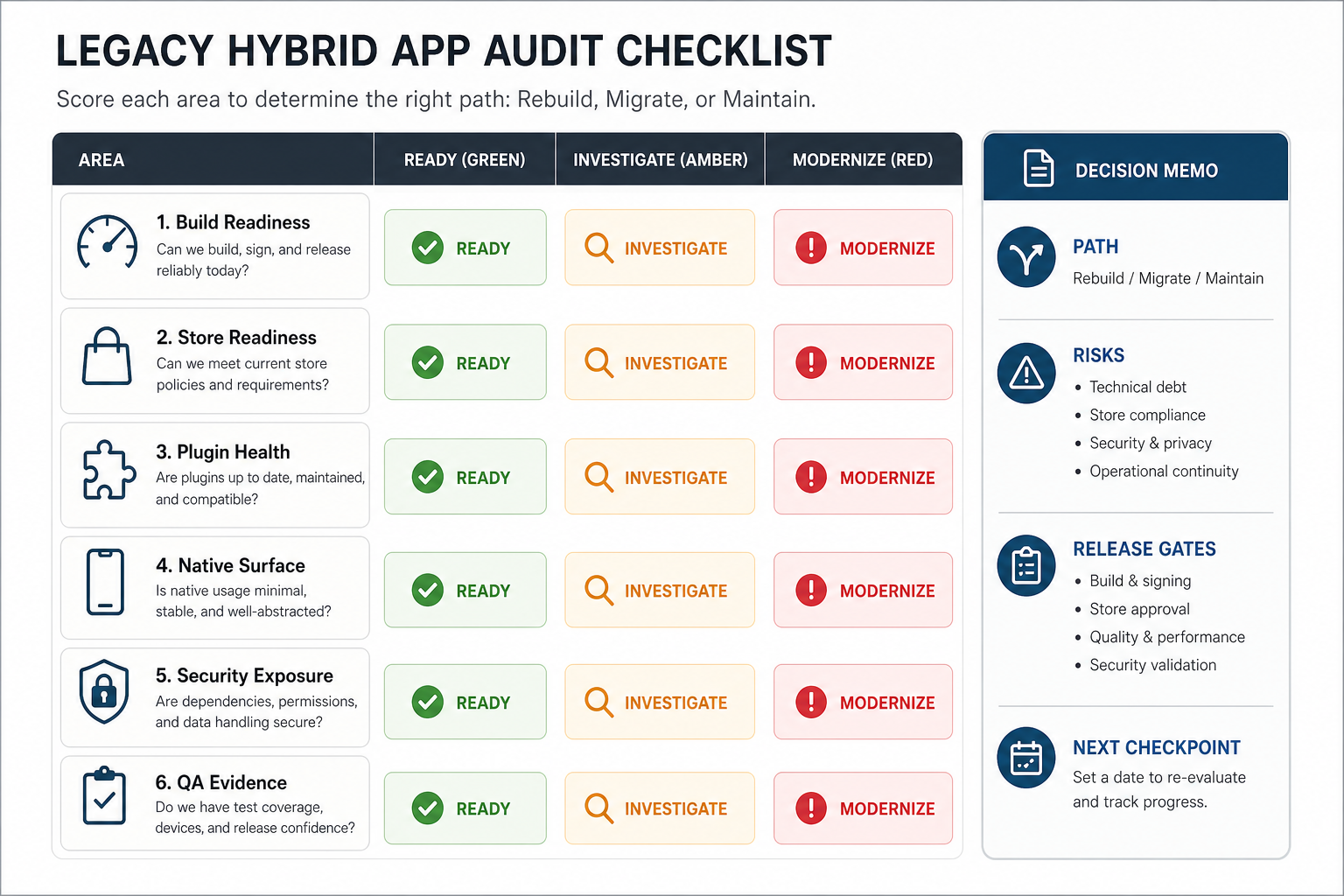
- Build readiness: Can the app build from a clean machine with documented versions, signing steps, environment variables, and CI requirements?
- Store readiness: Does Android target API, iOS SDK, privacy metadata, permissions, age rating, and review evidence meet current submission expectations?
- Plugin health: Which plugins are maintained, forked, replaced, security-sensitive, or no longer needed?
- Native surface: Which flows depend on camera, location, Bluetooth, files, notifications, biometrics, payments, background execution, or platform-specific UI?
- UX and performance: Where do users feel slow startup, clunky navigation, poor accessibility, poor offline behavior, or device-specific bugs?
- Security: What data is stored locally, which APIs are exposed, how auth tokens are handled, and what mobile security checks exist?
- QA evidence: Which devices, OS versions, network states, roles, permissions, upgrade paths, and rollback paths are tested before release?
- Business roadmap: Which upcoming features are cheap in the current stack, expensive but possible, or blocked completely?
For release evidence, combine this audit with the Mobile App QA and Launch Checklist or a focused mobile app testing services review. Hybrid modernization fails when teams test only the happy path and discover plugin, permission, or store-submission failures too late.
What Drives The Cost Of Hybrid App Modernization?
The cost depends less on the framework name and more on the number of risky surfaces. Budget drivers include plugin count, custom native code, payment or identity integrations, offline storage, role complexity, backend API quality, device coverage, data migration, app-store release history, compliance requirements, and how much UX redesign is needed.
A maintenance sprint might focus on dependency updates, SDK compatibility, crash fixes, release evidence, and a store submission. A migration may require plugin replacement, native shell rebuilds, permission updates, build pipeline changes, QA across devices, staged rollout, and rollback planning. A rebuild adds product discovery, UX redesign, architecture decisions, backend changes, data migration, and user communication.
Estimate only after discovery. If you price the work before plugin and release-risk discovery, the estimate will hide the tasks that usually break timelines.
A Practical Modernization Roadmap
Once the decision is clear, run modernization as a controlled release program. The path can be small, but it still needs ownership, gates, and evidence.
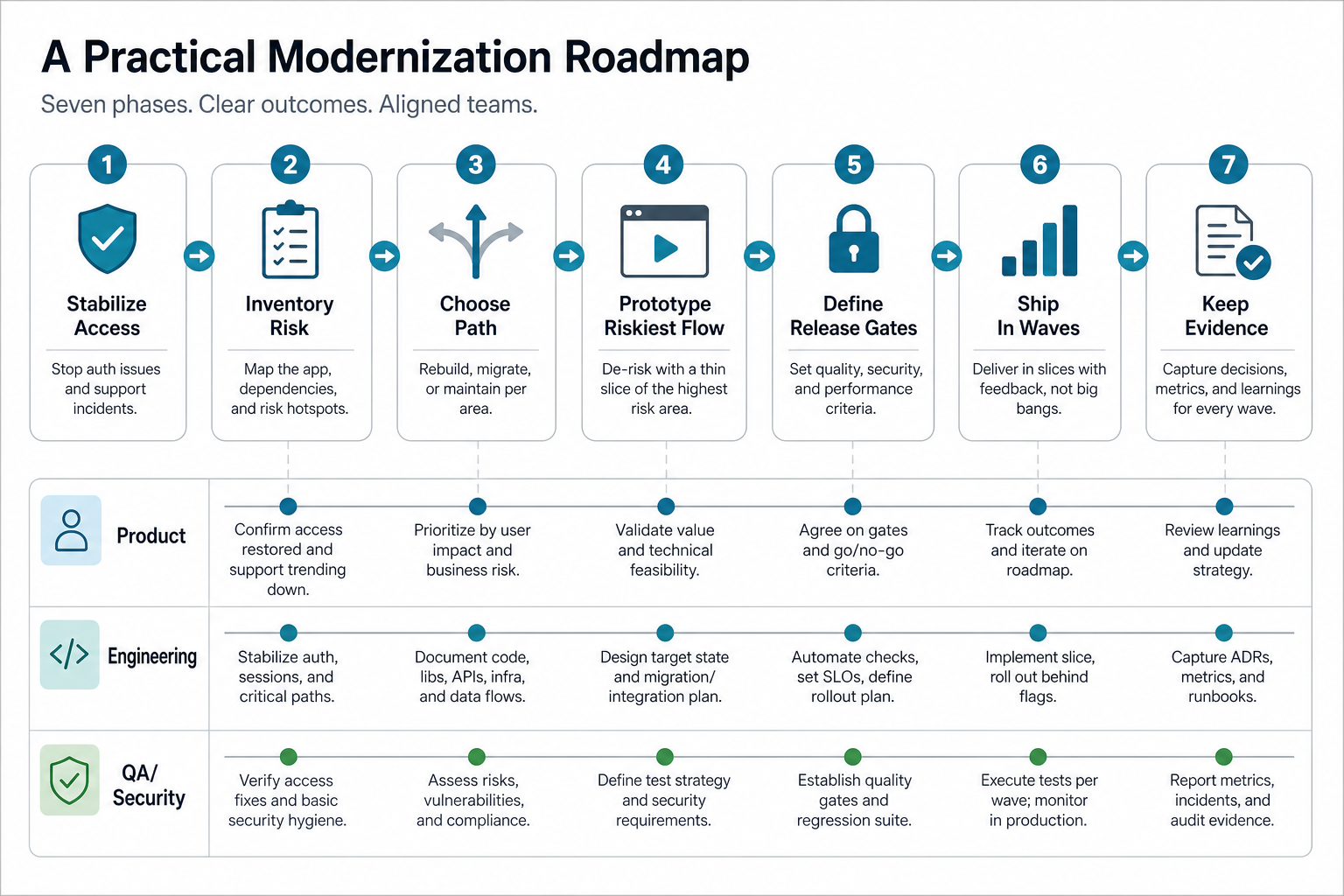
- Stabilize access: confirm repositories, signing credentials, store access, build machines, analytics, crash tools, and release history.
- Inventory risk: map plugins, native APIs, SDK levels, permissions, backend dependencies, local data, and customer-critical flows.
- Choose the path: maintain, migrate, rebuild, or split the work into stabilization now and rebuild later.
- Prototype the riskiest flow: prove camera, files, push, payments, auth, offline sync, or background behavior before committing to a full plan.
- Define release gates: device matrix, OS coverage, accessibility checks, security review, crash thresholds, rollback plan, and store-submission checklist.
- Ship in controlled waves: start with internal testing, then staged rollout, then monitored production release.
- Keep the evidence: record decisions, tests, incidents, remaining risks, and the next modernization checkpoint.
How NextPage Helps With Legacy Hybrid App Modernization
NextPage helps teams turn an aging hybrid app into a practical delivery plan. We audit the current app package, plugins, native project setup, SDK readiness, UX debt, backend dependencies, store risks, security exposure, and QA evidence before recommending a maintenance sprint, migration, or rebuild.
For a focused technical route, start with PhoneGap and Cordova app migration services. For a broader product and system view, use the modernization scorecard first, then plan the mobile roadmap around risk, budget, and release evidence.