
Quick Answer: How To Audit QA Risk In Legacy Software
A legacy software QA audit should prove three things before a risky release or modernization project: which business workflows can fail, where defects have already escaped, and whether regression coverage is strong enough to catch repeat failures. Start with critical user journeys, production incidents, integrations, data states, permissions, non-functional risks, support escalation paths, and release evidence. Then score each area by business impact, defect leakage, test coverage, automation reliability, rollback difficulty, and modernization need.
The goal is not to create the longest possible test spreadsheet. The goal is to expose release risk clearly enough that product, operations, engineering, and QA can decide what must be tested manually, what should be automated, what needs deeper modernization, and what cannot safely ship yet. For many teams, that audit is also the first useful input to a Legacy Software Modernization Scorecard because weak QA evidence is often a symptom of deeper architecture, dependency, and process risk.
Why Legacy QA Audits Matter Before Modernization Or Release
Legacy systems rarely fail only because code is old. They fail because important behavior is undocumented, integrations have hidden assumptions, test data is unrealistic, and releases depend on the memory of a few people who know where the dangerous paths are. A UI refactor, cloud migration, dependency upgrade, API replacement, or mobile companion app can break workflows far away from the changed module.
Case studies and testing guides tend to repeat the same pattern: regression programs start after production issues, upgrade delays, defect leakage, or unsustainable manual QA cycles. NextPage's recommendation is to run the audit before the incident. Treat regression coverage as a modernization safety net, release gate, and delivery planning input instead of a post-release apology.
Legacy QA Audit Control Board
A legacy QA audit works best when it becomes a control board, not a spreadsheet that only QA understands. Create lanes for workflow ownership, defect leakage, regression coverage, automation candidates, non-functional checks, release gate evidence, and modernization follow-up. Each lane needs an owner, a pass condition, a known gap, and a decision rule.
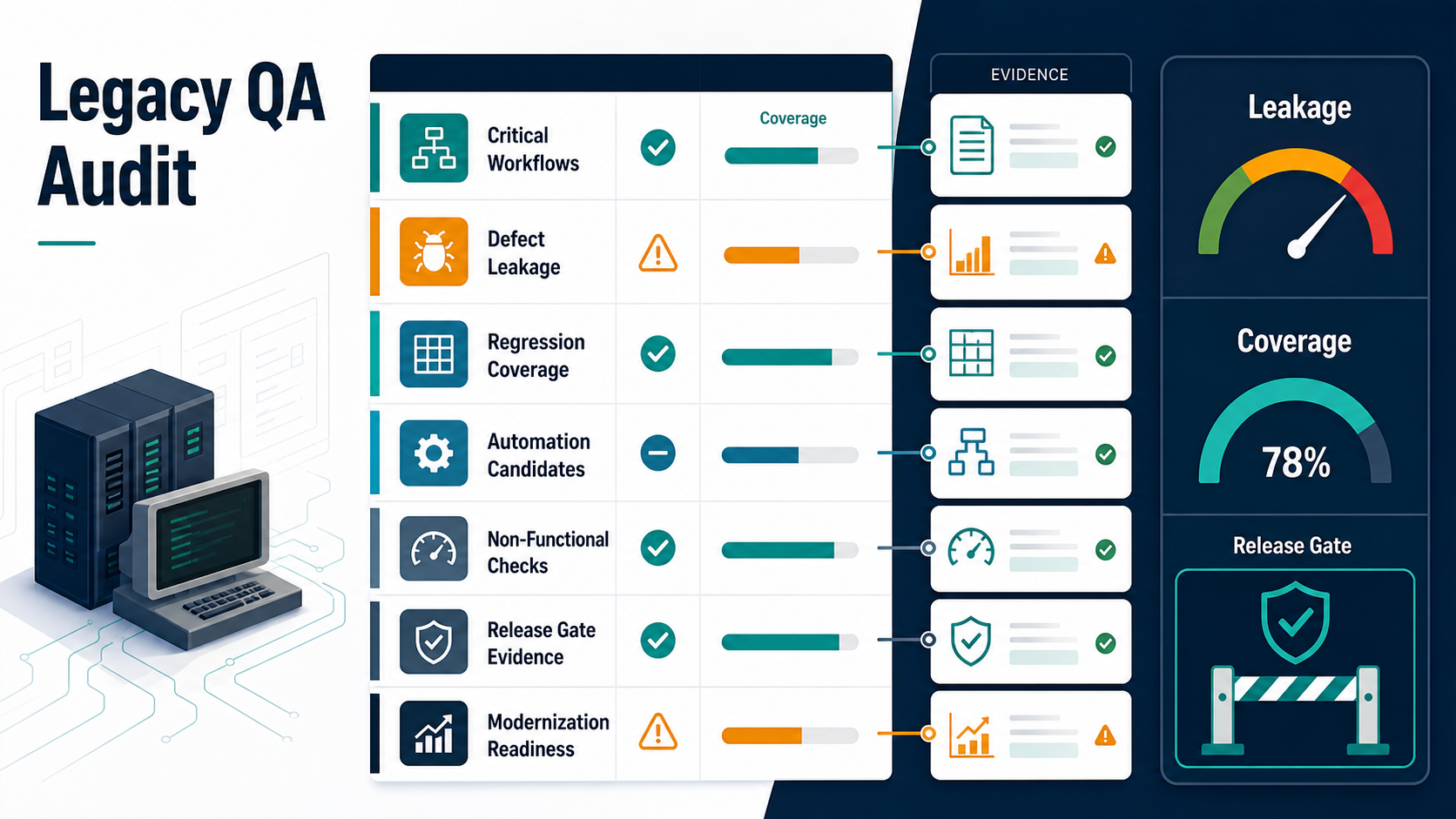
| Audit Lane | Owner Question | Evidence That Matters | Decision Rule |
|---|---|---|---|
| Critical workflows | Who owns the flows that must not fail? | Journey map, role matrix, last pass date, failure impact | No owner or no evidence means the flow is not release-ready |
| Defect leakage | Which escaped issues repeat across releases? | Incident history, missed test type, root cause, permanent prevention | Repeated leakage becomes a regression candidate or modernization item |
| Automation candidates | Which checks are stable enough to automate? | Run frequency, data stability, expected outcome, maintenance cost | Automate high-risk repeatable checks first |
| Release gate | What proof is required to ship, hold, or roll back? | Go/no-go checklist, owner signoff, monitoring, rollback trigger | Calendar pressure cannot override missing blocker evidence |
If the audit reveals staffing gaps, QA testing staff augmentation services can fill release coverage or automation capacity without turning the whole modernization program into a hiring delay.
The Legacy Software QA Audit Checklist
Use this checklist when a legacy portal, web app, mobile app, CRM workflow, internal tool, ERP extension, or custom business system is approaching a release or modernization step.
| Audit Area | What To Check | Evidence To Collect | Risk Signal |
|---|---|---|---|
| Critical workflows | Revenue, billing, approvals, reporting, user access, fulfillment, support, and admin actions | Journey map, role list, last tested date, pass/fail status | No owner can name the top 10 flows that must not fail |
| Defect leakage | Production bugs, reopened tickets, failed releases, support escalations, hotfixes | Incident list, root cause, missed test type, repeat pattern | The same defect category escapes more than once |
| Regression coverage | Smoke pack, functional checks, regression suite, UAT scenarios, automation status | Coverage matrix by workflow, role, integration, device, and data state | Regression means QA will retest everything manually |
| Integration risk | Payments, CRM, ERP, EHR, shipping, identity, notifications, analytics, third-party APIs | Contract tests, sandbox logs, failure cases, retry and reconciliation checks | Only happy-path integration tests exist |
| Data and permissions | Legacy roles, migrated records, edge-case records, exports, audit trails, access boundaries | Test data set, permission matrix, negative-path results | Testers use one admin account for every scenario |
| Release gate | Go/no-go criteria, known defects, rollback plan, monitoring, owner signoff | Release checklist, defect severity list, rollback rule, stakeholder approval | The release decision is based on calendar pressure instead of evidence |
Step 1: Measure Defect Leakage Before Adding More Tests
Defect leakage is the clearest signal that the current QA process is missing real user risk. Review the last three to six months of production bugs and ask where each defect should have been caught: requirements review, functional testing, regression testing, UAT, performance testing, security review, monitoring, or post-release support.
Group escaped defects by workflow and root cause. A billing bug caused by a role-specific discount rule is different from a broken button. A report that fails only for historical records is different from a new feature defect. Legacy QA audits become useful when they find patterns such as missing negative paths, stale test data, no cross-role checks, no integration failure cases, or automation that passes while the business outcome is wrong.
Defect Leakage Triage Table
Defect leakage data should change the next release plan. A triage table helps the team move from blame to prevention by naming the workflow, missed test type, business impact, and permanent control that will catch the issue next time.
| Leakage Pattern | Likely Missed Control | Audit Action | Prevention Owner |
|---|---|---|---|
| Role-specific access bug | Permission matrix and negative-path testing | Add role-based checks for admin, manager, staff, and restricted users | QA plus product owner |
| Invoice, order, or payment mismatch | Integration failure and reconciliation tests | Add failed sync, retry, tax, discount, and export scenarios | Engineering plus finance operations |
| Report breaks for old records | Legacy data-state coverage | Add historical, migrated, duplicate, archived, and partial records | QA plus data owner |
| Hotfix after dependency update | Regression pack and CI evidence | Add smoke checks around modules touched by old libraries or APIs | Engineering lead |
Teams starting from a thin test suite can pair this triage with an AI-powered QA automation roadmap, but only after the audit identifies stable checks with clear expected outcomes.
Step 2: Build A Regression Coverage Matrix Around Business Risk
A useful regression pack starts from business impact, not page count. List the workflows that must still work after any meaningful change, then map them across user roles, integrations, data states, devices, and recent defect history. The Regression Testing Checklist for Software Releases is a strong companion for release teams that need a reusable pack, but legacy systems need one extra layer: historical fragility.
| Workflow | Business Impact | Legacy Fragility | Current Coverage | Next Action |
|---|---|---|---|---|
| Login and permissions | High | Old roles, custom access rules, stale users | Smoke test only | Add role-based functional and negative tests |
| Order or invoice flow | Critical | Multiple integrations and exception paths | Manual happy path | Create regression scenarios for discount, tax, payment, and failed sync cases |
| Admin reporting | Medium | Historical data and export formats | Not consistently tested | Add data-state checks and export validation |
| Customer notifications | High | Third-party delivery and template changes | Ad hoc | Test trigger, content, delivery failure, and audit log |
Step 3: Decide What To Automate And What To Keep Manual
Automation is valuable when a check is stable, repeatable, high-risk, and expensive to run manually. It is wasteful when the behavior is still changing, the environment is unstable, or the test only verifies superficial UI states. Legacy teams often need a hybrid model: manual exploration for ambiguous workflows, automated smoke and regression checks for stable critical paths, and targeted API or data checks where the UI is too brittle.
- Automate critical smoke checks that should run on every build.
- Automate regression paths with stable expected outcomes and repeated release value.
- Keep exploratory testing manual when the risk is unclear or behavior needs human judgment.
- Use API, database, or contract checks when UI automation is slow or brittle.
- Retire automation that creates more maintenance noise than release confidence.
For teams needing delivery support, QA Automation Testing Services should be scoped around release risk and maintainability rather than a vanity coverage number.
Step 4: Separate Functional Testing, Regression Testing, And UAT
Legacy QA audits often reveal blurred ownership. Developers say QA tested it. QA says the business accepted it. Business users say they only checked the happy path. The fix is to separate the questions each test type answers.
UAT vs Functional Testing vs Regression Testing explains the difference in detail. For this audit, use a shorter rule: functional testing proves changed behavior works as required; regression testing proves existing behavior still works; UAT proves the business can operate the workflow in a realistic launch context.
Step 5: Add Security, Performance, Data, And Recovery Checks
Legacy release risk is not limited to feature behavior. Old systems often carry security gaps, slow queries, fragile batch jobs, outdated libraries, and unclear rollback plans. A QA audit should include non-functional checks when the release touches identity, data exports, payments, infrastructure, integrations, or customer-facing workflows. If the system has slow reporting, fragile batch jobs, or high-volume traffic, compare the findings with a cloud performance audit checklist so release risk does not hide in infrastructure behavior.
- Security: role boundaries, sensitive data exposure, password reset, audit trails, API authorization, old admin accounts.
- Performance: high-volume searches, report generation, background jobs, mobile load times, peak transaction flows.
- Data: migrated records, old statuses, duplicate records, deleted users, exports, reconciliations, rollback data safety.
- Integration recovery: retries, partial failures, webhook delays, sandbox differences, manual reconciliation steps.
- Observability: logs, alerts, dashboards, release monitoring, support escalation paths.
If the codebase is moving through refactoring or modernization, pair QA coverage with Legacy Application Refactoring Services planning. Test coverage gives the team confidence to improve risky code; refactoring gives the team a cleaner surface for future testing.
Step 6: Define A Release Gate With Evidence, Not Hope
A release gate is the point where the team decides whether to ship, delay, partially launch, or roll back. For legacy systems, the release gate should be explicit because hidden risk is high. The gate does not need to be bureaucratic, but it does need evidence.
| Gate Item | Pass Condition | Owner |
|---|---|---|
| Critical workflows | All agreed critical paths pass or have approved workarounds | QA and product |
| Known defects | No unresolved blocker or high-severity issue without signoff | Engineering and product |
| Regression pack | Selected regression checks pass with documented coverage gaps | QA |
| UAT | Business owner accepts realistic workflows and launch conditions | Operations or client stakeholder |
| Rollback and monitoring | Rollback owner, trigger, support path, and post-release checks are ready | Release owner |
NextPage's Functional Testing Services and Software QA Testing Services are designed around this evidence-first release model: map the workflows, test the risky paths, separate regression candidates from exploratory work, and make the go/no-go decision clearer.
Legacy QA Release Gate Evidence
The release gate should make hidden risk visible. Keep the gate small enough to use in a real release meeting, but strict enough to prevent a calendar-driven launch from overriding missing evidence. The gate should show which workflows passed, which defects remain, who accepted UAT, who owns rollback, and which monitoring checks will run after launch.
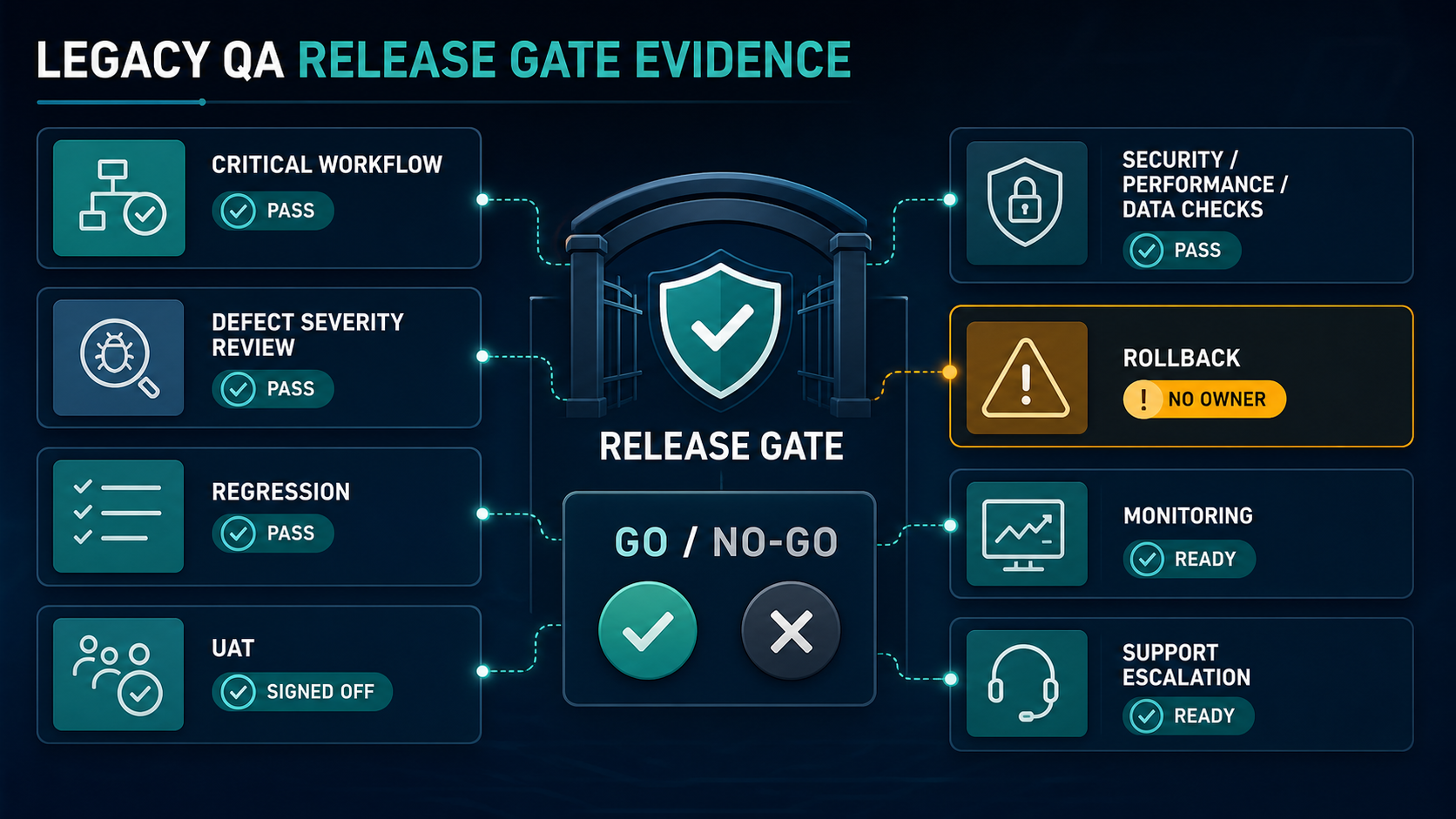
A missing rollback owner is a release blocker for fragile systems. A missing monitoring plan is also a blocker when the release touches payments, identity, reporting, mobile workflows, or high-volume integrations.
A Simple Scoring Model For Legacy QA Risk
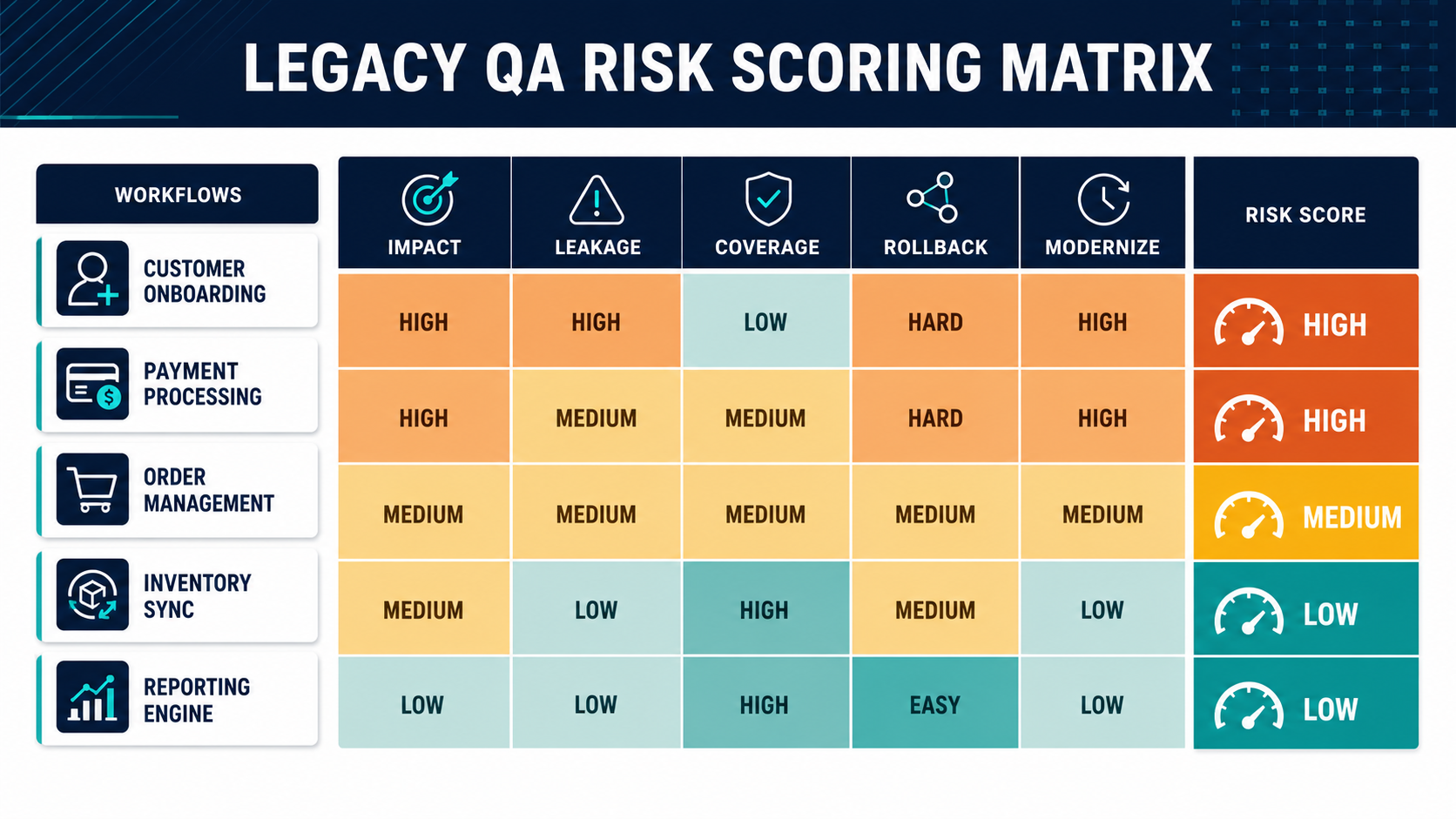
Score each critical workflow from 1 to 5 across five dimensions: business impact, defect history, coverage quality, integration complexity, and rollback difficulty. Any workflow with a total score above 18 deserves focused QA planning before release. Any workflow with high business impact and weak coverage should be treated as a release blocker until the team has at least manual evidence and a monitoring plan.
| Score | Meaning | Recommended Action |
|---|---|---|
| 5-10 | Lower release risk | Smoke test and focused regression may be enough |
| 11-17 | Moderate risk | Add functional checks, defect-history review, and targeted regression |
| 18-25 | High risk | Create a release-specific QA plan, UAT evidence, rollback rule, and automation roadmap |
This score should not replace engineering judgment. It creates a shared language so the team can stop arguing about whether QA is done and start deciding what evidence is missing.
How NextPage Can Help
NextPage helps teams stabilize legacy software before modernization, migration, or high-risk releases. We can audit release workflows, map regression coverage, design functional and UAT scenarios, identify automation candidates, and connect QA findings to a practical modernization roadmap. If the system also needs new features, integrations, refactoring, or rebuild work, the same audit can inform a safer custom software development plan. If budget and timeline are still unclear, the custom software cost estimator can turn the audit findings into a planning range.
Start with the Legacy Software Modernization Scorecard if you need a quick risk baseline. If the release window is already approaching, use a focused QA audit to decide which workflows must be stabilized before go-live and which improvements can move into the modernization backlog.