
Quick Answer: MCP Server Security Checklist
An MCP server security checklist should start with ownership and inventory, then move through authorization, tool scopes, secrets, egress, approval gates, audit logs, and rollback. The risk is not only that an AI agent calls a bad tool. The bigger enterprise risk is that a useful agent quietly gains broad access to internal APIs, files, tickets, databases, and SaaS actions before the organization has a control plane around those calls.
For enterprise teams, the safe pattern is simple: no unknown MCP servers, no unmanaged local server commands, no broad OAuth scopes, no tool descriptions that can silently change behavior, no secrets in prompts or logs, and no production tool execution without telemetry and a rollback path. Microsoft’s 2026 guidance around MCP governance emphasizes inventory, API-gateway style enforcement, per-tool allowlists, exposure scoring, and logging. The MCP specification’s own security guidance adds OAuth consent, protected resource metadata, exact redirect URI validation, state validation, HTTPS, session protections, scope minimization, and safeguards for one-click local server configuration.
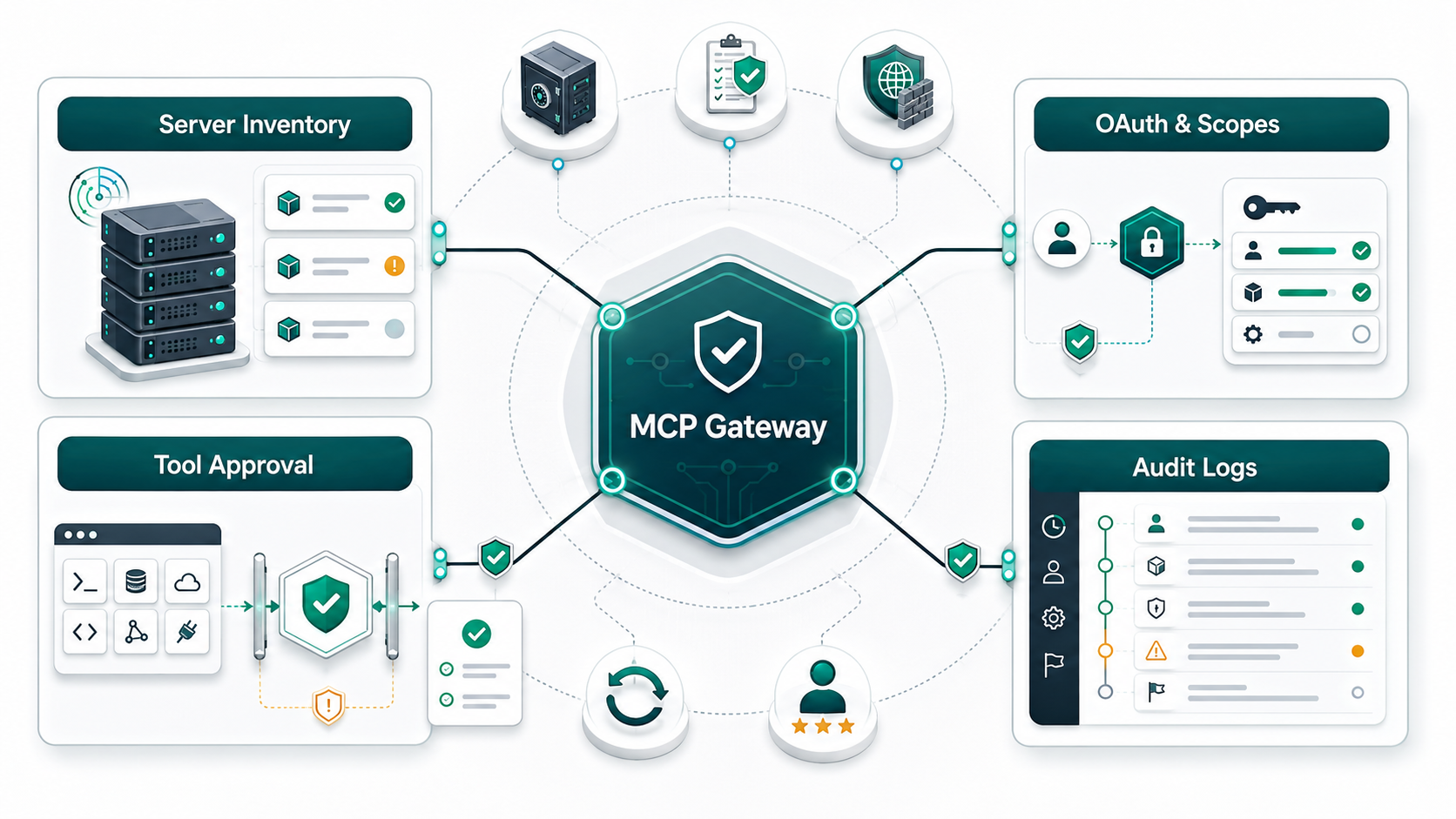
This guide is for CTOs, CISOs, platform teams, and product leaders who are connecting enterprise AI agents to internal tools through Model Context Protocol servers. It focuses on practical controls you can implement before a pilot becomes a production access path.
Why MCP Security Is Different From Normal API Security
Traditional API security assumes a human or application calls an endpoint with a defined intent. MCP adds another layer: a model can discover tools, read tool descriptions, choose among actions, and pass context from prompts, documents, tickets, code, or other tools into the next call. That makes permissions and descriptions part of the attack surface.
The main failure mode is not that MCP is “unsafe” by default. The failure mode is treating MCP servers like harmless developer plugins. A local MCP server can execute with the same privileges as the client. A remote MCP server can expose OAuth flows, delegated scopes, and enterprise data. A poisoned tool description can influence the agent’s reasoning. A broad token can turn one approved workflow into lateral access. A missing audit trail can make the whole incident look like normal automation.
That is why MCP should be governed like a production integration layer. Start with NextPage’s AI Agent Readiness Assessment if the workflow, data sensitivity, integration ownership, or human-review model is still unclear, then compare the runtime controls against the Secure AI Agent Development Checklist before any MCP server receives write access. Security controls work best after the business can name the workflow the agent is allowed to perform.
1. Inventory Every MCP Server Before It Connects To Agents
The first control is boring and essential: know which MCP servers exist, who owns them, where they run, which agent clients can reach them, and which systems they touch. Treat source-discovery IDs, experiment names, local config files, SaaS connectors, and marketplace installs as evidence, not governance.
| Inventory Field | Why It Matters | Minimum Evidence |
|---|---|---|
| Server owner | Every server needs a team accountable for scope, changes, and incidents. | Owner, approver, repository, support channel. |
| Transport and runtime | Local stdio, Streamable HTTP, and legacy SSE patterns have different risks. | Runtime, hosting location, network boundary, sandbox status. |
| Tools exposed | Tool names and descriptions influence agent behavior. | Tool catalog, description review, version history. |
| Data touched | Risk depends on files, SaaS records, database rows, secrets, and customer data. | Data classes, systems of record, retention rules. |
| Permissions requested | Broad scopes turn a narrow assistant into a privileged integration. | OAuth scopes, API keys, service accounts, role mapping. |
| Telemetry available | Incidents cannot be reconstructed without call-level evidence. | Tool call logs, policy decisions, failures, approvals. |
Inventory should include shadow MCP servers created by developers for convenience. Microsoft’s MCP logging guidance frames observability as a way to discover shadow servers and understand which tools are exposed or used. That matters because unofficial servers often skip least-privilege review, dependency scanning, and logging until after a risky demo becomes operational.
2. Enforce OAuth, Consent, And Least-Privilege Scopes
Remote MCP servers should not rely on static shared tokens, wildcard scopes, or trust in the client UI. Use OAuth-based authorization where appropriate, validate protected resource metadata, enforce exact redirect URI matching, require CSRF/state protection, and bind consent decisions to the requesting client. The MCP security best practices call out confused deputy risks when proxy servers and dynamic client registration are handled loosely.
Scope design is where many enterprise pilots drift. Do not request the full catalog of permissions at login. Start with low-risk discovery or read scopes, then elevate only when a privileged action is attempted. The server should emit precise scope challenges instead of advertising every possible permission. Audit elevation events with correlation IDs so security teams can answer which user, client, server, tool, and scope were involved.
| Bad Pattern | Better Pattern |
|---|---|
| One token with files:*, db:*, tickets:*, admin:* | Separate read, write, admin, export, and delete scopes. |
| Consent once for every future tool | Consent per client and elevate for sensitive actions. |
| Wildcard redirect URI matching | Exact registered redirect URI comparison. |
| Static API key in local config | Short-lived token, vault-backed secret, and rotation. |
| Scope names that hide intent | Human-readable scopes mapped to business actions. |
If your team is building production LLM workflows, connect this scope model to the broader controls in NextPage’s LLM Application Security Checklist. Prompt injection, retrieval risk, authorization, and logging need to be reviewed together because MCP tool calls often sit downstream of model-generated context.
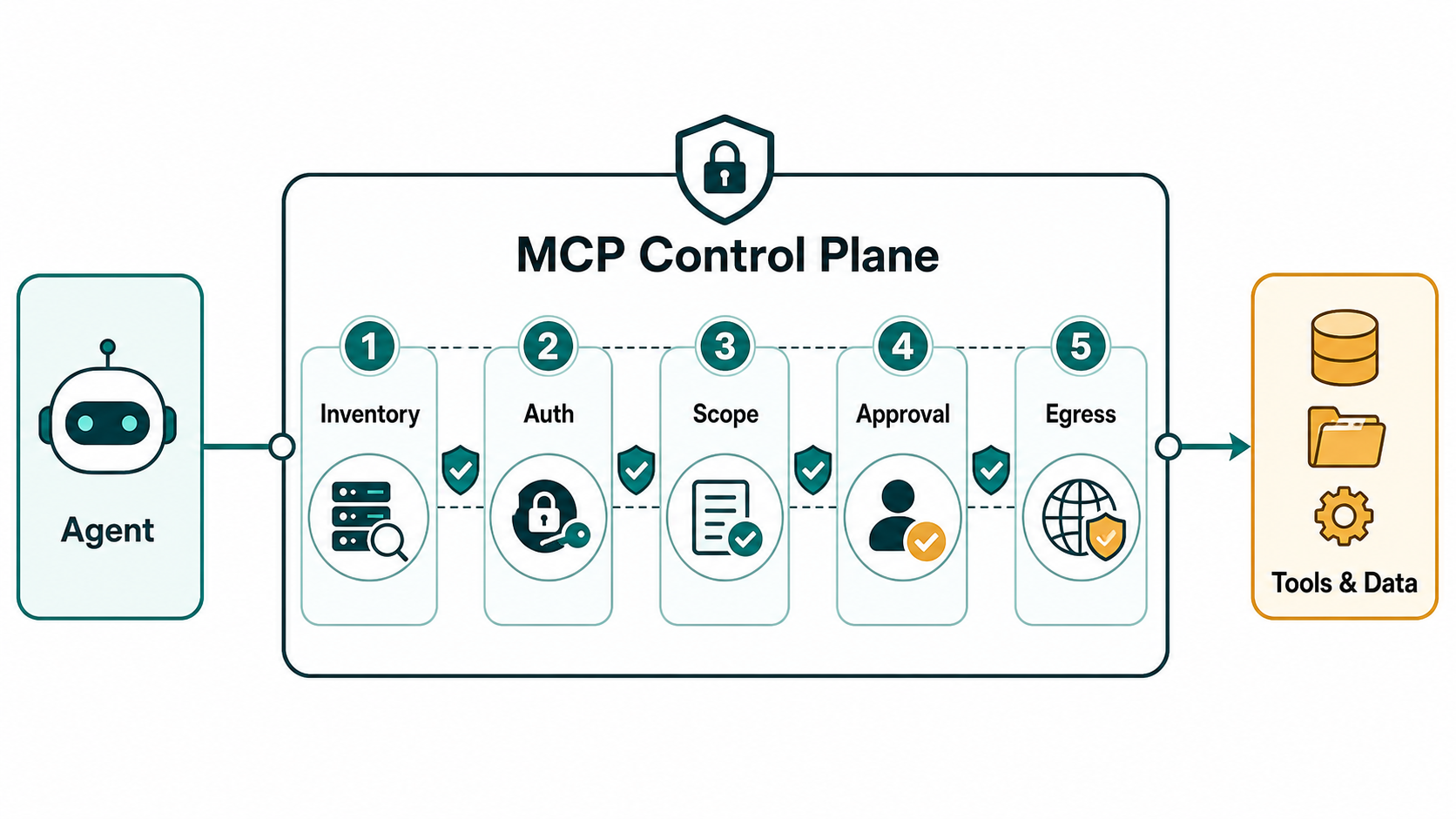
3. Review Tool Descriptions, Approval Rules, And Execution Boundaries
MCP tools are not just API wrappers. Tool descriptions can influence the agent. OWASP’s MCP tool poisoning coverage describes attacks where malicious instructions are embedded in tool metadata or outputs so the agent behaves against policy. That makes tool approval a security review, not a naming exercise.
Before a tool is exposed to a production agent, review the name, description, arguments, input validation, output format, side effects, error messages, and dependency chain. Separate read-only tools from mutating tools. Require human approval for operations that send messages, update records, delete data, commit code, deploy infrastructure, move money, export files, or change permissions. For higher-risk workflows, use a policy layer between the agent client and the MCP server so the model cannot bypass the allowlist just because it generated a plausible action. This is where enterprise AI agent governance becomes operational: the governance rule must be enforced at runtime, not only documented in a policy page.
- Keep tool descriptions short, declarative, and free of hidden operational instructions.
- Version tool descriptions and require review when descriptions or arguments change.
- Validate all tool arguments server-side, even when the model seems confident.
- Block command execution unless the server is sandboxed and the command is explicitly approved.
- Define which tools are allowed for each agent, user role, environment, and data class.
- Require human approval for destructive, external, irreversible, or regulated actions.
NextPage’s Enterprise AI Agent Governance guide covers the operating model around permissions, human review, monitoring, and rollback. Use that governance layer to decide which MCP tools can move from experiment to production.
4. Protect Secrets, Local Files, And Data Egress
MCP security breaks down quickly when secrets are treated as context. Tokens, database credentials, private URLs, SSH keys, environment variables, customer exports, and internal documents should not be exposed to the model or written into general-purpose logs. Secrets belong in a vault or managed identity flow, and the server should call downstream systems without handing raw credentials to the agent.
For local MCP servers, require clear consent before one-click configuration executes a command. Show the full command, highlight dangerous patterns, and avoid giving a local server broad filesystem or network access by default. For remote MCP servers, place servers behind gateways that can authenticate, authorize, rate-limit, log, and restrict egress. If the server can call arbitrary URLs, read internal network locations, or forward tool output to external destinations, treat it as an SSRF and exfiltration risk.
| Data Or Secret Risk | Control |
|---|---|
| Environment variables exposed to tools | Vault access, allowlisted keys, and no secret echoing. |
| Local file overreach | Sandboxing, approved roots, path canonicalization, deny sensitive directories. |
| External egress | Domain allowlist, outbound proxy, payload inspection, export approval. |
| Verbose logs | Metadata-first logging, payload redaction, retention limits. |
| Token theft | Short-lived tokens, scope minimization, rotation, anomaly detection. |
For teams building controlled production agents, NextPage’s generative AI development and LLM development work focuses on the workflow, data sensitivity, retrieval design, evaluations, and integration boundaries before choosing a model or tool stack.
5. Log Tool Calls, Policy Decisions, And Rollback Events
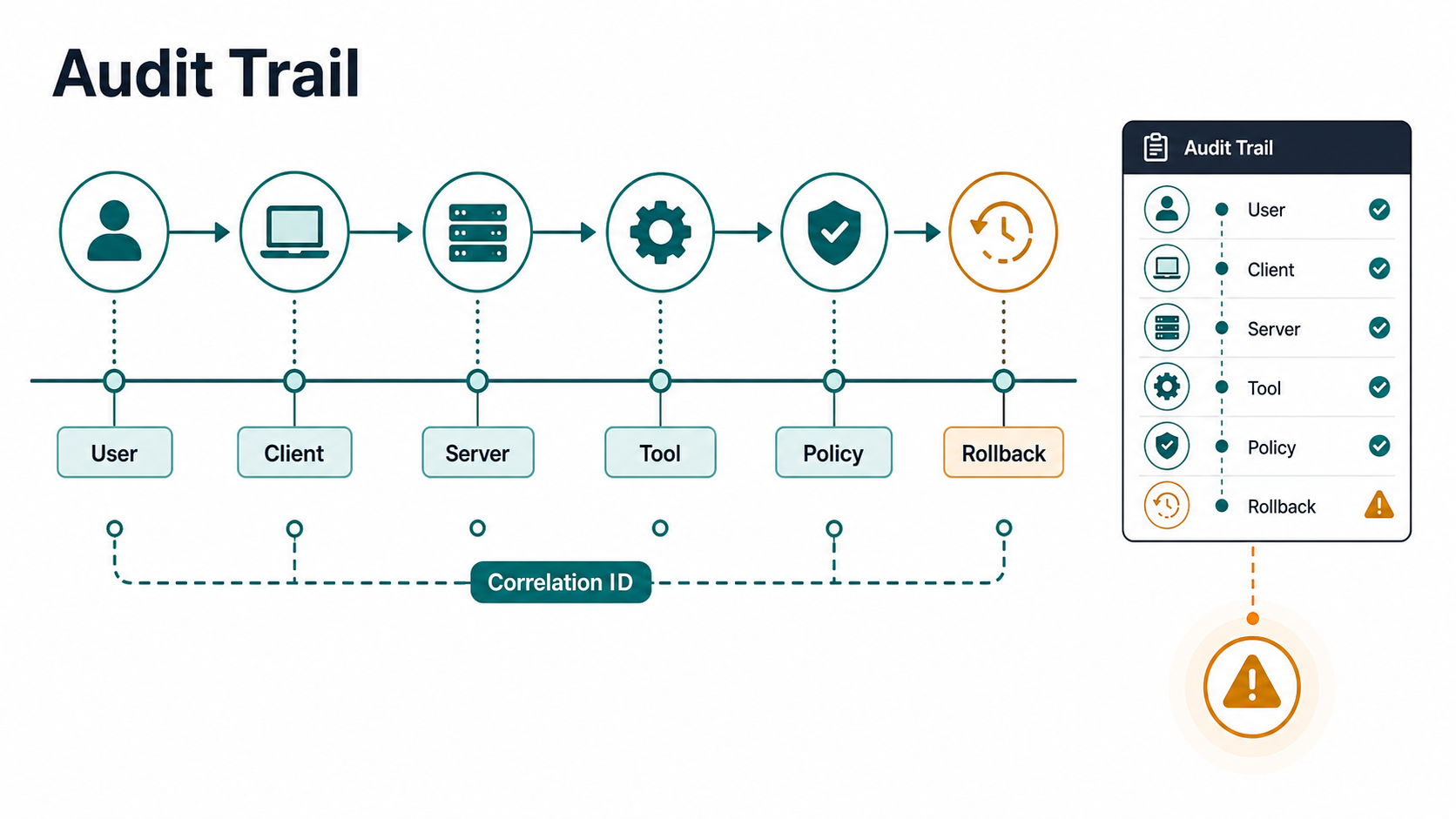
Audit logs should answer five questions: who initiated the agent session, which client and MCP server were involved, which tool was requested, what policy decision was made, and what happened next. Do not wait until an incident to define those fields.
Good MCP logs capture server ID, tool name, version, user, tenant, client, requested scope, granted scope, policy result, approval result, downstream system, status, error class, latency, correlation ID, and rollback marker. Sensitive prompts and payloads should be minimized or redacted unless there is a specific legal or operational reason to retain them. Microsoft’s 2026 agent governance material points toward full traceability and append-only audit patterns for tool execution; the practical lesson is that every allowed and denied tool call should leave evidence.
- Log denied calls, not only successful calls.
- Record policy decisions separately from model text.
- Use immutable or tamper-evident storage for high-risk environments.
- Alert on new servers, new scopes, tool description changes, unusual export volume, and repeated denials.
- Connect logs to rollback playbooks so operations can disable a server, revoke a token, or remove a tool quickly.
A Practical MCP Security Rollout Roadmap
The safest rollout is phased. Phase one is discovery: catalog MCP servers, owners, clients, tools, scopes, and data classes. Phase two is control: approve tool descriptions, place remote servers behind the right gateway, remove static secrets, and define least-privilege scopes. Phase three is operations: add audit logging, alerting, exception handling, and rollback drills. Phase four is scale: build reusable templates for new MCP servers, publish an approved server registry, and include MCP review in AI agent delivery gates. Use the broader AI Implementation Roadmap when MCP security is part of a larger production AI delivery plan.
| Phase | Outcome | Exit Criteria |
|---|---|---|
| Discover | Known server and tool inventory. | No production agent uses an unowned MCP server. |
| Constrain | Scopes, secrets, egress, and tool approvals are enforced. | High-risk tools require approval and all tokens are scoped. |
| Observe | Tool calls and policy decisions are traceable. | Security can reconstruct an agent action end to end. |
| Operate | Rollback and incident workflows are tested. | A risky server or scope can be disabled quickly. |
| Scale | Teams can add approved MCP servers without bypassing controls. | Templates, registry, review checklist, and ownership model are live. |
This is also where ROI and delivery planning matter. Use the AI Automation ROI Calculator to compare the operational value of an agent workflow against the cost of integration, governance, monitoring, and ongoing review. Security should not kill useful automation, but it should force teams to choose the workflows worth operating properly.
Production MCP Launch Gate
Before a production agent can use an MCP server, require a launch gate that produces evidence rather than promises. The gate should prove that the business workflow is narrow, the server owner is known, the tool catalog has been reviewed, credentials are scoped, secrets are isolated, egress is restricted, human approval exists for sensitive actions, and rollback has been tested.
| Launch Gate | Pass Condition | Evidence To Keep |
|---|---|---|
| Workflow boundary | The agent has a named workflow, users, allowed systems, and forbidden actions. | Workflow charter, owner, approval policy, exception list. |
| Tool and scope review | Every tool has typed arguments, side-effect notes, least-privilege scopes, and approval rules. | Tool catalog, scope map, reviewer sign-off, version history. |
| Secrets and egress | No raw secrets enter prompts or general logs; outbound destinations are allowlisted. | Vault policy, redaction rule, egress allowlist, test result. |
| Audit and rollback | Allowed and denied calls are traceable and a risky server can be disabled quickly. | Correlation ID sample, alert rule, rollback drill, incident owner. |
| Operational value | The workflow value justifies the governance, monitoring, and review cost. | ROI estimate, pilot metrics, support model, expansion criteria. |
For workflow-heavy teams, this launch gate should sit beside AI workflow automation design: intake, decisioning, tool execution, review, monitoring, and rollback need to be designed as one system. If the value case is unclear, estimate operating impact with the AI Automation ROI Calculator before expanding MCP access.
How NextPage Helps Secure MCP And AI Agent Workflows
NextPage helps teams move from AI agent experiments to production workflows with the right controls around data, integrations, permissions, evaluations, observability, and human review. For MCP-heavy systems, that can include server inventory, tool-scope mapping, approval gates, secure integration design, prompt-injection testing, audit-log design, and rollout planning.
If you already have internal copilots, coding agents, RAG workflows, or automation scripts connecting to tools, start by mapping which systems they can touch and which actions they can perform. Then use NextPage’s AI development services, LLM development, and AI workflow automation experience to turn the highest-value workflows into controlled, observable production systems.
The best MCP server security checklist is not a PDF that sits in a wiki. It is a working delivery gate: no server without an owner, no tool without a reviewed description, no scope without a reason, no secret in model context, no action without logs, and no production rollout without rollback.