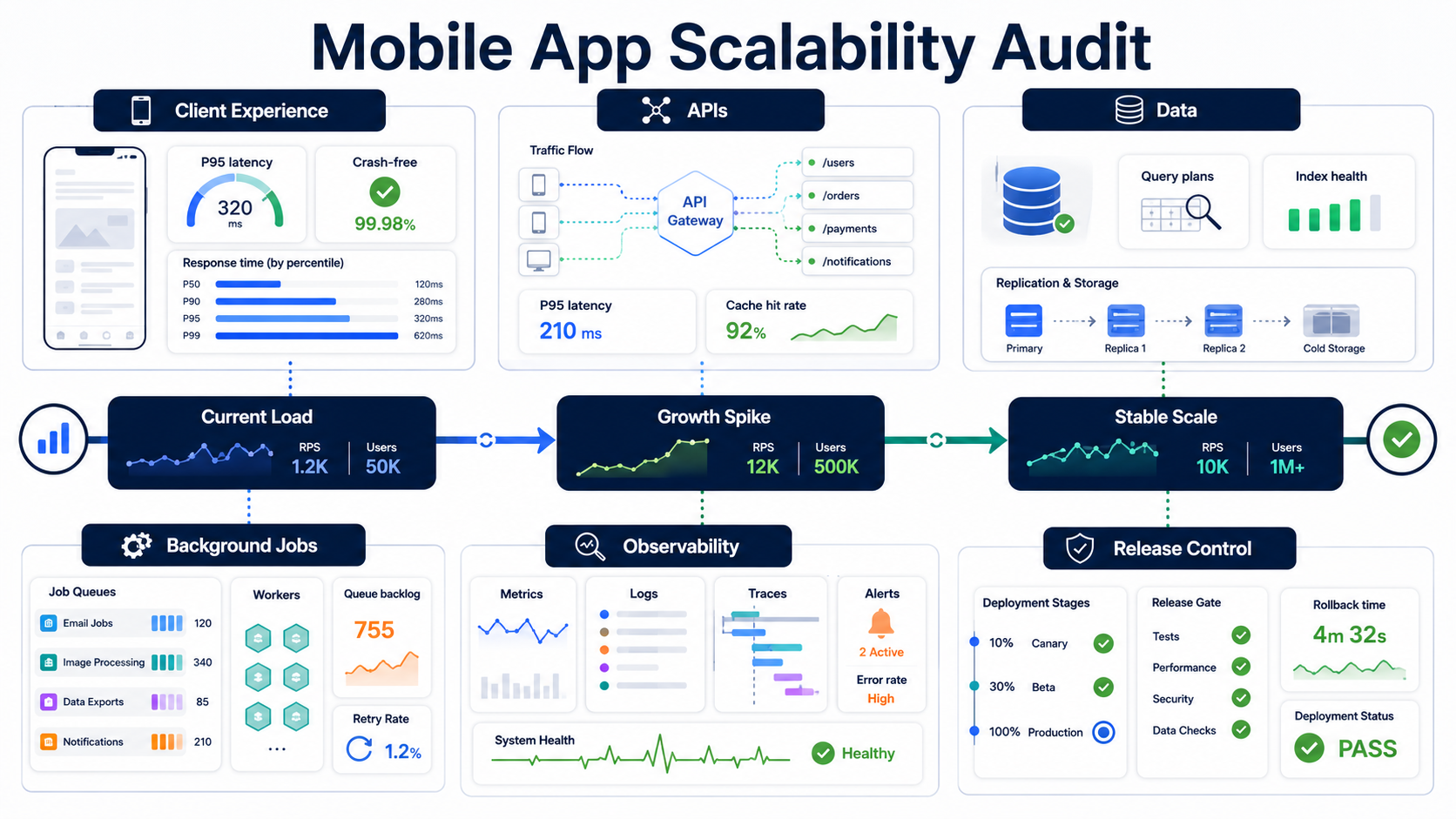

A mobile app scalability audit checks whether the product can handle more users, sessions, data, background work, releases, and integrations without slow APIs, crashes, queue backlogs, database pressure, or cloud cost spikes. The audit should not start with a server-size debate. It should start with evidence: where users wait, where requests pile up, which queries slow down, which jobs fall behind, which releases are hard to roll back, and which metrics prove the product is ready for the next growth push.
This checklist is for founders, CTOs, product managers, and engineering teams that already have a working mobile app and are preparing for growth. Maybe paid acquisition is increasing. Maybe a new market is launching. Maybe a push campaign, seasonal event, enterprise rollout, or new AI feature could multiply traffic. The question is the same: will the app stay usable when success arrives?
If the immediate problem is app speed, pair this audit with the mobile app performance optimization checklist. If the audit shows deeper architecture or modernization work, NextPage can help through scalable software development services and mobile product engineering support. When the growth event also increases sensitive data, permissions, payments, or regulated workflows, include mobile app security hardening in the same review instead of treating it as a later audit.
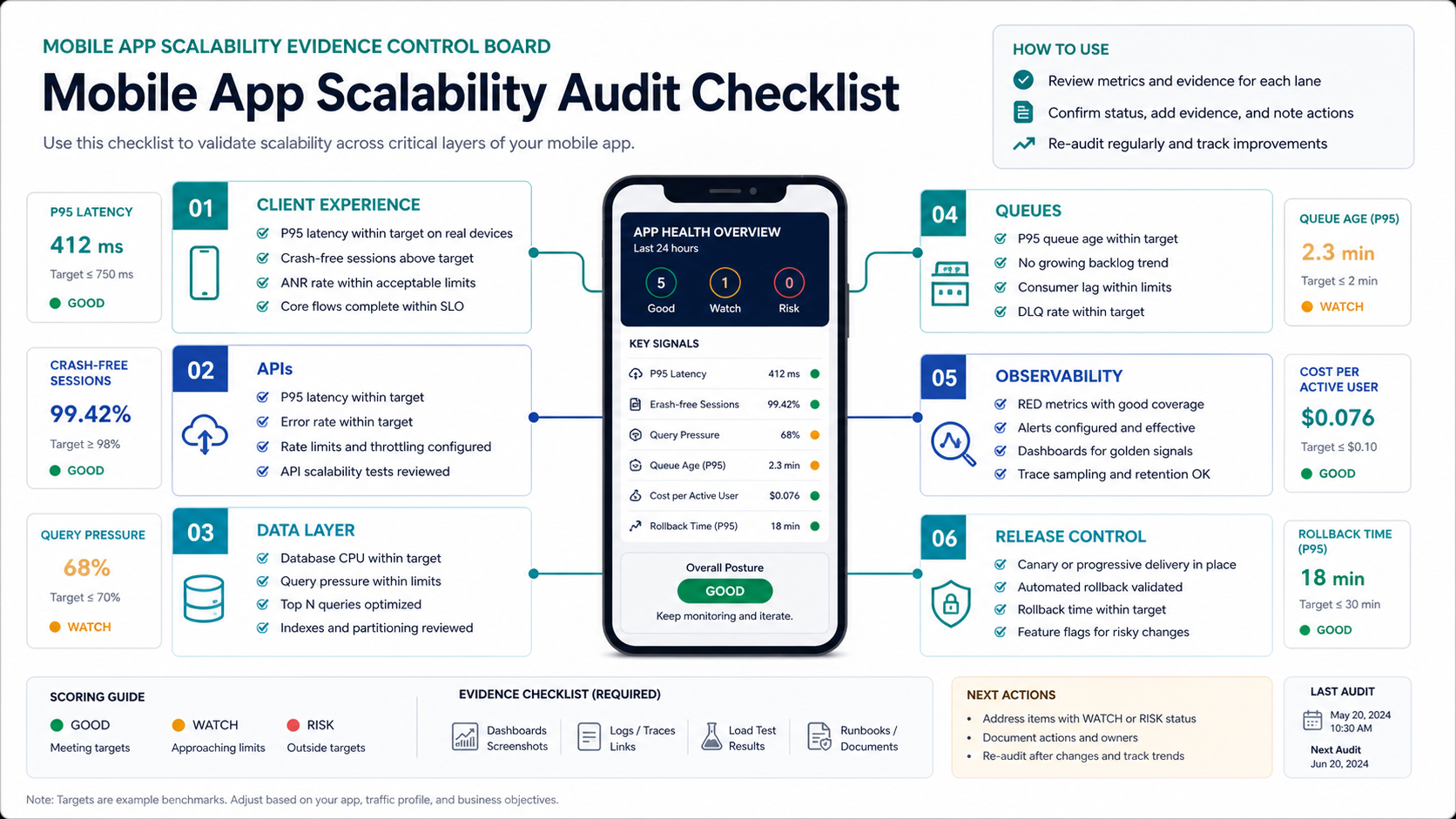
The Mobile App Scalability Audit Scorecard
Use the scorecard as a first pass before planning a refactor. Score each lane from 0 to 3. A 0 means the team has no reliable evidence. A 1 means the risk is known but not controlled. A 2 means the lane is mostly controlled with gaps. A 3 means the evidence, owners, and rollback plan are clear enough for a growth event.
| Audit Lane | Evidence To Collect | Growth Risk |
|---|---|---|
| Client experience | App startup time, screen latency, crash-free sessions, ANR or freeze rate, device/OS split | Users churn even if backend uptime looks healthy |
| APIs | P50/P95/P99 latency, error rate, payload size, hot endpoints, rate limits, auth latency | Login, checkout, search, feeds, or dashboards slow during spikes |
| Data layer | Slow query logs, index coverage, query plans, connection pool use, storage growth, lock waits | The database becomes the real ceiling behind every scaled server |
| Background jobs | Queue depth, consumer lag, retry rate, dead-letter volume, notification throughput | Push, email, media, sync, and billing work falls behind quietly |
| Observability | Dashboards, alerts, traces, release tags, correlation IDs, cost-per-active-user | The team sees symptoms but cannot find the bottleneck quickly |
| Release control | Feature flags, canary rollout, rollback time, migration safety, incident runbooks | A bad scaling fix creates a larger outage than the original issue |
Add the scores. Below 10 means the product is not ready for a major growth push. Between 10 and 14 means the app may handle moderate growth if the highest-risk lanes are fixed first. A score of 15 or higher means the team likely has enough control to plan a staged launch, but should still load-test the most important user journeys before spending heavily on acquisition.
Define The Growth Scenario Before The Architecture Debate
Scalability is not abstract. A food delivery app, fintech wallet, social commerce app, learning platform, and field-service app fail in different places. Before auditing infrastructure, define the exact growth scenario. Is the app expecting twice as many daily active users, a short burst from push notifications, heavier media uploads, more real-time location updates, larger enterprise tenants, or a new integration that calls the backend every few seconds?
Write the scenario as a measurable load shape: peak concurrent users, requests per minute, read/write ratio, largest tenant, expected records, media volume, notification volume, and acceptable response times. Then map the top five user journeys. For many mobile apps, those journeys are login, home feed, search, checkout or booking, payment, chat, notification open, profile update, and admin operations.
This framing prevents a common mistake: scaling the easy component instead of the actual bottleneck. Adding app servers will not fix an unindexed query. Moving to microservices will not fix bloated mobile payloads. Buying a bigger database will not fix a release process that cannot roll back a bad migration.
Audit Client Experience Under Real Conditions
Mobile scalability includes the client, not only the backend. A backend may return responses quickly while older Android devices freeze during rendering, low-memory devices crash after media-heavy screens, or users on weak networks retry the same action until the backend receives duplicate requests. The audit should segment client metrics by app version, OS version, device class, geography, network type, and release cohort.
Track startup time, time to interactive, slow screen transitions, crash-free users, app-not-responding events, memory pressure, battery-heavy flows, offline queue behavior, and API retry patterns. Also inspect payload size. A feed endpoint that returns unnecessary nested data may look fine at 5,000 users and become expensive at 100,000 users.
If the product team has not already done this, instrument the highest-value user actions with correlation IDs that travel from the app to the API and into backend traces. That lets engineers connect a slow mobile screen to the exact endpoint, database query, cache miss, or queue delay behind it.
Find API And Backend Bottlenecks Before They Become Outages
Mobile apps often fail at the API boundary during growth. Login spikes, push campaigns, social sharing loops, search, payments, map refreshes, and real-time feeds can create uneven traffic that average latency hides. Look at P95 and P99 latency, not only averages. Sort endpoints by total traffic, slowest responses, largest payloads, and highest error rates.
Then inspect how each endpoint behaves when dependencies slow down. Does the API time out cleanly? Does it retry safely? Does it use idempotency for payments, bookings, messages, or order creation? Does it apply pagination and limits? Does it cache read-heavy data? Are rate limits and abuse controls present without blocking legitimate customers?
For apps preparing a larger rebuild or modernization, connect these findings to the mobile app development roadmap. The right mobile stack is not just Swift, Kotlin, Flutter, or React Native. It includes API design, backend coordination, release cadence, analytics, testing, security, and maintainability.
Treat The Database As A Product Growth Constraint
The database is often where mobile scalability gets real. The audit should identify slow queries, missing indexes, hot tables, table growth, connection pool exhaustion, lock waits, N+1 patterns, large scans, over-flexible reporting queries, and tenant imbalance. Review query plans for the endpoints that power login, feed, search, checkout, booking, sync, and dashboards.
Do not jump to sharding, NoSQL, or microservices because those words sound scalable. First remove waste: paginate responses, add the right indexes, denormalize only where the access pattern is stable, cache read-heavy objects, move heavy reporting out of transactional paths, and separate background processing from user-facing requests.
If the data model is old, fragile, or difficult to change, use the Legacy Software Modernization Scorecard before committing to a large rebuild. Sometimes the safest path is a staged modernization around the highest-risk flows instead of a full rewrite.
Audit Queues, Push, Sync, And Background Jobs
Many mobile products look stable in the foreground while background work is failing. Push notifications, image processing, email, SMS, billing events, analytics exports, CRM updates, third-party webhooks, data sync, and recommendation jobs may run minutes or hours behind during a spike. Users experience this as missing messages, stale order status, duplicate notifications, or delayed confirmations.
Collect queue depth, consumer lag, retry rate, dead-letter volume, job age, provider failures, and cost per job. Every queue should have an owner, an alert threshold, and a decision about what gets dropped, retried, delayed, or escalated during peak load. A scalable app is not one where every job runs instantly. It is one where important work is prioritized and failure is visible.
For mobile apps with offline mode, background sync needs special attention. Reconnect storms after network recovery can produce sudden write bursts. The backend should handle idempotency, conflict resolution, and controlled sync windows instead of trusting the client to behave politely.
Turn Scalability Into A Release Gate
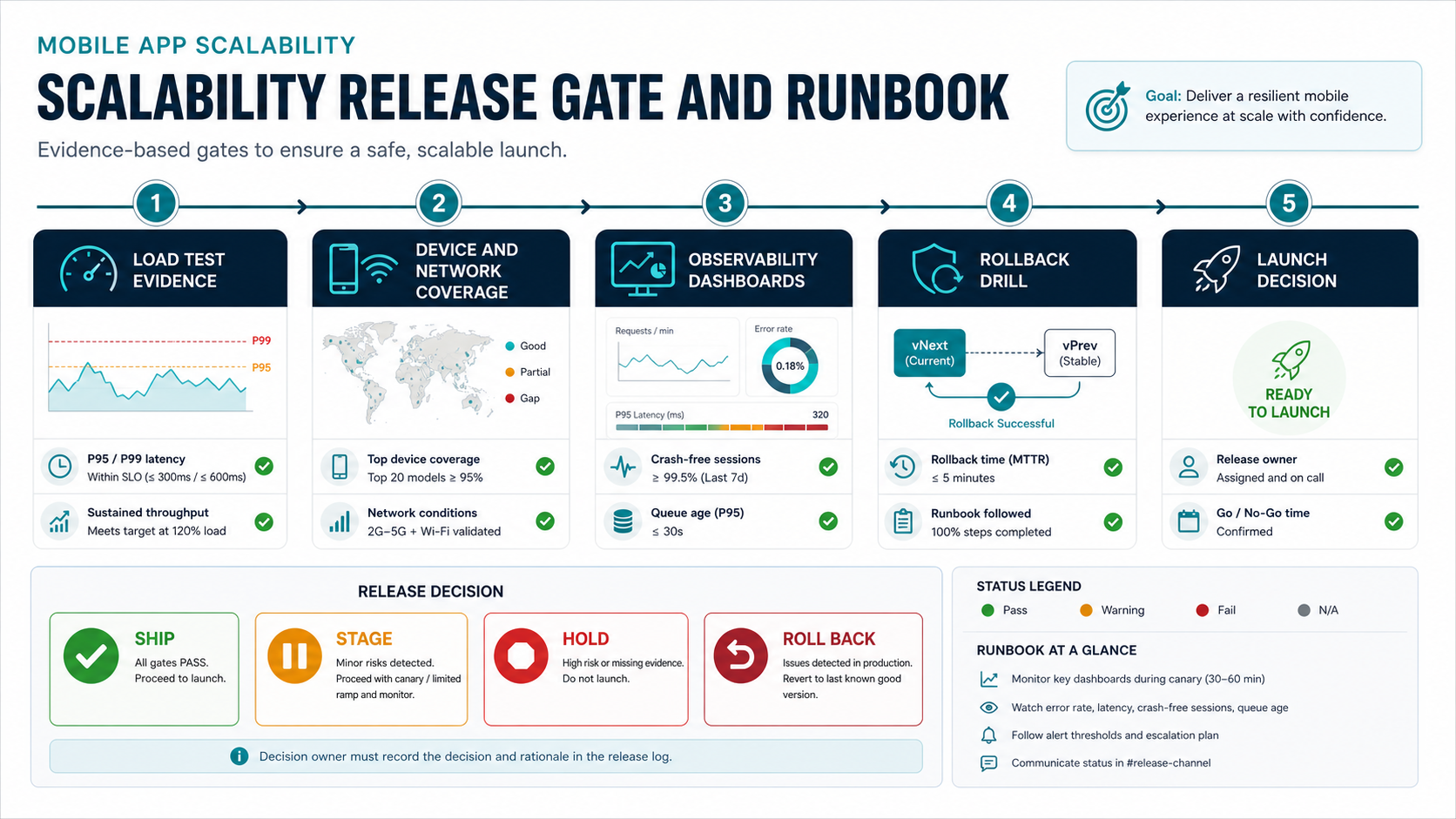
A scalability audit should create release rules, not just a report. Define the performance budget for major user journeys: app startup time, first meaningful screen, API latency, error rate, crash-free sessions, queue delay, and rollback time. Then add tests that run before major releases and before planned growth campaigns.
The test plan should include API load tests, database stress tests, device and network-condition tests, regression tests for core flows, and failure-mode tests for third-party dependencies. It should also include a rollback drill. If the team cannot roll back a schema migration, feature flag, payment change, or notification campaign quickly, the product is not ready for a large launch.
NextPage's mobile app testing services can support device coverage, regression automation, API validation, performance checks, and release readiness when an internal team needs more QA capacity before scale. For mixed web, API, and mobile release risk, combine that with software QA testing services and a clear distinction between UAT, functional testing, and regression testing.
Measure Observability And Cost Together
Growth readiness is partly an observability problem. The team needs dashboards that show client experience, API health, database pressure, queue backlog, dependency failures, release version, and cloud spend together. If the app slows down after a new feature, engineers should be able to identify whether the problem is a client regression, endpoint change, query plan, cache miss, queue delay, or provider incident.
Cost should sit beside reliability. Track infrastructure cost per active user, cost per transaction, image or media processing cost, AI inference cost when relevant, notification cost, and over-provisioned capacity. Scaling without cost visibility can turn a successful growth event into a margin problem.
Good alerts are tied to user impact. Alert on rising P95 latency for key journeys, crash-free-session drops, queue age, provider failures, database saturation, cache hit-rate collapse, and unusual cost-per-user movement. Avoid alerting only on CPU. CPU may be fine while users are waiting on locks, network calls, or overloaded third-party APIs.
Prioritize Fixes By Blast Radius And Evidence
After scoring the audit, group findings into four buckets. First, fix customer-visible bottlenecks in high-value journeys. Second, remove single points of failure that can take down login, payment, booking, messaging, or admin control. Third, improve observability where the team lacks evidence. Fourth, plan modernization work that reduces long-term scaling friction.
| Finding | Typical First Fix | When It Becomes A Larger Project |
|---|---|---|
| Slow API endpoint | Payload trimming, index review, cache, pagination | Endpoint owns too many responsibilities or depends on slow integrations |
| Database saturation | Query plan cleanup, connection pool tuning, read replicas | Data model no longer matches access patterns or tenant growth |
| Queue backlog | Consumer scaling, retry policy, dead-letter review | Workflow needs event-driven redesign or priority lanes |
| Release fragility | Feature flags, canary rollout, rollback drill | Deployment, migrations, and QA need a delivery-system reset |
| Cloud cost spike | Autoscaling limits, caching, workload profiling | Architecture unit economics do not support the business model |
If several findings imply a refactor or rebuild, use the Custom Software Cost Estimator to create a directional budget and scope conversation. The goal is not to rebuild everything. The goal is to invest where growth risk and business value intersect.
How NextPage Runs A Scalability Review
NextPage approaches a mobile app scalability review as an evidence exercise. We start with the growth scenario, core journeys, current metrics, app architecture, backend APIs, database pressure, queues, release process, and incident history. Then we separate quick wins from structural risks.
For existing products, the output is a practical remediation roadmap: what to fix before the next growth push, what to test before launch, what to monitor during rollout, and which changes should become a modernization project. For new builds, we design the mobile app, backend, data model, integrations, QA plan, and release strategy around the expected growth path from the beginning.
If your app is already showing slow screens, crashes, queue delays, or rising cloud cost, a scalability audit is usually faster than guessing. Start with the evidence, fix the bottleneck with the highest user impact, and make the next launch measurable enough that the team can scale with confidence.
Final Checklist Before A Growth Push
- Define the expected growth scenario with traffic, data, and user-journey assumptions.
- Measure client startup, screen latency, crash-free sessions, memory pressure, and retry behavior by version and device class.
- Review API P95/P99 latency, payload size, endpoint errors, rate limits, and idempotency.
- Inspect database query plans, indexes, locks, connection pools, table growth, and tenant imbalance.
- Check queue depth, job age, consumer lag, retries, dead-letter volume, and notification throughput.
- Tag dashboards by release version and connect mobile actions to backend traces.
- Set release gates for load, regression, device coverage, rollback, and incident ownership.
- Track cost per active user or transaction so scale does not hide margin risk.
- Prioritize fixes by customer impact, blast radius, evidence quality, and business timing.
A mobile app does not need a perfect architecture before it grows. It needs enough evidence, control, and release discipline that the team knows what will happen when traffic changes. That is what a scalability audit should prove.