
The best mobile app technology stack is the one that fits the product risk, device requirements, team skills, backend complexity, security posture, and release roadmap. Native Swift and Kotlin, React Native, Flutter, and web-first/PWA approaches can all be correct. The wrong choice is picking a framework because it is popular while ignoring payments, offline behavior, APIs, app-store review, AI data boundaries, monitoring, and long-term maintenance.
For most business apps, the stack decision should start with five questions: how deep the app must go into device APIs, whether iOS and Android need to launch together, what backend systems the app must connect, how quickly the first release needs to change, and what the team can maintain after launch. A polished mobile frontend cannot rescue a weak API contract, unclear auth model, missing analytics, or release process that breaks every update.
If you need a planning shortcut, use NextPage's MVP Scope Builder to define the first release before choosing frameworks. For budget ranges, pair it with the Custom Software Cost Estimator.
Quick Answer: Which Mobile App Stack Should You Choose?
| Product Situation | Likely Stack Fit | Why |
|---|---|---|
| High-polish consumer app with deep iOS and Android behavior | Swift for iOS and Kotlin for Android | Best control over platform APIs, performance, accessibility, OS features, and long-term native UX. |
| Startup or business app that needs iOS and Android together | React Native with Expo/EAS or a custom native build pipeline | Strong fit when the team already uses TypeScript/React and wants shared product velocity. |
| Design-heavy cross-platform app with consistent UI | Flutter | Good fit when one codebase and consistent rendering matter more than reusing a web React stack. |
| Internal workflow, B2B portal, or validation MVP | Mobile-first web app or PWA | Fastest to iterate when app-store distribution, deep device APIs, and offline-first behavior are not mandatory. |
| Regulated, offline, IoT, fintech, health, or field app | Native or carefully scoped cross-platform plus stronger backend/security architecture | Device permissions, data protection, auditability, network failure, and QA matter more than code sharing. |
Do not stop at the mobile frontend. A production stack also includes backend APIs, authentication, data storage, admin workflows, notifications, analytics, crash reporting, CI/CD, app-store release operations, security testing, and support tooling. NextPage's mobile app development work starts with that full product system instead of a framework-only decision.
The Mobile App Technology Stack Decision Map
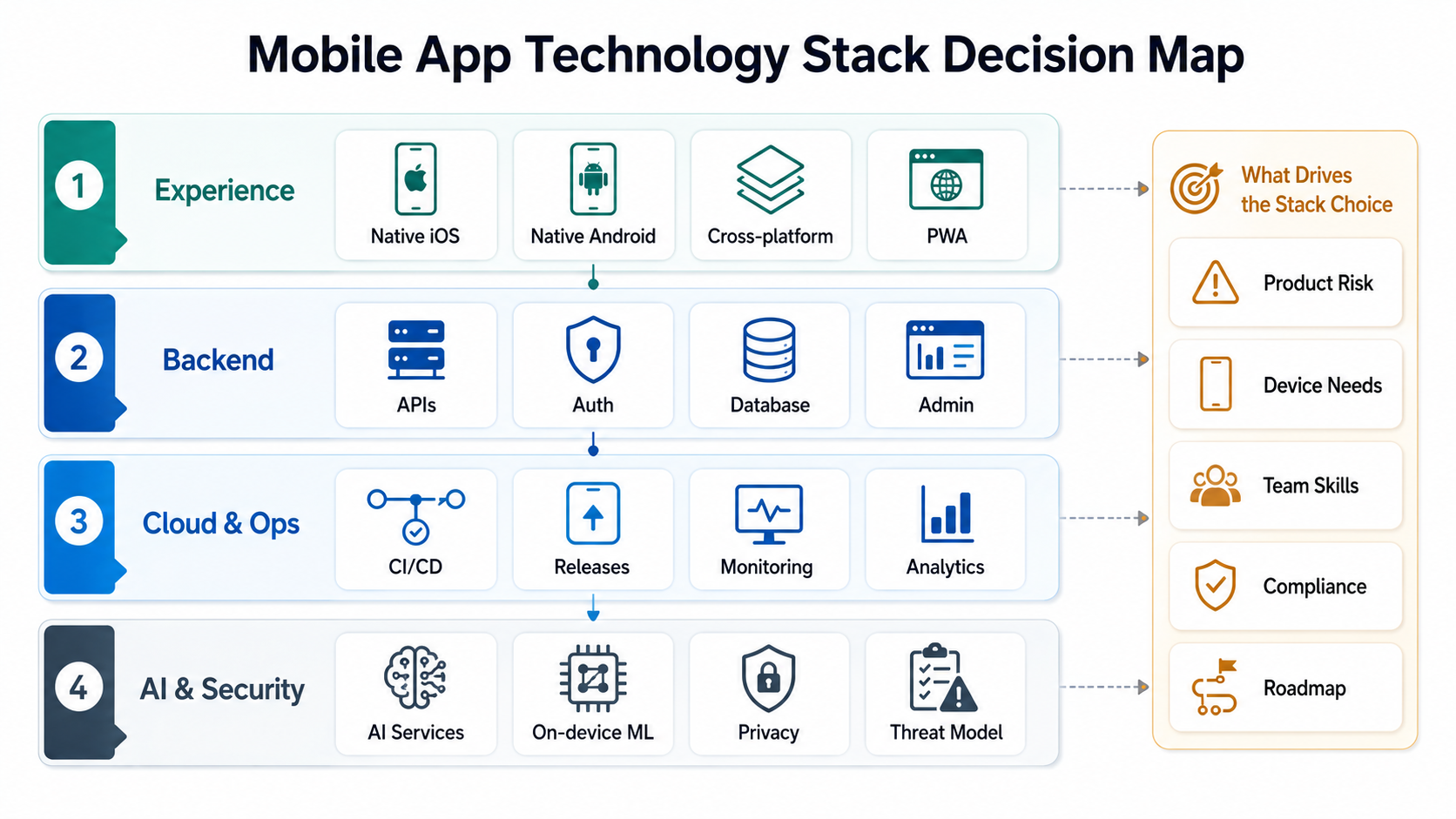
A stack is not a list of fashionable tools. It is a set of constraints you will live with through design, build, QA, launch, monitoring, updates, and support. A good stack makes the important work easier: user flows are fast, data is reliable, releases are repeatable, permissions are clear, and the team can change the app without fear.
Before comparing frameworks, decide who owns the stack after launch. A mobile app technology stack is a product operating model: design owns interface consistency, mobile engineers own platform behavior, backend engineers own API reliability, QA owns device evidence, security owns data boundaries, and product owns the roadmap tradeoffs. If ownership is unclear, even a fashionable stack becomes expensive.
Evaluate the stack across six layers:
- Mobile frontend: Swift, Kotlin, React Native, Flutter, PWA, or a combination by role.
- Backend and data: APIs, auth, database, admin console, files, search, payments, integrations, and reporting.
- Cloud and release operations: environments, CI/CD, app signing, store submission, feature flags, monitoring, and rollback plan.
- AI and automation: cloud AI APIs, on-device ML, prompt/data boundaries, evaluation, cost controls, and human review.
- Security and compliance: threat modeling, secrets, data retention, permissions, audit logs, and privacy disclosures.
- Maintenance: upgrade cadence, hiring market, test coverage, dependency health, and documentation.
When Native Swift And Kotlin Are The Right Choice
Native iOS and Android development makes sense when platform behavior is central to the product. That includes apps with heavy camera usage, Bluetooth, background location, wearables, offline-first field workflows, high-performance interactions, advanced accessibility requirements, strict app-store polish, or long-lived enterprise support.
The tradeoff is duplicated product implementation across iOS and Android. You can share backend contracts, design systems, analytics events, QA scenarios, and product rules, but the mobile UI and platform-specific behavior still require dedicated ownership. Native is not automatically slower if the product needs deep device integration; it is slower only when the app would have been equally good with shared code.
For iOS-heavy products, NextPage's Swift app development service is the relevant path. For Android-first products, Kotlin gives strong native control over device behavior, release performance, and Android ecosystem integrations.
When React Native And Expo Fit Best
React Native is often a strong default for startups and product teams that already use React, TypeScript, and web-style product velocity. It can share business logic, component thinking, design tokens, analytics patterns, and developer skills across web and mobile. Expo and EAS can also reduce build and distribution friction for many teams; Expo's official EAS Build documentation describes it as a hosted service for building app binaries for Expo and React Native projects, with support for internal distribution and store submission workflows.
React Native still needs architectural discipline. Native modules, push notifications, deep links, app-store permissions, background behavior, payments, and upgrade cadence must be planned. If the app depends on many custom native integrations, decide early whether Expo managed workflow is enough, whether prebuild/native customization is required, or whether a native stack is more honest.
Use NextPage's React Native app development services page when the goal is shared iOS and Android delivery with clear native boundaries, backend contracts, QA, and release operations.
When Flutter Is The Better Cross-Platform Bet
Flutter can be the better fit when the product needs one codebase, consistent UI across platforms, and a team comfortable with Dart and Flutter's rendering model. It is useful for design-heavy apps, fast cross-platform builds, and products where shared UI consistency matters more than reusing a React web stack.
The important question is not whether Flutter is "better" than React Native. The question is whether your team, hiring market, native plugin needs, design system, testing strategy, and app roadmap make Flutter easier to operate over three years. Official Flutter architecture documentation is useful when teams need to understand how the framework renders and structures apps before committing.
For broader shared-code planning, NextPage's cross-platform app development services cover React Native, Flutter, backend contracts, QA, and release operations around the product behavior users actually need.
When Web-First Or PWA Is Enough
A mobile-first web app or PWA can be the right first release when the goal is validation, internal workflow, field data capture, B2B portal access, or a customer journey that does not need deep native APIs. Web-first keeps iteration fast and avoids app-store review friction while the product is still learning.
It is not a shortcut for every app. If the product depends on background location, push reliability, advanced camera workflows, offline sync, app-store discovery, subscriptions, or native trust signals, a PWA may create experience debt. The best use of web-first is to validate roles, data model, admin workflow, and core demand before investing in a full native or cross-platform app.
Match The Stack To Product Risk
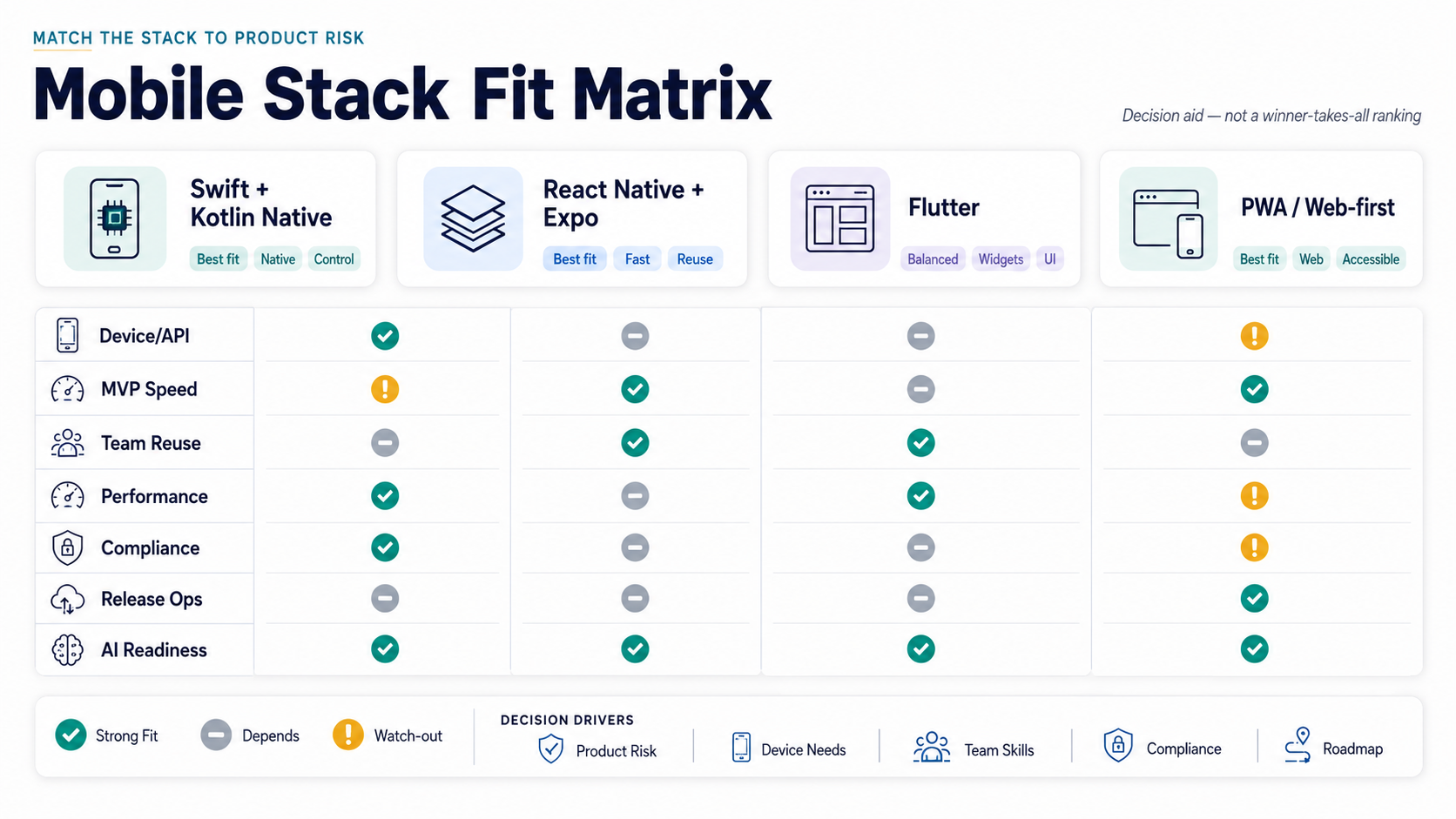
A useful stack decision matrix should expose tradeoffs leadership can act on. Do not ask "Which framework is best?" Ask which option minimizes the risk you cannot afford.
| Decision Factor | What To Ask | Why It Matters |
|---|---|---|
| Device/API depth | Does the app need camera, sensors, BLE, background location, wallets, widgets, or native payments? | Deep native behavior can erase cross-platform savings if not planned. |
| Speed to MVP | Can release one prove demand with shared code or web-first delivery? | Learning speed matters when the model is still uncertain. |
| Team reuse | Can the current team maintain TypeScript, Dart, Swift, Kotlin, backend, and release pipelines? | A stack nobody can support becomes expensive after launch. |
| Security and compliance | What data is stored, synced, logged, and exposed through the app? | Healthcare, fintech, enterprise, and marketplace apps need stronger data boundaries. |
| Release operations | How often will the product ship, test, review, and roll back mobile changes? | App-store binaries, OTA updates, feature flags, and QA environments affect velocity. |
| AI readiness | Will the app call cloud AI APIs, run on-device ML, or show AI-generated output? | AI introduces latency, cost, privacy, evaluation, and human-review decisions. |
The Backend Stack Decides More Than The App Screens
Many mobile stack debates over-focus on the frontend. In production, backend decisions often drive cost, timeline, and risk. The app needs reliable APIs, authentication, data model, admin operations, file storage, notifications, payments, integrations, observability, and support tools. If those are weak, the mobile client becomes a polished shell around brittle operations.
For simple MVPs, managed services such as Firebase or Supabase can reduce setup time. For complex products, a custom backend with Node.js, Python, .NET, Java, or another mature stack may be more maintainable because the team controls domain logic, integrations, permissions, and reporting. The right answer depends on data ownership, compliance, expected scale, integration complexity, and how much admin workflow the business needs.
If the app connects devices, real-time operations, or field workflows, review the IoT mobile app development roadmap. Device-to-cloud architecture changes how you think about offline sync, telemetry, retries, monitoring, and QA.
For integration-heavy products, include API ownership in the stack decision. A mobile app that depends on ERP, CRM, payments, maps, identity, warehouse, or support systems needs versioned API contracts, retry behavior, webhook handling, observability, and admin recovery. NextPage's custom software development work is often the right path when the mobile client is only one surface in a larger operational platform.
AI Integrations Need Architecture, Not Just An API Key
AI is now part of many mobile roadmaps: chat assistants, search, recommendations, document extraction, voice workflows, image recognition, fraud signals, support automation, and productivity features. The stack question is where AI runs, what data it sees, how answers are evaluated, and how failures are handled.
Cloud AI APIs are faster to integrate but introduce latency, cost, privacy, and vendor dependency. On-device ML can improve privacy and responsiveness for some tasks, but it requires model-size, device-performance, update, and evaluation planning. For user-facing AI, include fallback states, prompt/version tracking, moderation, logging boundaries, and human review for sensitive decisions.
The stack should also define where AI data is allowed to travel. Sensitive apps may need local redaction, server-side policy checks, retrieval limits, audit logs, and human approval before AI output changes an account, diagnosis, transaction, or operational record. If the AI feature changes workflow economics, model it with the AI Automation ROI Calculator before expanding the mobile scope.
Security And App Store Readiness Should Shape The Stack
Apple's App Store Review Guidelines were last updated on February 6, 2026, and app-review constraints still affect stack planning: app completeness, payments, privacy, user-generated content, safety, login/demo access, and data disclosures need to be ready before submission. Android release planning has similar practical needs around permissions, data safety, signing, and store evidence.
Security should be built into the stack selection. Sensitive apps need threat modeling, secure storage, token handling, certificate pinning decisions, jailbreak/root detection where appropriate, privacy-safe analytics, role-based admin permissions, audit trails, and penetration-testing readiness. NextPage's mobile app security hardening services cover those release-readiness questions directly.
QA And Release Operations Are Part Of The Stack
A mobile app stack is incomplete without testing and release operations. Device coverage, OS versions, network conditions, crash reporting, analytics events, API contract tests, app-store builds, staged rollout, and rollback plans should be chosen before the launch crunch.
Expo EAS, Fastlane, native CI/CD, TestFlight, internal Android tracks, feature flags, remote config, analytics, and crash monitoring all change how safely the team can ship. Expo's EAS Build documentation describes hosted builds for Expo and React Native app binaries, internal distribution, and store submission support; that makes release tooling part of the stack decision, not a deployment afterthought.
For cross-platform apps, test native edge cases, not only shared screens. For native apps, keep parity requirements clear so iOS and Android do not drift. NextPage's mobile app testing services page is the right companion when release risk is a major driver.
How Stack Choice Affects Cost And Timeline
Stack choice affects cost through team shape, duplicated implementation, integration complexity, QA coverage, release operations, and maintenance. Cross-platform can reduce duplicated frontend effort, but it does not remove backend, admin, QA, security, analytics, or app-store work. Native can cost more upfront, but it may be cheaper over time for device-heavy products that would otherwise fight framework limitations.
For planning ranges, use the Mobile App Development Cost in 2026 guide. It explains how features, team, timeline, and platform choices shape budget beyond the framework label.
| Cost Driver | Stack Decision To Make Early | Risk If Deferred |
|---|---|---|
| Device depth | Native, cross-platform, or web-first by role and API requirement. | Late native-module work can erase shared-code savings. |
| Backend ownership | Managed backend, custom API, or integration platform. | Admin, reporting, auth, and data rules become brittle. |
| AI scope | Cloud AI, on-device ML, human review, and data-boundary policy. | Latency, privacy, and cost issues appear after launch. |
| Release operations | CI/CD, signing, internal distribution, store submission, rollback, and monitoring. | Every app update becomes a risky manual event. |
A Practical Stack Selection Process
- Define release-one jobs: customer, admin, provider, staff, or internal-user workflows.
- Map device needs: camera, GPS, Bluetooth, push, offline sync, payments, biometric auth, files, or sensors.
- Map backend ownership: APIs, auth, database, admin, reporting, integrations, and support operations.
- Score risk: performance, compliance, security, release frequency, team skill, hiring, and roadmap uncertainty.
- Prototype hard parts: native module, offline sync, AI response flow, payment/refund path, or app-store permission flow.
- Choose the smallest stack that survives production: not the fanciest stack, and not the cheapest demo stack.
- Document the upgrade path: when to add native modules, split services, strengthen QA, or rebuild a web-first MVP into native apps.
How NextPage Helps Choose And Build The Stack
NextPage chooses mobile app technology stacks from product evidence: roles, workflows, device needs, backend systems, data sensitivity, AI scope, release cadence, QA risk, and support model. We help teams decide whether the first release should be native, cross-platform, web-first, or a hybrid of surfaces by role.
If you already know you need a production mobile product, start with mobile app development. If the question is budget, use the Custom Software Cost Estimator. If the first release is still fuzzy, use the MVP Scope Builder before committing to a stack.