
A powerful photo editing app is no longer just a crop tool with filters. Users now expect fast mobile editing, precise local adjustments, natural retouching, RAW support, social-ready exports, cloud backup, and a workflow that feels simple even when the image pipeline underneath is complex.
If you are planning a photo editing product, the feature list should be organized around user outcomes: help people import better images, make confident edits, protect original files, create a repeatable style, remove distractions, export cleanly, and share without friction. That product thinking is what separates a useful editor from a crowded tool drawer.
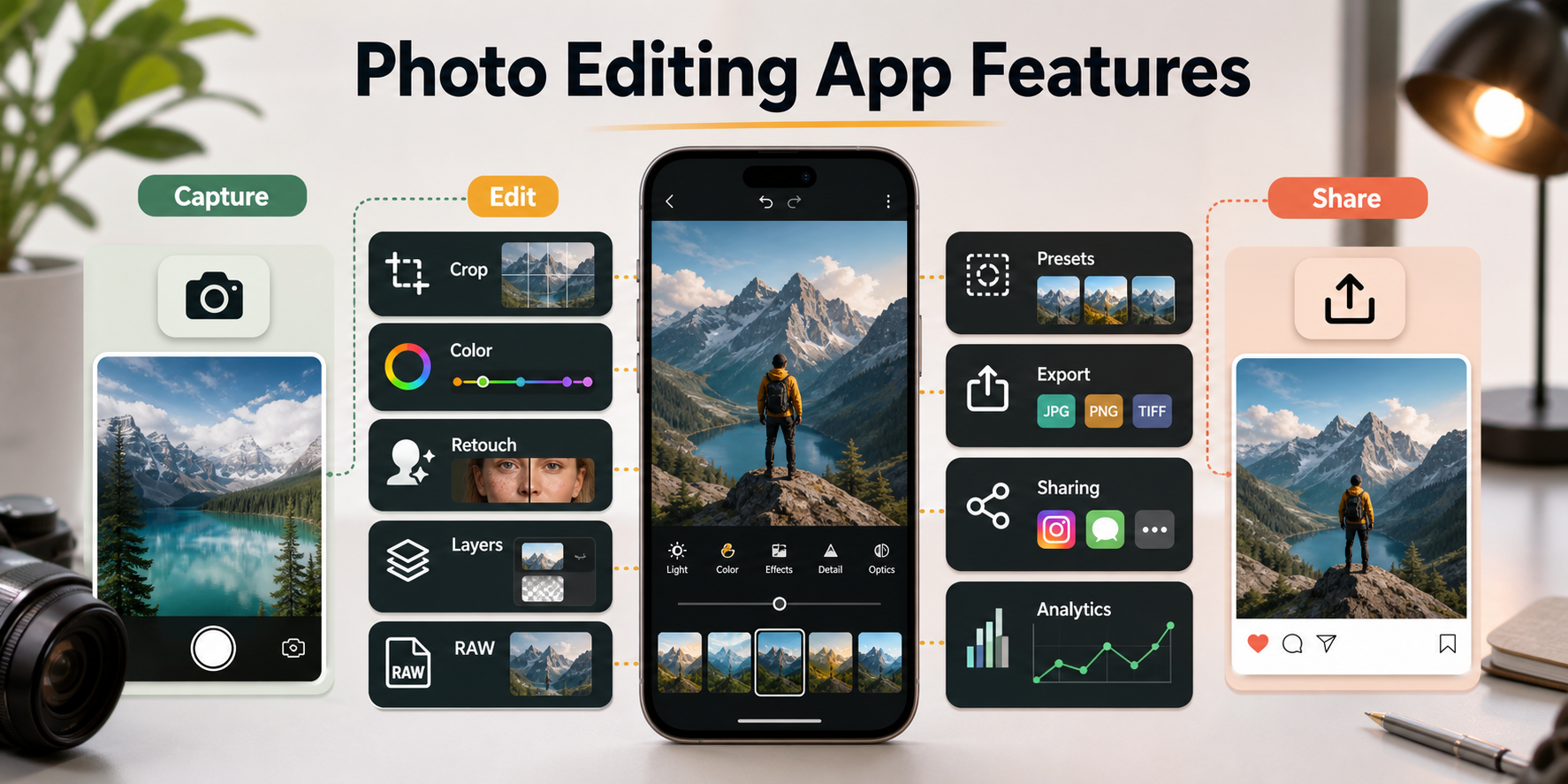
Quick Answer: What Features Does A Powerful Photo Editing App Need?
A powerful photo editing app needs an intuitive editor, crop and transform tools, exposure and color controls, filters and presets, selective adjustments, retouching, layers or masks, RAW support, text overlays, high-quality exports, cloud sync, social sharing, and a privacy-safe media workflow. For a commercial product, it also needs onboarding, analytics, monetization controls, performance optimization, and a clear upgrade path from beginner edits to pro workflows.
Teams building this kind of product should treat it as a full mobile app development project, not only a visual UI exercise. Image processing, device permissions, storage, offline behavior, GPU performance, export quality, and app store expectations all affect the user experience.
Photo Editing App Feature Priority Matrix
The most common planning mistake is trying to launch every editing idea at once. A better approach is to stage features by product maturity. The MVP should make ordinary editing fast and trustworthy. Growth features improve retention and sharing. Pro features serve serious creators. Scale features support monetization, teams, and platform operations.
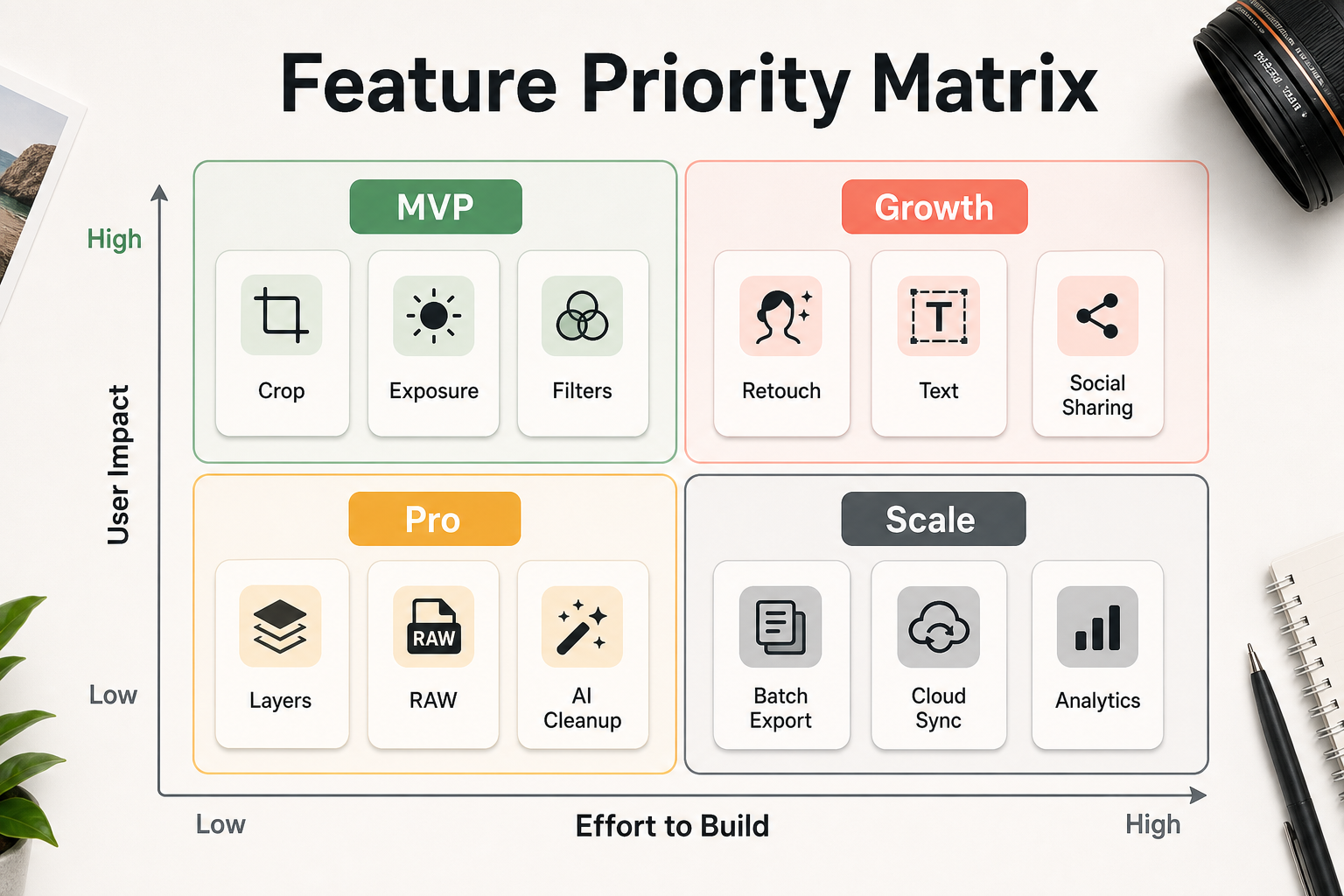
| Stage | Feature focus | Why it matters |
|---|---|---|
| MVP | Import, crop, rotate, exposure, contrast, color, filters, undo, and export. | Users can complete a real edit without learning a complicated product. |
| Growth | Presets, text, stickers, social sharing, saved styles, cloud backup, and simple onboarding. | The app becomes easier to reuse and recommend. |
| Pro | RAW support, selective edits, curves, healing, masks, layers, batch export, and advanced color. | Creators get precision and control without leaving mobile. |
| Scale | Subscriptions, AI cleanup, preset marketplace, collaboration, analytics, moderation, and admin tools. | The product can support revenue, operations, and continuous improvement. |
1. Intuitive Editor Interface
The editor interface is the product. Users should understand where to start, how to compare before and after, how to undo changes, and how to export without hunting through menus. Put common controls within thumb reach, keep destructive actions reversible, and use progressive disclosure so advanced tools do not overwhelm beginners.
A strong editor also needs clear empty states, permission prompts, loading states, and recovery flows. If media import fails, a RAW file takes time to render, or an export is too large, the app should explain what is happening without making the user restart the edit.
2. Core Correction Tools
Every photo editor needs reliable crop, rotate, straighten, perspective, exposure, contrast, highlights, shadows, white balance, saturation, sharpness, and noise controls. These are not glamorous features, but they determine whether the app can improve an image before any creative effect is applied.
Correction tools should feel predictable. Sliders need sensible ranges, instant preview feedback, and reset controls. Users should be able to compare the original image with the edited result at any time.
3. Filters, Presets, And Style Systems
Filters and presets help users create a consistent look quickly. The best apps let users tune the strength of a preset, save custom styles, organize favorites, and apply similar edits across multiple images. This is where casual users start to feel creative momentum.
Presets should not replace correction. Build the workflow so users can fix exposure and white balance first, then apply a style. For a deeper comparison of mobile editing tools and style workflows, the guide to photo editing apps for mobile photographers is a useful supporting read.
4. Advanced Editing Tools For Serious Creators
Advanced users need selective adjustments, curves, levels, gradients, brushes, HSL controls, detail recovery, and localized edits. These features give users control over the subject, background, sky, skin tones, shadows, and highlights without changing the entire image.
If your product targets creators or professional photographers, advanced editing cannot feel bolted on. It should be fast enough to preview on-device and structured enough that users can revise earlier choices. The supporting post on advanced editing tools for photo apps expands this section into selective editing, color grading, and pro workflows.
5. Retouching, Healing, And Object Cleanup
Retouching features remove distractions: blemishes, dust, wires, signs, stray objects, background clutter, or small flaws that pull attention away from the subject. Useful tools include spot healing, clone repair, object selection, content-aware fill, and portrait-safe refinements.
The product should encourage restraint. Over-smoothed portraits and unrealistic object removal can reduce trust. Keep the before/after comparison visible and make retouching reversible through edit history.
6. Text, Typography, And Creative Assets
Text tools are important for social graphics, quotes, thumbnails, posters, invitations, announcements, and product visuals. A useful text feature includes readable fonts, hierarchy controls, alignment, color, opacity, background shapes, and export-safe positioning.
Creative assets such as stickers, frames, overlays, and templates can help retention, but they should not make the app feel cluttered. Organize them by use case and keep premium packs discoverable without interrupting the edit.
7. Layers, Masks, And Non-Destructive History
Layers and masks unlock advanced composition, selective effects, text control, background edits, and complex creative workflows. Even if the first release does not expose full layer controls, the underlying edit model should be non-destructive so users can revise earlier steps.
Non-destructive history is also a trust feature. Users should know their original image is safe, edits can be adjusted, and exports are copies rather than accidental overwrites.
8. RAW Support And Image Quality
RAW and high-quality image handling matter for users who care about detail, dynamic range, color, and professional output. A photo editing app should handle large files without crashing, preserve metadata where appropriate, and export in formats that fit the destination.
Image quality decisions affect engineering scope. RAW decoding, GPU previews, memory management, background processing, and export compression all need deliberate architecture. Use the custom software cost estimator when you need a first budget range for a media-heavy mobile product.
Photo Editing App Architecture
A serious editor needs more than screens and sliders. The app must coordinate media permissions, import, preview generation, edit instructions, history, caching, storage, export, sharing, analytics, and sometimes cloud sync. If this foundation is weak, advanced tools will feel slow or unreliable.
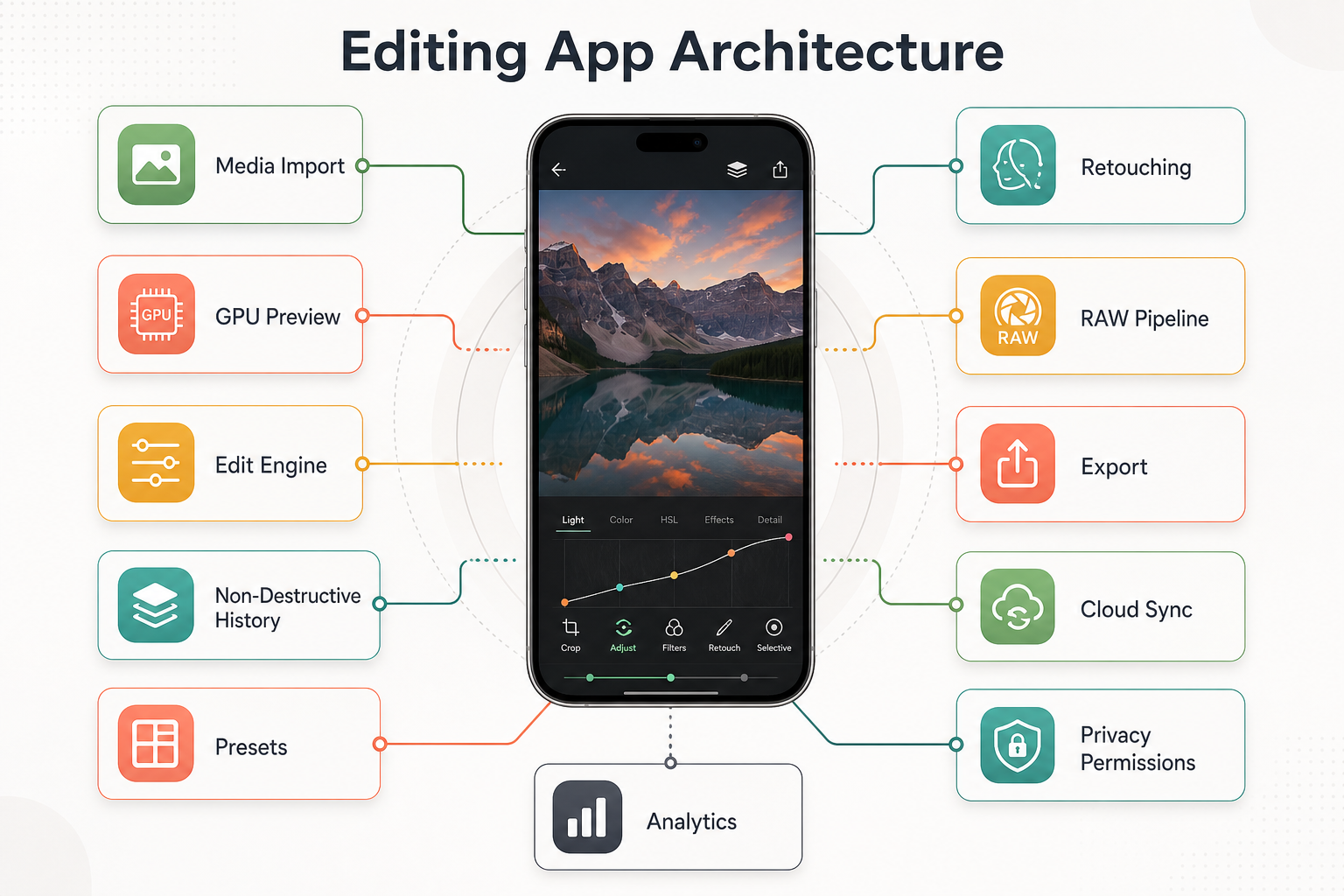
For media-heavy products, the architecture often overlaps with custom software development: backend storage, account sync, payment states, admin tools, content moderation, and observability may become as important as the editor screen itself. NextPage's SoundCrate mobile media case study shows similar mobile-media concerns around native performance, downloads, account workflows, and continuous playback.
9. Social Sharing, Export, And Publishing Workflow
Users rarely edit photos only to keep them inside the app. Export controls should support common aspect ratios, file types, compression levels, watermarking, background processing, and direct sharing to social platforms. The flow should also preserve quality when users move between apps.
Sharing is a growth loop when it is designed well. The related guide on social sharing integration for photo editing apps covers platform sharing, engagement, and retention in more detail.
10. Monetization And Retention Features
Photo editing apps commonly monetize through subscriptions, premium presets, retouching packs, cloud storage, advanced export tools, marketplace revenue, or team features. The paid model should be tied to real user value instead of locking basic corrections behind frustration.
Retention depends on saved styles, recent edits, templates, reminders, tutorials, community prompts, and a clear reason to return. The post on monetizing photo editing apps is a useful follow-up when the feature roadmap reaches pricing and subscription strategy.
11. Quality, Privacy, And App Store Readiness
Photo apps touch personal media, so privacy and trust matter. Ask only for permissions the app needs, explain why media access is required, support limited library access where possible, and avoid surprising uploads. If cloud sync or AI processing is used, tell users what leaves the device and what stays local.
QA should cover low-memory devices, large images, RAW imports, export failures, interrupted sessions, offline behavior, permission changes, background processing, accessibility, and app store privacy declarations. These checks protect reviews and reduce support load after launch.
Photo Editing App Launch Workflow
A useful launch plan moves from discovery to MVP scope, prototype validation, editing engine development, quality testing, app store release, retention measurement, and feature improvement. That sequence keeps the team focused on a releasable product instead of an endless backlog.
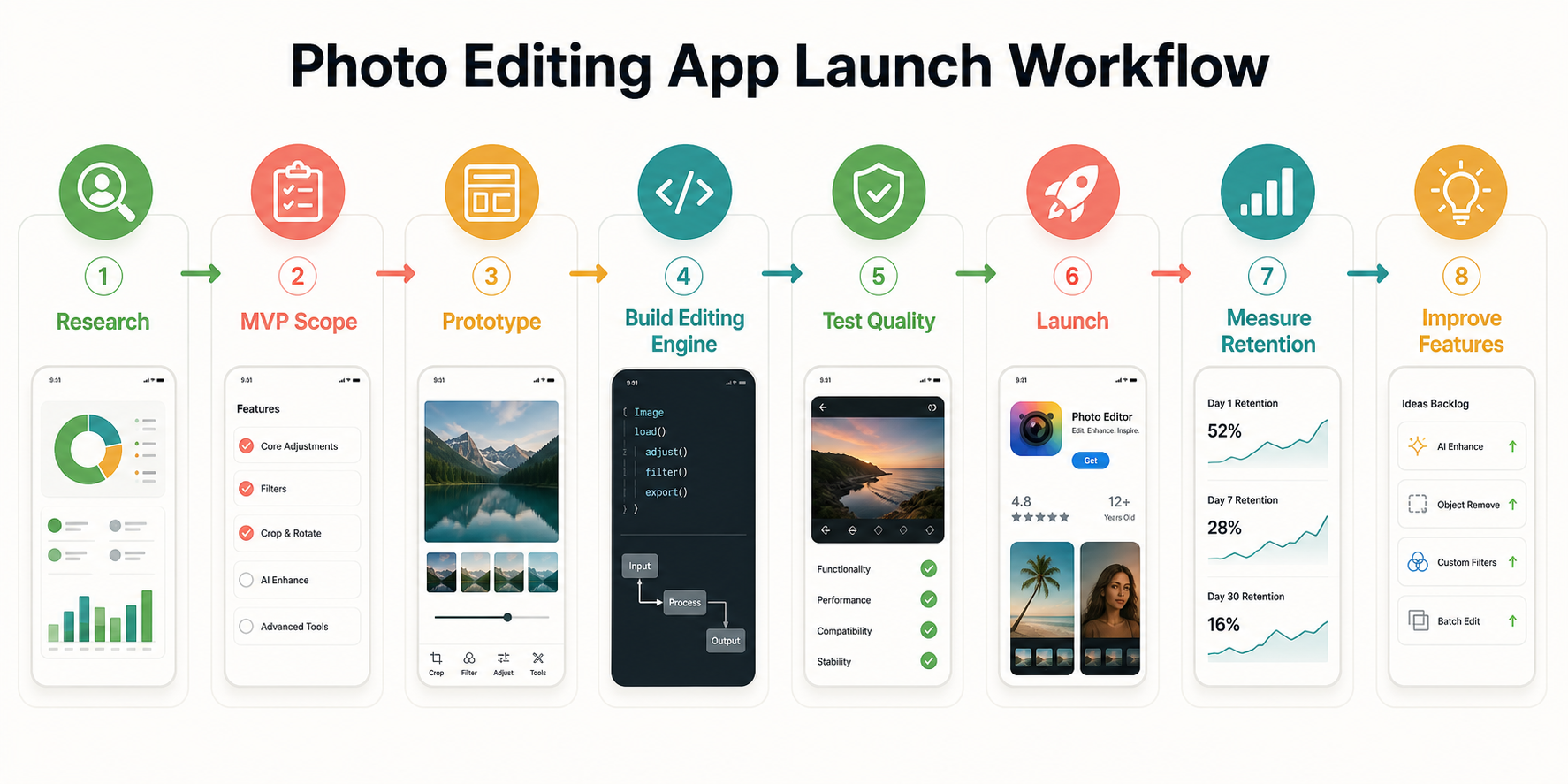
If the first release is still uncertain, plan it like an MVP development effort. The broader mobile app development process guide explains how discovery, UX, architecture, QA, and launch gates should work together.
Final Recommendation
Start with a complete editing loop: import, correct, style, retouch, export, and share. Add advanced capabilities only after the core flow feels fast, reversible, and trustworthy. For founders and product teams, the strongest photo editing app roadmap is not the longest feature list. It is the one that helps a defined user produce better images with fewer doubts.