
The native vs cross-platform mobile app development decision is no longer a simple argument about which technology is better. The better question is which approach gives your product the right balance of user experience, delivery speed, platform access, team capacity, maintenance cost, and long-term product risk.
Native development usually means building separately for iOS and Android with platform-specific tools such as Swift or Kotlin. Cross-platform development usually means using a shared codebase with frameworks such as React Native or Flutter, then adapting platform-specific behavior where the product needs it. Both can work well when the decision is tied to the product instead of a trend.
If you are planning a new app, start with the user journey, device features, integrations, budget, and launch timeline before choosing the stack. The same stack choice should be part of a broader mobile app development plan that covers backend, QA, analytics, release operations, and post-launch improvement.
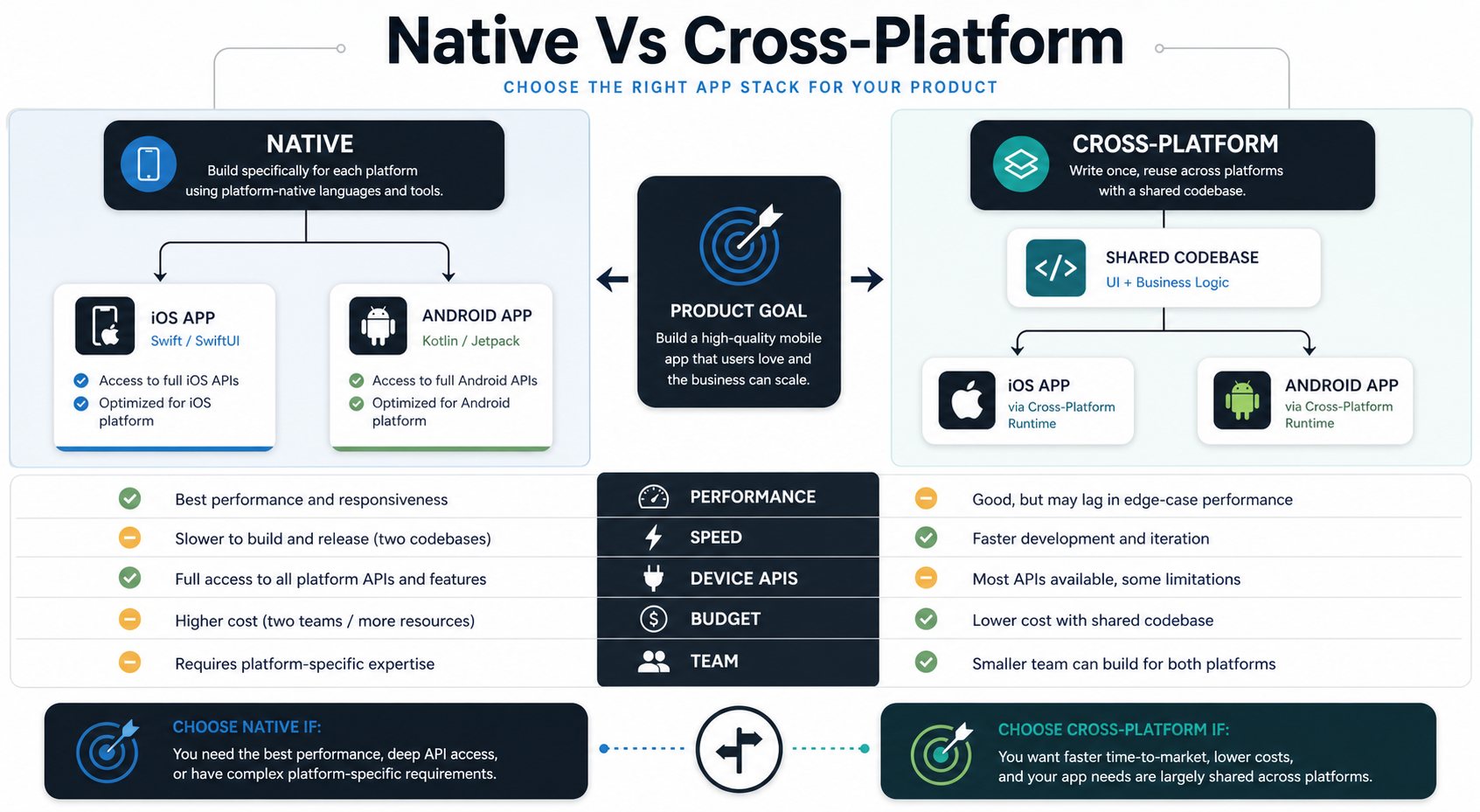
Quick Answer: Native Vs Cross-Platform Mobile App Development
Choose native mobile app development when the app needs the highest platform-specific performance, advanced device APIs, deep OS integration, premium UI polish, or separate iOS and Android product experiences. Choose cross-platform development when the product needs faster first release, shared business logic, a smaller team, consistent UI across platforms, and a lower maintenance burden for a straightforward app.
Many successful teams use a hybrid decision: cross-platform for the main customer experience, native modules for performance-heavy or device-specific areas, and platform-specific QA where behavior differs. This is often more useful than treating the decision as all-or-nothing.
What Native Mobile App Development Means
Native mobile app development uses the official platform ecosystem for each operating system. For iOS, that usually means Swift, SwiftUI, UIKit, Xcode, and Apple platform APIs. For Android, that usually means Kotlin, Jetpack Compose, Android Studio, and Android platform APIs.
The main advantage is control. Native teams can use platform capabilities early, tune performance deeply, follow platform interface conventions closely, and build separate experiences where iOS and Android users expect different behavior. This can matter for apps involving heavy animation, advanced camera behavior, Bluetooth, sensors, offline-first workflows, accessibility requirements, background processing, or strict app-store expectations.
The tradeoff is duplicated effort. Two native apps usually need two implementation tracks, two release pipelines, more platform-specific QA, and a team that can maintain both ecosystems over time.
What Cross-Platform Mobile App Development Means
Cross-platform mobile development uses a shared codebase to ship iOS and Android apps. React Native lets teams use React and JavaScript or TypeScript to call platform-backed native components. Flutter uses Dart and its own rendering approach to create a consistent app interface across platforms. Other approaches exist, but React Native and Flutter are the most common choices for many business apps.
The main advantage is leverage. A shared codebase can reduce duplicated product logic, help smaller teams ship to both app stores faster, and keep UI behavior more consistent across platforms. This is especially useful for MVPs, internal products, ecommerce apps, content products, booking apps, learning apps, marketplaces, and operational apps where the core workflow is similar on iOS and Android.
The tradeoff is abstraction risk. When an app needs unusual platform behavior, very new OS APIs, advanced background work, complex native SDKs, or heavy graphics, the team may need custom native modules, plugin evaluation, or platform-specific escape hatches.
Native Vs Cross-Platform Decision Scorecard
A practical decision should compare product requirements, not generic pros and cons. Use the scorecard below before asking for estimates so every vendor or developer is responding to the same constraints.
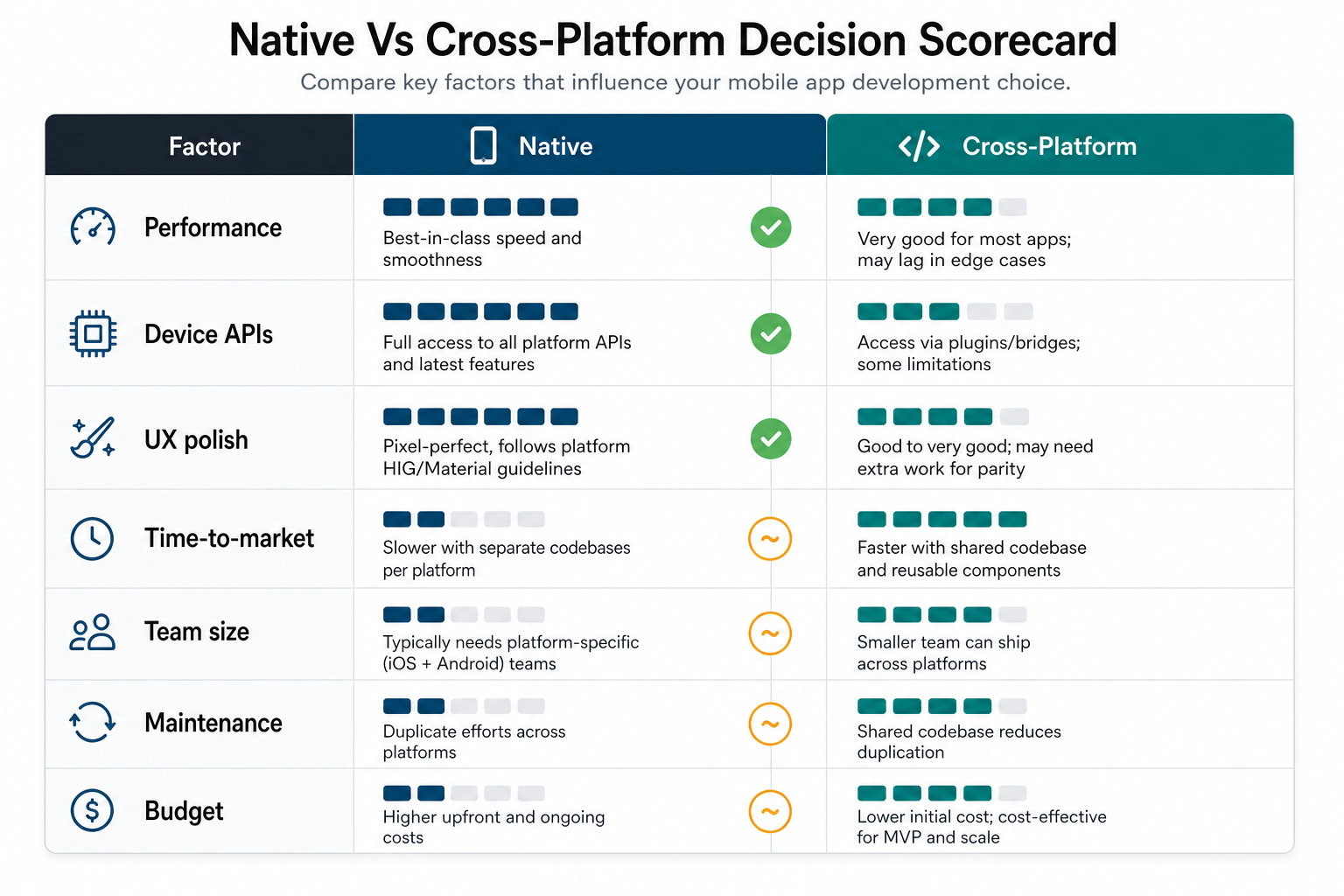
| Decision Area | Native Usually Fits When | Cross-Platform Usually Fits When |
|---|---|---|
| Performance | The app has demanding animations, media, graphics, or real-time interactions. | The app is mostly forms, feeds, dashboards, content, commerce, booking, or workflow screens. |
| Device APIs | The product depends deeply on camera, sensors, Bluetooth, health data, background tasks, or platform SDKs. | Device access is standard, plugin coverage is mature, and native modules are limited. |
| User experience | iOS and Android should feel distinctly platform-native. | A consistent brand experience across both platforms matters more than platform-specific differences. |
| Timeline | The team can afford parallel platform work or one platform launches first. | The business needs a focused first release on both app stores quickly. |
| Team | You have separate iOS and Android talent or a long-term budget for both. | You want one core mobile team with selective native support. |
| Maintenance | Separate roadmaps are acceptable because platform behavior differs. | Shared logic, shared UI, and fewer duplicate changes reduce operational load. |
| Budget | The business case justifies higher platform-specific investment. | The business needs to validate demand before funding full platform specialization. |
When Native Is The Better Choice
Native is often the better choice when the app experience is the product. If smooth gestures, camera quality, advanced notifications, wearable integration, offline reliability, real-time media, or platform-specific interface patterns are central to success, native development reduces the risk of fighting the framework later.
Native can also be the right call when you are building an app for a regulated environment, hardware-connected workflow, or high-volume consumer product where a few percentage points of performance, reliability, or retention justify the extra engineering investment. For example, IoT and device-connected products often need deeper planning around pairing, offline states, data sync, and diagnostics; the IoT mobile app development roadmap shows how those architecture decisions can affect the mobile stack.
The main risk is cost and duplicated work. Native does not automatically mean better product quality. Weak requirements, poor UX, thin QA, or rushed releases can still produce a bad app on both platforms.
When Cross-Platform Is The Better Choice
Cross-platform is often the better choice when the app has a shared workflow across iOS and Android, the business needs to move quickly, and the product can benefit from one core codebase. This is common for MVPs, marketplace apps, ecommerce apps, booking apps, content apps, wellness apps, education apps, and internal operational apps.
If you are still validating the first version, use the MVP Scope Builder to separate must-have workflows from later platform-specific polish. A focused cross-platform MVP can help you test demand before investing in separate native builds.
Cross-platform still requires serious engineering. Teams need to evaluate plugin quality, native module needs, navigation behavior, app size, accessibility, error handling, crash reporting, update cadence, and platform-specific QA. A shared codebase reduces duplication, but it does not remove the need to test on real iOS and Android devices.
Choose The Stack By Product Risk
The safest way to decide is to map the product risks first. A low-risk app with standard flows can benefit from shared code. A high-risk app with unusual device behavior, heavy platform APIs, or premium UX requirements may need native development from the start.
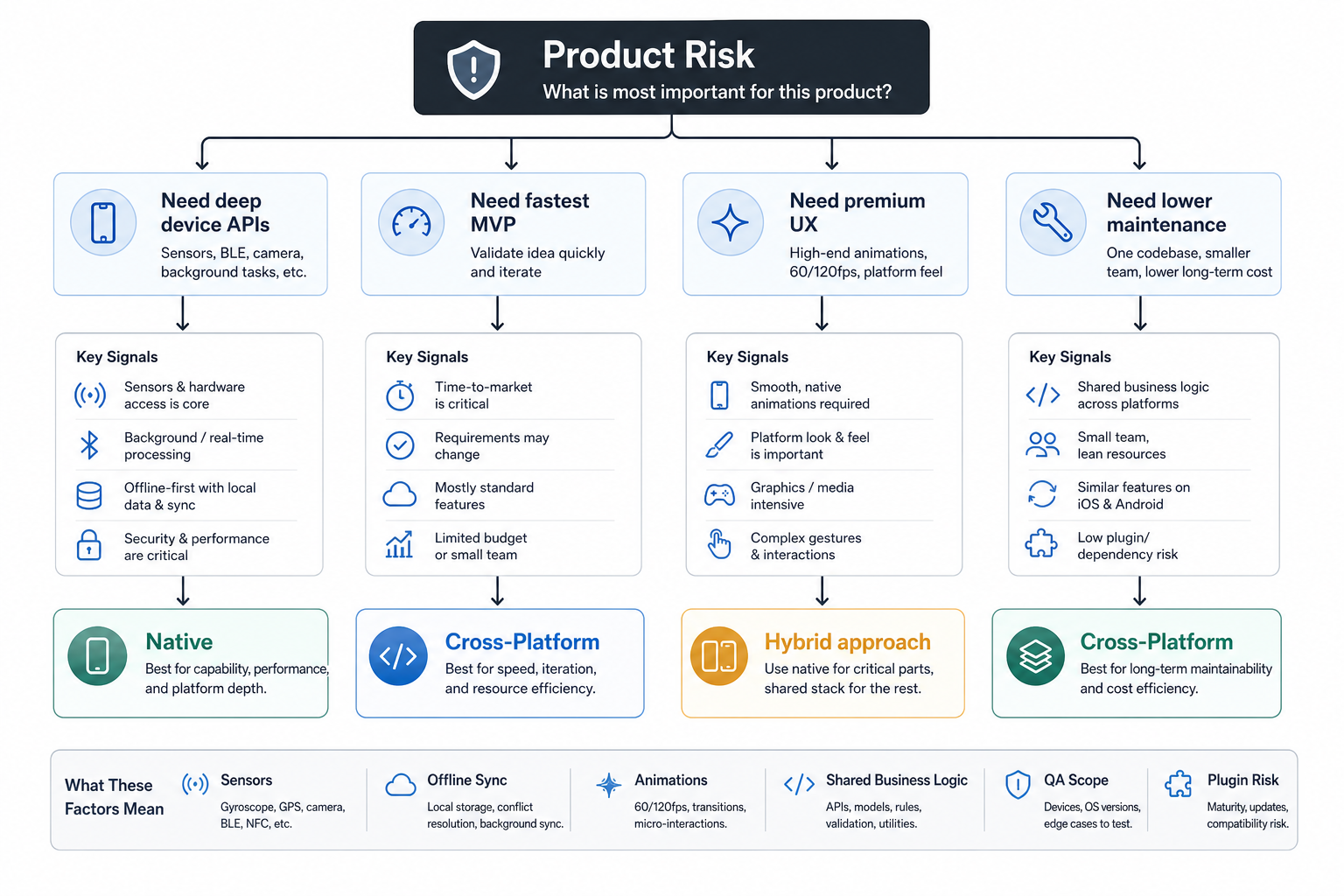
- Deep device APIs: favor native or budget for native modules inside a cross-platform app.
- Fastest useful MVP: favor cross-platform when the core workflow is shared across platforms.
- Premium platform UX: favor native when iOS and Android conventions should diverge.
- Lower long-term maintenance: favor cross-platform when shared business logic is the biggest cost driver.
- Mixed requirements: use cross-platform for common screens and native modules for platform-specific complexity.
Cost And Timeline Impact
Cross-platform development can reduce initial cost and timeline because one team can build much of the app once. That does not mean it is always cheaper in the long run. If the app later needs many custom native modules, framework upgrades, plugin replacements, or platform-specific workarounds, the savings can shrink.
Native development usually costs more upfront when you need both iOS and Android at the same time, but it can reduce risk for platform-intensive products. The budget question should include engineering roles, backend work, design, QA, DevOps, app-store release support, analytics, crash monitoring, and post-launch maintenance, not only screen count.
Use the Custom Software Cost Estimator when comparing build approaches. For feature-heavy industry products, compare similar cost drivers in supporting guides such as education app development cost and ecommerce app development cost.
Team And Maintenance Considerations
The stack should match the team that will own the app after launch. Native apps need ongoing iOS and Android attention for OS updates, app-store requirements, SDK changes, analytics, crashes, and feature parity. Cross-platform apps need framework expertise plus enough native knowledge to debug platform-specific issues.
A common mistake is treating cross-platform as a way to avoid native expertise entirely. Even with a shared codebase, a serious product still needs platform-aware QA, release management, performance profiling, and careful dependency decisions. The better argument for cross-platform is focused leverage, not absence of complexity.
Quality Assurance And Release Risk
Testing strategy changes with the stack. Native apps require separate platform test plans because implementation differs. Cross-platform apps require shared workflow tests plus platform-specific checks for navigation, permissions, push notifications, payments, camera access, file handling, accessibility, and app-store behavior.
Launch readiness also includes app-store metadata, screenshots, keyword positioning, ratings strategy, privacy labels, and release monitoring. If acquisition from the stores matters, pair the technical decision with the related guide on App Store Optimization so the build plan and launch plan support each other.
Examples Of Good Fit
A fitness tracker with deep HealthKit or Google Fit usage, watch integration, and complex background behavior may lean native. A wellness content app with subscriptions, onboarding, reminders, dashboards, and simple media playback may be a strong cross-platform fit. The wellness app development guide for iOS and Android shows how scope, integrations, and product loops can shift the decision.
An ecommerce app with catalog browsing, accounts, carts, push notifications, and checkout may work well cross-platform if payment and analytics SDKs are mature. A camera-heavy creator app or a hardware companion app may justify native investment earlier. The right answer comes from mapping the core user action, not from copying another company’s stack.
Final Recommendation
Choose native when platform control, device integration, performance, and premium user experience are central to the product. Choose cross-platform when shared workflows, faster launch, smaller team size, and lower maintenance are more important. Choose a hybrid approach when most screens can be shared but a few high-risk capabilities need native implementation.
The best mobile stack is the one your team can build, test, ship, and maintain responsibly. Define the first-release scope, identify the riskiest platform requirements, estimate the full lifecycle cost, and choose the approach that reduces product risk instead of winning a technology argument.