
Quick Answer: What Does Odoo ERP Implementation Cost?
Odoo ERP implementation cost depends less on the license alone and more on the operating change you are asking the system to carry. A narrow first release with CRM, sales, inventory, and basic accounting configuration can often be planned as a focused implementation. A multi-company rollout with manufacturing, eCommerce, warehouse logic, custom approvals, third-party integrations, historical data migration, reporting, training, and post-go-live support needs a larger delivery budget and a phased rollout plan.
For planning, separate the budget into seven buckets: Odoo subscription and hosting, implementation discovery, module configuration, data migration, integrations, customization, QA/training, and support. Odoo's own pricing page shows that implementation services, expert access, Odoo.sh hosting for custom developments, in-app purchase credits, and maintenance of custom code are outside the base subscription. That is why two companies with the same user count can have very different implementation budgets.
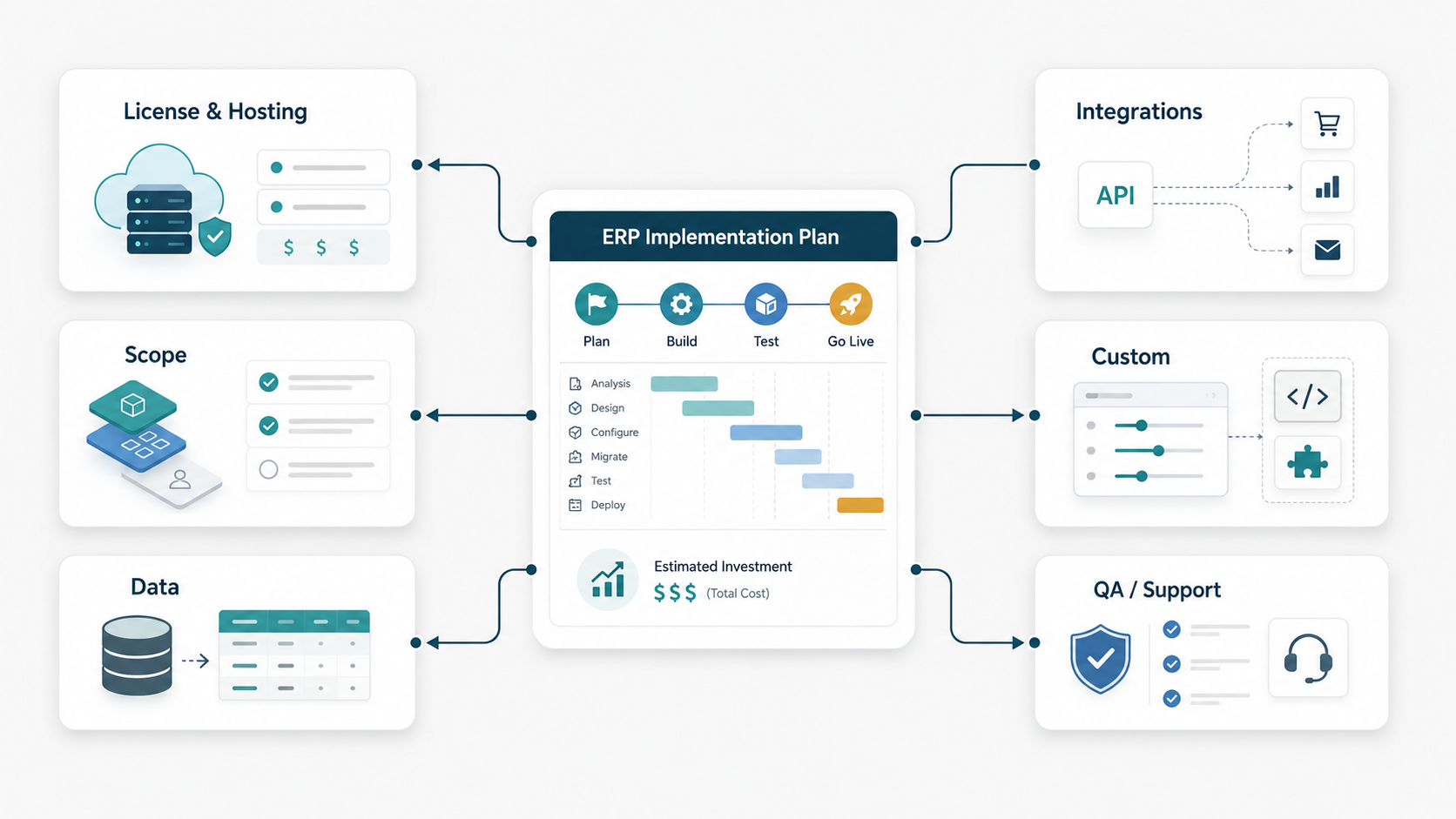
If you need a first estimate, use the Custom Software Cost Estimator with ERP modules, integrations, data migration, and support selected. Then validate the number through a workflow workshop before committing to a fixed implementation plan.
| Odoo Workstream | Typical Planning Range | What Changes The Cost |
|---|---|---|
| Discovery and ERP scope audit | $8,000-$30,000 | Process mapping, module fit, data audit, integration inventory, rollout plan |
| Simple first release | $25,000-$75,000 | Limited modules, light configuration, small data import, minimal custom logic |
| Mid-market implementation | $75,000-$250,000 | Inventory, finance, sales, approvals, reporting, integrations, user training |
| Complex multi-module rollout | $250,000-$750,000+ | Manufacturing, multi-company, eCommerce, warehouse rules, custom development, phased regions |
| Ongoing support | $3,000-$25,000+ per month | Admin support, enhancements, integration monitoring, reporting, releases, user enablement |
The Six Cost Drivers That Shape An Odoo Budget
A useful Odoo estimate starts with cost drivers, not a generic per-user calculation. Subscription cost matters, but implementation effort comes from how much business logic needs to be designed, migrated, connected, tested, and adopted.
Licensing and hosting. Odoo's Standard plan is usually simpler when you can stay on Odoo Online without custom modules. The Custom plan is relevant when you need Odoo.sh or on-premise deployment, Odoo Studio, multi-company, or external API access. Hosting choices affect environment setup, deployment workflow, backup expectations, and release governance.
Module scope. CRM, sales, invoicing, inventory, purchase, accounting, manufacturing, project, POS, website, and eCommerce all carry different process decisions. A team that implements five tightly connected modules has more design work than a team using one isolated app.
Data migration. Clean product masters, customers, vendors, chart of accounts, open invoices, stock levels, bill of materials, and historical orders are rarely ready on day one. Data quality drives extraction, cleansing, mapping, validation, and cutover rehearsals.
Integrations. ERP value increases when Odoo connects to accounting tools, payment providers, eCommerce storefronts, marketplaces, warehouse systems, CRM, BI, tax engines, shipping carriers, and legacy databases. Integration design should include ownership, retry logic, monitoring, reconciliation, and failure handling.
Customization. Some gaps can be solved with configuration or Odoo Studio. Others require custom modules, approval flows, portals, reports, permissions, automated actions, or extensions. Customization is not bad by default, but unmanaged customization creates upgrade and support cost.
QA, training, and support. ERP changes how people work. Budget for UAT scripts, role-based training, migration validation, go-live support, and a first-90-days support plan. This is where many under-scoped ERP projects lose adoption.
Module Scope: Start With The Workflows That Pay Back First
Do not implement every Odoo app just because the subscription includes access to many apps. A better first release targets the workflow that creates the most operational drag and the minimum adjacent modules needed to make it work. For a distributor, that might be sales, purchase, inventory, invoicing, and shipping. For a manufacturer, it might be inventory, manufacturing, purchase, quality, and accounting handoff. For a services company, CRM, sales, project, timesheets, invoicing, and reporting may matter more.
| Business Scenario | Likely First Modules | Cost Watchouts |
|---|---|---|
| Trading or distribution | Sales, purchase, inventory, invoicing, shipping | SKU cleanup, stock valuation, warehouse rules, carrier integration |
| Manufacturing | Inventory, MRP, BOM, purchase, quality, maintenance | BOM accuracy, routing, work centers, shop-floor adoption, costing |
| DTC or B2B commerce | Website, eCommerce, inventory, sales, accounting | Payment, tax, fulfillment, returns, catalog sync, order status |
| Professional services | CRM, sales, project, timesheets, invoicing | Approval flows, utilization reporting, contract rules, finance handoff |
| Multi-company group | Accounting, inventory, purchase, approvals, reporting | Intercompany rules, permissions, chart of accounts, consolidation |
Use the broader custom ERP development cost guide when you are deciding whether Odoo configuration is enough or whether a focused custom ERP module would be cleaner for a workflow that creates competitive advantage.
Data Migration Cost: The Budget Risk Buyers Underestimate
Data migration is where a simple Odoo project can become complex. The issue is rarely just moving rows from one database to another. The real work is deciding what becomes the source of truth, which historical records need to move, which fields are obsolete, how duplicates are handled, what gets archived, and how the business validates the result before go-live.
Plan migration in waves. Start with master data such as customers, vendors, products, chart of accounts, taxes, units of measure, and warehouses. Then move open transactions such as sales orders, purchase orders, invoices, inventory balances, and manufacturing orders. Historical data can be migrated, summarized, or kept read-only depending on reporting and compliance needs.
For a structured migration plan, use the ERP data migration checklist. It covers mapping, validation, cutover, rollback, and signoff so migration does not become a last-week scramble.
Integration Cost: ERP, eCommerce, Accounting, CRM, And Reporting
Odoo can become the operating core, but most companies still need integrations. The cost depends on data objects, sync direction, frequency, API quality, error handling, and whether the integration touches money, stock, tax, or customer promises.
| Integration | Common Data | Budget Risk |
|---|---|---|
| eCommerce storefront | Products, inventory, prices, orders, shipments, returns | Overselling, partial fulfillment, tax, promotions, marketplace exceptions |
| Accounting or tax | Invoices, payments, tax codes, journal entries, reconciliation | Compliance, rounding, multi-currency, month-end close |
| CRM | Accounts, contacts, quotes, opportunities, activities | Duplicate ownership, quote-to-order handoff, sales reporting |
| Warehouse or shipping | Pick lists, packing, labels, tracking, stock moves | Latency, carrier exceptions, barcode workflows, returns |
| BI and reporting | Orders, margin, inventory, finance, operations KPIs | Metric definitions, refresh cadence, permissions, auditability |
The ERP integration cost guide is useful when your Odoo estimate includes multiple systems, batch syncs, API work, or reporting pipelines. For implementation services, NextPage's ERP integration and modernization services focus on reliable data ownership, recovery paths, and maintainable workflows.
Customization: When Odoo Studio Is Enough And When Custom Development Is Needed
Configuration should come before code. Use Odoo settings, workflows, access rights, reports, automated actions, and Odoo Studio where they solve the business requirement cleanly. Move to custom development when the workflow needs deeper module behavior, external system orchestration, custom portals, advanced pricing, complex approvals, device-specific warehouse flows, or data structures that standard configuration cannot support.
The budget question is not "Can we customize Odoo?" The better question is "Will this customization survive upgrades, support, and user change?" Every custom field, report, automation, API endpoint, and module should have an owner, test plan, and upgrade note. If a requirement is unique to your operating model, custom development can be worth it. If it simply recreates a legacy habit, it may be better to adapt the process.
When the Odoo gap becomes a full workflow product, compare it with custom ERP development services. A focused custom module or companion app can sometimes be easier to maintain than forcing every edge case into the ERP core.
Odoo Implementation Timeline And Team Plan
A realistic Odoo timeline depends on decision speed as much as engineering effort. The fastest implementations have a small steering group, clear process owners, clean data, limited first-release scope, and a firm rule that nice-to-have changes move after go-live.
| Phase | Typical Duration | Output |
|---|---|---|
| Discovery and scope | 2-6 weeks | Process map, module fit, data audit, integration list, rollout plan |
| Configuration and prototype | 3-8 weeks | Configured modules, roles, sample reports, workflow demos |
| Migration and integrations | 4-12 weeks | Mapped data, sync logic, validation scripts, error handling |
| Customization and QA | 4-16 weeks | Custom modules, reports, approval paths, UAT evidence |
| Training and go-live | 2-6 weeks | Role training, cutover checklist, launch support |
| Stabilization | 4-12 weeks | Bug fixes, report tuning, adoption support, backlog prioritization |
Assign business owners early. Finance owns chart of accounts and close process. Operations owns inventory rules. Sales owns quote-to-order. Warehouse owns pick/pack/ship. IT or platform teams own integrations, security, environments, and deployment. Without owners, the implementation partner becomes the decision-maker by default, which is risky.
Support, Training, And Post-Go-Live Budget
Post-go-live support should be planned before go-live. The first 90 days usually uncover report tweaks, permission changes, edge-case transactions, integration failures, user questions, and process gaps. Budget for a launch room, issue triage, daily checks, admin handover, and backlog grooming.
Training should be role-based, not generic. A finance user needs month-end and exception handling. A warehouse user needs scanning, picking, receiving, returns, and stock adjustments. A sales user needs quote, discount, approval, order, and customer visibility. A manager needs dashboards, approvals, and escalation paths.
Support cost also depends on custom code. Odoo says maintenance of custom code is not included in base plans, so custom modules need a maintenance owner. Track who owns bug fixes, Odoo version upgrades, regression testing, and deployment approvals.
Odoo Implementation Cost Checklist
- Which Odoo plan and hosting model do you need: Online, Odoo.sh, or on-premise?
- Which modules must launch in phase one, and which can wait?
- How many companies, warehouses, currencies, tax regimes, and user roles are in scope?
- Which data objects need migration, and how clean are they today?
- Which external systems must sync with Odoo before go-live?
- Which custom workflows are truly business-critical?
- What reports are needed for launch versus post-launch improvement?
- Who owns UAT, training, cutover, rollback, and go-live approval?
- What support capacity is needed for the first 90 days?
- How will custom code, integrations, and Odoo upgrades be maintained?
If you cannot answer these questions yet, do a discovery sprint before requesting a fixed implementation quote. It is cheaper to narrow scope before delivery than to discover missing data and integration risk during go-live week.
How NextPage Helps Scope Odoo And ERP Implementation Work
NextPage helps teams plan ERP implementation work from the operating model first. We map modules, roles, records, approvals, reports, source systems, integrations, migration risk, and launch constraints before estimating. That makes the budget easier to defend and the rollout easier to control.
For Odoo projects, we can help with implementation discovery, integration architecture, data migration planning, custom workflow modules, companion portals, QA planning, post-go-live support, and modernization decisions when Odoo should connect to existing tools instead of replacing everything at once.
Estimate your ERP implementation budget with the NextPage cost estimator, or use it as the starting point for a scoped implementation review.