
Quick Answer: What Is Political App Development?
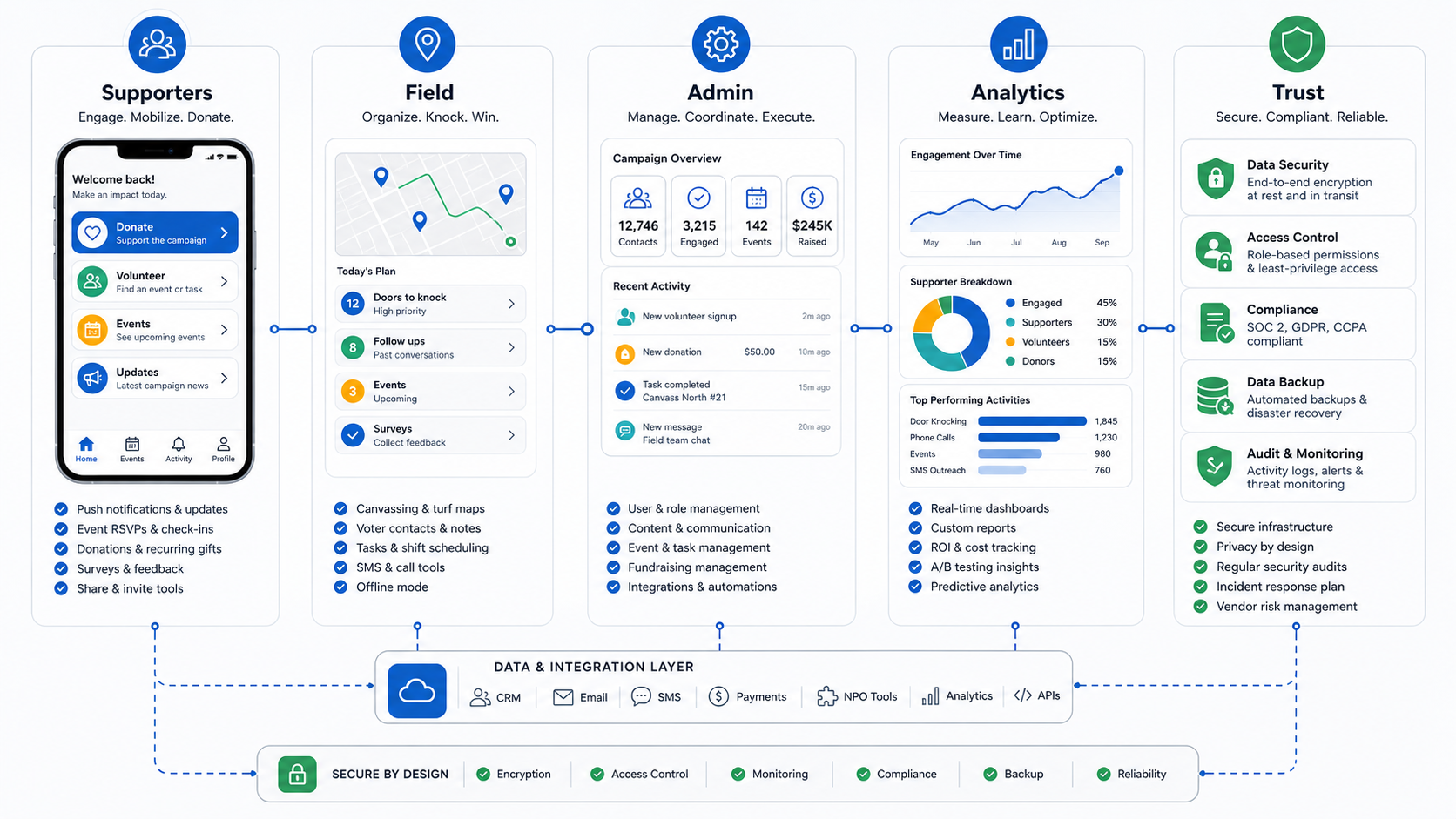
Political app development is the process of building a secure mobile or web platform that helps a campaign engage supporters, organize volunteers, manage events, collect donations, coordinate field work, and measure voter outreach without turning sensitive personal data into an uncontrolled risk. A useful campaign app is not just a news feed with push notifications. It is an operating layer for supporter action, field coordination, campaign content, compliance review, and analytics.
The best political apps start with campaign outcomes: more reliable volunteer shifts, faster event RSVPs, cleaner supporter segmentation, safer donation flows, better field reporting, and a repeatable way to turn interest into action. If your team needs a supporter-facing iOS and Android app, start with a focused mobile app development roadmap. If the product also needs admin workflows, integrations, approvals, and dashboards, treat it as custom software development, not a simple brochure app.
One important boundary: a campaign engagement app should not be confused with online voting software. Vote casting, ballot marking, voter registration, and official election administration carry different legal, certification, security, and public-trust requirements. Most campaigns need supporter engagement, field operations, fundraising, and analytics tools, while official election systems should remain outside a campaign product scope unless specialist election authorities and certified vendors are involved.
Where Campaign Apps Create Value
A political app creates value when it reduces the friction between intent and action. Supporters should be able to discover events, sign up for volunteer tasks, receive timely updates, donate safely, invite others, and return without hunting through fragmented email, messaging, spreadsheets, and social channels. Campaign staff should be able to review activity, approve messages, segment audiences, export reports, and coordinate teams without giving every volunteer access to sensitive data.
For local campaigns, the strongest first use cases are usually volunteer scheduling, event RSVPs, neighborhood canvassing, donation prompts, and supporter updates. For larger campaigns, the platform often needs regional permissions, CRM integration, call or SMS workflows, donor segmentation, content approval, multilingual content, analytics dashboards, and incident response procedures. Advocacy groups may also need petitions, issue education, membership renewals, chapter management, and long-running community engagement after election day.
The product should be planned around a clear campaign operating model. A small mayoral campaign does not need the same stack as a national advocacy organization. Before estimating cost, decide whether the app is mainly a supporter engagement channel, a field-team tool, a fundraising layer, a campaign CRM companion, or a full operating platform.
Political App Feature Map
Feature planning should separate supporter features from campaign staff features. Mixing everything into one backlog makes the product expensive and harder to secure. A better approach is to define what each user role must do and what data each role is allowed to see.
| Area | Useful Features | Why It Matters |
|---|---|---|
| Supporter App | Profile, interests, events, campaign updates, donation prompts, share links, notification preferences | Turns passive interest into measurable supporter action. |
| Volunteer Tools | Shift signup, task lists, canvassing routes, call lists, scripts, notes, offline mode | Helps field teams complete work with less coordinator overhead. |
| Fundraising | Donation pages, receipt flows, recurring contribution prompts, donor segmentation, compliance exports | Connects engagement to revenue while keeping finance workflows auditable. |
| Events | RSVPs, check-ins, waitlists, reminders, location details, post-event follow-up | Improves turnout and gives staff reliable attendance data. |
| Admin Panel | Roles, content approval, audience segments, event management, volunteer assignments, moderation | Keeps the campaign organized and limits risky data access. |
| Analytics | Source attribution, engagement cohorts, conversion funnels, field progress, donation trends, exportable reports | Shows which activities are moving the campaign forward. |
For a first release, keep the app narrow. A practical MVP development scope may include supporter profiles, event RSVP, volunteer signup, push notifications, basic donations, an admin panel, and analytics for the most important campaign actions. Add advanced canvassing, CRM sync, segmentation, and automated messaging after the team proves the engagement loop works.
Supporter Engagement Loop
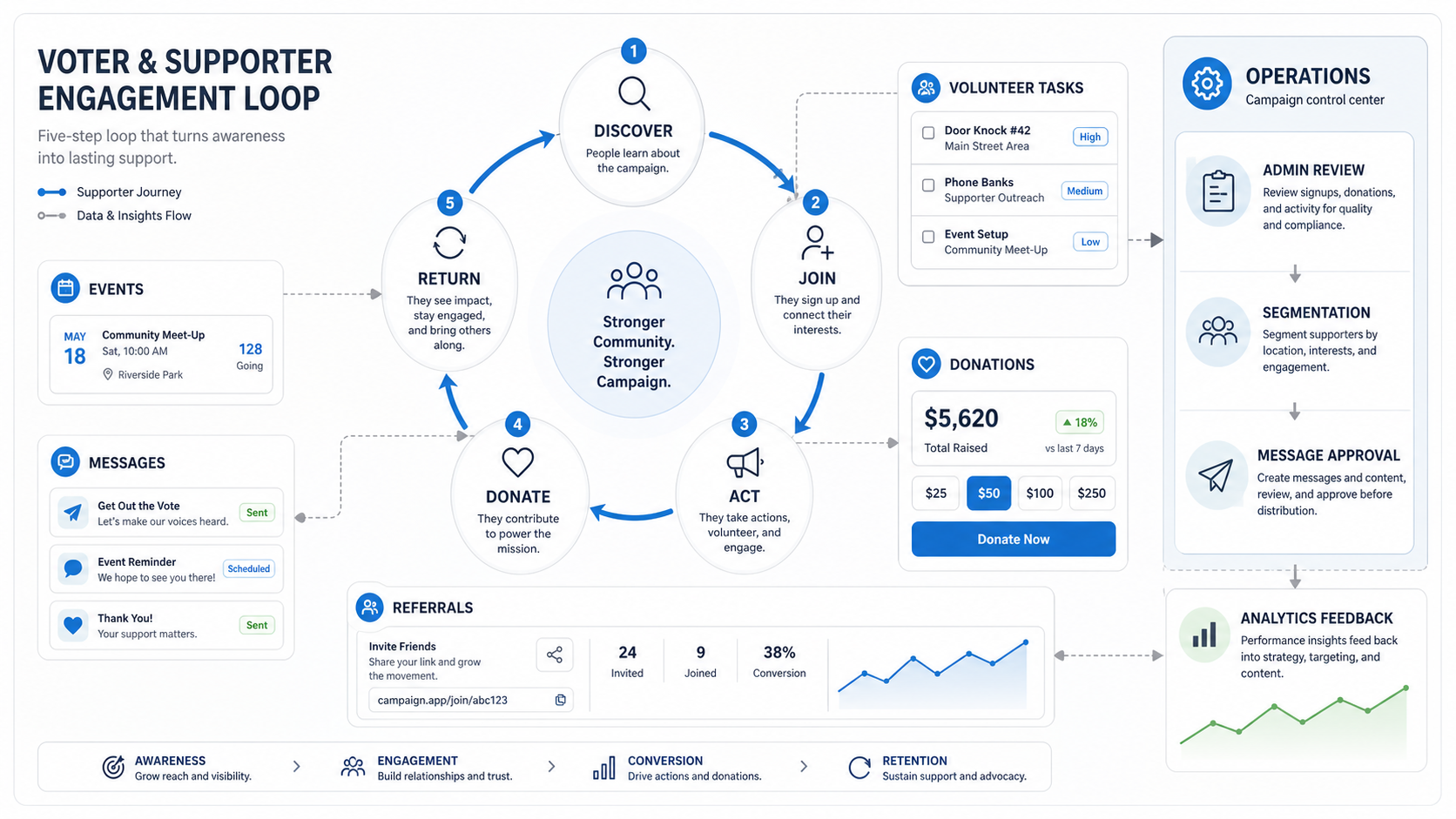
The supporter journey should not end at installation. Many campaign apps fail because they focus on launch downloads instead of repeat action. A stronger loop moves people through five steps: discover the campaign, join with consent, take a useful action, contribute or invite others, and return because the app continues to provide relevant opportunities.
Each step needs a product decision. Discovery may depend on share links, app-store listings, social campaigns, QR codes at events, or website CTAs. Joining should collect only the data needed for the campaign purpose. Action should be concrete: RSVP, volunteer, donate, call, canvass, sign a petition, or share an approved message. Return behavior depends on segmented notifications, fresh events, visible progress, and meaningful follow-up.
Campaign teams should also define when not to send notifications. Overuse of push, SMS, and email can create opt-outs, complaints, and compliance risk. Build preference controls, message approval, quiet hours, unsubscribe handling, and reporting from the start.
Campaign Operations And Admin Panel
The admin panel is where campaign apps become operational software. Staff need to manage events, supporter lists, volunteer tasks, content, donations, exports, and permissions without relying on developers for every campaign change. The admin experience should be simple enough for a fast-moving campaign office, but controlled enough that sensitive actions are logged and reversible.
Common admin roles include campaign owner, communications manager, field organizer, finance reviewer, regional coordinator, volunteer captain, and read-only analyst. Each role should get only the data and actions required for its work. A volunteer captain may need shift attendance and task status, but not donor history. A communications manager may draft messages, but legal or campaign leadership may need final approval before broadcast.
Integrations matter here. Many teams already use CRM, email, SMS, donation, analytics, maps, data warehouse, or nonprofit tools. Build an integration map before development starts, because API limits, export formats, consent records, and identity matching can change the architecture and timeline.
Privacy, Security, And Compliance Controls
Campaign data is sensitive because it can include contact details, location signals, donation behavior, political interests, volunteering activity, and inferred supporter preferences. Current privacy research and public security incidents show that campaigns are attractive targets and that weak disclosures, uncontrolled retention, and broad access can damage trust. The safest product decision is to collect less, explain more, and restrict access by role.
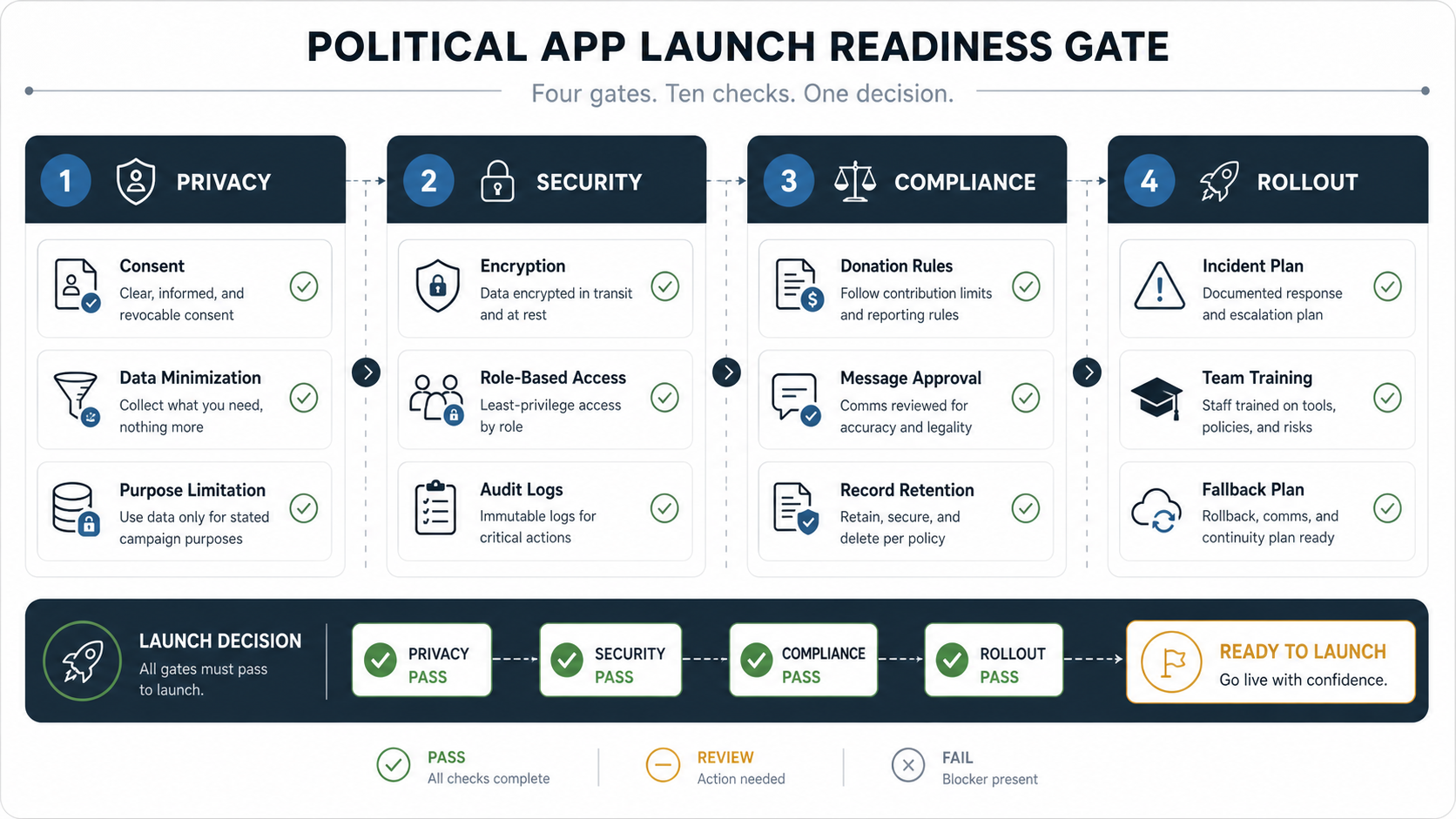
Start with a data inventory: what data is collected, why it is needed, where it is stored, who can access it, how long it is retained, and which systems receive it. Then define controls for consent, data minimization, encryption in transit and at rest, role-based access, audit logs, vendor access, deletion requests, backup, incident response, and post-campaign retention.
Compliance varies by geography and campaign type. Donation rules, political messaging rules, privacy notices, cookie and tracking requirements, SMS consent, email unsubscribe handling, accessibility, app-store policies, and nonprofit reporting can all apply. The app should make compliance easier by adding approval workflows, disclosure placement, exportable logs, and documented retention rules.
Security testing should include authentication review, permission testing, API abuse cases, rate limits, file upload safety, logging, backup recovery, and mobile app hardening. Campaign apps often move quickly, but speed is not a reason to skip basic release gates. A pre-launch security review is cheaper than responding to a public incident during a campaign.
Analytics And Field Intelligence
Useful analytics connect campaign work to decisions. Vanity metrics such as total installs or page views are not enough. Campaign teams need to know which outreach channels produce engaged supporters, which events convert RSVPs into attendance, which volunteer shifts are underfilled, which messages create donations, and which regions need follow-up.
A practical dashboard should show acquisition source, activation rate, volunteer conversion, event turnout, donation conversion, message engagement, opt-out rates, field task completion, and campaign-specific goals. For field teams, route progress, contact notes, callback status, offline sync health, and issue tags can be more valuable than broad web analytics.
Analytics should not become uncontrolled profiling. Keep reporting tied to campaign operations, document the purpose of segmentation, and avoid unnecessary enrichment. When AI or automation is used for message suggestions, routing, or supporter scoring, keep human review and explainability in the workflow.
Development Roadmap
A political app roadmap should match the campaign calendar. Building everything at once creates risk because the most important moment may arrive before the product is stable. A phased roadmap gives the campaign working software earlier and leaves enough time for training, security review, app-store approval, and field testing.
| Phase | Focus | Typical Output |
|---|---|---|
| Discovery | Campaign goals, roles, data inventory, integrations, legal/compliance constraints | Product brief, feature priorities, risk register, technical architecture |
| MVP | Supporter onboarding, events, volunteer signup, notifications, basic admin, analytics | Usable app and admin panel for a controlled campaign pilot |
| Field Pilot | Canvassing, task assignment, regional permissions, offline behavior, support process | Validated field workflow with training and issue tracking |
| Scale | CRM sync, donation reporting, segmentation, content approvals, dashboards | Campaign operating platform with auditable workflows |
| Hardening | Performance, security testing, backup, incident response, app-store readiness | Launch-ready product with monitoring and rollback procedures |
Timeline depends on scope, integrations, and approval cycles. A focused MVP can often be planned and built faster than a full operating platform, but campaigns should still reserve time for user testing, privacy review, app-store submission, and staff training.
Political App Development Cost Drivers
Political app development cost depends less on the word "political" and more on product scope, platform count, admin complexity, integrations, data sensitivity, and launch timeline. A simple supporter app with events and updates is very different from a field operations platform with offline canvassing, role-based admin, donation exports, CRM sync, analytics, and approval workflows.
| Cost Driver | Lower Complexity | Higher Complexity |
|---|---|---|
| Platforms | Responsive web or one mobile platform | iOS, Android, web admin, tablet field views |
| Admin Workflows | Basic event and content management | Regional permissions, approvals, moderation, audit logs |
| Field Tools | Volunteer signup and task lists | Canvassing routes, offline sync, scripts, contact notes |
| Integrations | Email, analytics, donation link | CRM, SMS, payments, data warehouse, identity matching |
| Security And Compliance | Standard app controls | Formal privacy review, penetration testing, retention workflows, incident planning |
| Launch Timeline | Planned release with testing time | Compressed election calendar and multi-region rollout |
Use a scoped estimate rather than a generic range. NextPage's custom software cost estimator can help frame platform, workflow, integration, and launch assumptions before a detailed proposal.
Political App MVP Checklist
A strong MVP is small enough to launch but complete enough to prove the campaign workflow. Use this checklist before committing to development:
- Define the campaign outcome the app must improve, such as volunteer conversion, event turnout, donation conversion, or field task completion.
- List supporter, volunteer, organizer, finance, communications, admin, and analyst roles.
- Decide which data is required and which data should not be collected.
- Map the first-party systems and third-party tools the app must integrate with.
- Write message approval, donation review, data export, and incident response rules.
- Prioritize launch features and explicitly defer nonessential features.
- Plan training, support, app-store review, analytics, and rollback before the launch date.
If a feature does not support the first campaign outcome or a required control, defer it. Campaign teams can add sophistication after the first engagement loop works in the real world.
How NextPage Can Help
NextPage can help plan and build political campaign apps, civic engagement apps, advocacy platforms, donor and volunteer portals, admin dashboards, and campaign operations software. The most useful starting point is a short discovery sprint that defines user roles, data flows, integrations, compliance constraints, launch timeline, MVP scope, and cost drivers.
From there, the team can design the supporter experience, build the admin workflows, connect the required systems, add analytics, and prepare a launch plan that includes security, privacy, training, and support. The goal is not more features. The goal is campaign software that helps real teams organize people, protect data, and act quickly when timing matters.