
PWA development usually costs less than a native app because one web-first codebase can cover mobile web, desktop, installable app-like access, offline tolerance, and instant updates. Native apps cost more because iOS and Android releases require platform-specific engineering, app-store operations, deeper device QA, and long-term maintenance. The right answer is not always the cheapest one: offline sync, push reliability, payments, hardware access, retention goals, and app-store distribution can change the platform decision.
For startup MVPs, customer portals, field workflows, commerce catalogs, booking tools, and internal apps, a PWA can be the fastest first release. For apps that depend on deep hardware access, high-performance graphics, background execution, subscriptions, Bluetooth/NFC, advanced camera behavior, or platform-specific UX, native or cross-platform delivery may be worth the extra budget.
If you are comparing options, start with the Custom Software Cost Estimator and the MVP Scope Builder. The cost decision should follow the first-release workflow, not a generic platform preference.
Quick Answer: PWA Cost Vs Native App
A PWA is usually the lower-cost path when the product can run well in the browser, needs broad reach, benefits from SEO or link sharing, and does not need heavy native device features. A native app is usually the higher-cost but stronger path when mobile experience, app-store presence, device APIs, performance, push reliability, or platform payments are central to the business model.
| Choice | Budget Shape | Best Fit | Watch Out |
|---|---|---|---|
| PWA | Leanest first release; one web codebase. | Portals, dashboards, commerce, booking, field forms, content, internal workflows. | Install friction, iOS edge cases, background limits, advanced device access. |
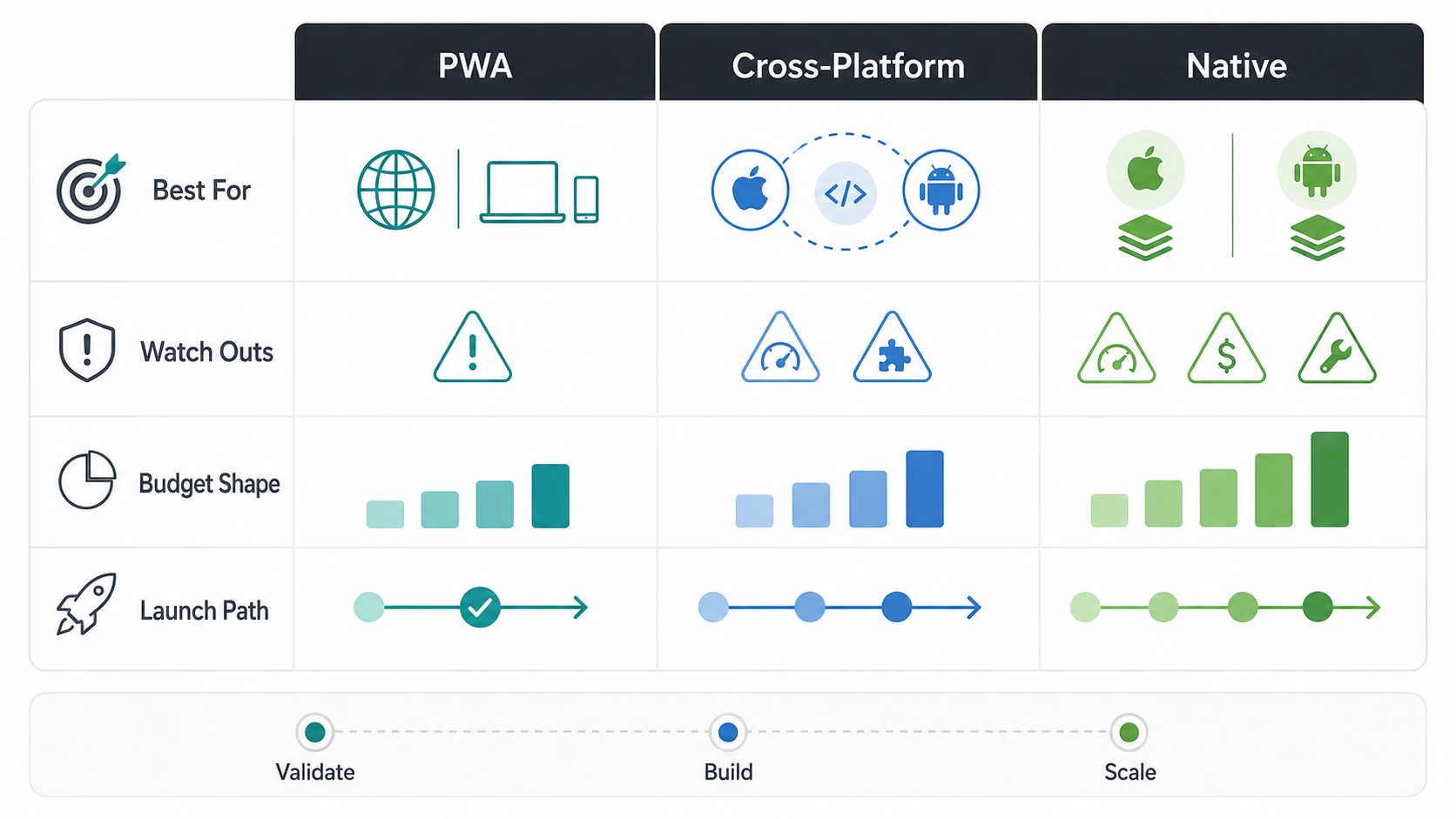
| Cross-platform | Middle path; shared code plus native releases. | Consumer apps needing stores, push, mobile UX, and shared delivery speed. | Native module boundaries, device QA, store operations. |
| Native | Highest initial and maintenance cost. | Performance-heavy, device-heavy, regulated, high-retention, or store-led products. | Two platform roadmaps, release review, larger QA matrix. |
What Changes The Cost Gap Between PWA And Native?
The cost gap is largest when the app is mostly workflow, content, forms, commerce, dashboards, or authenticated self-service. A PWA can reuse web architecture, browser delivery, responsive layouts, and centralized deployment. The gap shrinks when the product needs native-grade offline behavior, platform-specific notifications, app-store monetization, media processing, or heavy device APIs.
Modern PWA capability comes from a web app manifest, service workers, cache strategy, HTTPS, responsive UX, and progressive enhancement. Current web.dev PWA guidance frames installability, offline behavior, and push notifications as core app-like capabilities, while MDN's PWA documentation separates basic offline operation from background behavior that depends on browser support. That is powerful, but it is not magic. A cached app shell is much cheaper than conflict-safe offline transactions, encrypted local data, background retry, and role-aware sync recovery.
NextPage's progressive web app development guide covers the product cases where PWA delivery beats native mobile apps: broad reach, fast iteration, app-like repeat access, and enough offline support without deep platform dependency.
Cost And Launch Tradeoff Map
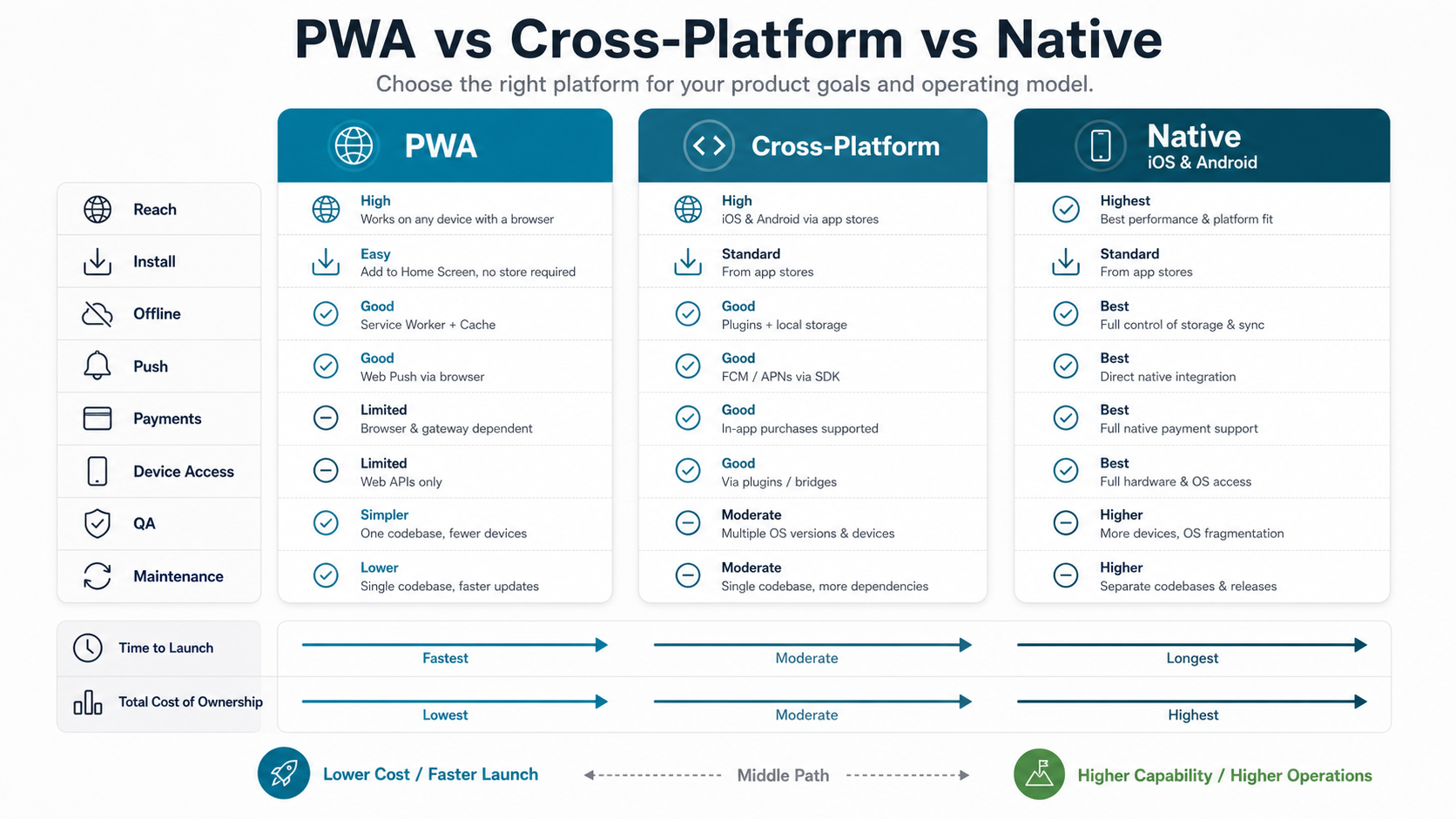
Use the tradeoff map before asking for a quote. The same feature can cost differently depending on where it runs. Push notifications in a native app, push in a home-screen PWA, and push through an email/SMS fallback are not the same engineering problem. Offline viewing, offline editing, and offline conflict-safe transaction sync are also different cost categories.
Payments can change the business case. A web-first checkout can be simpler for physical goods, bookings, and services. Google Play's current payments policy says Play Billing applies to digital goods and services sold in Play-distributed apps, while physical goods and many outside-app services follow different payment paths. Chrome's Trusted Web Activity model can package PWA content into an Android app shell, but payment and entitlement rules still need policy review before the estimate is treated as final. If app-store discovery or in-app subscription conversion is part of the growth model, native or a store-wrapped approach may still be justified.
Budget Ranges By Platform Choice
Use ranges carefully because scope, integrations, design depth, data model, and QA coverage matter more than the label. Still, platform choice changes the default team shape.
| Build Path | Typical First-Release Scope | Cost Drivers | Best Use |
|---|---|---|---|
| Responsive web app | Mobile-friendly web workflow without install/offline behavior. | UX, frontend, backend, auth, integrations, analytics. | Occasional mobile use, content, dashboards, admin workflows. |
| PWA | Web app plus installability, service worker, caching, mobile QA, and selected offline behavior. | Cache rules, service-worker updates, push, offline states, device/browser matrix. | Portals, field forms, catalogs, booking, customer self-service, MVP validation. |
| Cross-platform app | Shared app codebase with app-store delivery for iOS and Android. | Native modules, release pipeline, store assets, device QA, mobile UX. | Consumer apps that need stores and stronger mobile behavior without two fully separate builds. |
| Native apps | Separate or deeply platform-specific iOS and Android delivery. | Platform teams, SDKs, app-store operations, native QA, OS update maintenance. | Performance-heavy, device-heavy, subscription, regulated, or high-retention products. |
If the main product is web-shaped, plan it as web app development first and add PWA capabilities deliberately. If the product is mobile-first from the first session, compare the PWA plan with mobile app development before procurement locks the wrong assumptions.
When A PWA Is The Right First Release
Choose a PWA first when validation speed matters more than app-store presence. Good PWA candidates include SaaS dashboards, internal workflow tools, B2B portals, appointment booking, order management, inventory views, training content, calculators, lightweight marketplaces, and customer self-service.
The strongest PWA projects have a clear web workflow, responsive UX, authenticated roles, API-backed data, analytics, and a realistic offline scope. They do not pretend that every native feature is available. Instead, they decide which mobile behaviors matter for the first release and which can wait until usage data proves the need for native investment.
For budget planning, compare this path with NextPage's web app development cost guide and a structured MVP development guide. A PWA is often a web app with extra installability, caching, offline, push, and mobile QA requirements, so the estimate should identify which capabilities are release-critical and which are validation-stage experiments.
When Native Or Cross-Platform Is Worth The Cost
Native is worth the cost when the app is the product, not just a mobile access layer. Examples include consumer apps with daily retention goals, advanced camera or media capture, real-time location, Bluetooth or NFC, wearable integrations, high-performance graphics, background audio, complex push workflows, or strict app-store monetization strategy.
Cross-platform frameworks can be a practical middle when the team wants app-store distribution and native shell behavior without fully separate iOS and Android builds. The tradeoff is not zero native work. You still need device QA, release management, native module decisions, and a plan for platform-specific issues. NextPage's React Native app development services page explains the shared-code path for iOS and Android products, while the broader custom software development process helps decide when a mobile app should stay web-first.
For native budget details, use the broader mobile app development cost guide and the native vs cross-platform mobile app development comparison. Platform choice changes team shape, release cadence, QA coverage, and long-term maintenance.
Offline, Push, Payments, And Device Access
These four features decide many PWA-vs-native budgets. Offline is not one feature: cached reading, draft forms, queued writes, and conflict-safe transaction sync are different levels of effort. Push is not only a notification API: WebKit documents Web Push support for iOS and iPadOS Home Screen web apps through Push API, Notifications API, and Service Workers, which is useful but still depends on install state, permission UX, and target-device testing. Payments depend on whether the product sells physical goods, services, or digital content. Device access depends on how much the browser can support reliably for your target users.
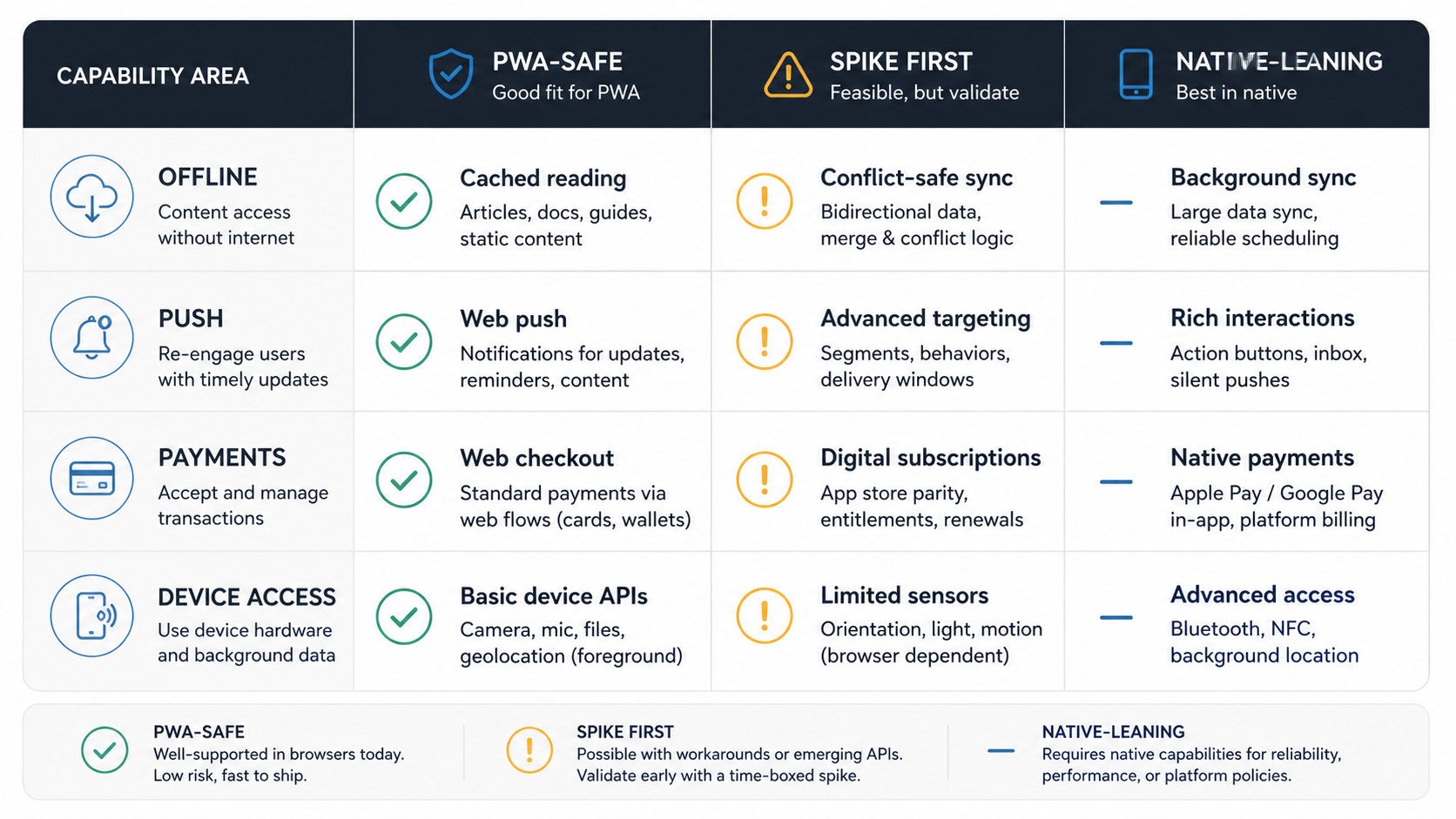
| Capability | PWA-Friendly Scope | Native-Leaning Scope |
|---|---|---|
| Offline | Cached shell, saved drafts, limited queue, clear stale-data warnings. | Long offline sessions, encrypted local database, complex conflict resolution. |
| Push | Web push for installed users plus email/SMS fallback. | Notification-heavy workflows, background actions, highly reliable re-engagement. |
| Payments | Web checkout for goods, bookings, services, and account payments. | Digital subscriptions, in-app purchase strategy, store-led monetization. |
| Device APIs | Camera, geolocation, files, basic notifications where browser support is enough. | Bluetooth, NFC, sensors, AR, background location, advanced camera/media processing. |
Do not treat an amber capability as a yes or no decision. Turn it into a testable spike. A one-week proof around offline drafts, push permission flow, web checkout, or camera upload can save a much larger rebuild later. If the spike fails on the target devices or purchase model, the budget should move toward cross-platform or native before the roadmap gets locked.
PWA Vs Cross-Platform Vs Native Decision Matrix
| Decision Question | Choose PWA When | Choose Cross-Platform When | Choose Native When |
|---|---|---|---|
| How will users find it? | Search, links, email, QR codes, or existing customer channels. | Stores plus direct links both matter. | App-store discovery, ratings, or subscriptions are strategic. |
| How deep is offline? | Offline reading, draft forms, cached records, or limited sync. | Offline plus stronger mobile UX and push. | Complex background sync, device storage, or high reliability needs. |
| What device access is required? | Camera, geolocation, files, basic notifications, and browser-supported APIs are enough. | Some native plugins are needed. | Advanced hardware, Bluetooth, NFC, sensors, media, or wearables are core. |
| How fast must the MVP launch? | Fast validation and lower maintenance matter most. | Stores are needed but full native budgets are too high. | Mobile experience is the brand and budget supports platform depth. |
QA, Release, And Maintenance Costs
PWA QA spans browsers, viewport sizes, install states, service-worker updates, cache invalidation, weak networks, and permissions. Native QA spans devices, OS versions, store builds, push tokens, app updates, permissions, native crashes, and release-channel behavior. Cross-platform apps inherit both shared-code QA and native-shell QA.
Budget QA as release evidence, not polish. Installation, update paths, stale data, offline recovery, payment edge cases, and push opt-in behavior should have test cases before launch. NextPage's QA testing services, mobile app testing services, and mobile app testing checklist are useful companions when the platform decision changes the test matrix.
| Release Area | PWA Evidence | Native/Cross-Platform Evidence |
|---|---|---|
| Install/update | Install prompt, home-screen launch, service-worker update, cache replacement. | Store build, beta track, update migration, rollback plan. |
| Network resilience | Offline shell, cached data, queued action, recovery state. | Offline storage, background sync, OS-level interruption handling. |
| Permissions | Browser permission copy, fallback path, denied-state UX. | OS permission prompts, native settings recovery, device-specific behavior. |
| Monitoring | Web vitals, frontend errors, API latency, cache incidents. | Crash reports, app-store feedback, OS version regressions, push delivery. |
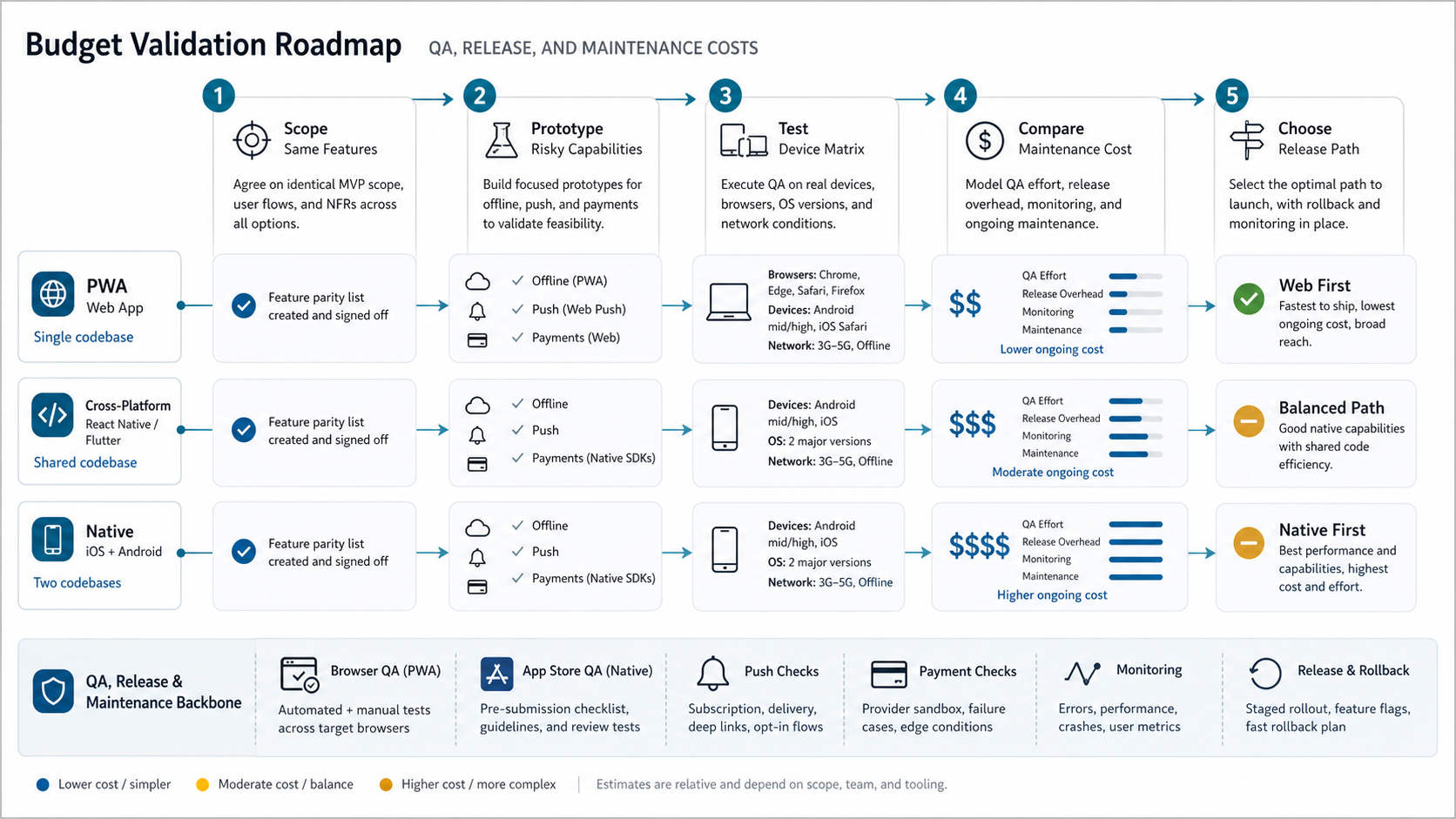
Budget Validation Roadmap
The safest path is phased. First, define the workflow and the revenue or operating goal. Second, classify every requirement as PWA-safe, cross-platform amber, or native-critical. Third, prototype risky capabilities such as offline sync, push, payments, camera uploads, and store packaging. Fourth, estimate PWA, cross-platform, and native paths with the same feature list. Fifth, choose the smallest release that proves demand without blocking the next platform step. Enterprise teams with existing mobile estates should also compare the result with an enterprise mobile app modernization roadmap so migration risk is not hidden inside a new-build estimate.
This roadmap keeps platform choice tied to evidence. In the FieldIQ portfolio case study, mobile access, media workflows, comments, and role-specific operations mattered because the product workflow required them. For buyer-side planning, pair that workflow evidence with the Custom Software Cost Estimator so the PWA, cross-platform, and native estimates compare the same scope.
If the first release is still uncertain, use a structured MVP development sprint to decide which platform risks are real and which are assumptions.
Common Mistakes That Inflate Cost
- Pricing a platform before pricing the workflow. A vague native app and a vague PWA are both bad estimates.
- Promising full offline mode without conflict rules. Offline editing needs sync ownership, retries, stale-data warnings, and recovery states.
- Assuming web push behaves like native push. Permission, install state, and platform behavior must be tested with the target audience.
- Ignoring store policy and payment rules. Monetization can change the architecture and the business model.
- Skipping QA until feature complete. Browser/device matrices, install states, and release channels should shape the plan early.
- Building native apps for discovery alone. If acquisition comes from search, email, QR, or sales-assisted onboarding, a PWA may validate demand faster.
How NextPage Can Help
NextPage builds web apps, PWAs, native mobile apps, and cross-platform products. The useful planning work is deciding which release creates the most learning and revenue for the least avoidable risk. That can include a PWA-first MVP, a React Native customer app, a native high-performance app, or a web-plus-mobile roadmap.
For custom workflows, our custom software development team maps roles, integrations, offline requirements, payment model, QA plan, and launch path before recommending a platform. If you are choosing between PWA and native, bring the workflow, not just the idea.