
Quick Answer: How Much Does Retail Automation Cost?
Retail automation cost depends on how much of the store, inventory, checkout, warehouse, customer-service, and back-office workflow you want software to control. A narrow pilot that connects POS data to an inventory dashboard may be a manageable software project. A multi-store automation program with RFID, IoT sensors, self-checkout, AI demand forecasting, ERP integration, staff tasking, analytics, support workflows, and security controls is a systems-integration program.
For planning, separate the budget into seven buckets: hardware and devices, software subscriptions, integration work, custom workflow development, AI and data readiness, training and change management, and ongoing support. Source cost ranges vary widely, but recent retail automation and IoT guides consistently show that hardware, licensing, integration, customization, and support all need their own line items. The practical question is not, "What does automation cost?" It is, "Which decisions should be automated in release one, and which systems must be trusted before that automation is safe?"
If you are comparing vendors or planning a custom platform, start with the Custom Software Cost Estimator. Use it to frame the first release around users, workflows, integrations, data sensitivity, and reporting depth before you price hardware or AI features.
What Counts As Retail Automation?
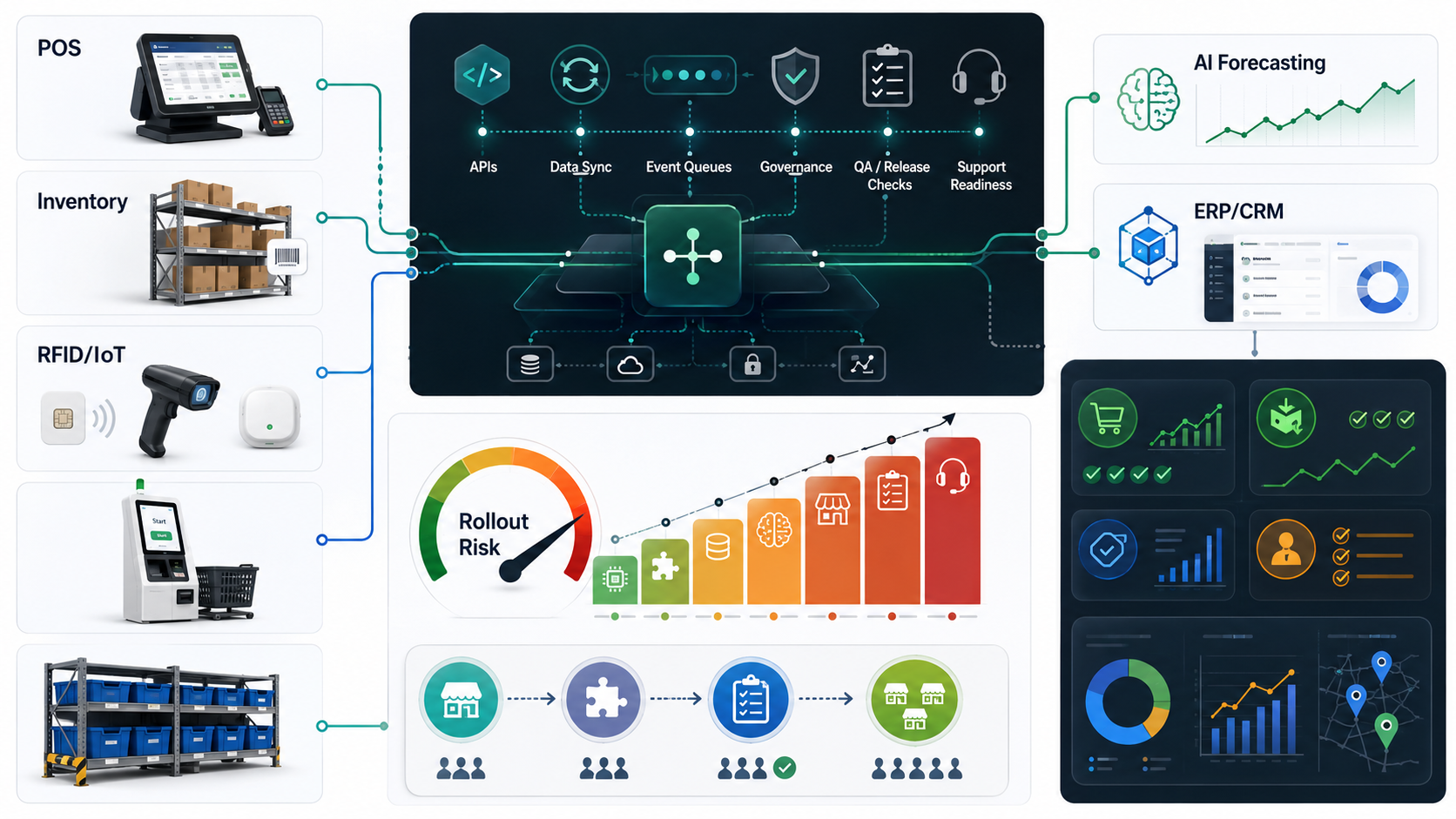
Retail automation is not one product category. It is a stack of connected decisions and devices that reduce manual work across stores, warehouses, online channels, and back-office teams. A retailer may automate stock counts, replenishment, checkout, loyalty offers, price changes, customer support, workforce tasks, demand forecasting, returns, or supplier coordination. Each use case has a different cost profile because the data sources and failure modes are different.
The lowest-risk automations usually read data and guide people: dashboards, alerts, reorder suggestions, exception queues, and daily task lists. The highest-risk automations write back into operating systems: changing inventory, adjusting prices, approving purchase orders, moving orders across channels, or letting customers complete transactions without staff review. Cost increases when the platform crosses from visibility into control.
That distinction matters more in 2026 because retail technology planning is shifting from isolated pilots toward AI-ready enterprise systems. NRF and IBM retail research point to a similar pattern: retailers are using AI for inventory optimization, customer service, pricing, fraud detection, and agent-assisted commerce, but the useful deployments depend on connected data, governance, security, and operational ownership. Treat retail automation as a data-and-workflow foundation before treating it as an AI feature list.
| Automation Layer | Typical Scope | Cost Driver |
|---|---|---|
| POS and checkout | Sales sync, returns, self-checkout, receipts, payment reconciliation | Device support, payment rules, fraud controls, exception handling |
| Inventory and RFID | Stock counts, item location, cycle counts, shrinkage signals, transfers | Tags, readers, store layout, data accuracy, POS and warehouse sync |
| IoT and store operations | Sensors, smart shelves, temperature checks, equipment alerts, footfall | Hardware estate, connectivity, alert quality, maintenance ownership |
| AI and analytics | Demand forecasting, recommendations, replenishment, staffing, pricing | Historical data quality, model evaluation, human review, monitoring |
| ERP and CRM | Orders, purchasing, finance, customer profiles, loyalty, reporting | API depth, data ownership, duplicate handling, recovery paths |
A Practical Retail Automation Cost Model
A realistic estimate starts by separating product scope from implementation scope. Product scope is what users see: dashboards, checkout flows, mobile tasks, reports, automations, alerts, and admin controls. Implementation scope is what makes those features reliable: hardware setup, vendor configuration, API contracts, data migration, role permissions, QA environments, training, monitoring, and support.
Use the table below as a planning model rather than a universal quote. Small retailers can often begin with a focused inventory, POS, or task automation workflow. Multi-location retailers should expect integration, rollout, and support work to become as important as the visible software.
| Budget Area | What It Includes | Why It Changes Cost |
|---|---|---|
| Hardware and devices | RFID tags, readers, scanners, kiosks, handhelds, sensors, edge devices | Store count, device quality, installation, replacement, network readiness |
| Software and licensing | POS, inventory, CRM, ERP, automation tools, AI tools, cloud services | Per-store, per-user, per-device, transaction, or usage-based pricing |
| System integration | POS, inventory, warehouse, ERP, accounting, loyalty, eCommerce, analytics | API maturity, batch versus real-time sync, data conflicts, retries |
| Custom workflows | Dashboards, approvals, exception queues, staff tasks, mobile or web portals | Role complexity, business rules, offline needs, admin depth |
| AI and data readiness | Forecasting, recommendations, anomaly detection, customer support automation | Clean historical data, model evaluation, confidence thresholds, monitoring |
| Training and rollout | Store training, SOP updates, change management, pilot support | Staff turnover, store formats, language, device familiarity |
| Maintenance and support | Bug fixes, vendor changes, integrations, monitoring, security, reporting | Uptime expectations, seasonality, payment risk, support SLAs |
For software planning, connect this model to custom ERP development services when the automation depends on inventory, purchasing, orders, approvals, finance operations, or AI-ready operational data. If the main risk is connecting existing platforms, ERP integration and modernization services are often the better starting point. When loyalty, customer profiles, service tickets, account notes, or store-associate follow-ups are part of the workflow, include CRM integration and workflow automation services in the estimate instead of leaving customer data outside the operating model.
Retail Automation Scope Tiers
Do not estimate every automation idea as one large program. Retailers get better cost control when they define a release tier and prove it before scaling across locations. The first release should remove a measurable operational bottleneck without requiring every device, dataset, and store process to change at once.
| Tier | Best Fit | Typical Scope | Decision Gate |
|---|---|---|---|
| Visibility pilot | Retailers with messy spreadsheets or delayed reports | POS/inventory sync, dashboards, stock alerts, basic task queues | Can store and ops teams trust the data daily? |
| Workflow automation | Teams with repeatable manual work | Reorder rules, transfer approvals, staff tasks, exception queues, alerts | Do automations reduce manual effort without creating new errors? |
| Store/device automation | Stores adding RFID, sensors, self-checkout, handhelds, or kiosks | Hardware rollout, device management, event processing, support runbooks | Can operations support devices during peak trading hours? |
| AI optimization | Retailers with enough clean historical data | Demand forecasting, replenishment suggestions, pricing signals, service bots | Are recommendations explainable enough for human review? |
| Multi-store operating platform | Growing retailers standardizing operations | ERP/CRM/eCommerce integration, roles, analytics, audit, support SLAs | Can the platform scale by store, region, role, and channel? |
Teams evaluating automation ROI can use the AI Automation ROI Calculator for repeatable operational work and the Workflow Automation Opportunity Finder to identify a first sprint that is useful without being too risky.
POS, Inventory, RFID, And IoT Integration
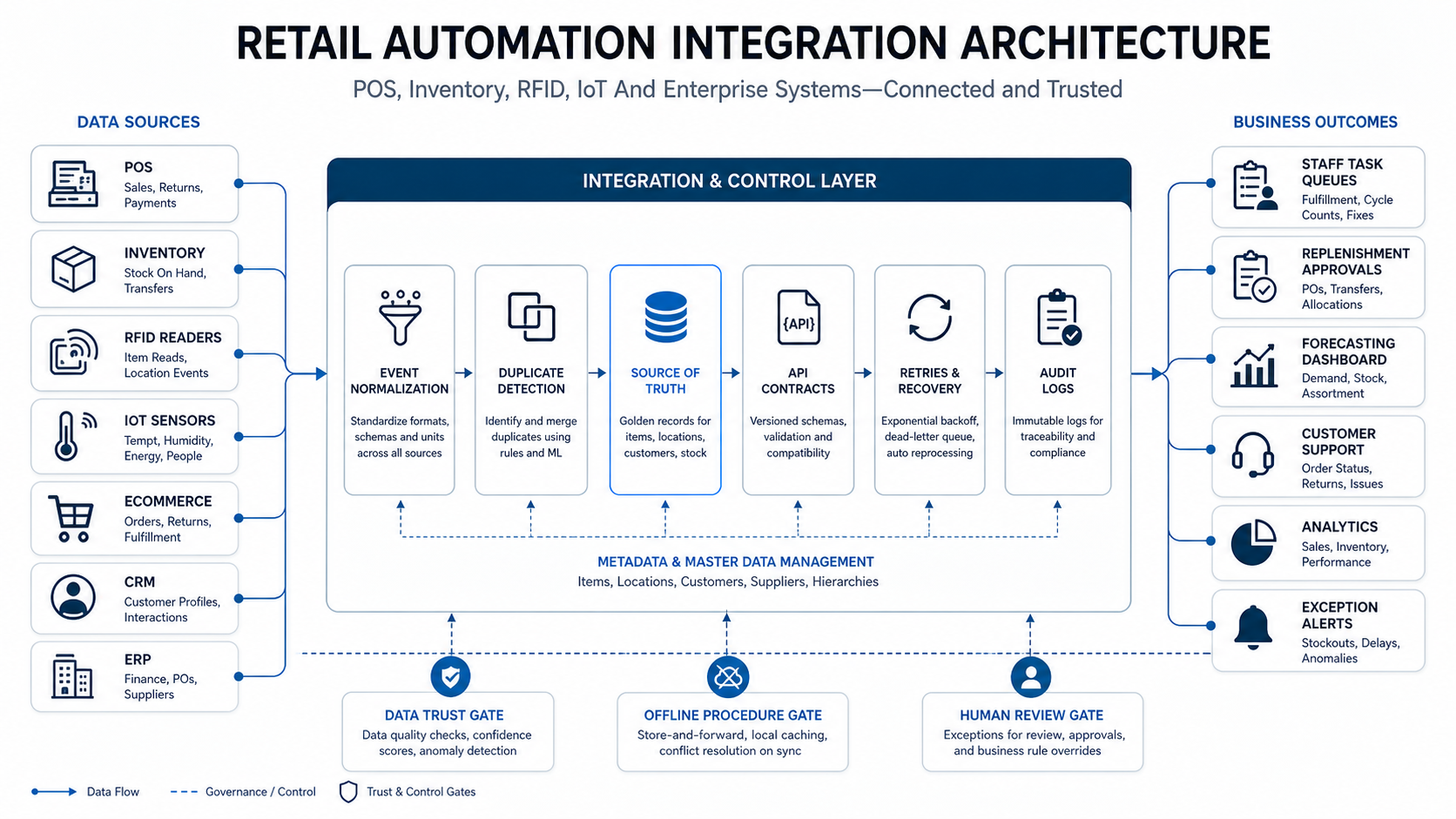
POS and inventory integration is the foundation for most retail automation. If sales, returns, transfers, online orders, and store counts do not agree, AI forecasting and staff automation will amplify bad data. Before pricing RFID, smart shelves, or IoT sensors, define which system owns each field: SKU, location, on-hand quantity, reserved stock, damaged stock, transfer status, price, promotion, tax, and customer order status.
RFID can improve stock visibility, cycle counts, and loss-prevention workflows, but it adds device and process cost. Tags, readers, handhelds, portals, middleware, store layout, staff process, exception handling, and POS sync all matter. IoT sensors add another layer: connectivity, device health, alert thresholds, maintenance ownership, and response playbooks.
The integration architecture should include idempotency, duplicate detection, reconciliation reports, delayed-event handling, offline procedures, and clear ownership for failed syncs. This is why custom retail automation often looks like an operating platform rather than a simple app. It needs system contracts, support workflows, and QA scenarios that match store reality.
Where AI Adds Value In Retail Automation
AI is useful when the retailer has repeatable decisions, enough clean data, and a human-review path for recommendations. Good first use cases include demand forecasting, replenishment suggestions, product recommendations, support routing, anomaly detection, return-risk signals, labor planning, and promotion analysis. Weak first use cases are those where source data is incomplete, business rules are unclear, or wrong recommendations could immediately affect revenue, compliance, or customer trust.
For AI-powered retail automation, separate three cost areas: data readiness, model or rule design, and production operations. Data readiness includes cleaning SKU histories, mapping channels, normalizing store-level demand, handling seasonality, and connecting promotions or weather where relevant. Model design includes evaluation metrics, confidence thresholds, fallback logic, and human review. Production operations include monitoring, retraining, drift checks, incident response, and cost control.
NextPage's AI automation services and predictive analytics services are relevant when the retailer wants automation to move beyond alerts into forecasting, prioritization, recommendations, or decision support. Keep AI narrow at first: one workflow, one metric, one owner, one rollback plan. If the team is still unsure whether a workflow is ready for model-assisted decisions, compare it with the AI workflow automation operating model before funding broad automation.
Omnichannel And eCommerce Cost Considerations
Retail automation becomes harder when store inventory, warehouse inventory, marketplace orders, customer apps, loyalty, returns, and click-and-collect workflows all share the same promise to the customer. The cost is not only the customer-facing app. It is the data contract between POS, inventory, eCommerce, ERP, CRM, payment, fulfillment, and support systems.
If the automation touches online ordering, loyalty, subscriptions, or delivery workflows, compare the scope with the eCommerce app development cost guide. If it resembles restaurant or food retail operations, the restaurant management software development cost guide is a useful analogy because POS, inventory, kitchen, delivery, analytics, and labor workflows create similar integration pressure.
A practical omnichannel estimate should answer these questions before development starts: which inventory number can customers trust, how often stock syncs, how returns affect availability, which channel owns the customer profile, how loyalty points are reconciled, and what happens when a store cannot fulfill an online promise. For adjacent retail and eCommerce AI planning, the demand forecasting software for retail and eCommerce guide is a useful companion because forecasting quality depends on the same inventory and channel data foundation.
Retail Automation Implementation Roadmap
A strong rollout avoids the common trap of buying devices before the operating model is ready. Start by proving data trust, then automate low-risk workflows, then connect devices, then add AI recommendations, and only then scale the platform across stores and channels.
- Audit current systems: list POS, inventory, ERP, CRM, eCommerce, warehouse, payment, loyalty, spreadsheets, and manual workarounds.
- Pick one measurable bottleneck: stockouts, slow counts, checkout queues, overstock, staff task chaos, delayed reports, or customer-support load.
- Define source of truth: decide which system owns product, price, stock, order, customer, and supplier data.
- Build a visibility pilot: connect enough data to produce trusted dashboards, alerts, and exception queues.
- Add workflow automation: automate approvals, reorders, staff tasks, handoffs, and notifications where rules are stable.
- Introduce devices carefully: deploy RFID, scanners, self-checkout, or IoT sensors with support ownership and failure procedures.
- Layer AI last: add forecasting or recommendation models after data quality and human review are working.
- Scale with governance: standardize roles, monitoring, support SLAs, security controls, and rollout playbooks before adding stores.
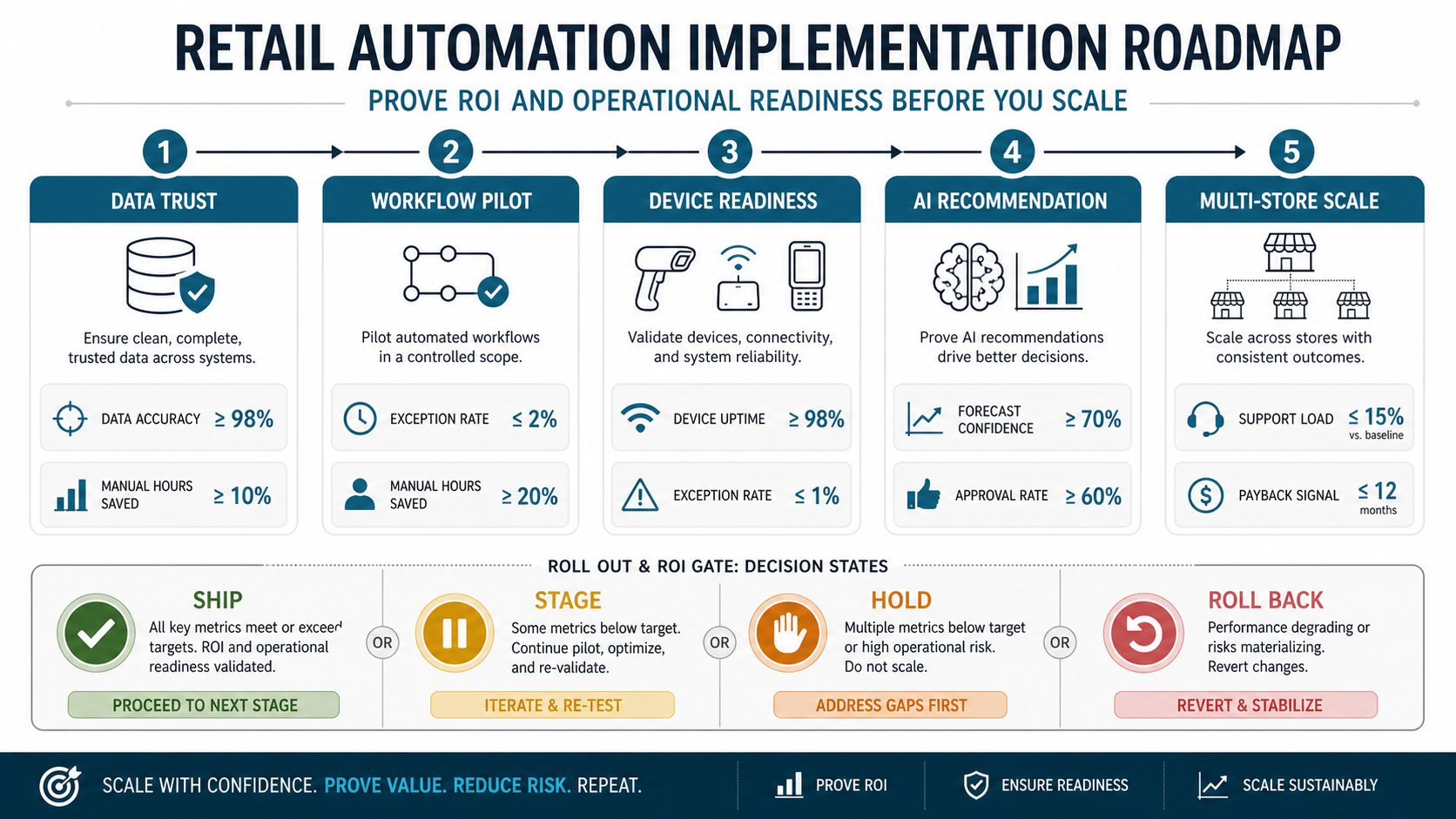
For each phase, define the metric that decides whether the program moves forward. A visibility pilot should prove data accuracy and daily usage. Workflow automation should show manual hours saved and fewer exceptions. Device automation should show uptime, training completion, and support readiness. AI recommendations should show confidence, approval rate, and measurable business impact. Multi-store scale should show that support load and incident response stay manageable.
Questions To Ask Before Choosing A Retail Automation Partner
- Which systems will be integrated in release one, and which will remain manual?
- Does the vendor understand POS, inventory, ERP, CRM, eCommerce, and device-level failure modes?
- How will duplicate transactions, delayed syncs, offline stores, returns, and inventory corrections be handled?
- What data is needed before AI forecasting or replenishment recommendations are useful?
- How will staff tasks, approvals, exceptions, and audit logs work during peak hours?
- Which QA scenarios cover real store operations, device failures, payment issues, and integration retries?
- Who owns support when a scanner, kiosk, RFID reader, POS sync, or API integration fails?
- How will the pilot prove savings before the rollout expands to more locations?
NextPage Point Of View
NextPage's view is that retail automation should be scoped as an operating system for store decisions, not a collection of disconnected gadgets. The right first release usually connects existing POS and inventory data, exposes the biggest operational bottleneck, and gives staff a practical workflow before adding heavier hardware or AI.
The best cost plan is phased. Start with the automation that saves measurable time or reduces measurable loss, then invest in integrations, devices, and AI only when the underlying data and support model can handle them. That approach gives retailers a cleaner ROI story and avoids expensive pilots that fail because the technology works but the operating process does not.
If you are planning retail automation across POS, inventory, RFID, IoT, AI forecasting, ERP, CRM, or omnichannel operations, use the estimator to shape the first release and then bring a scoped integration plan to a technical discovery call. You can also review NextPage's software and AI portfolio for examples of how we structure workflow platforms, dashboards, automation, and production-ready product delivery.