
SaaS integration architecture is the set of API contracts, webhook flows, data ownership rules, retry paths, monitoring, and team runbooks that keep billing, CRM, support, analytics, and workflow automation consistent. It is not just connecting tools. The real work is deciding which system owns each record, which events are trusted, how failures are replayed, and how teams know when customer data is wrong before customers do.
For SaaS founders and product leaders, integrations become risky when every tool talks directly to every other tool. Billing updates the CRM, the CRM updates support, support triggers a workflow, analytics pulls partial events, and no one can explain which state is true. A better architecture creates a small integration layer with clear contracts, durable events, mapping rules, idempotent processing, observability, and human review for high-risk changes.
If you are still shaping release-one scope, use NextPage's MVP Scope Builder before committing to every integration in the roadmap. If the integration count is already known, the Custom Software Cost Estimator can help turn API, workflow, and reporting complexity into a more realistic budget band.
Quick Answer: What Should A SaaS Integration Architecture Include?
A practical SaaS integration architecture should include these pieces:
- Source-of-truth decisions: which system owns accounts, users, subscriptions, invoices, entitlements, tickets, lifecycle stages, and usage events.
- API contracts: request/response schemas, authentication, rate-limit expectations, pagination, versioning, error formats, and ownership.
- Webhook/event handling: signature verification, event storage, deduplication, idempotency keys, retries, replay, and dead-letter handling.
- Data mapping: field transformations, status normalization, enum mapping, tenant boundaries, and audit trails.
- Workflow automation: clear triggers for sales handoffs, onboarding, support escalations, renewal risk, and finance operations.
- Observability: dashboards, alerts, lag metrics, failed-event queues, reconciliation reports, and runbooks.
- Testing: contract tests, webhook fixtures, sandbox coverage, integration smoke tests, and production-safe replay checks.
For teams building or modernizing a product, NextPage's SaaS development services cover these architecture choices alongside product discovery, UX, backend development, tenant architecture, subscriptions, admin workflows, integrations, QA, and deployment.
The SaaS Integration Architecture Map
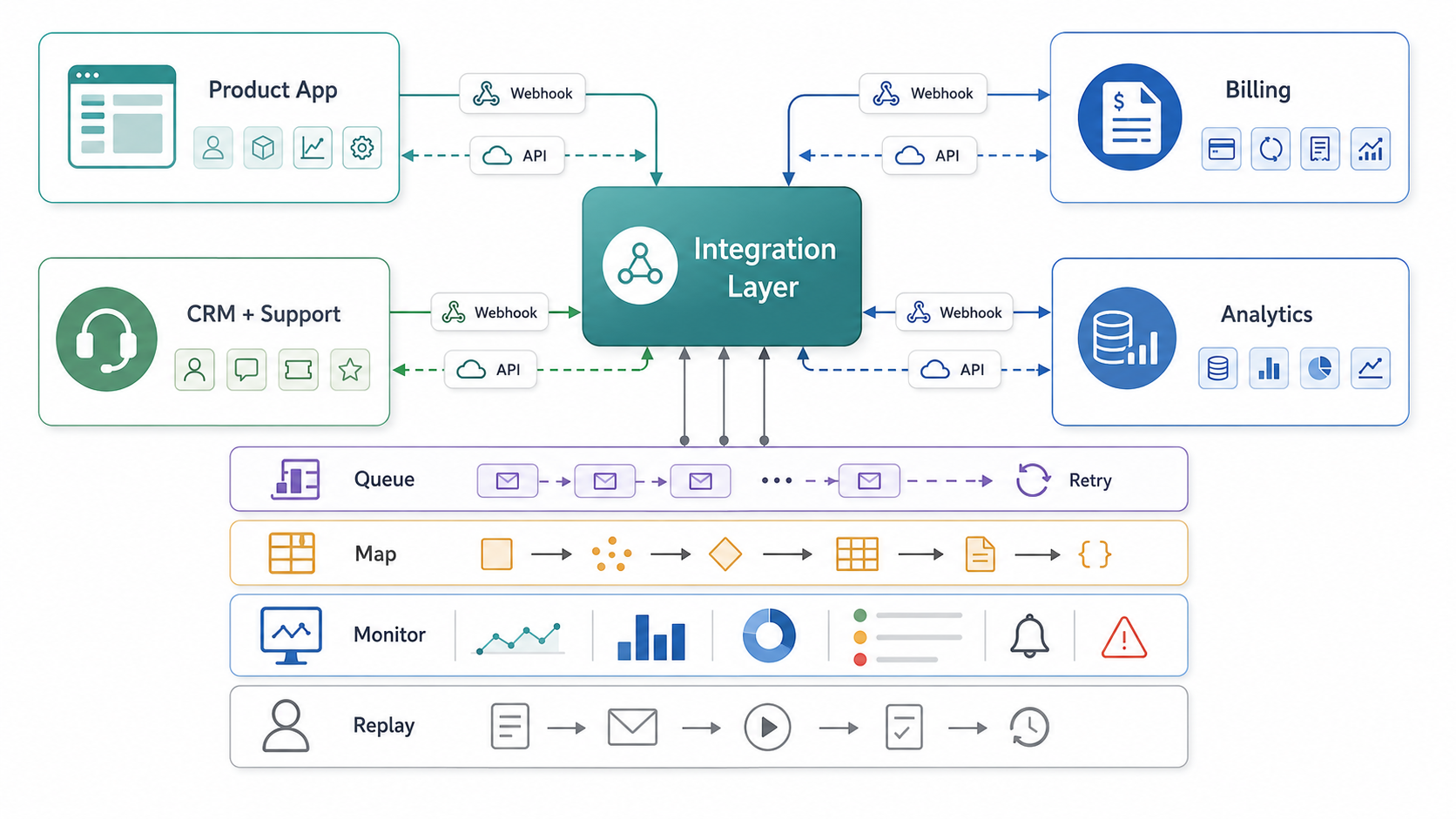
The center of the architecture should be an integration layer, not a maze of direct point-to-point scripts. That layer can be a custom service, iPaaS, workflow platform, event bus, queue-backed worker system, or a hybrid. The exact implementation matters less than the operating guarantees it provides.
Use the integration layer to receive events, verify authenticity, store raw payloads, map data into internal contracts, call downstream APIs, retry safely, replay failed work, and expose enough logging for support and engineering to diagnose customer-impacting issues. This is especially important for billing and CRM data because those systems shape entitlements, revenue reporting, support priority, and customer lifecycle automation.
Start With Source-Of-Truth Decisions
Most SaaS integration failures start as ownership failures. If the product database, billing platform, CRM, support desk, and analytics warehouse can all change account status, plan tier, user role, or customer lifecycle stage, conflicts are inevitable. Before writing integration code, document which system owns each record and which systems are subscribers.
| Data Object | Likely Source Of Truth | Common Subscribers | Failure To Watch |
|---|---|---|---|
| Tenant/account | Product database or CRM, depending on sales motion | Billing, support, analytics, onboarding workflows | Duplicate accounts, merged companies, wrong owner, missing tenant ID. |
| Subscription and plan | Billing platform | Product entitlements, CRM, finance reporting, support | Paid customer loses access or cancelled account keeps premium features. |
| User and role | Product identity system | CRM, support, analytics, audit logs | Role changes do not sync to support or admin workflows. |
| Sales lifecycle | CRM | Product onboarding, customer success, analytics | Lifecycle automation triggers from stale stages. |
| Product usage | Product event pipeline | Analytics, billing, customer success, AI workflows | Usage-based billing or health scoring runs on incomplete events. |
This is where architecture becomes a business decision. A product-led SaaS app may treat the product database as the account source of truth and sync commercial context outward. A sales-led SaaS product may let CRM drive onboarding, ownership, and enterprise account structure. Neither model is universally correct. The mistake is leaving the decision implicit.
Design API Contracts Before Workflow Automation
API integration should not start with a quick script. Define the contract first: auth method, rate limits, pagination, idempotency, error format, retry rules, versioning, object identity, timestamps, and field ownership. For public APIs, document how the product will handle 401, 403, 409, 422, 429, and 5xx responses. For internal APIs, document which team owns changes and how consumers get advance notice.
Official SaaS API guidance reinforces the need for limits and ownership. HubSpot documents rate limits, OAuth/token behavior, 429 responses, caching, batch endpoints, and webhooks as ways to avoid repeated polling. Salesforce provides API limit monitoring patterns and recommends integration ownership practices such as dedicated integration users. Stripe publishes separate rate, concurrency, endpoint, and resource-specific limits that can shape billing and usage-metering design. Those details should shape architecture early because rate limits and permission boundaries can determine whether a workflow is reliable at scale.
When the app already has several custom workflows, NextPage's CRM integration and workflow automation services are a useful companion because CRM data usually becomes the handoff layer between sales, onboarding, support, and operations.
API Limits, Versioning, And Change Management
Architecture also needs a plan for external platform limits and contract changes. Stripe documents global, endpoint, concurrency, and resource-specific rate limits, and rate-limited requests can return details such as a rate-limit reason header. HubSpot, Salesforce, billing platforms, and data providers all have similar operating constraints. If the SaaS app treats third-party APIs as infinite, workflows will fail under launch spikes, batch imports, month-end billing, or customer-success reporting bursts.
For every important provider, document the limit model, backoff behavior, pagination strategy, API version, deprecation monitoring, sandbox differences, and batch/export alternatives. For internal APIs, define who owns schema changes, how consumers get warning, and which contract tests must pass before deployment. This is where integration architecture connects directly to release quality: NextPage's QA automation testing services can cover API contracts, webhook fixtures, integration smoke tests, and release evidence for fragile handoffs.
Treat Webhooks As Production Infrastructure
Webhooks look simple because the first demo is easy: receive a payload and update a record. Production webhooks are harder. Events can arrive late, out of order, more than once, or not at all. Payload shapes can change. Downstream APIs can be unavailable. A customer can upgrade, downgrade, cancel, and re-subscribe while older events are still being retried.
A reliable webhook handler should verify signatures, store the raw event, deduplicate by event ID, process idempotently, record processing status, retry with backoff, expose dead-letter failures, and allow safe replay. Stripe's webhook documentation emphasizes endpoint security, signature verification, TLS, event handling, and operational best practices. Billing events deserve this discipline because they affect entitlements and revenue.
OpenAPI 3.1 also supports describing webhooks as first-class contracts. That matters because event payloads should be reviewed, versioned, tested, and documented like APIs, not hidden inside a worker script.
The Integration Reliability Checklist
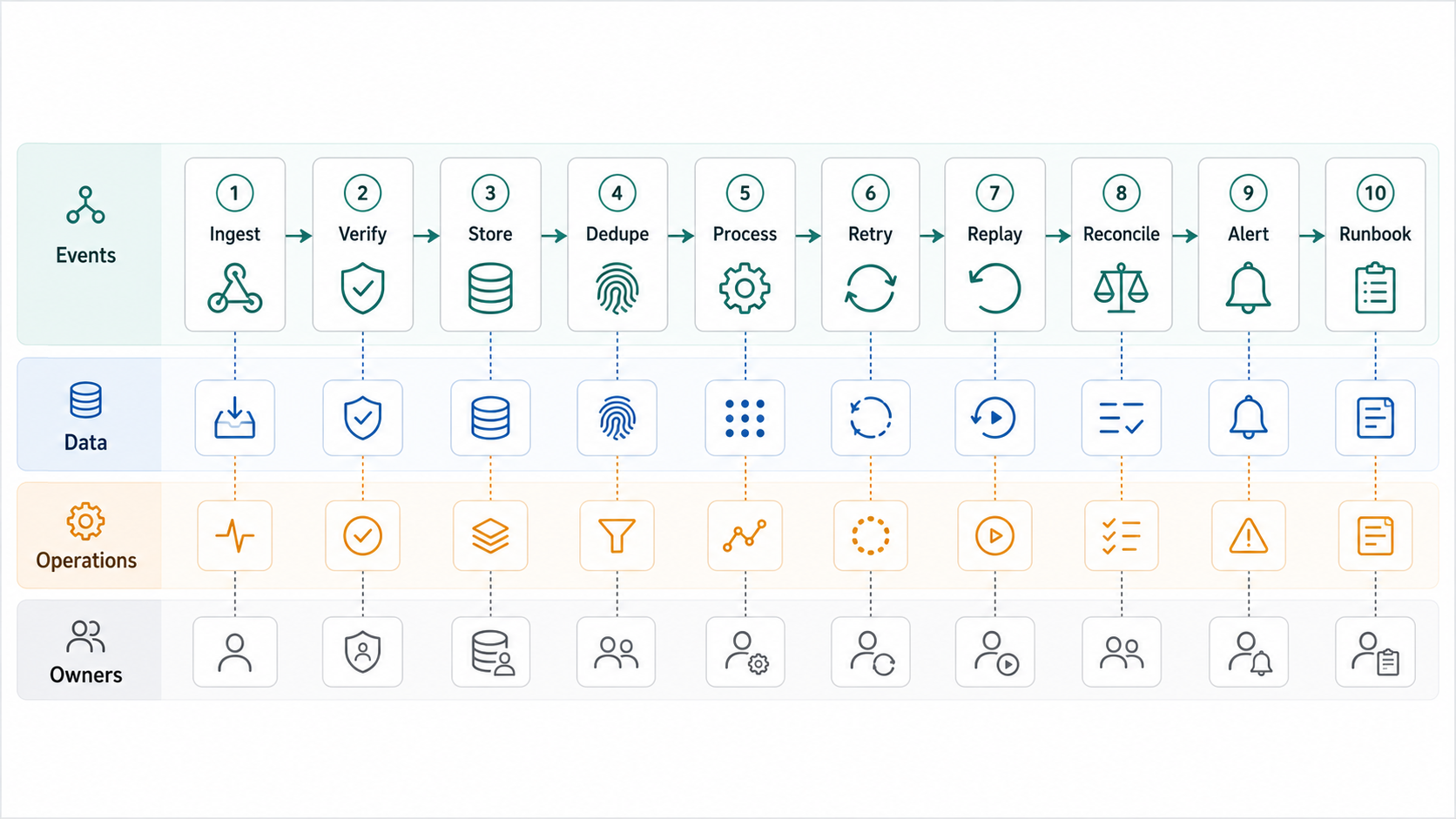
Every critical integration should have a reliability checklist before launch. The checklist does not need to be elaborate, but it must answer how the team detects, explains, and fixes failures.
| Step | Architecture Question | Evidence To Keep |
|---|---|---|
| Ingest | Where does the raw event or API response land first? | Raw payload table, event log, request ID, received timestamp. |
| Verify | How do we prove the event came from the expected provider? | Signature result, token scope, source IP policy where relevant. |
| Store | Can we inspect the original payload later? | Immutable raw payload or redacted event archive. |
| Dedupe | What prevents repeated events from changing state twice? | Event ID, idempotency key, unique processing record. |
| Process | What internal command or state change does the event trigger? | Mapped payload, target object ID, status transition. |
| Retry | What happens when the downstream API is slow or unavailable? | Retry count, next attempt, error class, backoff policy. |
| Replay | Can support or engineering safely re-run a failed event? | Replay tool, audit log, permission check, before/after state. |
| Reconcile | How do we catch drift between systems? | Daily diff report, sample audit, mismatch queue. |
| Alert | Which failures page a human? | SLO, threshold, channel, owner, escalation rule. |
| Runbook | Who fixes each failure class? | Owner, steps, links to logs, customer communication template. |
NextPage's QA automation testing services include API and integration automation for contracts, payloads, auth, third-party handoffs, webhooks, and backend workflows. For SaaS products, this coverage is not optional polish; it is how integration defects are caught before customer operations depend on them.
Billing Integrations Need Extra Control
Billing integration is the highest-risk part of many SaaS architectures because it touches revenue, entitlements, invoices, trials, discounts, renewals, taxes, and cancellations. Treat billing events as commands that may change product access only after validation. Do not let a single unverified callback directly grant or revoke critical access without an idempotent state transition.
For subscription SaaS, define how the app handles trial started, trial ending, checkout completed, payment failed, invoice paid, subscription updated, subscription cancelled, charge refunded, and dispute opened. Decide which events affect product entitlements immediately and which require reconciliation. Store enough event history to explain why a customer gained or lost access.
Integration complexity is also a major cost driver. The SaaS application development cost guide explains how multi-tenant architecture, subscriptions, admin panels, integrations, analytics, QA, and maintenance affect budget beyond basic screen count.
CRM And Support Sync Should Preserve Context
CRM and support integrations should answer practical questions: Who owns the account? What plan are they on? Are they in trial, active, overdue, or cancelled? Which product events signal risk? Which support tickets should trigger customer-success follow-up? Which CRM changes should never overwrite product truth?
Do not sync every field just because the API allows it. Sync the fields that support sales, onboarding, renewal, support, and reporting decisions. Keep internal IDs visible to support teams so they can map product accounts to CRM records and support tickets. Avoid ambiguous matching by email alone when B2B accounts have multiple domains, subsidiaries, invited users, and shared inboxes.
A useful pattern is to create a customer context object that CRM, support, and customer success can read: tenant ID, plan, billing status, account owner, lifecycle stage, key usage signals, open issues, last sync time, and integration health. That object reduces ad hoc lookups and keeps humans from stitching customer context manually.
Analytics And Warehouse Sync Should Not Depend On UI Events Alone
SaaS teams often start with client-side analytics events and later realize they need server-side truth for revenue, activation, retention, support, and AI automation. UI events are useful for product behavior, but billing, entitlement, account lifecycle, and workflow events should usually be captured server-side as well.
Design the event taxonomy before the data warehouse becomes a dumping ground. Standardize tenant ID, user ID, account ID, plan, role, event name, source, timestamp, version, and privacy boundaries. Decide which events are analytics-only and which events can trigger automation. Mixing those responsibilities without governance can create fragile workflows from metrics events that were never meant to be operational commands.
Security, Privacy, And Tenant Boundaries
Integration architecture must protect tenant boundaries. Every event and API call should carry enough context to prove which tenant, account, user, and role is affected. Secrets should be stored outside code. Tokens should use the narrowest workable scopes. Admin replay tools should require permissions and audit logs. PII and sensitive business data should be redacted from logs where possible.
For AI-enabled SaaS workflows, integration boundaries matter even more. Before sending CRM notes, support tickets, billing records, or usage data into an AI workflow, document what is allowed, what is redacted, where outputs are stored, and who reviews automated decisions. If the SaaS roadmap includes AI automation, security and governance should be part of the integration plan, not a later patch.
A Practical Integration Roadmap
Do not build every integration before launch. Build the integration layer in phases so the first release proves value without hiding future risk.
- Release one: product auth, tenant/account model, billing checkout or subscription state, minimum CRM/customer context, support identity lookup, and basic analytics.
- Stabilization: raw event storage, idempotent processors, dead-letter queue, replay tool, sync health dashboard, and integration smoke tests.
- Operations: lifecycle automation, onboarding tasks, renewal-risk signals, support escalation, finance reporting, and data warehouse sync.
- Scale: rate-limit management, backfill tooling, contract versioning, advanced observability, integration admin UI, and AI-assisted workflow automation with human review.
This sequencing keeps the MVP honest. Teams can prove product value before automating every edge case, while still designing the architecture so future integrations do not require a rewrite.
Build, Buy, Or Use iPaaS?
Use an iPaaS or workflow platform when the integration is mostly standard, low-risk, and operations teams need configuration control. Build custom integration services when the workflow is product-critical, needs tenant-aware business logic, must preserve strong auditability, or affects billing, access, security, compliance, or customer-facing behavior. If the decision is still unclear, run the workflow through NextPage's Build vs Buy Decision Tool before committing engineering capacity.
A hybrid is common. Use provider-native integrations or iPaaS for lower-risk operational sync, but keep product-critical state changes inside a controlled backend service. The decision should be based on strategic value, failure cost, workflow uniqueness, data sensitivity, and maintenance ownership. For broader vendor questions, the custom software development company checklist gives evaluation criteria for discovery, architecture, security, delivery, and support.
Build Vs Buy Integration Decision Framework
In 2026, the build-vs-buy question is less about whether an API connector can be created quickly and more about who will maintain auth changes, schema drift, webhook failures, retries, rate limits, customer-specific mappings, and production support after launch. AI coding tools and connector templates can reduce initial implementation time, but they do not remove ownership of reliability, security, tenant boundaries, and customer-impacting operations.
Use iPaaS or embedded integration platforms when the integration is mostly standard, lower risk, and valuable because customers want many connectors. Use a custom integration service when the workflow is product-critical, tenant-aware, billing-related, security-sensitive, or deeply tied to your product data model. A hybrid is common: buy commodity connectors, then build the control plane that owns entitlements, audit trails, workflow rules, and customer-visible state.
| Option | Best Fit | Watch The Risk | NextPage Planning Link |
|---|---|---|---|
| Provider-native integration | Simple CRM, analytics, support, or marketing sync where the provider already covers the workflow. | Limited control over retries, mappings, audit evidence, and future product-specific logic. | Build vs Buy Decision Tool |
| iPaaS or embedded integration platform | Many standard connectors, customer-managed configuration, and operational workflows that do not change core product state. | Connector cost, vendor limits, tenant-specific exceptions, and weaker control over product-critical state transitions. | Workflow Automation Opportunity Finder |
| Custom integration service | Billing, entitlements, permissions, compliance, AI workflow inputs, high-volume events, or workflows that define product value. | Requires engineering ownership for monitoring, replay, versioning, data contracts, and support runbooks. | SaaS Development Services |
| Hybrid integration layer | Commodity connectors plus custom rules for source of truth, auditability, tenant context, and customer-facing state. | Boundary clarity: teams must know what the platform owns and what the product backend owns. | MVP Scope Builder |
How Integration Architecture Affects Cost
Integration cost is driven by systems, not just endpoints. A single provider can still be expensive if it needs custom mapping, historical import, role-aware access, manual review, reporting, retries, and reconciliation. Five simple read-only integrations may be cheaper than one billing workflow that controls entitlements and revenue recognition.
Budget for discovery, API review, sandbox setup, data mapping, error handling, integration tests, staging data, migration/backfill, monitoring, runbooks, support handoff, connector maintenance, and vendor-change monitoring. The custom software development cost guide is useful when integration count and workflow complexity are the main budget drivers.
How NextPage Helps With SaaS Integration Architecture
NextPage helps SaaS teams design and build integrations as part of the product system: APIs, billing, CRM, support, analytics, admin workflows, event processing, test coverage, monitoring, and runbooks. We avoid brittle point-to-point automation when the workflow needs clear ownership, replay, observability, and customer-impacting reliability.
If you are planning a SaaS MVP or integration-heavy platform, start with SaaS Development Services and review the software and AI portfolio for examples of workflow-heavy product systems. If CRM and workflow reliability is the urgent pain, review CRM Integration And Workflow Automation Services. If you need a directional budget first, use the Custom Software Cost Estimator and include every billing, CRM, support, analytics, and workflow integration you expect in release one.