
Quick Answer: When Should You Replace SaaS With Custom Software?
A SaaS replacement roadmap makes sense when an off-the-shelf tool is no longer just imperfect, but actively shaping the business in the wrong direction. The strongest signals are repeated workarounds, duplicate data entry, brittle spreadsheet exports, rising license cost, blocked reporting, weak permissions, integration gaps, and teams changing their process to satisfy the software instead of the customer or operation.
That does not mean every SaaS tool should be rebuilt. Many products should stay. Some should be integrated better. Some workflows need a custom internal tool around the SaaS stack. A smaller number deserve full custom software because the workflow is proprietary, revenue-critical, or too specific for standard platforms. Use NextPage's Build vs Buy Decision Tool when the choice is still unclear.
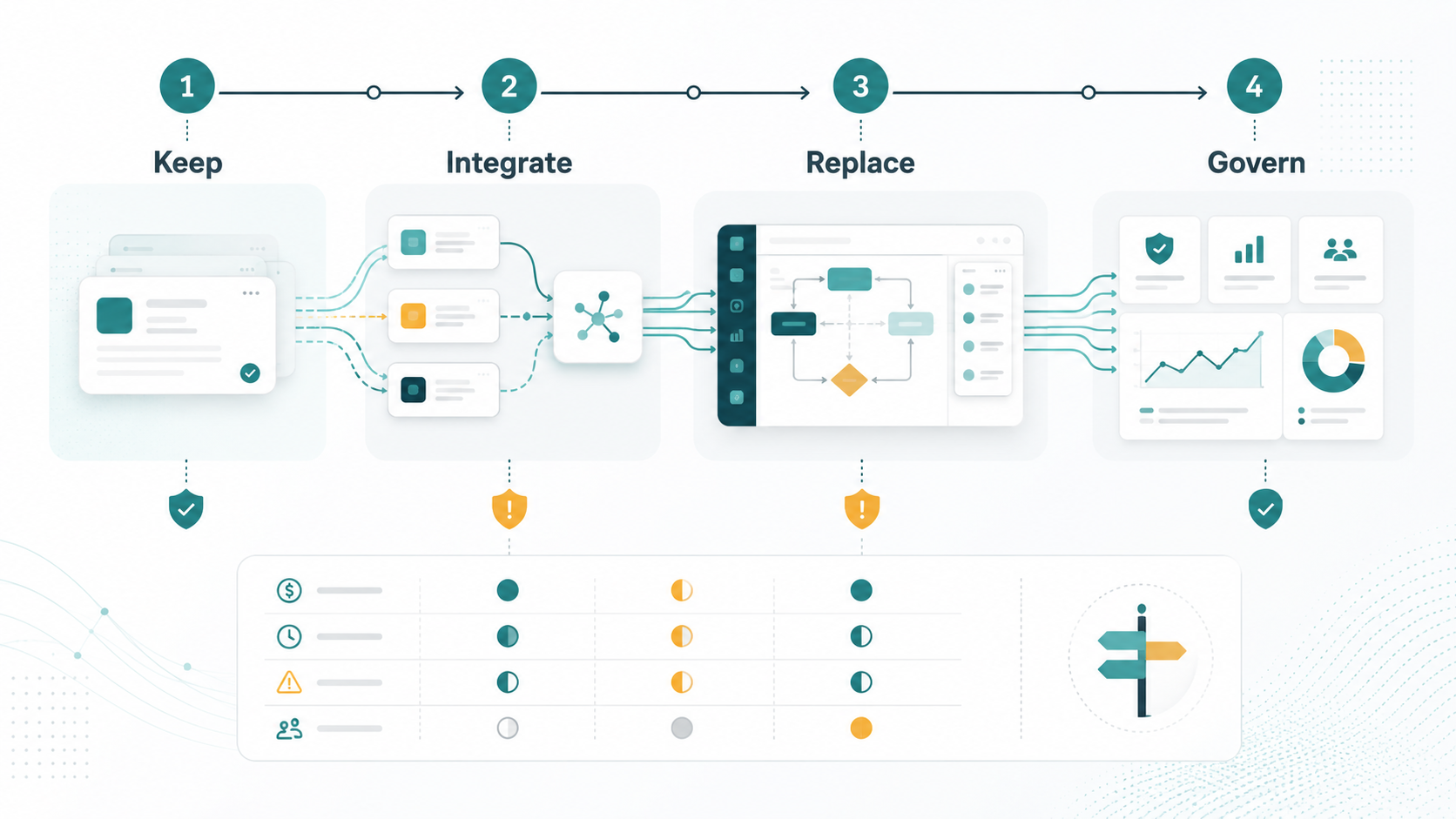
Why SaaS Replacement Is Not A Binary Choice
The wrong question is usually "Should we use SaaS or custom software?" Most businesses already use a mixture of both. The useful question is "Which parts of this workflow should remain standard, and which parts create enough operational value to control ourselves?"
SaaS is usually the right answer for commodity workflows: email, payroll basics, simple CRM, support desk foundations, accounting, analytics collection, identity, and payment infrastructure. Buying is faster when the process is standard and the team can adopt the product's assumptions. Custom software becomes stronger when the workflow itself is the advantage: unique pricing logic, multi-step approvals, operational dashboards, customer portals, scheduling constraints, field operations, or proprietary data models.
A good roadmap therefore keeps useful SaaS, connects systems that should talk to each other, and replaces only the workflow slices where control, speed, data ownership, or customer experience justify the cost. If the replacement target is still vague, NextPage's SaaS replacement fit assessment is designed to map that boundary before a build starts.
Common Triggers For Replacing SaaS
Most teams do not wake up one day wanting custom software. They arrive there after months or years of operational friction. The triggers below are stronger than generic preference because they connect software limitations to business cost.
| Trigger | What It Looks Like | Replacement Signal |
|---|---|---|
| Workflow workarounds | Teams export CSVs, copy data between tools, maintain side spreadsheets, or use comments as approval systems. | The process no longer fits the SaaS product's default model. |
| Integration debt | CRM, ERP, billing, inventory, support, or delivery systems do not share reliable state. | An integration layer or custom workflow hub may be needed before a full rebuild. |
| Data ownership gaps | Reporting is delayed, definitions conflict, or operational data cannot be modeled the way leaders need. | Custom data models and dashboards may create more value than another SaaS subscription. |
| License sprawl | Multiple tools overlap, paid seats are underused, and the team pays for features that do not match the workflow. | A replacement case may exist when savings and process control offset build and maintenance cost. |
| Customer experience limits | Clients see fragmented portals, manual updates, slow status changes, or inconsistent notifications. | A custom portal or workflow app can protect the customer-facing experience. |
| Governance and permissions | Access rules, audit trails, approvals, or compliance checks cannot be represented cleanly. | Custom software may be safer than forcing policy into a tool that was not designed for it. |
One trigger alone may not justify replacement. The stronger case appears when several triggers point to the same workflow and the business can describe the measurable outcome it wants: fewer handoffs, faster cycle time, cleaner reporting, better customer visibility, lower support load, or stronger control.
Phase 1: Inventory The Stack And The Workflow
Start with a plain inventory. List every SaaS tool involved in the workflow, what each tool owns, who uses it, what data enters and leaves, what reports depend on it, and what manual work surrounds it. This should include paid tools, no-code automations, spreadsheets, shared inboxes, and unofficial process documents.
Then map the real workflow, not the vendor demo workflow. Follow one customer request, order, employee record, ticket, shipment, project, or approval from start to finish. Mark every handoff, delay, duplicate entry, exception, and decision. The replacement target should come from this map. If the workflow cannot be drawn, the replacement scope is probably not ready.
Use the inventory to classify tools into four groups: keep, configure, integrate, and replace. Keeping a tool is an active decision, not a failure to modernize. A stable SaaS product that handles a standard process well should stay unless it blocks the parts of the workflow that matter.
Phase 2: Score Keep, Integrate, Or Replace
The decision should be made at the workflow level, not the application level. A CRM may stay while the quoting workflow around it becomes custom. An ERP may stay while a field operations portal replaces email and spreadsheets. A support desk may stay while a custom escalation dashboard connects customer health, invoices, and SLA risk.
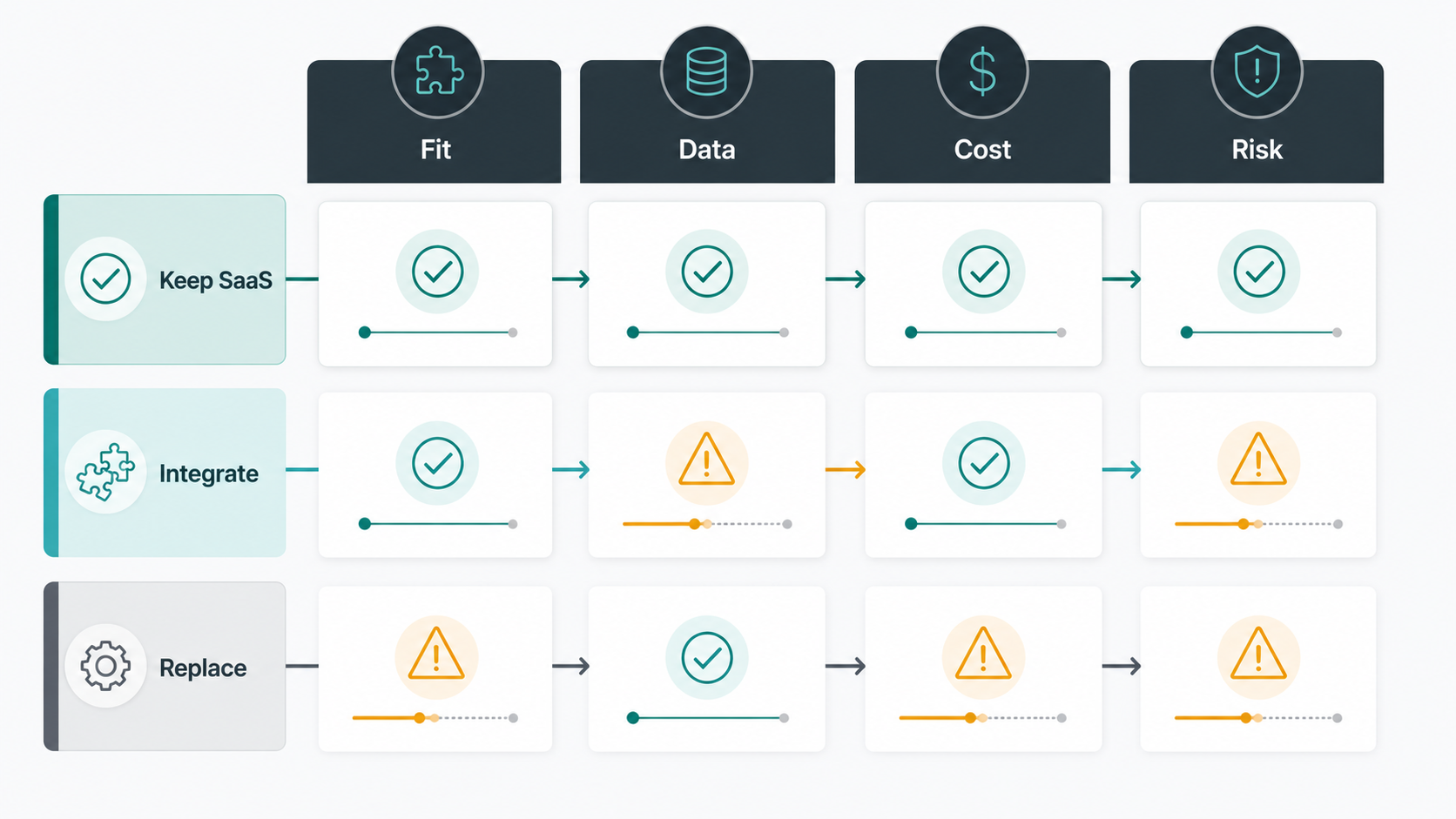
| Decision | Best Fit | Watch-Out |
|---|---|---|
| Keep SaaS | The workflow is standard, users are productive, reporting is acceptable, and license cost is justified. | Do not keep a tool only because migration feels uncomfortable. |
| Configure SaaS | The tool mostly fits, but forms, permissions, dashboards, or automations need cleanup. | Configuration can become expensive when it imitates custom development without custom control. |
| Integrate Systems | Several good tools exist, but data and handoffs are disconnected. | Point-to-point integrations can become fragile without ownership and monitoring. |
| Build A Custom Workflow | The workflow is unique, high-value, data-heavy, customer-facing, or constrained by unusual rules. | Custom software needs product ownership, support, maintenance, and a clear release boundary. |
This phase often shows that integration should happen before replacement. Good enterprise software integration services can remove duplicate entry, synchronize records, and improve reporting while preserving tools that still work. If integration solves the business problem, a full replacement can wait.
Phase 3: Define The Replacement Boundary
When replacement is justified, define the boundary tightly. The first version should replace a painful workflow, not recreate every feature in the SaaS product. A common mistake is turning "we need better approval routing" into "we need a new CRM." That is how replacement projects become bloated and risky.
Write a version-one statement: "This system will help these users complete this workflow with these records, these decisions, these integrations, and these reports." Then write the no-scope list. The no-scope list matters because users will remember every feature the old SaaS product had, including features nobody liked or used.
Custom replacement work often overlaps with custom software development, internal portals, dashboards, workflow automation, and data migration. Treat it as product work. The team needs users, acceptance criteria, admin needs, data definitions, audit requirements, support paths, and a release owner.
Phase 4: Plan Data, Integration, And Migration
Data is usually the hardest part of SaaS replacement. Before building screens, decide which system owns each record, how historical data will be migrated, what can be archived, what must remain searchable, and which reports must reconcile before launch. If two systems disagree today, replacing one of them will not automatically fix the definition problem.
Migration should be staged. Export sample data early. Clean obvious duplicates. Map fields. Test import rules. Reconcile totals. Decide what happens to attachments, comments, audit history, and inactive users. If the old SaaS tool remains read-only after launch, define how long it stays available and who can access it.
Integration planning should also include failure behavior. What happens when the CRM API is down? What if invoices sync late? What if a background job fails? Custom workflow software should make these states visible. Silent sync failures are one reason teams lose trust in replacement projects.
Phase 5: Build In Parallel And Release In Slices
Do not switch a critical workflow overnight unless the workflow is small and low-risk. A safer roadmap runs the new system beside the old process, moves one team or workflow slice first, and uses evidence before expanding. This reduces operational shock and gives users a real path to report gaps.
A practical sequence is prototype, pilot, limited launch, migration, then retirement. The prototype proves the workflow. The pilot proves that real users can complete work. The limited launch proves integrations and support. Migration moves clean data and active work. Retirement removes licenses, old forms, and duplicate process steps after the new workflow is stable.
For operations-heavy workflows, a custom replacement may look more like internal tool development than a public product. That is fine. The goal is not to impress users with a giant platform. The goal is to make repeated work faster, safer, and easier to measure.
Budget And ROI For SaaS Replacement
SaaS replacement ROI should include more than subscription savings. License reduction is useful, but the stronger case often comes from cycle-time reduction, fewer manual handoffs, lower error rates, faster reporting, better customer retention, and less operational supervision.
Budget depends on the replacement boundary. A lightweight workflow app with a few roles, one database, and two integrations is very different from an enterprise replacement with permissions, audit trails, migration, dashboards, API sync, admin tooling, and support workflows. Use planning bands, not promises: a narrow internal workflow may be a focused project, while a multi-team replacement can require phased product investment.
The fastest way to improve the estimate is to separate first release from later roadmap. If the current scope includes every screen, every historical report, every exception, and every future automation, the budget will be noisy. Use the Custom Software Cost Estimator after the keep/integrate/replace boundary is clear.
Risks To Control Before You Replace SaaS
The biggest SaaS replacement risks are vague scope, underestimated data cleanup, missing workflow owners, weak change management, brittle integrations, and premature license cancellation. These are avoidable if the roadmap treats replacement as an operating change, not just a development project.
- Scope risk: Control it with a version-one boundary and no-scope list.
- Data risk: Control it with sample imports, reconciliation, and ownership rules.
- Adoption risk: Control it with pilot users, training, and visible support paths.
- Integration risk: Control it with logs, retries, alerts, and manual fallback states.
- ROI risk: Control it by measuring cycle time, license reduction, manual effort, and error reduction before and after launch.
How NextPage Approaches SaaS Replacement
NextPage starts SaaS replacement work by mapping the current workflow, tool stack, data movement, user roles, operational pain, and business case. We do not assume custom software is automatically better. Sometimes the right answer is to keep the SaaS product and integrate it properly. Sometimes it is to build a focused workflow layer around existing systems. Sometimes the business has outgrown the tool and needs a controlled custom replacement.
The first useful deliverable is usually a replacement roadmap: what to keep, what to integrate, what to replace, what to migrate, what to measure, and what the first release should not include. From there, NextPage can plan the product architecture, data model, integrations, admin tooling, QA approach, and launch sequence.
If your team is paying for tools that no longer fit the way the business works, start with the decision map rather than a rebuild brief. The right roadmap may save the good parts of your SaaS stack while replacing the workflow debt that is slowing the business down.