
A Salesforce integration roadmap should define which systems connect to Salesforce, which data objects move between them, which integration pattern each workflow uses, who owns every interface, and how the rollout will be tested, monitored, and governed. For most teams, the critical integrations are ERP, eCommerce, accounting, marketing automation, support, analytics, and internal workflow tools. The roadmap should not start with connectors. It should start with business events, data ownership, security boundaries, and release gates.
The safest sequence is simple: inventory systems and owners, map customer and transaction data, classify workflows by latency and business risk, choose the integration pattern for each flow, clean data before sync, pilot the highest-value journeys, then roll out with reconciliation, monitoring, and rollback plans. If your team is also replacing manual handoffs, pair the roadmap with CRM integration and workflow automation services so the integration design improves operations instead of only moving records between tools.
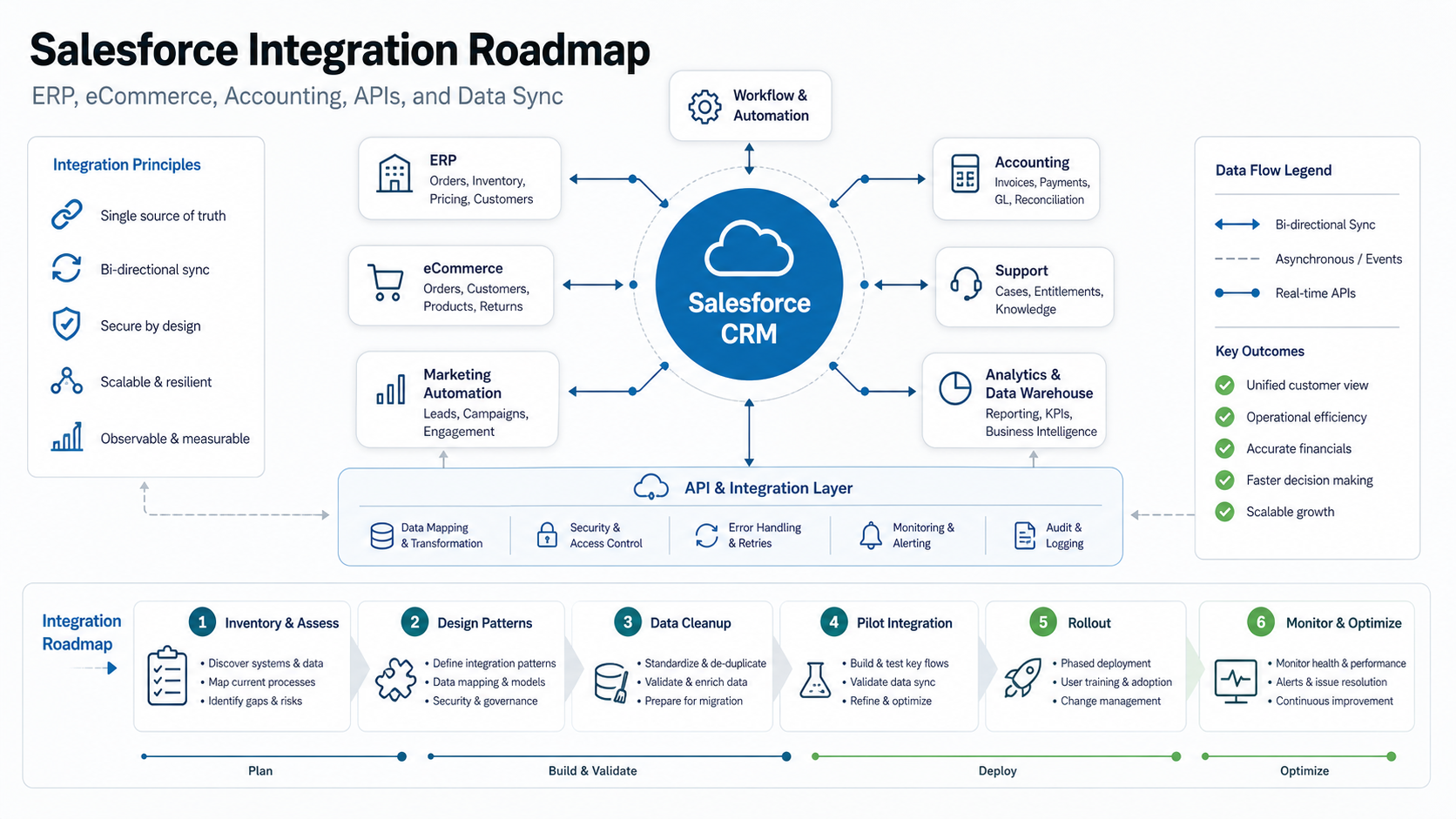
Quick Answer: What Should A Salesforce Integration Roadmap Include?
A practical roadmap includes eight decisions: business outcomes, connected systems, data ownership, object and field mapping, integration pattern, security model, testing and reconciliation plan, and operational monitoring. Each decision should be tied to a named workflow such as quote-to-cash, order-to-fulfillment, customer support escalation, lead routing, invoice reconciliation, subscription renewal, or executive reporting.
The roadmap should also separate system-of-record decisions from sync mechanics. Salesforce may own leads, opportunities, accounts, contacts, cases, and pipeline activity, but ERP may own inventory, pricing, invoicing, credit limits, tax, and fulfillment status. eCommerce may own carts, order events, customer preferences, and promotions. Accounting may own invoice status, payments, general ledger codes, and reconciliation. Without those boundaries, integrations create duplicate truth and expensive cleanup later.
For buyer planning, treat Salesforce integration as a product roadmap, not a one-time data plumbing task. The first release should prove the highest-value journeys with limited scope. Later releases can add less urgent objects, richer automation, analytics, and self-service workflows. Teams that need a broader application plan can use a SaaS integration architecture guide to align Salesforce with the rest of the application ecosystem.
Start With A System And Data Inventory
Begin by listing every system that reads from or writes to Salesforce. Include ERP, eCommerce, accounting, marketing automation, support desk, identity provider, billing platform, data warehouse, customer success tools, legacy databases, spreadsheets, and internal admin portals. For each system, capture the owner, vendor, authentication method, available APIs, data export limits, expected volume, uptime needs, and current manual workarounds.
The inventory should identify business events, not just tables. Examples include a new qualified lead, approved quote, won opportunity, shipped order, failed payment, credit hold, returned item, upgraded subscription, high-priority case, or customer-health risk. Events make it easier to define when Salesforce needs real-time information and when scheduled sync is enough.
Next, map core entities: account, contact, lead, opportunity, quote, order, product, price book, invoice, payment, asset, entitlement, case, subscription, and reporting dimension. Decide which system owns each entity, which fields are mastered elsewhere, and which fields Salesforce can safely update. This is also where CRM data migration services can prevent bad historical records from polluting every connected platform.
Choose The Right Integration Pattern For Each Workflow
Different Salesforce workflows need different patterns. A price lookup during quote creation may need a real-time API. Order status updates may work better as event-driven sync. Historical reporting may belong in batch ETL. A multi-step customer onboarding process may fit an iPaaS workflow. Legacy business rules may require custom middleware. Salesforce's own architecture guidance groups integration patterns around process integration, data integration, and virtualization, which is a useful way to avoid choosing one pattern for everything.
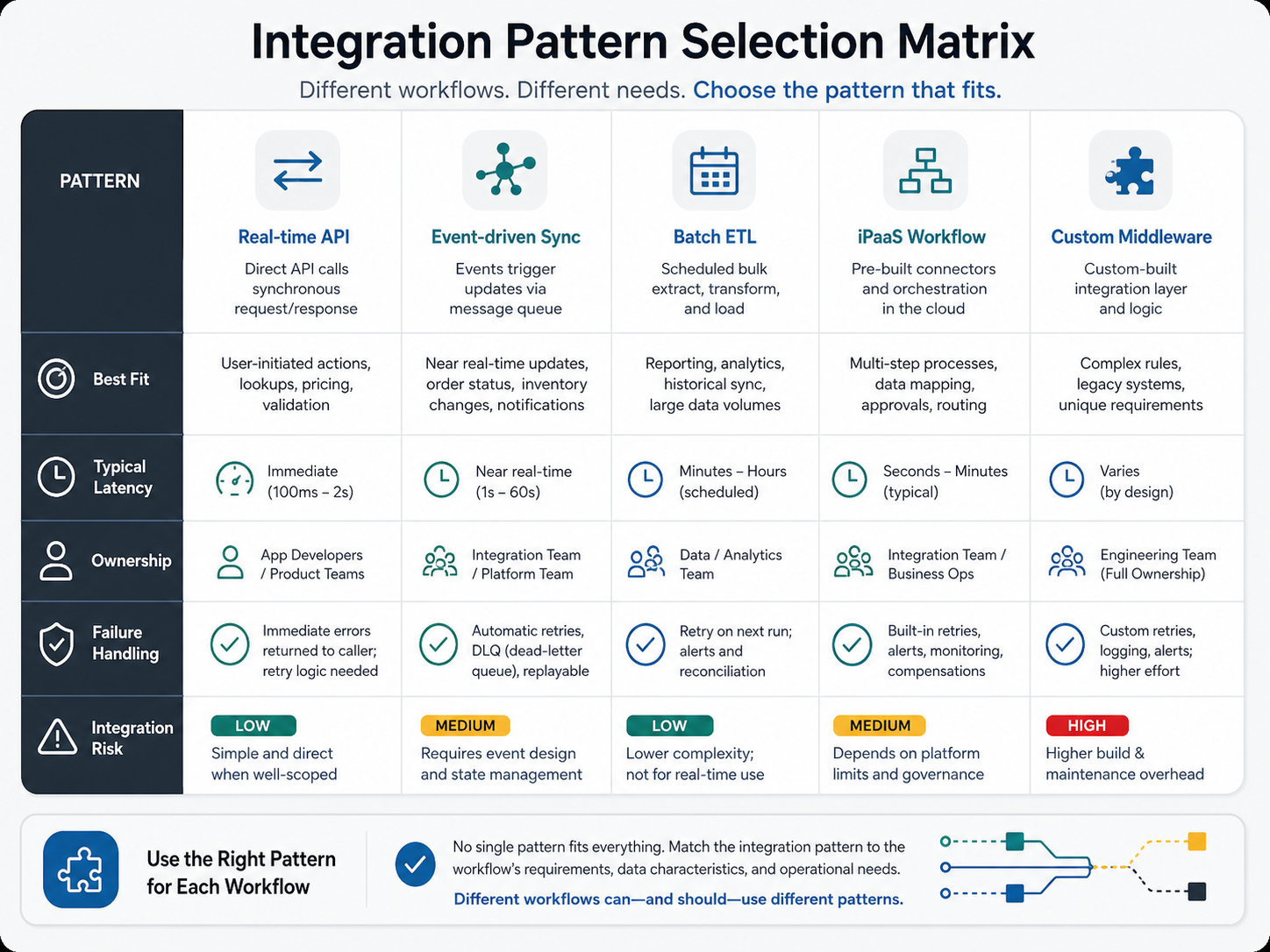
Use real-time APIs for user-facing lookups and validations where stale data creates errors. Use event-driven sync for order, inventory, customer-status, and entitlement updates that should propagate quickly but do not need a blocking response. Use batch ETL for large historical loads, analytics, archival jobs, or reconciliation runs. Use iPaaS workflows when business users need managed connectors and orchestration. Use custom middleware when the integration has unusual rules, complex transformations, strict performance goals, or legacy protocol constraints.
The pattern decision should also include ownership. Product teams can often own narrow real-time APIs. Platform or integration teams should own event schemas and shared middleware. Data teams should own analytics and batch pipelines. Business operations may co-own iPaaS workflows, but engineering should still review security, data mapping, and observability. For complex estate-level work, enterprise software integration services help define shared contracts before every department buys a separate connector.
Clean And Map CRM Data Before Syncing It Everywhere
Data cleanup is usually the difference between a useful Salesforce integration and a noisy one. Before the first production sync, define duplicate rules, merge strategy, field normalization, picklist mapping, consent fields, tax and region logic, product identifiers, currency handling, account hierarchy, and lifecycle status. Then profile the data for missing values, inconsistent formats, invalid relationships, orphan records, stale owners, and conflicting field meanings.
Do not assume that Salesforce field labels match ERP, eCommerce, or accounting field meanings. "Customer", "account", "company", "ship-to", and "bill-to" may represent different entities. "Order status" may mean checkout status in commerce, fulfillment status in ERP, and payment status in accounting. A data dictionary should define each field, the system of record, allowed values, transformation rules, validation rules, sync direction, and error owner.
If the integration is also part of a migration or cleanup program, use the CRM data cleanup before migration checklist as a preparation step. Clean data first, then sync. Syncing dirty data faster only spreads the problem.
Plan ERP, eCommerce, Accounting, And Reporting Handoffs
ERP integrations usually need product, price, inventory, order, fulfillment, shipment, account, credit-limit, and invoice boundaries. Sales teams want visibility inside Salesforce, but ERP should usually remain the system of record for inventory, fulfillment, tax, and financial posting. A strong roadmap identifies which ERP events Salesforce consumes, which Salesforce events ERP consumes, and where reconciliation reports catch drift.
For eCommerce, focus on customer identity, cart and order events, product catalog changes, returns, subscriptions, promotion history, and support handoffs. Commerce teams need conversion speed and accurate customer context; CRM teams need lead, account, opportunity, and service visibility. If Salesforce integration is part of a broader commerce modernization, connect it with retail and eCommerce modernization services so checkout, order management, customer support, and analytics do not become separate programs.
Accounting integrations should be conservative. Invoice status, payment status, credit holds, tax, GL codes, and reconciliation outcomes affect cash and compliance. Avoid letting Salesforce become an accounting system. Instead, expose the financial state sales and service teams need, with audit logs, role-based access, and exception queues for disputed or failed records. Cost planning should also account for ERP complexity; the ERP integration cost guide is a useful benchmark for sizing downstream effort.
Security, Monitoring, Retries, And Failure Recovery
Every interface needs an authentication model, authorization boundary, secrets rotation plan, data minimization rule, audit trail, and failure path. Do not share a single integration user across unrelated workflows without compensating controls. Separate read and write scopes where possible. Log what changed, which system initiated it, which object was affected, and which retry or compensation path ran when a failure occurred.
Salesforce's API library includes synchronous APIs, bulk APIs, and event-oriented APIs such as Pub/Sub API. The roadmap should make those options explicit: real-time APIs for interactive work, Bulk API for large data loads, and Pub/Sub or event-driven patterns for changes that should be published and consumed reliably. Integration monitoring should track latency, error rate, retry count, dead-letter backlog, data-quality exceptions, API consumption, and reconciliation variance.
Testing should cover field mapping, permission boundaries, rate limits, idempotency, rollback, duplicate events, partial failures, retry storms, and user-facing edge cases. For release gates, pair integration tests with QA automation testing services so regression coverage keeps pace as Salesforce, ERP, commerce, and accounting workflows evolve.
A Phased Salesforce Integration Rollout Plan
A phased rollout lowers risk by proving one valuable journey before connecting every object. Start with a discovery phase that locks owners, scope, and success metrics. Move into data cleanup and field mapping. Then pilot one or two core flows, such as account and opportunity sync or order-status visibility. After that, run systems in parallel, reconcile outputs, resolve exceptions, and only then expand to production rollout.
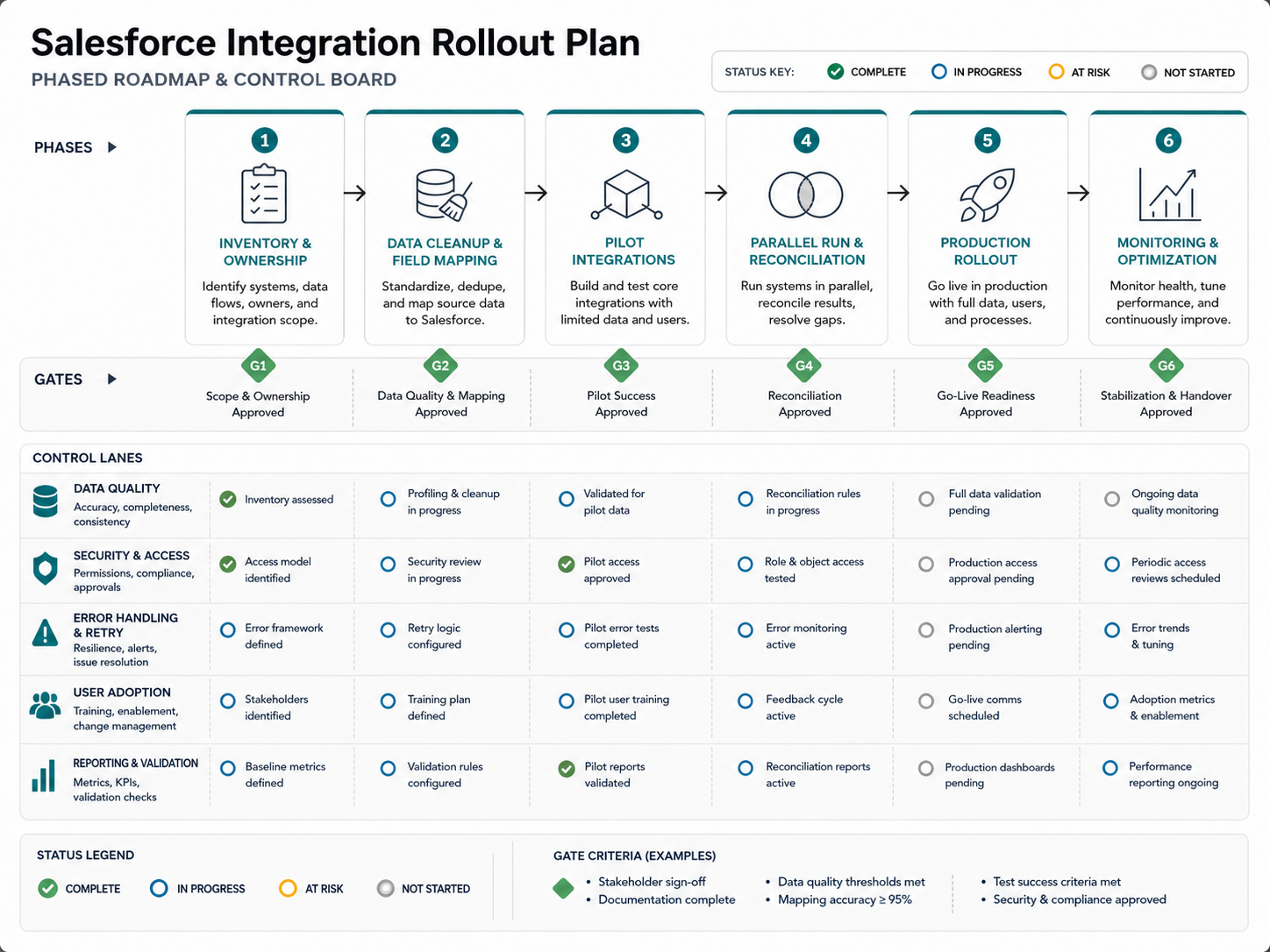
The rollout plan should define go/no-go criteria. Examples include mapping accuracy above an agreed threshold, zero unresolved critical security findings, successful replay of failed events, validated reconciliation reports, support-team runbooks, stakeholder sign-off, and business-owner acceptance of exception queues. These gates keep a CRM integration program from turning into a silent production dependency with no owner.
After launch, keep a stabilization window. Monitor adoption, failed syncs, support tickets, duplicate records, API usage, sales-cycle impact, order exceptions, and finance reconciliation issues. If internal teams also need dashboards or custom workflows around the integration, the custom software cost estimator can help frame the extra application work before it is bundled into the integration budget.
Salesforce Integration Roadmap Checklist
| Roadmap Area | What To Decide | Evidence To Produce |
|---|---|---|
| Business outcome | Which sales, service, finance, commerce, or reporting process improves first | Named workflows, baseline metrics, release-one success criteria |
| System ownership | Which platform owns each object and field | System-of-record matrix and approval owners |
| Integration pattern | Real-time API, event sync, batch ETL, iPaaS, or middleware per workflow | Pattern matrix with latency, volume, and failure handling |
| Data quality | Duplicate rules, validation, field mapping, and cleanup threshold | Data dictionary, profiling report, mapping tests |
| Security | Auth, scopes, secrets, audit logs, and access control | Security review, integration-user design, logging policy |
| Testing | Functional, regression, reconciliation, failure, and rollback coverage | Test plan, automated checks, exception runbooks |
| Operations | Monitoring, alerts, retry queues, ownership, and support handoff | Dashboards, alert thresholds, owner rota, incident process |
How NextPage Helps With CRM Integration Architecture
NextPage helps teams turn disconnected CRM, ERP, eCommerce, accounting, and reporting systems into a practical integration roadmap. The work usually starts with a system inventory, data-quality review, object ownership matrix, workflow prioritization, and architecture plan. From there, we can design APIs, event flows, middleware, migration scripts, dashboards, QA coverage, and rollout controls around the business journeys that matter most.
For Salesforce-specific programs, the strongest starting point is a focused architecture review: what should Salesforce own, what should stay in ERP or accounting, which workflows need real-time behavior, where data cleanup is blocking trust, and which release gates protect the business. Teams that need a broader CRM buildout can also review custom CRM development services, while product and operations teams can compare relevant implementation examples in the NextPage portfolio.
If your Salesforce roadmap is already underway, the next best step is to identify the first workflow where bad integration creates revenue, fulfillment, support, or finance risk. Scope that workflow tightly, define the system-of-record rules, test the failure paths, and make it observable before expanding the program.