
A SAP ECC to S/4HANA migration checklist should start with business scope, data quality, custom code, integrations, test evidence, cutover planning, and rollback readiness before it turns into a technical conversion plan. SAP's mainstream maintenance window for Business Suite 7 core applications runs until the end of 2027, with optional extended maintenance until the end of 2030. That timeline creates pressure, but pressure is exactly why software leaders need a migration-control checklist instead of a rushed upgrade calendar.
This guide is written for CIOs, ERP owners, operations leaders, and software teams that need to reduce migration risk. It does not pretend every company needs the same S/4HANA path. Some teams will convert an existing ECC landscape. Others will use the migration to simplify processes, rebuild integrations, or modernize adjacent systems around ERP. The practical question is: what must be true before you commit the business to a migration window?
If your SAP landscape is surrounded by legacy applications, brittle exports, custom portals, reporting layers, or manual reconciliation, treat the program as broader ERP integration and modernization, not only a SAP technical project. The checklist below helps you separate SAP partner work, internal business ownership, and the surrounding software modernization work that often decides whether the program succeeds.
Quick Checklist: What To Verify Before The Migration Plan Is Approved
| Gate | What To Prove | Owner |
|---|---|---|
| Business scope | Processes, company codes, plants, interfaces, reports, and users included in release one are explicit. | ERP sponsor and process owners |
| Path decision | Greenfield, brownfield, selective transformation, or phased surrounding-system modernization is justified. | CIO, SAP lead, finance, operations |
| Data readiness | Master data, open transactions, historical reporting, reconciliation rules, and cutover loads are testable. | Data owner and finance/operations SMEs |
| Custom code | Unused code is scoped out; active code is scanned, remediated, tested, and assigned to owners. | SAP technical lead and app owners |
| Integrations | Every inbound/outbound dependency has an owner, test case, fallback, and monitoring plan. | Integration architect |
| Testing | Unit, SIT, UAT, performance, security, regression, and business close simulations are scheduled. | QA lead and process owners |
| Cutover | Freeze dates, load windows, reconciliation checkpoints, support rota, rollback criteria, and go/no-go rules are approved. | Program manager |
The Migration Readiness Map
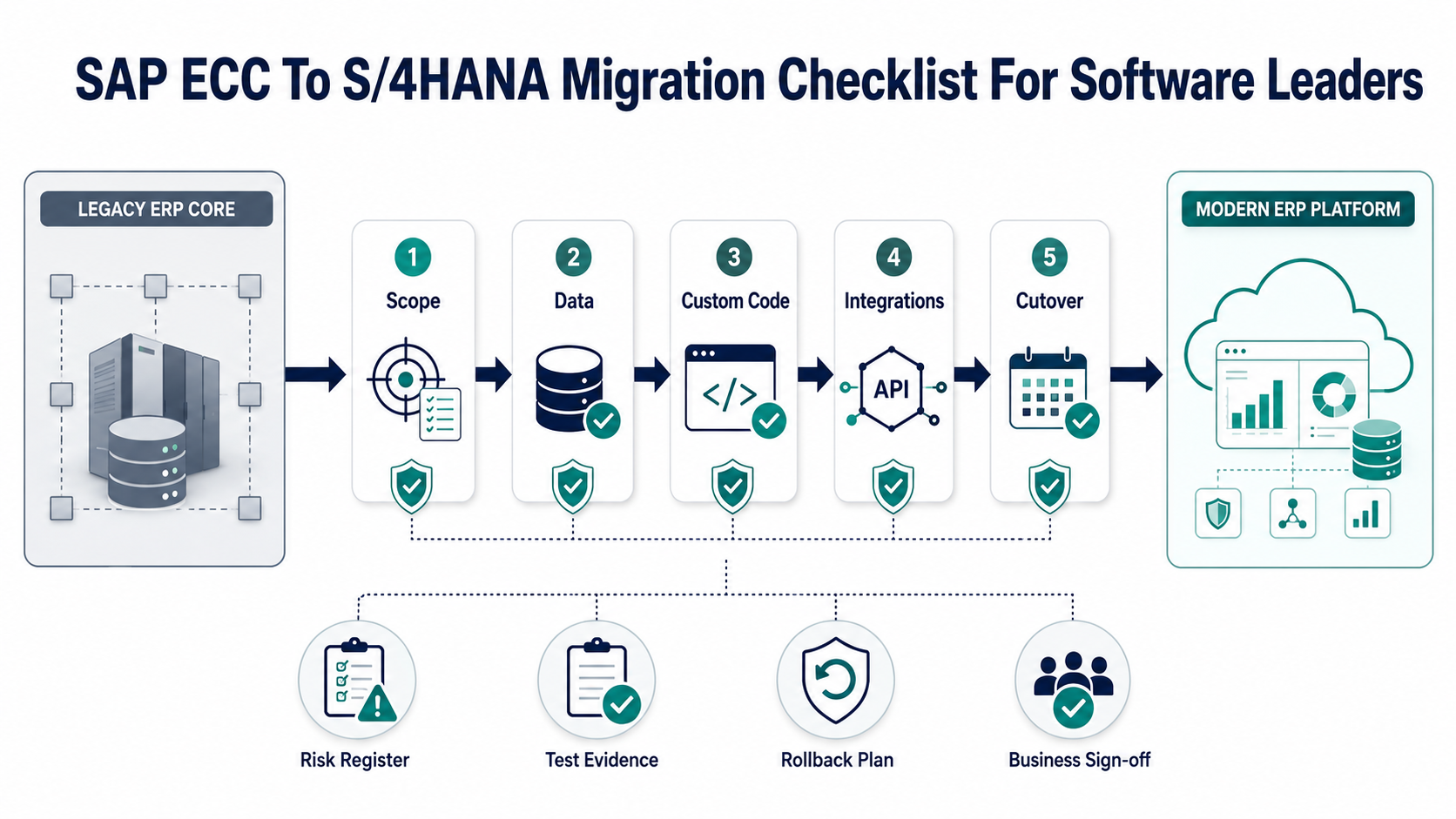
A useful migration checklist should expose dependencies early. SAP configuration, ABAP remediation, data migration, surrounding applications, reporting, workflows, and user adoption all move on different timelines. If leadership sees only a single go-live date, the project will discover risk late. If leadership sees gates with evidence, blockers become manageable.
Use the readiness map as a steering view. Each gate needs a named owner, evidence, unresolved risks, and a decision rule. For example, the data gate is not complete because a mapping spreadsheet exists. It is complete when representative migration loads reconcile, exception handling is documented, and business owners have signed off on what happens to old, duplicate, inactive, or incomplete records.
1. Choose The Migration Path Before Planning The Timeline
SAP describes a brownfield approach as converting an existing SAP ERP system and a greenfield approach as starting with a new clean SAP S/4HANA environment. Many real programs sit between those labels because companies also need process redesign, selective data moves, cloud decisions, integration replacement, or modernization of non-SAP systems around ERP.
Do not let path labels hide the actual decision. A brownfield conversion may preserve too much complexity if the current system is full of unused customizations. A greenfield move may create business disruption if process redesign, master data, and integration ownership are not ready. A phased modernization path may be best when the ERP deadline is only one part of a larger application portfolio problem.
For software leaders, the first decision is where the risk lives. If risk is mostly SAP configuration and standard process fit, a SAP implementation partner should lead the core path. If risk lives in legacy portals, old middleware, reporting databases, manual exports, or connected applications, pair the SAP roadmap with application migration services and system-by-system modernization planning.
2. Lock Business Scope Around Processes, Not Modules
Module names are not enough. Define scope by business process, legal entity, plant, market, workflow, report, interface, and user group. A finance migration scope should identify close activities, tax reporting, approval workflows, treasury dependencies, audit evidence, and operational reports. A manufacturing scope should include planning, inventory, MES connections, barcode flows, quality checks, and downtime windows.
The scope gate should answer these questions:
- Which processes are changing, staying the same, or being retired?
- Which company codes, plants, warehouses, regions, and users are in release one?
- Which custom reports are business critical and which can be retired?
- Which adjacent systems depend on SAP data or trigger SAP transactions?
- Which manual workarounds are being eliminated, automated, or temporarily tolerated?
Scope should also include decision exclusions. If a workflow is not part of the migration, name how it will continue and what integration or reporting impact it creates.
3. Treat Data Migration As A Workstream, Not A Task
Data problems are one of the most common reasons ERP migrations slip. Poor master data, duplicate vendors, inconsistent material codes, stale customers, open transactions, manual spreadsheet dependencies, and unclear historical-reporting requirements all become harder during cutover.
Start with a source inventory: tables, files, extracts, interfaces, external systems, reporting databases, and manual datasets. Then classify each dataset by business owner, cleansing need, transformation rule, test-load priority, reconciliation method, and retention requirement. If a dataset cannot be reconciled, it is not ready for migration.
NextPage's ERP Data Migration Checklist covers mapping, validation, cutover, and rollback in more detail. For teams that need execution support beyond the SAP core, ERP data migration services and broader data migration services can help build repeatable ETL, validation evidence, and reconciliation workflows.
4. Run Custom-Code Scoping Before Remediation
Custom code is often the hidden schedule driver. SAP's custom-code migration guidance points teams toward the Simplification Database, custom-code scoping, usage monitoring, and ABAP Test Cockpit checks for SAP S/4HANA simplifications. The important leadership takeaway is simple: not every old object deserves remediation.
Start by finding what is actually used. Usage evidence helps retire dead code, isolate business-critical enhancements, and reduce the remediation list. Then scan active objects against simplification items, assign owners, estimate remediation, and add business-process tests around every changed object. A technical fix is not complete until the business process that depends on it has passed regression testing.
Track custom code in four buckets:
- Retire: unused or obsolete objects with no business owner.
- Replace: old custom behavior better handled by standard S/4HANA capability or modern extension patterns.
- Remediate: active objects affected by data model, API, performance, or simplification changes.
- Rebuild outside core: workflows that should move into cleaner services, portals, or integration layers.
5. Build An Integration Inventory With Failure Modes
ERP migrations break when connected systems are treated as background dependencies. Inventory every integration: CRM, eCommerce, WMS, MES, PLM, HRMS, banking, tax, BI, data warehouse, vendor portals, mobile apps, approval tools, EDI, and custom middleware. For each integration, record direction, protocol, owner, frequency, data contract, authentication, retry rules, monitoring, and fallback process.
Integration testing should not wait for the end. Test representative business flows early: order-to-cash, procure-to-pay, inventory movements, month-end close, production planning, support cases, and executive reporting. If interfaces rely on brittle files or manual extracts, use the migration as a forcing function to modernize the integration layer.
This is where NextPage's ERP integration modernization work fits well: stabilizing legacy modules, replacing brittle exports, building API-friendly workflows, and planning controlled cutovers for surrounding applications.
6. Make Test Evidence A Steering Artifact
Testing should produce evidence leadership can use, not only defect counts. The steering committee should see process coverage, high-risk scenarios, unresolved blockers, reconciliation results, performance findings, security issues, and go-live readiness by business owner.
Plan at least six testing layers:
- Configuration and unit tests for SAP changes.
- Integration tests across connected systems.
- Data-load and reconciliation tests.
- Business UAT by process owner.
- Regression tests for critical reports and workflows.
- Performance, security, access, and audit-readiness checks.
Do not rely on happy-path UAT. Include failed payments, duplicate vendors, backdated postings, partial shipments, inventory discrepancies, approval exceptions, tax changes, broken interface retries, and reporting delays. These are the scenarios that determine whether the business trusts the new environment. When the surrounding applications need release evidence outside the SAP core, NextPage's software testing services can help structure regression, integration, performance, security, and business-readiness coverage.
7. Plan Cutover, Rollback, And Hypercare Together
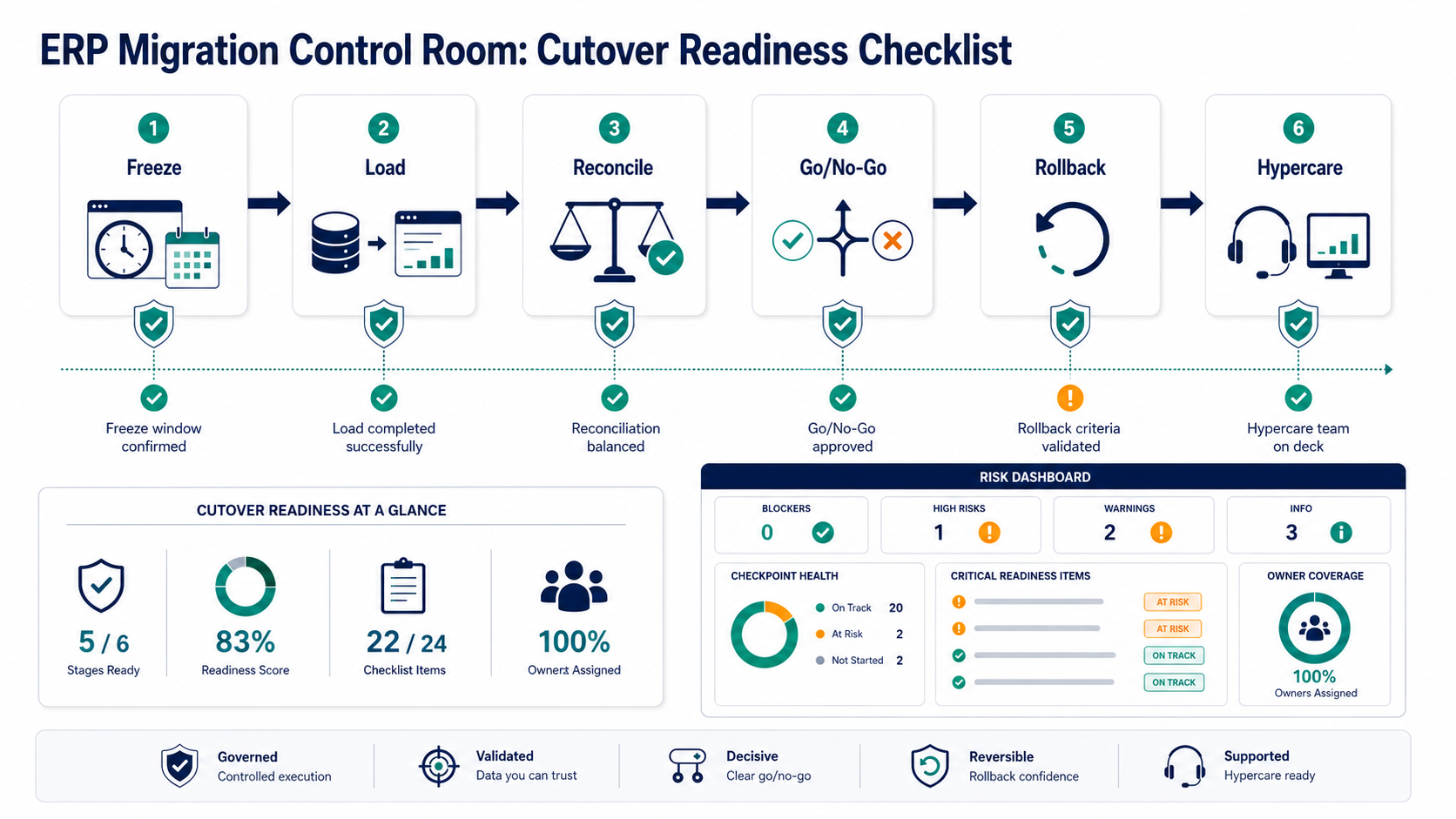
Cutover is not a weekend checklist you write after UAT. It is a rehearsal discipline. Define system freezes, final extracts, load windows, validation checkpoints, business sign-offs, communication paths, support rota, monitoring, and rollback criteria before the final test cycle.
A practical cutover plan includes:
- Named decision makers for go/no-go calls.
- Sequenced technical and business tasks with owners.
- Data-load, reconciliation, and exception thresholds.
- Interface stop/start timing and monitoring ownership.
- Fallback process for critical business operations.
- Rollback criteria that are specific enough to use under pressure.
- Hypercare rota, incident categories, escalation paths, and daily stabilization metrics.
If the program includes cloud or infrastructure movement, review related workload planning with Google Cloud migration services or your chosen cloud partner. ERP migration cutovers often depend on network, identity, database, and observability readiness outside the SAP project plan.
8. Track Cost By Risk, Not Only By Phase
Migration cost is shaped by scope, data quality, custom code, integrations, testing depth, business availability, timeline compression, and post-go-live support. A short calendar can become expensive if it forces parallel work, late remediation, weekend cutovers, emergency contractors, or rework after failed tests.
Use a risk-based budget view with separate lines for data cleansing, custom-code remediation, integration rebuilds, test environments, reporting, change management, hypercare, and surrounding application modernization. The Custom ERP Development Cost guide is useful when leaders need to understand how modules, integrations, migration, and support change budget beyond licensing and core implementation fees.
What Software Leaders Should Own
A SAP migration partner may own core SAP configuration, conversion tooling, and SAP-specific execution. Software leaders still need to own adjacent application risk. That includes custom portals, reporting layers, APIs, data pipelines, mobile apps, approval workflows, legacy databases, batch jobs, observability, and support tooling.
Before the migration calendar is locked, software leaders should create an adjacent-systems register. For each system, capture owner, dependency on SAP, change required, test case, fallback, and modernization opportunity. This prevents the SAP migration from exposing old technical debt too late.
How NextPage Helps Around SAP Modernization Programs
NextPage is not a SAP implementation shop. Our role is most useful around the software and integration work that surrounds ERP modernization: legacy workflow audits, data migration utilities, custom portals, API layers, reporting modernization, cloud migration support, QA automation, and cutover tooling.
If your SAP ECC to S/4HANA roadmap is exposing brittle applications, data-quality gaps, or integration risk, start with a modernization readiness review. We can help map dependencies, prioritize surrounding-system work, stabilize critical workflows, and build the software pieces that make the core ERP program safer.
Relevant starting points are ERP integration and modernization services, application migration services, and a direct conversation through NextPage contact.