
Shadow AI governance for software teams starts with visibility, not prohibition. The practical checklist is to inventory AI usage, classify the data and code involved, define approved tools and safe use cases, sandbox experiments, add review gates for prompts, generated code, and agents, and monitor usage with audit evidence. That gives developers a safe path to use AI without turning private code, credentials, customer data, or production systems into unmanaged inputs for external tools.
This matters because AI is no longer just a chat window. Developers use copilots, browser extensions, API keys, SaaS AI features, internal agents, document summarizers, and workflow automations. Some of those tools can read code, call APIs, execute commands, or send context to external services. If the organization only has a policy document, shadow AI will keep moving through personal accounts, untracked prompts, and unreviewed automation.
The goal is not to slow teams down. The goal is to convert hidden AI use into an approved delivery system with clear boundaries, evidence, and escalation paths. Use this checklist when your team is adopting AI coding assistants, agentic workflows, GenAI SaaS features, or internal automation faster than security and governance can review them.
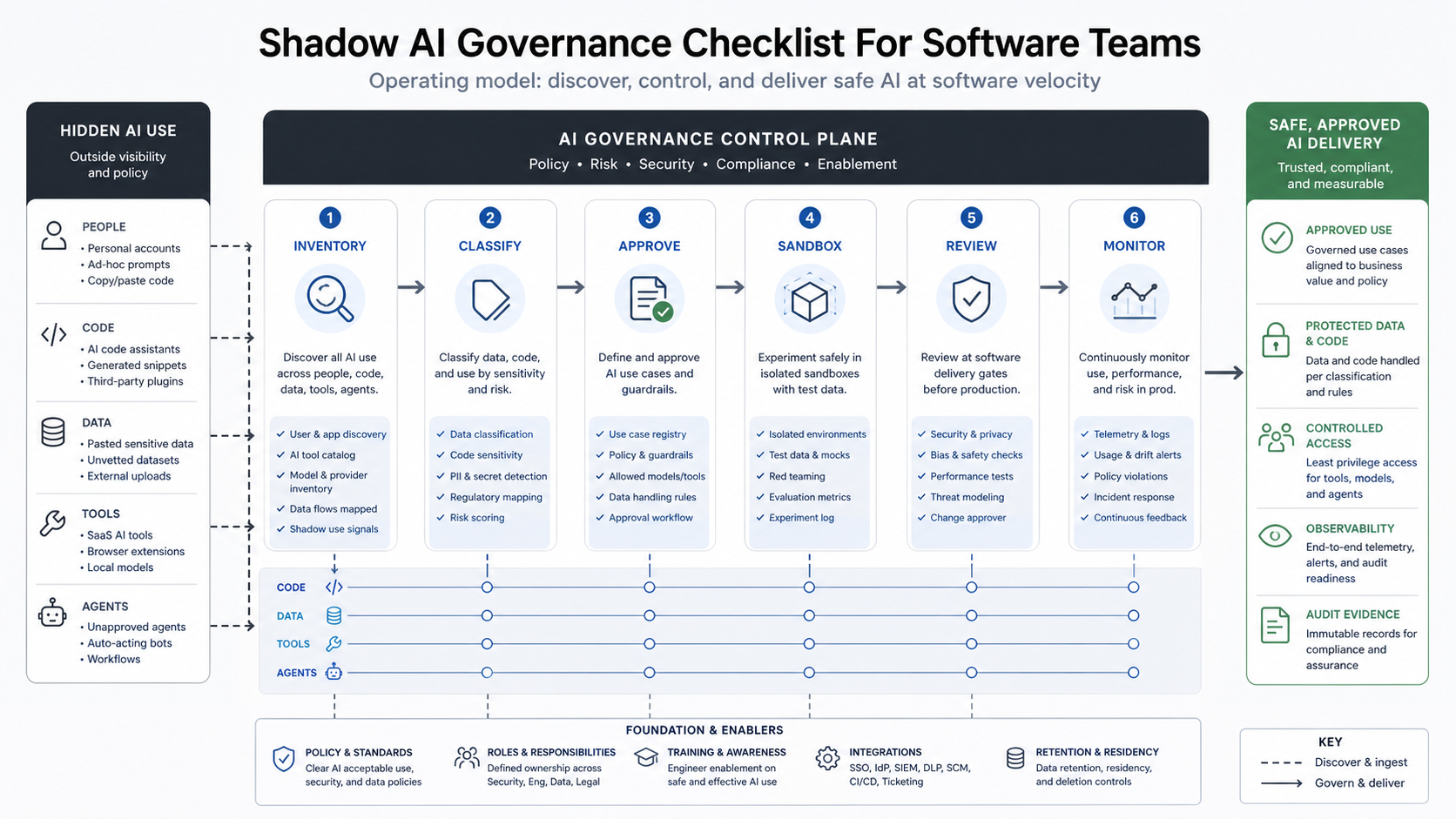
What Is Shadow AI In Software Teams?
Shadow AI is the use of AI tools, models, agents, browser extensions, SaaS features, or personal accounts outside the organization's approved governance process. In software teams, that can include a developer pasting proprietary code into a consumer chatbot, using a personal API key to test an agent, installing an AI code-review extension without security review, summarizing customer tickets in an unapproved tool, or letting an agent interact with repositories and internal systems without logging.
The risk is sharper than traditional shadow IT because AI tools often create a two-way flow. Sensitive prompts, files, code, credentials, and operational context can leave the organization, while generated code, scripts, decisions, or recommendations flow back into delivery. ITPro's April 2026 analysis framed this as a visibility gap for development teams and highlighted the risk of private data, external communication, and untrusted context combining inside agent workflows.
NIST's AI Risk Management Framework is useful here because it treats governance as part of design, development, use, and evaluation rather than a one-time policy. NIST's Generative AI Profile also notes that generative AI may need additional human review, tracking, documentation, and management oversight. For software teams, that translates into a governance process embedded in delivery work.
Why Standard Shadow IT Controls Miss Shadow AI
Traditional controls can find unsanctioned SaaS domains, unusual network traffic, unmanaged devices, or risky cloud usage. They do not reliably show what an engineer pasted into a prompt, which repository context an AI extension read, which MCP server an agent connected to, what generated code was accepted, or whether customer data was used inside a personal account.
The visibility gap is also cultural. Developers reach for AI because it removes friction: faster debugging, test generation, documentation, scaffolding, research, and refactoring. If the official process takes weeks, teams will route around it. A workable governance model needs a fast intake path and a clear safe-use menu. NextPage's Enterprise AI Readiness Checklist uses the same principle: readiness depends on clear workflows, governed data, controllable integrations, human review, and measurement.
The Shadow AI Governance Checklist
Use the checklist below as an operating model. It is intentionally practical: each control should produce evidence that engineering, security, legal, and product leaders can inspect.
1. Discover Where AI Is Already Being Used
Start with a non-punitive survey and technical discovery. Ask teams which AI tools they use for code, documentation, research, testing, support, sales engineering, analytics, and operations. Then compare that with browser extensions, OAuth grants, SaaS usage, repository integrations, package dependencies, API keys, CI jobs, and endpoint software. The first inventory does not need to be perfect. It needs to reveal the highest-risk usage patterns quickly.
| Discovery Area | Questions To Ask | Evidence To Keep |
|---|---|---|
| AI coding tools | Which tools can read repositories, generate code, or open pull requests? | Tool list, user groups, repository access, data terms |
| Consumer chatbots | Are employees using personal accounts for code, customer data, contracts, or incidents? | Survey results, policy exceptions, training records |
| Agents and automations | Which agents can call APIs, run commands, send messages, or write records? | Agent registry, scopes, logs, owner, kill switch |
| SaaS AI features | Which existing platforms added AI features without a fresh review? | Vendor list, feature flags, data-processing notes |
2. Classify The Data And Code AI Can Touch
Governance breaks down when every prompt is treated the same. Create a simple classification model for AI usage: public, internal, confidential, regulated, production-secret, and customer-sensitive. Then map each class to allowed tools and review requirements. For software teams, code deserves its own lens: open-source snippets, proprietary application code, infrastructure code, secrets, vulnerability data, customer logs, and incident details are not equivalent.
OWASP's GenAI Security Project highlights risks such as prompt injection, insecure output handling, sensitive information disclosure, excessive agency, system prompt leakage, and supply-chain concerns for LLM applications. Those categories are useful when deciding which data and tool permissions require a stronger gate.
For software teams, connect this classification to concrete engineering evidence: repository access, prompt/context retention, source-code exposure, model or vendor terms, secrets handling, dependency provenance, generated-code acceptance, production access, and whether an agent can call tools or APIs. If the use case can alter code, data, tickets, builds, customer communications, or production state, it needs more than an acceptable-use policy.
3. Define Approved AI Use Cases, Not Just Approved Tools
A tool can be safe for one task and unsafe for another. An approved coding assistant may be acceptable for test scaffolding but not for pasting unreleased product code into a personal account. A document summarizer may be fine for public research but unsafe for customer contracts. Define approved use cases with the tool, user group, data class, allowed inputs, retention rules, and review owner.
For AI agents, use a readiness check before approval. The AI Agent Readiness Assessment is a useful starting point because it weighs workflow clarity, data readiness, integration access, and human-review controls before a workflow is treated as agent-ready. For broader workflow automation, estimate whether the use case has enough value and reviewable volume with the AI Automation ROI Calculator before granting production access.
4. Sandbox Experiments Before Production Access
Shadow AI often appears because a team wants to test a workflow before the organization has a formal platform. Give them a safe sandbox instead. The sandbox should use synthetic or approved sample data, scoped API keys, isolated repositories, limited network access, and explicit expiration dates. If the experiment needs real customer data, production credentials, or external communication, it should move into a formal review path.
5. Add Review Gates To Software Delivery
AI-assisted work should pass through the same delivery evidence as other code, plus a few AI-specific checks. Generated code still needs human review, tests, dependency scanning, secret scanning, license review, and security analysis. AI-written infrastructure scripts need rollback plans. Agent workflows need permission review, prompt-injection testing, output validation, and monitoring.
Teams can adapt controls from the DevSecOps Pipeline Checklist: secrets, scans, approvals, release gates, rollback evidence, and ownership. Shadow AI governance should strengthen delivery quality, not create a separate paperwork lane.
For agentic workflows, add one more gate: verify the tool permissions before the agent can act. The enterprise AI agent governance model is useful because it separates policy from operational controls such as scoped credentials, human approval, monitoring, rollback, and incident response.
6. Monitor Usage, Incidents, And ROI
Governance has to measure both risk and usefulness. Track approved users, active tools, prompt and file categories, generated-code acceptance, policy exceptions, incidents, blocked actions, review findings, and time saved. Without adoption data, leadership sees only risk. Without incident and exception data, leadership sees only productivity.
Risk Matrix For Shadow AI In Engineering
Prioritize by data sensitivity, tool permissions, external exposure, and production impact. A low-risk use case might be brainstorming documentation with public information. A high-risk use case might be an agent with repository write access, customer logs, external email, and untrusted web content.
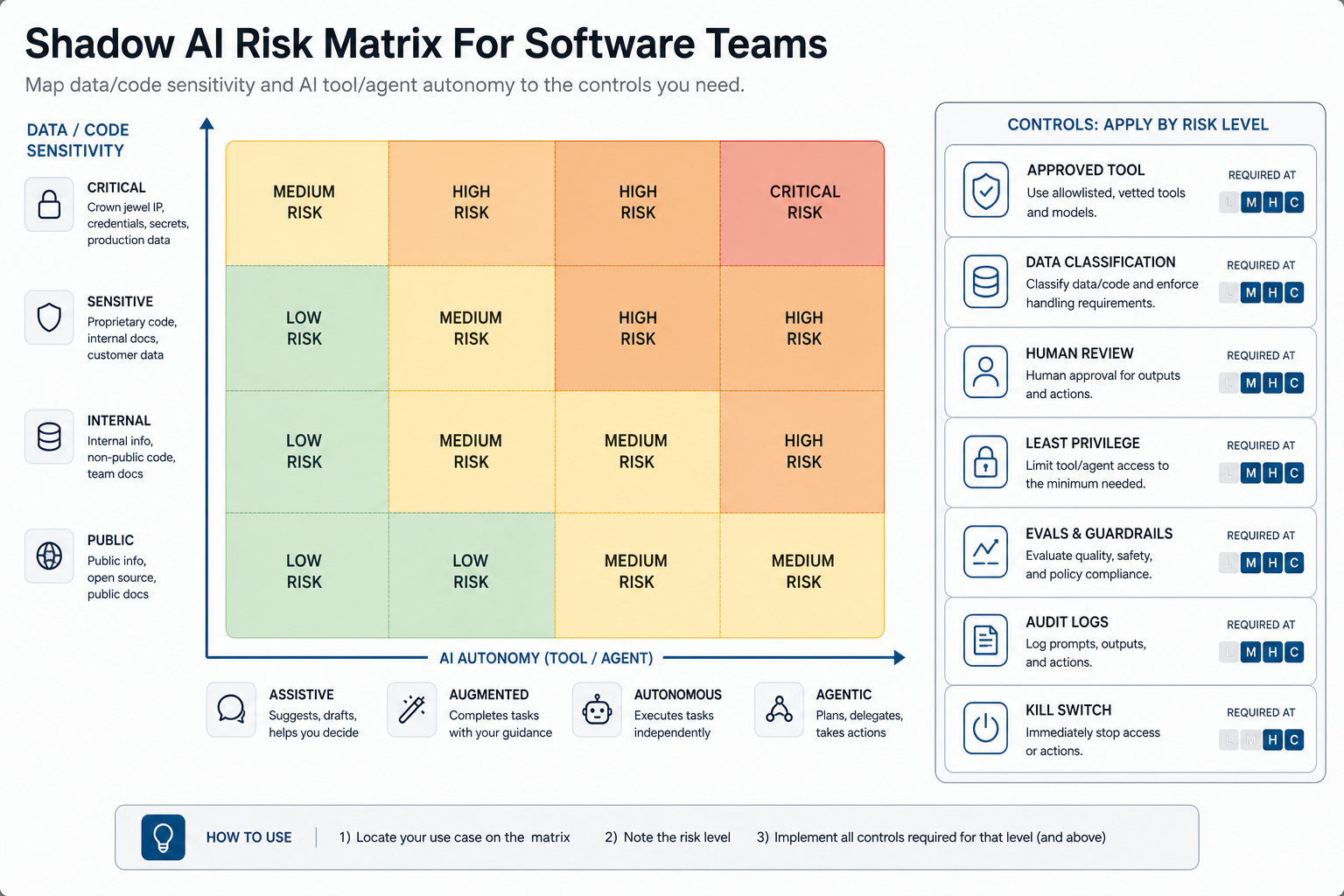
| Risk Level | Example | Control Required |
|---|---|---|
| Low | Public research, grammar edits, generic test ideas | Approved tool guidance and training |
| Medium | Internal process notes, non-sensitive code explanation, boilerplate generation | Approved account, retention settings, human review |
| High | Proprietary code, customer logs, architecture diagrams, incident summaries | Data classification, restricted tools, logging, security review |
| Critical | Agents with write access, production credentials, regulated data, external actions | Formal risk review, sandboxing, least privilege, evals, monitoring, kill switch |
Regulated or high-impact teams should use stronger governance. NextPage's AI governance for critical infrastructure software guide shows how to connect risk tiering, oversight, evidence, and monitoring for environments where failure consequences are higher.
Policy That Developers Will Actually Follow
A policy that says "do not use unapproved AI" is not enough. Developers need a short approved-use guide, examples of forbidden data, a fast exception path, and a clear route for proposing new tools. The policy should answer five questions:
- What can I use today? List approved tools, account types, and safe use cases.
- What can I never paste? Name secrets, production credentials, private keys, unreleased customer data, regulated records, and incident details.
- When do I need review? Trigger review for repository access, customer data, agents, external actions, and generated production code.
- How do I request a new tool? Provide a lightweight intake form with owner, use case, data class, vendor terms, permissions, and expected value.
- What evidence do I keep? Capture prompts, model/tool version, approvals, tests, code review notes, and monitoring links when the work affects production.
Operating Model For Approved AI Tools
Assign ownership across engineering, security, IT, legal, product, and data owners. One team should maintain the tool registry, but each tool needs a business owner and technical owner. Without owners, exceptions linger and integrations sprawl.
For production AI workflows, the operating model should include model or vendor selection, prompt and retrieval design, evaluation, permissions, monitoring, incident response, and change control. If your team needs help turning experiments into governed production systems, NextPage's AI development services cover LLM apps, AI agents, RAG systems, evaluations, and production workflow integration. For more autonomous workflows, agentic AI development services should be scoped around least privilege, human review, auditability, and rollback from the start.
A 30-60-90 Day Rollout Plan
First 30 days: build the inventory, run the employee survey, identify high-risk tools, publish a temporary safe-use guide, and block obvious critical exposures such as personal AI accounts handling secrets or customer records.
Days 31-60: classify use cases, approve a first tool set, define intake and exception workflows, add AI-specific checks to code review and DevSecOps gates, and launch training for developers, product teams, and managers.
Days 61-90: move repeatable use cases into governed platforms, add telemetry, measure adoption and incidents, review vendor terms, formalize agent permissions, and start quarterly audits. For teams modernizing internal platforms at the same time, NextPage's custom software development team can help design controlled portals, workflow systems, and AI-enabled business applications with governance built in.
When Shadow AI Needs Formal Product Security Review
Escalate any AI workflow that touches customer data, regulated data, production credentials, source-code repositories, CI/CD systems, financial records, healthcare records, contracts, external communications, or automated decisions. Also escalate tools that can install plugins, connect MCP servers, invoke functions, call APIs, or operate with broad OAuth scopes.
If AI features are part of a customer-facing product, consider product governance and regulatory readiness early. NextPage's EU AI Act readiness checklist for software teams is useful for teams that need to map product risk, data governance, documentation, and oversight before release.
AI-Assisted Delivery Review Gates
Shadow AI becomes manageable when AI-assisted work enters the same delivery evidence stream as human-authored work. Capture the prompt or context source when it affects production code, require human review for generated changes, scan dependencies and secrets, check agent permissions, run tests and evals, approve deployment, monitor production behavior, and keep rollback evidence close to the release.
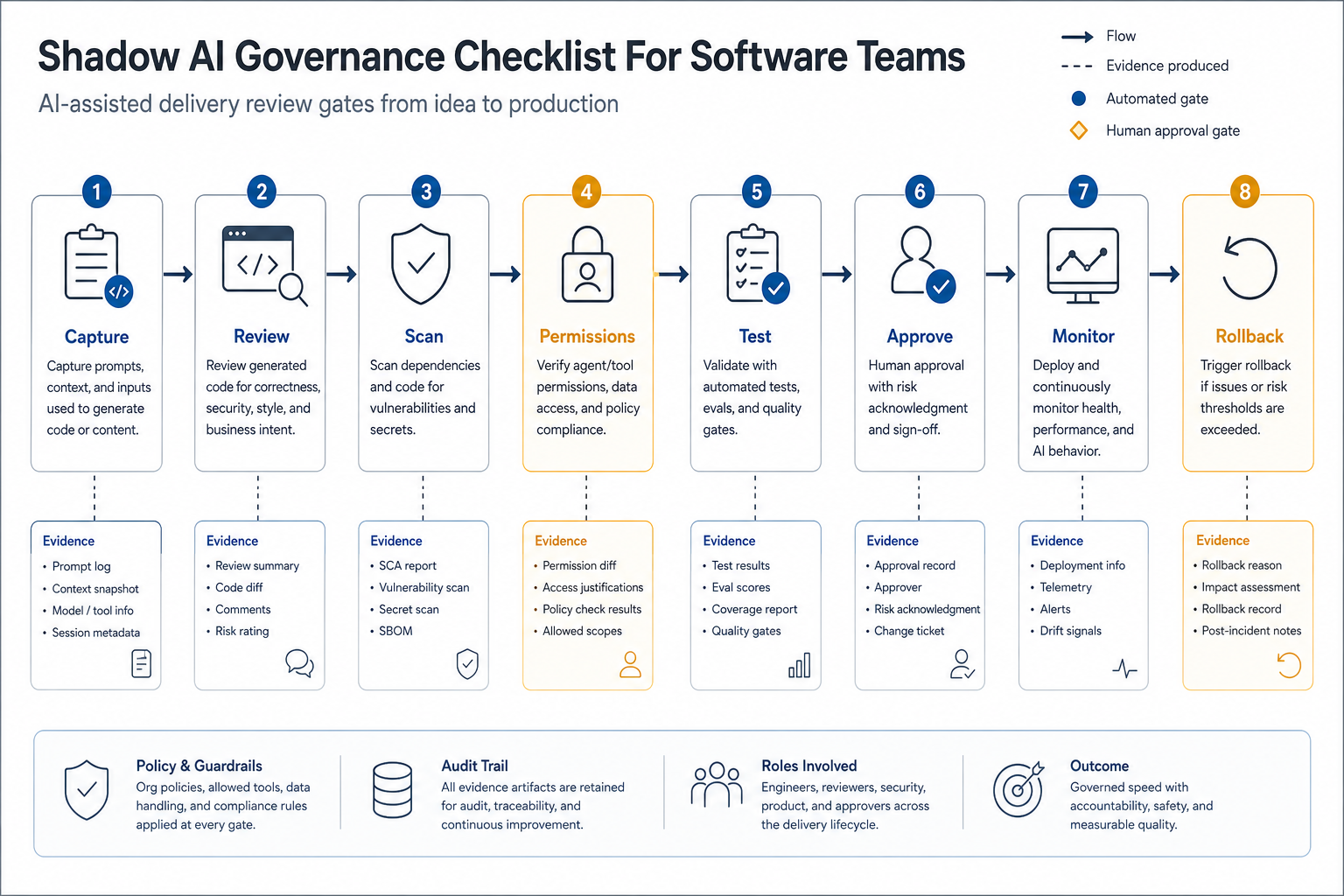
This gate should be lightweight for low-risk assistance and strict for agentic work. A developer using AI to summarize public documentation may only need approved-tool guidance. An agent that opens pull requests, writes tickets, updates CRM records, or calls deployment tools needs scoped credentials, review ownership, logs, failure handling, and a shutdown path.
Common Mistakes To Avoid
- Banning everything without an approved path. Teams will keep using AI where it saves time.
- Approving tools without use-case limits. Vendor approval does not mean every data class is allowed.
- Ignoring SaaS AI feature creep. Existing vendors may add AI capabilities that change data exposure.
- Skipping generated-code review. AI output can introduce insecure patterns, weak dependencies, or license concerns.
- Letting agents inherit human privileges. Agents need narrower scopes, stronger logging, human approval for irreversible actions, and reliable shutdown controls.
- Skipping evidence ownership. If no one owns prompt/context records, approvals, evaluation results, and post-release monitoring, the organization cannot prove that AI-assisted delivery is controlled.
- Measuring only incidents. Track productivity and adoption too, or governance will be seen as pure friction.
Next Steps For Software Leaders
Start with one visible action this week: create a shadow AI inventory and publish a short safe-use guide. Then define the review path for tools that touch code, customer data, integrations, or autonomous actions. Once teams see a legitimate way to request and use AI, the hidden layer starts moving into governance.
If you need a practical starting point, run the AI Agent Readiness Assessment for the first workflow your team wants to automate. It gives you a structured way to discuss workflow clarity, data readiness, integration access, human review, and governance before the tool becomes another shadow system.
NextPage can help inventory AI usage, design governance controls, build secure workflow systems, and connect approved AI automation to production software without losing auditability. Review the NextPage portfolio for examples of workflow-heavy platforms, dashboards, APIs, and automation systems.
Book a shadow AI governance and secure delivery assessment with NextPage.