
Quick Answer: Modernize Shopify Inventory Before Rebuilding Commerce
Shopify inventory management works well for many specialty retailers until the business adds multiple locations, wholesale orders, marketplace channels, seasonal stock, bundles, returns, preorders, or complex fulfillment rules. At that point, the problem is rarely Shopify itself. The problem is that inventory, orders, shipping, customer communication, and analytics no longer share one reliable operating model.
The right modernization path is usually phased. Keep Shopify as the commerce backbone where it fits, clean up product and variant data, define location-level stock rules, connect fulfillment and finance systems carefully, and build custom operations software only where standard apps cannot handle the workflow. For specialty categories such as craft beverages, gourmet food, hobby products, beauty, parts, and regulated goods, this approach reduces stockouts and support load without forcing a risky full replatform.
If you already know your catalog size, locations, channels, integrations, and admin roles, the Custom Software Cost Estimator can turn that scope into a directional budget and timeline before you ask for a formal proposal.
When Basic Shopify Inventory Starts To Break
Shopify gives merchants native inventory tracking, inventory adjustments, inventory history, reports, locations, purchase orders, transfers, and automation options. Those features are useful, but they depend on disciplined data and a workflow that matches how the retailer actually buys, stores, sells, ships, and returns products.
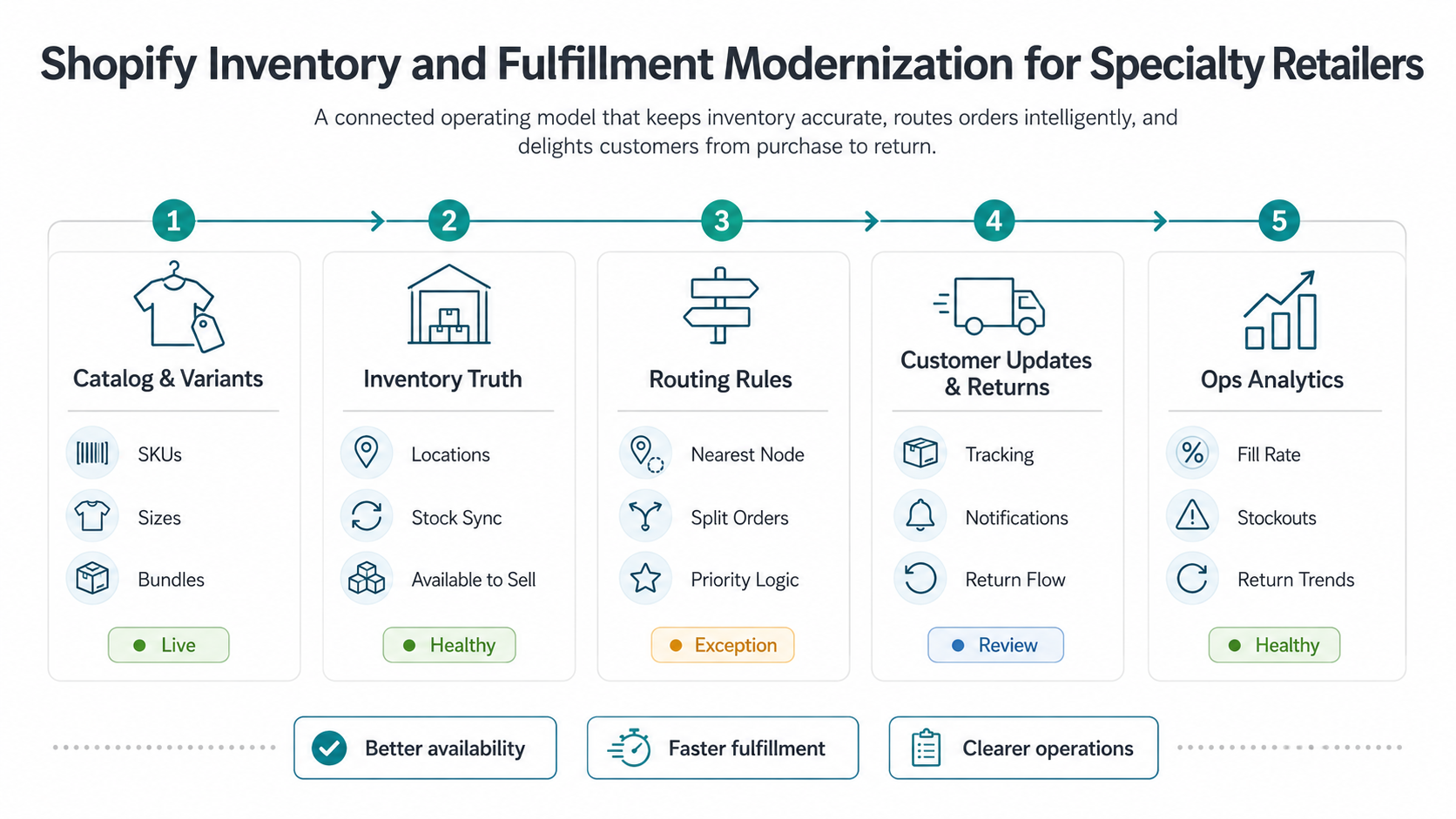
Specialty retailers tend to feel pain first in five places: variant accuracy, location accuracy, order routing, exception handling, and planning visibility. A wine retailer may need vintage, case, bottle, tasting-room, and shipping constraints. A specialty food brand may need batch, shelf-life, cold-chain, subscription, and wholesale logic. A hobby retailer may need kits, bundles, preorders, backorders, and supplier lead times. In each case, a simple stock number is not enough context for daily operations.
For food, beverage, and complex catalog brands, these workflows overlap with broader food and beverage eCommerce development services: Shopify, ERP, CRM, warehouse, analytics, and customer-support systems need shared definitions for product, order, customer, and fulfillment status.
| Symptom | What It Usually Means | Modernization Response |
|---|---|---|
| Frequent oversells | Available inventory is not adjusted fast enough across locations or channels | Audit stock states, reservations, sync latency, and marketplace rules |
| Manual order splitting | Routing logic cannot handle location, shipping, or product constraints | Define fulfillment rules before adding apps |
| Untrusted dashboards | Sales, returns, stock, and purchase data do not reconcile | Create a source-of-truth map and exception reports |
| Too many apps | Each operational problem was solved independently | Consolidate workflows around a clear architecture |
| Slow buying decisions | Teams cannot see demand, sell-through, lead time, and stockout risk together | Add planning views and forecasting signals |
The Inventory Data Map Specialty Retailers Need
Before choosing an app or building custom software, map the inventory data model. Shopify inventory levels connect inventory items to locations and track quantity states such as available, committed, incoming, and on hand. That model is a strong starting point, but specialty retailers often need additional business context around the stock number.
The map should answer practical questions: which system owns SKU creation, which locations can sell online, which locations can fulfill, how returns affect availability, how bundles decrement components, how preorders reserve stock, how wholesale orders are separated, and when purchase orders become reliable incoming stock.
- Product and variant identity: SKU, barcode, size, color, batch, pack size, kit, bundle, subscription eligibility, and replacement relationships.
- Location model: warehouse, retail store, pop-up, 3PL, dropshipper, vendor, quarantine, damaged stock, and returns area.
- Quantity states: on hand, available, committed, incoming, reserved, safety stock, backorderable, and unavailable.
- Channel rules: online, POS, marketplace, wholesale, subscription, pickup, local delivery, and regional restrictions.
- Audit signals: adjustment reason, user, timestamp, order reference, return reason, transfer, and reconciliation status.
This is where many app-first projects fail. If teams do not define the source of truth, each app interprets inventory differently. A custom operations layer can help, but only after the data responsibilities are explicit.
Fulfillment Workflows To Fix Before Adding More Apps
Fulfillment modernization starts with order routing, not dashboards. Shopify locations can represent warehouses, stores, pop-ups, dropshipping apps, and third-party fulfillment services. Order routing rules can assign online orders based on inventory availability and proximity, but the retailer still needs to define the business policy behind those rules.
Common specialty retail policies include ship-from-store thresholds, cold-chain restrictions, hazmat or age-verification constraints, pickup-only items, high-value manual review, split-shipment limits, subscription priority, wholesale allocation, and returns restocking rules. These policies should be written as operations decisions before they become automation.
| Workflow | Decision To Define | System Requirement |
|---|---|---|
| Order routing | Which location should fulfill this order? | Location priority, inventory availability, shipping zone, SLA, and exception rules |
| Stock reservation | When should stock be held for checkout, preorder, wholesale, or subscription orders? | Reservation state, expiration, cancellation, and release logic |
| Returns | When can returned stock be resold? | Inspection status, damaged state, refund status, and restock approval |
| Customer updates | What should customers know when fulfillment changes? | Status triggers, templates, support notes, and tracking sync |
| Exceptions | Who reviews low confidence or high-value orders? | Admin queue, owner, SLA, audit trail, and escalation path |
Native Shopify, App, Integration, Or Custom Layer?
The modernization decision is not simply build versus buy. Most specialty retailers need a mix of native Shopify features, carefully selected apps, direct integrations, and a small amount of custom workflow software. The wrong move is adding another app before deciding which system owns the process.
Use native Shopify when the workflow matches Shopify inventory, locations, transfers, purchase orders, and basic automation. Add an app when the workflow is common and the app can own it without distorting the operating model. Integrate ERP, WMS, POS, CRM, accounting, or support systems when the process crosses departments. Build a custom layer when the workflow is differentiated, high-risk, or impossible to run reliably inside disconnected tools.
NextPage frames these decisions inside custom eCommerce web app development services, where the storefront, operations dashboard, APIs, admin roles, and integrations are scoped as one product system instead of a pile of separate tasks.
| Path | Use It When | Watch Out For |
|---|---|---|
| Native Shopify | Inventory is location-based, workflows are standard, and teams can operate inside Shopify admin | Custom exceptions, reporting gaps, and channel-specific rules |
| Shopify app | The need is common, supported, and well maintained by a specialist vendor | Data ownership, sync delays, lock-in, and overlapping app responsibilities |
| System integration | ERP, WMS, POS, CRM, support, or finance must share order and inventory data | Mapping, retries, rate limits, reconciliation, and monitoring |
| Custom layer | The workflow is unique, high-value, or requires role-based operations across systems | Scope creep, maintenance, security, and unclear ownership |
A Phased Modernization Roadmap
A practical roadmap reduces risk by stabilizing one operating layer at a time. Do not start with every integration. Start with the workflows that protect revenue and customer trust.
- Audit the current operating model. Document catalog structure, variants, locations, stock states, order statuses, returns, apps, manual spreadsheets, and reconciliation gaps.
- Clean product and inventory foundations. Standardize SKU rules, location responsibilities, safety stock, bundle logic, and adjustment reasons.
- Fix fulfillment and customer exceptions. Define routing, split-shipment, return, cancellation, and backorder policies before automating them.
- Connect critical systems. Integrate only the systems that own inventory, orders, finance, support, and fulfillment decisions.
- Add dashboards and planning workflows. Give operations, buying, marketing, and leadership views that match their decisions.
- Automate with guardrails. Use Shopify Flow, apps, APIs, and custom workflow logic where the decision rules are stable and measurable.
Each phase should end with evidence: fewer oversells, faster fulfillment, lower support load, cleaner reconciliation, or better planning speed. If a phase cannot show operational improvement, the next phase will add complexity without trust.
Analytics And Forecasting That Reduce Stockouts
Inventory modernization is incomplete if the team only sees what happened yesterday. Specialty retailers need forward-looking signals: sell-through by variant, stockout days, aged stock, supplier lead time, purchase order reliability, promotion lift, return rate, and location-level demand.
That is where demand forecasting software for retail and eCommerce becomes relevant. Forecasting does not have to start as a large AI project. The first version can be a planning dashboard that combines Shopify sales, inventory levels, purchase orders, promotions, and lead times into reorder alerts and exception queues.
Useful dashboards answer specific decisions: what should we reorder, what should we transfer, which items are at risk of stockout, which promotions need stock protection, which products are tying up cash, and which fulfillment locations are creating delays. Avoid dashboards that only replicate reports without changing action.
Budget Risks And Implementation Tradeoffs
The budget risk in Shopify operations modernization comes from integrations, edge cases, and ownership, not from the first dashboard screen. Costs rise when the project needs multiple source systems, unreliable historical data, custom admin roles, marketplace reconciliation, returns complexity, subscription logic, or regulated fulfillment controls.
Use eCommerce app development cost planning as a reminder that catalog, checkout, inventory, admin, and integrations drive budget together. For physical retail and omnichannel workflows, retail automation cost and integration planning adds another layer: POS, warehouse, RFID, IoT, AI, and reporting systems can all affect scope.
- Keep the first release narrow. Stabilize one or two high-value workflows before automating every exception.
- Budget for reconciliation. Every integration needs failure handling, retry logic, audit reports, and support procedures.
- Protect admin usability. Operations teams need fast exception queues, not developer-centric dashboards.
- Measure before automating. Add automation after the team agrees on rules, owners, and success metrics.
- Plan maintenance. Shopify APIs, apps, shipping providers, payment flows, and warehouse rules change over time.
Shopify Operations Readiness Checklist
Use this checklist before starting a Shopify inventory and fulfillment modernization project.
- Do we know which system owns SKU, product, variant, location, and inventory item records?
- Are all sales and fulfillment locations modeled correctly?
- Can we explain available, committed, incoming, reserved, damaged, and returned stock?
- Do we know which products can be fulfilled from each location?
- Are bundles, kits, subscriptions, preorders, wholesale orders, and returns handled consistently?
- Do we have a policy for oversells, backorders, split shipments, and substitutions?
- Can support see order, inventory, fulfillment, and refund context in one place?
- Can buying teams see sell-through, lead time, stockout risk, and promotion impact?
- Do integrations have retry, monitoring, and reconciliation reports?
- Can we measure whether modernization reduces stockouts, manual work, support tickets, and fulfillment delay?
How NextPage Helps Specialty Retailers Modernize Shopify Operations
NextPage helps specialty retailers turn Shopify inventory and fulfillment pain into a phased software roadmap. We start by mapping the operating workflow: catalog, locations, stock states, order routing, customer updates, returns, purchasing, dashboards, and integrations. Then we separate what should stay native to Shopify, what can be handled by apps, what needs API integration, and what deserves a custom operations layer.
Our work can include Shopify integration planning, custom admin dashboards, inventory and fulfillment workflow software, ERP/WMS/POS/CRM connections, reporting, QA, and production support. The goal is not to replace Shopify by default. The goal is to make Shopify part of a reliable operations system that specialty retail teams can trust.
Book a Shopify operations modernization consultation with NextPage.