
Quick Answer: What Should A Shopify Plus Migration Checklist Include?
A Shopify Plus migration checklist should cover platform fit, catalog and customer data, order history, checkout rules, payment and tax logic, theme or headless architecture, apps, ERP and CRM integrations, SEO redirects, analytics events, launch QA, cutover ownership, rollback criteria, and post-launch stabilization. The work is not only moving products into Shopify. It is proving that the new store can take real orders without losing revenue, rankings, reporting, or operational control.
For DTC, retail, and marketplace teams, Shopify Plus can simplify storefront operations and give commerce teams stronger platform tooling. But migration risk usually sits outside the visible storefront: broken redirects, missing variants, bad customer tags, checkout app conflicts, wrong tax rules, failed ERP order sync, duplicated discount logic, incomplete analytics, and a launch window where nobody knows who can stop the release.
NextPage treats Shopify Plus migration as a controlled software and operations program. Our custom eCommerce web app development work starts by mapping buyer journeys, data ownership, checkout constraints, and integration dependencies before anyone commits to a launch date.
The Shopify Plus Migration Roadmap
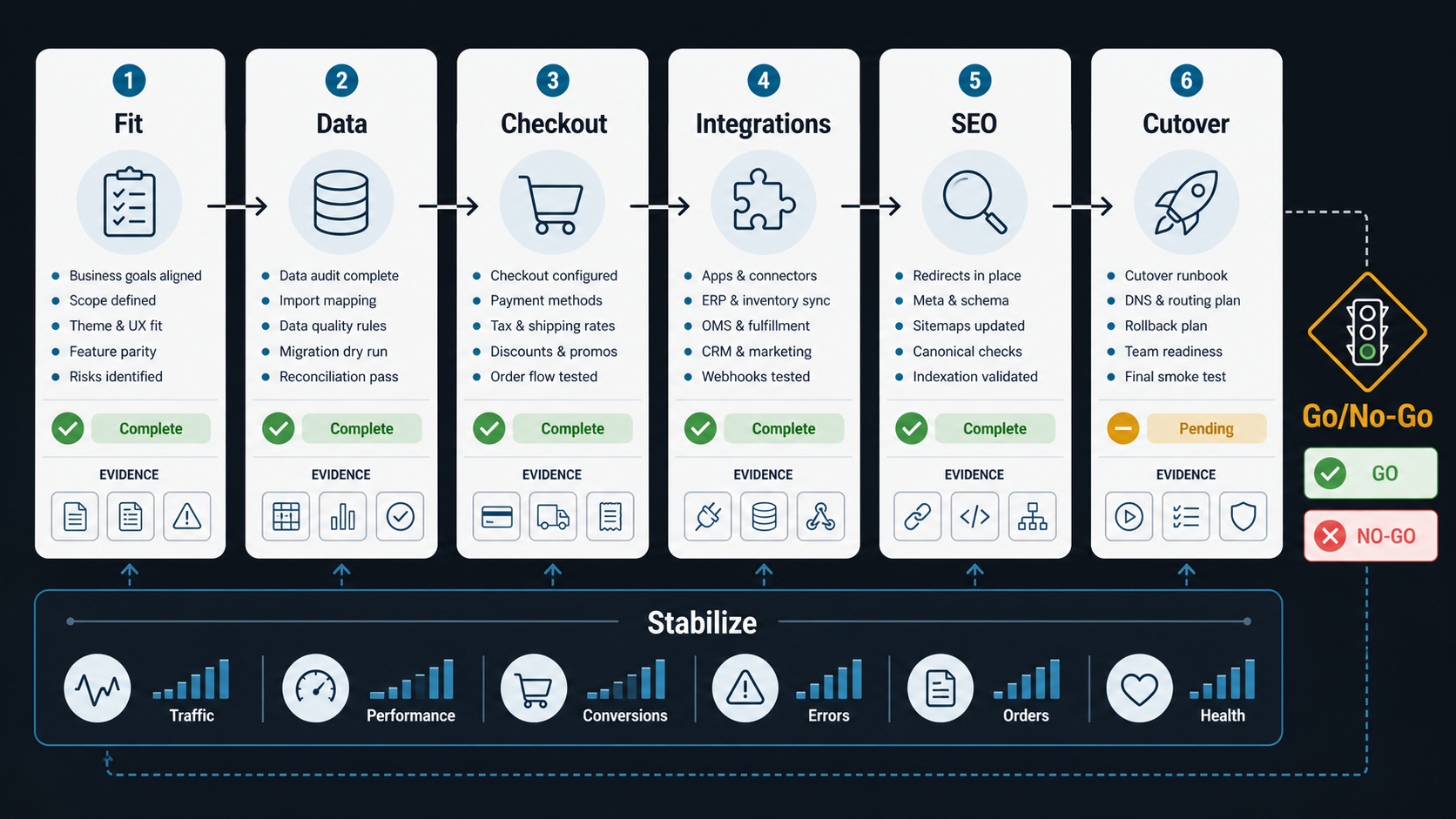
A useful roadmap separates decisions into workstreams. Teams often start with theme selection or app replacement, then discover late that catalog rules, customer groups, tax exemptions, subscriptions, ERP inventory, search behavior, redirects, or checkout customizations are harder than expected. The checklist should make those risks visible early and tie each workstream to launch evidence, not only task completion.
| Workstream | Key decision | Evidence before launch |
|---|---|---|
| Platform fit | Confirm Shopify Plus can support catalog, checkout, B2B, localization, content, and integration needs. | Fit-gap matrix, app inventory, custom-build list, and ownership model. |
| Data migration | Decide what moves, what is archived, what is rebuilt, and what remains in source systems. | Mapping sheets, sample imports, validation reports, and reconciliation totals. |
| Checkout | Define payment, shipping, discount, tax, subscription, and fraud rules. | Scenario tests, payment captures, tax examples, and failed-payment handling. |
| Integrations | Connect ERP, CRM, WMS, support, marketing, analytics, and accounting systems. | API contracts, retry rules, sync logs, monitoring, and support runbooks. |
| SEO and analytics | Protect organic traffic, attribution, reporting, and customer behavior data. | Redirect map, metadata checks, event QA, and pre/post-launch dashboards. |
| Cutover | Sequence freeze, DNS, redirects, order monitoring, support, and rollback. | Launch checklist, owner roster, rollback triggers, and hypercare plan. |
1. Confirm Platform Fit Before Migration Scope
Shopify Plus is a strong fit when the business wants a managed commerce platform, faster merchandising operations, strong checkout infrastructure, app ecosystem leverage, and a clearer admin model. It may need careful architecture when the business relies on complex B2B ordering, heavily customized checkout behavior, multi-system pricing, marketplace workflows, subscription edge cases, or deeply custom front-end experiences.
Before scope is approved, create a fit-gap matrix:
- Storefront model: theme-based Shopify storefront, headless storefront, or hybrid.
- Markets and localization: countries, currencies, languages, tax rules, shipping zones, and content variations.
- Catalog complexity: variants, bundles, subscriptions, digital products, product options, metafields, and merchandising rules.
- Checkout scope: discounts, payment methods, shipping rates, gift cards, taxes, fraud checks, subscriptions, and loyalty logic.
- Custom software needs: middleware, private apps, customer portals, data sync, workflow dashboards, or reporting layers.
If the migration includes custom portals, operational dashboards, ERP workflows, or non-standard buying paths, use NextPage's Custom Software Cost Estimator to pressure-test the build versus configuration split before the timeline is promised.
2. Audit Catalog, Customer, And Order Data
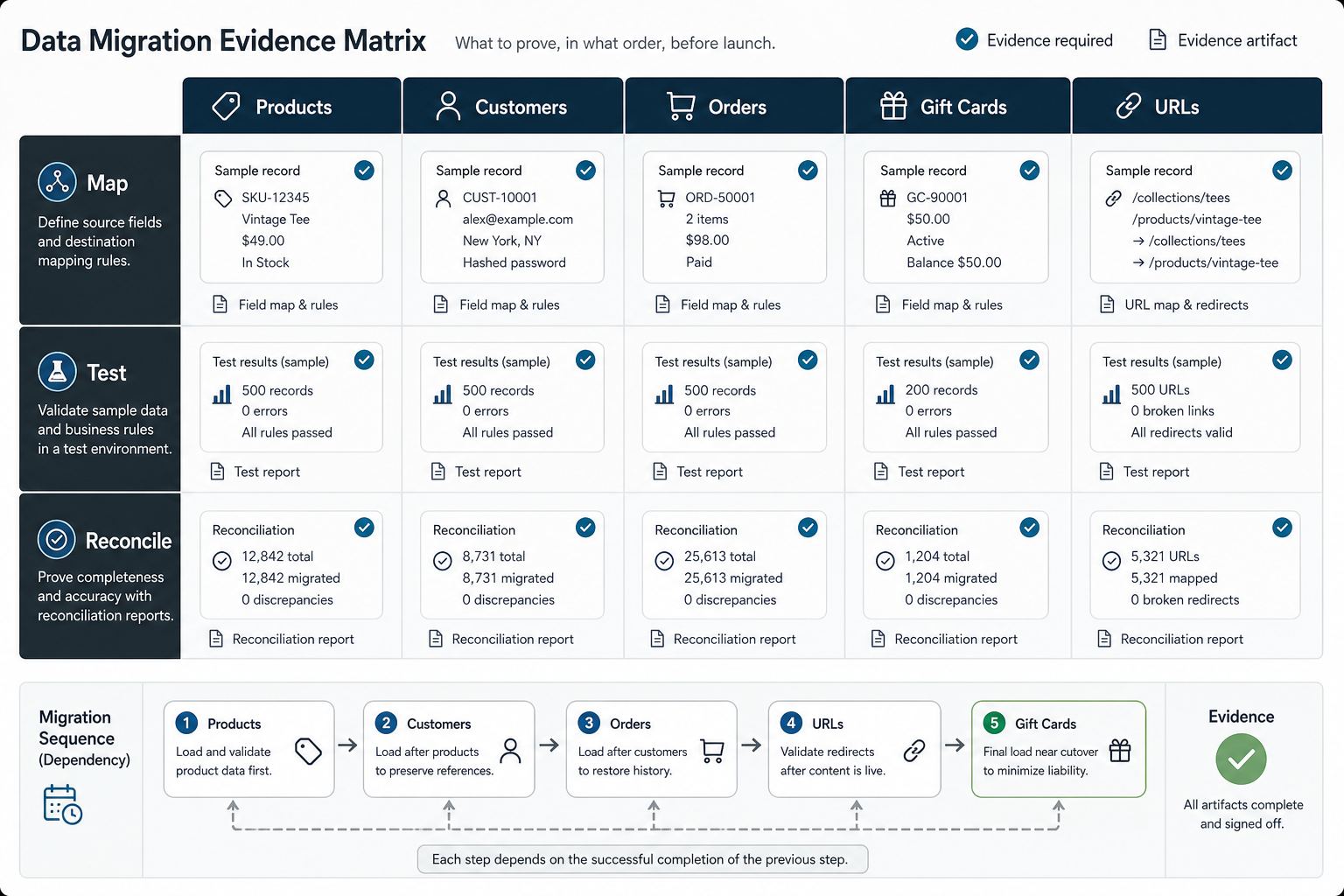
Data migration is where eCommerce replatforming projects become fragile. Product titles may be clean, but variants, handles, images, collections, tags, metafields, subscriptions, customer groups, addresses, tax statuses, order history, gift cards, discounts, and product reviews often have inconsistent structures in the source platform. Treat the migration like an evidence trail: every major object should have a mapping rule, sample import, reconciliation report, exception owner, and rollback decision.
Start with a source inventory. Name every system that owns commerce data: the current eCommerce platform, PIM, ERP, warehouse system, CRM, subscription platform, review tool, search tool, loyalty app, analytics stack, and spreadsheets still used by operations. Then decide what Shopify owns after launch and what continues to sync from another system.
NextPage's data migration checklist is useful here because the same principles apply: inventory, mapping, cleansing, sample loads, validation, reconciliation, cutover, and rollback. For Shopify Plus, the validation should include product counts, variant counts, media coverage, collection rules, customer totals, address samples, historical orders, redirects, metafields, and app-specific records.
| Data object | Migration risk | Validation method |
|---|---|---|
| Products and variants | Missing options, wrong handles, duplicate SKUs, broken images, incomplete metafields. | Sample imports, SKU reconciliation, image checks, collection tests. |
| Customers | Duplicate accounts, bad tags, missing consent, wrong addresses, lost tax status. | Deduping rules, tag mapping, consent field review, sample customer journeys. |
| Orders | Incomplete history, unsupported statuses, wrong totals, missing fulfillment data. | Historical order sample review, totals by period, support lookup tests. |
| Discounts and gift cards | Invalid rules, duplicate codes, expired promotions, balance mismatch. | Promotion export, sample redemption tests, balance reconciliation. |
| URLs and SEO fields | Traffic loss from missing redirects, duplicate metadata, broken canonical paths. | Crawl comparison, redirect test suite, metadata spot checks. |
3. Design Checkout, Payment, Tax, And Shipping Rules
Checkout is the revenue path. Treat it as a product workflow, not a configuration screen. The checklist should cover payment gateways, wallets, fraud tools, tax calculation, shipping rates, delivery promises, subscriptions, discounts, gift cards, store credit, B2B payment terms, and any custom validation logic.
Shopify's checkout customization model has moved toward platform-supported extensibility and app-based patterns, so migration teams should avoid assuming every legacy checkout edit maps directly to the future Shopify Plus setup. Document which checkout behaviors can be configured, which need an app, which need custom integration, and which should be simplified because they create unnecessary risk.
For teams trying to improve revenue as part of the move, connect the migration plan to eCommerce conversion optimization services. Migration is a good moment to fix mobile checkout friction, confusing shipping rules, hidden fees, slow payment steps, inconsistent trust signals, and missing analytics events.
- Test guest checkout, logged-in checkout, discount stacking, payment failure, refund, cancellation, and abandoned checkout recovery.
- Run payment captures in test mode and confirm transaction data reaches accounting, ERP, analytics, and support tools.
- Validate shipping rates across regions, product classes, free-shipping thresholds, pickup, and expedited delivery.
- Confirm taxes for representative regions, exempt customers, digital goods, B2B terms, and cross-border orders.
4. Inventory ERP, CRM, Fulfillment, And App Integrations
Every integration needs a source-of-truth decision. Shopify may own storefront orders, but ERP may own inventory, product availability, invoices, customer terms, or fulfillment status. CRM may own lifecycle segments. Marketing platforms may own consent and campaign events. Warehouse software may own pick, pack, ship, and return updates.
Create an integration matrix before build starts:
| Integration | Questions to answer | Launch evidence |
|---|---|---|
| ERP | Which objects sync both ways? How are failed orders retried? What prevents duplicates? | API tests, retry logs, sample orders, reconciliation dashboard. |
| CRM | Which customer fields, tags, lifecycle stages, and consent states sync? | Customer samples, segment checks, consent proof, owner mapping. |
| Fulfillment/WMS | How do orders, inventory, shipping labels, tracking, returns, and exceptions flow? | End-to-end order tests, failed fulfillment queue, support runbook. |
| Marketing | Are events, product feeds, consent, audiences, and attribution preserved? | Event debugger screenshots, campaign feed checks, sample attribution. |
| Support | Can agents see order, customer, shipment, refund, and subscription context? | Support-ticket scenarios and customer lookup tests. |
If customer records and revenue workflows are moving across CRM or lifecycle systems too, compare the plan with NextPage's CRM migration checklist. The same cutover risk appears when sales, support, marketing, and commerce teams depend on the same customer truth.
5. Protect SEO, Redirects, And Analytics
Organic traffic loss is one of the most expensive migration failures because it may not be visible on launch day. Build a redirect map from current URLs to Shopify URLs and test it before DNS changes. Include product, collection, blog, content, search, landing, campaign, and discontinued URLs. Do not rely only on top pages; long-tail product and collection URLs often carry meaningful revenue.
SEO and analytics checks should include:
- Current crawl export with status codes, titles, descriptions, canonicals, headings, schema, and indexable URLs.
- Redirect map for every valuable URL, with 404 and soft-404 monitoring after launch.
- Metadata and canonical checks on product, collection, blog, and landing templates.
- GA4, server-side tracking, pixels, product feed, search console, and ad-platform event validation.
- Revenue events for product view, add to cart, begin checkout, payment step, purchase, refund, and subscription actions.
The WooCommerce migration checklist covers similar SEO, data, integration, and launch QA risks for another eCommerce platform. The platform changes, but the discipline of crawl comparison, redirect QA, data validation, and post-launch monitoring stays the same.
6. Build Launch QA, Cutover, And Rollback Evidence
Migration QA should be scenario-based. Do not only test pages. Test customer behavior and operations: browse, search, filter, select variants, apply discounts, create an account, check out, receive confirmation, sync to ERP, fulfill, refund, contact support, and review analytics.
A Shopify Plus cutover plan should name owners and timeboxes:
- Content and catalog freeze window.
- Final data export and import.
- Redirect deployment and DNS readiness.
- Payment, tax, shipping, fraud, and checkout smoke tests.
- ERP, CRM, fulfillment, analytics, and marketing event checks.
- Support team go/no-go and incident channel setup.
- Rollback decision deadline and criteria.
- Hypercare monitoring for orders, revenue, errors, search, speed, and customer complaints.
Rollback criteria should be specific. Examples: payment capture fails, ERP order creation fails for a material share of test orders, checkout conversion drops sharply, redirects fail at scale, inventory is unreliable, or support cannot see order context. Without explicit rollback triggers, teams often keep a broken launch live because the decision feels subjective.
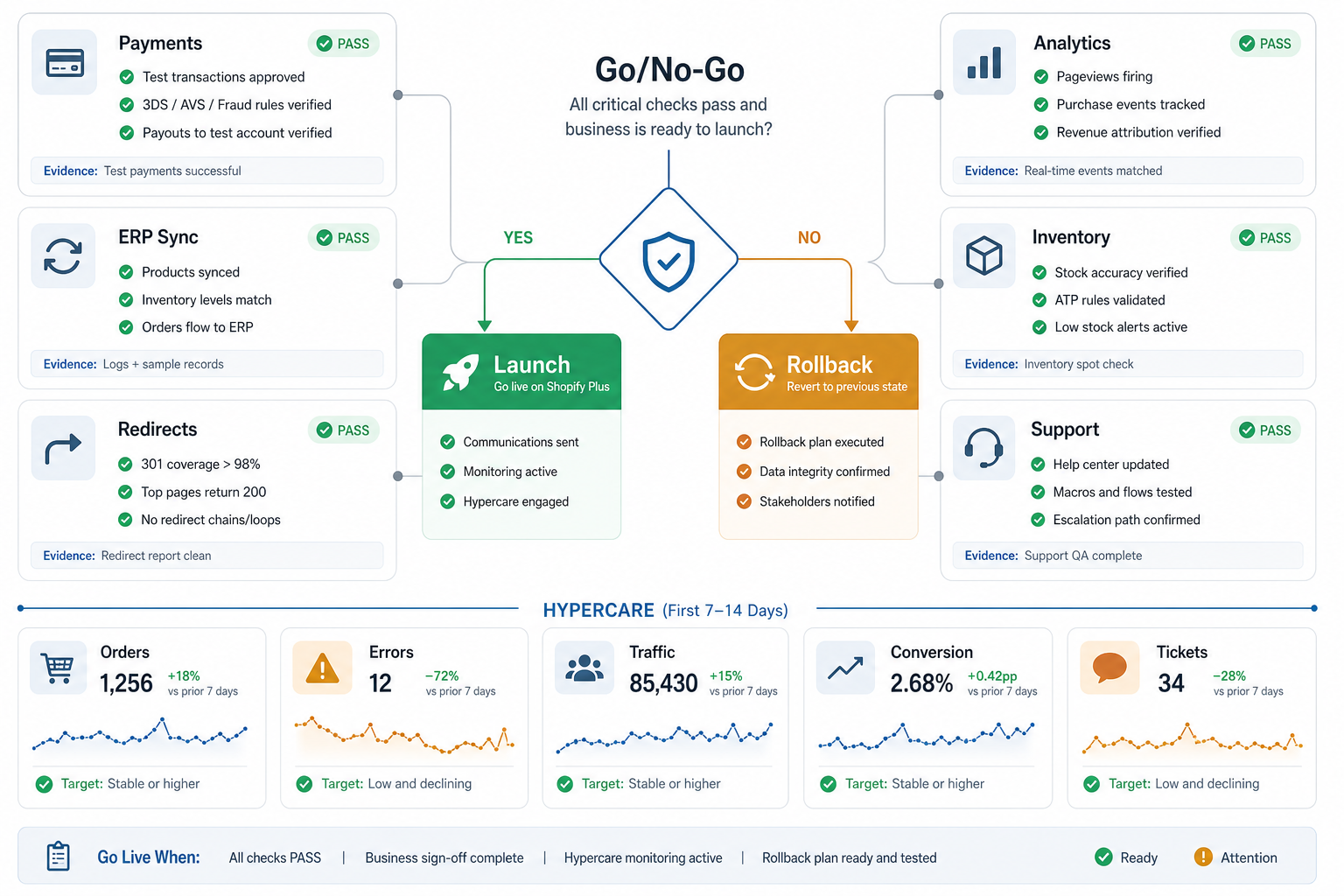
After launch, keep hypercare tied to the same evidence board. Track orders, errors, traffic, conversion, support tickets, inventory mismatches, redirect failures, and integration queues at least daily. If traffic spikes are likely after campaigns or seasonal launches, compare the plan with NextPage's eCommerce cloud performance optimization checklist so storefront speed, checkout APIs, payment callbacks, and autoscaling are tested together.
How To Scope Budget And Timeline
Shopify Plus migration cost depends less on product count alone and more on data quality, checkout complexity, app replacement, integrations, headless storefront needs, B2B rules, localization, analytics, and launch support. A theme refresh with clean catalog data is a different project from a migration that includes ERP pricing, subscriptions, custom checkout logic, multi-market routing, and historical order imports.
Use the eCommerce app development cost guide to frame feature and integration drivers, then estimate the migration-specific work: discovery, data migration, storefront implementation, checkout configuration, app setup, custom extensions, integration middleware, QA, cutover, and hypercare.
If the migration touches custom workflows beyond standard platform setup, NextPage can help through web app development, eCommerce integration engineering, and conversion optimization support. Teams comparing platform migration options can also review NextPage's WooCommerce migration services page to see the same replatforming controls applied to another commerce stack.
Next Steps
If you are planning a Shopify Plus migration, start with the risk inventory before the theme. Map data sources, checkout rules, integrations, redirects, analytics, operational owners, and rollback criteria. Then decide what Shopify can handle directly, what needs apps, and what needs custom engineering.
NextPage can help turn that inventory into a buildable migration plan through eCommerce web app development services, checkout and conversion optimization, and migration-ready custom software support.