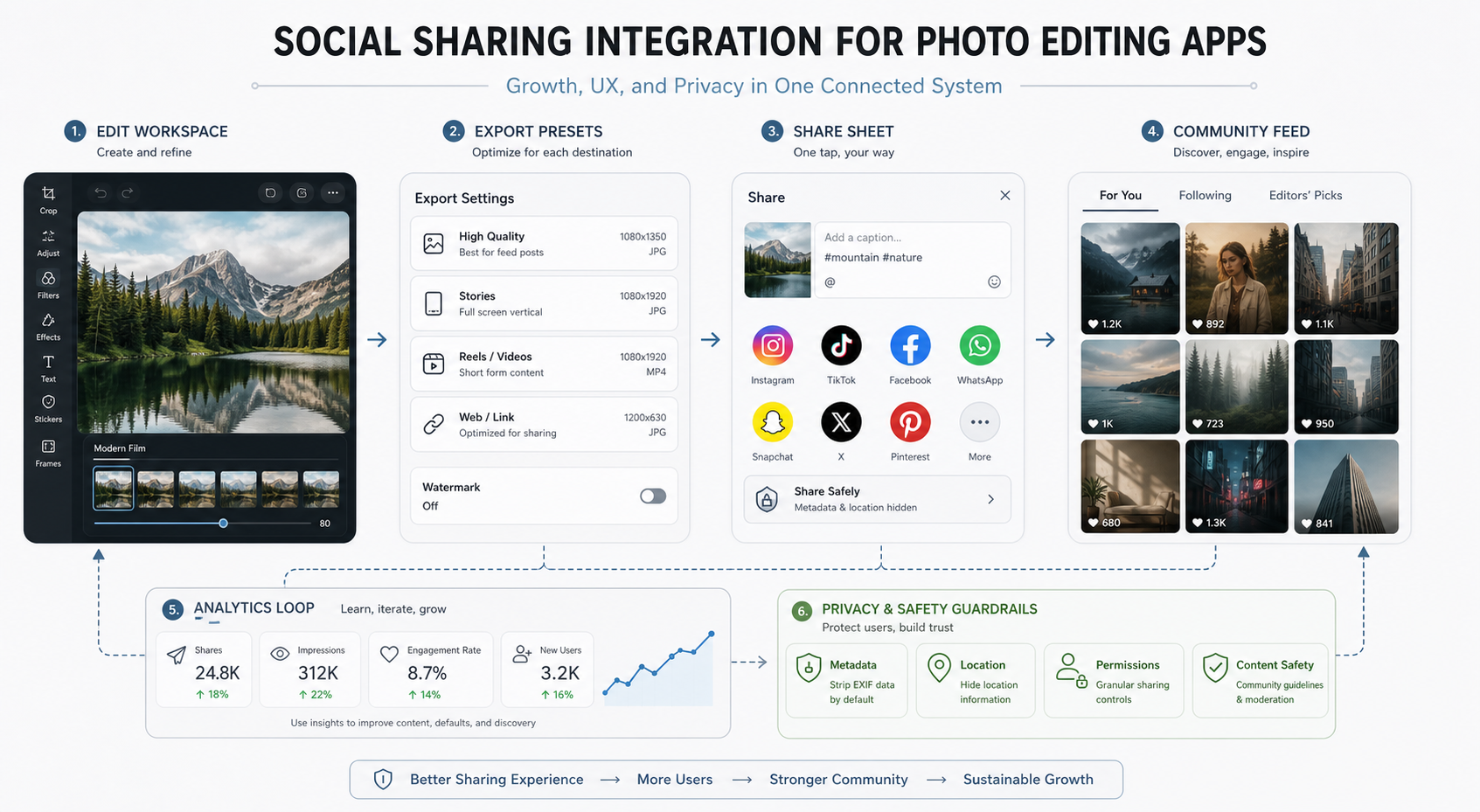

Social sharing integration in a photo editing app is more than a button at the end of an edit. It connects the editor, export settings, native share sheet, creator identity, community discovery, link attribution, privacy controls, and analytics. When those pieces work together, every edited image can become a cleaner sharing experience and a measurable growth loop.
This guide explains how product teams should design social sharing for photo editing apps, what features matter, how to protect users, and which metrics reveal whether sharing is actually improving retention and acquisition. If you are planning a creator product, these decisions should sit inside the broader mobile app development roadmap instead of being treated as a last-minute integration task.
Quick Answer: What Should Social Sharing Integration Include?
A strong social sharing integration should include one-tap sharing, platform-specific export presets, caption and hashtag support, creator credit, deep links or attribution links, optional watermark controls, audience selection, privacy-safe metadata handling, clear failure states, and analytics for share completion, click-through, installs, and returning creators.
The most important principle is control. Users should understand what they are sharing, where it will appear, whether location or metadata is included, and how the edited image will look after compression or resizing. Product teams should also connect sharing to discovery and retention: saved presets, remixable edits, community challenges, and profile follow loops can turn a single export into repeat usage.
Why Social Sharing Matters In Photo Editing Apps
Photo editing is naturally tied to identity, creativity, and distribution. Users do not edit only to store a file; they edit to publish, send, collaborate, compare, sell, or build a recognizable style. That makes social sharing a core product workflow for creator apps.
Good sharing improves the user experience because it removes friction between the final edit and the destination. It improves growth because shared work carries the app, preset, creator, or link into new audiences. It improves product learning because analytics can show which export formats, templates, presets, and content types users actually share.
For adjacent feature planning, compare the sharing layer with other must-have photo editing app features such as AI cleanup, filters, overlays, background editing, and export quality. Sharing works best when it is designed around the complete editing journey.
Social Sharing Workflow Architecture
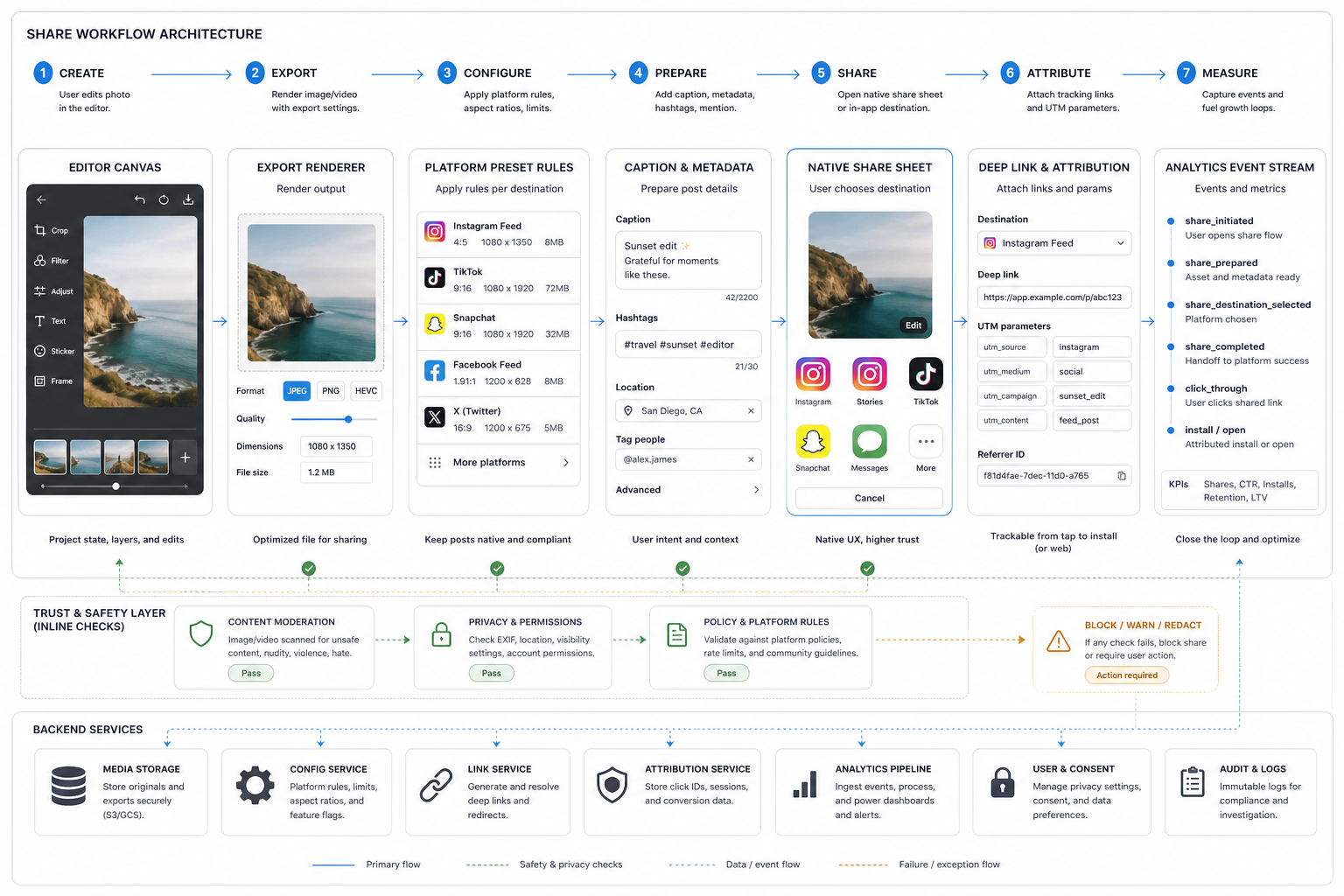
The best sharing workflows are predictable. A user finishes an edit, chooses a destination, sees the right export settings, adds context, confirms privacy choices, and gets a clear result. Behind that simple flow, the app needs services for rendering, destination rules, link generation, attribution, moderation, analytics, and consent.
| Layer | What It Does | Product Decision |
|---|---|---|
| Editor state | Stores layers, filters, text, crop, effects, and project history. | Decide whether the shared output is flattened, editable, or remixable. |
| Export renderer | Creates the final image or video in the right format, quality, and aspect ratio. | Support destination presets for feeds, stories, thumbnails, web links, and downloads. |
| Share composer | Lets users add captions, hashtags, creator credit, watermarks, or links. | Keep defaults useful but editable so sharing does not feel forced. |
| Native share sheet | Hands the asset to installed apps and platform destinations. | Use native patterns when possible because users already trust them. |
| Attribution and links | Tracks shared content, opens, installs, campaigns, and creator referrals. | Use deep links or web fallback links without exposing private user data. |
| Trust layer | Handles permissions, EXIF/location removal, moderation checks, and failure states. | Make the safest reasonable option the default. |
Features To Build For A Better Sharing Experience
Start with the pieces that make sharing reliable before adding advanced community mechanics. A sharing flow that fails, exports the wrong size, or surprises users with hidden metadata will hurt trust faster than it helps growth.
- One-tap destination sharing: let users move from final edit to destination without unnecessary screens.
- Platform export presets: prepare aspect ratio, file size, compression, and video length guidance for common destinations.
- Caption and hashtag helpers: make posts easier to publish while keeping user authorship visible.
- Creator credit and watermark controls: help users protect work without forcing heavy branding.
- Deep links and attribution: connect shared content back to the app, creator profile, preset, template, or campaign.
- Community feed or gallery: give users a place to discover, follow, remix, and save inspiration inside the product.
- Share recovery: save export drafts and offer retries when network, permission, or policy checks fail.
Teams building creator workflows should also study the mobile photo editing workflow because sharing quality depends on capture, editing, retouching, and export decisions that happen before the share sheet appears.
Design The Sharing Growth Loop
Sharing creates growth only when the loop is measurable and repeatable. The loop usually starts when a user creates something worth sharing. Other people view it, save a preset, follow the creator, install or open the app, and return to create their own version. Analytics then helps the product team improve defaults, templates, destinations, and onboarding.
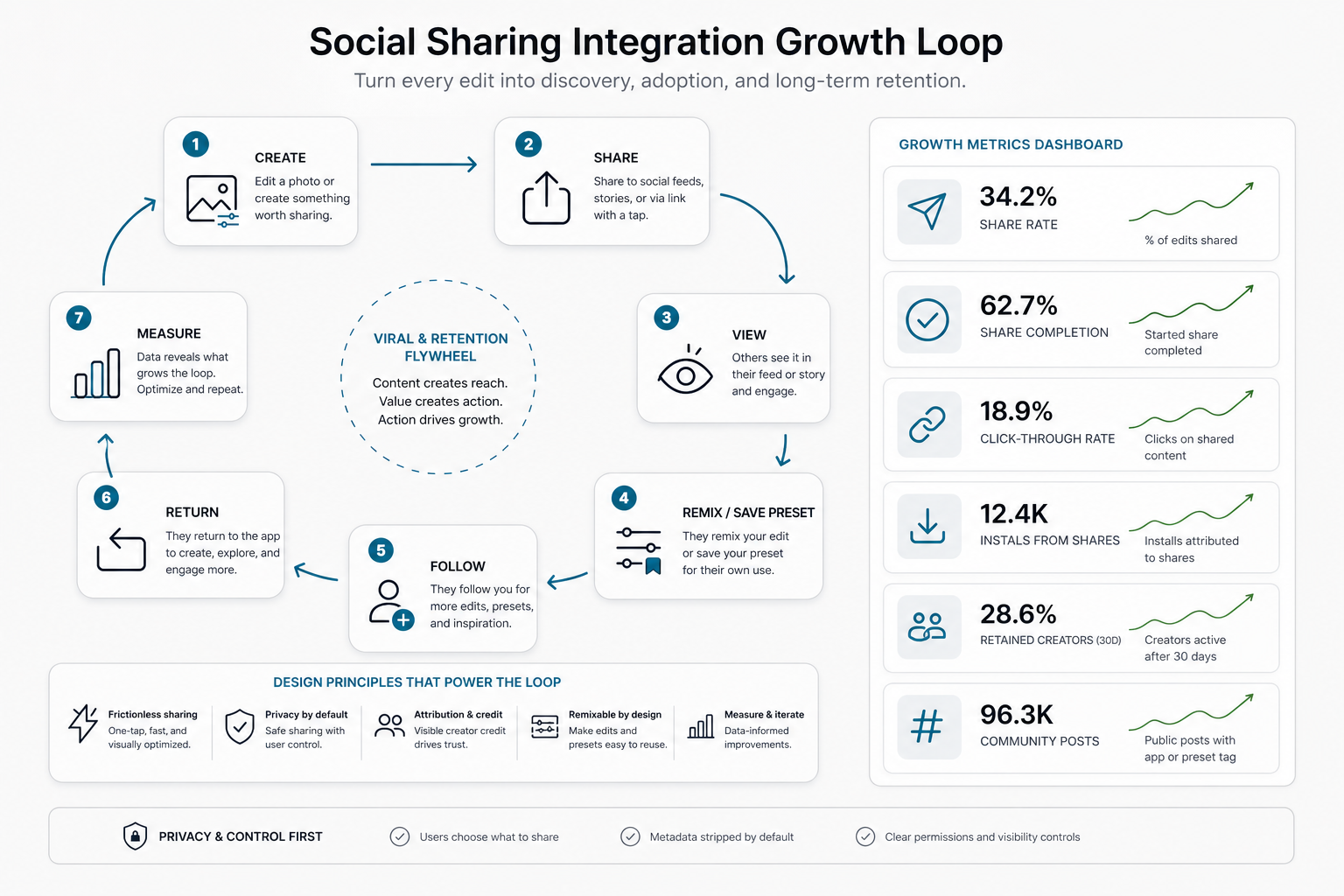
The metrics that matter include share initiation rate, share completion rate, destination mix, exported asset quality, link click-through, installs or opens from shared links, preset saves, remixes, follows, returning creator rate, and 7-day or 30-day retention for users who share. If AI editing or automated creative workflows are part of the product, the AI Automation ROI Calculator can help frame whether automation is saving enough time to justify the build and operating cost.
Sharing can also support revenue. Preset marketplaces, creator packs, premium export quality, watermark removal, team collaboration, and advanced analytics can all connect to photo editing app monetization, but they should be introduced only after the free sharing loop feels valuable.
Privacy, Safety, And Platform Compliance
Photo sharing can expose sensitive information if the app is careless. Images may contain location data, device metadata, faces, private spaces, brand assets, minors, or copyrighted material. A trustworthy sharing flow removes hidden risk by default and asks for explicit consent when the sharing context changes.

Use a practical checklist before launch: strip EXIF and location metadata by default, explain what will be shared, ask for destination permissions clearly, default to the safest audience option, validate media against platform rules, provide creator-credit controls, make watermark settings editable, and handle upload failures without losing the user's work.
AI, Remixing, And Creator Workflows
Modern photo editing apps increasingly include AI cleanup, background changes, image expansion, smart captions, style transfer, and preset recommendations. These features can make sharing more powerful because the final asset is easier to personalize and reuse. They also add product responsibility around user consent, model quality, review controls, and cost per generation.
If AI-generated edits, remixable templates, or automated creative workflows are part of the roadmap, connect them to a production-grade generative AI development plan. The product needs more than a model call; it needs quality checks, moderation, usage limits, fallback behavior, and clear user control.
Implementation Checklist For Product Teams
| Build Area | Questions To Answer | Launch Signal |
|---|---|---|
| Export quality | Do shared images keep enough resolution, color, and crop accuracy? | Users do not re-export repeatedly to fix quality. |
| Destination rules | Are aspect ratios, formats, captions, and limits handled per destination? | Share completion rate improves after presets launch. |
| Attribution | Can shared content point back to the app, preset, creator, or campaign? | Shared links create measurable opens, installs, or profile visits. |
| Privacy | Is metadata removed, permission explained, and audience choice clear? | Support tickets and share regrets stay low. |
| Community | Can users discover, save, follow, or remix without turning the app into noise? | Creators return to publish again. |
| Analytics | Do events show where the sharing flow starts, fails, and succeeds? | The team can prioritize improvements from real data. |
Before committing engineering capacity, use the custom software cost estimator to compare a simple native-share MVP against a deeper community, attribution, and analytics roadmap.
Common Mistakes To Avoid
- Treating sharing as the final screen only: export quality, metadata, attribution, and recovery need to be designed earlier.
- Forcing branded watermarks: users may abandon sharing if the app over-promotes itself.
- Ignoring failed shares: network errors, destination restrictions, and permission denials need clear next steps.
- Measuring taps instead of outcomes: a share initiated event is not the same as a completed share that drives installs or retention.
- Skipping privacy defaults: hidden location or device metadata can create trust problems.
- Building community too early: a feed works only after creation, moderation, discovery, and creator incentives are clear.
Final Recommendation
Build social sharing integration as a product system. Start with reliable one-tap sharing, destination-aware exports, user-controlled captions and watermarks, privacy-safe defaults, and clean failure handling. Then add attribution, community discovery, remix flows, and growth analytics once the basic share experience is trusted.
For photo editing apps, the strongest sharing experience helps users publish with confidence while helping the product team learn what content, formats, templates, and workflows create lasting engagement. That balance is what turns social sharing from a convenience feature into a meaningful growth engine.