
A practical software QA budget should be sized by release risk, not by a flat percentage of development cost. Start with the workflows that would hurt revenue, safety, compliance, or customer trust if they failed. Then decide which checks need human judgment, which should become repeatable automation, and which specialist tests deserve a separate budget line.
For most web, mobile, SaaS, and internal software releases, the useful budget model has five parts: manual exploratory testing, regression automation, performance testing, security checks, and a release-risk buffer for test data, environments, retesting, defect triage, and release evidence. The right mix changes by product maturity. A startup MVP may need focused manual testing and a small smoke suite. A revenue-generating SaaS product needs recurring regression automation, API coverage, performance signals, security checks, and stronger release evidence.
If your team is budgeting a launch or trying to reduce defect leakage, start by mapping critical journeys with a software QA testing services review. The goal is not to buy more testing hours. The goal is to spend the QA budget where it lowers business risk fastest.
Quick Answer: How Much Should You Budget For Software QA?
Use 10% to 25% of build effort as a planning range, then adjust by risk, release cadence, integrations, supported devices, compliance exposure, and automation maturity. A low-risk internal tool can sit near the lower end if workflows are simple. A public SaaS product, fintech workflow, healthcare portal, marketplace, or mobile app with payments, roles, and third-party APIs often needs the upper end or a separate QA workstream.
Hourly rates and project ranges vary widely by region and specialization, but the budget conversation should not start with rates. It should start with coverage. A cheap test cycle that misses the payment, permissions, reporting, or data-migration failure is more expensive than a focused QA plan that catches the issue before release.
| QA Budget Area | What It Pays For | When It Matters Most |
|---|---|---|
| Manual exploratory testing | Human review of workflows, edge cases, UX friction, data states, and release behavior. | New features, changing requirements, complex workflows, and early MVPs. |
| Regression automation | Repeatable smoke, API, UI, and critical-path checks in CI/CD. | Frequent releases, stable journeys, and teams tired of retesting the same flows. |
| Performance testing | Load tests, API latency checks, database bottleneck discovery, and launch readiness. | Traffic spikes, marketplaces, portals, mobile backends, and revenue workflows. |
| Security checks | OWASP-style review, authentication checks, permissions, input handling, and sensitive-data paths. | Apps with logins, payments, personal data, healthcare, finance, or enterprise buyers. |
| Release-risk buffer | Test data, environments, retesting, defect triage, hotfix validation, and release evidence. | Every serious release, especially when teams discover bugs late. |
What Changed In Quality Engineering For 2026?
QA budgeting in 2026 is less about buying more test execution and more about funding a quality-engineering system. Capgemini's World Quality Report 2025-26 frames quality engineering around generative AI, agentic technologies, human-in-the-loop systems, and the need to test software that changes faster; the August 2026 refresh keeps that context but treats AI as an accelerator around governed release evidence rather than a substitute for accountable QA. That does not eliminate manual QA. It changes where human judgment belongs: risk review, exploratory sessions, acceptance evidence, model-assisted test design, and release decisions.
The budget implication is important. Teams should expect new line items for AI-assisted test design, test-data management, CI/CD quality gates, observability, flaky-test cleanup, accessibility, security review, and post-release monitoring. Those costs can still reduce total risk when they replace slow retesting, late bug discovery, and repeated production fixes.
CISQ's research on the cost of poor software quality remains a useful reminder: defects, vulnerabilities, technical debt, and operational failures are business costs, not only engineering issues. A QA budget should therefore be judged by risk reduced, release confidence improved, and rework avoided rather than by test-case count alone.
What Drives Software QA Cost?
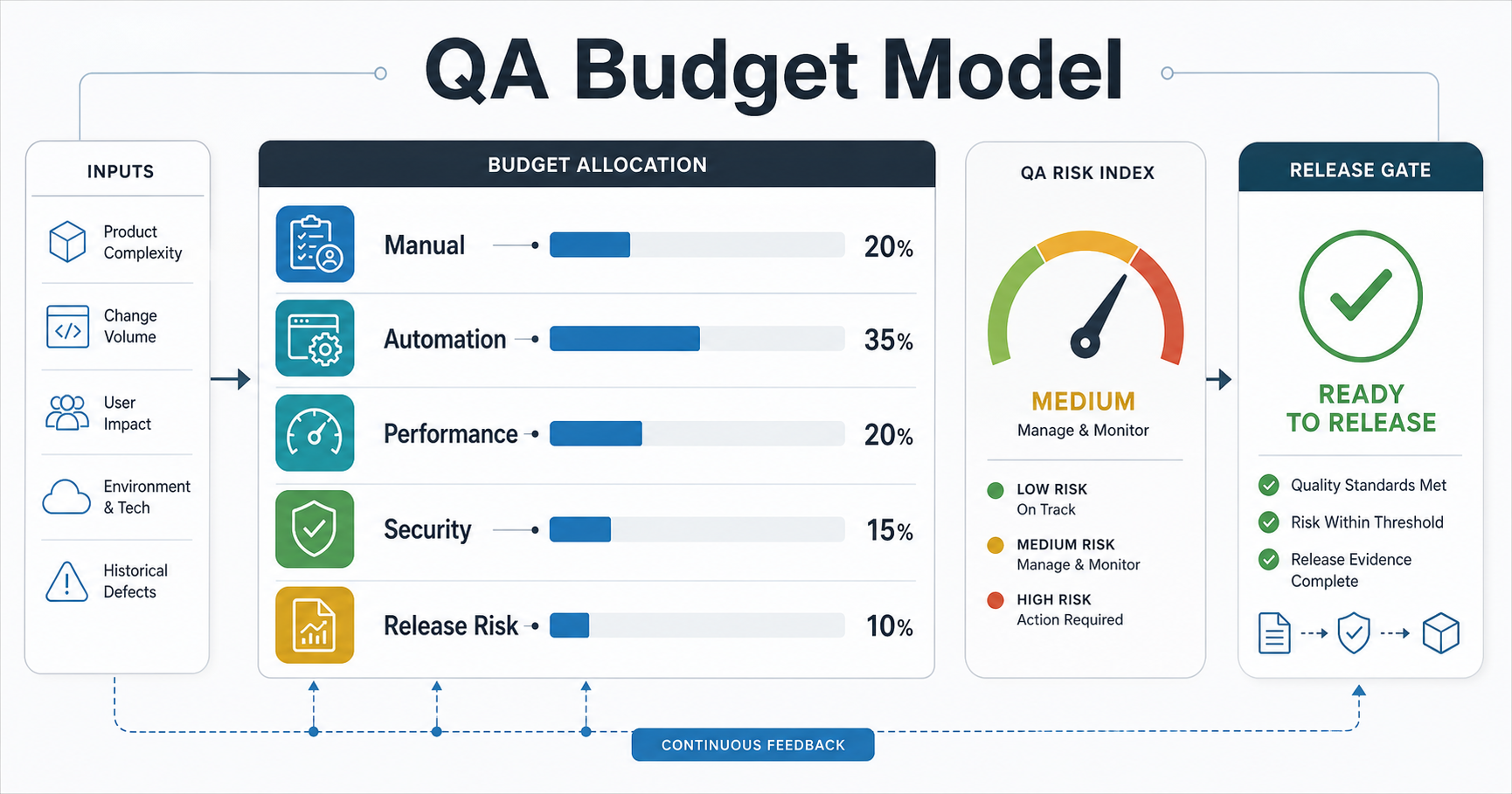
The biggest QA cost drivers are not the number of test cases in a spreadsheet. They are product risk, change volume, system complexity, compliance exposure, release cadence, and how much evidence leadership needs before a release.
A small brochure website may only need smoke testing, browser checks, accessibility basics, and form validation. A SaaS billing workflow needs role-based tests, payment-provider scenarios, subscriptions, failed-payment handling, invoices, permissions, reporting, API checks, regression coverage, and security review. A mobile app needs device and OS coverage, network interruption checks, push notifications, store-readiness checks, analytics, crash reporting, and backend API validation.
Use these cost drivers to scope the budget before asking vendors for rates:
- Critical workflows: login, checkout, onboarding, booking, reporting, approvals, data import, admin actions, and permissions.
- Release cadence: weekly releases need more automation and tighter CI evidence than quarterly releases.
- Integration count: payments, CRM, ERP, maps, notifications, analytics, identity, and third-party APIs all add failure modes.
- Supported surfaces: browsers, devices, operating systems, user roles, regions, languages, and accessibility requirements.
- Nonfunctional risk: performance, security, privacy, uptime, auditability, and recovery expectations.
- Product maturity: new MVPs need exploratory learning, while mature products need regression discipline and defect analytics.
Manual Testing Budget: Where Human Judgment Still Pays Back
Manual testing is not obsolete in 2026. It has just moved away from low-value checklist repetition. Budget manual QA for places where humans notice ambiguity, workflow confusion, inconsistent data, edge-case behavior, accessibility friction, and product risk that scripts cannot judge well.
Manual exploratory testing is especially valuable before first launch, after major UX changes, when requirements are still moving, and when the product has many user roles or real-world workflows. It is also useful when a team has poor test data, incomplete acceptance criteria, or a legacy system where automation would be brittle at first.
The mistake is paying manual testers to repeat the same stable checks every sprint forever. Those checks should feed an automation backlog. NextPage's guide on manual vs automation testing explains how to decide which checks should remain human-led and which should become repeatable regression coverage.
Automation Budget: Calculate Payback Before Buying Tools
Automation is a budget decision, not a maturity badge. It pays back when a check is stable, important, repeated often, and costly to run manually. It wastes money when teams automate unstable flows, low-risk screens, or brittle UI paths before the product is ready.
A simple ROI model is enough for most teams, but it should include maintenance and release ownership from day one:
Monthly automation value = manual regression hours avoided + release delay reduced + defect leakage avoided - automation maintenance hours - tool/platform costs.
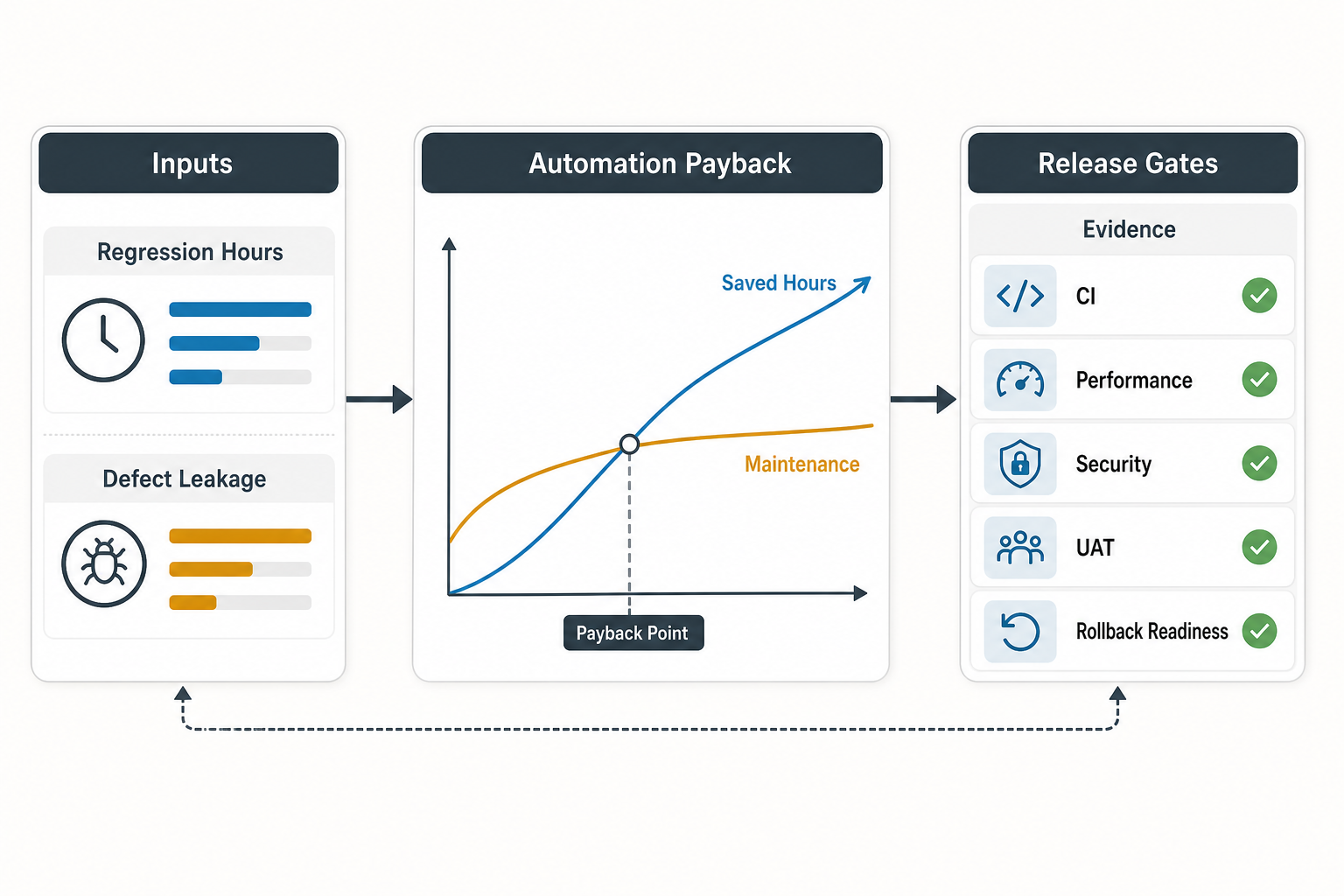
Use that formula per workflow, not for the entire product. Login, checkout, permissions, quote generation, invoice creation, API contracts, and data imports often justify early automation. One-off admin screens usually do not. The existing test automation ROI guide gives a deeper model for regression time and payback.
| Automation Candidate | Budget Signal | Decision |
|---|---|---|
| Critical smoke flow | Run before every release or deploy. | Automate early. |
| Payment, booking, or approval workflow | High business impact if broken. | Automate stable paths and keep exploratory checks. |
| API contract | Breakage affects multiple clients or integrations. | Automate at API level before UI-heavy checks. |
| New feature still changing weekly | Selectors, fields, or rules are unstable. | Use manual testing first, then automate after stabilization. |
| Low-risk admin screen | Rarely used and easy to verify manually. | Do not automate unless defect history proves risk. |
When automation is the right move, a QA automation testing services plan should include framework selection, test data, CI integration, reporting, flaky-test policy, maintenance ownership, and a clear first suite. Tool setup without ownership becomes another hidden cost. If release gates are part of the plan, align the automation budget with a practical CI/CD testing strategy so every check has a clear decision: block, warn, monitor, or stay manual.
AI-Assisted QA Budget: Useful Accelerator Or Hidden Cost?
AI-assisted QA can make the budget more efficient when it accelerates test case design, requirement coverage checks, defect triage, log review, synthetic data ideas, visual review, or regression prioritization. It becomes wasteful when teams buy a platform before they know which workflows are stable, which failures matter, and who owns the generated evidence.
Budget AI-assisted QA as an accelerator around a grounded quality plan, not as a replacement for release accountability. The useful costs include tool subscriptions, prompt and workflow design, evaluation datasets, human review, test-data controls, CI integration, privacy review, and time to remove low-value generated tests. The risk is false confidence: a large AI-generated test inventory can still miss permissions, payment edge cases, device behavior, accessibility, security, or production observability.
| AI QA Use | Budget Value | Control Needed |
|---|---|---|
| Requirement-to-test suggestions | Faster first-pass coverage and fewer missed acceptance paths. | Product-owner review and duplicate cleanup. |
| Regression prioritization | Run the highest-risk checks first when time is limited. | Defect history, code-change signals, and release owner approval. |
| Failure triage | Shorter investigation loops for flaky tests, logs, screenshots, and traces. | Human confirmation before closing defects or changing release status. |
| Visual and accessibility assistance | Faster discovery of layout, contrast, and state issues. | Device/browser checks and accessibility criteria. |
| Security test ideation | Better coverage prompts for auth, permissions, input handling, and data paths. | OWASP-style checklist review and specialist validation. |
For teams planning AI in QA, the AI-powered QA automation roadmap is a useful companion because it separates AI assistance from deterministic automation, CI gates, and human release decisions.
Performance And Security Testing Budget
Performance and security testing should not be treated as optional extras discovered a week before launch. They need explicit budget when the product handles authentication, payments, personal data, enterprise buyers, high traffic, or operational workflows.
Performance testing budget usually covers scenario design, baseline measurements, load generation, bottleneck analysis, API and database tuning support, retesting, and monitoring recommendations. Treat performance as a launch-risk decision: the budget should include the time needed to define success thresholds, run realistic scenarios, fix bottlenecks, and retest before traffic arrives. Security testing budget covers threat-informed review, authentication and authorization checks, input handling, sensitive-data paths, dependency risk, and OWASP-style web or mobile checks. The current OWASP Web Security Testing Guide remains a useful reference for structuring web application security test areas, and OWASP now lists the Top 10 2025 as the current released awareness baseline for common web application risks.
Do not ask QA to "guarantee security." Instead, budget security testing as evidence that common risks were reviewed, findings were triaged, and fixes were verified. For mobile apps, pair QA planning with mobile app testing services and security hardening where the app stores sensitive data or uses risky permissions.
Build A QA Coverage Matrix Before Setting The Budget
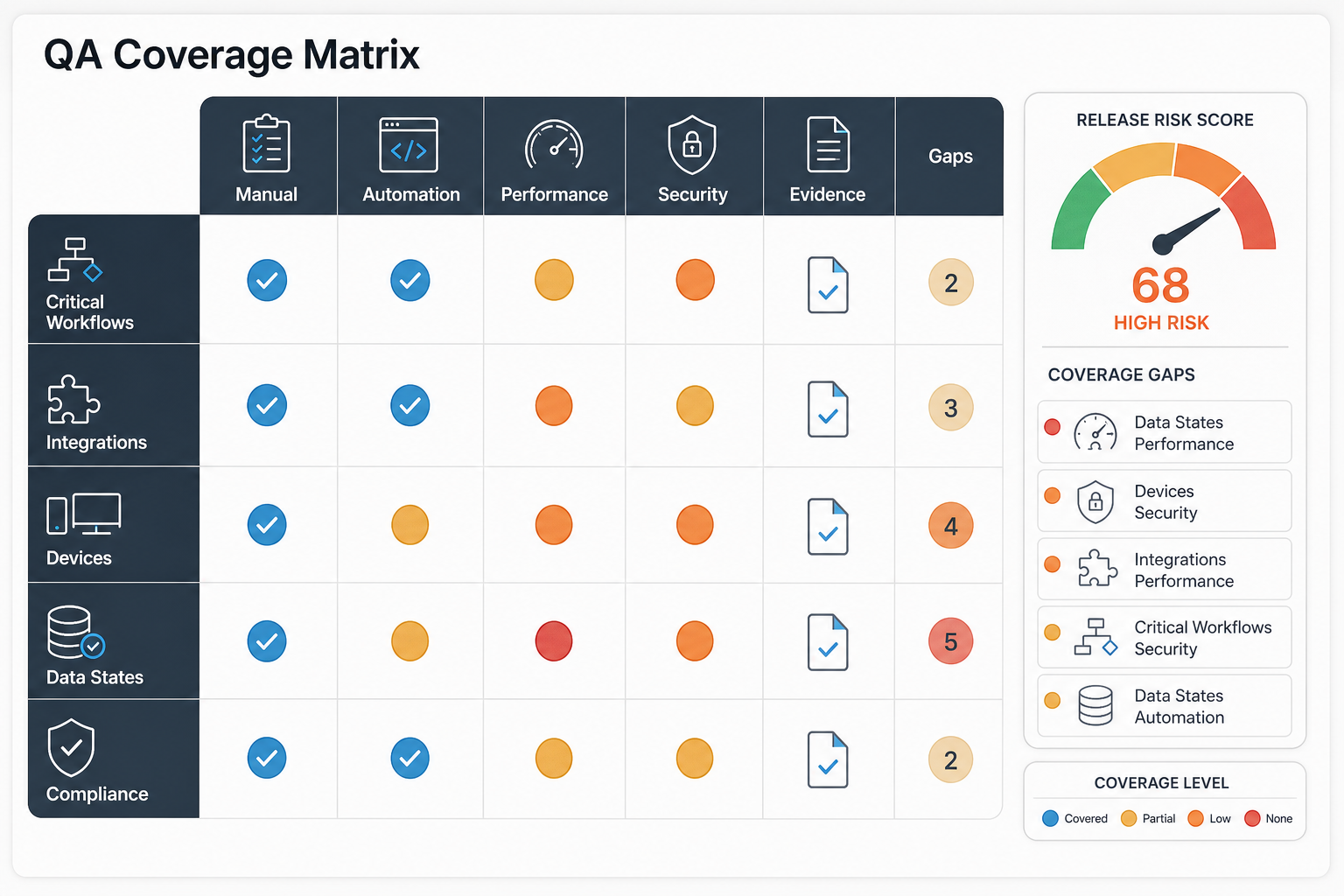
A coverage matrix turns a vague QA budget into a business decision. List the workflows and risk areas, then decide the depth of testing each one deserves.
| Coverage Area | Low-Risk Budget | Higher-Risk Budget |
|---|---|---|
| Core workflows | Manual smoke checks and acceptance testing. | Exploratory testing, regression automation, API checks, and release evidence. |
| Roles and permissions | Basic role checks. | Matrix testing across roles, data access, admin actions, and audit-sensitive paths. |
| Integrations | Happy-path API validation. | Contract tests, failure states, retries, webhooks, reconciliation, and monitoring. |
| Mobile/device coverage | One or two target devices. | Device/OS matrix, interruptions, network conditions, store readiness, and crash signals. |
| Performance | Basic page/API checks. | Load scenarios, bottleneck analysis, retesting, and launch monitoring. |
| Security | Basic authentication and input checks. | OWASP-style testing, permissions, sensitive data, dependency review, and fix validation. |
If the product is a legacy system approaching modernization, use a legacy software QA audit checklist before budgeting automation. Legacy systems often need coverage discovery, defect leakage review, and release-gate cleanup before scripts can be trusted.
Release Evidence And Budget Governance
A QA budget should not be set once and forgotten. Review it at release milestones, after major incidents, and after three to six sprint cycles. The goal is to move spend from repeated manual effort and late rework toward earlier evidence, stable automation, and better product decisions.
| Governance Question | Budget Signal | Action |
|---|---|---|
| Which defects reached users? | Escaped defects, support tickets, hotfix effort, refunds, churn, or SLA pressure. | Add or shift coverage toward the workflows that caused real business pain. |
| Which checks repeat every release? | Manual regression hours and release delay from stable paths. | Move repeatable high-risk checks into automation with ownership. |
| Which tests are not trusted? | Flaky-test rate, ignored failures, unclear owners, or noisy dashboards. | Fund cleanup before expanding the suite. |
| Which risks lack evidence? | No performance baseline, missing security review, weak device coverage, or no rollback test. | Create explicit budget lines instead of hiding them in general QA hours. |
| Which product changes are coming? | New payment flow, role model, integration, mobile release, migration, or compliance requirement. | Re-scope QA before development is complete. |
Good release evidence is decision-ready. It should show what was tested, what was skipped, what failed, what was accepted, what was retested, who approved the risk, and what will be monitored after launch. That evidence is what turns QA from a cost center into a release-control system.
QA Team Models And Budget Tradeoffs
QA can be handled by an internal team, a dedicated QA pod, staff augmentation, project-based testing, or a hybrid model. The best choice depends on release cadence and how much product context testers need.
| Team Model | Best Fit | Budget Watchout |
|---|---|---|
| Internal QA | Long-lived products with deep domain workflows. | Salary, tools, training, device labs, and idle periods between releases. |
| Dedicated QA pod | Ongoing releases with stable product roadmap. | Needs clear ownership, reporting, and integration with engineering rituals. |
| QA staff augmentation | Temporary capacity gap, release crunch, automation buildout, or specialist testing. | Weak onboarding can waste the first sprint. |
| Project-based testing | Defined launch, audit, migration, or one-time release. | Scope must define retesting, environments, and defect triage expectations. |
| Hybrid model | Internal ownership plus external specialists for automation, performance, or security. | Requires clean handoff and shared release evidence. |
For teams that need capacity without hiring a full department, QA testing staff augmentation services can fill manual, automation, API, mobile, or release-readiness gaps while internal product owners keep context.
Budget QA By Product Stage
The QA budget should change as the product matures. Early products need learning and launch safety. Growing products need repeatability. Mature products need defect analytics, automation maintenance, and stronger governance.
- MVP: budget for acceptance criteria review, critical-flow testing, exploratory sessions, device/browser smoke checks, and launch blockers.
- Post-launch product: add regression shortlist, API checks, analytics/crash review, retesting discipline, support-ticket feedback loops, and release evidence review.
- Scaling SaaS or marketplace: add automation, performance baselines, security checks, role/permission matrix, and release evidence.
- Enterprise or regulated product: add audit trail, data privacy, accessibility, traceability, environment controls, documentation, and stronger change gates.
- Legacy modernization: budget for baseline coverage, characterization tests, defect history review, regression suite planning, and migration validation.
Use the Custom Software Cost Estimator when QA budget is part of a broader build or modernization plan. QA is easier to budget when feature scope, integrations, release cadence, and risk level are visible together.
Common QA Budget Mistakes
The most common mistake is cutting QA to protect the build budget, then paying for rework, delayed releases, production fixes, customer support, and trust loss later. CISQ's research on poor software quality shows that defects, vulnerabilities, supply-chain issues, and technical debt create large economic costs. Your product does not need a trillion-dollar benchmark to feel the same pattern: bugs are cheaper when caught closer to the source.
Other mistakes include buying automation or AI QA tools before defining coverage, underbudgeting test data and environments, ignoring performance until launch week, treating security as a one-time scan, testing only happy paths, failing to retest fixes, accepting flaky tests as normal, and measuring QA by test-case count instead of release risk reduced.
A better budget asks: which failures would hurt the business, how often do we release, which checks are repeated, which specialists do we need, and what evidence should leadership see before approving launch?
How NextPage Can Help
NextPage helps teams turn QA budget uncertainty into a practical release-risk plan. We map critical workflows, define manual and automated coverage, identify performance and security checkpoints, build regression candidates, support mobile and web testing, assess AI-assisted QA opportunities, and create release evidence that product and engineering leaders can use.
If your QA budget feels like a rate-card comparison, start with a coverage review. We can identify where manual testing still matters, where automation will pay back, where performance or security testing needs specialist attention, and what QA model fits your release cadence.