
Quick Answer: What A Swift 6 Migration Should Cover
A Swift 6 migration checklist should cover more than changing the Swift language version. For an existing iOS app, the safer path is to audit modules and dependencies, enable strict concurrency checking in warning mode where useful, fix data-race risks, isolate UI work correctly, update SwiftUI and UIKit integration points, expand release testing, and only then move targets or packages into Swift 6 language mode.
Apple describes Swift 6 strict concurrency as a way to catch data-race risks at compile time. That is valuable, but it can expose years of shared mutable state, delegate callbacks, Combine pipelines, background queues, and third-party SDK assumptions at once. Treat the migration as a release-risk project, not a syntax cleanup. The first decision is not "turn Swift 6 on everywhere"; it is deciding which modules, packages, workflows, and release gates can absorb stricter compiler checks without risking revenue, identity, offline sync, or App Store timing.
This guide is for product owners, engineering leaders, and iOS teams maintaining a production app with older Swift code, UIKit-heavy screens, SwiftUI islands, background work, or App Store release pressure. If you need help scoping the engineering work, NextPage's Swift app development company team can audit the app, plan the migration, fix release blockers, and support QA before submission. Teams comparing the scope with broader platform work can also use the custom software cost estimator before committing to a release window.
Why Swift 6 Migration Needs A Plan
Swift 6 language mode remains an adoption decision for each target or package, but the direction is clear: safer concurrency, stronger compile-time checks, and more pressure on app teams to keep build tooling current. Apple also requires apps uploaded to App Store Connect since April 28, 2026 to be built with Xcode 26 or later and current platform SDKs, including the iOS and iPadOS 26 SDKs. That SDK requirement is not the same as a Swift 6 language-mode mandate, but both forces often arrive in the same modernization window.
The risk is sequencing. If the team flips every target to Swift 6 on day one, the compiler may surface hundreds of issues before anyone knows which warnings are real release risks, which are dependency issues, and which are isolated to low-traffic modules. A better plan gives the team a migration register, module order, dependency strategy, CI gates, owner map, release evidence, and rollback triggers.
| 2026 Requirement | What It Means | Migration Response |
|---|---|---|
| Xcode 26 upload requirement | App Store Connect uploads need current Xcode and platform SDKs for new submissions. | Update build machines, CI images, signing, archive/export steps, and SDK compatibility before release week. |
| Swift 6 language mode | Swift 6 checking is adopted per target or package rather than forced by App Store upload policy. | Stage adoption by module risk, dependency readiness, and test evidence instead of flipping every target at once. |
| Strict concurrency diagnostics | Compiler checks can expose shared state, non-Sendable types, delegate callbacks, and UI isolation gaps. | Group findings by workflow risk, owner, and user impact so high-value flows are fixed first. |
| Release evidence | Compiler success does not prove device behavior, TestFlight stability, privacy metadata, or rollback readiness. | Pair migration work with QA gates, performance baselines, monitoring, and App Store submission evidence. |
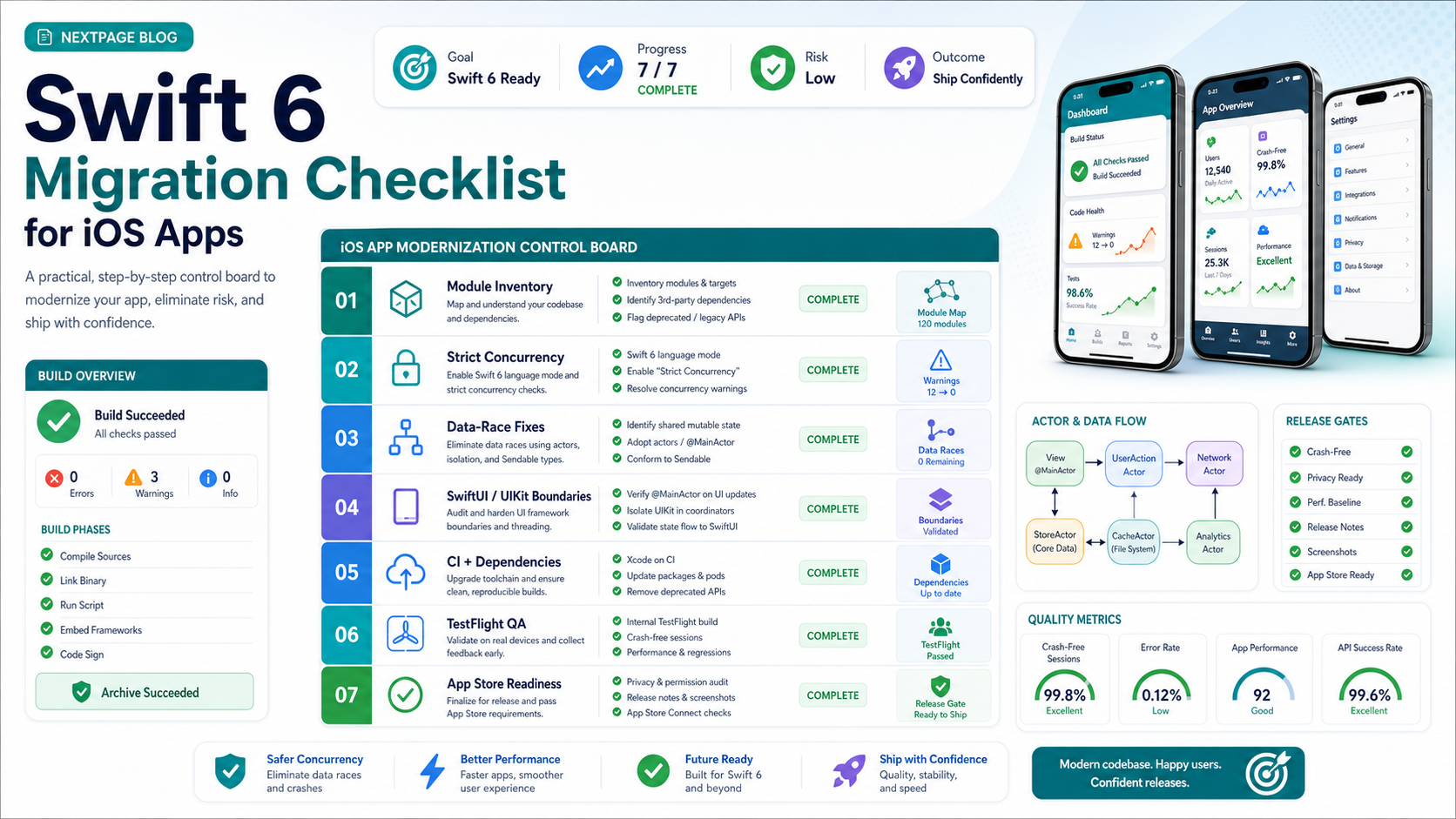
Swift 6 Migration Control Board
A migration control board turns the checklist into an operating plan. Instead of letting every target, package, and warning compete for attention, group work into lanes: module inventory, strict concurrency, data-race fixes, UI boundaries, CI and dependencies, TestFlight QA, and App Store readiness. Each lane should have an owner, evidence requirement, and go/no-go condition.
This is especially useful for apps that combine native iOS code with older services, hybrid shells, or long-lived release processes. If the app already needs platform cleanup, treat the migration as part of legacy software modernization, not only an iOS refactor. If the same release also exposes device policy, offline workflow, API, or security debt, use an enterprise mobile app modernization roadmap to separate Swift 6 fixes from broader platform work.
| Control Lane | Owner Question | Release Evidence |
|---|---|---|
| Module inventory | Which targets and packages can move first without blocking critical flows? | Target map, dependency register, risk order. |
| Concurrency triage | Which warnings threaten money, identity, sync, data integrity, or app stability? | Workflow risk board, fixed examples, accepted exceptions. |
| CI and dependencies | Can the same build archive cleanly on release infrastructure? | Pinned toolchain, locked packages, archive log. |
| QA and release | Which device, OS, TestFlight, privacy, and rollback checks prove readiness? | Device matrix, smoke pass, monitoring plan. |
1. Build A Migration Inventory Before Changing Language Mode
Start with a map of the current app. List every target, Swift package, CocoaPods or Swift Package Manager dependency, app extension, background mode, push notification path, authentication flow, payment flow, analytics SDK, crash reporter, and custom framework. Mark which modules already use async/await, actors, Combine, operation queues, GCD, or callback-heavy APIs.
This inventory gives the team a migration order. Start with modules that are important enough to matter but isolated enough to fix safely. Avoid beginning with the highest-risk checkout, login, or production sync flow unless it blocks all other work.
If the app is already hard to build or release, treat Swift 6 as part of broader legacy app modernization and a wider mobile app development quality plan. The same discipline applies: separate technical debt cleanup from release-critical work, then stage improvements behind testable milestones.
- Record each target's current Swift language version and strict concurrency setting.
- Identify third-party dependencies that are not concurrency-clean or not maintained.
- Flag modules that touch money, identity, health, location, files, offline sync, or sensitive customer data.
- List flows that need manual device testing because unit tests cannot prove them.
- Decide which modules can move first, which need dependency work, and which should wait.
2. Enable Strict Concurrency Checking In A Controlled Way
Swift 6 language mode enables full data-race safety checking, but teams can often prepare by surfacing strict concurrency issues before making the final mode switch. In Xcode projects, review the Swift Language Version and strict concurrency settings per target. For Swift packages, review the package tools version and language-mode choices. For command-line or CI paths, make sure the same flags run outside the developer's laptop.
The goal is not to silence the compiler quickly. The goal is to understand the patterns behind the warnings. Common issue clusters include mutable singletons, non-sendable model objects crossing task boundaries, delegate callbacks reaching UI state, static caches, test doubles, SDK wrappers, Combine pipelines, and Task.detached usage without a clear ownership model.
| Warning Pattern | Why It Matters | Migration Response |
|---|---|---|
| Shared mutable state | Multiple tasks may read and write the same object unpredictably. | Use actor isolation, value types, locks where justified, or narrower ownership. |
| UI work off main actor | UIKit and SwiftUI updates may race or crash. | Move UI-facing state behind @MainActor or explicit main-actor boundaries. |
| Non-Sendable types crossing tasks | Reference objects may move across concurrency domains unsafely. | Redesign the boundary, add value snapshots, or audit justified annotations carefully. |
| Dependency warnings | The app may be blocked by SDKs the team does not control. | Upgrade, replace, wrap, or isolate the dependency before the final mode switch. |
Swift 6 Concurrency Risk Triage
The biggest migration mistake is treating all compiler warnings as equal. A warning in login, payment, offline sync, or notification delivery can carry more production risk than several warnings in low-traffic settings screens. Build a triage board that ranks each workflow by shared state, main-actor UI assumptions, Sendable boundaries, dependency risk, test evidence, and owner readiness.
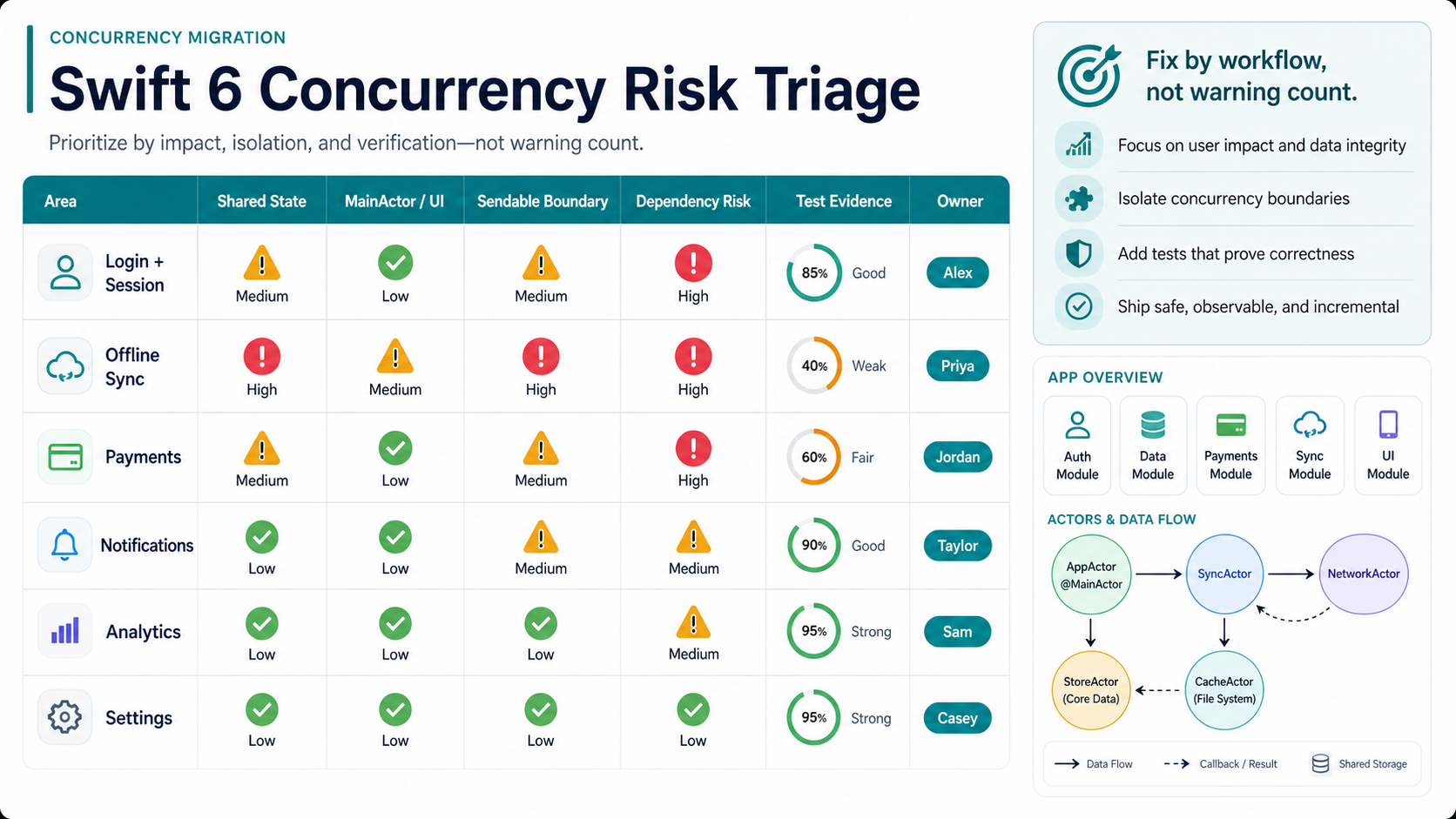
A practical board lets product and engineering leaders agree on what must be fixed before release, what can ship with a documented exception, and what should move to a follow-up modernization sprint. For teams still defining vendor or pod responsibilities, the mobile app development RFP checklist is a useful way to make concurrency, QA, dependency, and release evidence expectations explicit.
3. Fix Data-Race Risks By Workflow, Not By Warning Count
A warning count is useful for tracking progress, but it does not reflect business risk. One warning in an offline sync engine may matter more than twenty warnings in a rarely used settings screen. Group concurrency work by user workflow: onboarding, login, dashboard load, search, checkout, upload, notifications, account management, support, and background refresh.
For each workflow, document the data owner, async entry points, cancellation behavior, retry behavior, UI updates, and failure states. Then decide the right concurrency model. Some areas belong on the main actor. Some should move behind actors. Some should become immutable snapshots. Some old callback APIs should be wrapped with async functions only after the team understands lifetime and cancellation.
A good migration PR should include the compiler fix, the test evidence, and the workflow it protects. If the app depends on complex APIs or background synchronization, compare the work with a broader mobile app integrations checklist so retries, webhooks, analytics, and support tools do not become hidden migration risks. Avoid broad annotations that hide real risk. If the team must use an unchecked annotation around a dependency or legacy object, record the reason and create a follow-up task to remove it later.
4. Review SwiftUI, UIKit, Combine, And Async Boundaries Together
Most production iOS apps are not pure SwiftUI or pure UIKit. Migration problems often sit between layers: a UIKit controller owns a view model, a SwiftUI view observes state from a legacy service, a Combine publisher feeds an async task, or a background callback updates UI state after navigation has changed.
Use migration to clarify boundaries. UI state should have an obvious owner. Network and persistence layers should not leak mutable reference objects across task boundaries. SwiftUI views should avoid doing heavy work directly in body calculations. UIKit controllers should not become dumping grounds for async orchestration.
Teams with heavy native app work can also compare the migration scope against Swift app development cost drivers and the native vs cross-platform mobile app development tradeoff if the roadmap is already questioning platform strategy. A small warning cleanup is one budget. A broader SwiftUI refactor, dependency replacement, device QA, and App Store release support is a different project.
5. Update Dependencies, CI, And Build Settings Before Release Week
Swift 6 migration often exposes old dependency decisions. Review each SDK and package for maintenance status, Swift compatibility, privacy impact, binary size, and build warnings. If a critical SDK is not ready, decide whether to upgrade, wrap, replace, or isolate it before the final Swift 6 mode switch.
CI should prove the same build the release team will ship. This belongs in the same engineering discipline as a CI/CD testing strategy: fast checks in pull requests, fuller regression before release, and production monitoring after rollout. Teams with multiple apps or inherited estates should connect the work to an application migration readiness checklist so dependencies, environments, data flows, cutover steps, and rollback ownership are visible. That means current Xcode images, pinned dependency resolution, repeatable archive/export steps, unit tests, UI tests where available, lint or formatting checks if used, and release artifacts that can be traced back to a commit. Do not wait until TestFlight day to discover the build works only on one developer machine.
- Pin the Xcode and SDK versions used by CI and release machines.
- Run warning checks in pull requests before changing production targets.
- Keep dependency updates separate from risky concurrency refactors when possible.
- Archive release builds early and verify signing, capabilities, and entitlements.
- Track any ignored warning with an owner and removal condition.
6. Expand QA Evidence Around Real Devices And TestFlight
Compiler checks reduce one class of bugs, but they do not prove the app is release-ready. The migration test plan should cover device and OS combinations, logged-in and logged-out states, permission denial, background/foreground transitions, slow network, offline recovery, push notifications, deep links, purchases, analytics events, and crash reporting.
Use the mobile app QA launch checklist as the release gate, and keep a more detailed mobile app testing checklist for workflow coverage. For teams without enough device coverage, NextPage's mobile app testing services can add structured regression, device matrix testing, and release evidence.
| Test Area | Swift 6 Migration Risk | Release Evidence |
|---|---|---|
| Login and session | Async token refresh or keychain calls can race. | Fresh install, upgrade, expired session, offline retry. |
| Data sync | Shared caches and background tasks can conflict. | Slow network, retry, cancellation, duplicate prevention. |
| UI navigation | Main-actor gaps can surface during rapid taps or state changes. | Device videos, UI tests, crash-free smoke pass. |
| Release channels | Build settings may differ across debug, beta, and release. | TestFlight build notes, archive log, go/no-go checklist. |
Swift 6 Release Readiness Gates
A Swift 6 migration is ready to ship when the team can show evidence across build tooling, dependency freeze, device QA, TestFlight, App Store metadata, and rollback planning. The gate should be stricter for workflows that handle payments, identity, health data, offline sync, enterprise accounts, or critical notifications.
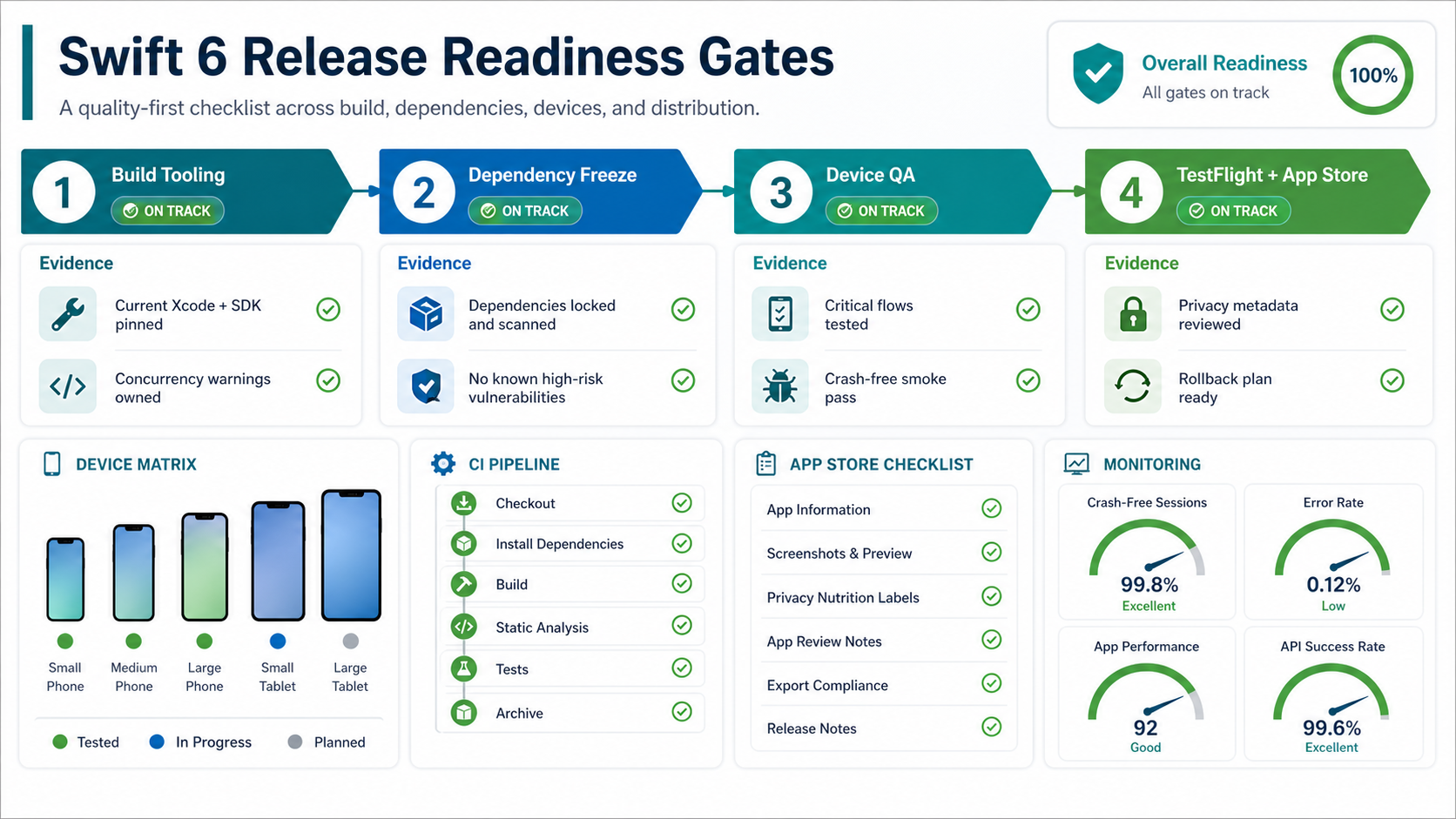
Use the gate to avoid a false sense of safety. Compile-time concurrency checks are valuable, but they do not prove real-device behavior, push delivery, purchase state, analytics, support workflows, or release-channel configuration. Pair the gate with software QA testing services or mobile app testing services when internal coverage is thin.
7. Prepare App Store Readiness Without Confusing SDK And Language Requirements
Apple's current submission requirement is about building uploaded apps with current Xcode and platform SDKs. That does not automatically mean every app target must use Swift 6 language mode. Still, a release that updates Xcode and SDK versions is a natural time to review Swift language settings, privacy details, screenshots, age ratings, entitlement changes, and App Store Connect metadata.
Treat Current SDK Upload Readiness As Its Own Gate
For 2026 release planning, keep a separate current-SDK gate in the migration board. The owner should prove that CI uses Xcode 26 or later, archives with the required platform SDK, signs with the correct profiles, exports the same build that QA tested, and has App Store Connect metadata ready before the Swift 6 language-mode switch becomes a release blocker.
Also check the current App Store Connect release notes during release week, because Apple accepts specific Xcode 26.x and SDK point releases over time. Treat that note as operational evidence: record the Xcode build number, SDK version, archive log, TestFlight build, and reviewer-facing release notes in the same go/no-go pack.
| Gate | Evidence To Collect | Owner |
|---|---|---|
| Build environment | Xcode 26 or later image, locked package resolution, archive/export logs, and reproducible signing settings. | iOS lead plus DevOps owner |
| Runtime safety | Real-device smoke pass for login, payments, offline sync, notifications, analytics, and any high-risk workflow touched by concurrency fixes. | QA lead plus feature owners |
| Store submission | Privacy details, SDK declarations, screenshots, release notes, support URL, TestFlight feedback, and rollback decision recorded before submission. | Release owner |
This gate also makes vendor handoffs clearer. If an internal team or migration pod claims the app is ready, the proof should match the same release evidence used in the mobile app testing checklist, not just a green compiler run.
Before submission, verify the archive, signing, provisioning profiles, privacy nutrition labels, third-party SDK declarations, crash reporting, TestFlight feedback, support URL, release notes, and rollback plan. If the migration affects core workflows, stage the rollout and monitor crash rate, login failures, payment errors, support tickets, conversion, and performance regressions. The mobile app performance optimization checklist can help define before-and-after baselines for launch week, while the website to iPad app migration checklist gives a parallel App Store readiness model for teams modernizing tablet workflows.
8. Decide Whether To Use Internal Capacity Or A Migration Pod
Swift 6 migration needs engineering attention, but it also needs product judgment. Internal teams usually know the app's edge cases best. External support can help when the team lacks concurrency migration experience, has too many release deadlines, or needs broader QA coverage.
A practical migration pod includes an iOS lead, a second Swift developer for module cleanup, QA support, backend/API awareness, and a release owner. If you need temporary capacity, NextPage can help you hire Swift developers in India or assemble a focused modernization team around the migration scope. Teams that want a broader delivery partner can compare the pod with IT outsourcing services, while larger roadmaps should compare staff augmentation vs managed dedicated team before assigning accountability.
Swift 6 Migration Checklist
Use this checklist to turn the migration into a controlled delivery plan:
- Confirm Xcode, SDK, CI, and App Store submission requirements for the release window.
- Inventory targets, packages, app extensions, SDKs, async code, and critical workflows.
- Enable strict concurrency checks in the lowest-risk modules first.
- Group warnings by workflow and risk, not only by count.
- Fix ownership of shared mutable state, UI updates, task boundaries, and dependency wrappers.
- Upgrade or isolate packages that block Swift 6 language-mode adoption.
- Run unit, integration, UI, device, TestFlight, and release-channel checks.
- Keep warning exceptions documented with owners and expiration conditions.
- Prepare App Store Connect metadata, privacy details, screenshots, and release notes.
- Define rollout monitoring, rollback triggers, and post-release support ownership.
For launch governance, add one more gate: decide what evidence blocks release and what evidence can follow in a stabilization sprint. A high-risk payment, identity, offline sync, or regulated-data workflow should require stronger device, crash, monitoring, and rollback proof than a low-traffic settings update.
How NextPage Helps With Swift 6 Migration
NextPage helps teams turn Swift 6 migration into a practical modernization plan through enterprise mobile app development services and focused iOS modernization support. We can audit your current iOS app, map concurrency warnings to real workflows, update SwiftUI and UIKit boundaries, replace risky dependencies, expand mobile QA coverage, prepare TestFlight evidence, and support App Store submission.
If your app is valuable but difficult to release, start with a migration audit. The output should be a module-by-module plan, dependency risk register, QA matrix, timeline, cost range, and release gate. That gives product and engineering leaders a safer path than waiting until a blocked App Store update forces a rushed migration.