
Quick Answer: Swift App Development Cost In 2026
Swift app development cost in 2026 depends less on the programming language alone and more on the release you are trying to ship. A focused native iOS MVP with one core workflow, SwiftUI screens, basic authentication, a simple backend, and limited integrations can stay in a disciplined planning band. A production Swift app with custom UX, backend APIs, admin tools, payments, analytics, TestFlight cycles, App Store review preparation, accessibility QA, privacy labels, monitoring, and maintenance needs a larger budget. Marketplace, fintech, health, AI-enabled, IoT, Apple Watch, or enterprise iOS apps need deeper architecture, security, device coverage, and support planning.
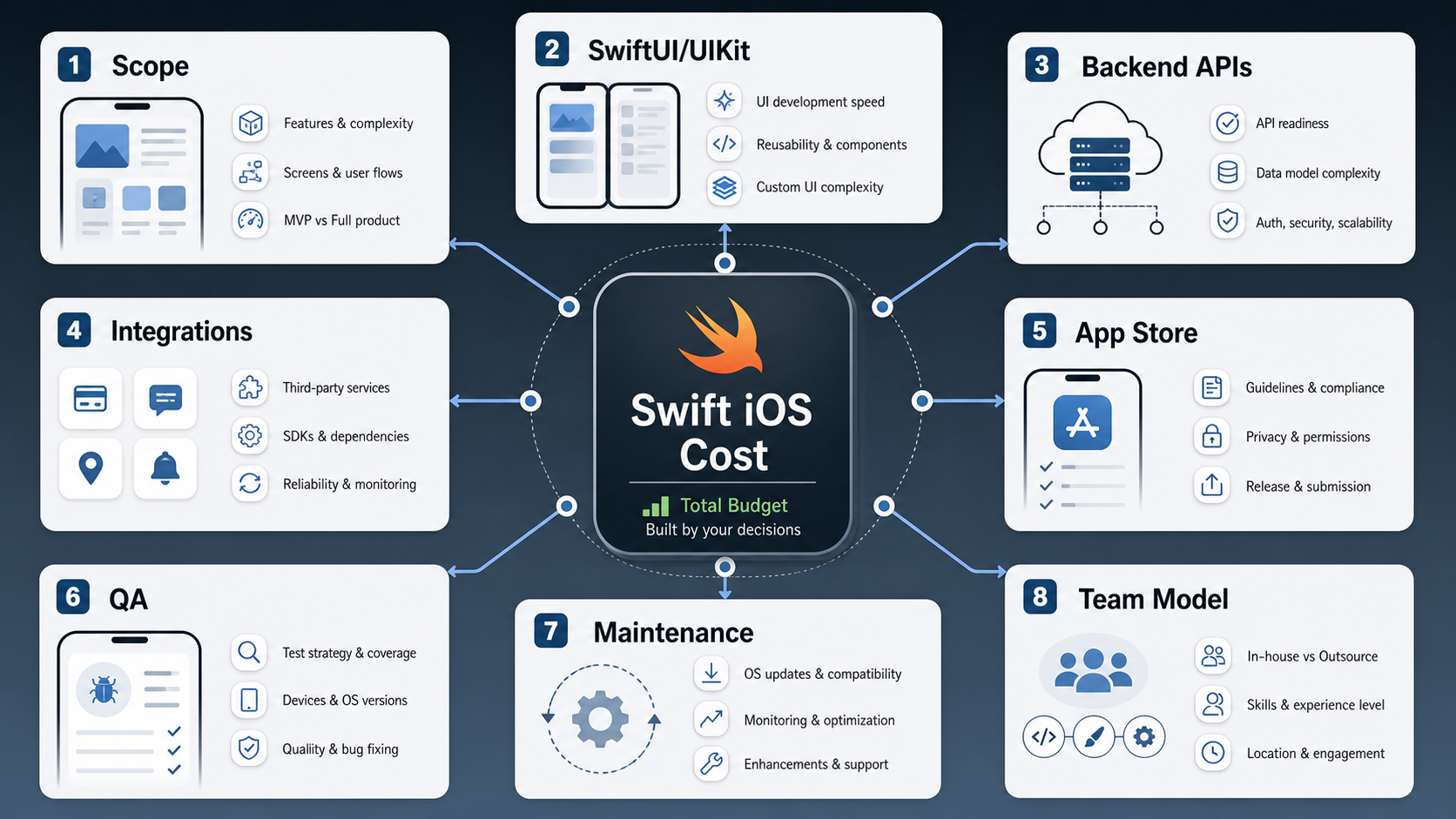
Use public cost ranges as market context, not as a quote. The estimate should come from scope, team model, SwiftUI versus UIKit needs, backend/API readiness, device and OS coverage, integrations, release QA, App Store obligations, and post-launch ownership. If you need a first-pass number before a scoping call, start with NextPage's Custom Software Cost Estimator, then refine the result around native iOS risks.
What Makes Swift App Cost Different?
Swift is the primary modern language for native iOS apps, but the cost advantage is not just syntax. Native Swift development gives teams direct access to iOS frameworks, device behavior, performance tuning, Apple platform conventions, and release tooling. That matters when the app depends on camera behavior, offline state, location, payments, accessibility, high-quality animation, or deep iPhone and iPad UX.
The tradeoff is platform specificity. A native Swift app is usually the right call when iOS quality is a product advantage, but it does not automatically give you an Android app. If the business needs both platforms on day one, compare native Swift with Flutter, React Native, or a phased platform plan. NextPage's Native Vs Cross Platform Mobile App Development guide is useful when the cost question is really a platform strategy question.
For iOS-first products, NextPage's Swift app development company team estimates Swift work as a full product system: app frontend, backend, integrations, release operations, QA evidence, and maintenance.
Swift Cost Bands By Release Scope
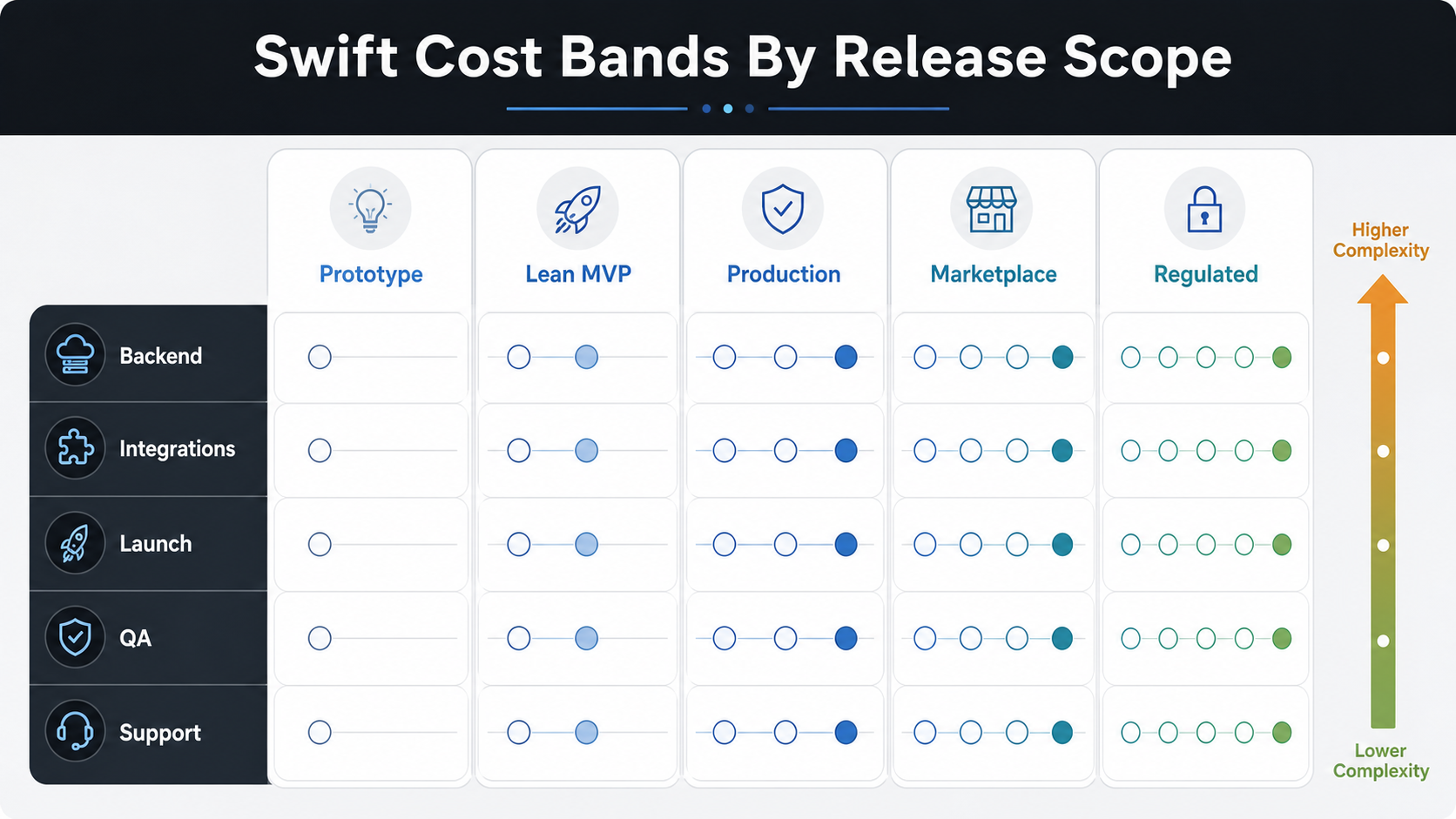
The table below is a planning model, not a fixed price list. Geography, delivery model, stakeholder speed, design maturity, API readiness, data sensitivity, and review cycles can shift the number.
| Release Scope | Typical Swift Build | Budget Signal | Timeline Signal |
|---|---|---|---|
| Prototype | Clickable UX, technical proof, sample data, limited or no backend | Lowest spend; useful before committing to engineering | 2-6 weeks |
| Lean Swift MVP | One core workflow, SwiftUI frontend, basic auth, simple backend, one or two integrations, TestFlight testing | Lower to mid range when version one is tightly scoped | 8-14 weeks |
| Production iOS App | Custom UX, backend APIs, admin tools, analytics, notifications, payments or subscriptions, App Store launch | Mid to high range because launch quality and support matter | 4-7 months |
| Marketplace Or Operations App | Multiple roles, transactions, moderation, reporting, real-time states, support tooling | Higher because edge cases and permissions multiply | 6-10 months |
| Regulated, AI, IoT, Or Enterprise App | Sensitive data, SSO, audit logs, model workflows, device integrations, compliance, high availability | Highest because architecture, QA, and governance are deeper | 8-12+ months |
SwiftUI, UIKit, Or Both?
SwiftUI is often the fastest path for modern native iOS interfaces, especially when the app can use current iOS patterns, declarative UI, reusable components, and a clean design system. It can reduce UI boilerplate and make iteration faster when the design is stable enough to implement.
UIKit still matters. Mature apps, complex collection views, advanced custom interactions, older codebases, and highly specific interface behavior may still need UIKit. Apple documents UIKit as the framework for constructing and managing iOS app interfaces, and SwiftUI/UIKit mixed strategies are legitimate for phased modernization.
The estimate should name this decision clearly. A greenfield SwiftUI MVP is different from a UIKit-heavy modernization project, and both are different from a hybrid app where only selected native modules are written in Swift.
Feature Cost Drivers For Native iOS Apps
| Feature Area | Lower-Cost Version | Higher-Cost Version |
|---|---|---|
| Accounts | Email login, basic profile, account deletion | SSO, MFA, roles, audit trail, admin controls, enterprise identity |
| Backend | Simple CRUD APIs and a few tables | Complex domain model, reporting, event history, import/export, backups |
| Payments | Simple checkout or subscription setup | Refunds, taxes, invoices, entitlements, reconciliation, fraud workflows |
| Device Behavior | Standard forms and content views | Camera, Bluetooth, location, offline sync, background work, media processing |
| AI | Assisted copy, classification, or recommendations | RAG, agents, personalization, evals, privacy controls, monitoring |
| Operations | Manual support and basic analytics | Admin dashboards, moderation, alerts, data exports, SLA reporting |
Integration readiness is a common budget trap. Payment gateways, maps, chat, CRM, ERP, analytics, identity, video, and vendor APIs can require approvals, sandbox data, security review, webhook handling, and support escalation. Before treating integrations as fixed line items, use the Mobile App Integrations Checklist.
App Store Launch Costs To Budget
Apple's Developer Program membership is currently listed at USD 99 per membership year, with local-currency pricing and possible waiver eligibility for qualifying organizations. That fee is small compared with the engineering budget, but App Store launch work is not just an account purchase.
Plan for App Store Connect setup, bundle identifiers, signing, TestFlight testing, screenshots, app metadata, review notes, privacy policy, data collection answers, subscription or payment configuration when relevant, accessibility checks, crash monitoring, release notes, and review feedback. Apple's App Review Guidelines are organized across Safety, Performance, Business, Design, and Legal, so a launch-ready estimate should account for product, policy, and technical evidence.
Apple's app privacy details require teams to understand what data the app and third-party partners collect before completing App Store Connect answers. If analytics, advertising, identity, payments, support chat, or AI vendors touch user data, those decisions belong in the estimate. NextPage's Mobile App QA And Launch Checklist helps turn launch requirements into a release gate instead of a last-week scramble.
Team Model And Timeline
A lean Swift app can use a compact team, but the responsibilities still exist: product scope, UX, Swift engineering, backend engineering, QA, release management, and cloud operations all need ownership. Compressing the team can reduce monthly burn, but it usually increases calendar time or rework if one person carries too many responsibilities.
| Role | What They Protect | When They Matter Most |
|---|---|---|
| Product Lead | Scope, priorities, acceptance criteria, tradeoffs | Any build with multiple stakeholders |
| UX/UI Designer | Onboarding, forms, empty states, accessibility, repeated-use clarity | Consumer, marketplace, and workflow-heavy apps |
| Swift Engineer | SwiftUI/UIKit implementation, state, device behavior, performance, release readiness | Every native iOS build |
| Backend Engineer | APIs, data model, auth, admin tools, integrations | Apps with accounts, workflows, payments, or reports |
| QA Engineer | Device matrix, regression, accessibility, release evidence, edge cases | Apps with payments, roles, integrations, or production users |
| Cloud/DevOps Engineer | Environments, monitoring, backups, build pipelines, performance | Apps that rely on backend reliability |
If your plan needs a dedicated iOS pod instead of a fixed-scope vendor quote, review NextPage's hire Swift developers in India option. Dedicated capacity can fit ongoing roadmap work, modernization, and release support better than a narrowly scoped build.
Swift Estimate Readiness Scorecard
A Swift estimate is only useful when the assumptions are visible. Before comparing vendors, score each category as clear, partially clear, or unresolved. Unresolved categories do not mean the app is impossible to price, but they should create a discovery line item instead of disappearing into a vague fixed quote.
| Estimate Input | Ready Signal | Risk If Missing |
|---|---|---|
| Product Scope | Core workflow, roles, screens, and acceptance criteria are named. | The team prices a feature list instead of a releasable app. |
| Native Stack | SwiftUI, UIKit, mixed strategy, and minimum iOS version are decided. | UI effort, device behavior, and modernization work are underestimated. |
| Backend And Admin | APIs, data model, admin users, reports, and support actions are visible. | The app ships screens but lacks the operating system behind them. |
| Integrations | Payment, maps, push, CRM, identity, analytics, and vendor owners are known. | Sandbox delays, API gaps, and approval cycles surprise the budget. |
| Quality Gate | Device matrix, accessibility, performance, crash thresholds, and regression scope are defined. | The app reaches TestFlight without enough release evidence. |
| Launch And Support | App Store assets, privacy details, monitoring, release notes, and maintenance owner are assigned. | Launch work and post-release fixes become emergency effort. |
Hidden Costs That Surprise iOS Teams
Swift app budgets often miss admin tooling, content moderation, support workflows, account deletion, accessibility, offline states, analytics events, privacy labels, review notes, device testing, dependency updates, and post-launch monitoring. None of these sound like major features, but they decide whether the app survives real users and App Store review.
Build and release infrastructure can also matter. Apple includes Xcode Cloud access as part of the Apple Developer Program, with compute-hour plans for teams that need more capacity. Whether the team uses Xcode Cloud, GitHub Actions on macOS runners, Bitrise, or another CI setup, the estimate should include build automation, signing ownership, TestFlight cadence, and rollback planning.
Maintenance should be budgeted from day one because iOS, Xcode, third-party SDKs, privacy expectations, and App Store rules keep changing. The Post-Launch Mobile App Maintenance Checklist can help teams plan crash fixes, OS updates, SDK reviews, analytics, security patches, and support response after launch.
How To Control Swift App Cost Without Weakening The Product
The best way to control Swift app cost is not to cut QA, backend ownership, or launch work. Those cuts usually return as rework. Cost control should start with sharper version-one decisions: one primary user journey, fewer payment or subscription variants, a smaller device support promise, fewer admin reports, and integrations that have real business value in the first release.
Use phased delivery when a feature is valuable but not yet validated. A founder may want social login, referrals, subscriptions, chat, offline mode, personalization, and analytics in the first version. A better MVP may ship one login method, one payment path, basic analytics, and a clear roadmap for the next two releases. The budget gets easier to defend because each phase has a product reason, not just a cheaper feature list.
Reuse should also be intentional. Existing backend APIs, design systems, identity providers, CMS tools, and analytics stacks can reduce effort when they are documented and stable. They can increase effort when they are brittle, undocumented, or missing sandbox data. Treat reuse as an estimate assumption and confirm it during discovery.
For cross-platform questions, do not force Swift to solve a business problem it is not meant to solve. If iOS quality is the differentiator, native Swift is sensible. If the first business risk is proving demand on two platforms, a cross-platform plan or phased Android rollout may be worth comparing before committing the budget.
How To Compare Swift App Development Quotes
Two Swift app quotes can look similar while covering very different work. One may include product discovery, UX, backend APIs, admin tooling, QA, App Store launch, crash monitoring, and maintenance. Another may include only mobile screens and a narrow handoff. Compare quotes by included responsibilities, assumptions, exclusions, and evidence, not only by the total number.
| Quote Area | What To Check | Why It Changes Cost |
|---|---|---|
| Scope Definition | Does the quote name workflows, roles, edge cases, and excluded features? | Vague scope turns into change requests. |
| Backend Ownership | Are APIs, admin tools, data model, cloud setup, and reporting included? | Many app budgets omit the system behind the iOS client. |
| QA Evidence | Does the team include device coverage, regression checks, accessibility, and crash thresholds? | Release quality is one of the largest hidden cost differences. |
| Launch Support | Are App Store Connect, TestFlight, screenshots, review notes, and privacy details included? | Launch work often appears late if it is not priced. |
| Maintenance | Is there a post-launch support window, dependency update plan, and analytics review? | iOS apps need ongoing ownership after version one. |
A strong quote should also explain delivery model. Fixed-scope pricing can work for a narrow MVP with clear acceptance criteria. Dedicated capacity can work better when the roadmap is evolving, the backend is still being shaped, or the product needs ongoing releases. Hybrid models can start with discovery and then move into phased delivery once risk is clearer.
Ask every vendor what would make the estimate wrong. Good answers mention integration uncertainty, App Store review feedback, missing API docs, device-specific behavior, compliance requirements, analytics gaps, stakeholder delays, and support expectations. Weak answers usually promise certainty before the product has been scoped.
What To Include In A Swift Estimate
A useful Swift estimate should separate discovery, UX, native iOS frontend, backend, integrations, admin tooling, QA, launch, and maintenance. It should also show assumptions: target devices, minimum supported iOS version, accessibility expectations, API owners, analytics events, payment rules, privacy requirements, support window, and what is excluded from version one.
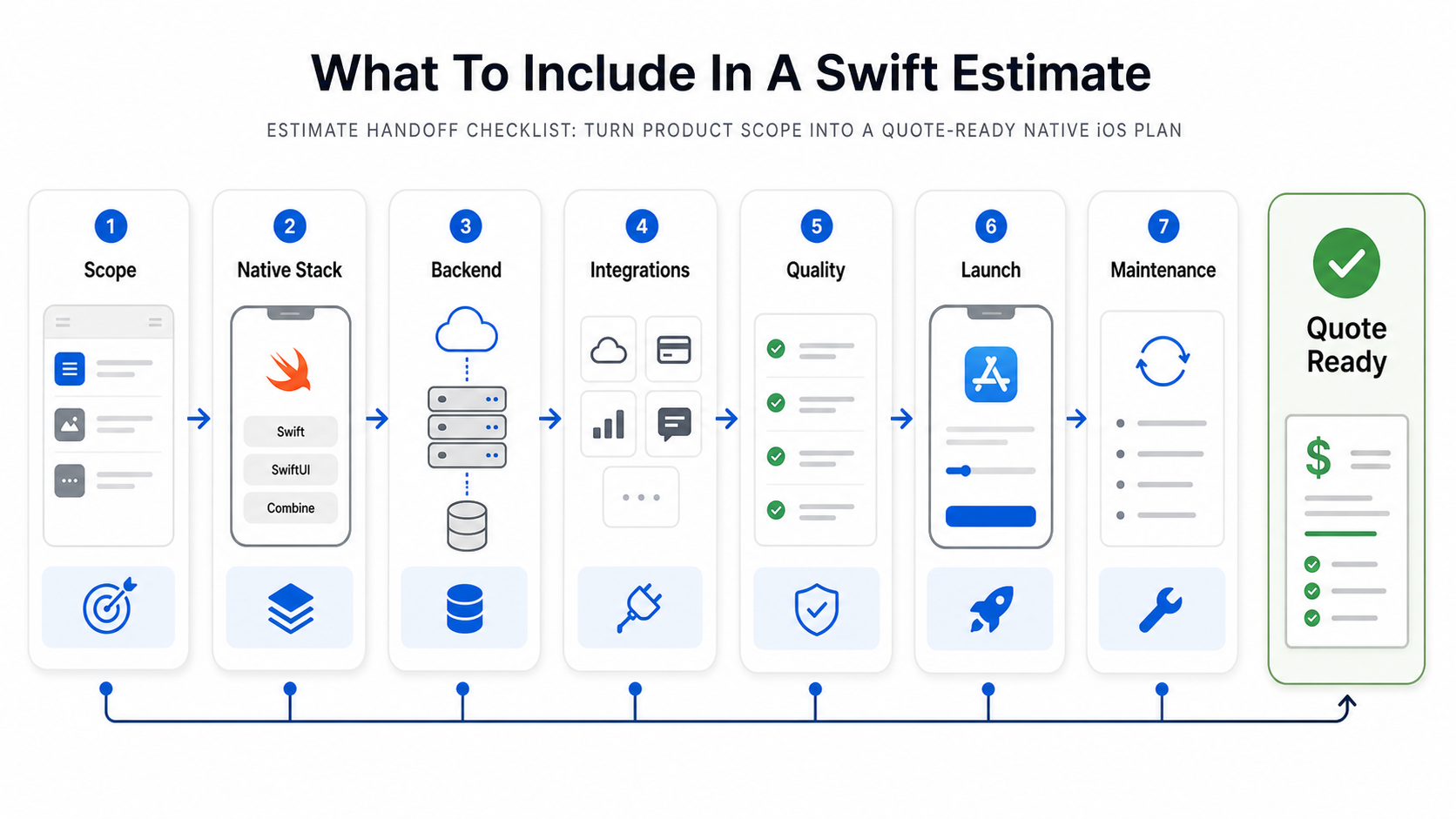
- Scope: core workflow, user roles, screens, permissions, edge cases, acceptance criteria.
- Native Stack: SwiftUI, UIKit, mixed approach, local storage, state management, device APIs.
- Backend: APIs, database, admin tools, auth, reporting, cloud environments, backups.
- Integrations: payment, maps, push, chat, CRM, identity, analytics, vendor APIs, sandbox status.
- Quality: device matrix, iOS coverage, accessibility, performance targets, crash thresholds, security review.
- Launch: Developer Program, App Store Connect, TestFlight, screenshots, privacy labels, review notes, release notes.
- Maintenance: dependency updates, OS changes, crash fixes, analytics reviews, support tooling, roadmap releases.
If the team is still debating version-one scope, use the MVP Scope Builder before collecting fixed-price quotes. The cheapest estimate is often the one that removes low-confidence features before engineering starts. For broader context, compare this native iOS plan with the companion mobile app development cost guide.
How NextPage Estimates Swift Apps
NextPage estimates Swift apps by mapping the operating workflow first, then translating it into native iOS scope, backend architecture, integrations, QA depth, App Store launch work, and post-launch ownership. That gives founders and product leaders a budget they can defend because it names the assumptions behind the number.
For a narrow MVP, the answer may be a disciplined SwiftUI app with a small backend and limited integrations. For a production product, the answer may include admin tools, analytics, accessibility checks, TestFlight cycles, release management, and maintenance capacity. For marketplace, AI, regulated, or enterprise apps, the estimate should include architecture, security, compliance, monitoring, support, and phased delivery.
Start with the Custom Software Cost Estimator, then review the result with a team that can challenge the scope, expose hidden iOS risks, and turn the estimate into a practical build plan. If release quality is the biggest unknown, NextPage's mobile app testing services can help turn QA assumptions into a launch gate.