
Quick Answer: What Is The Future Of eLearning Apps?
The future of eLearning apps is not only video lessons on a phone. The strongest products combine mobile access, adaptive learning paths, AI tutoring, microlearning, gamified practice, immersive simulations, LMS analytics, and accessibility controls into one learning system. The goal is simple: help each learner reach a useful outcome faster, with enough feedback and support to keep going.
For founders, schools, training teams, and education businesses, the practical question is not "Which trend should we copy?" It is "Which learning problem are we solving, and which product model can prove that users learn, practice, and return?" That product lens matters because every future-facing feature adds cost, content operations, data responsibility, and support expectations.
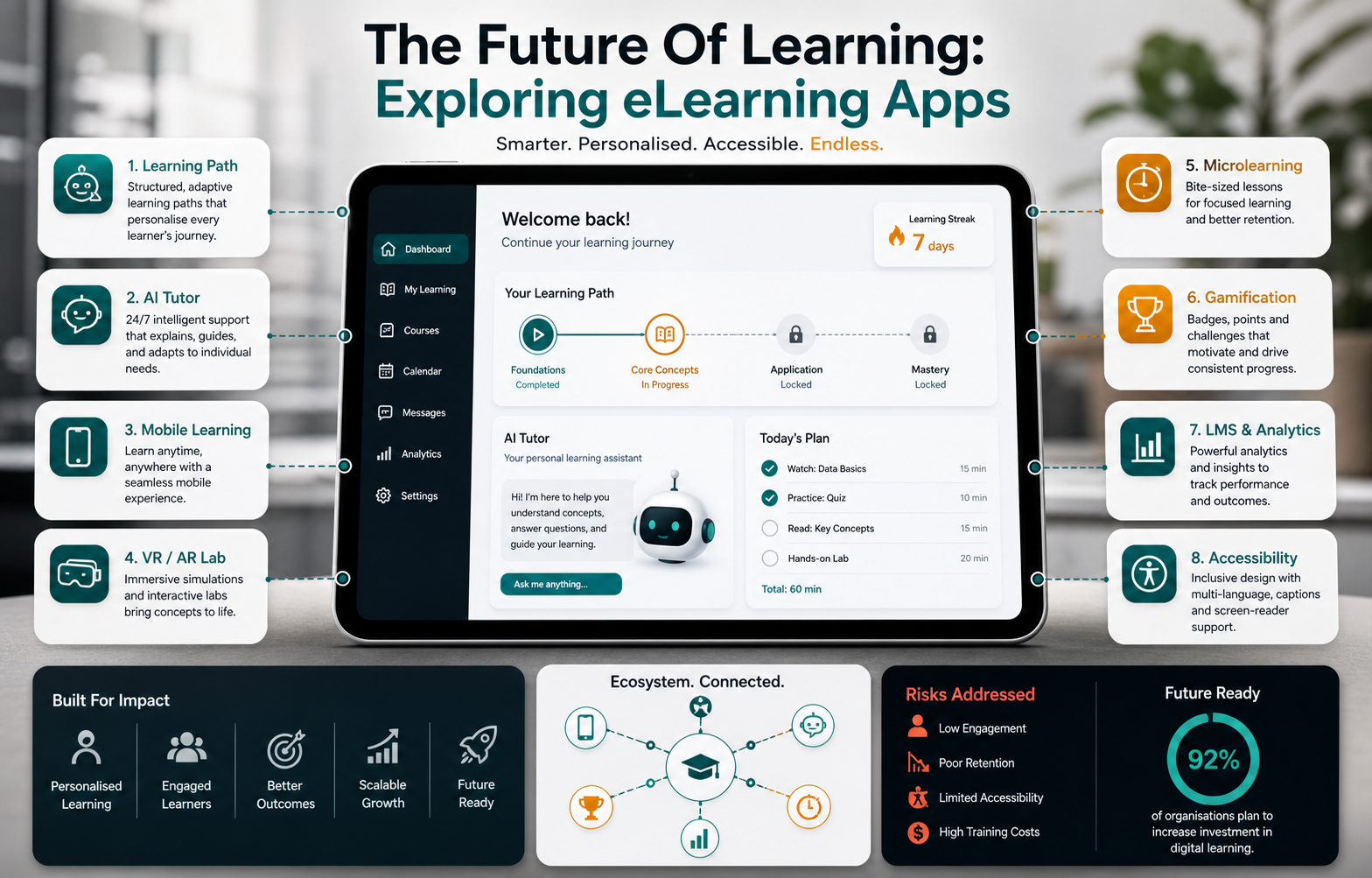
Why eLearning Apps Are Changing Education
eLearning apps changed education because they removed many of the old constraints around location, schedule, and access to content. A learner can review a lesson before work, complete a quiz during a commute, join a live class from home, or revisit a difficult concept without waiting for the next classroom session. That flexibility is valuable for students, professionals, parents, field teams, and distributed workforces.
But access alone is no longer enough. A content library with poor onboarding, weak practice, and no feedback quickly becomes another unused subscription. The next generation of learning apps has to make progress visible, personalize the path, support different devices, and help educators or admins see where learners are stuck. For teams planning a serious learning product, NextPage's mobile app development work can connect product scope, app UX, integrations, analytics, and launch readiness from the start.
Accessibility And Flexible Learning Come First
Accessibility is one of the most important promises of eLearning, but it has to be designed intentionally. Learners may need captions, transcripts, adjustable text size, keyboard-friendly navigation, screen reader support, low-bandwidth modes, offline downloads, multilingual content, or flexible pacing. These are not polish items. They decide whether the product can serve learners with different abilities, devices, locations, and schedules.
A strong eLearning roadmap should treat accessibility as a product requirement instead of a compliance afterthought. That means designing lesson formats that work on small screens, keeping interactions predictable, testing with assistive technologies, and avoiding important instructions that only appear in images or audio. Related examples from online education apps show why convenience and usability often matter as much as the lesson library itself.
AI Personalization And Tutoring
Artificial intelligence can make eLearning more adaptive, but it should not be treated as a magic layer on top of weak content. Useful AI features start with clear learning objectives, structured lessons, quality source material, and measurable progress signals. When those foundations exist, AI can recommend the next lesson, explain a concept in a different way, generate practice questions, summarize gaps, and help instructors identify learners who need support.
AI tutoring also creates responsibility. A learning app may need guardrails for incorrect answers, age-appropriate explanations, approved content sources, moderation, privacy, and human escalation. The education app development cost guide is useful here because AI tutor scope changes budget, timeline, data architecture, and quality assurance. The safest MVP usually begins with bounded AI assistance around approved lessons before expanding into open-ended tutoring.
Immersive Learning With VR And AR
Virtual reality and augmented reality can make complex lessons easier to understand when the subject benefits from spatial practice. Medical training, engineering, architecture, manufacturing, safety procedures, lab simulations, and historical environments can all become more concrete through guided 3D experiences. Learners can practice a risky or expensive scenario before facing it in the real world.
Immersive learning should still be tied to outcomes. A VR module that looks impressive but does not improve recall, confidence, or task performance will be hard to justify. Start with moments where a normal video or quiz cannot teach the concept well enough. Then design the experience around specific actions, feedback, and assessment. For product teams considering this path, the principles behind AR/VR app development help frame device support, interaction design, 3D asset quality, and performance constraints.
Microlearning For Busy Learners
Microlearning breaks complex topics into short, focused lessons that can be completed in a few minutes. This works well for workplace training, language learning, product education, compliance refreshers, sales enablement, and skill reinforcement. The format matches how many people actually learn: in small windows, across repeated sessions, with quick checks for understanding.
The risk is fragmentation. If each short lesson is isolated, learners may collect badges without building real mastery. Good microlearning products connect small lessons to a larger path, repeat important concepts, and use practice to move knowledge from recognition to application. The product should answer what learners do next, not only what they watched.
Gamification That Supports Real Progress
Gamification works when it reinforces behavior that already matters: completing practice, reviewing weak areas, keeping a streak, helping peers, or applying a skill. Points, badges, levels, challenges, and leaderboards can improve motivation, but they should not distract from the learning goal. A leaderboard may help one audience and discourage another.
The best gamified eLearning apps make progress feel visible without making the product childish. For example, a professional certification app might use mastery levels, scenario challenges, and confidence scores instead of cartoon rewards. Language products often show how this can work because adaptive learning paths, daily practice, pronunciation feedback, and gamified review loops all support repeated use.
Mobile Learning And Offline Access
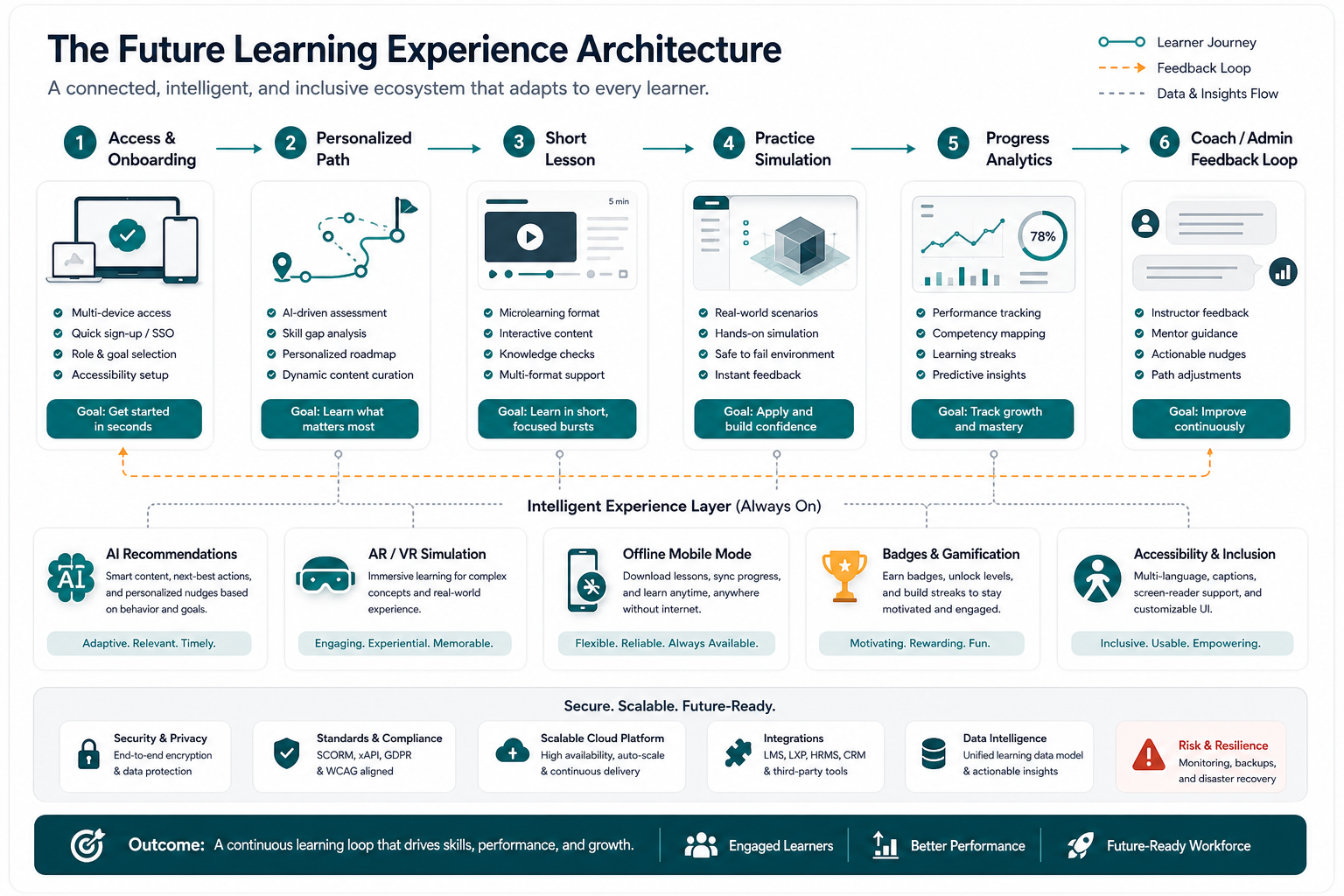
Mobile learning is central to eLearning because the phone is often the learner's most reliable device. A strong mobile experience supports short sessions, saved progress, push reminders, downloads, low-data playback, quick assessments, and clear resume points. For many learners, offline access is not a bonus. It is the difference between completing a course and abandoning it.
Mobile design also changes content strategy. Long lectures may need chaptering, transcripts, summaries, quizzes, bookmarks, and notifications that respect the learner's schedule. If the app is expected to support both consumer learners and institutions, product teams should decide early how accounts, cohorts, admin dashboards, certificates, and payment models will work across devices.
Learning Management Systems Are Becoming Product Platforms
Learning Management Systems used to be seen mostly as content delivery and progress tracking tools. Modern LMS products are becoming broader platforms with cohort management, integrations, analytics, skill maps, certification workflows, AI support, content authoring, and admin reporting. The value is no longer just "host the course." It is "show who is learning, where they are stuck, and what action should happen next."
This evolution matters for both education companies and corporate training teams. A consumer learning app may prioritize engagement and subscription retention. A corporate LMS may prioritize compliance, manager visibility, role-based learning paths, identity integrations, and audit trails. Teams that need a custom learning platform can also evaluate NextPage as a custom platforms, apps, and AI systems partner when off-the-shelf LMS constraints block the product model.
Professional Development And Workforce Training
eLearning is reshaping professional development because teams need faster reskilling without pulling employees out of work for long classroom sessions. Apps can deliver role-based learning paths, onboarding modules, compliance refreshers, sales playbooks, product training, and leadership development with measurable completion and assessment data.
The most useful workforce learning products connect training to the job. That may mean contextual lessons, manager assignments, practice scenarios, real-time knowledge checks, and reporting that highlights who needs help. If a training product claims to improve performance, the app should track more than completions. It should measure confidence, skill application, repeat attempts, assessment results, and relevant business outcomes.
Privacy, Quality, And Data Responsibility
Learning apps collect sensitive signals: age, progress, weak areas, assignments, behavior patterns, messages, certificates, and sometimes workplace or school data. AI features can add even more complexity because prompts, tutor responses, and generated feedback may need review and retention rules. Privacy and data security should be part of the product plan before launch.
Quality assurance is equally important. Broken progress tracking, inaccurate AI feedback, inaccessible lessons, poor video playback, and confusing admin reports can damage trust quickly. Plan testing around learner roles, admin roles, payment flows, content updates, offline sync, notifications, and analytics accuracy. The more the product affects formal education or work outcomes, the more careful the release process needs to be.
How To Plan An eLearning App MVP
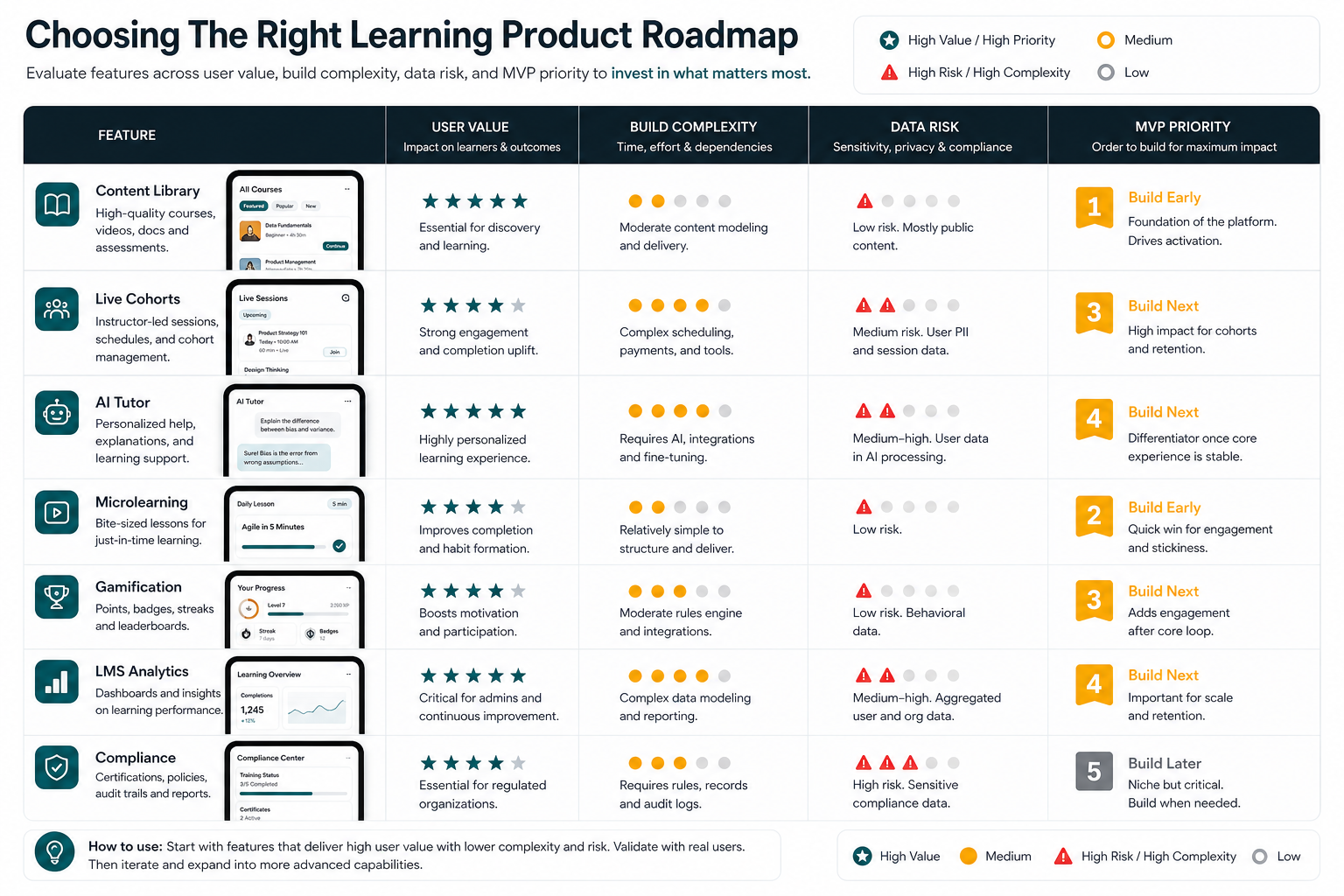
An eLearning MVP should prove a learning behavior, not simply ship a large content library. Choose one audience, one outcome, and one learning loop. For example, a language MVP might prove daily practice and retention. A professional training MVP might prove onboarding completion and manager visibility. An AI tutor MVP might prove that learners ask useful questions and receive safe, accurate help around approved content.
Use the first version to test the product model: content operations, onboarding, lesson completion, assessments, reminders, analytics, and support. Advanced features such as AI tutoring, VR modules, complex gamification, and enterprise integrations can be staged after the core loop is working. To estimate scope before overcommitting, the Custom Software Cost Estimator can help frame feature complexity, integrations, user roles, AI scope, and timeline assumptions.
Common eLearning App Mistakes To Avoid
| Mistake | Why It Hurts | Better Product Decision |
|---|---|---|
| Starting with too much content | Teams ship a library before proving engagement or outcomes. | Validate one learning loop with a focused audience and measurable result. |
| Adding AI without content guardrails | Answers can become inaccurate, unsafe, or inconsistent with the curriculum. | Use approved sources, scoped prompts, review workflows, and escalation paths. |
| Treating accessibility as a late fix | Important learners may be blocked by captions, navigation, contrast, or device issues. | Design accessibility, offline use, and low-bandwidth behavior into the MVP. |
| Using gamification as decoration | Rewards can distract from the actual learning behavior. | Tie badges, streaks, and challenges to practice, mastery, and retention. |
| Ignoring admin and educator workflows | Learners may progress, but teams cannot manage content, cohorts, or interventions. | Plan dashboards, roles, reporting, and content operations early. |
| Measuring only course completion | Completion does not prove understanding or job impact. | Track assessment quality, repeat practice, confidence, application, and retention. |
eLearning App Build Checklist
- Define the learner, learning outcome, and core behavior the MVP must prove.
- Choose the product model: content library, live cohort, marketplace, LMS, AI tutor, or blended platform.
- Design mobile-first lesson flows with offline, low-bandwidth, and accessibility requirements.
- Map each advanced feature to a clear learning outcome before adding it to scope.
- Plan content operations, moderation, assessments, certificates, and admin workflows.
- Set analytics for activation, lesson completion, assessment performance, retention, and intervention points.
- Protect learner data with role-based access, privacy rules, and secure integrations.
- Start AI features with bounded, approved content before moving toward open-ended tutoring.
- Test the app across learner, instructor, admin, and payment or subscription flows.
Final Recommendation
The future of learning apps belongs to products that combine access with evidence of progress. AI, VR, AR, gamification, microlearning, and LMS analytics can all help, but only when they serve a real learner journey. A future-ready eLearning app should be easy to start, useful in short sessions, accessible across devices, clear about progress, and supported by strong content and data practices.
If you are planning an education or training product, begin with the learning outcome and the business model. Then build the smallest product that proves users learn, practice, return, and trust the system. Once that loop is working, advanced learning technologies become accelerators instead of expensive distractions.