
Quick Answer: What Makes Photos Feel Unique?
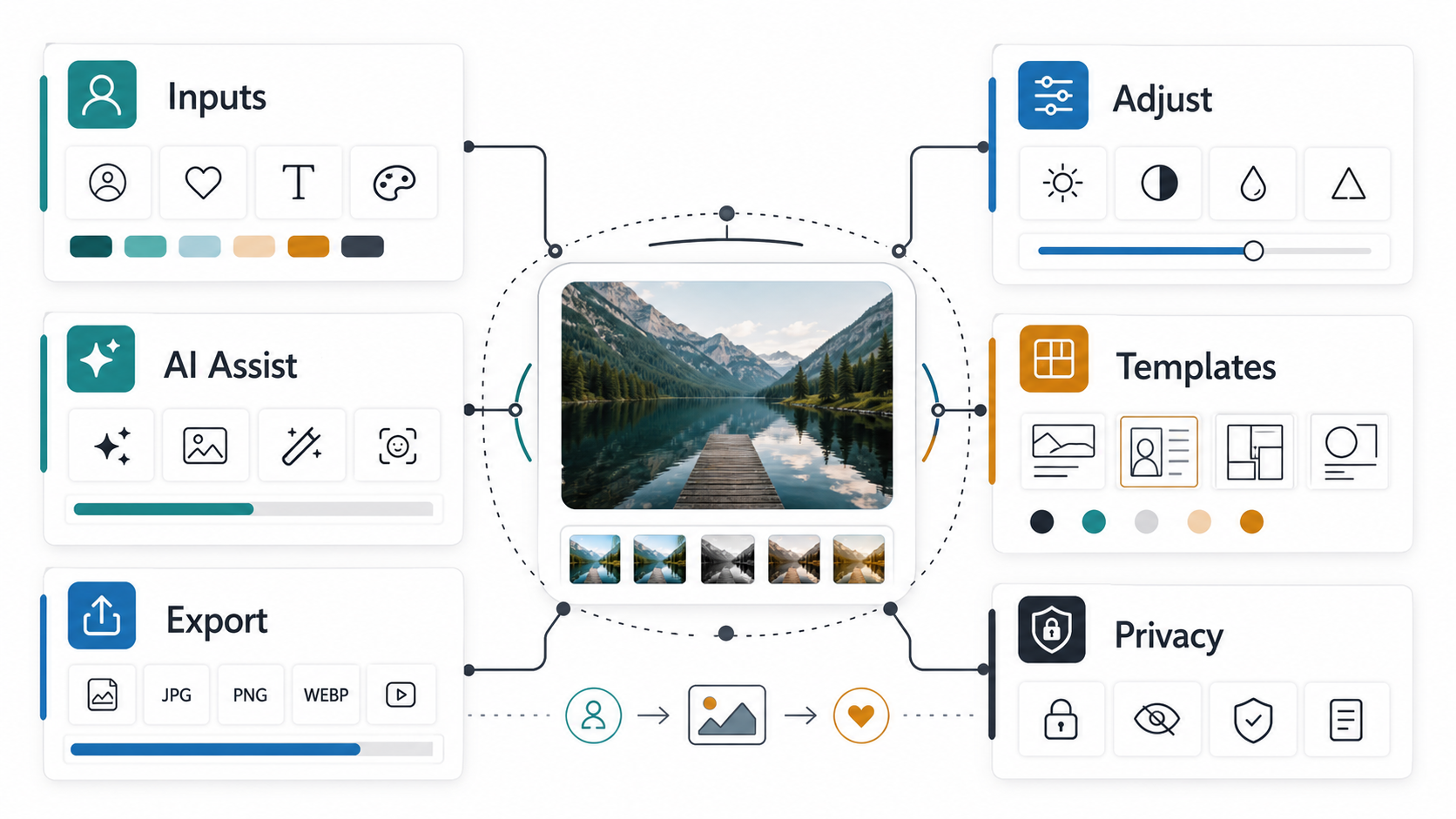
Unique photos usually come from a combination of thoughtful composition, controlled editing, and personal context. Brightness, contrast, color, cropping, filters, text, stickers, AI cleanup, and export settings all matter, but the strongest results come when those tools support a clear style or story instead of being applied randomly.
For users, photo customization means adjusting the image so it reflects a mood, brand, memory, product, or creative identity. For product teams, personalization means building editing flows that adapt to user goals, skill level, saved preferences, and output channels. If you are planning a photo editor or creator app, these decisions belong in the earliest mobile app development scope, not as a last-minute tool drawer.
Why Customization And Personalization Matter In Photo Editing
Most people can take a technically decent photo. The harder job is making that image feel intentional. Customization helps a user turn a generic capture into something that fits a personal style, product catalog, campaign, profile, invitation, memory, or social post. Small changes such as warmer color, tighter crop, cleaner background, consistent typography, or a saved preset can make the image feel owned instead of copied.
Personalization also improves retention in photo editing apps. When an app remembers a user's favorite filters, brand colors, export formats, caption styles, or editing history, the next edit starts faster. That is why product planning should begin with user jobs and personas. NextPage's guide to user personas in app development is a useful companion when separating casual editors, creators, photographers, sellers, and business teams.
Core Feature Stack For Personalized Photo Editing
| Feature Layer | What It Enables | Product Priority |
|---|---|---|
| Basic adjustments | Brightness, contrast, saturation, warmth, sharpness, crop, rotate, and resize. | Must have |
| Style controls | Filters, presets, color grading, overlays, borders, and reusable looks. | Must have |
| Composition tools | Crop ratios, alignment guides, object placement, background cleanup, and templates. | Must have |
| Personal overlays | Text, stickers, captions, graphics, logos, dates, and campaign elements. | Growth stage |
| AI assistance | Object removal, background replacement, retouching, denoise, upscale, and suggestions. | Growth stage |
| Export intelligence | Channel-specific sizes, compression, watermarking, metadata, and saved formats. | Must have for creators and brands |
The best photo editing products do not expose every control at once. They create a layered journey: quick improvement first, manual refinement second, creative overlays third, and export decisions last. This keeps beginners from feeling overwhelmed while still giving advanced users enough control.
For a broader photo-editing feature baseline, compare this article with must-have features for a powerful photo editing app and advanced editing tools for your app.
Fine-Tuning Visual Elements
Visual adjustment is the foundation of personalization. Brightness, contrast, saturation, exposure, highlights, shadows, white balance, and color temperature decide whether the image feels soft, bold, natural, cinematic, premium, playful, or dramatic. Even simple edits can change the perceived quality of a product image or social post.
Good apps make these controls understandable. Instead of hiding everything behind technical labels, they can offer before/after previews, named presets, suggested ranges, and undo history. Advanced users still need precise sliders, curves, selective edits, masks, and RAW support, but beginners need confidence that every change can be reversed.
Composition, Cropping, And Layout Control
Composition tools help users decide what the viewer should notice first. Cropping, rotation, straightening, perspective correction, background cleanup, and object positioning can turn a busy capture into a focused image. This matters for portraits, product photos, real estate images, food photos, event posts, and creator thumbnails.
Modern photo apps should include common aspect ratios for Instagram, YouTube thumbnails, app-store screenshots, ecommerce listings, profile photos, blog images, and ads. Export-aware cropping is especially helpful because a photo that looks good in the editor may fail when cropped by a platform feed.
Filters, Presets, And Brand Style
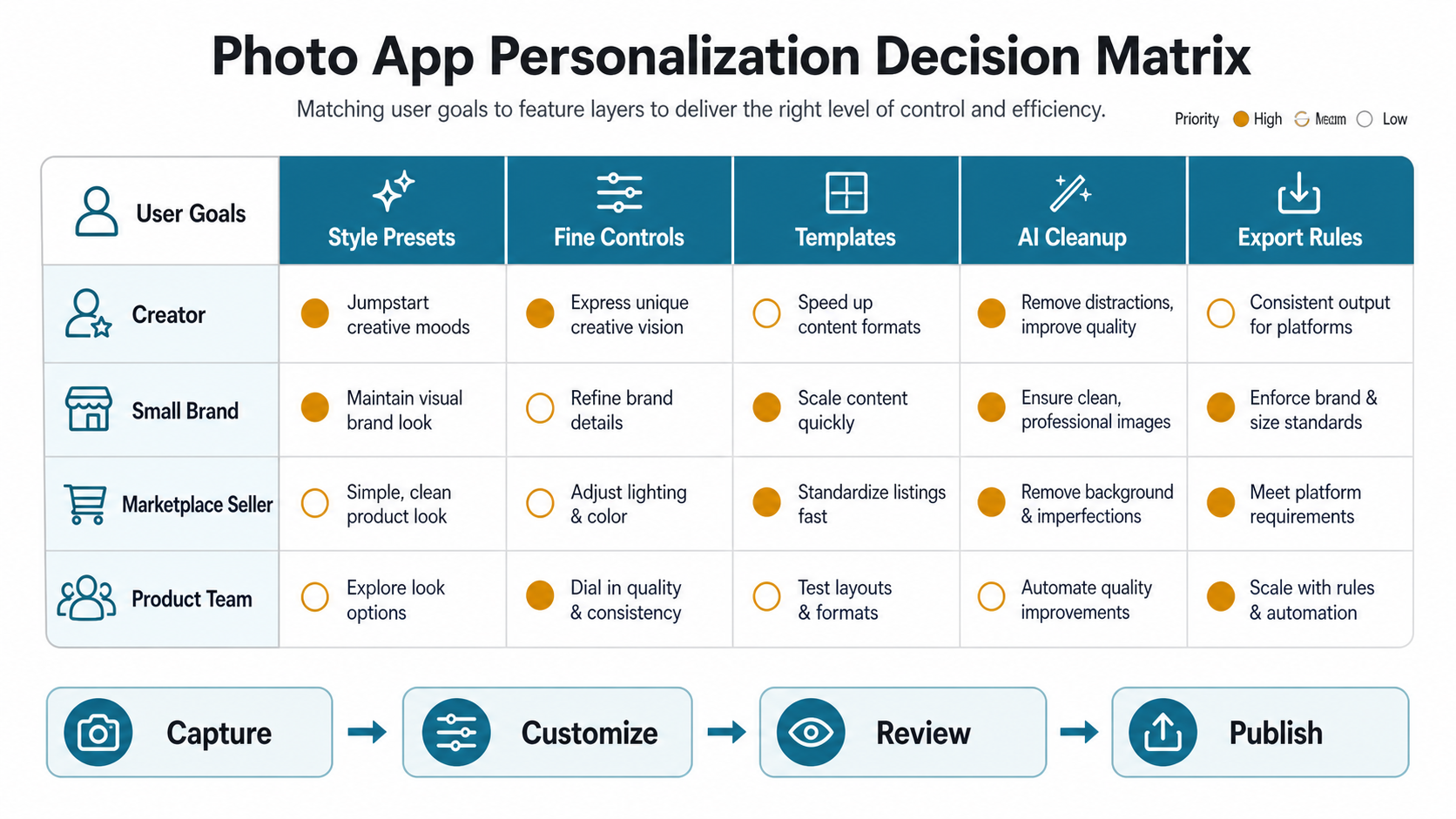
Filters are useful when they create consistency, not when they replace judgment. A creator may use a warm preset across travel photos. A small brand may use the same contrast, background treatment, and text placement across catalog images. A marketplace seller may use a clean bright preset to keep listings consistent.
Product teams should let users save, name, reuse, and adjust style presets. Preset locking can also help business users keep brand visuals consistent across multiple team members. When the editing app has social loops, the connection between style and sharing becomes even stronger; NextPage's post on social sharing integration for photo editing apps explains why sharing is part of the product workflow, not just an export button.
Text, Graphics, And Personal Overlays
Text, captions, stickers, graphics, frames, logos, and overlays help photos communicate context. A birthday image, product launch post, sale announcement, tutorial cover, or event memory often needs more than color correction. The challenge is giving users enough creative freedom without creating cluttered images.
Useful controls include font pairing, alignment guides, contrast checks, reusable brand kits, safe-area warnings, and channel templates. If the editor serves business users, templates should include repeatable campaign layouts and export rules. If it serves casual users, the app should make it easy to remove, reposition, resize, and undo overlays.
AI-Assisted Personalization Workflow
AI can make photo personalization faster by suggesting edits, cleaning backgrounds, removing distractions, retouching portraits, upscaling low-resolution images, generating captions, or adapting exports for different channels. The best AI features act like assistants. They reduce repetitive work while leaving the user in control of the final image.
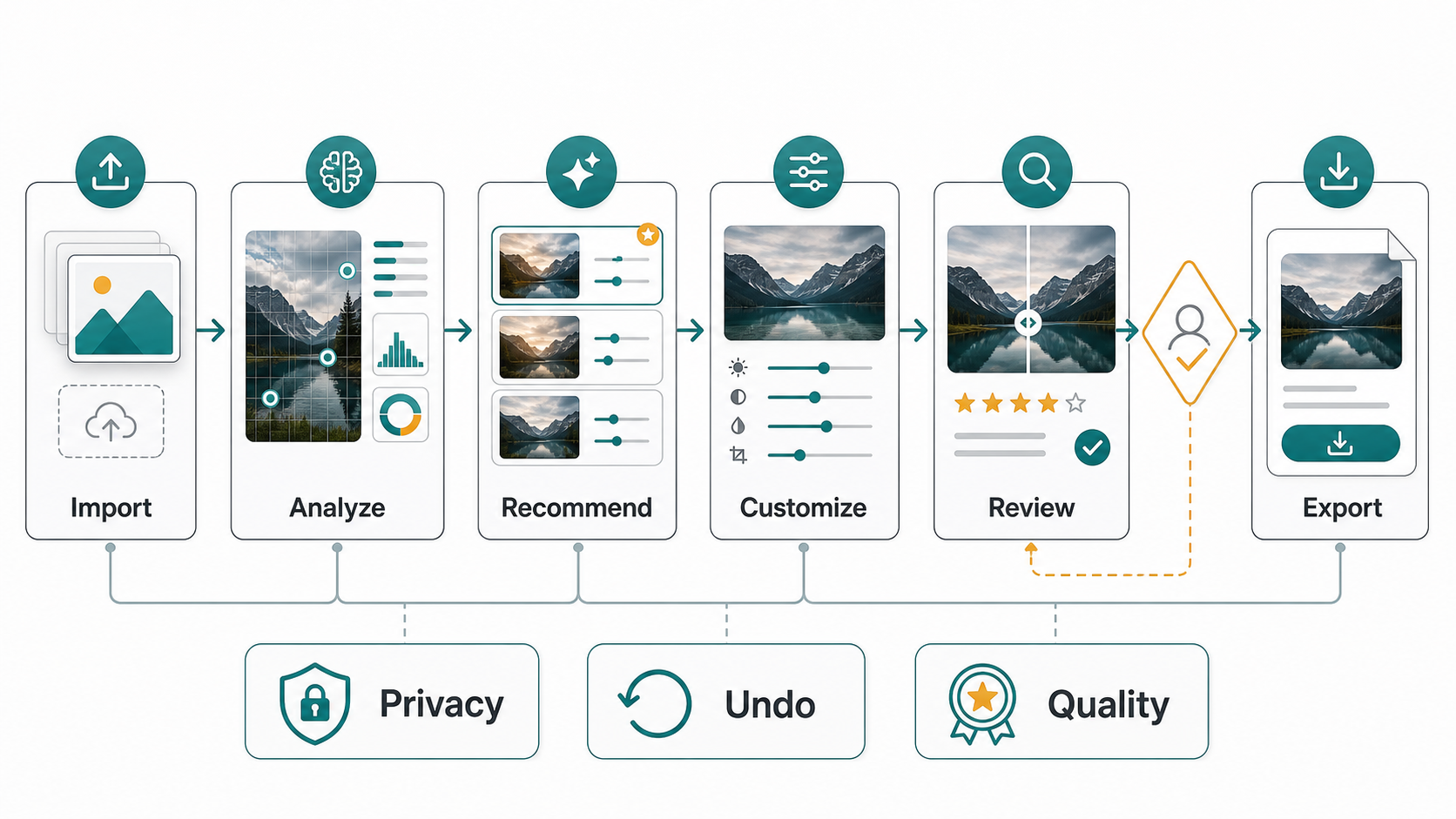
AI also adds product risk. Teams need to define image privacy, model quality, failed-generation states, edit transparency, usage limits, cost per action, and human review. If AI features are part of the roadmap, NextPage's generative AI development work can help connect model capability with a reliable app workflow. The AI Automation ROI Calculator can also help decide whether the editing volume justifies custom automation.
Use Cases: Portraits, Products, And Creator Content
Different image types need different personalization rules. Portrait editing needs subtle retouching, natural skin tone, lighting correction, and reversible changes. Product images need clean backgrounds, sharp detail, consistent color, and export quality. Creator content needs speed, templates, captions, visual identity, and social-ready formats.
This is why a photo editor should avoid one universal workflow. The app can ask about the user's goal during onboarding, then prioritize the right controls. A seller may see background cleanup first. A creator may see templates and captions. A photographer may see RAW controls and color tools. A casual user may see one-tap enhancement with easy manual edits nearby.
Privacy, Export, And Quality Controls
Personalized photos often contain faces, homes, products, documents, locations, or business assets. A trustworthy editing app should explain what is processed locally, what is sent to the cloud, how long images are retained, and whether uploads are used to improve models. These choices become more important when AI cleanup, face editing, or background generation is involved.
Export quality is just as important. Users should understand resolution, file type, compression, watermarking, metadata, and channel size. A polished edit can still disappoint if the exported image is blurry, over-compressed, cropped incorrectly, or missing transparency where the user expected it.
Planning A Photo Personalization App
If you are building a photo personalization product, start with the smallest workflow that proves the core value. The first release may include import, basic adjustments, presets, crop ratios, text overlays, export settings, account sync, and a simple admin or analytics layer. AI cleanup, background generation, brand kits, collaboration, subscriptions, and marketplace templates can follow once the core editing loop is stable.
The MVP Scope Builder is useful for separating launch-critical editing features from later roadmap items. If the product needs accounts, subscriptions, cloud storage, AI credits, team roles, or marketplace content, the Custom Software Cost Estimator can help frame the likely complexity before engineering starts.
Common Mistakes To Avoid
- Adding too many tools at launch: a crowded editor can make the first successful edit harder.
- Ignoring export context: every channel crops, compresses, and displays images differently.
- Overusing AI retouching: unrealistic edits can reduce trust, especially for portraits and products.
- Forgetting undo and history: users experiment more when they know edits are reversible.
- Skipping privacy decisions: cloud processing and AI features need clear user-facing rules.
- Treating personalization as decoration: true personalization should make the workflow faster and the output more relevant.
How To Measure A Better Personalization Experience
Photo editing teams should measure more than downloads. Useful metrics include import-to-first-edit completion, preset use, undo rate, export success, repeat edits, saved template use, AI action acceptance, paid feature conversion, share rate, and support tickets around quality or privacy. These metrics show whether personalization is helping users finish better images faster.
For content-heavy photo products, also track which templates, filters, AI actions, and export formats create repeat usage. That data can guide roadmap decisions without overwhelming users with every possible tool.
Final Recommendation
Personalization is not just about adding filters. It is the system that helps a user turn a raw image into a result that feels intentional, distinctive, and ready for its destination. Start with strong adjustment and composition tools, add style memory and templates, introduce AI where it saves real effort, and protect trust with privacy, review, undo, and export quality.
For readers choosing an editor, pick the app that fits your workflow. For teams building one, design the path from import to export around the user's real goal, then add advanced personalization only where it makes that path faster or better.