
Quick Answer: What Makes A Fitness App User-Friendly?
A user-friendly fitness app helps people start quickly, understand what to do next, track progress without friction, and keep exercising safely over time. The best products combine simple onboarding, personalized workout plans, habit reminders, progress dashboards, accessibility options, expert guidance, community features, and privacy controls into one clear mobile experience.
For founders and product teams, user-friendly does not mean basic. It means the app removes decision fatigue while still supporting real fitness goals. A strong mobile app development plan should connect UX, data, integrations, coaching content, notifications, analytics, and launch operations before engineering starts.
Start With A Clear User Promise
Before choosing features, define the job the app will help users complete. A weight-loss app, strength-training app, yoga app, wellness app, sports coaching product, and wearable companion all need different onboarding flows, metrics, and retention loops. The promise should be specific enough that a user knows why the app belongs on their home screen.
A practical product promise might be: build a realistic four-week routine, complete safe workouts at home, understand daily movement, or keep a trainer and client aligned between sessions. This positioning shapes the product roadmap far more than a generic checklist of fitness features.
Simple And Clear Design
Fitness apps often fail because the interface asks users to make too many choices before they have built a habit. A user-friendly design keeps the first screen focused on the next useful action: start today's workout, log a meal, review progress, or adjust the plan.
Use recognizable navigation, readable type, high-contrast workout controls, large tap targets, and predictable layouts. During active exercise, the interface should be even simpler: current move, timer or rep count, form cue, pause button, and the next exercise. Anything else can wait until the workout is complete.
Quick Sign-Up And Low-Friction Onboarding
A long registration flow can break motivation before the first workout. Ask only for information that changes the initial plan: goal, current level, available equipment, workout location, limitations, preferred schedule, and consent for health-related data. Social login, email login, and phone login are useful, but the more important decision is when to ask each question.
The best onboarding flows show value immediately. Instead of collecting a long profile first, generate a starter plan, explain why it fits, and let users refine it. Teams building a broader wellness product can use the planning approach in this wellness app development guide to separate must-have onboarding fields from later personalization.
Personalized Workouts And Goals
Personalization is the difference between a static workout library and a fitness product people trust. Useful personalization accounts for goal type, training history, injuries or restrictions, available time, equipment, intensity preference, and recovery signals. It should also adapt as users complete workouts, skip sessions, or report that a plan feels too difficult.
A strong product does not need complex AI on day one. Rule-based progression, trainer-authored plans, and clear feedback loops can create a reliable first version. For deeper product planning, NextPage's related article on fitness app development from idea to reality covers the larger build path from concept to launch.
Feature Priority Matrix For A Fitness App MVP
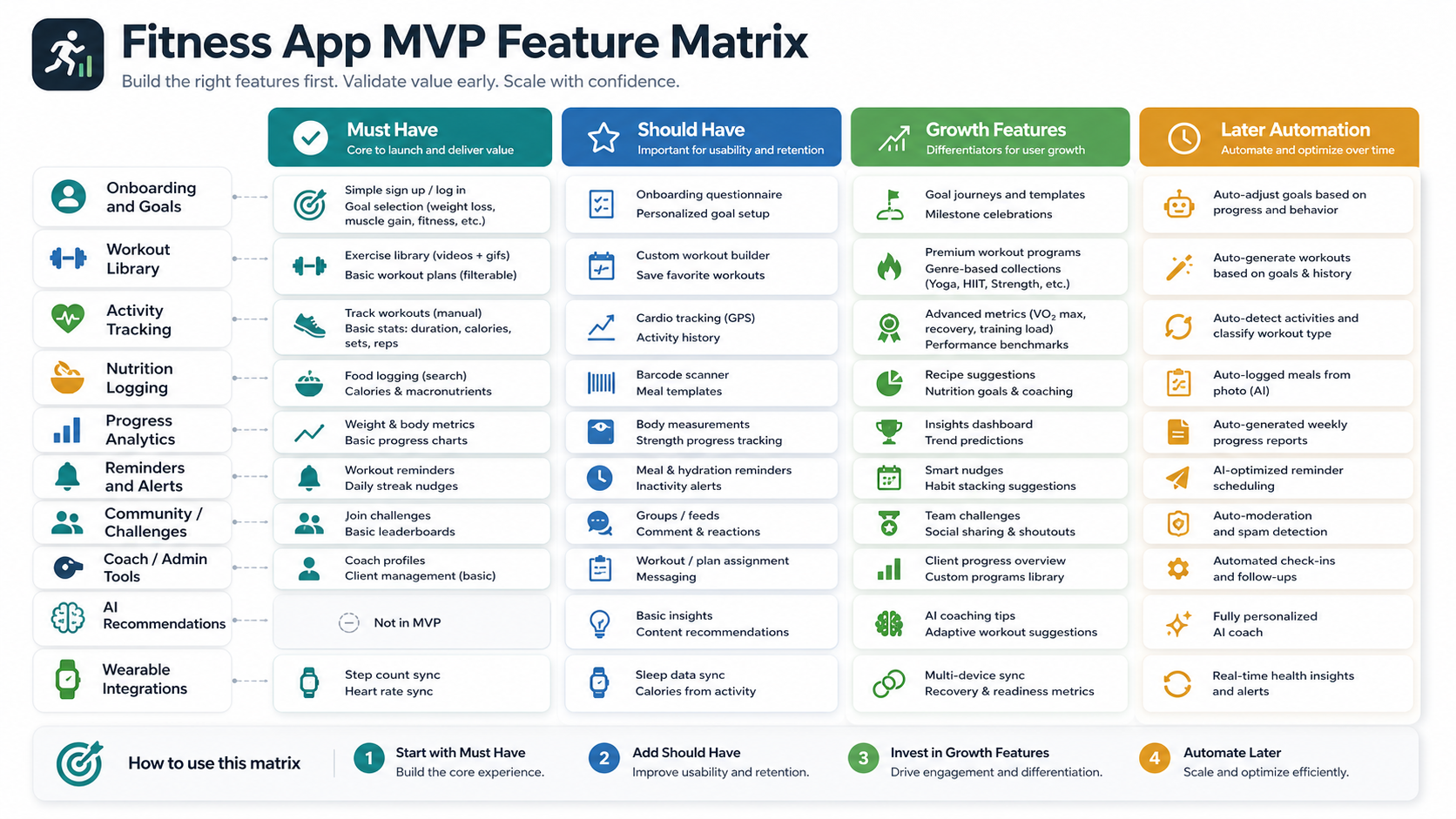
The first release should balance engagement with delivery risk. Start with account setup, goal capture, workout plans, exercise instructions, progress tracking, reminders, and basic admin controls. Then add richer features such as trainer messaging, wearable integrations, nutrition workflows, subscriptions, challenges, and AI coaching once the core loop is working.
This phased approach keeps the app useful without overloading the team. It also makes budget conversations more realistic because each feature can be tied to acquisition, retention, monetization, or operational efficiency.
Variety Of Workouts Without Choice Overload
Users like variety, but too many options can make the app feel unfocused. Group workouts by goal, duration, equipment, intensity, and experience level. A beginner should be able to find a safe 15-minute home session quickly, while an advanced user should still have depth through programs, splits, progressions, and recovery days.
Use recommendations to narrow the library. Instead of showing every cardio, strength, yoga, mobility, and HIIT workout at once, surface the next best session based on the user's plan and recent activity. Save browsing for users who want to explore.
Progress Tracking That Motivates Instead Of Shames
Progress dashboards should help users understand improvement without making them feel punished for missed days. Useful metrics include completed workouts, active minutes, strength progression, mobility improvements, streaks, personal records, resting days, and goal milestones. For many wellness apps, consistency and confidence matter more than aggressive calorie messaging.
Charts should be simple enough to read in seconds. Show weekly trends, not only daily numbers. Let users compare against their own baseline rather than forcing public leaderboards. When health, medical, or sensitive wellness data is involved, borrow security and compliance thinking from broader healthcare app development planning, even if the product is not a clinical application.
Smart Reminders And Habit Loops
Reminders work when they are timely, personal, and easy to act on. A good fitness app should let users choose workout days, quiet hours, notification tone, and reminder frequency. It should also recognize behavior. If a user consistently trains in the evening, a morning push notification may be noise.
Use reminders for workouts, hydration, recovery, habit streaks, plan updates, trainer notes, and milestone celebrations. Avoid guilt-heavy copy. The product should feel like a useful coach, not a spam channel.
Wearables, Privacy, And Data Architecture
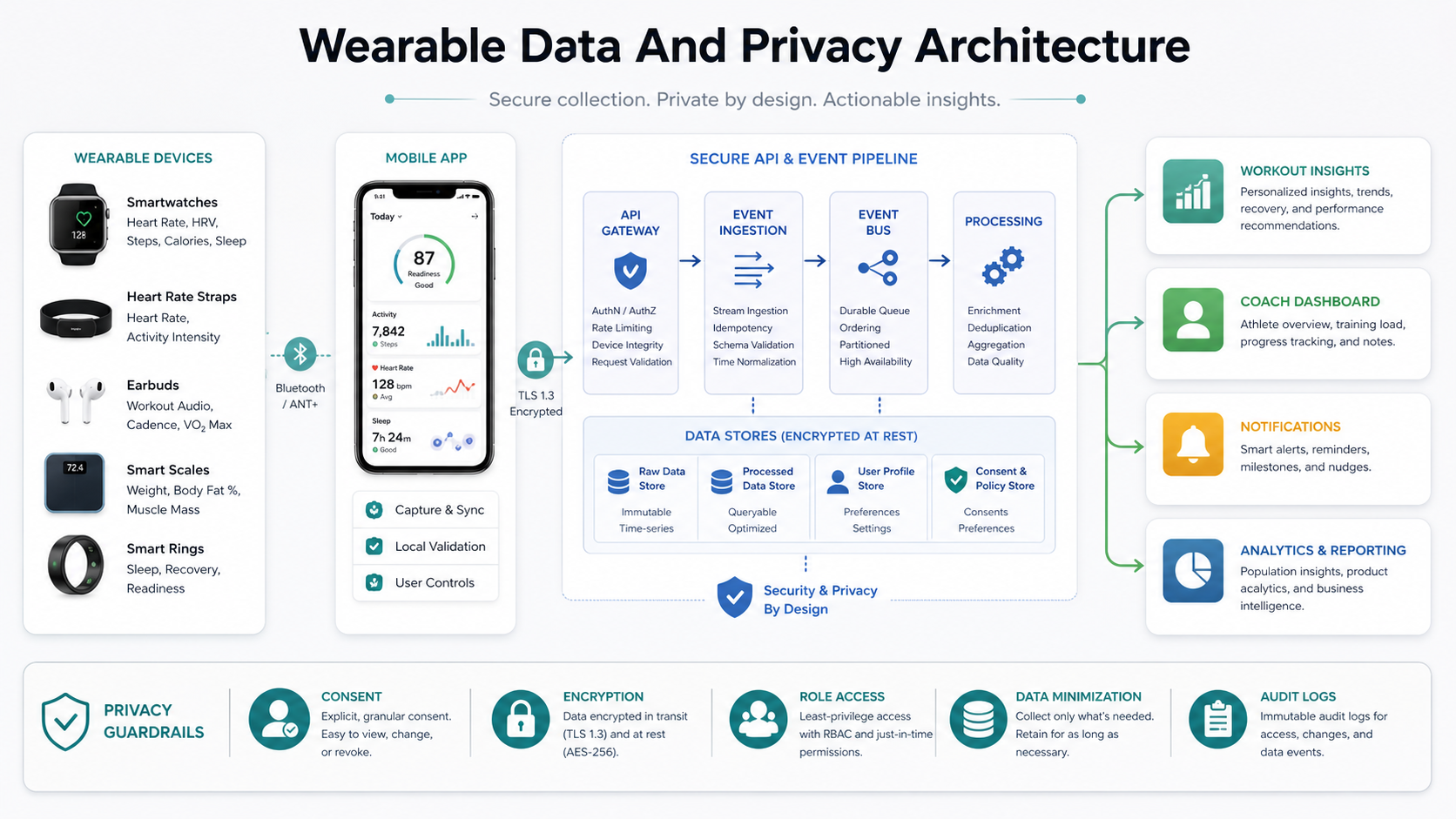
Wearable integrations can make a fitness app more useful by bringing in steps, heart rate, sleep, workouts, and recovery signals. They also raise privacy and reliability expectations. Users need clear consent screens, data controls, sync status, and explanations of how device data affects recommendations.
From a technical perspective, plan for device APIs, background sync, data normalization, permissions, error handling, and analytics from the beginning. If wearable data powers coaching, the app must handle missing or delayed data gracefully instead of producing confusing recommendations.
Community Features That Support The Core Goal
Community can improve retention, but it should serve the user promise. Useful social features include private groups, friend challenges, trainer-led cohorts, progress sharing, comments, and team goals. Public leaderboards are not always the right answer, especially for beginners or wellness audiences who may prefer encouragement over competition.
Moderation and privacy controls matter. Users should decide what to share, who can see it, and whether they want social features at all. A supportive community can make fitness feel less lonely, but only when the product gives people control.
Accessibility For Every Fitness Level
Accessibility is a product requirement, not a polish task. Fitness apps should support readable contrast, screen reader labels, captions for video, clear audio cues, beginner modifications, seated or low-impact alternatives, and flexible pace controls. Workouts should explain substitutions for injuries, limited mobility, limited space, or missing equipment.
Accessibility also includes emotional accessibility. New users may feel uncertain or embarrassed. Friendly language, realistic goals, and nonjudgmental progress feedback make the app easier to return to after missed sessions.
Real-Time Feedback And Expert Guidance
Real-time feedback helps users feel guided during a workout. Depending on the product, this can include timers, rep counters, heart-rate zones, form cues, pace alerts, trainer audio, or video demonstrations. The key is to provide guidance at the moment it is needed without distracting from movement.
Expert guidance should be visible in the content model. Exercise instructions need clear setup, movement, breathing, common mistakes, and safety notes. If the app offers advanced coaching, make sure the plan explains why workouts change over time. That transparency builds trust.
Development Roadmap For A User-Friendly Fitness App
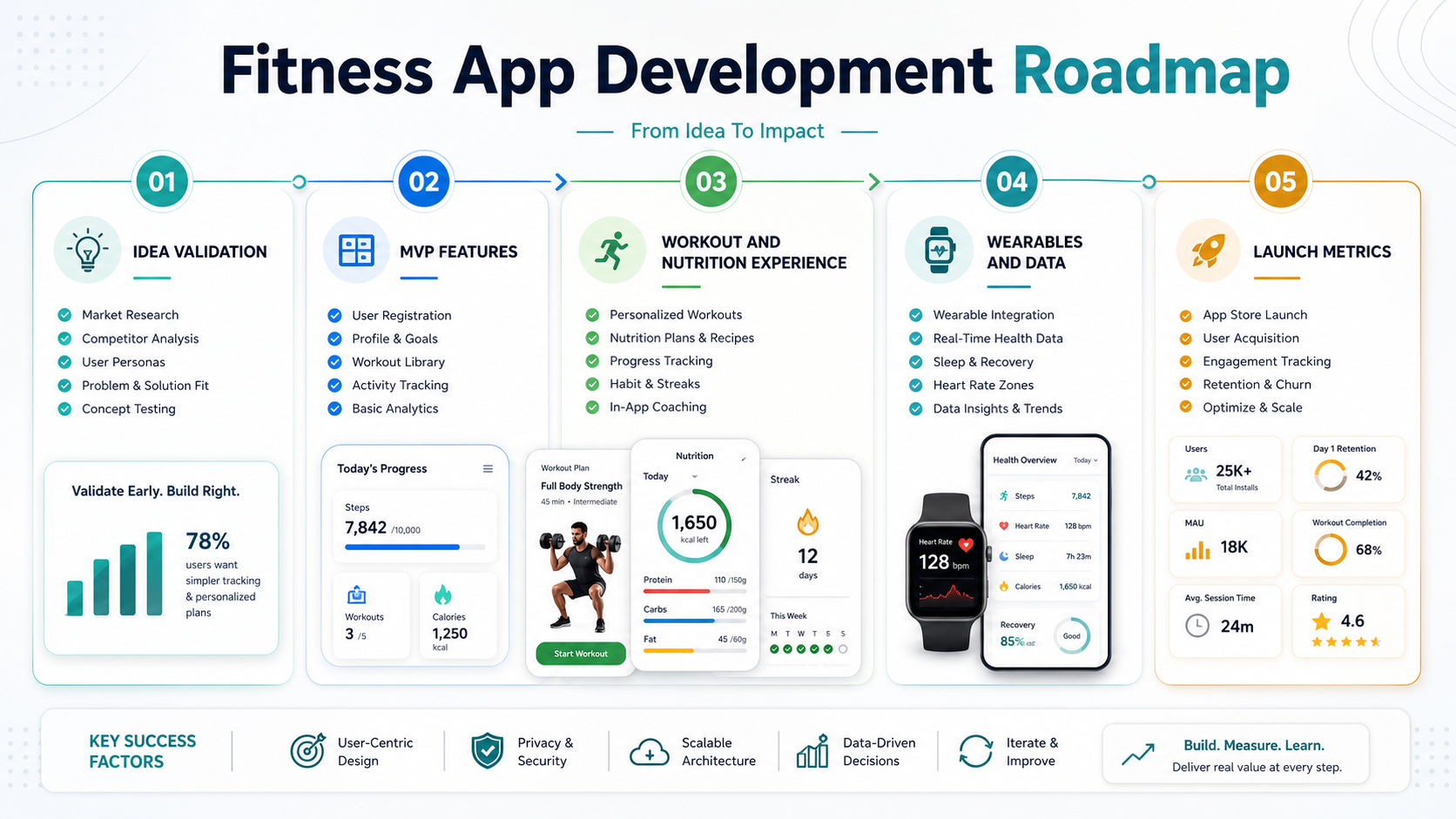
A practical build roadmap usually starts with discovery, user research, UX flows, technical architecture, MVP development, QA, beta testing, launch analytics, and post-launch iteration. Product teams should validate the core habit loop before building every possible integration.
App store presentation also matters once the product is ready. Screenshots, descriptions, onboarding claims, reviews, and retention metrics all influence growth. The related guide on app store optimization is a useful next read when the fitness app is moving toward launch.
How NextPage Can Help
NextPage helps founders and product teams plan, design, build, and improve mobile apps with the backend systems, integrations, analytics, QA, and launch support needed for real usage. For a fitness or wellness app, that can include MVP scoping, UX design, workout content architecture, wearable integrations, subscriptions, admin dashboards, and post-launch optimization.
If you are turning a fitness app idea into a product roadmap, start with the user promise, core habit loop, and first-release feature matrix. The technology should support that experience, not bury it under unnecessary complexity.
Conclusion
User-friendly fitness apps make healthier routines easier to start and easier to keep. The strongest products combine clear design, fast onboarding, personalized plans, useful progress tracking, smart reminders, accessibility, expert guidance, and privacy-aware integrations. For businesses, the opportunity is not simply to ship a workout library. It is to build a trusted mobile product that helps people take the next healthy action again and again.