
Virtual event app development is no longer about recreating a webinar room with chat on the side. The next generation of virtual and hybrid event platforms has to connect live programming, mobile attendee journeys, venue operations, sponsor reporting, community follow-up, accessibility, security, and AI-assisted personalization into one reliable product.
That shift matters for founders, event organizers, associations, and enterprise teams because event technology now sits closer to revenue, customer education, partner enablement, and brand trust. A future-ready platform should help attendees find the right sessions, meet relevant people, participate from anywhere, and keep receiving value after the live agenda ends.
Quick Answer: What Is The Future Of Virtual Event App Development?
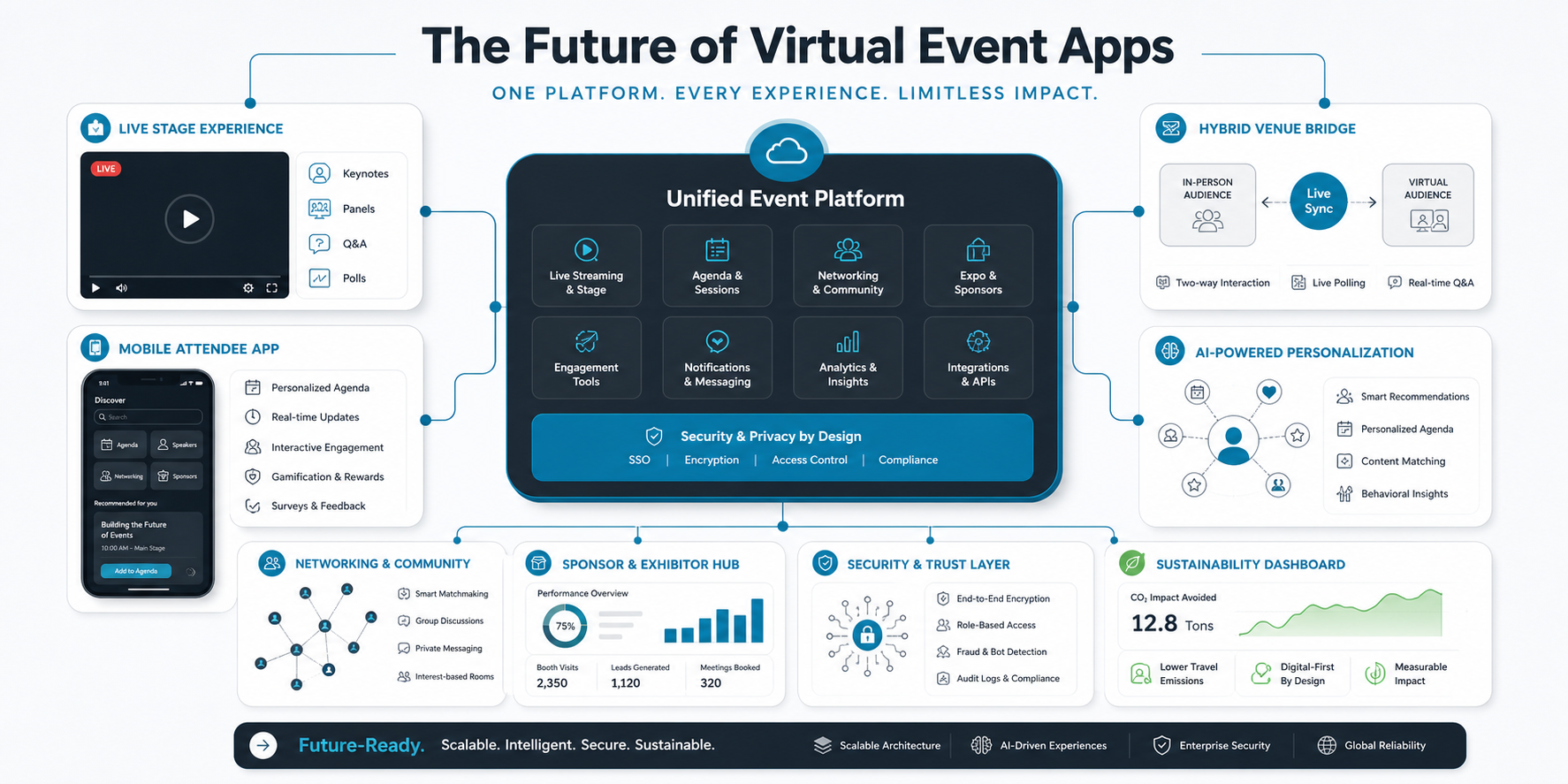
The future of virtual event app development is hybrid, data-driven, accessible, and measurable. Strong platforms will combine live streaming, mobile agendas, in-person check-in, AI recommendations, matchmaking, sponsor analytics, community features, multilingual access, privacy controls, and resilient infrastructure. The goal is not to replace in-person events. The goal is to extend reach, improve engagement, and make every attendee journey easier to understand and optimize.
Teams planning this kind of product should treat it as a specialized mobile app development and web platform effort, not just a video integration project. The attendee app, organizer console, sponsor experience, and backend data model all shape whether the event feels useful or fragmented.
What The Original Post Was Missing
The original article identified useful trends such as personalization, AI, hybrid events, networking, cybersecurity, and sustainability, but it repeated ideas, used awkward phrasing, had no featured image, no excerpt, no inline images, weak SEO metadata, and an empty FAQ section in the body. It also linked to an outdated non-canonical URL and did not explain what product teams should actually build.
This optimization keeps the original topic but turns it into a practical planning guide for virtual event platform strategy, architecture, feature sequencing, and business outcomes.
Why Virtual Event Platforms Are Changing
Virtual and hybrid events have moved from emergency replacements to strategic channels. Teams use them to expand audience reach, make content reusable, reduce travel friction, support accessibility, and capture better first-party engagement data. At the same time, attendees expect the platform to feel coordinated across desktop, mobile, email, calendar, live sessions, on-demand content, and post-event community spaces.
That creates a higher bar for product design. The platform has to support event operations, but it also has to help people decide where to spend attention. Session discovery, reminders, networking recommendations, transcript search, sponsor follow-up, and personalized content recaps are now central parts of the experience.
Hybrid Event Platform Architecture
A future-ready event app needs a clear architecture before the team adds advanced features. Live streaming, venue check-in, session scheduling, content management, notifications, attendee profiles, sponsor modules, analytics, and moderation should not behave like disconnected plugins.
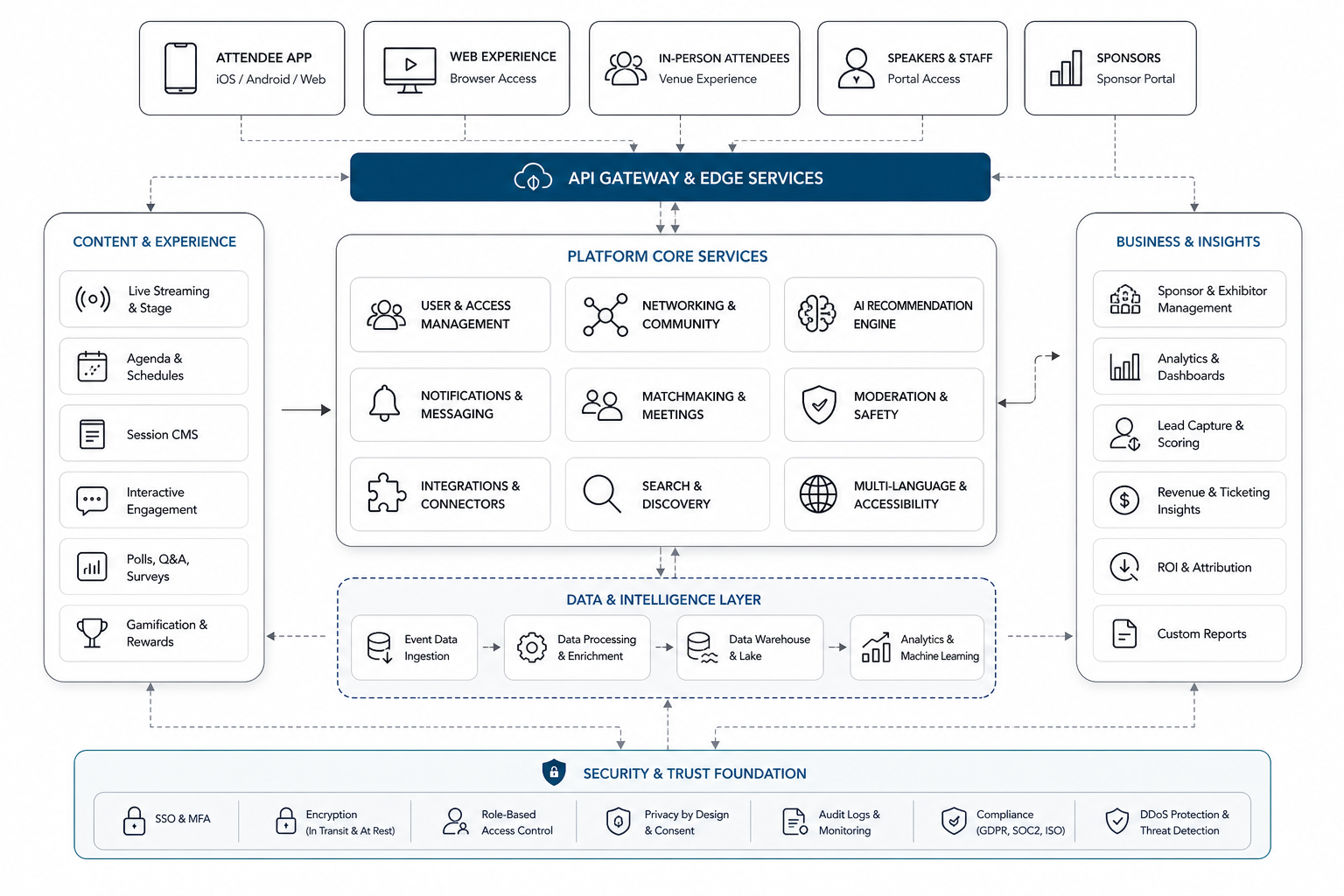
For complex events, this usually becomes a web app development challenge as much as a mobile app challenge. Organizers need dashboards, role-based permissions, content controls, sponsor reporting, integrations, and reliable data pipelines behind the attendee-facing experience.
Feature Roadmap For A Future-Ready Virtual Event App
Not every platform needs every advanced feature in the first release. A focused MVP should prove that attendees can register, join sessions, build an agenda, interact live, and receive useful follow-up. Growth and enterprise stages can then add deeper personalization, integrations, sponsor intelligence, and governance controls.
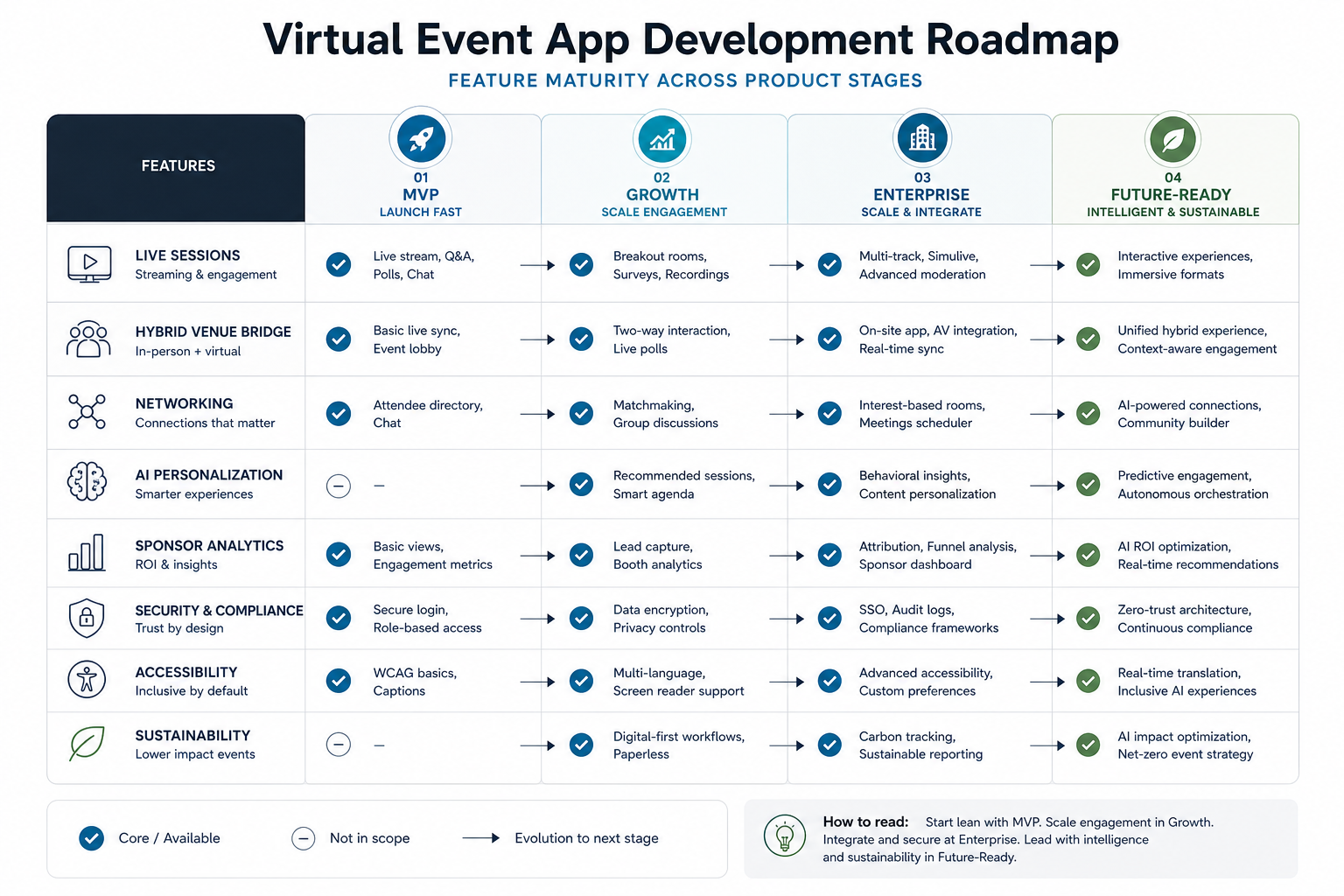
| Capability | MVP | Growth stage | Enterprise stage |
|---|---|---|---|
| Live sessions | Streaming, chat, Q&A, reminders | Breakouts, replays, transcript search | Multi-track production, failover, permissions |
| Hybrid operations | Basic check-in and agenda sync | Venue maps, badge logic, room capacity signals | AV integrations, exhibitor operations, onsite support workflows |
| Networking | Profiles and direct messaging | Interest-based matchmaking and meeting slots | CRM sync, community follow-up, relationship analytics |
| AI personalization | Rule-based recommendations | AI agenda suggestions and content summaries | Governed AI assistants, multilingual support, model monitoring |
| Security | Authentication, role controls, basic moderation | Audit logs, data retention, abuse reporting | SSO, compliance review, vendor risk controls |
AI Personalization Should Solve Real Attendee Problems
AI can improve virtual events when it helps attendees choose sessions, find relevant people, ask questions, summarize content, translate captions, and continue learning after the event. It becomes less useful when it is added as a generic chatbot without clean data, clear constraints, or a measurable user outcome.
Good AI event features start with the data model: attendee roles, interests, registrations, watched sessions, questions, meetings, sponsor interactions, and feedback. That foundation lets the platform recommend sessions, generate recap emails, route questions, flag engagement drops, and help organizers improve the next event. For deeper event-specific AI context, the supporting guide on AI in event app planning and execution covers where AI fits into event management workflows.
The Attendee Engagement Flywheel
Strong virtual event products are built around repeated engagement loops. The loop starts before the event with registration data and agenda intent, continues through live participation, and carries into community, follow-up content, and future event recommendations.
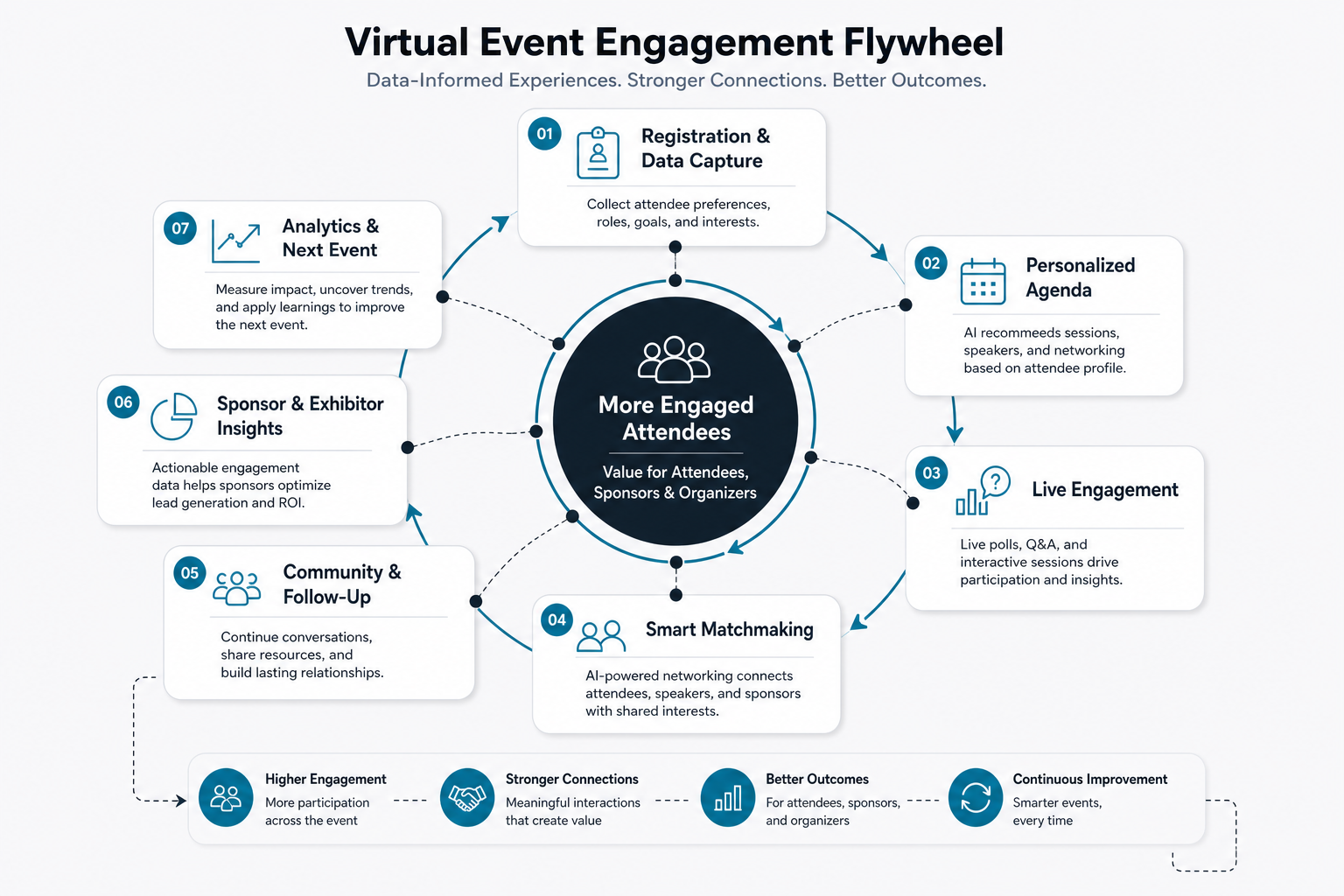
Features such as polls, live Q&A, reactions, session bookmarks, smart reminders, meeting suggestions, and community prompts should support that loop. The related post on features for event management apps is useful when translating those engagement needs into product requirements.
Hybrid Events Need One Shared Experience Layer
Hybrid events fail when onsite and remote attendees feel like they are attending two different events. The app should give both groups a shared agenda, consistent session access, networking visibility, Q&A participation, sponsor interactions, support paths, and post-event content.
That does not mean every feature has to be identical. Remote attendees may need captions, replay access, timezone-aware reminders, and virtual networking rooms. Onsite attendees may need check-in, wayfinding, badge support, session capacity, and venue notifications. The platform should coordinate both journeys from one operating model.
Networking Should Continue After The Event
Networking is often the weakest part of virtual events because chat rooms and random profile lists do not create enough intent. Better platforms use profile fields, session interest, company role, topic tags, meeting availability, and opt-in preferences to help people find relevant connections.
Post-event community features matter too. Saved contacts, suggested follow-ups, session discussion threads, resource libraries, and recap notifications can keep the event valuable after the live window closes. The event app should become a relationship system, not just a broadcast channel.
Sponsor And ROI Analytics Are Becoming Core Product Features
For many organizers, sponsor value determines whether an event model is financially sustainable. A virtual event platform should show meaningful engagement signals such as session attendance, booth visits, content downloads, qualified meetings, poll responses, CTA clicks, and post-event follow-up activity.
Analytics should be useful without becoming invasive. Aggregate dashboards, consent-aware lead sharing, clear privacy notices, and role-based data access help organizers prove ROI while protecting attendee trust.
Accessibility, Localization, And Inclusion
Accessibility is now a product requirement for serious virtual and hybrid events. Plan for captions, keyboard navigation, readable contrast, screen reader support, transcript access, replay availability, sensory-friendly choices, clear error states, and device-friendly performance. For global events, add multilingual content, localized schedules, timezone-aware reminders, and translated support paths.
These requirements should be designed early because they affect video vendors, content workflows, navigation, QA, and support operations. Adding accessibility after launch is more expensive and usually less complete.
Security, Privacy, And Trust Controls
Event platforms handle attendee profiles, company data, chat messages, meeting intent, content access, payments, sponsor interactions, and sometimes sensitive community discussions. That makes security and privacy central to the product roadmap.
Plan for SSO where enterprise customers need it, role-based permissions, secure invite links, moderation queues, abuse reporting, rate limits, audit logs, encryption in transit, data retention controls, vendor reviews, and clear consent for analytics or sponsor lead sharing. If the platform uses AI features, explain which data is processed, where it is processed, and how outputs are reviewed.
Sustainability And Operational Efficiency
Virtual and hybrid formats can reduce travel needs, but sustainability is not automatic. Streaming infrastructure, device usage, production workflows, and content storage still carry environmental and operational costs. The product should help organizers make practical choices: reusable content libraries, right-sized streaming quality, event replay retention policies, and reporting that compares formats honestly.
Operational efficiency matters as much as environmental messaging. A platform that lets teams reuse templates, clone event workflows, automate reminders, and analyze content performance can reduce waste across every event cycle.
Cost And Scope Planning
Virtual event app cost depends on the event model, user roles, streaming requirements, integrations, AI scope, analytics depth, compliance needs, and whether the platform must support both web and mobile experiences. A small single-event MVP is very different from a reusable enterprise event platform with sponsor dashboards, SSO, hybrid venue operations, and community features.
Use the custom software cost estimator to compare scope levels before committing to a build. For broader budgeting context, the guide to custom software development cost explains how workflows, integrations, security, and team shape affect budget more than screen count alone.
Implementation Checklist For Product Teams
- Define the primary event model: virtual-only, hybrid, community-led, sponsor-led, enterprise training, or customer education.
- Map attendee, organizer, sponsor, speaker, moderator, and admin roles before designing screens.
- Choose the streaming, captioning, chat, calendar, CRM, payment, analytics, and email integrations early.
- Decide which personalization features are rules-based and which require AI or machine learning.
- Design security, privacy, accessibility, and moderation workflows before launch.
- Measure event success with engagement quality, qualified connections, content reuse, sponsor outcomes, and post-event retention.
Final Recommendation
The future of virtual event app development belongs to platforms that make hybrid participation feel intentional, not secondary. Build the first release around a reliable event journey, then add AI personalization, networking intelligence, sponsor analytics, accessibility, and security controls as the operating model matures.
If your team is planning a reusable event product, start with the workflows that must be excellent every time: registration, agenda discovery, session access, interaction, follow-up, reporting, and trust. Once that foundation is stable, advanced features can improve the experience instead of adding complexity.