
Quick Answer: Voice Assistants In Elderly Care Apps
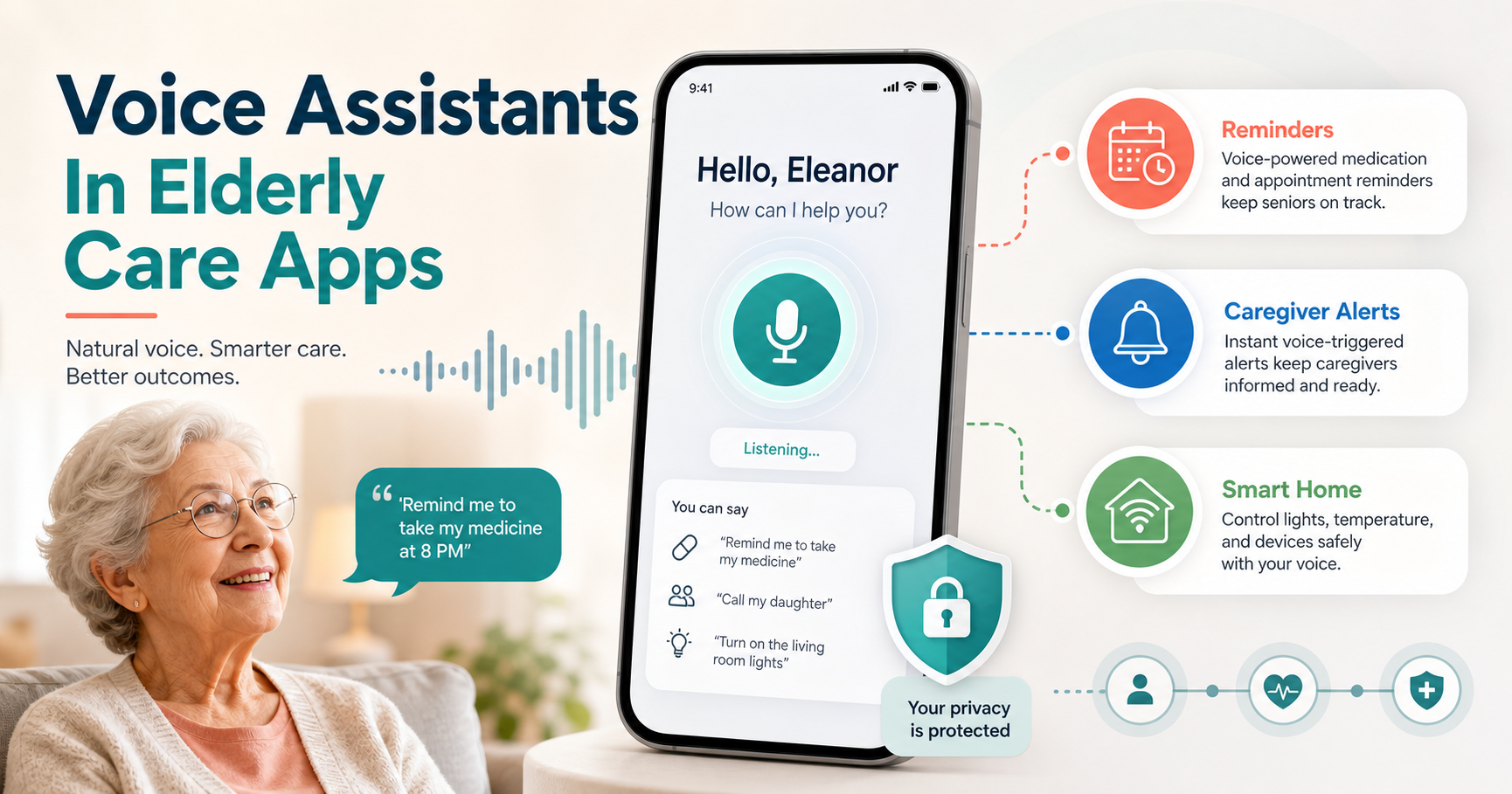
Voice-activated assistants can make elderly care apps easier to use because they let older adults ask for help, set reminders, control devices, contact caregivers, and access information without navigating small screens. The strongest use cases are medication reminders, appointment prompts, hands-free calling, smart home controls, wellness check-ins, emergency escalation, and caregiver updates.
The real product challenge is not adding a voice command layer. It is designing a care workflow that older adults, caregivers, and clinical or support teams can trust. A good voice assistant must understand common speech patterns, confirm sensitive actions, protect personal data, handle failed recognition gracefully, and give caregivers enough visibility without removing the older adult's independence.
What Voice Assistants Do In Elderly Care
Voice assistants convert spoken commands into actions through speech recognition, natural language processing, intent detection, and integrations with calendars, reminders, smart home systems, health devices, or care platforms. For older adults, the value is practical: voice can reduce the need to tap through menus, remember where a setting lives, or read small interface text.
In elderly care apps, voice should usually support a small set of high-confidence tasks first. That might include asking for today's medication schedule, calling a caregiver, logging a symptom, starting a guided exercise, checking a delivery, or turning on a connected light. For broader context on connected care environments, NextPage's guide to assistive technologies in elderly care explains how AI and IoT can support independence at home.
Highest-Value Use Cases For Older Adults
The best use cases are frequent, simple, and emotionally meaningful. Medication reminders help users stay on schedule. Appointment prompts reduce missed care. Hands-free calls make caregiver contact easier during mobility issues. Smart home controls improve comfort and safety. Audio instructions can guide users through routine tasks when memory or confidence is low.
These workflows should be designed inside the broader product experience, not as isolated voice tricks. Teams planning a care, wellness, or accessibility-focused app should connect voice flows with the same notification, offline, device-permission, and accessibility decisions used in mobile app development. Voice is one interface layer; the surrounding mobile product still has to be reliable.
Caregiver And Family Workflows
Voice assistants can reduce caregiver burden when they create useful signals rather than more noise. A caregiver might receive a confirmation that medication was acknowledged, a missed-check-in alert, or a summary of repeated help requests. Family members may also use simple voice or app-based check-ins to stay connected without constant phone calls.
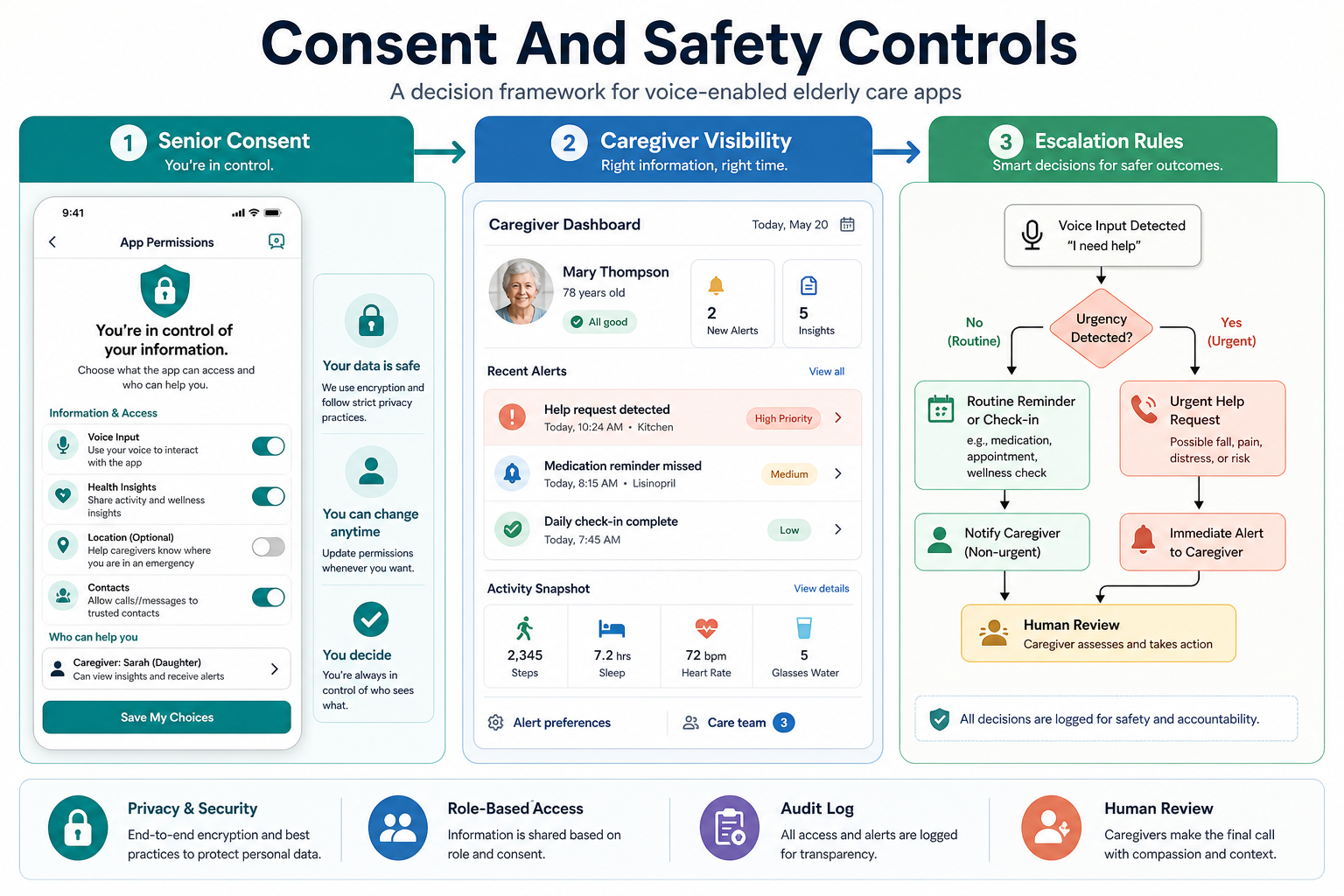
Caregiver features need consent, role-based access, and clear escalation rules. Older adults should know what is shared, who can see it, and how to pause or adjust sharing. If the app touches health data, the operating model should be scoped like a healthcare product. The healthcare app development cost guide is a useful companion for understanding how privacy, roles, integrations, and compliance change project scope.
Healthcare Monitoring And Medication Support
Voice assistants can support medication adherence, symptom logging, appointment preparation, chronic-care routines, and recovery checklists. A senior might say that they took a medicine, report dizziness, ask when the next dose is due, or request a caregiver call. The app can then store the event, show it in a caregiver dashboard, or trigger a rule-based alert.
Health workflows need careful boundaries. A voice assistant should not present uncertain medical advice as diagnosis. It should confirm critical information, show or speak disclaimers when needed, and escalate to a human when risk is high. For AI-supported triage, summaries, or care routing, NextPage's generative AI development work can help design retrieval, evaluation, and review loops around the assistant.
Privacy, Consent, And Safety Risks
Voice-enabled elderly care apps can process sensitive household, health, location, and caregiver data. Product teams should plan consent screens, data retention rules, role permissions, audit trails, and voice-history controls before launch. Older adults and caregivers need plain-language explanations, not buried settings.
Safety design also matters. The assistant should confirm purchases, medication updates, emergency calls, and account changes. It should distinguish between casual questions and actions that affect care. Misheard commands, background speech, shared devices, and cognitive decline can create real risks unless the product uses confirmations, fallback UI, and caregiver escalation paths.
Voice Recognition And Accessibility Challenges
Older adults may speak more softly, pause longer, use regional expressions, or have speech changes caused by health conditions. Voice recognition errors can quickly reduce trust. The interface should support repeat, rephrase, cancel, and confirm patterns. It should also offer visible alternatives for people with hearing loss, noisy homes, or limited comfort with voice controls.
Accessibility should be multi-modal. A strong elderly care app combines voice, readable screens, clear notifications, large touch targets, and caregiver support. Voice is helpful because it lowers interaction friction, but it should never be the only way to complete critical care tasks.
Implementation Scope For Product Teams
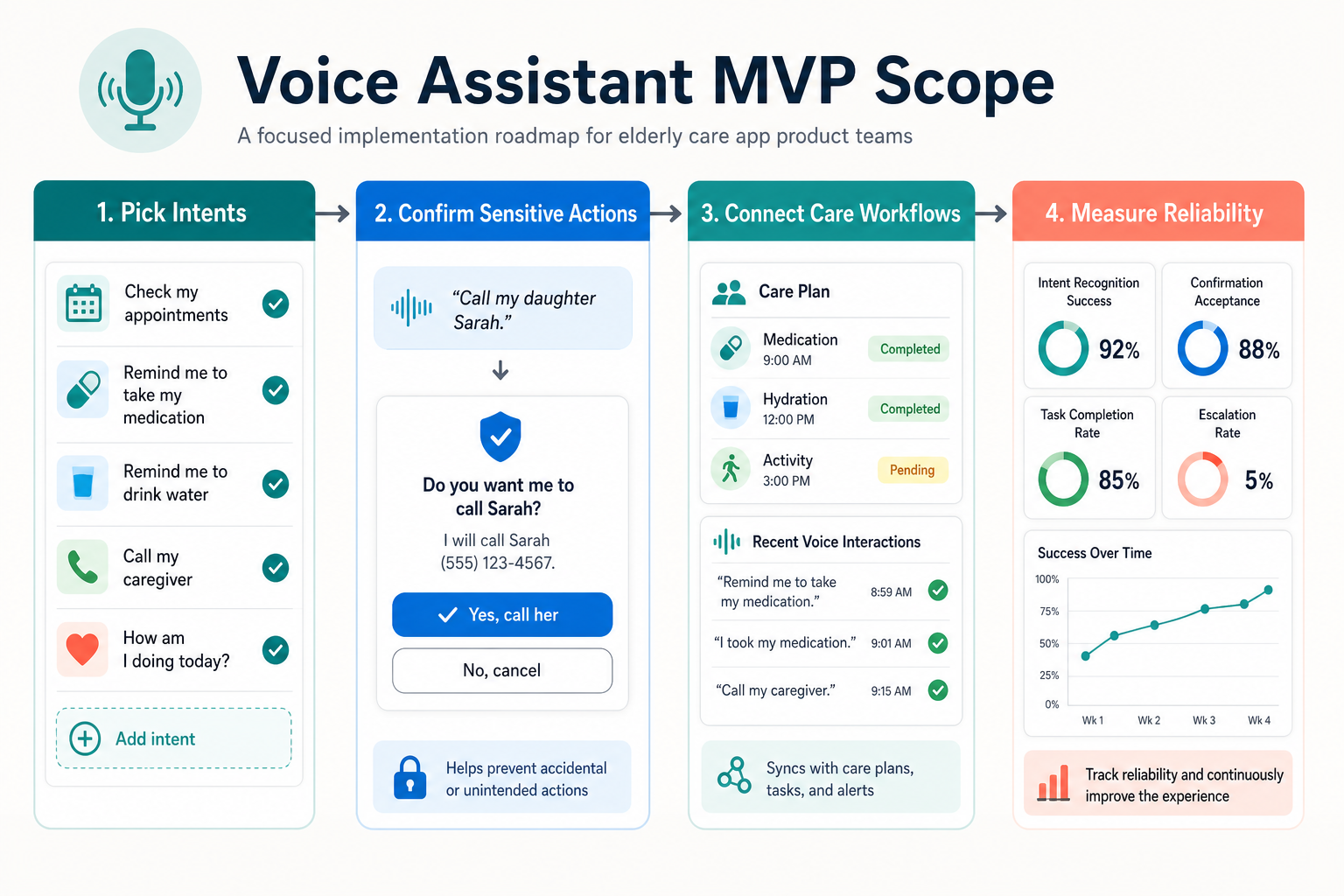
A practical first release should start with a small set of voice intents, a reliable command vocabulary, clear fallback flows, and measurable success criteria. Product teams should decide which commands are informational, which are transactional, which require confirmation, and which require caregiver or support-team escalation.
For AI-enabled assistants, architecture decisions include model choice, speech-to-text quality, prompt and retrieval design, integration depth, logging, human review, and operating cost. NextPage's AI development services page covers how production AI systems are planned around workflow clarity, data sensitivity, latency, and evaluation needs.
Readiness Checklist Before Building
- Workflow clarity: choose the first three to five voice tasks that create real care value.
- User evidence: test with older adults, caregivers, and support staff before expanding scope.
- Consent model: define who can hear, see, edit, or act on voice-triggered data.
- Fallback design: provide readable screen flows when voice recognition fails.
- Escalation rules: separate routine reminders from urgent care events.
- Measurement: track task completion, recognition failures, false alerts, caregiver actions, and user confidence.
If your team is unsure whether the workflow is ready for AI, run it through an AI Agent Readiness Assessment. For operational workflows with measurable time savings, the AI Automation ROI Calculator can help decide whether automation belongs in the first release or a later iteration.
Platform And Integration Decisions
Voice assistants can live in mobile apps, web apps, smart speakers, wearable workflows, or connected home systems. The right platform depends on device access, notification needs, offline behavior, smart home integrations, caregiver dashboards, and security requirements. A lightweight educational companion may work as a mobile-first app, while a safety-critical home-care product may need deeper native or device integrations.
Teams comparing mobile approaches should review native vs cross-platform mobile app development before committing to a stack. Voice, Bluetooth, background audio, push notifications, and accessibility behavior can all influence whether native, cross-platform, or hybrid delivery is the right first version.
Common Mistakes To Avoid
Many voice-enabled care products fail because they overpromise. They try to support too many commands, skip caregiver consent, ignore privacy settings, or rely on perfect recognition. Others treat older adults as passive recipients instead of designing for independence, dignity, and control.
A stronger approach is to launch with fewer workflows and better recovery. Make the assistant repeat what it heard, confirm sensitive actions, show a readable fallback, and explain what happens next. Then use real usage data to expand the command set safely.
Final Recommendation
Voice-activated assistants can improve elderly care apps when they are scoped around real care tasks, not novelty. Focus on reminders, communication, safe home controls, caregiver coordination, and health workflow support. Build privacy, consent, accessibility, and fallback design into the product from day one.
The best elderly care voice assistant is not the one with the most commands. It is the one older adults can trust when they need help, caregivers can understand when they need context, and product teams can monitor safely as usage grows.