
Quick Answer: What Should A Website To iPad App Migration Checklist Cover?
A website to iPad app migration checklist should prove that the move creates a better tablet workflow, not just another wrapper around the same web screens. The checklist needs decision gates for tablet-first UX, API readiness, authentication, offline data, file handling, device permissions, performance, privacy disclosures, QA, App Store submission, and post-launch support.
Use this guide if you already have a portal, dashboard, ecommerce workflow, field form, booking system, training surface, or internal business tool and users now need a reliable iPad experience. The goal is to decide what should remain responsive web, what can become a PWA, and what deserves a native or cross-platform iPad app with app-grade APIs, offline behavior, privacy evidence, and release ownership.
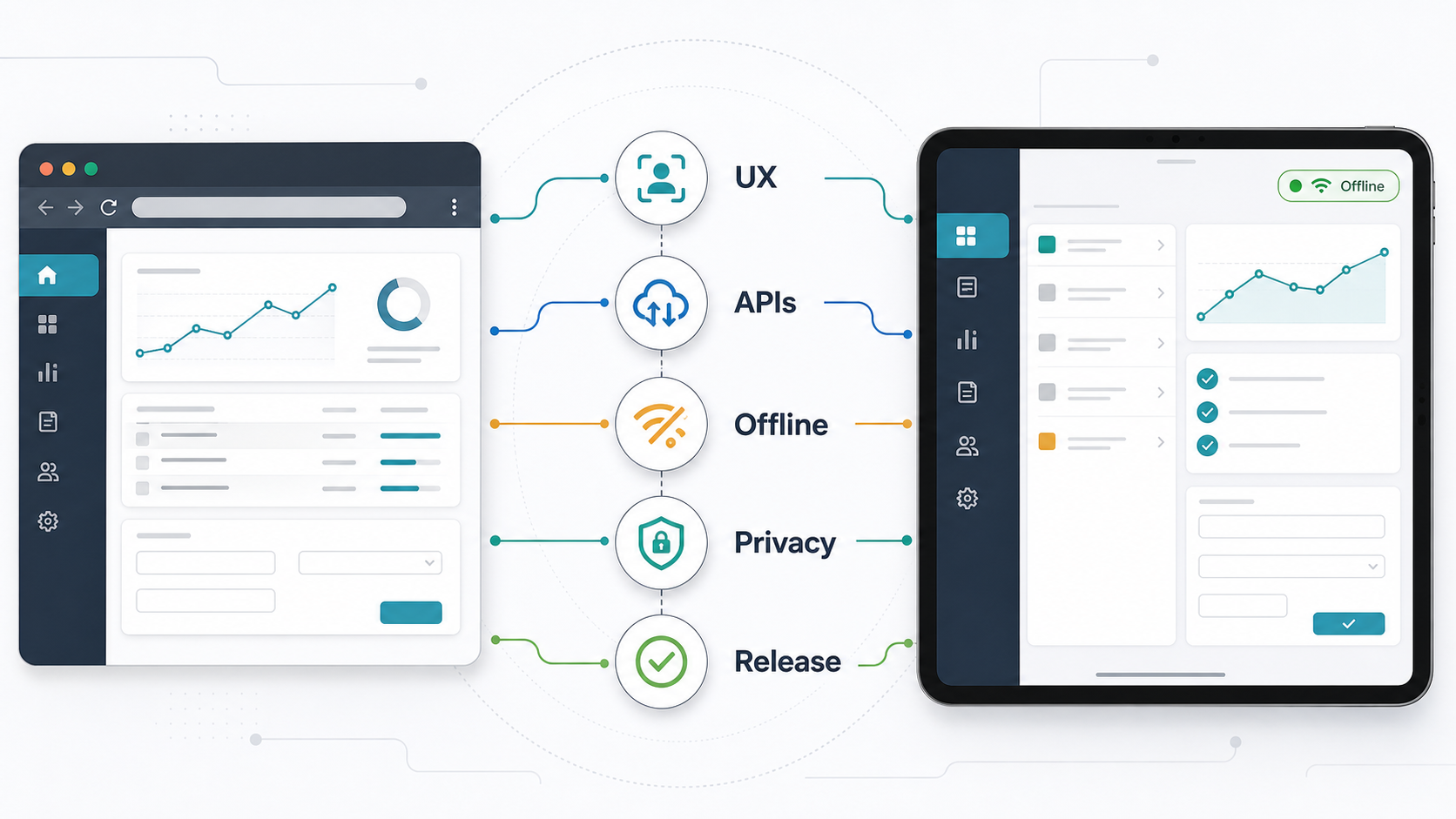
If the migration is tied to a real product or operations target, start with the MVP scope builder before estimating the build. It helps separate first-release iPad workflows from later-phase features so the app does not become a full website rebuild by accident.
1. Decide Whether An iPad App Is Actually Worth It
The first migration decision is not technology. It is whether the iPad experience changes the work enough to justify app delivery. A responsive website may be enough for occasional browsing, marketing content, simple account lookup, or workflows that depend on desktop-sized data entry. An iPad app makes more sense when the user needs repeated field use, kiosk mode, device sensors, offline capture, native file handling, faster repeat sessions, controlled hardware, or a simplified interface for a specific role.
| Option | Best Fit | Watchouts |
|---|---|---|
| Responsive Web | Content, simple forms, low-frequency workflows, broad device access. | Weak offline support, browser chrome, limited device controls. |
| PWA | Installable web-like workflows, basic offline cache, faster iteration. | Platform limits, store expectations, weaker native integration. |
| Wrapped WebView | Temporary bridge for an existing web workflow with minor native needs. | Often fails to feel tablet-native and may inherit every web UX problem. |
| Native or Cross-Platform iPad App | Field work, kiosks, dashboards, scan/upload flows, offline sync, role-specific operations. | Requires API, QA, release, privacy, and support discipline. |
For a dedicated tablet workflow, NextPage's iPad app development services page shows the kind of field, retail, healthcare, kiosk, inventory, and dashboard use cases where tablet-first design is usually worth planning. If the web product is already carrying technical debt, compare the migration against a broader legacy application modernization roadmap before committing to a simple app wrapper.
2. Map The Current Web Workflow Before Redesigning Screens
Do not start with a screen-by-screen copy of the website. Start with the user job. List each role, trigger, input, decision, approval, exception, attachment, notification, and output. Then mark which steps happen at a desk, in the field, in a queue, during a customer conversation, or without reliable internet.
This map exposes what should change for iPad. A desktop portal might have dense navigation, multi-column tables, hover states, bulk actions, tiny filters, and long forms. On iPad, the workflow may need split-view navigation, larger touch targets, simplified task queues, progressive disclosure, persistent context panels, keyboard shortcuts for power users, and cleaner handoff between touch, pencil, camera, and file actions.
Also document how the workflow behaves in modern iPadOS usage patterns: Windowed Apps in iPadOS 26, Stage Manager, Split View, external keyboards, pointer input, rotation, multiple windows, shared devices, and handoff from Files, camera, scanner, or Pencil annotation. These are not polish items when the app is replacing a real work surface.
- Inventory the top 5-8 workflows by usage, revenue, risk, or operating cost.
- Mark which steps are painful on tablets today.
- Remove desktop-only clutter before creating app screens.
- Identify workflows that need camera, file, location, signature, barcode, Bluetooth, or external keyboard support.
- Define the minimum useful offline state for each workflow.
Website To iPad Migration Workstream Evidence Matrix
A migration checklist becomes useful when every workstream has an owner and evidence artifact. UX should prove the redesigned workflow works on real iPad layouts. APIs should prove app contracts, auth, uploads, and retries are stable. Offline should prove cache, encryption, sync, and conflict behavior. Security should prove role rules, shared-device behavior, SDK review, and local data handling. QA and rollout should prove the release can be reviewed, monitored, supported, and updated after launch.
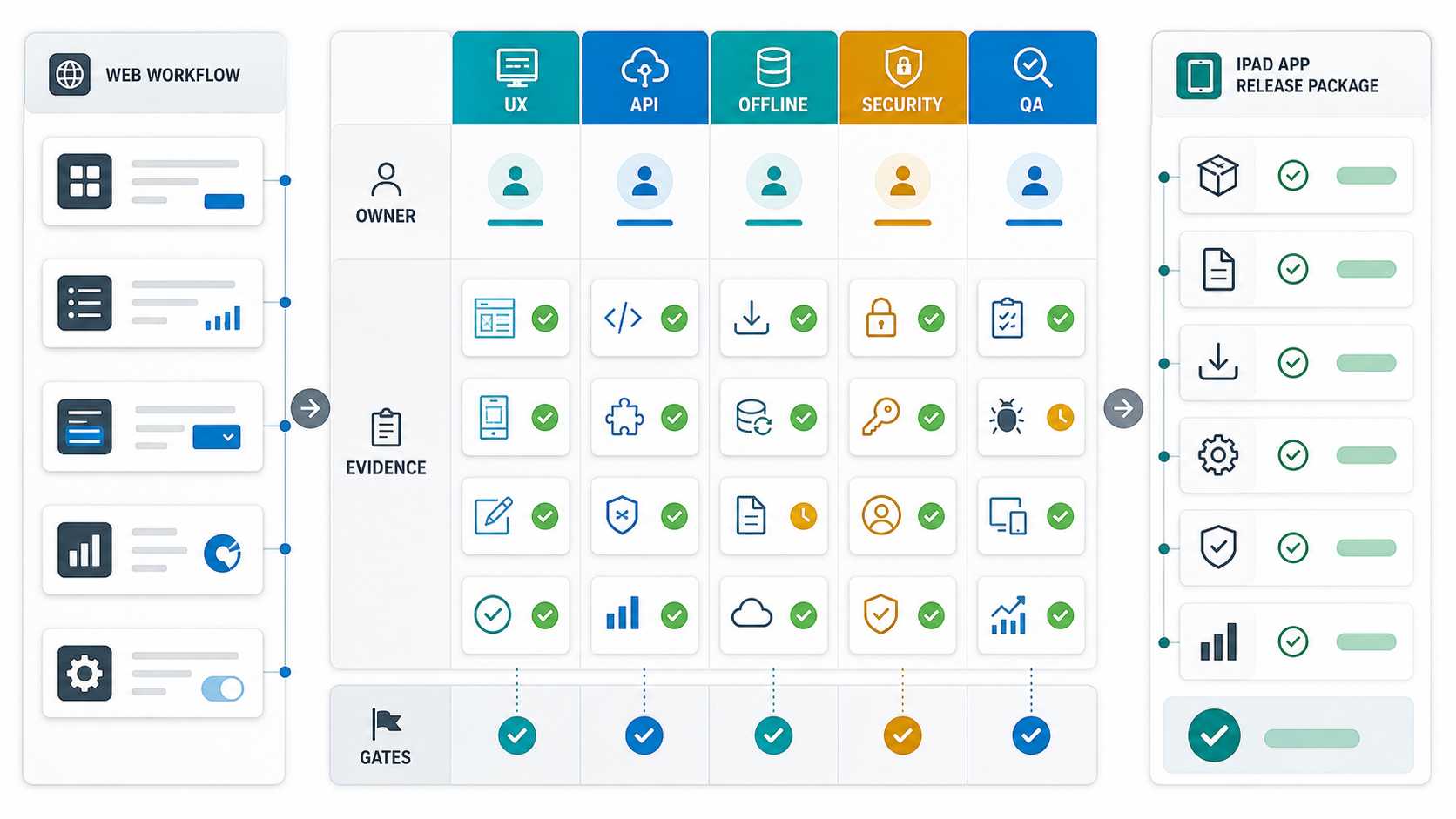
| Workstream | Evidence To Keep | Decision Gate |
|---|---|---|
| UX redesign | Role flows, iPad layouts, orientation states, keyboard and pointer states, accessibility notes. | Critical workflows are easier on iPad than the current web surface. |
| APIs and backend | Endpoint contracts, auth rules, upload behavior, retry rules, versioning, audit events. | The app can call structured APIs without depending on hidden web-page assumptions. |
| Offline and sync | Cache inventory, encrypted local data plan, queued actions, conflict scenarios, recovery paths. | Offline promises are limited to workflows the team can test and support. |
| Security and privacy | Permission map, SDK inventory, data collection answers, shared-device controls, account-deletion path. | Privacy and access controls match App Store answers and real product behavior. |
| QA and rollout | Device matrix, TestFlight feedback, store review notes, monitoring dashboard, support script. | The team has release evidence, first-week ownership, and a rollback path. |
This is where migration planning often exposes hidden backend scope. If the existing website needs reliable app contracts, NextPage's backend and API development services can help stabilize the server-side foundation while the iPad UX is redesigned. For web workflows that should stay browser-based, the web app development company page gives a better fit than forcing everything into a tablet app.
3. Redesign For Tablet UX, Not A Larger Phone
iPad UX is not a stretched phone UI. A practical migration should define navigation, layout, multitasking behavior, input methods, and state recovery. Users may work with touch, keyboard, pointer, Apple Pencil, external displays, Split View, Stage Manager, iPadOS 27 beta windowing behavior, or device rotation. As of August 7, 2026, Apple lists iPadOS 27 beta resources for developers, so migration QA should include current beta testing when the app will launch near the next platform cycle. Even when the first version is simple, the app should avoid layouts that break when screen size, orientation, or input method changes.
Tablet-first redesign usually means fewer screens with more contextual depth. A technician may need the asset list, job detail, checklist, photo capture, and sync state on one clean surface. A store associate may need product lookup, inventory, customer history, and checkout handoff without returning to a desktop-style menu. A manager may need dashboard drill-down with large, glanceable cards and filters that work without hover.
| Web Pattern | iPad Migration Question | Better iPad Direction |
|---|---|---|
| Dense sidebar menu | Which role uses which tasks daily? | Role-based task home with split-view detail. |
| Hover controls | What is the touch equivalent? | Visible actions, menus, gestures only where discoverable. |
| Large tables | What decision does the table support? | Cards, filters, saved views, drill-down panels. |
| Long forms | Can the form become a guided workflow? | Step groups, validation, autosave, draft recovery. |
| Desktop upload flow | What device inputs matter? | Camera, Files, scanner, signature, annotation, compression. |
If the current app is already hybrid or plugin-heavy, compare the migration against the Cordova to Capacitor migration checklist and the legacy hybrid mobile app modernization guide. Sometimes the right first step is stabilizing the app shell and plugins before redesigning the product.
4. Prepare APIs, Auth, And Backend Workflows
Most web-to-iPad migrations fail when the web app was built for server-rendered pages rather than app-grade APIs. The iPad app needs predictable endpoints, documented authentication, role-aware authorization, pagination, partial responses, upload handling, retry behavior, and versioning. If the web product mixes business logic into templates, the migration may require backend extraction before app development can move quickly.
For 2026 planning, separate three backend tracks before estimating the build: API extraction for app contracts, identity and device-session rules for shared tablets, and observability for sync, upload, and crash recovery. This prevents the iPad app from inheriting browser-only assumptions such as hidden form state, cookie-only auth, HTML responses, and admin workflows that cannot be safely retried.
Check each workflow for read calls, write calls, file uploads, validation rules, notifications, admin actions, and audit events. This API inventory should also include analytics, crash reporting, admin dashboards, and third-party integrations so the app does not launch with invisible operational gaps. Then decide which calls must work offline, which can fail gracefully, and which must never be queued without a server response. Avoid designing the iPad app around hidden web assumptions such as session-only state, browser cookies, desktop-only redirects, or form submissions that return HTML instead of structured responses.
- Create API contracts for the first-release workflows before UI build.
- Define token refresh, session expiry, password reset, SSO, and device logout behavior.
- Plan uploads for camera files, PDFs, signatures, scans, and poor networks.
- Version APIs so web and iPad releases can move safely.
- Log audit events for approvals, edits, deletes, exports, and sync conflicts.
For build planning, use the custom software cost estimator when API extraction, admin changes, integrations, or backend modernization become part of the migration scope.
5. Design Offline Mode And Sync As Product Behavior
Offline mode is not a storage toggle. It is a product decision about what users can see, create, edit, approve, attach, and submit when the network drops. Decide what data is cached, how long it can live on device, how it is encrypted, what happens when records change on the server, and how conflicts are shown to users.
Apple's Core Data and CloudKit documentation shows that sync can be a first-class data architecture decision. In business apps, many teams still use their own backend as the source of truth because they need role rules, audit logs, approvals, and cross-platform access. Either way, the migration plan should name conflict rules, retry states, deletion behavior, background sync limits, and manual recovery paths. For workflows with location, device, sensor, or field data, the IoT mobile app development roadmap is a useful companion because offline capture and device integration usually affect the same release risks.
Treat every offline promise as a release contract. If users can capture data offline, the app also needs visible queue state, encrypted local storage, retry limits, conflict review, stale-data warnings, and a support path when sync cannot resolve automatically. These states should be tested with real field scenarios, not only simulated airplane-mode demos.
| Offline Question | Why It Matters | Migration Gate |
|---|---|---|
| What can users do offline? | Prevents vague promises and unsafe workflows. | Every offline action is listed by role. |
| What is cached? | Controls storage, privacy, and freshness risk. | Cache inventory has retention and encryption rules. |
| How are conflicts resolved? | Protects data when multiple users edit the same record. | Conflict rules are tested with real scenarios. |
| How does sync fail? | Users need trust and recovery paths. | Retry, pending, failed, and resolved states are visible. |
6. Plan Privacy, Security, And App Store Readiness Early
App Store readiness starts before submission. Apple revised the App Review Guidelines and Developer Program License Agreement on June 8, 2026, and the current guidelines still require clear privacy policies, relevant permissions, user consent where needed, data minimization, and respect for permission choices. Apple also requires developers to describe data collection practices in App Store Connect, including third-party SDK behavior. That means analytics, crash reporting, ad attribution, SSO, support tooling, and embedded SDKs need review before the build is packaged.
For iPad migrations, the risky areas are often inherited from the web stack: broad account permissions, weak session handling, unreviewed analytics tags, file downloads, local storage, admin-only workflows, and personal data that was never meant to sit on a shared tablet. Treat shared-device use, MDM, remote logout, data wipe, local encryption, and role-based access as migration requirements, not later hardening tasks.
Third-party SDK review deserves its own checkpoint. Apple's current privacy-manifest and SDK-signature requirements make analytics, crash reporting, authentication, attribution, chat, and support SDKs part of the release evidence. Match the SDK inventory to App Store Connect privacy answers before the team packages the build.
- Map all collected data, SDKs, permissions, and storage locations.
- Confirm privacy policy, account deletion, consent, and permission copy.
- Define shared-device behavior for retail, field, school, or clinic environments.
- Review authentication, token storage, biometric unlock, SSO, and logout.
- Prepare TestFlight, App Store metadata, screenshots, review notes, and demo accounts.
Budget App Store work separately. The Swift app development cost guide covers native iOS budget drivers and App Store launch costs that buyers often forget during migration planning.
App Store, Privacy, And Rollout Release Gates
Privacy and App Store readiness should be treated as migration gates, not final paperwork. Apple's current App Review Guidelines remain a living review standard, and teams planning 2026 migrations should also check iOS and iPadOS 26 release notes plus iPadOS 27 beta documentation before submission. The review process still expects accurate metadata, privacy policies, permission behavior, reviewer access, and data-use disclosures. App Store Connect privacy answers should match the app's actual data map, third-party SDK behavior, analytics events, crash payloads, and account flows.
For a migrated website, the hardest review gaps are often operational rather than visual: demo credentials, paid or restricted content access, permission prompts, account deletion, user-generated content, background behavior, support contact paths, and any SDK that collects data beyond what product teams expected. Keep a release packet that maps each app capability to the privacy answer, SDK list, test account, and reviewer note.
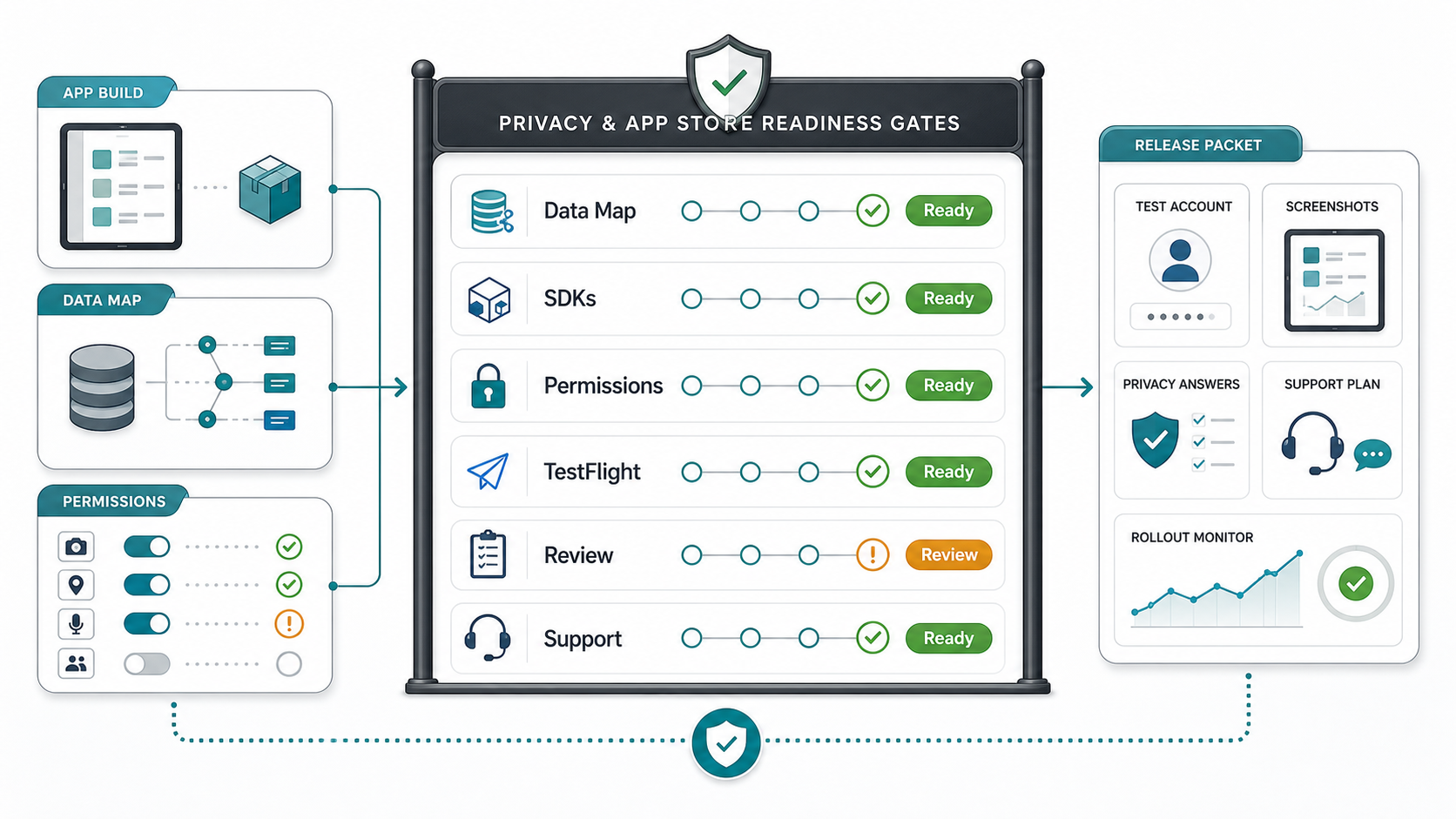
| Gate | What To Verify | Owner |
|---|---|---|
| Data map | Personal data, files, analytics, crash payloads, local storage, retention, and deletion behavior are documented. | Product + engineering |
| SDK review | Third-party SDKs, privacy manifests where applicable, permissions, and data sharing are reviewed before packaging. | Mobile lead |
| Reviewer access | Demo account, role access, review notes, backend dependencies, and restricted workflows are ready for App Review. | Release owner |
| TestFlight evidence | Target roles test real iPad flows, offline states, inputs, support paths, and known limitations. | Product + QA |
| Support and monitoring | Crash/error dashboards, support scripts, escalation owners, first-week triage, and update path are assigned. | Operations + engineering |
For discoverability and store conversion, pair release evidence with the App Store Optimization guide. For implementation planning, NextPage's Swift app development company service page covers native iOS backend, QA, TestFlight, and App Store readiness work that often appears during iPad migrations.
7. Test The Migration Like A Release, Not A Demo
A working demo on one iPad does not prove migration readiness. Test device models, iPadOS versions, orientations, Split View, Stage Manager, iPadOS 26 Windowed Apps behavior, iPadOS 27 beta 4 changes where relevant, multiwindow scene creation, external keyboard shortcuts, pointer input, camera, file import/export, push notifications, low storage, weak networks, backgrounding, app updates, expired sessions, and offline sync loops. If the app will be used by teams, test role switching, shared-device logout, stale records, permission denial, and support escalation.
The mobile app testing checklist covers device and workflow coverage, and the functional testing checklist for web and mobile apps helps teams compare old web behavior against the new iPad workflow. Pair it with the mobile app QA and launch checklist so the migration has release evidence, not just feature signoff.
| Release Gate | Evidence | Owner |
|---|---|---|
| Workflow parity | Each critical web workflow has an iPad pass/fail record. | Product + QA |
| API reliability | Primary calls tested under realistic latency and retry conditions. | Backend + mobile |
| Offline recovery | Pending, conflict, retry, and failure states are tested. | Mobile + QA |
| Security and privacy | Permissions, local storage, SDKs, and data labels reviewed. | Engineering + compliance |
| Store readiness | Build, metadata, review notes, screenshots, privacy answers, TestFlight feedback. | Release owner |
If your team needs independent release coverage, NextPage's mobile app testing services can cover device matrices, API handoffs, offline states, regression cycles, and launch evidence.
8. Estimate Cost By Migration Workstream
Website-to-iPad migration cost depends less on screen count and more on how much of the website must become app-grade product infrastructure. A narrow first release might redesign one workflow, add several APIs, support login, cache a small dataset, and submit a store-ready app. A larger migration might include offline sync, file capture, admin changes, MDM support, analytics, accessibility, localization, and backend modernization.
Budget the migration in phases: workflow audit, tablet UX redesign, API extraction, offline and sync, privacy and security evidence, QA/release, and post-launch support. This makes hidden backend and App Store work visible before the iPad app becomes a fixed-price screen-count estimate.
| Workstream | Cost Driver | Scope Control |
|---|---|---|
| UX redesign | Number of roles, workflows, states, and device inputs. | Start with the highest-value iPad workflow. |
| APIs/backend | Existing API maturity, integrations, auth, uploads, audit logs. | Freeze first-release contracts before UI build accelerates. |
| Offline sync | Cached data volume, conflict rules, encryption, background behavior. | Limit offline edits to workflows that truly need them. |
| QA/release | Device matrix, regression depth, TestFlight feedback, store assets. | Define release gates before feature complete. |
| Operations | Monitoring, support, crash triage, user training, device management. | Assign owners before rollout. |
For broader app budgeting, compare this migration with the mobile app development cost guide and the mobile app development company service page. If the migration also needs long-term support planning, use the mobile app maintenance checklist to budget OS updates, crash triage, SDK updates, store feedback, and roadmap iteration after launch.
Website To iPad App Migration Checklist
- Confirm why iPad is better than responsive web or a PWA for the target workflow.
- Choose the first-release roles, workflows, data, integrations, and offline needs.
- Redesign desktop web patterns for tablet navigation, touch, keyboard, pointer, rotation, and split-view use.
- Extract or formalize app-grade APIs for every critical screen and action.
- Define authentication, authorization, token refresh, logout, and shared-device behavior.
- Design offline states, sync queues, conflict rules, retries, failed submissions, and recovery paths.
- Review privacy policy, permissions, third-party SDKs, data collection, local storage, and App Store Connect privacy answers.
- Prepare TestFlight, demo accounts, review notes, screenshots, metadata, and support ownership.
- Test on real iPads, iPadOS versions, orientations, input methods, networks, and update paths.
- Launch with monitoring, crash triage, support routing, training, and a phase-two backlog.
How NextPage Helps With Website To iPad App Migration
NextPage helps teams turn existing web portals, dashboards, ecommerce flows, and internal tools into focused iPad apps. We start by mapping the real workflow, choosing the right surface, scoping the first release, and identifying the API, offline, QA, security, and App Store work needed to launch without surprises.
The useful output is not a generic app estimate. It is a migration plan: what stays web, what becomes iPad-native, what backend work is needed, which workflows can be offline, what evidence is required for release, and how the rollout will be supported. If you are evaluating a migration now, use the MVP scope builder, estimate hidden backend and QA work with the custom software cost estimator, or contact NextPage for a tablet-workflow planning session.