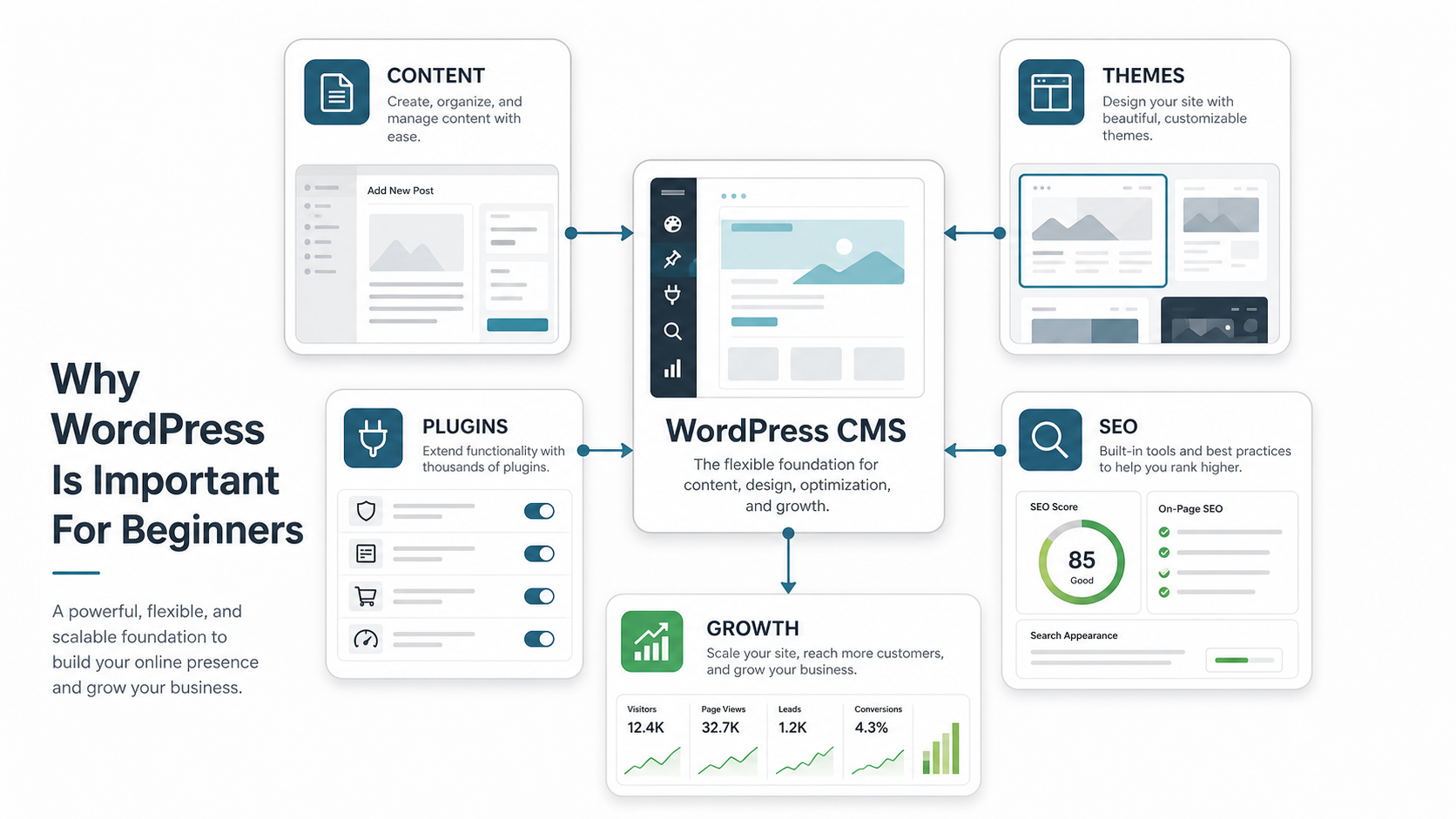

WordPress is important for beginners because it gives non-technical teams a practical way to publish pages, manage content, test ideas, and grow a website without starting from a blank engineering project. It is not the right answer for every digital product, but it is still one of the fastest ways to launch a credible website when content, speed, and flexibility matter.
For a founder, consultant, local business, nonprofit, or marketing team, the real question is not whether WordPress is popular. The better question is whether it matches the job your website needs to do. If the first version needs a homepage, service pages, blog posts, lead forms, landing pages, basic ecommerce, and SEO control, WordPress can be a strong starting point. If the product needs complex workflows, custom permissions, real-time collaboration, or deep product logic, a dedicated web app development path may be a better fit.
Quick Answer: Why Is WordPress Important For Beginners?
WordPress matters for beginners because it lowers the barrier to building and maintaining a website. You can choose a theme, create pages, publish posts, install plugins, add forms, improve SEO basics, and update content without depending on a developer for every small change.
That control is valuable in the early stage. Beginners usually need to learn what their audience responds to, which pages convert, which content gets search traffic, and which offers deserve more investment. WordPress helps teams iterate on those questions before committing to a larger custom build.
What WordPress Actually Does
WordPress is a content management system, or CMS. A CMS separates website content from the code that displays it. Instead of editing raw HTML for every page, you can log into an admin area, write content, upload images, manage navigation, choose templates, and publish updates through a visual interface.
The platform also has a large ecosystem of themes and plugins. Themes control much of the visual presentation. Plugins add features such as contact forms, SEO controls, analytics, caching, security hardening, backups, ecommerce, memberships, and page-building workflows. This ecosystem is one reason WordPress remains approachable for beginners.
Why Beginners Choose WordPress First
Beginners often choose WordPress because it balances control, affordability, and flexibility. You can start small with a simple site, then add pages, forms, content sections, lead magnets, integrations, and ecommerce features as the business becomes clearer.
WordPress also makes content publishing less intimidating. A beginner can write a blog post, preview it, add images, assign categories, edit the URL slug, and update the page later. That workflow is useful for teams trying to build organic search visibility. If search is a priority, pair WordPress basics with a practical SEO checklist for websites so titles, descriptions, internal links, content depth, speed, and crawlability are not treated as afterthoughts.
WordPress Is Best When Content Is The Product
WordPress is especially strong when the website is driven by content: service pages, articles, guides, portfolios, resource libraries, location pages, campaign pages, and simple product catalogs. The CMS gives marketing teams a way to keep publishing without opening a development ticket for every edit.
This matters because search visibility usually compounds through consistent, useful content. A WordPress site can support topic clusters, pillar pages, supporting blog posts, and landing pages. For service businesses, the same content system can also support AI-answer visibility when pages clearly explain expertise, offers, proof, and buyer questions. NextPage's guide to AI search optimization for service businesses explains why content structure now matters beyond traditional search results.
WordPress Vs Custom Development: How To Decide
WordPress is a good fit when the website mainly needs publishing, lead generation, basic ecommerce, marketing pages, and manageable integrations. Custom development is usually better when the business needs a product, portal, SaaS workflow, marketplace, internal dashboard, complex permissions, custom data model, or heavy integration logic.
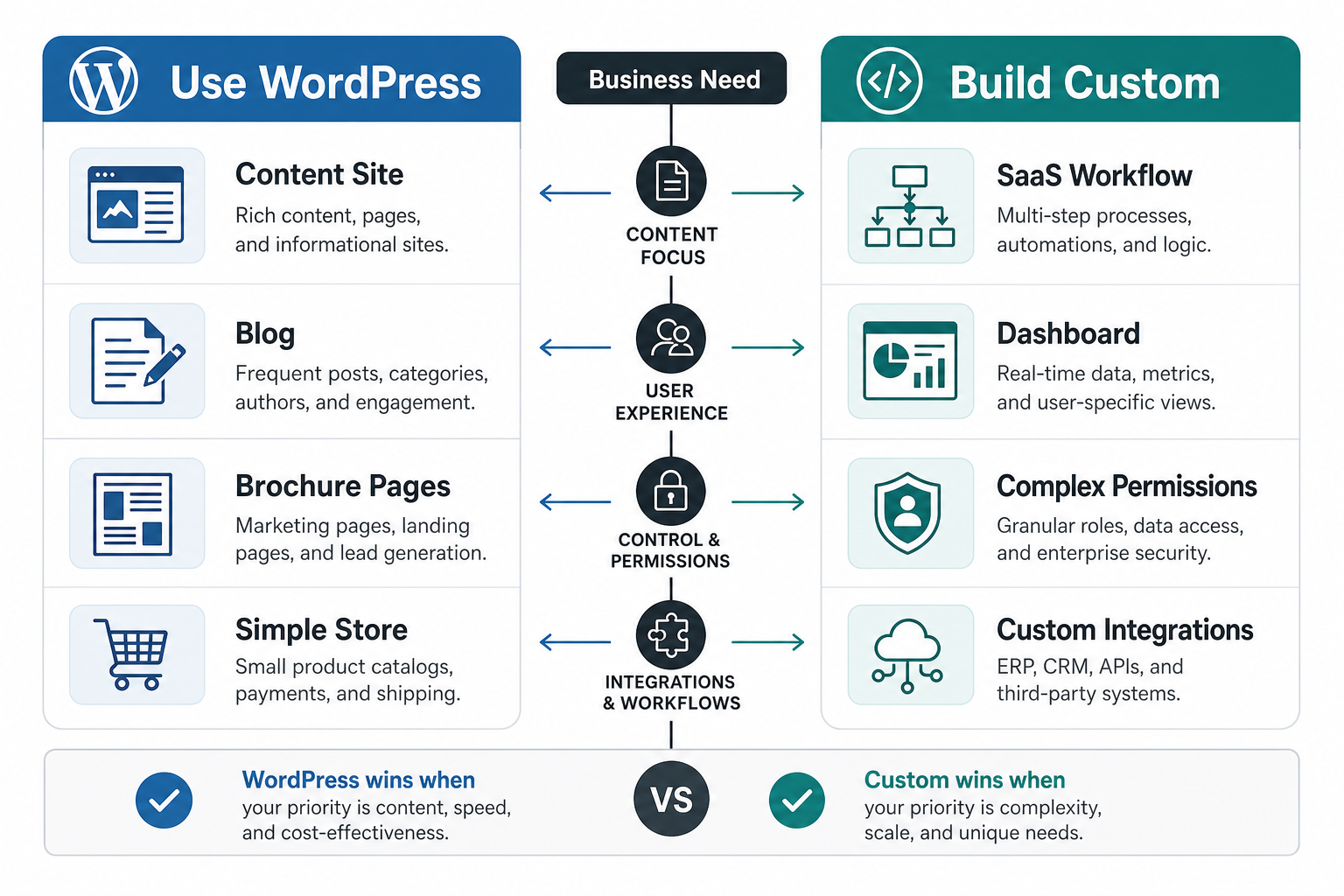
A useful rule is this: use WordPress when the content model is the center of the experience. Consider custom software development when the workflow, data, automation, or user interaction is the product. This decision can save money because it avoids forcing WordPress to behave like a custom application or overengineering a simple marketing site.
The Beginner WordPress Launch Roadmap
A beginner-friendly WordPress launch should be deliberate. Start with the website goal, then choose hosting, define the page structure, pick a theme, install only necessary plugins, add core pages, configure SEO basics, test forms, connect analytics, set up backups, and publish with a maintenance plan.
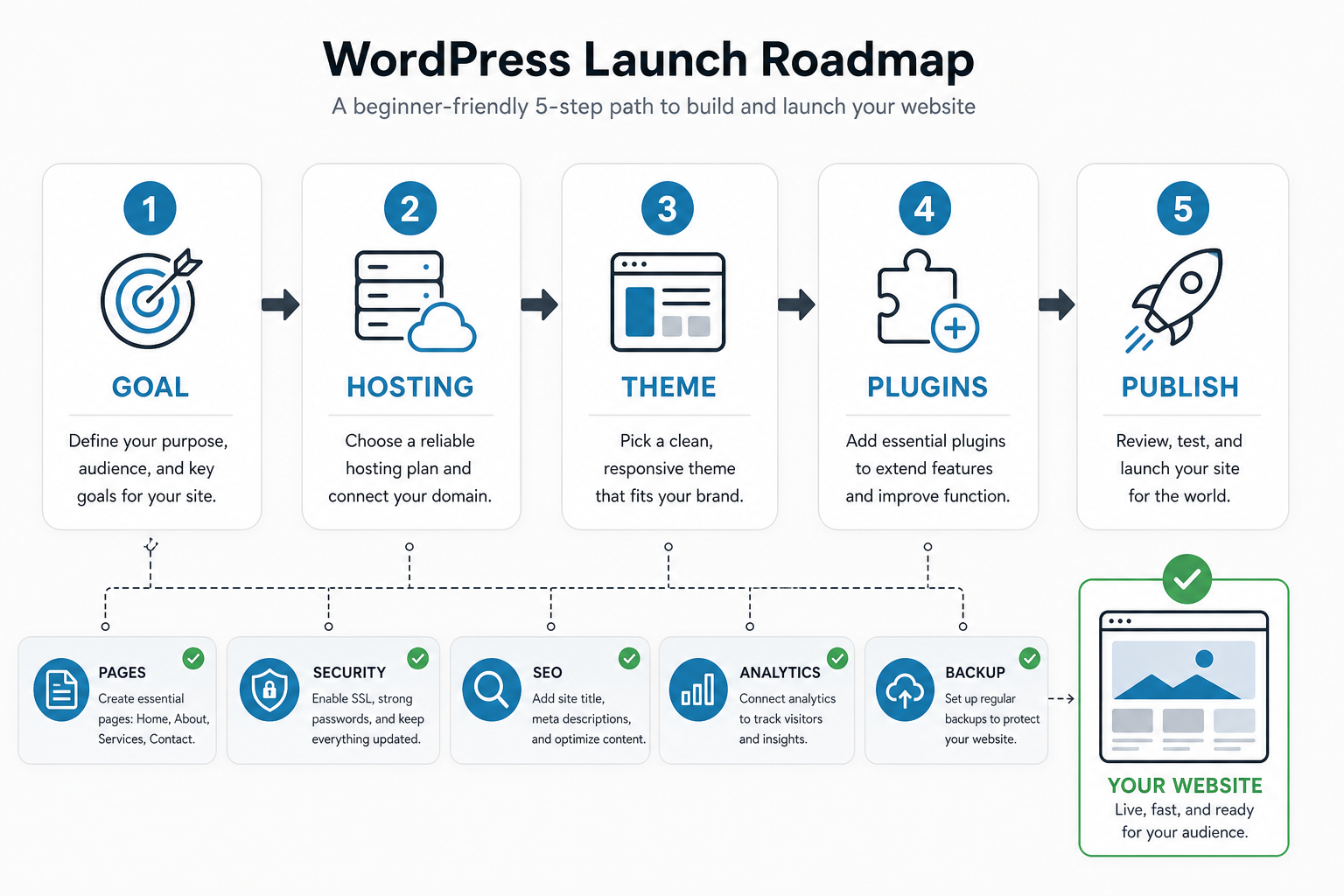
The biggest beginner mistake is installing too much too early. Every plugin adds maintenance overhead. Some plugins slow down the site, conflict with other plugins, or create security risk when ignored. Start with a small, reliable stack, then add features only when there is a clear business reason.
Essential WordPress Building Blocks
A solid beginner site usually needs a homepage, service or product pages, about page, contact page, blog or resources area, privacy policy, analytics, search-friendly titles and descriptions, a sitemap, contact forms, backups, caching, security controls, and clear calls to action.
These basics are more important than a crowded design. A fast, clear, trustworthy five-page site will usually outperform a visually busy site that hides the offer, loads slowly, or makes contact forms hard to find. If the goal is lead generation, each page should make the next action obvious.
SEO And AI Search Visibility Need More Than A Plugin
SEO plugins are useful, but they do not make a website useful by themselves. Beginners still need clear page titles, specific headings, helpful content, internal links, fast pages, original images, schema where appropriate, and content that answers real buyer questions.
AI search raises the bar further. Pages need to explain who the company serves, what it does, what proof supports the claim, and which questions the page answers. The AI Search Visibility Checker can help teams review whether their website has the content depth, schema readiness, authority signals, and entity clarity needed for AI-assisted discovery.
Common WordPress Mistakes Beginners Should Avoid
- Choosing a theme only because it looks polished in the demo.
- Installing too many plugins before defining the actual workflow.
- Ignoring backups, updates, security, and basic performance checks.
- Publishing thin service pages that do not answer buyer questions.
- Using page builders in ways that make the site slow or hard to maintain.
- Forgetting to test mobile layouts, forms, analytics, and conversion paths.
How Much Should Beginners Budget?
A beginner WordPress site can be inexpensive when the scope is simple, but costs rise with custom design, professional copywriting, ecommerce, memberships, booking flows, multilingual content, performance work, migrations, integrations, and ongoing maintenance.
Before choosing a low-cost template route or a custom build, map the actual requirements. Use the Custom Software Cost Estimator to compare the likely effort behind a simple marketing site, a more advanced web experience, or a custom product that should not be squeezed into WordPress.
When WordPress Stops Being Enough
WordPress may stop being enough when the site becomes a product rather than a content system. Warning signs include complex user roles, heavy data entry, custom dashboards, real-time workflows, advanced reporting, unusual checkout logic, deep third-party integrations, or performance requirements that fight the plugin stack.
That does not mean the original WordPress site was a bad decision. It may have been the right first step. Many teams start with WordPress to validate the offer and build content, then move the product experience into a custom application while keeping WordPress for marketing pages and publishing.
Key Takeaways
- WordPress is important for beginners because it makes website publishing and content management accessible.
- It is strongest for content-led websites, service pages, blogs, landing pages, and simple ecommerce.
- Beginners should keep the plugin stack lean and prioritize speed, security, backups, SEO basics, and clear calls to action.
- Custom development is a better fit when the workflow, data model, permissions, or product logic becomes complex.
- The best first website is not the most complicated one. It is the one that helps the team publish, learn, improve, and convert visitors consistently.
For beginners, WordPress is valuable because it creates momentum. It lets a team launch, publish, test, and improve without waiting for a full custom product build. The important part is knowing where WordPress fits, where it does not, and when the business has grown enough to justify a more custom web platform.