Portfolio case study

AccessDesk: Coworking space operations platform

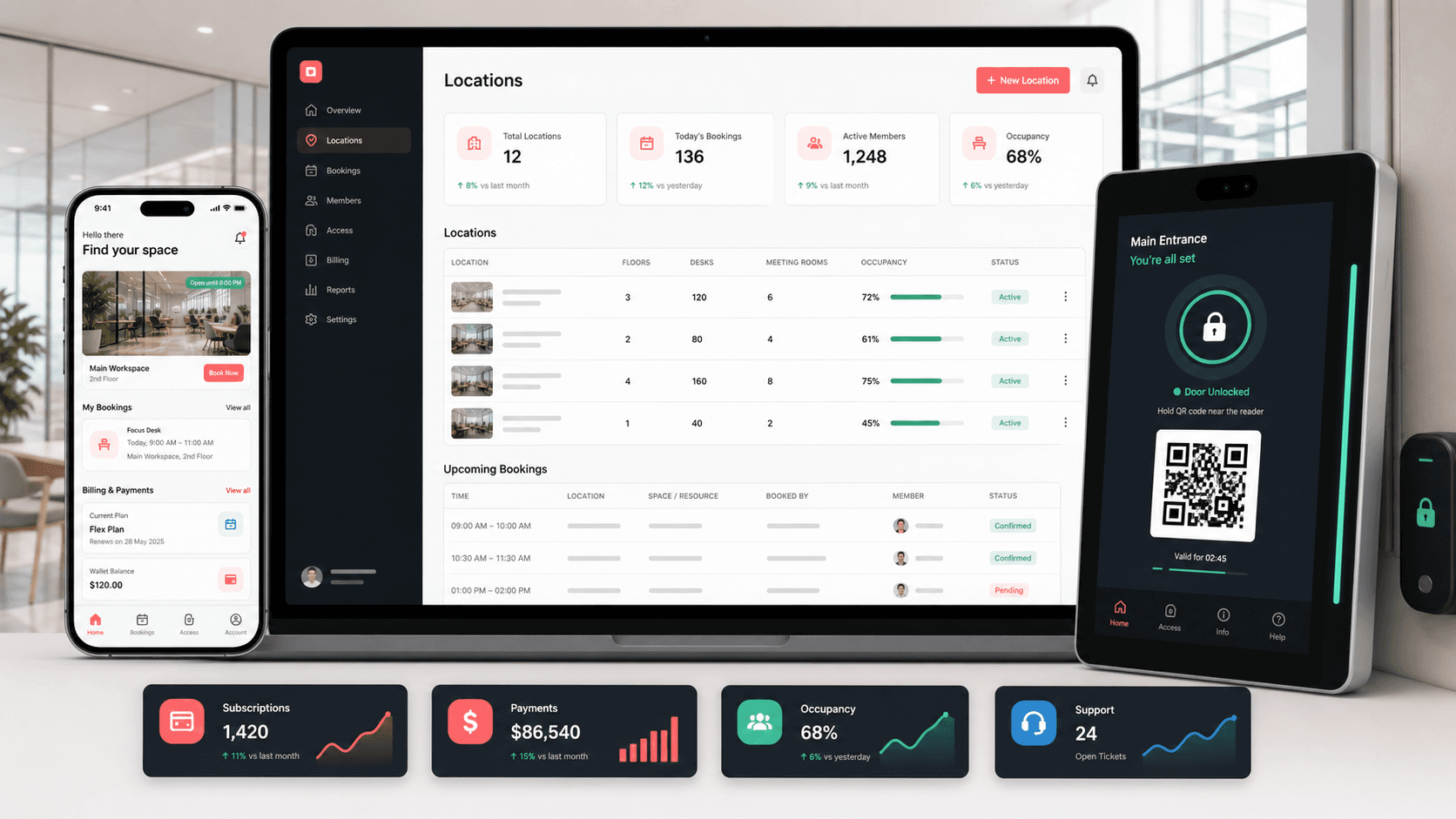
A coworking space operations platform that connects location management, space booking, member apps, tenant workflows, subscription billing, QR access, smart locks, and tablet-based front-desk control.

Name changed to respect NDA.

Coworking operations platform visual with admin dashboard, mobile booking app, QR access, tablet lock control, subscriptions, payments, and occupancy indicators
Project scope

Product engineering for a React operations console, Android member app, iOS member app, Android tablet access app, booking workflows, subscriptions, payment methods, QR access, and smart-lock operations

4
connected product surfaces
3
user contexts
Access
QR and smart-lock workflows
Billing
plans, cards, subscriptions, and invoices

Timeline

Multi-surface coworking platform build across admin, member, and on-site access surfaces

Coworking operations needed to connect booking, billing, and access

The product had to support members booking spaces from mobile, operators managing locations and plans from an admin console, and on-site devices validating bookings and door access without splitting the experience across unrelated tools.

  • Members needed mobile workflows for signup, login, nearby spaces, bookings, subscriptions, cards, and invoices
  • Operators needed a control center for locations, spaces, amenities, pricing, tenants, plans, bookings, payments, locks, and device logs
  • Front-desk and room-access workflows needed QR scanning, device lookup, smart-lock metadata, and booking validation
  • The platform needed role-aware navigation for admins, tenants, members, guests, and on-site access users

A connected coworking platform for operators, tenants, members, and access devices

AccessDesk brings the operating layer, mobile member journeys, and tablet access workflows into one product system, giving each role a tailored surface while keeping bookings, plans, spaces, locks, and payments aligned.

  • React admin and tenant console for locations, spaces, bookings, plans, subscriptions, users, settings, reports, and lock management
  • Android and iOS member experiences for profile setup, booking lists, space discovery, billing methods, subscriptions, invoices, and account settings
  • Android tablet/front-desk app for QR scanning, booking lookup, device-specific bookings, lock lists, and access-state workflows
  • Shared REST API patterns for auth, locations, plans, bookings, user plans, cards, QR, taxes, FAQs, dashboards, and lock operations

Product surfaces

What the platform brought together

The work spanned core product operations, daily user workflows, data-heavy coordination, and resilient platform management.

Location and space inventory

Operators can model the physical coworking footprint before exposing it to booking and access workflows.

  • Location, space, image, amenity, pricing, industry, company, and account-setting management
  • Space statistics, all-space views, booking history, and space-lock reporting
  • Reusable forms and record views for adding and editing operational data

Bookings and QR access

Members can book spaces while the platform keeps QR, booking details, time slots, and access checks tied to the same record.

  • Booking creation, edit, date-range filtering, booking detail, booking confirmation, QR generation, and QR display flows
  • Mobile booking lists, booking detail screens, cancellation paths, and nearby space discovery
  • Tablet QR scanning, device booking lookup, lock lookup, and on-site booking validation

Plans, subscriptions, and payments

The business model is built into the product through plans, user subscriptions, billing methods, taxes, transactions, and invoice-style member screens.

  • Admin plan, subscription, transaction, tax, payment-status, and user-plan operations
  • Android card entry, card saving, subscription payment, Google Pay, and Square in-app payment support
  • iOS member screens for billing methods, invoices, subscription details, and subscription history

Smart locks and device operations

The access layer connects software bookings to physical-space control through lock records, device IDs, Bluetooth permissions, tablet flows, and operational reports.

  • Admin lock setup with Bluetooth ID, device ID, and location-space-lock relationships
  • Android Bluetooth smart-lock SDK integration, scanner activity, device lookup, and lock-control screens
  • Device logs and space-lock reports for operational supervision

Module depth

Dedicated product blocks for the highest-value workflows

For large platforms, the conversion story depends on showing how each major module solves a specific operating problem, not only listing features.

Operations

Locations Become Bookable Inventory

The admin console gives teams a way to turn locations, spaces, amenities, prices, images, and locks into inventory that can be sold and accessed.

Supported by location, space, pricing, amenity, location image, booking log, all-space, space statistics, lock, and space-lock report routes.

  • Operators can configure the space catalog before members book
  • Location and space records stay connected to pricing and amenities
  • Lock metadata and reports keep access management visible to admins

Member journey

Booking And Billing Stay In The Member App

Members can move from profile and discovery into booking, cards, subscriptions, invoices, and settings without leaving the mobile experience.

Supported by Android activities and fragments for signup, login, profile, booking, subscription, billing, card saving, payment, and confirmation plus iOS storyboard/controllers for bookings, invoices, billing, and subscriptions.

  • Mobile discovery and booking workflows reduce dependence on staff
  • Saved card and subscription flows support repeat revenue
  • Account and profile screens keep member data self-service

Access

On-site Devices Close The Loop

The tablet and smart-lock workflows help translate digital bookings into room access at the physical location.

Supported by the tablet app scanner, device booking lookup, lock list, booking-by-device APIs, Bluetooth permissions, and smart-lock SDK integration.

  • QR and device lookup workflows validate the right booking at the right location
  • Lock records connect spaces to physical access devices
  • Device logs and reports support support and audit workflows

Buyer priorities

What mattered most to the people evaluating the platform

Prospective buyers want to know whether the work solved real workflow, adoption, reliability, data, and operations problems. These priorities shaped the product decisions.

Operational control

Coworking operators needed the admin console to manage the business side of locations, plans, users, bookings, locks, and reports.

  • Admin and tenant navigation separate higher-control workflows from member self-service
  • Reports and device logs give teams a way to supervise access and booking health
  • Reusable forms and data tables keep day-to-day administration efficient

Member adoption

The mobile experience had to make booking, billing, profile, and subscription tasks feel direct enough for repeat use.

  • Android and iOS flows cover signup, login, bookings, invoices, billing, subscriptions, and settings
  • Nearby space discovery and booking detail screens support real-world booking decisions
  • Saved cards and payment paths reduce friction for ongoing membership use

Physical access reliability

The product story depends on connecting software reservations to real doors, rooms, tablets, and staff supervision.

  • Tablet QR scanning and device-specific booking lookup support on-site validation
  • Bluetooth smart-lock integration creates a bridge between bookings and room entry
  • Lock reports and device logs make access issues easier to investigate

System model

How the platform connects roles, workflows, and product surfaces

The product architecture brings every role into the same operating model, with shared data moving cleanly between web, mobile, media, and notification layers.

Booking to access workflow

Members discover a space, choose a time slot, confirm payment, receive QR access, and validate entry through an on-site device.

Coworking role matrix

Admins, tenants, members, guests, and access devices each receive different controls around the same locations, bookings, and locks.

Multi-surface operations platform

Admin web, mobile apps, tablet access, and API services work together around booking, billing, inventory, and access records.

Technology

The Stack We Used And Why

The stack section is written for buyers who need to understand the product architecture, operational trade-offs, and long-term maintainability of the system.

Admin and tenant web

Used for dense operations workflows around locations, spaces, bookings, users, plans, subscriptions, reports, settings, and locks.

ReactCoreUIBootstrapReduxRedux FormAxiosChart.js

Member mobile apps

Used for booking, billing, profile, subscription, invoice, card, payment, and account workflows across Android and iOS.

Android JavaSwiftUIKitRetrofitAlamofireFirebase Messaging

Access and device layer

Used to support tablet check-in, QR scanning, device lookup, lock lists, Bluetooth permissions, and smart-lock behavior.

Android tablet appQR scanningBluetooth SDKGoogle Play Services VisionDevice logs

Commerce and platform APIs

Used to connect authentication, booking, subscriptions, cards, taxes, dashboards, uploads, locations, spaces, and lock records.

REST APIsBearer tokensSquare In-App PaymentsGoogle PayFirebase Crashlytics

Why Separate Admin, Member, And Access Surfaces

Coworking operations involve different physical and digital contexts, so one interface would have made the product harder to use.

  • Admin web screens support table-heavy operations and settings
  • Mobile apps keep recurring member tasks fast and portable
  • Tablet access flows stay focused on QR, booking, device, and lock checks

Why Access Was Treated As A Product Layer

Room access is not only a hardware detail; it affects member trust, front-desk workload, and operational support.

  • Lock records and space-lock relationships attach physical access to the inventory model
  • QR and device lookup workflows help validate bookings at the door
  • Device logs and reports give teams evidence when support issues appear

Why Billing Belongs Beside Booking

Plans, subscriptions, saved cards, invoices, transactions, and taxes shape both revenue and member experience.

  • Plan and subscription screens support recurring membership operations
  • Mobile card and payment flows support self-service upgrades and bookings
  • Transaction and payment-status views help admins supervise commercial activity

Delivery

How the product came together

The work moved from domain modeling to core platform delivery, mobile adoption, and operational hardening.

1

Map coworking operations

Define how locations, spaces, users, tenants, plans, subscriptions, bookings, locks, and payments connect.

2

Build the admin console

Create route-based operational screens for locations, spaces, bookings, plans, users, subscriptions, settings, reports, and locks.

3

Create member apps

Add Android and iOS flows for registration, login, profile, booking, billing methods, subscriptions, invoices, and account settings.

4

Connect physical access

Layer in QR scanning, booking lookup, device IDs, lock records, Bluetooth smart-lock integration, and support reports.

Operational depth

What made the platform usable after launch

The strongest case studies are not only feature lists. They show how the system is operated, monitored, governed, and improved when real users depend on it.

Inventory, pricing, and access are connected

Locations and spaces are not isolated records; they connect to pricing, amenities, images, bookings, locks, and reports.

  • Location-space relationships and pricing relationships shape what can be booked
  • Space-lock relationships connect rooms to access devices
  • Booking history and space statistics help operators review usage

Member self-service supports repeat revenue

Members can manage the recurring parts of coworking use from mobile instead of asking staff to handle every change.

  • Profile, card, booking, billing, invoice, and subscription flows live in the member apps
  • Square and Google Pay support payment capture from Android flows
  • Subscription history and billing summary screens support member transparency

Access support has operational evidence

The tablet, smart-lock, and reporting workflows give staff more context when a booking or room access issue needs attention.

  • QR and booking-by-device lookup provide a clear validation trail
  • Device logs help support teams understand what happened at the location
  • Lock records capture the hardware details needed for operations

Results

The measurable and observable lift from the work

The strongest improvements are the ones a buyer can connect to daily work: fewer disconnected tools, safer operations, clearer workflows, and more reliable product behavior.

4 surfaces

Web, Android, iOS, And Tablet

The product spans an admin console, Android member app, iOS member app, and Android access-tablet app.

Access-ready

QR And Lock Workflows

Bookings are connected to QR, device lookup, Bluetooth lock, and space-lock report workflows.

Revenue-aware

Plans And Payments

Plans, subscriptions, transactions, taxes, billing methods, cards, invoices, and payment status are part of the operating model.

Role-aware

Admin, Tenant, Member, Guest

The product separates operational controls from tenant and member self-service experiences.

Outcome

A stronger operating system for coworking space booking and access management platform

The platform reduced tool fragmentation and gave each role a clearer path from live activity to day-to-day action.

A React operations console for locations, spaces, bookings, plans, subscriptions, users, tenants, transactions, settings, reports, locks, and device logs

Android and iOS member apps for signup, login, booking, profile, billing methods, subscriptions, invoices, payment, and settings workflows

An Android tablet/front-desk app for QR scanning, booking lookup, device lookup, lock lists, and smart-lock access workflows

A public-safe portfolio page that positions the work as a complete coworking operations platform without exposing real repository names, API hosts, credentials, source screenshots, brand assets, or hardware identifiers

FAQ

Frequently Asked Questions About AccessDesk

Answers about the coworking space booking and access management platform scope, platform model, technology choices, operational workflows, and related build patterns.

What Kind Of Coworking Platform Does AccessDesk Represent?

AccessDesk represents a coworking operations platform that connects location and space inventory, member bookings, plans, subscriptions, payments, QR access, smart locks, and admin reporting.

Why Does The Product Need Both Mobile Apps And A Tablet App?

Members need mobile self-service for booking and billing, while the tablet surface supports on-site access validation, QR scanning, device lookup, and lock workflows at the physical location.

How Does The Platform Support Revenue Operations?

The platform includes plans, subscriptions, transactions, taxes, payment methods, cards, invoices, payment status, and subscription history so booking and billing stay connected.

Can This Pattern Support Flexible Offices Or Membership Spaces?

Yes. The same architecture can support coworking networks, flexible offices, meeting-room operators, membership clubs, shared studios, and other access-controlled bookable spaces.

Related services

Build a similarly ambitious product without starting from a blank page.

We can help scope the web, mobile, AI, media, and operating layers needed for your own platform.

Start a project inquiry