Portfolio case study

MemoryLane: Family memory album and print subscription platform

A family memory album platform that helps relatives collect photos and notes, invite family members, manage recipients, subscribe to monthly print delivery, and turn shared moments into a generated keepsake album.

Name changed to respect NDA.

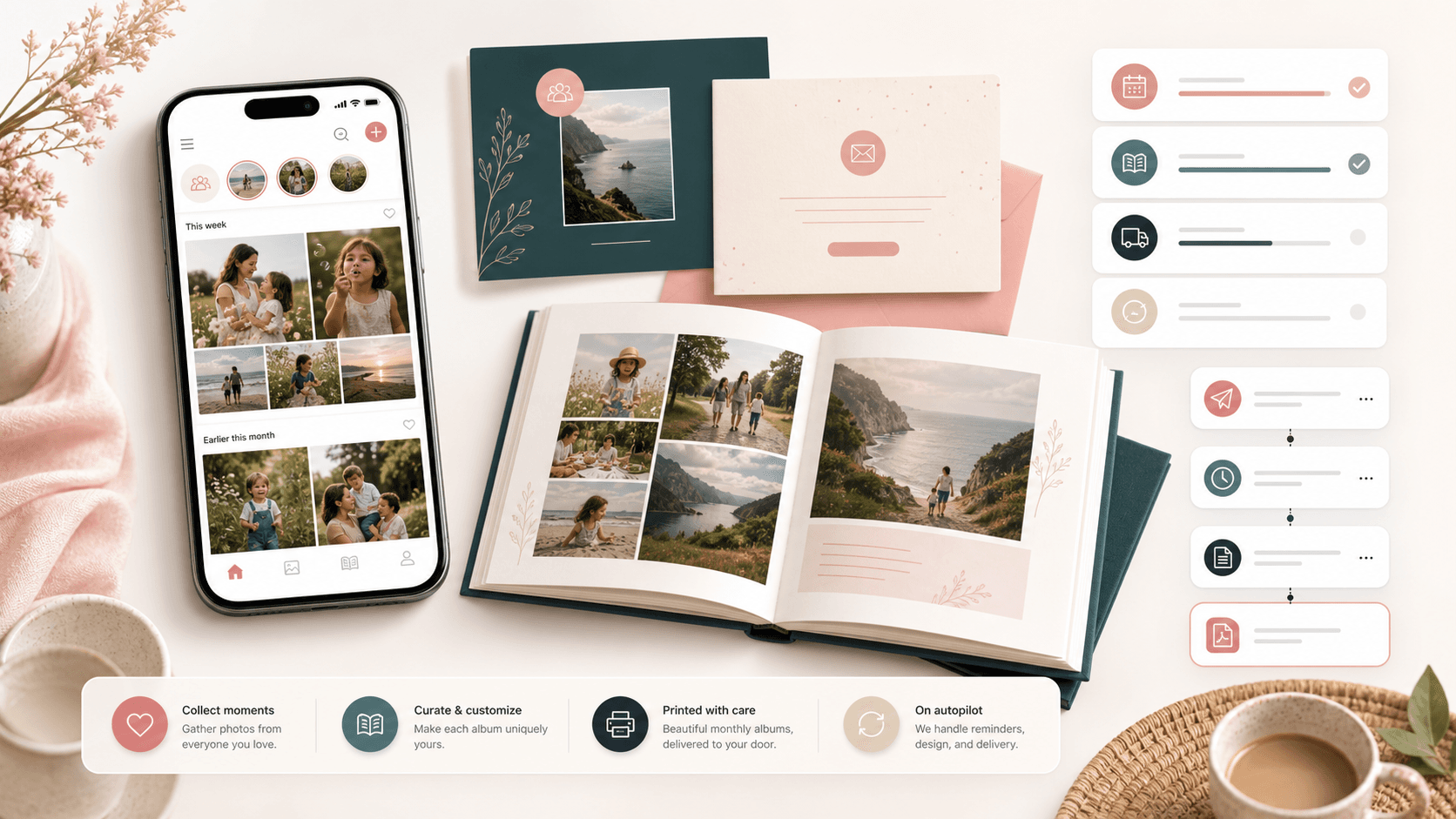
Family memory album platform visual with a mobile photo feed, printed album, invitation cards, reminders, and delivery workflow
Project scope

Product engineering, responsive web app, family collaboration flows, subscription checkout, PDF generation, email automation, and media upload delivery

30
monthly album post slots
3
core family roles
2
language-ready experience
Stripe
subscription checkout

Timeline

Consumer subscription product build with operational automation

Family updates were easy to miss and hard to preserve

The product needed to make photo sharing feel simple for relatives while still producing a polished monthly album that could be printed, mailed, and enjoyed by recipients who may not use social apps every day.

  • Families needed a shared place for monthly photos, captions, birthdays, and recipient details
  • The album workflow had to handle contributors, invitations, reminders, and subscription state without heavy admin effort
  • Uploaded images needed cropping, compression, storage, and print-friendly layout handling
  • The business needed recurring revenue, referral loops, and email automation around a physical fulfillment cycle

A guided memory collection platform with print-ready automation

MemoryLane connects family onboarding, invite links, photo posting, subscription checkout, monthly reminders, and PDF album generation into one consumer product workflow.

  • Responsive dashboard with feed and gallery views for each family space
  • Photo upload, crop, caption, word-count, and monthly post-limit controls
  • Family-code invitations, referral codes, recipient records, address capture, and member profiles
  • Automated monthly newsletter generation with cover, birthday, author, and photo layout logic

Product surfaces

What the platform brought together

The work spanned core product operations, daily user workflows, data-heavy coordination, and resilient platform management.

Family onboarding and recipient setup

The first-use flow captures account, recipient, address, family, and language context so the album has a clear destination from the start.

  • Account creation links a user to a new family space and primary recipient
  • Recipient address fields can be completed during sign-up or later from the family area
  • Profile fields support birthdays, avatars, language preference, and family membership

Shared monthly memory feed

Family members can add photos and notes into a monthly album queue with controls that fit a printed keepsake format.

  • Dashboard shows remaining monthly post capacity and days left in the current album cycle
  • Feed and gallery views make submitted memories easier to review
  • Image upload, compression, crop ratios, captions, and edit/delete paths prepare posts for layout

Invitations and referral growth

Built-in sharing tools help one subscriber bring more relatives into the same family space and invite new subscribers.

  • Family codes and invite links help relatives join the correct private family space
  • Pre-filled share messages make invitations easier for less technical users
  • Referral codes and discount messaging support subscription-led acquisition

Subscription and fulfillment readiness

Checkout, reminder, and PDF workflows connect digital collection to recurring printed album delivery.

  • Stripe checkout supports monthly and annual plans with country-aware currency labels
  • Reminder endpoints send month-end prompts based on subscription state and remaining post slots
  • PDF generation builds cover, birthday, member, author, photo, and caption layouts for production handoff

Module depth

Dedicated product blocks for the highest-value workflows

For large platforms, the conversion story depends on showing how each major module solves a specific operating problem, not only listing features.

Retention

Month-End Contribution Loop

The product nudges families before the album cycle closes, giving subscribers a reason to return and contribute while there is still time.

Source evidence includes scheduled reminder endpoints, subscription-state branching, remaining-post calculations, and current-month newsletter records.

  • Subscribed families receive contribution prompts tied to days remaining
  • Unsubscribed families receive upgrade prompts before print cutoff
  • Dashboard counters reinforce the same monthly cadence inside the app

Operations

Print-Ready Album Builder

The platform turns scattered family posts into a structured PDF with cover details, birthdays, photo frames, captions, and contributor attribution.

Source evidence includes PDFKit generation, image orientation handling, cover-page assets, birthday sections, and post-to-author payload assembly.

  • Cover pages combine recipient, address, month, year, and family framing
  • Post pages balance captions, photos, author avatars, and orientation-specific image frames
  • Birthday sections make the album feel personal beyond a simple photo dump

Revenue

Subscription And Referral Engine

Recurring payment, plan choice, and referral mechanics support a consumer subscription business rather than a one-off photo upload tool.

Source evidence includes Stripe subscription setup, annual and monthly plan controls, referral code generation, and discount-code entry.

  • Monthly and annual plans make pricing clear before checkout
  • Referral codes give subscribers a built-in sharing incentive
  • Subscription status shapes dashboard alerts and fulfillment readiness

Buyer priorities

What mattered most to the people evaluating the platform

Prospective buyers want to know whether the work solved real workflow, adoption, reliability, data, and operations problems. These priorities shaped the product decisions.

Low-friction family adoption

Family products need to work for users with different comfort levels, so invite, join, post, and profile flows had to stay direct.

  • Family codes and shareable messages reduce onboarding explanation
  • Mobile-friendly screens make contribution easier from the device where photos already live
  • Simple feed and gallery views keep the monthly album understandable

Recurring product operations

The business model depends on repeat contribution, subscription state, print deadlines, and reliable fulfillment signals.

  • Plan, payment, referral, reminder, and recipient workflows sit in the core product
  • Month-based newsletter records provide a clear operational unit
  • Automated emails reduce manual customer nudging

Media and document quality

The final printed album depends on images, captions, layout rules, and generated PDFs behaving predictably.

  • Image compression and crop ratios prepare uploads before storage
  • PDF layout code separates cover, member, birthday, and post presentation
  • Photo orientation handling improves printed page consistency

System model

How the platform connects roles, workflows, and product surfaces

The product architecture brings every role into the same operating model, with shared data moving cleanly between web, mobile, media, and notification layers.

One family space, many contributors

Subscribers, relatives, and recipients connect through one family record while seeing only the workflows they need.

From post to printed album

Photos and notes move from upload through crop, storage, newsletter records, PDF layout, and delivery readiness.

Consumer app with operational automation

The family dashboard, API layer, payment system, media storage, PDF builder, and email automation work together.

Technology

The Stack We Used And Why

The stack section is written for buyers who need to understand the product architecture, operational trade-offs, and long-term maintainability of the system.

Web app

Used for subscription sign-up, family spaces, dashboards, profiles, posting, invitations, and mobile-friendly account workflows.

Next.jsReactTypeScriptReduxRedux-SagaBulma

Data and authentication

Used to model users, families, recipients, posts, newsletters, family codes, and session access.

Firebase AdminFirestoreJWTbcryptMoment.js

Media and document generation

Used to collect, process, store, and convert family memories into printable monthly album documents.

AWS S3Browser image compressionReact CropperPDFKitImage orientation checks

Payments and messaging

Used to support subscription checkout, referral incentives, email notifications, reminders, and customer lifecycle messages.

StripeSendGridReact IntlCron endpointsReferral codes

Why A Web-First Product

The product needed to reach relatives through shared links and account flows without forcing an app-store install before the first contribution.

  • Next.js supported routed onboarding, dashboard, profile, invitation, and checkout screens
  • Responsive pages kept contribution accessible on phones and desktops
  • API routes kept product actions close to the web experience

Why PDF And Email Automation

A physical album subscription needs more than a gallery; it needs predictable production and communication around each monthly issue.

  • PDF generation made the monthly album a reproducible operational artifact
  • Reminder emails helped recover incomplete months before print deadlines
  • SendGrid templates handled sign-up, subscription, reminder, and error communications

Why Subscription Infrastructure Was Core

Revenue, fulfillment, and reminders all depend on knowing whether a family is subscribed and ready for the next album.

  • Stripe handled recurring plan setup and payment collection
  • Subscription state shaped dashboard alerts and reminder branches
  • Referral codes connected customer delight to acquisition

Delivery

How the product came together

The work moved from domain modeling to core platform delivery, mobile adoption, and operational hardening.

1

Map the album cycle

Define how a family moves from sign-up to contribution, reminder, PDF generation, and monthly delivery.

2

Build family contribution flows

Create dashboards, posting, profile, invite, join, recipient, and member-management workflows.

3

Connect revenue and reminders

Add subscription checkout, plan selection, referral logic, and month-end email automation.

4

Automate album output

Generate print-friendly PDF pages from family posts, author data, recipient details, and birthday information.

Operational depth

What made the platform usable after launch

The strongest case studies are not only feature lists. They show how the system is operated, monitored, governed, and improved when real users depend on it.

Family-code collaboration

A short code and share flows let additional relatives join the right private family space without manual admin matching.

  • Generated family codes for invite and join flows
  • Copyable code and link sharing screens
  • User records connected to one or more family IDs

Month-based content control

The app treats each month as a concrete album cycle, with contribution limits and reminder timing tied to that unit.

  • Current-month newsletter records are created or fetched for each family
  • Dashboard counters show remaining posts and days left
  • Reminder logic uses subscription state and posts remaining

Print-oriented media handling

The product normalizes user uploads into predictable assets before they become part of the PDF album.

  • Browser-side image compression before upload
  • Portrait and landscape crop ratios for album pages
  • Orientation-aware PDF placement and reusable frame assets

Results

The measurable and observable lift from the work

The strongest improvements are the ones a buyer can connect to daily work: fewer disconnected tools, safer operations, clearer workflows, and more reliable product behavior.

Guided

Family Contribution

Relatives received a simple path to join, post, invite, and keep a monthly album moving.

Recurring

Subscription Model

Plans, referrals, reminders, and fulfillment readiness supported an ongoing consumer product.

Printable

Album Output

Photo posts and family context could be converted into structured monthly PDF albums.

Outcome

A stronger operating system for family memory album and print subscription platform

The platform reduced tool fragmentation and gave each role a clearer path from live activity to day-to-day action.

A responsive family memory platform with sign-up, login, profile, recipient, family, invitation, join, posting, feed, gallery, subscription, and referral workflows

A media pipeline with image compression, crop controls, signed upload policy usage, post records, and current-month newsletter association

An operational layer for monthly reminders, subscription-aware alerts, SendGrid messaging, Stripe plan selection, and PDF album generation

A public-safe family album platform case study that connects buyer value to recurring subscriptions, retention loops, contributor onboarding, print fulfillment, and document automation

FAQ

Frequently Asked Questions About MemoryLane

Answers about the family memory album and print subscription platform scope, platform model, technology choices, operational workflows, and related build patterns.

What Kind Of Product Does This Case Study Represent?

It represents a family memory subscription platform where relatives add photos and notes during the month, then the system prepares those memories for a printed album workflow.

Why Does A Family Album Product Need Automation?

Automation helps keep contribution, reminders, subscription state, PDF generation, and fulfillment moving without relying on manual coordination every month.

Can This Pattern Fit Other Print Or Keepsake Businesses?

Yes. The same structure can support photo books, school memories, baby books, celebration albums, caregiver updates, community newsletters, and other recurring print products.

What Should A Buyer Prepare Before Building A Similar Product?

Useful inputs include contributor roles, recipient data, print format, subscription rules, reminder cadence, photo quality needs, delivery process, and customer support workflows.

Related services

Build a similarly ambitious product without starting from a blank page.

We can help scope the web, mobile, AI, media, and operating layers needed for your own platform.

Start a project inquiry