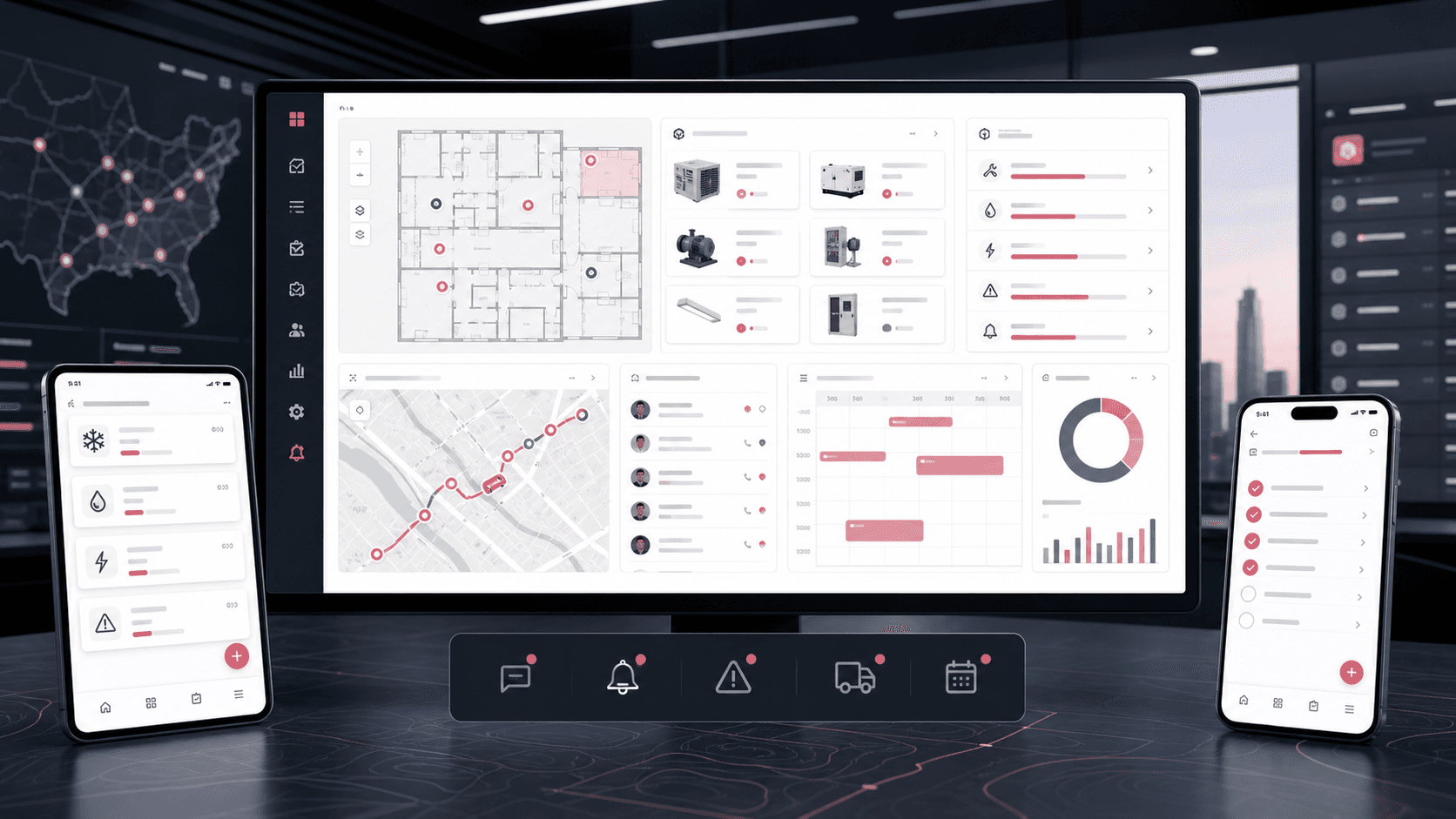
OpsLink: Facility operations and asset management platform
A multi-module facility and field operations platform that connects assets, building maps, maintenance schedules, work orders, inspections, vendors, fleet telemetry, calendars, response requests, chat, and mobile field execution into one operating system.
React admin console and Flutter mobile app engineering for facility operations, asset management, maintenance workflows, inspections, vendors, fleet visibility, calendars, chat, notifications, and field-team execution
2
connected product surfaces
12+
operational modules
Mobile
field team execution layer
RBAC
role-aware admin workflows
Timeline
Large multi-module platform build across admin web and mobile operations surfaces
Facility operations were spread across assets, people, places, vendors, and field work
The product needed to coordinate buildings, floors, rooms, equipment, inspections, maintenance schedules, work orders, teams, vendors, fleet data, calendars, files, notifications, and mobile users without forcing operators to manage each workflow in a separate tool.
Assets needed to stay connected to locations, rooms, QR codes, custom fields, transfers, files, and check-in/out history
Room-level inventory rules needed to balance shared defaults with local quantity and assignment controls
Maintenance, work orders, inspections, and response requests needed repeatable assignment, duplicate-request warnings, deadlines, evidence, reminders, and follow-up paths
Field users needed mobile access to tickets, assets, inspections, check-in/out, schedules, vendors, chat, files, and notifications
A unified operations hub for facility teams and field workers
OpsLink combines a dense React operations console with a Flutter mobile app so administrators can configure and monitor work while field users can act on assets, tickets, inspections, locations, schedules, vendors, and team communication from their phones.
Admin web routes cover dashboards, users, teams, vendors, buildings, assets, maintenance, inspections, response requests, telematics, calendars, settings, and activity tracking
Mobile routes mirror the daily field workflow for assets, locations, floors, rooms, check-in/out, tickets, inspections, maintenance tasks, vendors, teams, calendar events, and notifications
API-backed repositories and endpoint constants keep users, assets, locations, tickets, schedules, inspections, vendors, files, roles, and response requests connected across surfaces
Role-aware menus, permissions, notifications, chat integration, file uploads, image annotation, maps, and QR scanning turn operations into practical daily workflows
Lifecycle rules preserve asset, file, maintenance, and transaction context when equipment is checked out, transferred, leased, sold, retired, or disposed
Product surfaces
What the platform brought together
The work spanned core product operations, daily user workflows, data-heavy coordination, and resilient platform management.
Asset and inventory operations
The platform gives operators a structured view of equipment, files, QR labels, custom fields, transfers, check-in/out records, and asset-specific maintenance context.
Asset list, add/edit, detail, type management, custom field groups, quantity controls, QR code printing, zip upload, and linked files
Asset transaction and check-in/out workflows with reason, location, user, file, and history context
Transfer and lifecycle states for moved, leased, sold, retired, or disposed equipment without discarding related history
Mobile asset screens for browse, create, edit, detail, barcode scanning, media preview, and field updates
Buildings, floor maps, and room structure
Physical spaces are modeled as locations, floors, areas, rooms, floor images, markers, and tours so operational work stays tied to place.
Building/location lists, detail views, floor and area management, room bulk import, image lists, floor markers, and tour management
Image annotation and map controls for linking spaces, assets, rooms, and operational references
Room-level inventory controls that can inherit site defaults while preserving local quantities and assignments
Mobile location, floor, area, room, image editor, and map-assisted field workflows
Maintenance, tickets, and work orders
Maintenance is handled as scheduled plans, task execution, work-order boards, priorities, assignments, chat, attachments, timers, and status movement.
Scheduled maintenance, maintenance tasks, recurring rules, work-order list and detail screens, ticket Kanban, and add/edit ticket paths
Duplicate-work warnings reduce parallel requests for the same asset or location before a new ticket is confirmed
Mobile ticket list, Kanban, detail, chat, add-ticket, and add-response-request workflows support field completion
Response requests carry owners, deadlines, reminders, supporting evidence, and structured follow-up states
Inspections and configurable forms
Inspection forms, custom fields, assignments, details, edits, files, and status flows give teams a reusable compliance and quality-control layer.
Inspection list, detail, v2 detail, manage-inspection settings, inspection form setup, and custom-field value support
Mobile inspection list, add, edit, detail, picker dialogs, attachments, and selected inspection form workflows
Configurable fields and grouped forms support different inspection types without hard-coding every checklist
Vendors, clients, and approvals
Vendor and client workflows make outsourced service, approvals, recommended vendors, user requests, and vendor profile setup part of the same operations model.
Admin workflows for vendors, clients, client approvals, user requests, recommended vendors, vendor services, and vendor profile setup
Mobile vendor list, add/edit, detail, recommended vendor, client approval, and service-related data entry screens
Vendor records include service coverage, contact details, approvals, files, client relationships, and operational status
Fleet, telematics, and calendar coordination
Fleet and scheduling modules connect field movement, equipment state, jobs, events, and team calendars to daily operations.
Telematics routes for fleet providers, fleet complete views, vehicle activity, reports, and report forms
Unified, organizational, team, personal, and job-scheduler calendars connect events and maintenance plans to time-based work
Module depth
Dedicated product blocks for the highest-value workflows
For large platforms, the conversion story depends on showing how each major module solves a specific operating problem, not only listing features.
Asset module
Asset Registry With Field-Ready Controls
Assets are not treated as static inventory records. The platform connects each asset to locations, files, QR workflows, custom fields, transfers, check-in/out history, maintenance, and mobile scanning.
Conversion value: buyers can see that the asset module covers both office administration and on-site equipment handling, which is where generic dashboards usually fall short.
Asset type and custom-field configuration for different equipment categories
QR code and barcode workflows that bring physical equipment back into the digital record
Mobile-friendly asset detail, edit, check-in/out, and file preview paths
Linked maintenance and work-order context stays actionable through transfers, leases, sale, retirement, and disposal
Space module
Building Maps, Floors, Areas, And Rooms
Facility work becomes easier to route when assets and work orders are tied to a clear spatial model. OpsLink models buildings, floors, areas, rooms, images, markers, and tours across admin and mobile surfaces.
Conversion value: the page can show that the product understands real facilities, not only abstract task lists, by connecting work to buildings, floors, rooms, and visual maps.
Hierarchical location data for buildings, floors, areas, rooms, and room-level details
Annotated images and location markers for visual navigation and asset placement
Bulk room creation and CSV-oriented operations for larger facilities
Room-level inventory rules support inherited setup alongside local quantity and assignment changes
Mobile location screens for field workers moving through physical spaces
Maintenance module
Maintenance Schedules, Tasks, Tickets, And Kanban
The work management layer combines preventive maintenance, reactive tickets, work orders, assignments, priorities, chat, files, status movement, timers, and recurring schedules.
Conversion value: maintenance buyers can quickly recognize preventive schedules, reactive work orders, assignments, mobile completion, and collaboration in one workflow.
Recurring maintenance schedules with human-readable timing and assignment data
Ticket and work-order workflows tied to assets, spaces, vendors, files, priorities, and teams
Kanban and detail views for moving work from request to completion
Duplicate-work warnings before creation and response deadlines with reminder-driven follow-up
Mobile ticket chat and attachment paths for field collaboration
Inspection module
Inspection Forms And Evidence Capture
The inspection module gives operations teams a configurable checklist layer with forms, custom fields, assignments, details, edits, files, and mobile evidence capture.
Conversion value: configurable inspections help the case study speak to compliance, safety, QA, turnover checks, and routine facility audits without overclaiming one narrow use case.
Reusable inspection form setup for different operational checks
Custom field values and grouped forms for facility-specific data capture
Mobile inspection screens that support field completion and evidence upload
Inspection detail views that preserve review context for admins and supervisors
Vendor module
Vendor, Client, And Approval Workflows
Vendors and external service providers are managed as first-class operational participants, with service profiles, client relationships, approval flows, recommended vendors, and request handling.
Conversion value: vendor workflows make the platform credible for outsourced maintenance, service networks, client approvals, and multi-party operations.
Vendor profiles with services, locations served, approvals, contacts, and status
Client approval and user request workflows for controlled onboarding
Recommended vendor discovery and vendor detail screens inside the mobile app
Service configuration that keeps outsourced operations tied to platform permissions
Fleet module
Fleet Visibility, Telematics, And Calendar Scheduling
Fleet and calendar modules help teams coordinate movement, jobs, maintenance timing, vehicle status, and field schedules from the same operations layer.
Conversion value: fleet and calendar coverage shows the product can coordinate people, assets, vehicles, jobs, and time-sensitive field work from the same operating layer.
Provider-specific telematics routes and report views for operational visibility
Unified, organizational, team, personal, and job-scheduler calendar surfaces
Mobile calendar and fleet routes for technicians and field supervisors
Buyer priorities
What mattered most to the people evaluating the platform
Prospective buyers want to know whether the work solved real workflow, adoption, reliability, data, and operations problems. These priorities shaped the product decisions.
Operational consolidation
The platform had to reduce the number of places managers and field users looked for asset, space, maintenance, vendor, inspection, and schedule context.
Admin navigation brings dashboards, assets, maintenance, buildings, inspections, vendors, fleet, users, and settings into one console
Mobile navigation gives field workers the same core operating concepts from their phones
Search, dashboards, notifications, and activity tracking help operators find work faster
Field adoption
The mobile app needed to support real on-site work, including scanning, attachments, files, chat, check-in/out, maps, and task updates.
Flutter screens cover daily field modules instead of only showing a lightweight companion app
QR scanning, image editing, media preview, file uploads, and attachments keep evidence close to the work
Push notifications and persistent sessions support ongoing operational communication
Configurable control
Facility platforms serve different organizations, so roles, permissions, custom fields, data types, inspection forms, teams, and vendor services had to be configurable.
Role, permission, menu-item, category, department, reason, timezone, organization type, and vendor service settings
Custom asset and inspection fields reduce the need to rebuild the product for every operating model
Client, vendor, independent user, super admin, admin, and user role paths keep access scoped
System model
How the platform connects roles, workflows, and product surfaces
The product architecture brings every role into the same operating model, with shared data moving cleanly between web, mobile, media, and notification layers.
From facility signal to field action
Assets, locations, tickets, inspections, vendors, schedules, and mobile updates move through one operational loop.
Operators, vendors, and field teams
Admins, technicians, vendors, clients, team leads, and super admins each work through scoped permissions and module access.
Admin web and mobile field layer
The React operations console and Flutter mobile app share assets, tickets, inspections, spaces, vendors, calendars, chat, and notification data.
Technology
The Stack We Used And Why
The stack section is written for buyers who need to understand the product architecture, operational trade-offs, and long-term maintainability of the system.
Admin web console
Used for dense browser workflows across dashboards, assets, buildings, maintenance, inspections, vendors, settings, users, fleet, calendars, search, and activity tracking.
Used to give field workers cross-platform access to assets, locations, tickets, inspections, vendors, check-in/out, fleet, calendars, files, chat, and notifications.
FlutterDartProviderDioFirebase MessagingOneSignal
Forms, tables, and workflow UI
Used to support high-volume operational data entry, lists, filters, pagination, Kanban movement, date scheduling, files, and custom fields.
Create the React operations console for dashboards, lists, detail routes, forms, settings, calendars, maps, Kanban, uploads, and approvals.
3
Ship mobile workflows
Mirror the most important field actions in Flutter so technicians and supervisors can act from the job site.
4
Connect operational systems
Wire API repositories, file handling, chat, fleet data, calendars, response requests, and notification paths into one coherent product.
Operational depth
What made the platform usable after launch
The strongest case studies are not only feature lists. They show how the system is operated, monitored, governed, and improved when real users depend on it.
Role-aware navigation
The menu and route model adapts to admin, super admin, user, vendor, independent vendor, and independent user contexts.
Allowed-user checks shape access to dashboards, assets, vendors, buildings, maintenance, inspections, settings, and calendars
Permission keys and calendar permission checks keep sensitive actions scoped
Impersonation and approval paths support administrative support workflows
Field evidence capture
Operational records can carry files, images, annotations, uploaded media, and scanned asset context rather than only typed notes.
QR/barcode scanning connects equipment in the field to digital asset records
Ticket, inspection, response request, and asset records can preserve supporting files
Communication and notifications
The platform includes direct and group communication patterns that keep work moving after assignment.
Rocket.Chat service integrations and mobile group/ticket chat screens
OneSignal and Firebase messaging support web and mobile notifications
Response requests and team/group workflows create structured follow-up loops
Results
The measurable and observable lift from the work
The strongest improvements are the ones a buyer can connect to daily work: fewer disconnected tools, safer operations, clearer workflows, and more reliable product behavior.
12+ modules
Operational Breadth
Assets, locations, maintenance, tickets, inspections, vendors, fleet, calendars, response requests, chat, settings, users, and dashboards were connected into one platform story.
Web + Mobile
Full-Surface Delivery
Administrators get a dense web console while field workers get a Flutter mobile app for on-site execution.
Configurable
Workflow Fit
Custom fields, roles, permissions, inspection forms, categories, departments, teams, vendors, and static data make the platform adaptable to different facilities.
Field evidence
Traceable Work
Files, images, annotations, QR scans, chat, time logs, and status changes make operational work easier to review after the fact.
Outcome
A stronger operating system for facility operations and asset management platform
The platform reduced tool fragmentation and gave each role a clearer path from live activity to day-to-day action.
A Flutter mobile app for field users covering assets, barcode scanning, locations, floors, rooms, tickets, Kanban, ticket chat, inspections, maintenance tasks, vendors, check-in/out, teams, groups, calendar events, notifications, and files
Dedicated module depth for assets, spaces, maintenance, inspections, vendors, fleet, calendars, chat, notifications, and permissions instead of a generic operations dashboard
A portfolio-ready product narrative that positions the work as a complete facility operations platform with clear buyer value across administration and field execution
FAQ
Frequently Asked Questions About OpsLink
Answers about the facility operations and asset management platform scope, platform model, technology choices, operational workflows, and related build patterns.
What Kind Of Platform Does OpsLink Represent?
OpsLink represents a facility operations and asset management platform with admin web and mobile field surfaces for assets, building locations, maintenance schedules, tickets, inspections, vendors, fleet telemetry, calendars, response requests, chat, notifications, roles, and settings.
Why Does A Facility Operations Platform Need Both Web And Mobile?
The web console is best for dense administration, settings, tables, dashboards, maps, and planning, while the mobile app is best for technicians and supervisors who need to scan assets, update tickets, complete inspections, upload evidence, view schedules, and communicate from the field.
How Did The Product Support Different Operational Modules?
The product used route-based modules, role-aware menus, API-backed repositories, typed models, custom fields, configurable inspection forms, vendor settings, calendar permissions, and shared file/notification patterns so each module could solve a specific facility workflow while staying connected.
Can This Pattern Work For Other Field Operations Products?
Yes. The same pattern can support property management, campus operations, healthcare facilities, construction maintenance, hospitality operations, equipment rental, fleet service, manufacturing maintenance, and outsourced vendor management products.
Related services
Build a similarly ambitious product without starting from a blank page.
We can help scope the web, mobile, AI, media, and operating layers needed for your own platform.