Portfolio case study

VentraFlow: Event registration and on-site operations platform

A multi-surface event registration and on-site operations platform that connects attendee management, QR check-in, kiosk workflows, badge generation, sessions, payments, exhibitor tools, signage, and admin controls.

Name changed to respect NDA.

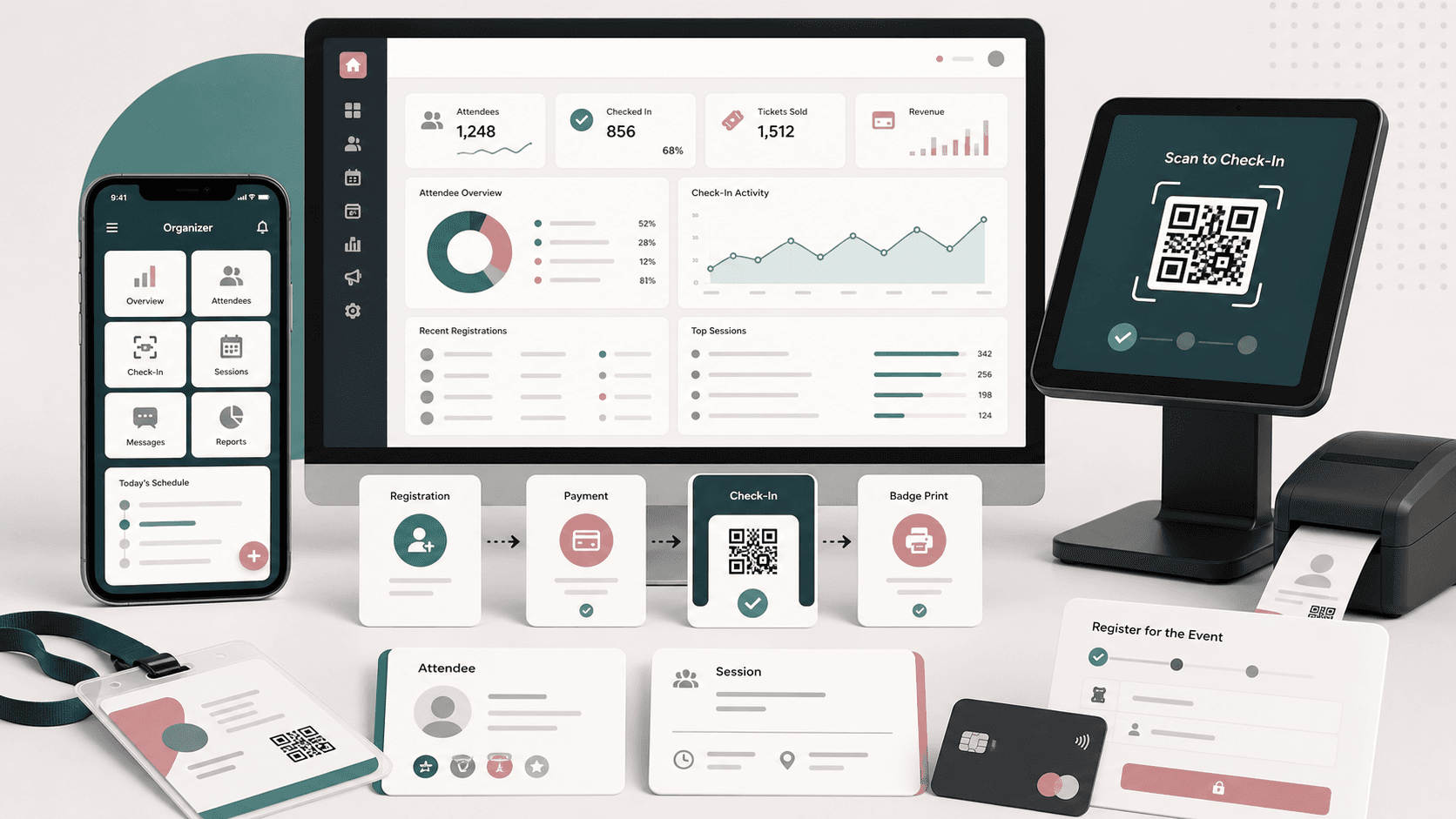
Event registration platform visual with admin dashboard, mobile organizer app, QR check-in, kiosk, badge, attendee, session, and payment workflow cards
Project scope

Product engineering across React administration console, Flutter organizer and kiosk app, API integration, registration workflows, on-site check-in, badges, payments, and event operations tooling

2
connected product surfaces
QR
attendee and session check-in workflows
Kiosk
self-service registration and waiver flows
Stripe
payment and card handling integration

Timeline

Admin and mobile platform delivery for event registration, check-in, and operational management

Event operations needed one system from setup to venue floor

The product needed to serve both back-office event teams and on-site staff. Registration records, attendee imports, sessions, badges, check-in, payments, exhibitor leads, signage, and permissions had to stay coordinated across web and mobile workflows.

  • Administrators needed dense tools for events, attendees, sessions, badges, teams, sponsors, settings, reports, and integrations
  • Venue teams needed fast QR scanning, attendee lookup, session check-in, badge preview, printing, and kiosk registration paths
  • Payment and registration flows had to connect mobile checkout, discount codes, attendee records, and event registration types
  • Role-aware access was required for super admins, admins, staff, exhibitors, team leads, and event users

A web admin command center paired with a Flutter on-site app

VentraFlow combines a React administration console with a Flutter organizer and kiosk app so event teams can configure operations in the browser and execute check-in, registration, payment, and badge workflows on venue devices.

  • React admin console for event setup, attendee management, badges, sessions, sponsors, signage, reports, integrations, subscriptions, and user roles
  • Flutter app for organizer check-in, attendee search, QR scanning, session registration, session check-in, badge preview, badge selection, payments, and settings
  • Kiosk mode for event lists, kiosk selection, QR scan, registration, waivers, personal information, attendee details, and success or exception states
  • API client patterns, token-aware requests, local storage, validation helpers, and shared endpoint contracts across product surfaces

Product surfaces

What the platform brought together

The work spanned core product operations, daily user workflows, data-heavy coordination, and resilient platform management.

Event and attendee operations

The admin and mobile surfaces keep attendee records, event context, registration types, imports, and day-of check-in activity connected.

  • Event administration, attendee lists, attendee details, imports, CSV mapping, and timeline activity
  • Mobile attendee search, attendee info, add/edit attendee flows, custom questions, and profile verification
  • QR-based event check-in and session check-in with success and exception screens for fast venue handling

Badge, kiosk, and venue workflows

On-site teams can turn registration data into printable badges and self-service kiosk journeys without leaving the operational app.

  • Badge list, badge detail, badge preview, badge PDF, duplicate badge, and badge selection workflows
  • Kiosk event selection, kiosk check-in, attendee lookup, registration, waiver, personal information, and confirmation flows
  • Printer selection and PDF rendering support for badge and document workflows on mobile devices

Sessions, content, and signage

The platform supports event programming, session metadata, speakers, locations, tracks, public signage surfaces, and reusable content snippets.

  • Session lists, session detail, import sessions, speakers, tracks, agenda, locations, and daily-location flows
  • Digital signage modules for agendas, location displays, directional flow, advertisements, sponsors, and shareable links
  • Snippet, template, notification content, app setting, and checklist tools for repeatable event operations

Commercial and exhibitor tooling

Registration revenue, lead retrieval, exhibitor access, billing, credits, and integrations were treated as part of the same event operating system.

  • Stripe-connected mobile payment checkout, payment methods, billing information, billing history, credits, and license flows
  • Lead retrieval modules for exhibitors, staff members, integrations, leads, purchase forms, and metrics
  • Integration management for event systems, external tools, settings, and import workflows

Buyer priorities

What mattered most to the people evaluating the platform

Prospective buyers want to know whether the work solved real workflow, adoption, reliability, data, and operations problems. These priorities shaped the product decisions.

Fast venue execution

Check-in systems are judged under pressure, so scanning, lookup, badge preview, and exception handling needed to be clear and fast.

  • QR scan paths supported attendee and session check-in
  • Kiosk mode gave self-service registration and waiver flows a dedicated device experience
  • Badge and printer workflows helped teams move from record lookup to physical credential

Operational control

Back-office users needed enough control to configure events, sessions, signage, sponsors, badges, users, reports, and billing without scattering work across tools.

  • Admin navigation grouped high-volume event operations into role-aware sections
  • Search, import, export, and mapping paths reduced manual data handling
  • Settings, roles, permissions, snippets, and integrations kept repeat event setup manageable

Connected commercial workflows

Registration platforms often blend operations and commerce, so payment, subscription, license, credit, and exhibitor workflows had to sit near event data.

  • Mobile checkout connected registration flows with payment handling
  • Discount codes and registration types gave event teams flexible commercial setup
  • Lead retrieval and exhibitor tools supported revenue activity beyond attendee check-in

System model

How the platform connects roles, workflows, and product surfaces

The product architecture brings every role into the same operating model, with shared data moving cleanly between web, mobile, media, and notification layers.

Admin, mobile, and kiosk as one operating model

Event setup, attendee records, payments, QR scanning, kiosk registration, and badge workflows share the same operational foundation.

Registration to check-in workflow

Attendees move through registration, payment, QR verification, badge preview, session check-in, and reporting.

Role-aware event operations

Admins, staff, exhibitors, team leads, attendees, and kiosk users interact with the platform through role-appropriate controls.

Technology

The Stack We Used And Why

The stack section is written for buyers who need to understand the product architecture, operational trade-offs, and long-term maintainability of the system.

Admin console

Used for dense operational workflows where administrators manage events, attendees, sessions, badges, signage, reports, billing, integrations, and permissions.

ReactTypeScriptReact RouterReduxRedux-SagaBootstrap

Mobile and kiosk app

Used for on-site organizer, attendee, payment, scanning, kiosk, badge, and printer workflows across venue devices.

FlutterDartGetXDioGetStorageMobile Scanner

Event operations UI

Used to support calendars, charts, rich editing, forms, imports, tables, maps, reports, and event-specific admin interactions.

FullCalendarApexChartsCKEditorReact TableGoogle Mapsi18next

Payments and documents

Used to support registration checkout, card tokenization, badge PDFs, printing, waiver handling, and venue documents.

StripeFlutter StripePDF renderingPrintingSignature capture

API integration

Used to keep admin and mobile flows aligned around attendees, events, sessions, badges, questions, settings, teams, and payments.

REST APIsJWT bearer headersAxiosDio interceptorsLocal storage

Why React And Flutter

The product needed a high-density admin workspace plus a mobile and kiosk experience that could move quickly on venue devices.

  • React supported complex administrative navigation, data grids, forms, reports, and configuration screens
  • Flutter provided one cross-platform app for organizer, check-in, kiosk, badge, and payment workflows
  • Shared API contracts helped web and mobile surfaces remain aligned around the same event records

Why Dedicated Kiosk Flows

Self-service registration behaves differently from staff-administered check-in, so kiosk screens needed their own route model.

  • Kiosk mode separated event selection, QR scanning, search, waivers, personal information, and confirmation states
  • Dedicated success and exception paths reduced ambiguity for venue teams
  • Device-friendly flows kept the app usable when check-in volume was high

Why Payments, Badges, And Signage Sat Together

Event registration is not only a form. It touches revenue, credentials, session movement, exhibitors, and venue communication.

  • Payment integration helped registration and checkout stay in the same product context
  • Badge and PDF flows linked attendee data to on-site credentialing
  • Signage, sessions, sponsors, and lead retrieval gave the admin console broader event operations coverage

Delivery

How the product came together

The work moved from domain modeling to core platform delivery, mobile adoption, and operational hardening.

1

Map the event lifecycle

Translate event setup, attendee records, registration types, sessions, badges, exhibitors, payments, and venue check-in into product workflows.

2

Build the admin foundation

Create the browser console for event operations, data management, permissions, reports, integrations, and commercial configuration.

3

Ship mobile and kiosk execution

Bring attendee lookup, QR scan, registration, waivers, badges, payments, session check-in, and settings into the Flutter app.

4

Connect operational edges

Add badges, printing, signage, lead retrieval, integrations, subscriptions, imports, and reporting so the system supports real event teams.

Operational depth

What made the platform usable after launch

The strongest case studies are not only feature lists. They show how the system is operated, monitored, governed, and improved when real users depend on it.

Day-of check-in reliability

The mobile app focused on high-pressure venue workflows that need clear states and minimal operator friction.

  • QR scanner and attendee lookup paths for staff-assisted check-in
  • Session check-in routes for agenda-level attendance control
  • Success, exception, and detail screens for quick correction when records need attention

Reusable event administration

The admin console grouped recurring event setup work into modules that can be reused across events and teams.

  • Event, session, speaker, location, sponsor, badge, team, user, and question management
  • Imports, exports, CSV mapping, reports, and timeline views for data-heavy operations
  • Settings, snippets, roles, permissions, and integrations for repeatable configuration

Commercial and exhibitor operations

The platform supported event revenue workflows alongside operational workflows instead of treating them as detached add-ons.

  • Payment, billing, credit, license, and discount-code workflows
  • Exhibitor leads, staff members, integrations, and metrics
  • Subscription and payout settings for administrative control

Results

The measurable and observable lift from the work

The strongest improvements are the ones a buyer can connect to daily work: fewer disconnected tools, safer operations, clearer workflows, and more reliable product behavior.

2 surfaces

Admin And Venue Execution

A React admin console and Flutter mobile/kiosk app covered both planning and day-of event operations.

QR ready

Check-In Workflow

QR scanning, attendee lookup, session check-in, and exception screens supported faster venue handling.

Badge ready

Credentialing Flow

Badge preview, PDF, selection, and printer-related workflows connected attendee data to physical credentials.

Commerce aware

Payments And Exhibitors

Payment, billing, discount-code, license, and lead-retrieval modules connected commercial operations to event data.

Outcome

A stronger operating system for event registration and check-in platform

The platform reduced tool fragmentation and gave each role a clearer path from live activity to day-to-day action.

A connected event operations platform instead of separate admin, check-in, kiosk, payment, badge, and exhibitor workflows

A Flutter organizer and kiosk app that supports QR scanning, attendee lookup, registration, waivers, sessions, badges, and payments on venue devices

A React administration console for events, attendees, sessions, badges, signage, sponsors, reports, integrations, teams, settings, and user roles

A product foundation that can support repeat events, imports, exports, lead retrieval, digital signage, registration commerce, and role-aware access

FAQ

Frequently Asked Questions About VentraFlow

Answers about the event registration and check-in platform scope, platform model, technology choices, operational workflows, and related build patterns.

What Kind Of Event Platform Does This Case Study Represent?

It represents an event registration and on-site operations platform with a React admin console, Flutter organizer app, kiosk check-in flows, attendee management, badges, sessions, payments, signage, reporting, integrations, and exhibitor tools.

Why Build A Custom Event Registration Platform Instead Of Using Separate Tools?

The product needed attendee records, session data, QR check-in, kiosk registration, badges, payments, exhibitors, signage, and role-aware admin controls to work from one operational model instead of several disconnected systems.

Can This Pattern Support Conferences, Trade Shows, And Corporate Events?

Yes. The same architecture pattern can support conferences, expos, trade shows, corporate events, membership events, training events, and venue workflows where registration data must connect to check-in and day-of operations.

What Should A Buyer Prepare Before Starting A Similar Build?

Useful inputs include attendee and registration rules, badge formats, check-in roles, venue device assumptions, payment rules, session structures, exhibitor workflows, imports, integrations, and reporting needs.

Related services

Build a similarly ambitious product without starting from a blank page.

We can help scope the web, mobile, AI, media, and operating layers needed for your own platform.

Start a project inquiry