Portfolio case study

ChairLink: Barbershop appointment booking and customer engagement app

A mobile-first barbershop booking and customer engagement app that gives clients quick access to services, shop information, appointment scheduling, and return-visit prompts from one branded phone experience.

Name changed to respect NDA.

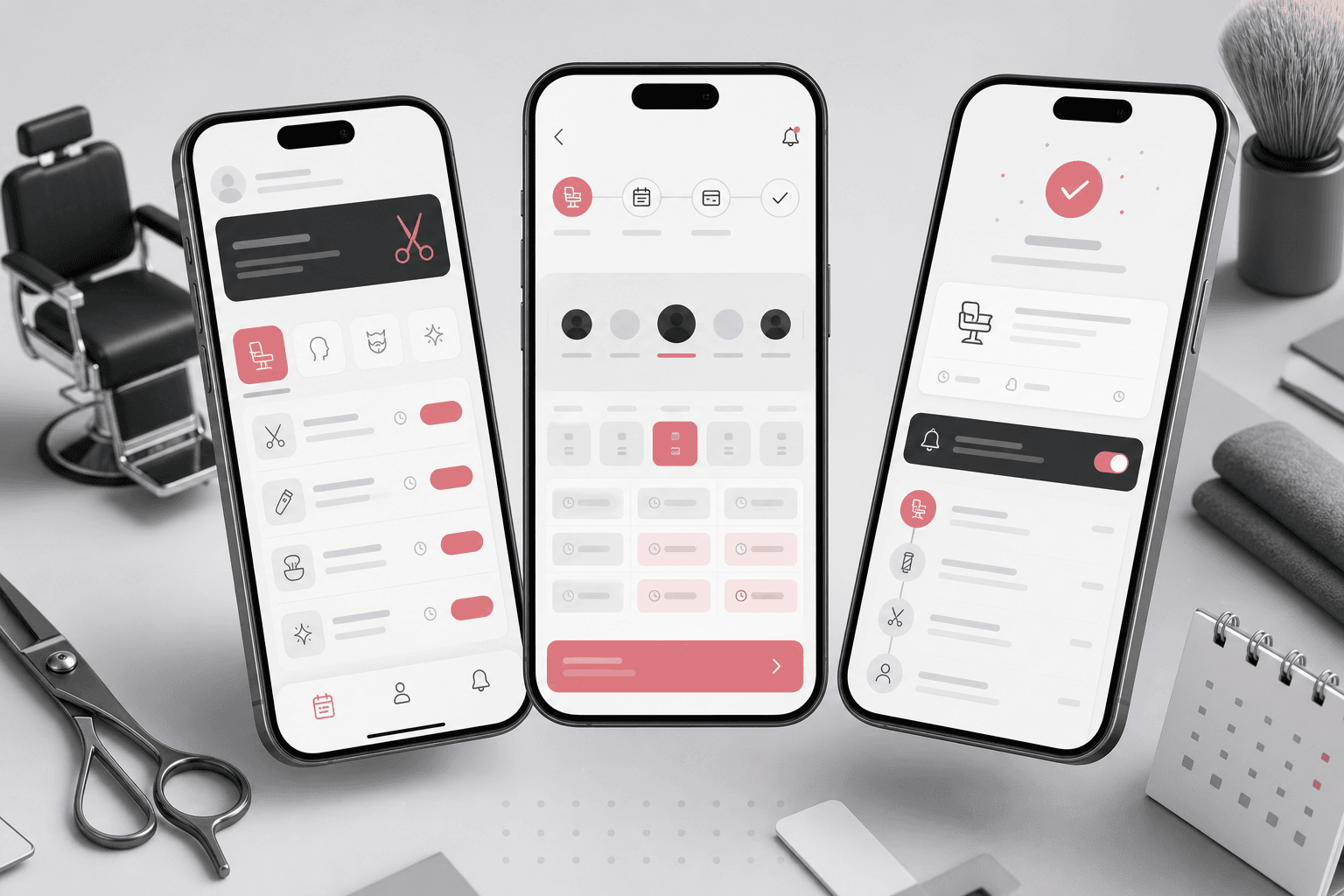
Barbershop appointment booking mobile app visual with service cards, barber availability, appointment confirmation, reminders, and profile surfaces
Project scope

Mobile product engineering, Ionic/Cordova app packaging, appointment flow integration, service navigation, and release-ready iOS and Android setup

3
core mobile navigation actions
2
native platform targets
1
booking-first customer app
Ionic
cross-platform mobile shell

Timeline

Mobile app build for a local services booking experience

Clients needed a faster path from interest to appointment

A local grooming business needed a simple branded app that kept customers close to shop information, service context, and appointment scheduling without asking them to search through disconnected web pages.

  • New and returning clients needed quick mobile access to shop details and appointment booking
  • The business needed one branded app surface for home, about, and scheduling actions
  • The experience had to work across iOS and Android without maintaining separate native codebases
  • The app needed to bridge existing web content and booking tools while feeling like a focused mobile product

A lightweight mobile booking companion for the shop

ChairLink wraps the customer journey into a mobile app shell with clear bottom navigation, embedded service content, and a direct appointment path that can evolve into reminders, loyalty, and repeat-visit workflows.

  • Ionic/Angular mobile app structure with Cordova packaging for Android and iOS
  • Home, shop information, and appointment actions exposed in a simple mobile footer
  • Embedded web content and external scheduling integration so clients can move from discovery to booking
  • Native app configuration for icons, splash screens, status bar behavior, and platform-specific launch settings

Product surfaces

What the platform brought together

The work spanned core product operations, daily user workflows, data-heavy coordination, and resilient platform management.

Mobile service discovery

Clients can open the app and immediately reach the shop experience instead of navigating a generic browser flow.

  • Mobile home surface for service discovery and brand context
  • Embedded web content path for keeping app content aligned with the public site
  • Bottom navigation that keeps primary actions visible on small screens

Appointment scheduling path

The booking action is promoted as a first-class app workflow so clients can pick services and reserve time quickly.

  • Dedicated appointment action in the mobile footer
  • External scheduling integration for service and slot selection
  • Booking-first information architecture that reduces taps between intent and reservation

Customer return loop

The mobile app creates a foundation for repeat business through saved access, reminders, and future loyalty prompts.

  • Installable app presence on the customer phone
  • Room for appointment reminders, follow-up prompts, and seasonal service messaging
  • A consistent app entry point for customers who book repeatedly

Cross-platform app packaging

One Ionic codebase supports both major mobile platforms while preserving native launch, splash, and device behavior.

  • Cordova platform targets for Android and iOS
  • Native splash screen, icon, status bar, whitelist, and webview configuration
  • Angular/Ionic component structure for future app-native screens beyond embedded content

Buyer priorities

What mattered most to the people evaluating the platform

Prospective buyers want to know whether the work solved real workflow, adoption, reliability, data, and operations problems. These priorities shaped the product decisions.

Fewer lost bookings

For appointment-led local services, the mobile experience needed to make scheduling obvious at the moment a client is ready.

  • Appointment access is visible from the main app navigation
  • Service discovery and booking live in the same branded customer context
  • The app reduces dependency on customers remembering a website URL

Practical small-business delivery

The business needed a pragmatic mobile app that could launch quickly by reusing the strongest existing web and booking surfaces.

  • Ionic/Cordova reduced platform duplication for a budget-conscious local services product
  • Existing web content stayed usable inside the app shell
  • The architecture left room to add native modules as the customer experience matured

Brand recall

A dedicated app icon and mobile presence help a local shop stay visible between visits.

  • App-store-ready mobile assets and splash screens support a branded launch
  • Simple navigation reinforces the core customer actions
  • Future notification and loyalty workflows can build on the same mobile foundation

System model

How the platform connects roles, workflows, and product surfaces

The product architecture brings every role into the same operating model, with shared data moving cleanly between web, mobile, media, and notification layers.

Appointment-first mobile journey

Clients move from shop discovery to service context, barber availability, booking confirmation, and follow-up prompts.

Customer and operator priorities

The app balances client convenience with the shop need for repeat bookings, brand recall, and simple content updates.

Mobile shell over booking services

The Ionic app, embedded content, scheduling flow, and native packaging work together as one customer-facing mobile product.

Technology

The Stack We Used And Why

The stack section is written for buyers who need to understand the product architecture, operational trade-offs, and long-term maintainability of the system.

Mobile app shell

Used to deliver one cross-platform customer app with app-style navigation and native packaging.

IonicAngularTypeScriptCordovaIonicons

Native mobile packaging

Used for Android and iOS builds, launch screens, app icons, webview behavior, and device-ready configuration.

Cordova AndroidCordova iOSIonic WebViewSplash ScreenStatus Bar

Booking integration

Used to connect customers from the app experience into a scheduling flow without rebuilding every booking rule from scratch.

In-app browser patternsEmbedded web contentExternal scheduling flow

Customer engagement foundation

Used as the product direction for reminders, loyalty prompts, content updates, and repeat-visit workflows.

Mobile navigationService contentAppointment CTAsFuture notification paths

Why Ionic And Cordova

A local services app benefits from one codebase that can ship to both iOS and Android while keeping the UI close to web content that already changes with the business.

  • Ionic provided app-style navigation and components without separate native teams
  • Cordova handled device packaging, icons, splash screens, and webview setup
  • Angular and TypeScript kept the app structure maintainable for future native screens

Why Integrate Scheduling Instead Of Rebuilding It

Booking systems already encode staff, service, and availability rules. Integrating the scheduling path kept the app focused on customer convenience.

  • The mobile shell could promote booking without duplicating scheduling logic
  • Existing shop content and appointment tools stayed connected
  • Future phases can replace or deepen the booking layer when operational needs justify it

Delivery

How the product came together

The work moved from domain modeling to core platform delivery, mobile adoption, and operational hardening.

1

Map the client journey

Identify the essential mobile actions: learn about the shop, understand the service offer, and book an appointment quickly.

2

Build the app shell

Create the Ionic app structure, home surface, footer actions, embedded content frame, and platform initialization.

3

Connect booking

Wire the appointment action into an external scheduling path so the app can convert mobile intent into reserved time.

4

Prepare native release assets

Configure Cordova platform targets, icons, splash screens, device preferences, and webview behavior for mobile distribution.

Operational depth

What made the platform usable after launch

The strongest case studies are not only feature lists. They show how the system is operated, monitored, governed, and improved when real users depend on it.

Booking CTA prominence

The appointment action is kept in persistent bottom navigation so booking remains visible after clients review shop content.

  • Footer appointment button
  • Direct scheduling path
  • Reduced booking friction

Content continuity

Embedded web content allowed the shop to keep app-visible information aligned with the public site.

  • Home content
  • About content
  • Shared content updates

Release-ready app configuration

Platform preferences, icons, splash screens, status bar behavior, and webview plugins were configured as part of the mobile delivery.

  • Native assets
  • Device plugins
  • Android and iOS setup

Results

The measurable and observable lift from the work

The strongest improvements are the ones a buyer can connect to daily work: fewer disconnected tools, safer operations, clearer workflows, and more reliable product behavior.

Book

Primary Conversion Path

The app keeps appointment scheduling one tap away from the main customer experience.

iOS + Android

Platform Reach

Cordova packaging supports both major mobile platforms from one Ionic codebase.

Mobile

Customer Recall

A dedicated app presence gives repeat clients a persistent path back to the shop.

Outcome

A stronger operating system for barbershop appointment booking mobile app

The platform reduced tool fragmentation and gave each role a clearer path from live activity to day-to-day action.

A branded mobile app shell for a barbershop customer journey instead of a generic browser-only experience

A direct appointment path that promotes scheduling as the primary conversion action

A cross-platform Ionic/Cordova foundation for Android and iOS app distribution

A public-safe portfolio story that turns a thin mobile wrapper repo into a complete local services booking product narrative

FAQ

Frequently Asked Questions About ChairLink

Answers about the barbershop appointment booking mobile app scope, platform model, technology choices, operational workflows, and related build patterns.

What Kind Of App Does ChairLink Represent?

ChairLink represents a barbershop appointment booking and customer engagement mobile app with shop information, service discovery, appointment scheduling, and a foundation for reminders and repeat-visit workflows.

Why Use A Cross-Platform Mobile App For A Local Service Business?

A cross-platform app lets a local services business stay present on customer phones, promote booking, and support iOS and Android without funding two separate native products.

Can An App Start By Integrating Existing Web And Scheduling Tools?

Yes. A mobile shell can launch quickly around existing content and scheduling systems, then add more native modules such as reminders, loyalty, profiles, payments, or staff operations as the business grows.

Related services

Build a similarly ambitious product without starting from a blank page.

We can help scope the web, mobile, AI, media, and operating layers needed for your own platform.

Start a project inquiry