Portfolio case study

CareGrid: Healthcare field operations and clinician scheduling platform

A healthcare field-operations platform that connects clinician scheduling, patient coordination, document due alerts, caseload views, live location tracking, secure messaging, agency administration, and mobile visit workflows.

Name changed to respect NDA.

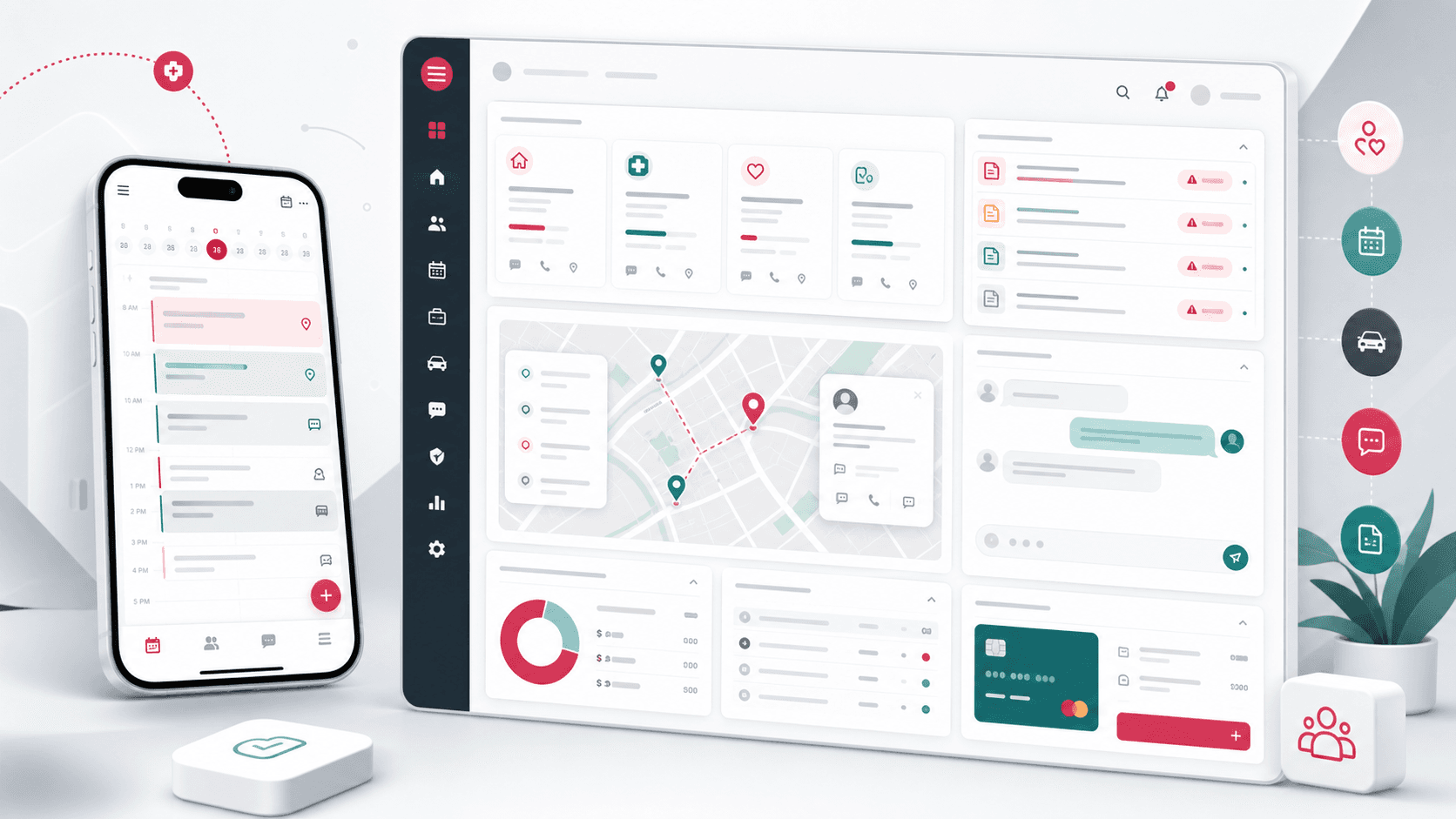
Healthcare field operations platform visual with mobile clinician scheduling, patient coordination cards, document due alerts, location pins, messaging, and admin dashboard surfaces
Project scope

Product engineering for a mobile clinician app, React administration console, scheduling workflows, patient management, messaging, live tracking, payment setup, and role-aware operations

2
connected product surfaces
5+
clinical operations workflows
Role-aware
agency and clinician access
Live
location and messaging support

Timeline

Multi-surface healthcare operations build with mobile and admin delivery

Healthcare field teams needed one place to coordinate patients, clinicians, and visits

The product had to support mobile clinicians in the field while giving administrators a broader command center for patient records, visit scheduling, caseload management, overdue documents, agency setup, and operational visibility.

  • Clinicians needed mobile access to daily schedules, patient records, documents due, and visit frequency workflows
  • Administrators needed role-aware dashboards for patients, users, agencies, documents, payments, and settings
  • Scheduling workflows had to handle patient visits, caseload views, date ranges, calendar modes, and clinician assignment
  • Operations teams needed messaging and live location visibility without exposing every control to every role

A connected mobile and admin platform for home-health operations

CareGrid pairs an Ionic and Capacitor mobile app for clinicians with a React admin console for agency operations, giving each role the surface it needs while keeping scheduling, patients, documents, messaging, and location data connected.

  • Mobile workflows cover clinician login, patient schedules, patient profiles, recertifications, non-availability, documents due, and settings
  • Admin routes cover dashboards, patients, users, agencies, clinician schedules, patient schedules, caseload views, messaging, live tracking, and payment methods
  • Role-based access separates super admin, admin, clinician, assistant, and support-style workflows
  • Calendar, map, messaging, notification, and API utilities create a practical operating layer around visit coordination

Product surfaces

What the platform brought together

The work spanned core product operations, daily user workflows, data-heavy coordination, and resilient platform management.

Clinician mobile scheduling

Field users can move between patient lists, daily visits, week and month calendar views, visit frequency setup, and schedule additions from a mobile-first app.

  • Ionic mobile navigation for caseload scheduling, patient schedules, documents due, patients, and settings
  • Calendar segments for patient, today, week, and month views with screen-orientation handling
  • Visit frequency creation with weekly and monthly visit-code generation

Patient and care-team coordination

Patient forms and detail workflows keep demographics, contacts, care-team roles, addresses, admission context, availability, and status changes connected.

  • Patient profile creation and update paths with validation and saved status feedback
  • Care-team role assignment across clinical disciplines and assistants
  • Non-availability, recertification, visit history, and patient schedule views

Administration and agency operations

The admin console gives operators route-level control over patients, users, agencies, dashboards, settings, payment methods, and account support.

  • Role-aware routes for dashboards, users, agencies, patient records, documents due, and settings
  • Agency setup and payment method screens for commercial and administrative operations
  • Reusable form controls, loaders, calendars, selects, address autocomplete, and confirmation components

Messaging and live field visibility

Communication and location views help administrators understand where field work is happening and keep teams connected.

  • Messaging workspace with inbox, sidebar, and welcome-state components
  • Live tracking map with clinician location markers and schedule handoff links
  • Dashboard charts and clinician drive-history data for operational review

Module depth

Dedicated product blocks for the highest-value workflows

For large platforms, the conversion story depends on showing how each major module solves a specific operating problem, not only listing features.

Scheduling

Patient Visits Move From Assignment To Calendar

The scheduling layer gives teams a path from patient selection and visit-frequency rules into daily, weekly, and monthly calendar views.

Supported by mobile schedule routes, visit schedule APIs, patient selection flows, calendar segments, add-schedule pages, and admin patient scheduling routes.

  • Clinicians can switch between patient queues and calendar views
  • Visit frequency rules are generated and saved beside the patient context
  • Admin scheduling and caseload views support broader operational planning

Coordination

Patient Records Stay Connected To Care Teams

Patient workflows include demographics, address context, clinical discipline assignment, availability, and status so scheduling decisions have the right context.

Supported by patient form fields, care-team role assignment, address autocomplete, patient detail routes, non-availability routes, and recertification screens.

  • Care-team roles keep multiple disciplines attached to one patient profile
  • Availability and recertification flows reduce disconnected scheduling notes
  • Patient status and detail screens give operators a reviewable record

Operations

Admins Get Visibility Without Replacing Field Workflows

The admin console focuses on the higher-control jobs: dashboards, users, agencies, documents due, messaging, live tracking, settings, and payments.

Supported by route-level access rules, admin dashboard charts, clinician drive history, live tracking maps, messaging components, agency forms, and payment method routes.

  • Role rules decide which menus and routes each user type can access
  • Live tracking and messaging help support active field operations
  • Agency, user, payment, and dashboard tools keep the business side connected

Buyer priorities

What mattered most to the people evaluating the platform

Prospective buyers want to know whether the work solved real workflow, adoption, reliability, data, and operations problems. These priorities shaped the product decisions.

Field adoption

Clinicians needed a mobile interface that stayed focused on daily visits, patient context, documents, and schedule changes.

  • Ionic mobile screens keep core field tasks in a compact navigation model
  • Calendar views and patient lists map to the way clinicians plan daily work
  • Settings and routing preferences keep repetitive mobile work configurable

Operational control

Healthcare operations require clear role boundaries, patient accountability, and enough admin visibility to prevent schedule and documentation gaps.

  • Role-aware routing separates super admin, admin, clinician, and assistant-style access
  • Documents due and patient schedule screens help operators find missing work
  • Dashboard, live tracking, and drive-history views support day-to-day oversight

Multi-surface delivery

The strongest product story is not only the mobile app or the admin panel; it is the connection between field execution and operations management.

  • Capacitor packages the field app for mobile environments
  • React admin routes handle dense operational workflows
  • Shared REST API patterns keep users, patients, schedules, documents, and settings aligned

System model

How the platform connects roles, workflows, and product surfaces

The product architecture brings every role into the same operating model, with shared data moving cleanly between web, mobile, media, and notification layers.

Visit scheduling workflow

Patient assignment, visit frequency, calendar planning, clinician execution, and document follow-up stay in one operating loop.

Healthcare role matrix

Super admins, agency admins, clinicians, assistants, and support users receive different controls around the same patient and schedule data.

Mobile and admin platform

The clinician app and operations console sit on one API foundation for patients, visits, documents, users, and settings.

Technology

The Stack We Used And Why

The stack section is written for buyers who need to understand the product architecture, operational trade-offs, and long-term maintainability of the system.

Mobile app

Used for clinician scheduling, patient workflows, documents due, settings, and field-friendly app packaging across devices.

Ionic ReactCapacitorTypeScriptReact RouterIonicons

Admin console

Used for healthcare operations dashboards, patients, users, agencies, scheduling, messaging, tracking, payments, and role-aware navigation.

ReactTypeScriptCoreUIReact RouterReduxReact Hook Form

Scheduling and maps

Used to coordinate visit calendars, patient schedules, clinician availability, live location views, and field routing support.

FullCalendarGoogle MapsMoment.jsdate-fnsScreen orientation controls

API and communication

Used for authentication, patient data, schedule APIs, documents due, messaging, account data, and runtime deployment configuration.

REST APIsAxiosBearer tokensRuntime configurationRocket.Chat integration patterns

Why Ionic And Capacitor For Clinicians

The field app needed mobile packaging, native-adjacent device behavior, and a React codebase that could share patterns with the web admin surface.

  • Ionic provided mobile UI primitives for menus, pages, lists, segments, modals, and buttons
  • Capacitor supported iOS and Android packaging from the same codebase
  • React and TypeScript kept mobile screens maintainable as scheduling and patient workflows expanded

Why A Separate Admin Console

Administrators needed denser screens, dashboards, role-aware routing, maps, messaging, and agency controls that would have made the mobile app too heavy.

  • React admin routes support table-heavy and dashboard-heavy operations
  • Role guards keep navigation aligned with user type
  • Reusable controls reduce inconsistent behavior across forms and settings

Why Calendar And Location Were Core

Healthcare field operations depend on where clinicians are, who they are seeing, and which visit or document needs attention next.

  • FullCalendar supports day, week, month, and schedule planning views
  • Location markers help administrators understand active field coverage
  • Documents due and visit history connect clinical work with operational follow-up

Delivery

How the product came together

The work moved from domain modeling to core platform delivery, mobile adoption, and operational hardening.

1

Map care operations

Define the roles, patient data, schedule patterns, document checkpoints, and agency controls needed across field and admin workflows.

2

Build clinician mobile workflows

Create mobile routes for patient lists, schedules, frequency setup, recertifications, documents due, non-availability, settings, and authentication.

3

Add admin operations

Build dashboards, patients, users, agencies, documents due, caseload scheduling, messaging, live tracking, and payment setup in the admin console.

4

Connect visibility and support

Layer in location views, messaging, dashboard charts, drive history, and reusable API utilities for day-to-day support.

Operational depth

What made the platform usable after launch

The strongest case studies are not only feature lists. They show how the system is operated, monitored, governed, and improved when real users depend on it.

Role-aware healthcare navigation

Different users see different modules, keeping the system useful without making sensitive operations universally available.

  • Super admin routes cover agencies and high-level commercial operations
  • Admin routes cover users, patients, dashboards, live tracking, settings, and payment methods
  • Clinician-oriented routes focus on daily schedules, patient work, documents, and caseload views

Scheduling is treated as the operating core

The platform repeatedly returns users to scheduling context because visit coordination is the heartbeat of the product.

  • Patient schedule, clinician schedule, caseload schedule, and schedule detail routes
  • Frequency generation and visit-code logic tied to patient context
  • Day, week, month, and patient queue views for different planning modes

Field visibility supports admin decisions

Live tracking, drive history, and dashboards turn field activity into operational context for administrators.

  • Location markers show clinician positions with links back to schedule context
  • Dashboard views track admissions and drive-history style operational data
  • Messaging keeps support communication inside the same operations surface

Results

The measurable and observable lift from the work

The strongest improvements are the ones a buyer can connect to daily work: fewer disconnected tools, safer operations, clearer workflows, and more reliable product behavior.

2 surfaces

Mobile And Admin Coverage

The platform includes a clinician-focused Ionic app and a React admin console for operational oversight.

5 roles

Access-aware Workflows

Super admin, admin, clinician, assistant, and support-style access patterns shape navigation and route availability.

Calendar-led

Visit Coordination

Patient schedules, clinician schedules, caseload views, visit frequencies, and document follow-up all connect back to time-sensitive care delivery.

Live ops

Tracking And Messaging

Location tracking, dashboard views, and messaging modules give administrators more context around active field work.

Outcome

A stronger operating system for healthcare field operations and clinician scheduling platform

The platform reduced tool fragmentation and gave each role a clearer path from live activity to day-to-day action.

A mobile clinician app for schedules, patients, documents due, recertifications, non-availability, settings, and visit-frequency workflows

A React admin console for dashboards, patients, users, agencies, scheduling, caseload views, documents due, messaging, live tracking, settings, and payment methods

Role-aware navigation and route access for super admin, admin, clinician, assistant, and support-style healthcare operations

A public-safe portfolio page that positions the work as a complete healthcare operations platform without exposing real repository names, private assets, certificates, API hosts, source screenshots, or implementation-only identifiers

FAQ

Frequently Asked Questions About CareGrid

Answers about the healthcare field operations and clinician scheduling platform scope, platform model, technology choices, operational workflows, and related build patterns.

What Kind Of Healthcare Platform Does CareGrid Represent?

CareGrid represents a healthcare field-operations platform for clinician scheduling, patient coordination, document due alerts, caseload management, live location visibility, messaging, agency administration, and mobile visit workflows.

Why Pair A Mobile Clinician App With An Admin Console?

Clinicians need a focused mobile surface for daily visits and patient context, while administrators need denser dashboards, maps, user controls, agency settings, and scheduling oversight.

How Does The Platform Support Scheduling?

The product separates patient queues, day/week/month calendar views, patient schedules, clinician schedules, caseload views, and visit-frequency rules so teams can coordinate field work from multiple angles.

Can This Pattern Support Home-health Or Field-care Teams?

Yes. The same architecture can support home-health agencies, therapy teams, visiting clinician networks, care coordination teams, and other appointment-led healthcare field operations.

Related services

Build a similarly ambitious product without starting from a blank page.

We can help scope the web, mobile, AI, media, and operating layers needed for your own platform.

Start a project inquiry