
Quick Answer: What Should An AI Agent Implementation Roadmap Include?
An AI agent implementation roadmap should start with one business workflow, not a tool wish list. The practical sequence is: audit repeatable workflows, score data and system readiness, define what the agent can and cannot do, add human approval for risky actions, run a narrow 90-day pilot, measure operational ROI, and scale only after the workflow has proven quality, security, adoption, and support ownership.
For most companies, the first agent should not be fully autonomous. It should draft, route, summarize, reconcile, or recommend inside a bounded process where humans can approve exceptions. That lets the team learn how the agent behaves against real tickets, orders, leads, invoices, documents, or internal requests before giving it broader write access.
Use this roadmap when leaders are asking a commercial question: "Which workflow is ready for an agent, what will it cost to pilot, and what evidence do we need before we scale?" A structured AI Agent Readiness Assessment is the fastest way to separate promising candidates from workflows that still need process cleanup, data work, or integration design.
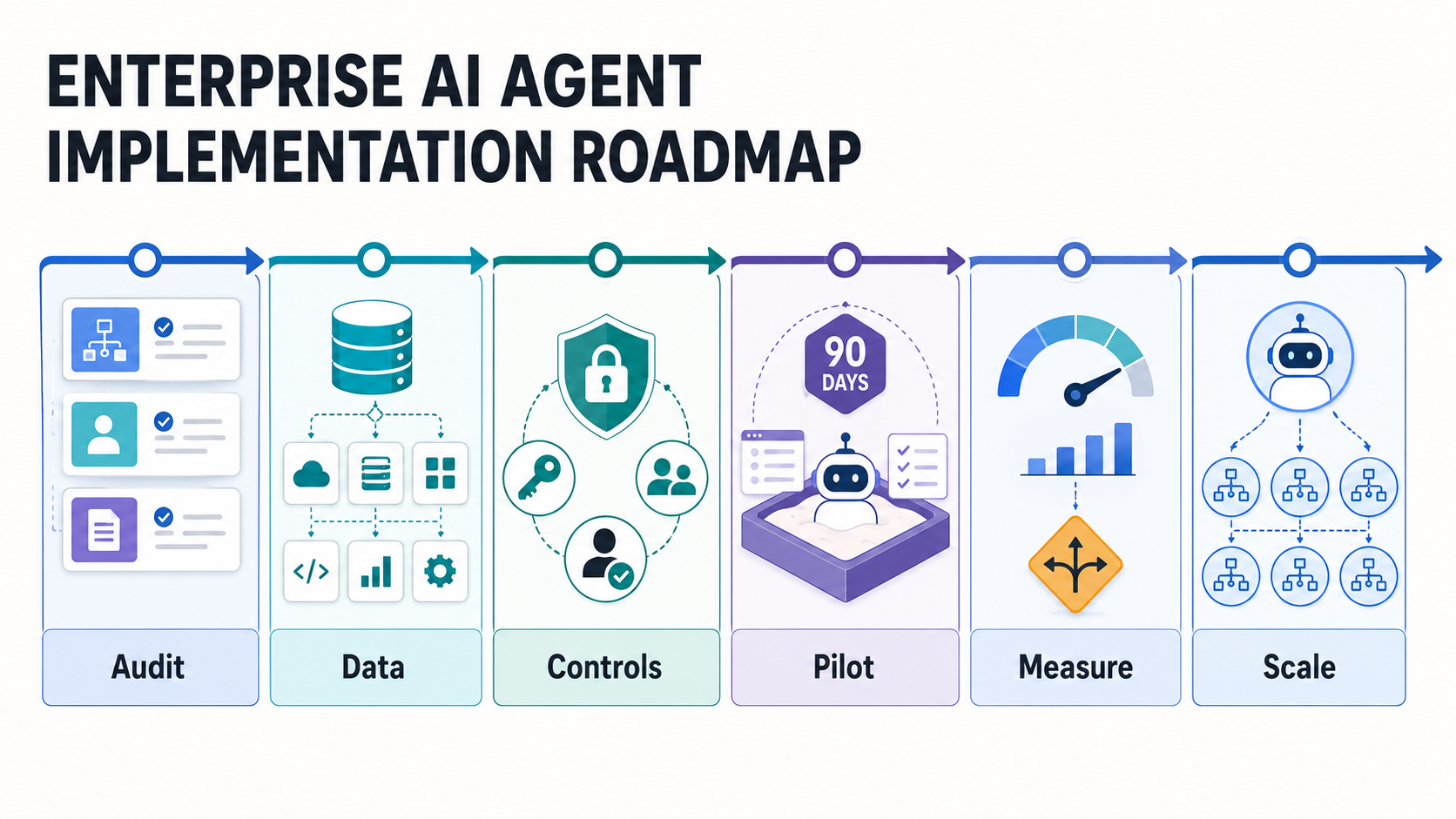
Why The Roadmap Starts With Workflow Selection
AI agents are often described as systems that can plan, use tools, remember context, and act across applications. That definition is useful, but it is not enough for implementation. A business does not buy "agentic AI" in the abstract. It invests in shorter cycle times, fewer manual handoffs, better routing, faster analysis, higher-quality follow-up, or lower exception backlog.
That is why the roadmap starts with a workflow inventory. List the repetitive work that already has a clear trigger, input, owner, decision path, system of record, and measurable outcome. Good early candidates include support triage, sales follow-up, invoice exception review, employee helpdesk routing, compliance document checks, procurement intake, knowledge-base answer drafting, and CRM task creation.
Weak early candidates are usually ambiguous, high-liability, poorly documented, or dependent on tribal knowledge that no one has converted into usable rules or data. If the process is chaotic for humans, an agent will not magically make it safe. It will make the chaos faster.
NextPage's broader AI implementation roadmap covers use-case discovery through production rollout. This article narrows the lens to agent workflows where the system may take steps, call tools, and hand work back to people.
The Workflow Audit Scorecard
Before selecting a pilot, score each candidate workflow against value, readiness, and risk. The best first agent is rarely the flashiest idea. It is the workflow where the pain is visible, the data exists, the action boundary is clear, and the organization can safely measure improvement.
| Score Area | What To Check | Strong Candidate Signal | Delay Signal |
|---|---|---|---|
| Volume | How often the workflow repeats | Dozens or hundreds of similar cases per week | Rare edge cases with little learning data |
| Decision Pattern | Whether the task follows repeatable logic | Clear rules, examples, and escalation paths | Every case requires senior judgment |
| Data Readiness | Source quality, access, freshness, and permissions | Reliable CRM, ticketing, ERP, document, or warehouse data | Manual exports, missing fields, or unclear ownership |
| Tool Access | Systems the agent must read or write | Stable APIs and permissioned service accounts | No API, shared credentials, or unmanaged browser-only work |
| Risk | Impact of a wrong answer or action | Low-risk drafts or recommendations with approval | Irreversible customer, financial, legal, or safety action |
| Measurement | Baseline and KPI availability | Cycle time, backlog, quality, or cost can be measured | No agreed baseline or owner |
Score each dimension from 1 to 5. A strong first pilot usually has high volume, clear decision patterns, decent data, measurable value, and manageable risk. If risk is high, keep the agent in recommendation mode until evidence supports more autonomy.
Readiness Gates Before The First Pilot
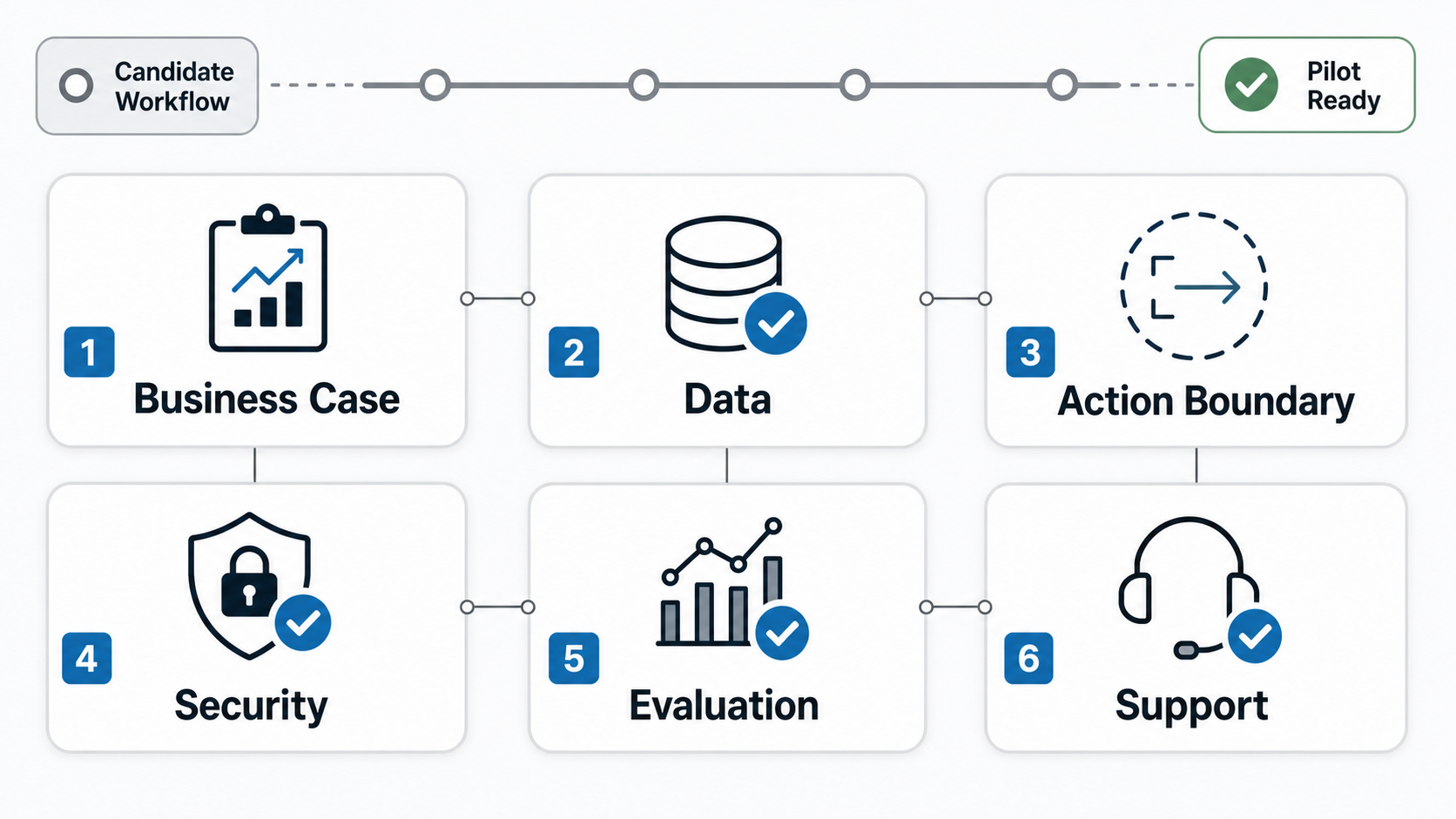
Workflow value is only one part of readiness. The agent also needs enough system context, permissions, controls, and operational ownership to behave predictably. A useful roadmap turns those requirements into gates that leaders can approve.
| Gate | Evidence Required | Owner |
|---|---|---|
| Business Case | Target workflow, pain point, KPI baseline, cost of current process, expected improvement | Business owner |
| Data And Knowledge | Source systems, fields, documents, freshness, permissions, retention rules, known gaps | Data owner |
| Action Boundary | Allowed reads, drafts, recommendations, writes, approvals, and blocked actions | Product and operations owner |
| Security | Role-based access, credential handling, audit logging, data masking, prompt-injection checks | Security owner |
| Evaluation | Gold examples, test cases, expected outputs, quality rubric, failure categories | AI/product lead |
| Support | Monitoring, incident path, rollback plan, feedback loop, change approval | Delivery owner |
These gates are not bureaucracy. They are what prevents a promising demo from becoming an unmanaged production risk. Current agent tooling makes that point clear: production agent systems need traceable tool calls, approval pauses, guardrails, handoffs, and session state, not only a good prompt. NIST's AI Risk Management Framework and Generative AI Profile also reinforce that AI risk work should map, measure, manage, and govern risks across the lifecycle, which is the operating model a workflow agent needs before it can scale.
Reference Architecture For A Business Workflow Agent
A workflow agent usually needs five layers. First, the user or event trigger starts the workflow: a new ticket, lead, invoice, document, status change, or scheduled job. Second, the context layer retrieves the right records, knowledge, rules, and history. Third, the reasoning layer decides what to draft, recommend, classify, route, or request. Fourth, the tool layer reads or writes to business systems. Fifth, the control layer logs decisions, asks for approval, monitors quality, and rolls back when needed.
For knowledge-heavy workflows, the context layer may use retrieval-augmented generation. For action-heavy workflows, orchestration, tool permissions, and enterprise software integration services matter more. For customer-facing work, escalation and tone checks become critical. NextPage's generative AI development work often combines these layers with product UX, integrations, evaluation, and deployment planning.
Do not start by connecting the agent to every system. Start with the minimum useful path. A support agent might read ticket history and knowledge-base articles, draft a response, tag intent, and suggest escalation. A sales agent might summarize an inbound lead, enrich CRM context, draft a follow-up, and create a task for approval. A finance agent might classify invoice exceptions and recommend the next step without releasing payment.
Human-In-The-Loop Controls: When The Agent Can Act
The central design question is not "Can the agent do this?" It is "What should the agent be allowed to do without approval?" The answer should vary by risk level, confidence, customer impact, reversibility, identity, and auditability. For regulated or high-impact workflows, pair this section with an enterprise AI agent governance review before expanding permissions.
| Action Type | Good Early Permission | Approval Needed When |
|---|---|---|
| Summarize | Summarize tickets, meetings, documents, or records | The summary affects a legal, financial, medical, or contractual decision |
| Classify | Tag intent, priority, owner, or next step | Classification changes SLA, pricing, compliance, or customer status |
| Draft | Create response, note, task, or plan for review | Message is customer-facing or commits the company |
| Retrieve | Find policy, order, CRM, or knowledge-base context | Access crosses role boundaries or sensitive data categories |
| Write | Update low-risk internal fields after validation | Write is hard to reverse or triggers downstream automation |
| Act | Execute low-risk, policy-bounded tasks | Action changes money, access, entitlement, contract, or safety state |
This staged approach lets leaders earn trust through evidence. It also gives the product team a clear backlog: improve data quality, narrow tool permissions, add checks, harden prompts, improve retrieval, and move only selected tasks from recommendation to approved write-back.
A 90-Day AI Agent Pilot Plan
A useful pilot should be long enough to test real work but narrow enough to protect quality and momentum. Ninety days is a practical window for many operational workflows because it gives time to discover, build, run a shadow period, and measure results without turning the pilot into an open-ended platform program.
| Phase | Timeline | Output | Decision Gate |
|---|---|---|---|
| Workflow Discovery | Weeks 1-2 | Workflow map, data sources, users, risks, KPI baseline | Proceed only if value and owner are clear |
| Prototype Slice | Weeks 3-5 | Agent prompt, retrieval/tool path, approval UX, initial tests | Proceed only if the system works on representative cases |
| Shadow Run | Weeks 6-8 | Agent recommendations compared with human decisions | Proceed only if quality and failure patterns are understood |
| Controlled Pilot | Weeks 9-11 | Limited users, approval workflow, logs, feedback loop | Proceed only if adoption and control metrics are acceptable |
| Scale Decision | Week 12 | ROI report, risk review, backlog, scale or stop recommendation | Scale, narrow, harden, or stop |
The best pilots produce reusable operating assets: test sets, evaluation rubrics, permission patterns, logging conventions, prompt/version history, rollback steps, and a backlog of improvement opportunities. That is more valuable than a demo that only works in a vendor meeting.
ROI Gates: What To Measure Before Scaling
AI agent ROI should include more than model cost versus manual hours. Agents affect quality, speed, employee workload, customer experience, compliance, and operational consistency. A workflow that saves time but increases rework or risk is not ready to scale.
Measure a primary KPI and a set of guardrails. Primary KPIs may include average handling time, first-response time, backlog reduction, claims or invoice cycle time, lead response speed, analyst throughput, or exception resolution time. Guardrails should include accuracy, human override rate, escalation rate, hallucination or unsupported-claim rate, latency, cost per completed workflow, user adoption, and incident count.
For a first pilot, a simple ROI model is often enough: monthly cases multiplied by minutes saved per case, adjusted by quality/rework and implementation/support cost. NextPage's AI Automation ROI Calculator can help estimate whether a candidate workflow is worth a deeper discovery sprint.
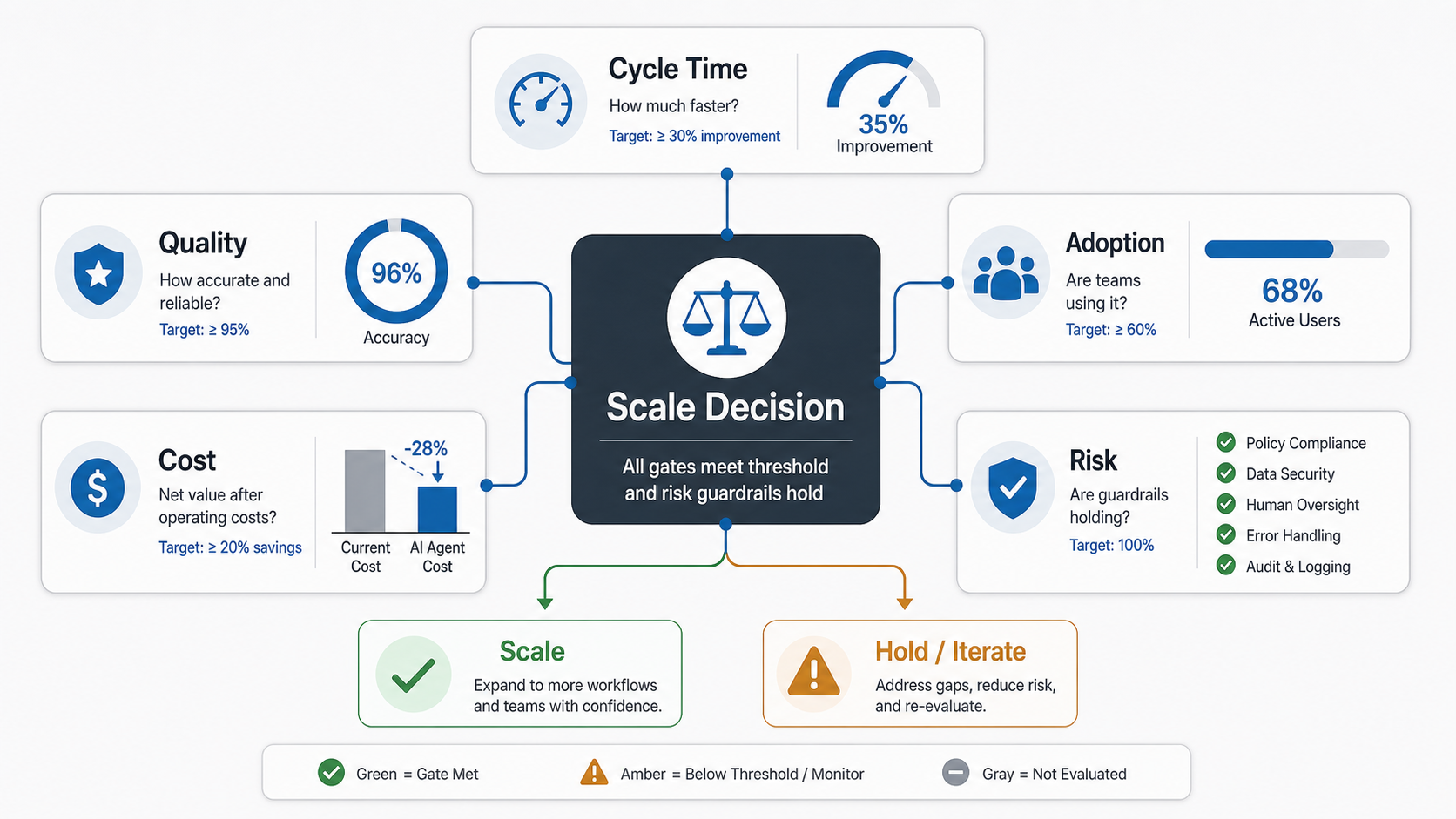
Production Controls After The Pilot
If the pilot passes, production should still be staged. Add role-based permissions, audit logs, prompt and model versioning, retrieval-source tracking, tool-call limits, cost alerts, user feedback, error categories, and rollback. Decide who can change prompts, add data sources, modify tool access, approve automated actions, and expand the agent to a new workflow.
Agent monitoring must include business and technical signals. Track the workflow KPI, quality rubric, confidence distribution, retrieval failures, tool-call errors, human edits, user sentiment, cost per case, and exception backlog. For higher-risk workflows, keep a weekly review until the failure modes are stable.
This is where AI automation services should feel closer to product engineering than experimentation. The job is not only to call an LLM. It is to connect the model to a real workflow with permissions, tests, integrations, observability, and support.
Common Mistakes That Derail AI Agent Projects
The most common mistake is picking a workflow because it sounds impressive instead of because it is ready. The second is giving the agent too much action access before the team has evidence. The third is underestimating integration work. Most business value appears when the agent reads and writes the systems where work already happens, which means CRM, ERP, ticketing, document, finance, or internal-tool integration cannot be an afterthought.
Other mistakes include ignoring permissions, measuring only productivity, skipping human review design, relying on a small demo dataset, treating the prompt as the product, and failing to name the post-launch owner. OWASP's LLM and agentic-application guidance makes the security angle concrete: prompt injection, excessive agency, tool misuse, identity abuse, memory poisoning, insecure output handling, and unexpected code execution should be treated as design inputs before the agent is allowed near production systems. If no one owns feedback, incidents, prompt changes, and rollout decisions, the agent will become another unsupported tool.
For teams planning agents that need private knowledge or retrieval, LLM development and RAG architecture decisions should be made before the workflow expands. Retrieval quality, document ownership, access control, and update cadence directly affect agent trust.
How NextPage Helps Build AI Agent Roadmaps
NextPage helps teams turn agent ideas into scoped, measurable workflow pilots. We start by auditing candidate workflows, scoring readiness, mapping data and integrations, defining approval boundaries, and building the smallest useful production slice. From there, we help with agent architecture, RAG, workflow UX, API integration, evaluation, monitoring, and rollout support through AI automation services and delivery engineering.
For companies still comparing use cases, the Workflow Automation Opportunity Finder and AI Agent Readiness Assessment can make the first decision clearer. For teams ready to build, our AI development services and AI automation delivery work connect strategy to working software.
The right next step is a focused readiness review: bring one target workflow, sample cases, source systems, current cycle-time baseline, risk concerns, and the business owner. The output should be a pilot backlog, acceptance criteria, control plan, and ROI gate that tells the team whether to build, narrow, or fix readiness first.