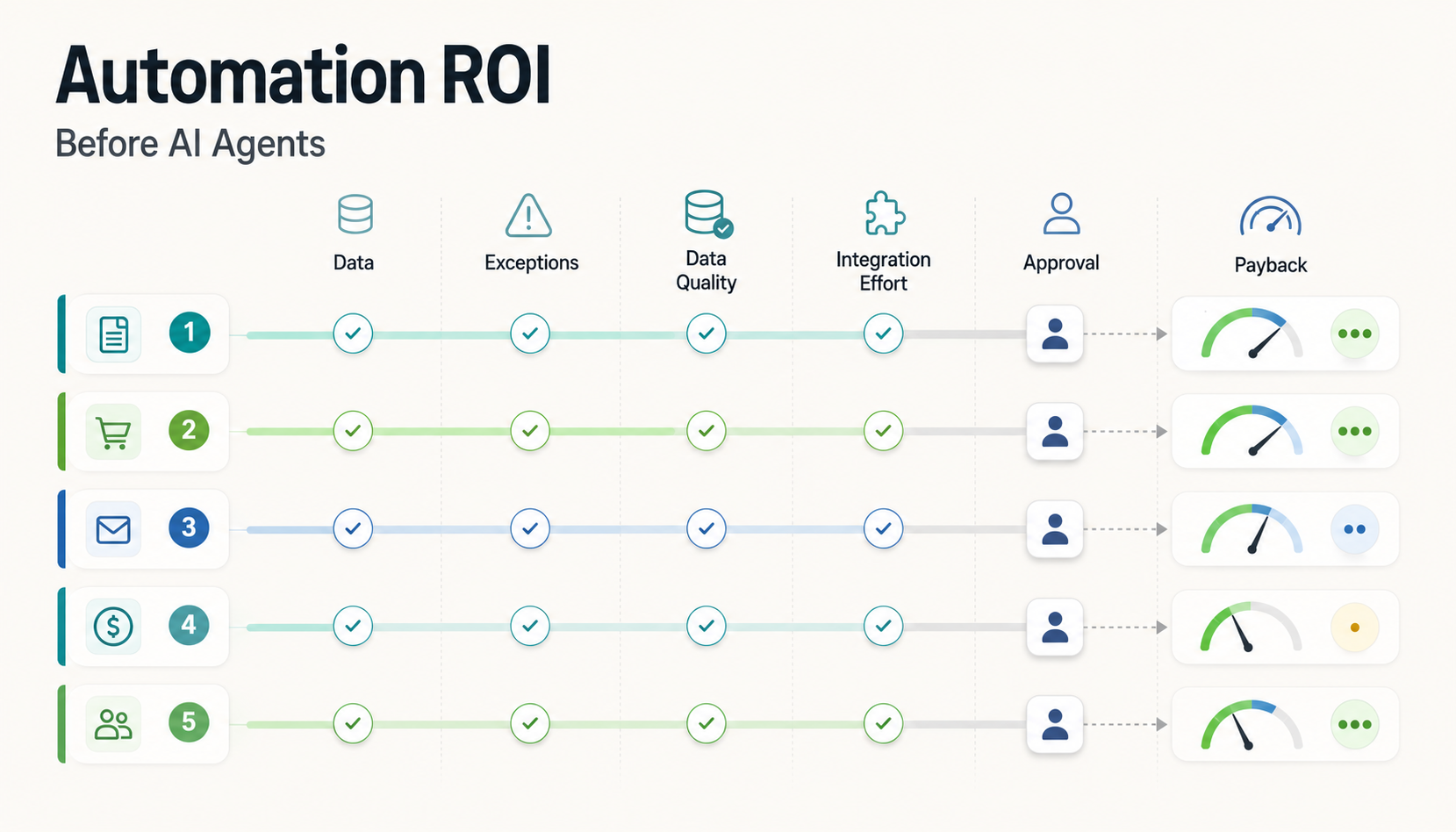

Quick answer: IT process automation ROI comes from comparing the cost of today's manual workflow with the cost of a controlled automated workflow, then subtracting build, integration, support, and review effort. Before building AI agents, rank workflows by volume, exception rate, data quality, integration complexity, approval risk, and payback confidence. The best first automations are repeatable, measurable, rules-friendly, and already understood by the team.
That sequence matters. AI agents can coordinate complex work, but they do not fix a messy process by themselves. If the intake fields are inconsistent, exceptions are undocumented, permissions are unclear, or no one knows which decision needs a human, an agent simply moves ambiguity faster. A better first step is to build an automation backlog that proves where software can save time safely and where agentic behavior would create extra risk.
This guide is for IT, operations, support, finance, and service leaders who are deciding what to automate before commissioning AI agents. It gives you a practical scoring model, a simple ROI formula, workflow examples, and a 30-day backlog template you can use before a build sprint.
Quick Answer: IT Process Automation ROI Before AI Agents
Use this short model before you approve an automation or AI-agent project:
- Measure the manual baseline. Count monthly volume, minutes per item, error rate, rework time, waiting time, and escalation cost.
- Score readiness. Check whether the workflow has stable inputs, clear rules, known exceptions, accessible systems, and a named human approver.
- Choose the automation type. Use rules and workflow automation for deterministic work, AI assistance for language-heavy steps, and agents only when the process needs multi-step coordination with controlled autonomy.
- Calculate payback. Estimate monthly savings after automation minus platform, integration, maintenance, monitoring, and review costs.
- Start with the safest high-volume workflow. A boring workflow with clean data usually beats an impressive agent demo with unclear ownership.
If you want a fast starting point, NextPage's supporting guide to IT process automation and AI agents can help frame whether a workflow is ready for an agent, a rules-based workflow, or a smaller automation sprint.
The ROI Formula That Keeps Automation Honest
A useful ROI calculation is intentionally simple. It should be good enough to compare candidates, not so detailed that the team spends weeks modeling a workflow no one has validated.
Monthly baseline cost = monthly volume x average handling time x loaded hourly cost + rework cost + delay cost.
Monthly automation value = baseline cost avoided + error reduction + faster cycle-time value - monthly automation operating cost.
Payback period = one-time build and integration cost / monthly automation value.
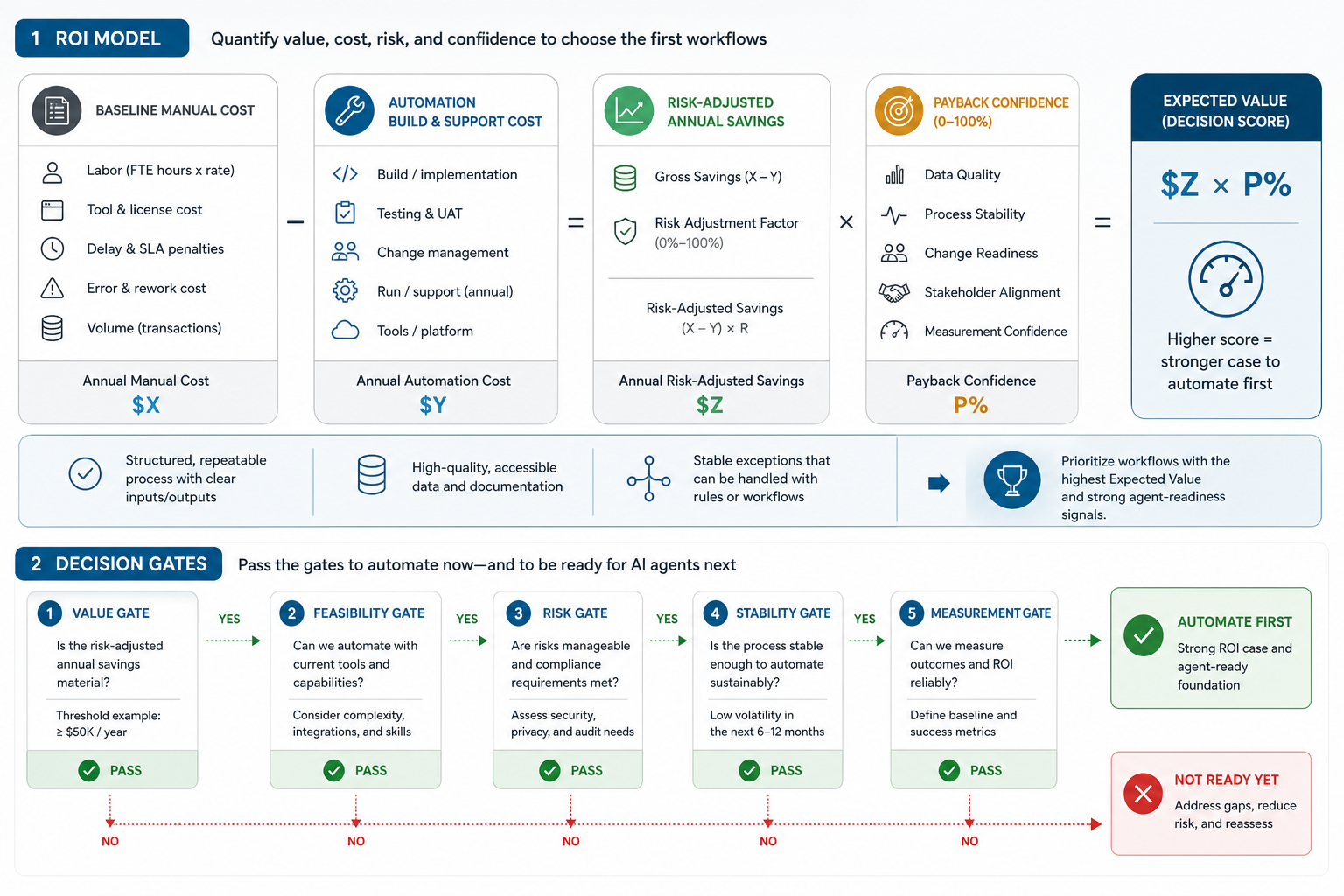
The hidden mistake is leaving out the work that remains after automation. Most IT workflows still need monitoring, exception handling, audit trails, permission reviews, and occasional process changes. For AI-assisted workflows, add prompt monitoring, output review, data retrieval checks, and escalation rules. For agents, add orchestration, authorization, observability, rollback design, and token or model-operating cost. This is the agent premium: if the work can be solved with rules, API integration, or robotic process automation services, the ROI hurdle for an AI agent should be higher.
Use ranges rather than false precision. If the workflow saves 90 to 130 hours per month and costs six to nine weeks to build, that is enough to rank it against another candidate. You can tighten the model once real workflow logs and pilot data are available.
Why Simple Automation Should Come Before AI Agents
Agentic AI is becoming part of enterprise workflows. Gartner has projected a sharp increase in task-specific AI agents inside enterprise applications, and McKinsey's agentic AI guidance emphasizes high-impact workflows, data foundations, and operating model changes. The direction is clear, but the implementation path still starts with workflow discipline.
Simple automation should usually come first when:
- The workflow has predictable steps and clear business rules.
- Most exceptions can be routed to a person instead of reasoned through autonomously.
- The main bottleneck is copy-paste work, status checking, routing, or report generation.
- The systems involved already expose APIs, exports, queues, or stable database records.
- The team needs ROI evidence before approving a larger agent program.
That does not mean avoiding AI. It means matching the tool to the work. A rules-based workflow can create the audit trail and data quality that a later agent needs. A small AI extraction step can classify tickets or summarize documents without giving an agent permission to execute every downstream action. A human-in-the-loop queue can prove where autonomy is safe.
The Automation Candidate Scorecard
Score each candidate from 1 to 5 across the dimensions below. A high total does not automatically mean "build now"; it means the workflow deserves deeper discovery.
| Score Area | What To Check | Strong Signal | Weak Signal |
|---|---|---|---|
| Volume | How often the workflow runs | Hundreds or thousands of repeat cases per month | Rare work with high one-off variation |
| Handling Time | Manual time per item | Repetitive steps consume measurable staff hours | Most time is expert judgment or negotiation |
| Exception Rate | How often cases break the normal path | Exceptions are known and routable | Every case requires a different decision |
| Data Quality | Completeness and consistency of inputs | Fields are structured, current, and trusted | Teams rely on free text, screenshots, or missing context |
| Integration Effort | Systems touched by the workflow | APIs, webhooks, exports, or direct database access exist | Manual portals, brittle screens, and no stable identifiers |
| Approval Risk | Impact of an incorrect action | Automation can prepare work for human approval | Wrong action creates legal, financial, safety, or customer harm |
| Payback Confidence | Evidence behind the savings estimate | Logs, tickets, time studies, and cost data exist | Savings are based on anecdotes only |
A strong first automation is usually not the flashiest one. It is the workflow with enough volume to matter, enough structure to automate, enough data to measure, and enough control to recover when something goes wrong. When the candidate touches repeated cross-department work, a broader business process automation services assessment can expose approval, integration, and exception paths before build scope is locked.
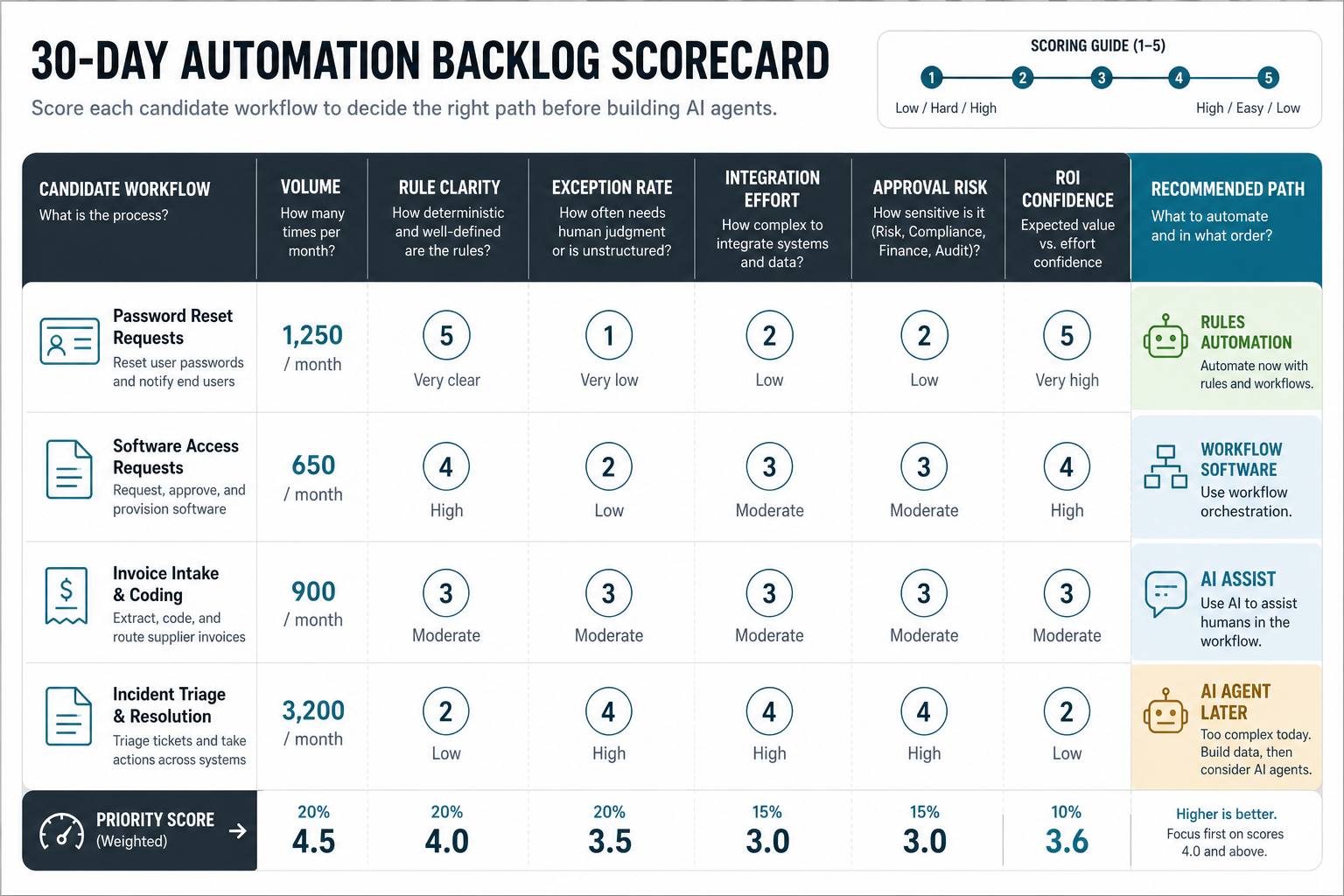
Automation Backlog Template For The First 30 Days
Use the first month to create an evidence-backed backlog rather than a list of ideas. A practical backlog row should include:
- Workflow name: for example, vendor onboarding, support escalation, invoice matching, access request, lead enrichment, renewal reminder, or compliance evidence collection.
- Owner: the person accountable for business rules and exceptions.
- Baseline: monthly volume, handling time, rework rate, delay cost, and systems involved.
- Automation candidate type: rules-based workflow, integration, internal tool, AI-assisted classification, or AI agent.
- Readiness blockers: missing data, unclear permissions, unstable process, manual approvals, poor API access, or unowned exceptions.
- Expected value: hours saved, cycle time reduced, error reduction, compliance improvement, customer response speed, or capacity released.
- Evidence needed: logs, sample records, policy rules, API docs, QA criteria, and stakeholder sign-off.
- Decision: automate now, clean up first, pilot with human review, or defer.
Teams that skip this backlog step often buy or build around a symptom. Teams that do the backlog work can decide whether they need a lightweight integration, a custom workflow portal, an RPA-style task, or a controlled agent. NextPage often pairs this discovery with the Workflow Automation Opportunity Finder so business teams can compare candidates before engineering effort begins.
Workflow Examples And ROI Signals
Here are common workflow candidates and what usually drives their ROI.
IT Access Requests
Access requests often have clear forms, approval paths, and audit requirements. Automation value comes from routing requests, checking required fields, validating manager approval, provisioning through APIs, and logging evidence. Keep human approval for privileged access, financial systems, production infrastructure, and exceptions.
Support Escalation Triage
Support queues benefit from classification, priority scoring, SLA checks, duplicate detection, and suggested next actions. AI can help summarize messy tickets, but deterministic routing and escalation rules should still own high-risk decisions.
Invoice And Procurement Checks
Automation can match vendor, purchase order, invoice amount, tax fields, and approval status. ROI comes from faster cycle time and lower rework. Do not agentify payment release until fraud checks, approval rules, and exception handling are explicit.
Employee Onboarding And Offboarding
These workflows usually touch HRIS, identity, devices, payroll, email, and internal tools. The value is not only time saved; it is also risk reduction when access removal and setup steps stop depending on memory.
Sales And Customer Operations Handoffs
Lead enrichment, CRM updates, meeting summaries, and renewal workflows are good candidates when the data model is consistent. The risk is silent data pollution, so use validation rules and review queues for important account changes.
Data, Exception, Approval, And Integration Gates
Before you fund an automation, run it through four gates.
Data gate: Can the workflow start from structured, current, authorized data? If not, the first project may be data cleanup, form redesign, or a small internal tool.
Exception gate: Are exceptions known enough to route? If the team cannot name the top five exception types, do not give an AI agent broad execution authority. Log exceptions first.
Approval gate: What is the worst credible outcome of a wrong action? Low-impact actions can be automated. Customer-visible, financial, compliance, security, and production actions need approval paths and rollback.
Integration gate: Can the software act through stable interfaces? APIs, webhooks, queues, and database records create durable automation. Screen-only workflows may still be possible, but they are more fragile and need extra monitoring.
These gates also help teams choose architecture. A custom portal may be better than a bot when users need visibility. A workflow engine may be enough when rules are stable. An AI agent may be useful when the workflow requires multi-step planning across tools, but only after permissions, logging, and fallback behavior are defined.
Rules, Workflow Automation, AI Assistance, Or AI Agent?
| Pattern | Best Fit | Risk Control | Example |
|---|---|---|---|
| Rules-based automation | Stable decisions with clear conditions | Unit tests and approval for rule changes | Route access request by role and department |
| Workflow automation | Multi-step routing across people and systems | Status visibility, retries, and exception queues | Invoice matching and approval reminders |
| AI assistance | Language-heavy tasks that need human review | Confidence scores and reviewer sign-off | Summarize support ticket history |
| AI agent | Controlled multi-step action across tools | Scoped permissions, audit logs, tool limits, and rollback | Prepare renewal workflow, update CRM draft, and ask for approval |
The safest roadmap is often progressive: rules first, workflow visibility second, AI assistance third, controlled agents fourth. That path creates the instrumentation needed to prove ROI and reduce operational risk. For language-heavy workflows, NextPage's AI development services can add controlled classification, retrieval, summarization, and review support without pretending every workflow needs full autonomy on day one.
How NextPage Turns ROI Into A Build Plan
NextPage treats automation as a product delivery problem, not only a tool-selection problem. The work usually starts by mapping workflows, scoring candidate value, identifying data and integration gaps, and choosing the smallest useful build.
For teams that already know the workflow, a focused AI automation services sprint can turn the backlog into integrations, approval queues, dashboards, and AI-assisted steps. For teams that need custom portals, dashboards, or internal systems, web app development may be the better base. When the workflow is part of a larger product or MVP, MVP development planning keeps the scope tied to real user value instead of automation novelty.
If you are still deciding where an agent fits, start with the AI Agent Readiness Assessment. If the business case is mostly financial, use the AI Automation ROI Calculator to compare baseline effort, expected savings, and payback assumptions before a build sprint.